steering MERCEDES-BENZ S-Class 2013 W221 Owner's Manual
[x] Cancel search | Manufacturer: MERCEDES-BENZ, Model Year: 2013, Model line: S-Class, Model: MERCEDES-BENZ S-Class 2013 W221Pages: 542, PDF Size: 7.97 MB
Page 5 of 542
Index
....................................................... 4Introduction
......................................... 28 At
ag lance ........................................... 35 Safety
................................................... 47 Opening/closing
................................. 81 Seats, steering wheel and mirrors
..105 COMAND
............................................ 119 Lights and windshield wipers
..........279 Climate control
................................. 293 Driving and parking
..........................305 On-board computer and displays
....373 Stowage and features
......................437 Maintenance and care
......................461 Breakdown assistance
.....................477 Wheels and tires
............................... 497 Technical data
................................... 527 Contents
3
Page 7 of 542
Alarm system
see ATA (Anti-Theft Alarm system)
Alertness Assistant
see ATTENTION ASSIST
Alternative route ............................... 175
Ambient light setting (COMAND) .....268
AMG menu (on-board computer) .....381
Anticipatory occupant protection
see PRE-SAFE ®
(anticipatory
occupant protection)
Anti-loc kBraking System
see ABS (Anti-lock Braking System)
Anti-Theft Alarm system
see ATA (Anti-Theft Alarm system)
Ashtray ............................................... 446
Assistance menu (on-board
computer) .......................................... 385
ATA (Anti-Theft Alarm system) Activating/deactivating ...................79
Function .......................................... .79
Switching off the alarm ....................79
ATTENTIO NASSIST
Activating/deactivating .................386
Display message ............................ 412
Function/notes ............................. 359
Audio
Radio mode ................................... 215
Audio database
see MUSIC REGISTER
Audio DVD
Mode ,switchin gto........................ 226
Pause function ............................... 227
Playback options ........................... 232
Safety notes .................................. 225
Setting the audio forma t................ 232
Stop function ................................. 228
Audio format, setting
Audi oDVD ..................................... 232
Rear Seat Entertainment System ...262
Video DVD ..................................... 249
Audio menu (on-board computer) ....380
Authorized Mercedes-Benz Center see Qualified specialist workshop
Authorized workshop
see Qualified specialist workshop AUTO lights
Display message ............................ 408
see Lights
Automatic engine start (ECO start/
stop function) .................................... 311
Automatic engine switch-off (ECO
start/stop function) ..........................311
Automatic headlamp mode ..............281
Automatic transmission Automatic drive program ...............318
Changing gea r............................... 317
DIRECT SELECT leve r..................... 314
Display message ............................ 422
Drive position (ECO start/stop
function) ........................................ 315
Driving tips .................................... 317
Emergency running mode ..............321
Engaging drive position .................. 316
Engaging neutra l............................ 315
Engaging revers egear ................... 314
Engaging the par kposition ............ 314
Kickdow n....................................... 317
Manual drive program ....................319
Neutral (ECO start/stop function) .315
Problem (malfunction) ...................321
Progra mselector button ................317
Pulling away ................................... 309
Shift range s................................... 318
Starting the engine ........................309
Steering wheel paddle shifters ......318
Transmission position displa y........ 316
Transmissio npositions .................. 316
Automatic transmission
emergency mode ............................... 321
Autostore ........................................... 217
see Station memory (radio)
AUX (audio)
Notes/socket ................................ 243
Switching to ................................... 244
AUX (video)
Setting the picture .........................244
Setting the volume and sound .......250
Showing/hiding the menu .............250
Switching to ................................... 250 Index
5
Page 9 of 542
Calling voicemail
............................... 205
Call lists Displaying details ........................... 209
Introduction ................................... 213
Opening and selecting an entry .....213
Saving an entry in the address
book .............................................. 214
Car
see Vehicle
Care
Carpets .......................................... 476
Car wash ........................................ 470
Display ........................................... 474
Exterior lights ................................ 473
Gea rors electo rlever .................... 476
Interior ........................................... 474
Matte finish ................................... 472
Nigh tView Assist Plus ...................475
Notes ............................................. 470
Paint .............................................. 472
Plastic trim .................................... 475
Power washer ................................ 471
Rea rview camera .......................... 474
Roof lining ...................................... 476
Seat bel t........................................ 476
Seat cover ..................................... 476
Sensors ......................................... 474
Steering wheel ............................... 476
Tai lpipes ....................................... 474
Trim pieces .................................... 476
Washing by hand ........................... 471
Wheels ........................................... 472
Windows ........................................ 473
Wiper blades .................................. 473
Wooden trim .................................. 476
Cargo tie down rings .........................441
Car pool lanes .................................... 173
Car wash (care) ................................. 470
Category Satellite radio ................................ 222
CD
Cop yprotection ............................. 234
Fast forward/fast rewind ...............230
General information .......................234
Inserting ........................................ 225
Inserting/loading (Rear Seat
Entertainment System) ..................255
Mode ,switchin gto........................ 226Multisession
.................................. 233
Notes on discs ............................... 234
Operating the player/changer
(on-board computer) ......................381
Pause function ............................... 227
Playback options ........................... 232
Player/change roperation
(COMAND )..................................... 225
Removing/ejecting (Rear Seat
Entertainment System) ..................256
Safety notes .................................. 225
Selecting amedia type .................. 228
Selecting atrack ............................ 229
Sound settings (balance, bass,
fader, treble ).................................. 139
Center console ..................................... 41
Central locking Automatic locking feature
(COMAND) ..................................... 269
Locking/unlocking (SmartKey) ........82
Changing batteries (remote
control, headphones) ........................251
Changing bulbs High-beam headlamps (vehicles
with halogen daytime running
lamps) ............................................ 288
High-beam headlamps (vehicles
with LED daylight lamps) ...............288
Important safety notes ..................286
Overview of bul btypes .................. 287
Changing direction
Announcement phase ....................171
Change of direction phase .............171
Preparation phase .........................171
Character bar ..................................... 133
Characters Entering ......................................... 134
Entering (address book, phone
book) ............................................. 136
Entering (navigation) ......................133
Child-proof locks
Important safety notes ....................70
Rea rdoors ....................................... 71
Children
In the vehicle ................................... 66
Restraint systems ............................ 66 Index
7
Page 18 of 542
Microphone
,switching on/off .........205
Mirrors see Exterior mirrors
see Rear-view mirror
see Vanity mirror
Mobile phone
Menu (on-board computer) ............384
see Phone
Modifying the programming
(SmartKey) ........................................... 84
MOExtended run-flat system ...........483
MP3 Bit/sampling rates ......................... 233
Copyright ....................................... 234
Data medium ................................. 233
Fast forward/fast rewind ...............230
File systems ................................... 233
Formats ......................................... 233
Mode ,switchin gto........................ 226
Notes ............................................. 233
Operation ....................................... 381
Pause function ............................... 227
Playback options ........................... 232
Safety notes .................................. 225
Selecting amedia type .................. 228
Selecting atrack ............................ 229
Sound settings (balance, bass,
fader, treble ).................................. 139
Multicontour seat
Front .............................................. 274
Rea rcompartmen t......................... 112
Multifunction display
Function/notes ............................. 376
Lane recommendations .................173
Multifunction steering wheel
Adjusting the volume .....................138
Operating the on-board computer .375
Overview .......................................... 39
Using the telephone ....................... 203
Multisession CD ................................ 233
Music files Recording ...................................... 230
MUSIC REGISTER
Copying musi cdata ....................... 235
Deleting allm usic files................... 236
Deleting individual musi cfiles ....... 237
Disk space information ..................236
Folder functions ............................. 237General notes
................................ 234
Playback options ........................... 237
Switching to ................................... 234
Music search ..................................... 230
Music storage see MUSIC REGISTER
Mute ................................................... 138 N
Navigation Adjusting the volume of the
navigation announcements ............138
Alternativ eroute ............................ 175
Basi csettings ................................ 156
Blocking a route section affected
by a traffic jam ............................... 175
Compass function ..........................192
Destination memory ......................182
Displaying destination
information (arrival time, distance
to destination) ............................... 176
Entering/saving you rhome
address .......................................... 160
Entering adestination .................... 157
Entering a destination by address .. 157
Entering a destination using the
map ............................................... 164
Entering an intermediate stop .......165
Entering a point of interest ............166
Entering characters (character
bar )................................................ 133
Freeway information ......................191
General notes ................................ 155
GPS reception ................................ 155
Installing map software .................. 192
Lane recommendatio n................... 172
Map settings .................................. 186
Off-road/off-map (off-road
destination) ................................... .177
On-board computer .......................379
Previous destinations ....................185
Repeating announcements ............174
Route guidance .............................. 170
Route overview .............................. 176
Safety notes .................................. 154
Selecting a destination from the
destination memory .......................16316
Index
Page 24 of 542
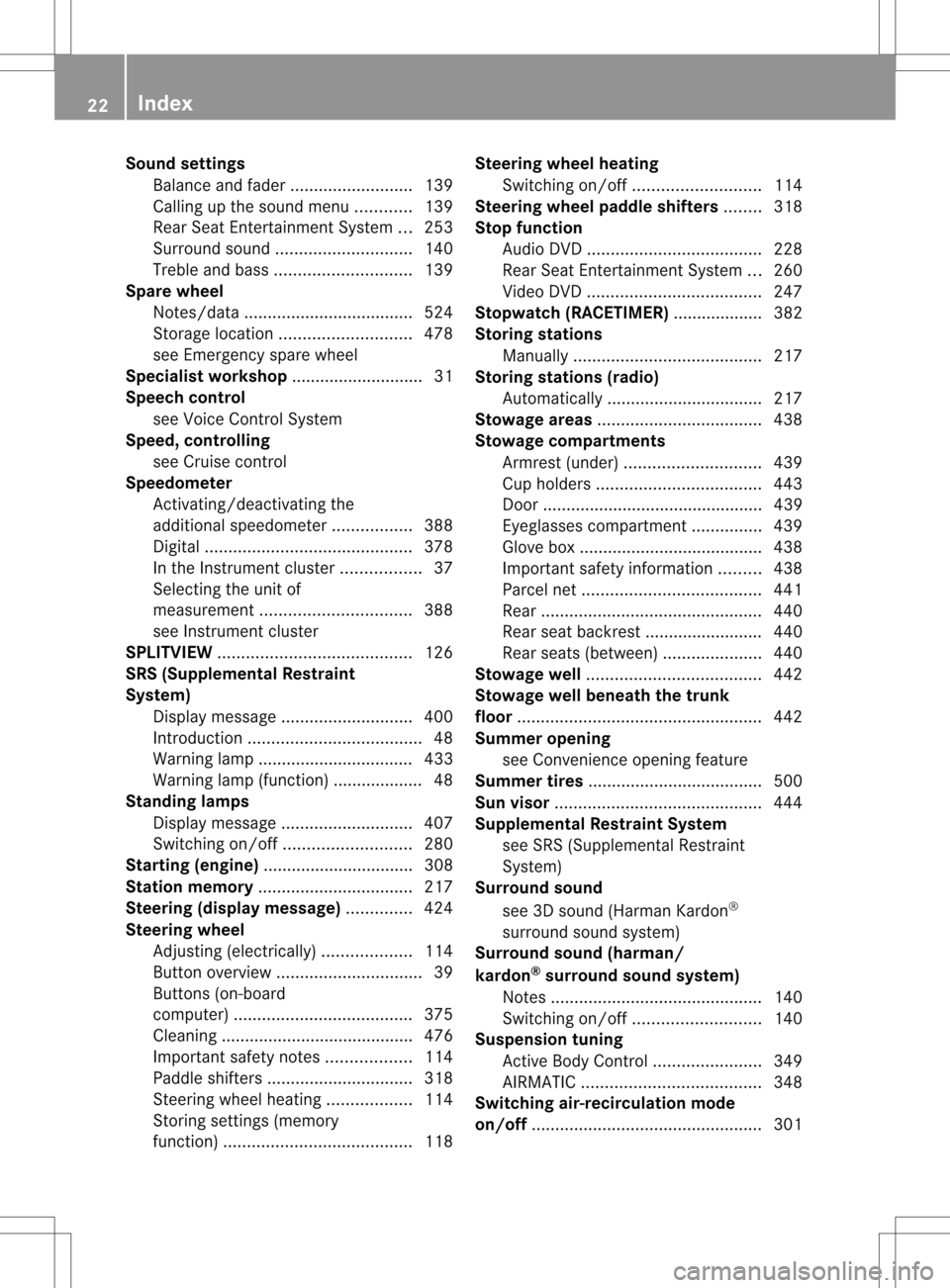
Sound settings
Balance and fader ..........................139
Calling up the sound menu ............139
Rear Seat Entertainment System ...253
Surround sound ............................. 140
Treble and bas s............................. 139
Spare wheel
Notes/data .................................... 524
Storage location ............................ 478
see Emergency spare wheel
Specialist workshop ............................ 31
Speech control see Voice Control System
Speed, controlling
see Cruise control
Speedometer
Activating/deactivating the
additional speedometer .................388
Digita l............................................ 378
In the Instrument cluster .................37
Selecting the unit of
measurement ................................ 388
see Instrument cluster
SPLITVIEW ......................................... 126
SRS (Supplemental Restraint
System)
Display message ............................ 400
Introduction ..................................... 48
Warning lamp ................................. 433
Warning lamp (function) ................... 48
Standing lamps
Display message ............................ 407
Switching on/off ........................... 280
Starting (engine) ................................ 308
Station memory ................................. 217
Steering (display message) ..............424
Steering wheel Adjusting (electrically). ..................114
Button overview ............................... 39
Buttons (on-board
computer) ...................................... 375
Cleaning ......................................... 476
Important safety notes ..................114
Paddle shifters ............................... 318
Steering wheel heating ..................114
Storing settings (memory
function) ........................................ 118Steering wheel heating
Switching on/off ........................... 114
Steering wheel paddle shifters ........318
Stop function Audi oDVD ..................................... 228
Rear Seat Entertainment System ...260
Video DVD ..................................... 247
Stopwatch (RACETIMER) ................... 382
Storing stations Manually ........................................ 217
Storing stations (radio)
Automatically ................................. 217
Stowage areas ................................... 438
Stowage compartments Armrest (under) ............................. 439
Cuph olders ................................... 443
Door ............................................... 439
Eyeglasses compartment ...............439
Glove box ...................................... .438
Important safety information .........438
Parce lnet ...................................... 441
Rea r............................................... 440
Rear seat backrest ......................... 440
Rea rseats (between) .....................440
Stowage well ..................................... 442
Stowage well beneath the trunk
floor .................................................... 442
Summer opening see Convenience opening feature
Summer tires ..................................... 500
Sun visor ............................................ 444
Supplemental Restraint System see SRS (Supplemental Restraint
System)
Surround sound
see 3D sound (Harman Kardon ®
surround sound system)
Surround sound (harman/
kardon ®
surround sound system)
Notes ............................................. 140
Switching on/off ........................... 140
Suspension tuning
Active Body Control .......................349
AIRMATIC ...................................... 348
Switching air-recirculation mode
on/off ................................................. 30122
Index
Page 38 of 542
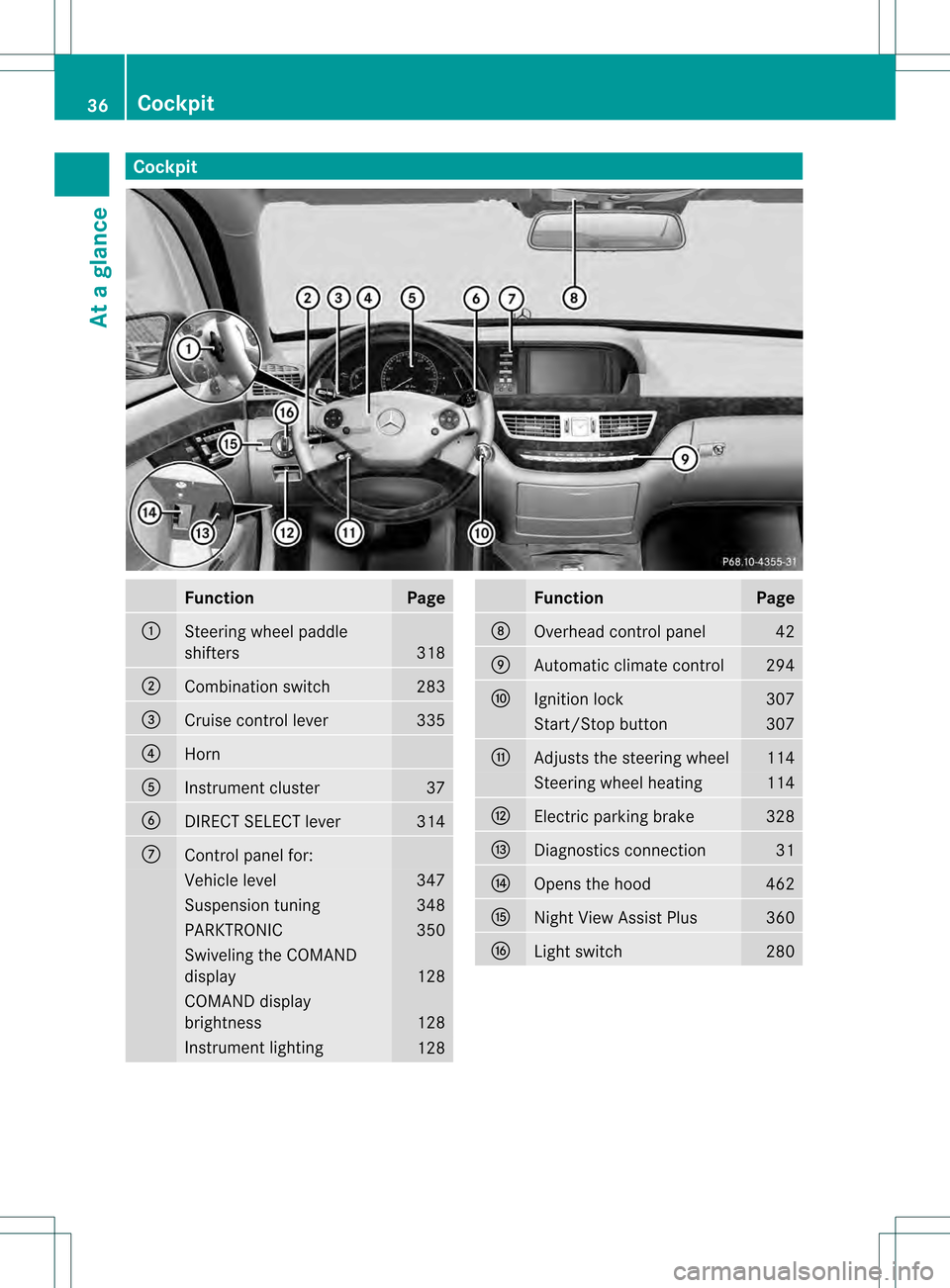
Cockpit
Function Page
0002
Steering wheel paddle
shifters
318
0003
Combination switch 283
0026
Cruise control lever 335
0025
Horn
0023
Instrument cluster 37
0024
DIRECT SELECT lever 314
0014
Control panel for:
Vehicle level 347
Suspension tuning 348
PARKTRONIC 350
Swiveling the COMAND
display
128
COMAND display
brightness
128
Instrument lighting
128 Function Page
0015
Overhead control panel 42
0016
Automatic climate control 294
0017
Ignition lock 307
Start/Stop button 307
0018
Adjusts the steering wheel 114
Steering wheel heating 114
001C
Electric parking brake 328
001D
Diagnostics connection 31
001E
Opens the hood 462
001F
Nigh
tView Assist Plus 360
0021
Light switch 28036
CockpitAt a glance
Page 51 of 542
The SRS components are in operational
readiness if the
001ASRS warning lamp is not
lit while the engine is running. G
WARNING
The SRS self-check has detected a
malfunction if the 001ASRS indicator lamp:
R does not light up at all
R does not go out after approximately four
seconds after the engine is started
R comes on after the engine was started or
while driving.
For your safety, Mercedes-Benz strongly
recommends that you have the system
checked as soon as possible at an authorized
Mercedes-Benz Center. SRS may otherwise
fail to activate when it is needed in the event
of an accident, which could lead to serious or
fatal injuries. SRS might also be activated
unexpectedly and unnecessarily, which could
also result in injury.
In addition, work carried out improperly on
SRS may render SRS inoperative or cause
unintended air bag deployment. Work on the
SRS system should only be carried out by
qualified specialist personnel. Consult an
authorized Mercedes-Benz Center.
If it is necessary to modify an air bag system
to accommodate a person with disabilities,
contact an authorized Mercedes-Benz Center
for details. USA only: for further information
contact our Customer Assistance center at
1-800-FOR-MERCedes (1-800-367-6372).
Safety guidelines for seat belts,
Emergency Tensioning Devices (ETDs)
and air bags G
WARNING
R Damaged seat belts or seat belts that have
been subjected to stress in an accident
must be replaced. Their anchoring points
must also be checked. Only use seat belts installed or supplied by an authorized
Mercedes-Benz Center.
R Air bags and pyrotechnic Emergency
Tensioning Devices (ETDs) contain
perchlorate material, which may require
special handling and regard for the
environment.C heck your national disposal
guidelines. California residents, see
www.dtsc.ca.gov/HazardousWaste/
Perchlorate/index.cfm.
R Air bags and ETDs are designed to function
on a one-time-only basis. An air bag or ETD
that has deployed must be replaced. PRE-
SAFE ®
has electrically operated reversible
belt tensioners in addition to the
pyrotechnic ETDs.
R Do not pass seat belts over sharp edges.
They could tear.
R Do not make any modification that could
change the effectiveness of the seat belts.
R Do not bleach or dye seat belts as this may
severely weaken them. In a crash they may
not be able to provide adequate protection.
R No modifications of any kind may be made
to any components or wiring of the SRS.
R Do not change or remove any component
or part of the SRS.
R Do not install additional trim material, seat
covers, badges, etc. to the:
- padded steering wheel boss
- front-passenger air bag cover
- outer side of front seat bolsters
- side trim next to the rear seat backrest
- roof lining trim
R Do not install additional electrical/
electronic equipment on or near SRS
components and wiring.
R Keep area between air bags and occupants
free of objects (e.g. packages, purses,
umbrellas, etc.).
R Do not hang items such as coat hangers
from the coat hooks or handles over the
door. These items may be thrown around in
the vehicle and cause head and other Occupant safety
49Safety
Z
Page 52 of 542
injuries when the window curtain air bag is
deployed.
R Air bag system components will be hot after
an air bag has inflated. Do not touch them.
R Never place your feet on the instrument
panel, dashboard, or on the seat. Always
keep both feet on the floor in front of the
seat.
R Improper repair work on the SRS creates a
risk of rendering the SRS inoperative or
causing unintended air bag deployment.
Work on the SRS must therefore only be
performed by qualified technicians.
Contact an authorized Mercedes-Benz
Center.
R For your protection and the protection of
others, when scrapping the air bag unit or
ETD, our safety instructions must be
followed. These instructions are available
fro ma ny authorized Mercedes-Benz
Center.
R Given the considerable deployment speed,
required inflation volume, and the material
of the ai rbags, there is the possibility of
abrasions or other, potentially more serious
injuries resulting from air bag deployment.
If you sell your vehicle ,Mercedes-Benz
strongly recommends that you inform the
subsequent owner that the vehicle is
equipped with SRS. Also, refer them to the
applicable section in the Operator's Manual. Air bags
Important safety notes G
WARNING
Air bags are designed to reduce the incidence
of injuries and fatalities in certain situations:
R frontal impacts (driver's and front-
passenger fron tair bags)
R side impacts (side impact air bags and
window curtain air bags)
R rollover (window curtain air bags) However, no system available today can
completely eliminate injuries and fatalities.
When the air bags are deployed, a small
amount of powder is released
.The powder
generally does not constitute a health hazard
and does not indicate that there is a fire in the
vehicle. In order to prevent potential
breathing difficulties, you should leave the
vehicle as soon as it is safe to do so. If you
have any breathing difficulty but cannot get
out of the vehicle after the air bag inflates,
then get fresh air by opening a window or
door. G
WARNING
In order to reduce the potential danger of
injuries caused during the deployment of the
front air bags, the driver and front passenger
must always be correctly seated and wear
their seat belts.
For maximum protection in the event of a
collision, you must always be in the normal
seat position with your back against the
backrest. Fasten your seat belt and make sure
that it is correctly positioned on your body.
As the air bag inflates with considerable
speed and force, a proper seating position
and correct positioning of the hands on the
steering wheel will help to keep you at a safe
distance from the air bag. Occupants who are
not wearing their seat belt, are not seated
properly or are too close to the air bag can be
seriously injured or killed by an air bag, as it
inflates with great force instantaneously:
R sit with the seat belt fastened correctly and
in a position that is as upright as possible
with your back against the backrest.
R move the driver's seat as far back as
possible, still permitting proper operation
of vehicle controls. The distance from the
center of the driver's chest to the center of
the air bag cover on the steering wheel
must be at least 10 inches (25 cm). You
should be able to accomplish this by
adjusting the seat and steering wheel. If 50
Occupant safetySafety
Page 53 of 542
you have any difficulties, please contact an
authorized Mercedes-Ben zCenter.
R do not lean your head or chest close to the
steering wheel or dashboard.
R only hold the steering wheel on the outside.
Placing hands and arms inside the rim can
increase the risk and potential severity of
hand/arm injury if the driver front air bag
inflates.
R adjust the front-passenger seat as far back
as possible from the dashboard when the
seat is occupied.
R occupants, especially children, should
never place their bodies or lean their heads
in the area of the door where the side
impact air bag inflates .This could result in
serious or fatal injuries should the side
impact air bag be deployed. Always sit as
upright as possible, wear the seat belt
properly and use an appropriately sized
infant restraint, toddler restraint or booster
seat recommended for the size and weight
of the child.
Failure to follow these instructions can result
in severe injuries to you or other occupants.
If you sell your vehicle, it is important that you
make the buyer aware of this safety
information. Be sure to give the buyer this
Operator's Manual. G
WARNING
Accident research shows that the safest place
for children in an automobile is in a rear seat.
There is a possibility for a side impact air bag-
related injury if occupants, especially
children, are not properly seated or restrained
when next to a side impact air bag which
needs to deploy rapidly in a side impact in
order to do its job.
To help avoid the possibility of injury, please
follow these guidelines:
(1) Occupants, especially children, should never place their bodies or
lean their heads in the area of the
door where the side impact air bag inflates. This could result in
serious injuries or death should
the side impact air bag be
deployed.
(2) Always sit as upright as possible, wear the seat belt properly and use
an appropriately sized infant
restraint, toddler restraint, or
booster seat recommended for the
size and weight of the child. and
for children 12 years old and
under, use an appropriately sized
infant restraint, toddler restraint,
or booster seat recommended for
the size and weight of the child.
(3) Always wear seat belts properly.
If you believe that, even with the use of these
guidelines, it would be safer for your rear seat
occupants to have the rear mounted side
impact air bags deactivated, then
deactivation can be carried out upon your
written request at an authorized Mercedes-
Benz Center at an additional cost.
Please contact an authorized Mercedes-Benz
Center or call the Customer Assistance
Center (in the USA) at 1-800-FOR-MERCedes
(1-800-367-6372), or Customer Service (in
Canada) at 1-800-387-0100 for details.
The air bags are only deployed if the air bag
control unit detects the need for deployment.
Only in the event of such a situation will they
provide their supplemental protection.
The driver and passenger should always wear
their seat belts. Otherwise, it is not possible
for the air bags to provide their supplemental
protection.
In the event of other types of impacts and
impacts below air bag deployment
thresholds, the air bags will not deploy.T he
driver and passengers will then be protected
to the extentp ossible by a properly fastened
seat belt. Aproperly fastened seat belti s also
needed to provide the best possible
protection in a rollover. Occupant safety
51Safety Z
Page 54 of 542
Air bags provide additional protection; they
are not, however, a substitute for sea tbelts.
All vehicle occupants must fasten their seat
belts regardless of whether your vehicle is
equipped with air bags or not.
It is important for your safety and that of your
passenger to have deployed air bags replaced
and to have any malfunctioning air bags
repaired. This will help to make sure the air
bags continue to perform their protective
function for the vehicle occupants in the
event of a crash.
Front air bags The fron
tair bags increase protection for the
driver's and front-passenger's head and
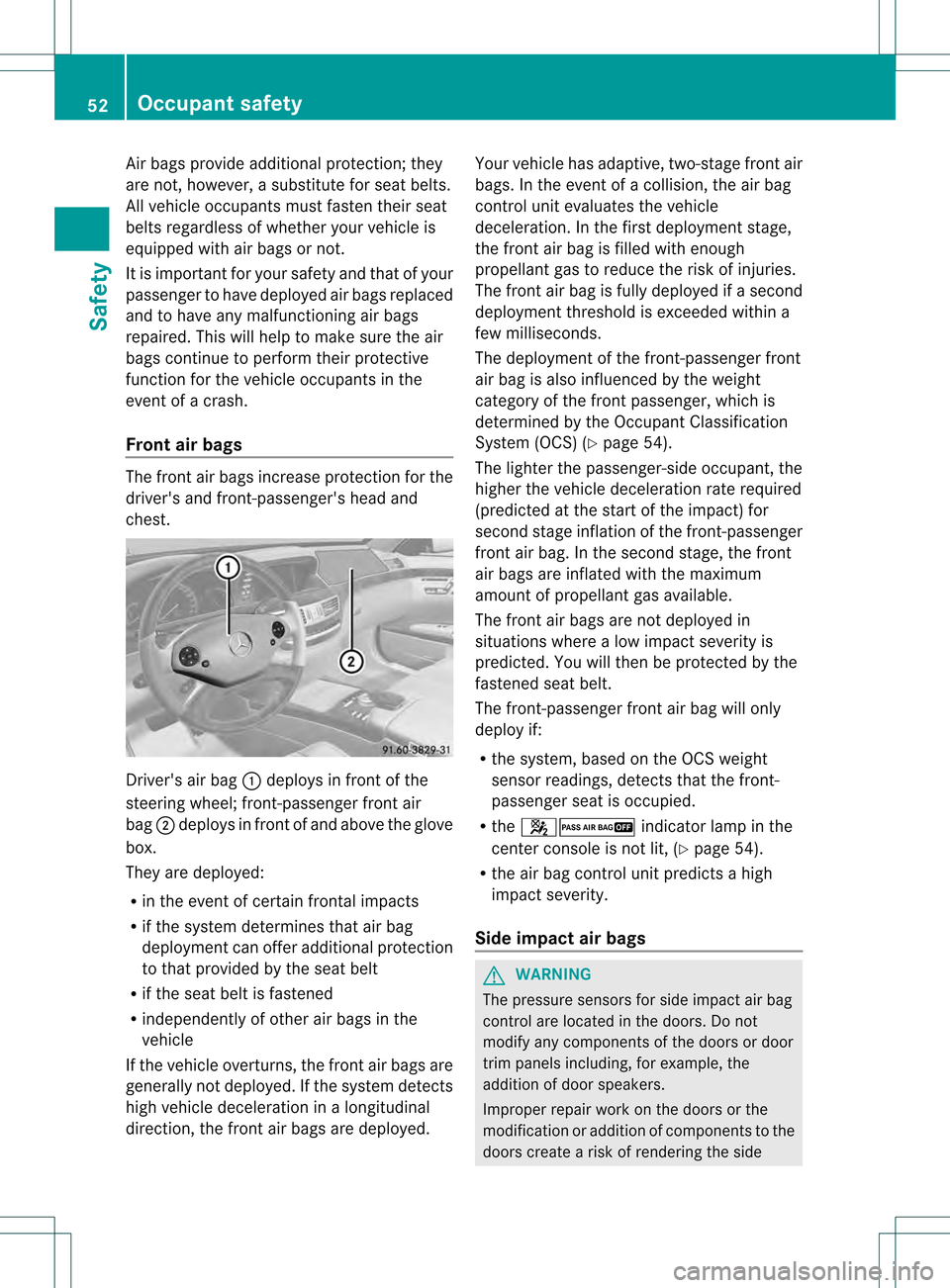
chest. Driver's air bag
0002deploys in front of the
steering wheel; front-passenger front air
bag 0003deploys in front of and above the glove
box.
They are deployed:
R in the event of certain frontal impacts
R if the system determines that air bag
deploymen tcan offer additional protection
to that provided by the seat belt
R if the seat belt is fastened
R independently of other air bags in the
vehicle
If the vehicle overturns, the fron tair bags are
generally not deployed. If the system detects
high vehicle deceleration in alongitudinal
direction, the front air bags are deployed. Your vehicle has adaptive, two-stage front air
bags. In the event of a collision, the air bag
control unit evaluates the vehicle
deceleration. In the first deployment stage,
the front air bag is filled with enough
propellant gas to reduce the risk of injuries.
The front air bag is fully deployed if a second
deployment threshold is exceeded within a
few milliseconds.
The deployment of the front-passenger front
air bag is also influenced by the weight
category of the front passenger, which is
determined by the Occupant Classification
System (OCS) (Y
page 54).
The lighter the passenger-side occupant, the
higher the vehicle deceleration rate required
(predicted at the start of the impact) for
second stage inflation of the front-passenger
front air bag. In the second stage, the front
air bags are inflated with the maximum
amount of propellant gas available.
The front air bags are not deployed in
situations where a low impact severity is
predicted. You will then be protected by the
fastened seat belt.
The front-passenger front air bag will only
deploy if:
R the system, based on the OCS weight
sensor readings, detects that the front-
passenger seat is occupied.
R the 00170016 indicator lamp in the
center console is not lit, (Y page 54).
R the air bag control unit predicts a high
impact severity.
Side impact air bags G
WARNING
The pressure sensors for side impact air bag
control are located in the doors. Do not
modify any components of the doors or door
trim panels including, for example, the
addition of door speakers.
Improper repair work on the doors or the
modification or addition of components to the
doors create a risk of rendering the side 52
Occupant safetySafety