reset MERCEDES-BENZ S-Class 2014 W222 Comand Manual
[x] Cancel search | Manufacturer: MERCEDES-BENZ, Model Year: 2014, Model line: S-Class, Model: MERCEDES-BENZ S-Class 2014 W222Pages: 278, PDF Size: 6.65 MB
Page 143 of 278
Using the speed dial list
Storing an entry
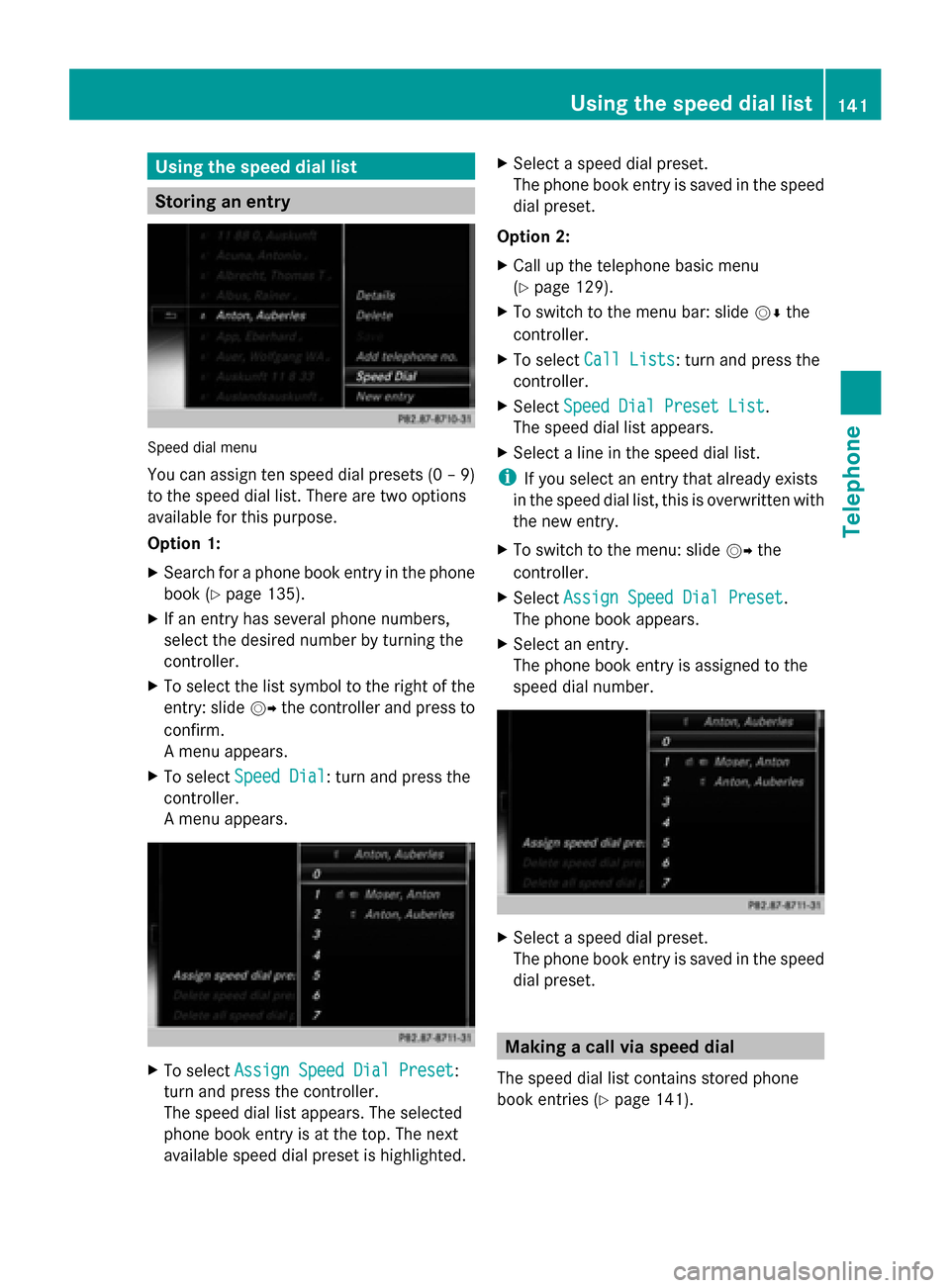
Speed dial menu
You can assign ten speed dial presets (0 – 9)
to the speed dial list. There are two options
available for this purpose.
Option 1:
X Search for a phone book entry in the phone
book (Y page 135).
X If an entry has several phone numbers,
select the desired number by turning the
controller.
X To select the list symbol to the right of the
entry: slide 00520096the controller and press to
confirm.
A menu appears.
X To select Speed Dial Speed Dial: turn and press the
controller.
A menu appears. X
To select Assign Speed Dial Preset Assign Speed Dial Preset :
turn and press the controller.
The speed dial list appears. The selected
phone book entry is at the top. The next
available speed dial preset is highlighted. X
Select a speed dial preset.
The phone book entry is saved in the speed
dial preset.
Option 2:
X Call up the telephone basic menu
(Y page 129).
X To switch to the menu bar: slide 00520064the
controller.
X To select Call Lists
Call Lists: turn and press the
controller.
X Select Speed Dial Preset List Speed Dial Preset List.
The speed dial list appears.
X Select a line in the speed dial list.
i If you select an entry that already exists
in the speed dial list, this is overwritten with
the new entry.
X To switch to the menu: slide 00520096the
controller.
X Select Assign Speed Dial Preset Assign Speed Dial Preset .
The phone book appears.
X Select an entry.
The phone book entry is assigned to the
speed dial number. X
Select a speed dial preset.
The phone book entry is saved in the speed
dial preset. Making a call via speed dial
The speed dial list contains stored phone
book entries (Y page 141). Using the speed dial list
141Telephone Z
Page 144 of 278
Option 1:
X
Hold down one of the number keys for
longer than two seconds.
The telephone basic menu displays the
selected entry. This initiates dialing.
Option 2:
X Call up the telephone basic menu
(Y page 129).
X To switch to the menu bar: slide 00520064the
controller.
X To select Call Lists
Call Lists: turn and press the
controller.
X Select Speed Dial Preset List
Speed Dial Preset List.
The speed dial list appears.
X Select a preset.
The telephone basic menu displays the
selected entry. This initiates dialing. Deleting a speed dial number
Deleting a speed dial preset:
X To select an entry: turn the controller.
X To switch to the menu: slide 00520096the
controller.
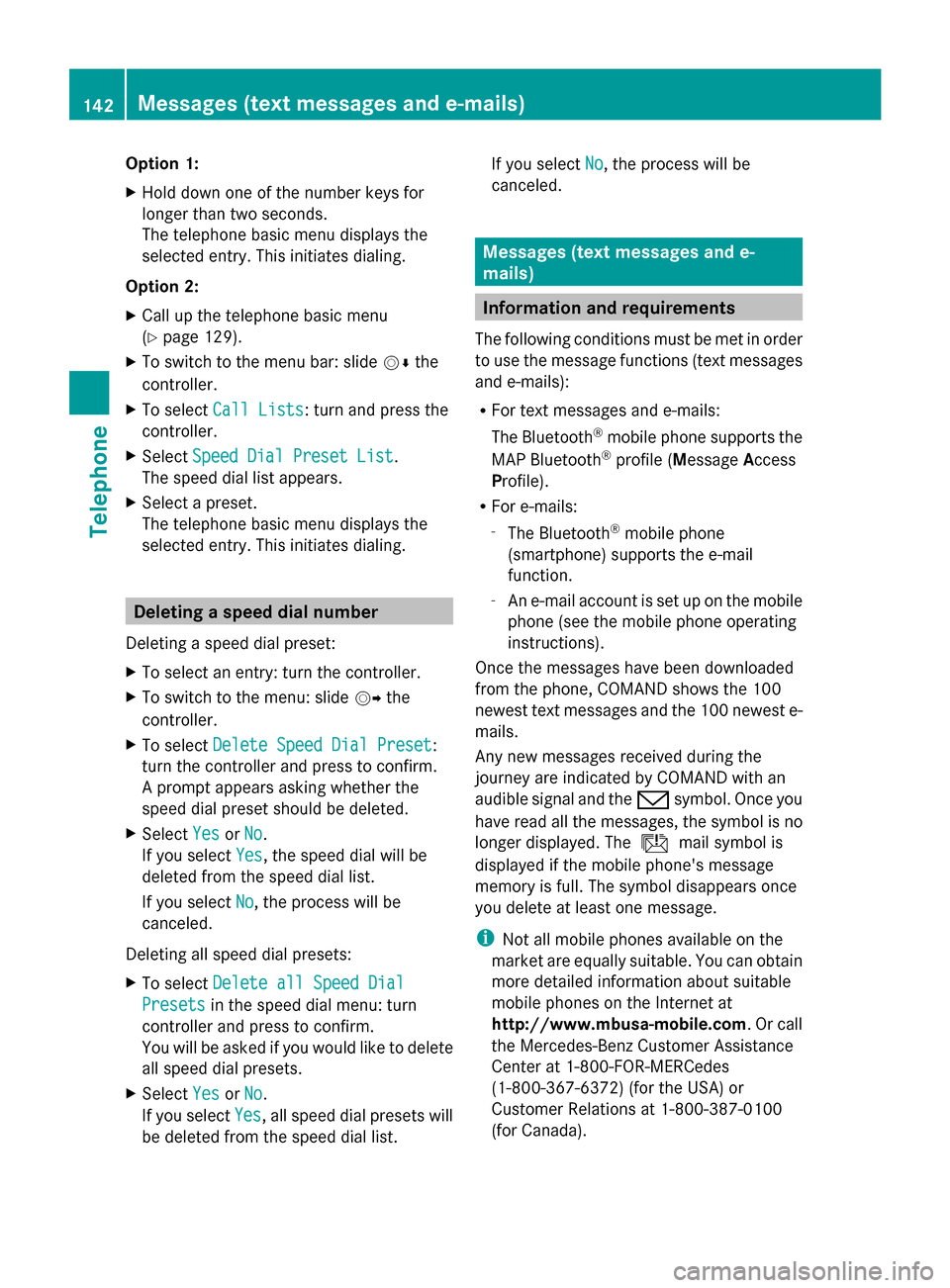
X To select Delete Speed Dial Preset
Delete Speed Dial Preset:
turn the controller and press to confirm.
A prompt appears asking whether the
speed dial preset should be deleted.
X Select Yes
Yes orNo No.
If you select Yes
Yes, the speed dial will be
deleted from the speed dial list.
If you select No
No, the process will be
canceled.
Deleting all speed dial presets:
X To select Delete all Speed Dial Delete all Speed Dial
Presets
Presets in the speed dial menu: turn
controller and press to confirm.
You will be asked if you would like to delete
all speed dial presets.
X Select Yes
Yes orNo No.
If you select Yes
Yes, all speed dial presets will
be deleted from the speed dial list. If you select
No
No, the process will be
canceled. Messages (text messages and e-
mails)
Information and requirements
The following conditions must be met in order
to use the message functions (text messages
and e-mails):
R For text messages and e-mails:
The Bluetooth ®
mobile phone supports the
MAP Bluetooth ®
profile (Message Access
Profile).
R For e-mails:
-
The Bluetooth ®
mobile phone
(smartphone) supports the e-mail
function.
- An e-mail account is set up on the mobile
phone (see the mobile phone operating
instructions).
Once the messages have been downloaded
from the phone, COMAND shows the 100
newest text messages and the 100 newest e-
mails.
Any new messages received during the
journey are indicated by COMAND with an
audible signal and the 008Fsymbol. Once you
have read all the messages, the symbol is no
longer displayed. The úmail symbol is
displayed if the mobile phone's message
memory is full. The symbol disappears once
you delete at least one message.
i Not all mobile phones available on the
market are equally suitable. You can obtain
more detailed information about suitable
mobile phones on the Internet at
http://www.mbusa-mobile.com. Or call
the Mercedes-Benz Customer Assistance
Center at 1-800-FOR-MERCedes
(1-800-367-6372 )(for the USA) or
Customer Relations at 1-800-387-0100
(for Canada). 142
Messages (text messages and e-mails)Telephone
Page 150 of 278
Adding the sender to an address book
entry X
Press 0098the controller while the message
is being displayed.
X Text messages:
To select Save
Save Number Number : turn and press the
controller.
X E-mails:
To select Save Sender's E-Mail
Save Sender's E-Mail
Address Address: turn and press the controller.
X To select Add
Add: turn and press the controller.
X Proceed from the step "Selecting a
category" ( Ypage 137).
Deleting messages X
Call up the message folder ( Ypage 144).
X To select the message: turn and press the
controller.
X To select the list symbol on the right-hand
side next to the message: slide 00520096and
press the controller.
X To select Delete
Delete : turn and press the
controller.
A deletion prompt appears.
X To select Yes
Yes orNo No: turn and press the
controller.
If you select Yes
Yes , the message is deleted.
If you select No
No, the process will be
canceled.
i This delete function is not supported by
all mobile phones. The Delete Failed Delete Failed
message appears. Using the address book
Introduction
Always pay attention to traffic conditions.
Before starting the journey, familiarize
yourself with the address book functions.
Only use COMAND when the road and traffic
conditions permit. You could otherwise become involved in an accident in which you
or others could be injured.
The address book organizes and stores
entries that are entered from different
sources (mobile phone, memory card, USB
device, COMAND phone book, navigation
system).
You can use these entries to make telephone
calls and for navigation.
i Number of contacts in the address
book: the address book can store a total of
5000 contacts.
Of these:
R 2000 entries are reserved for
permanently saved contacts and
R 3000 entries are reserved for contacts
that you can load from the mobile phone.
i Display of mobile phone contacts:
contacts downloaded from the mobile
phone will no longer be displayed in the
address book if you disconnect the mobile
phone from COMAND. However, the
contact data of the last two mobile phones
connected are still stored in an internal
memory. When the relevant mobile phone
is reconnected, the contacts are displayed
immediately. When automatic download is
activated (Y page 153), COMAND
downloads the mobile phone contacts
again and updates the address book.
When the mobile phone is removed, only
the phone book entries from the mobile
phone are removed from the address book.
The remaining entries are retained. For this
reason, delete your personal data using the
reset function before selling your vehicle,
for example (Y page 48). Calling up the address book
Using the telephone button:
X Press the 002Bbutton one or more times. 148
Using the address bookTelephone
Page 153 of 278
Calling a telephone number
X
To select the telephone number data field:
turn the controller and press to confirm.
This initiates dialing and you can then make
your call (Y page 132).
Sending text messages X
To select a telephone number: turn the
controller.
X To select the list symbol to the right of the
data field: slide 00520096the controller and
press to confirm.
X To select Send Text Message
Send Text Message: turn the
controller and press to confirm.
The text message input menu appears
(Y page 145).
Sending e-mail X
To select the e-mail address: turn the
controller.
X To select the list symbol to the right of the
data field: slide 00520096the controller and
press to confirm.
X To select Send E-Mail
Send E-Mail : turn the controller
and press to confirm.
The e-mail input menu appears
(Y page 145).
Displaying sub-entry information X
To select the desired data field: turn the
controller.
X To select the list symbol to the right of the
data field: slide 00520096the controller and
press to confirm.
X To select Details
Details: turn and press the
controller.
The display is shown in full.
X To close the detailed display: press the
0038 button. Changing an address book entry X
To select the desired data field: turn the
controller.
X To select the list symbol to the right of the
data field: slide 00520096the controller and
press to confirm.
X To select Edit Edit: slide the controller and
press to confirm.
The input screen for the selected data field
appears.
Information about character entry
(Y page 30).
Changing the category of a data field X
To select the desired data field: turn the
controller.
X To select the list symbol to the right of the
data field: slide 00520096the controller and
press to confirm.
X To select Change Category Change Category: turn the
controller and press to confirm.
X To select a category: turn the controller and
press to confirm. Storing the phone number as a speed
dial number
X Call up the address book (Y page 148).
X Select an entry: turn and press the
controller.
The address book entry with all data fields
appears.
X To select the desired telephone number
data field: turn the controller.
X To select the list symbol to the right of the
data field: slide 00520096the controller and
press to confirm.
X To select Speed Dial Speed Dial: turn the controller
and press to confirm.
You can now store the number in one of the
ten speed dial presets (Y page 141). Using the address book
151Telephone Z
Page 162 of 278
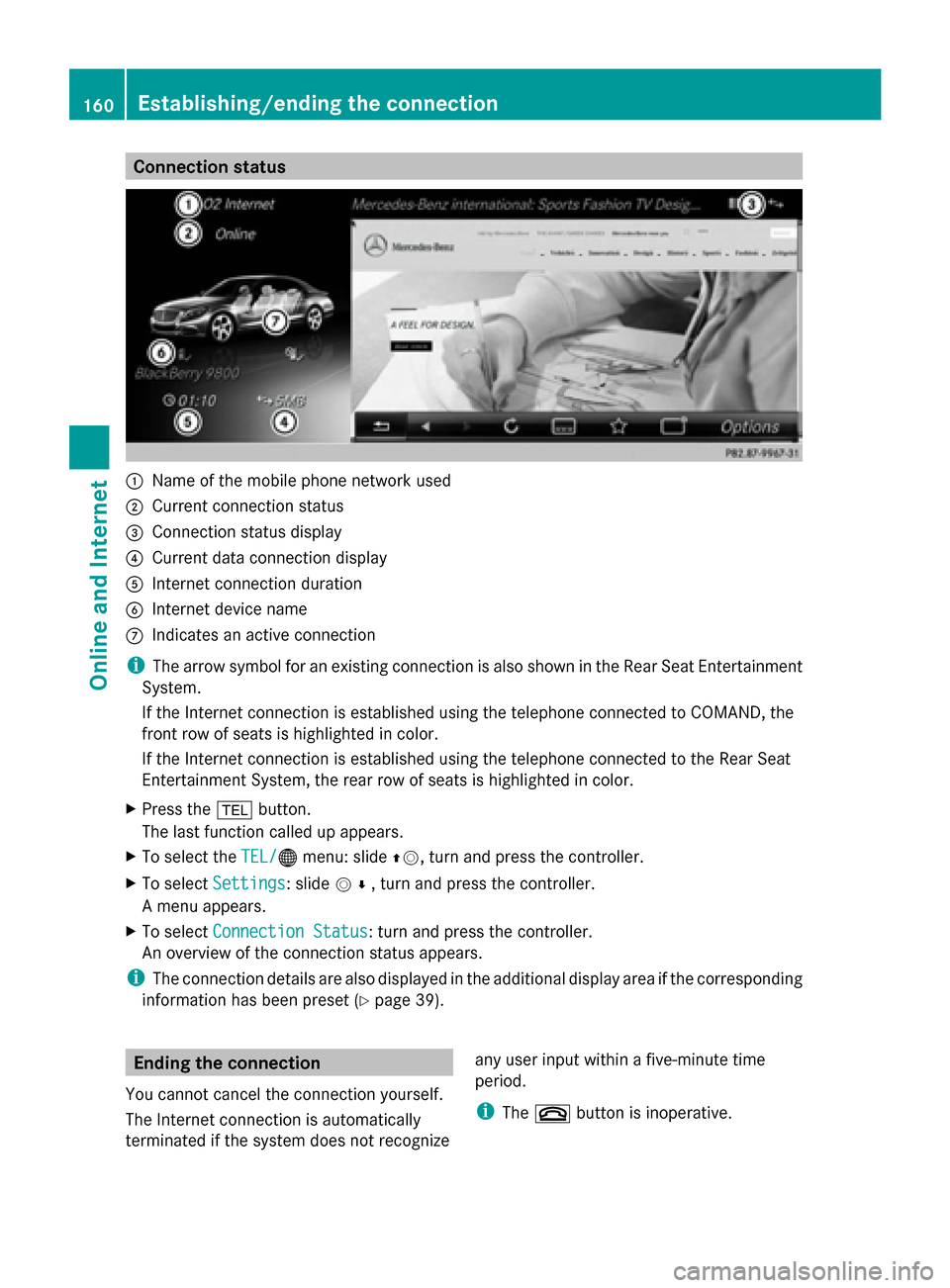
Connection status
0043
Name of the mobile phone network used
0044 Current connection status
0087 Connection status display
0085 Current data connection display
0083 Internet connection duration
0084 Internet device name
006B Indicates an active connection
i The arrow symbol for an existing connection is also shown in the Rear Seat Entertainment
System.
If the Internet connection is established using the telephone connected to COMAND, the
front row of seats is highlighted in color.
If the Internet connection is established using the telephone connected to the Rear Seat
Entertainment System, the rear row of seats is highlighted in color.
X Press the 002Bbutton.
The last function called up appears.
X To select the TEL/
TEL/00A7 menu: slide 00970052, turn and press the controller.
X To select Settings
Settings: slide 005200C5, turn and press the controller.
A menu appears.
X To select Connection Status Connection Status : turn and press the controller.
An overview of the connection status appears.
i The connection details are also displayed in the additional display area if the corresponding
information has been preset (Y page 39).Ending the connection
You cannot cancel the connection yourself.
The Internet connection is automatically
terminated if the system does not recognize any user input within a five-minute time
period.
i
The 0076 button is inoperative. 160
Establishing/ending the connectionOnline and Internet
Page 166 of 278
X
Select and confirm the entry.
The selected service provider is accepted.
X To exit the menu: select0039.
Deleting search queries X
Select the Options menu for the Google
Google
Local Search
Local Search app (Ypage 166).
The menu shows the current settings.
X To select Delete
Delete All AllSearches
Searches : turn and
press the controller.
A prompt appears, asking whether you
really wish to delete the search.
X Select Yes YesorNo
No.
If you select Yes
Yes, the search queries are
deleted.
If you select No
No, the process will be
canceled.
Resetting search history X
Select the Options menu for the Google
Google
Local Search
Local Search app (Ypage 166).
The menu shows the current settings.
X To select Reset
Reset Search Search History
History: turn the
controller and press to confirm.
A prompt appears, asking whether you
really wish to reset the search history.
X Select Yes YesorNo
No.
If you select Yes
Yes, the search history is
deleted.
If you select No
No, the process will be
canceled.
i The last ten search queries are reset. Destination/route download
Introduction
You can use Google™ Maps to send
navigation destinations to the server and then
download them from the vehicle. You can use
destinations for route guidance and save
them in COMAND for further use. In order to use the destination download
function, the mbrace system must be:
R
activated
R set up
R and activated for COMAND and Internet
access services.
For information on the mbrace system, see
the separate vehicle Operator's Manual. Sending destinations to the server
X Call up the website for Google™ Maps on
the Internet.
X Enter a destination.
X Click "More" at the destination.
X Click "Send".
X Click "Send to vehicle".
X Select Mercedes-Benz as the vehicle
brand.
X Enter the mbrace e-mail address or the
vehicle identification number.
Vehicle identification number
(Y page 166).
X Click "Send".
The destination is sent to the server.
i The availability of the destination/route
download function is country-dependent. Downloading destinations from the
server
Proceed as follows to use destinations/
routes that have been sent to the server:
X Press the 002Bbutton.
The last function called up appears.
X Select TEL/ TEL/00A7 in the main function bar by
sliding 00970052, turning and pressing the
controller.
A menu appears.
X To select Internet Internet: turn and press the
controller.
The menu for the Internet functions
appears. 164
Destination/route downloadOnline and Internet
Page 168 of 278
X
To select an entry from the list: turn the
controller and press to confirm.
X Select Import
Import.
The entry is stored in the address book.
Deleting a destination from the server X
To select an entry from the list: turn the
controller and press to confirm.
X Select Delete
Delete.
A prompt appears asking whether you
really wish to reset.
X Select Yes
Yes orNo
No.
If you select Yes
Yes, the settings are reset.
If you select No
No, the process will be
canceled. Setting options for destination
download
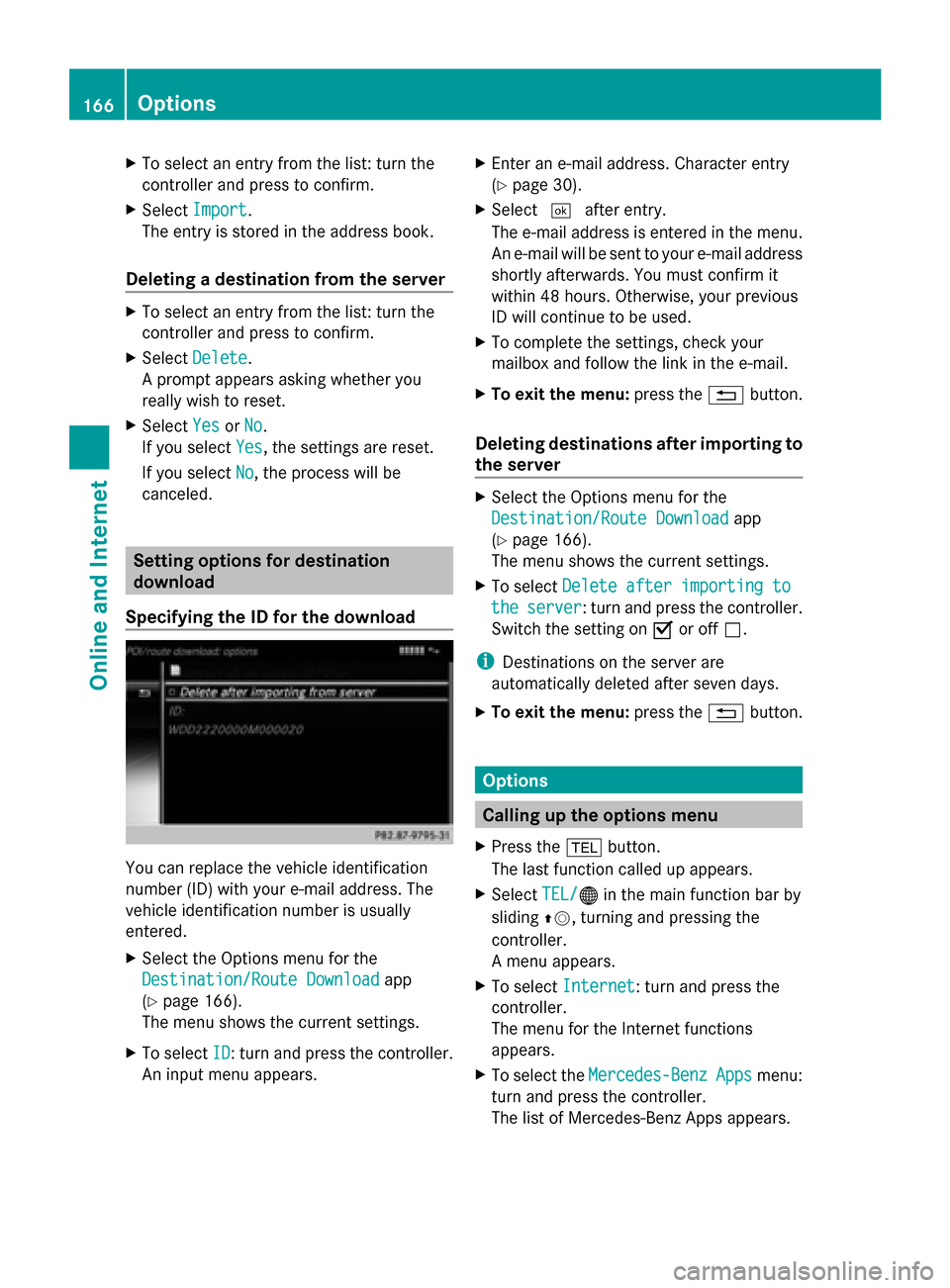
Specifying the ID for the download You can replace the vehicle identification
number (ID) with your e-mail address. The
vehicle identification number is usually
entered.
X Select the Options menu for the
Destination/Route Download
Destination/Route Download app
(Y page 166).
The menu shows the current settings.
X To select ID
ID: turn and press the controller.
An input menu appears. X
Enter an e-mail address. Character entry
(Y page 30).
X Select 0054after entry.
The e-mail address is entered in the menu.
An e-mail will be sent to your e-mail address
shortly afterwards. You must confirm it
within 48 hours. Otherwise, your previous
ID will continue to be used.
X To complete the settings, check your
mailbox and follow the link in the e-mail.
X To exit the menu: press the0038button.
Deleting destinations after importing to
the server X
Select the Options menu for the
Destination/Route Download Destination/Route Download app
(Y page 166).
The menu shows the current settings.
X To select Delete after importing to Delete after importing to
the
the server
server : turn and press the controller.
Switch the setting on 0073or off 0053.
i Destinations on the server are
automatically deleted after seven days.
X To exit the menu: press the0038button. Options
Calling up the options menu
X Press the 002Bbutton.
The last function called up appears.
X Select TEL/
TEL/00A7 in the main function bar by
sliding 00970052, turning and pressing the
controller.
A menu appears.
X To select Internet Internet: turn and press the
controller.
The menu for the Internet functions
appears.
X To select the Mercedes-Benz Mercedes-Benz Apps
Appsmenu:
turn and press the controller.
The list of Mercedes-Benz Apps appears. 166
OptionsOnline and Internet
Page 169 of 278
X
Select the desired app, e.g. Google
Google
Local Search
Local Search .
X To select the 00DEOptions menu: slide
00520096 and press the controller.
The menu shows the current settings. Resetting adjustments
With the reset function, all Mercedes-Benz
Apps settings are reset to the factory
settings.
X Call up the Options menu (Y page 166).
A menu appears.
i No apps should be selected, otherwise
the options menu of the respective app
opens.
X To select Reset
Reset: turn the controller and
press to confirm.
A prompt appears asking whether you
really wish to reset.
X Select Yes
Yes orNo No.
If you select Yes
Yes, the settings are reset.
If you select No
No, the process will be
canceled. Mercedes-Benz Apps
General notes
To be able to use Mercedes-Benz Apps, you
first have to register COMAND. To do so, you
have to enter your name and postal address
once in the vehicle and confirm the general
terms and conditions. A message to this
effect appears the first time you call up the
online and Internet functions.
For individual Mercedes-Benz Apps, it may be
necessary to pay license fees before using.
Use is then limited to a certain period of time.
License fees must be paid again for use
beyond this time period. Mercedes-Benz Mobile Website
Connect to the Internet: (Y
page 159)
The COMAND functions contain the
Mercedes-Benz Mobile Website as a
predefined favorite.
X Press the 002Bbutton.
The last function called up appears.
X Select TEL/ TEL/00A7 in the main function bar by
sliding 00970052, turning and pressing the
controller.
A menu appears.
X To select Internet Internet: turn and press the
controller.
The menu for the Internet functions
appears.
X Select the Mercedes-Benz Mobile Mercedes-Benz Mobile
Website
Website menu.
The Mercedes-Benz home page appears.
i You cannot delete the Mercedes-Benz
Mercedes-Benz
Mobile Website
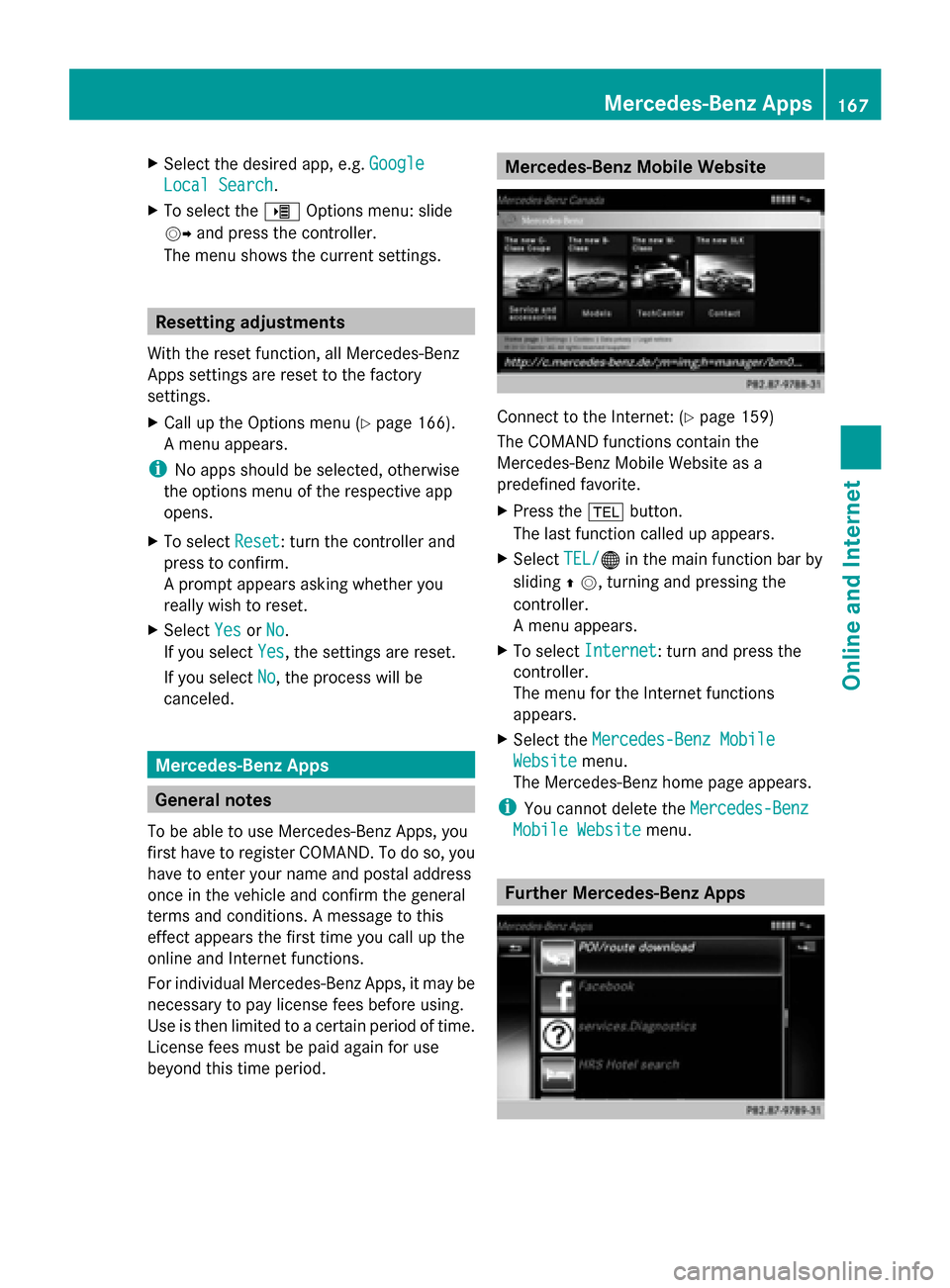
Mobile Website menu. Further Mercedes-Benz Apps Mercedes-Benz Apps
167Online and Internet Z
Page 178 of 278
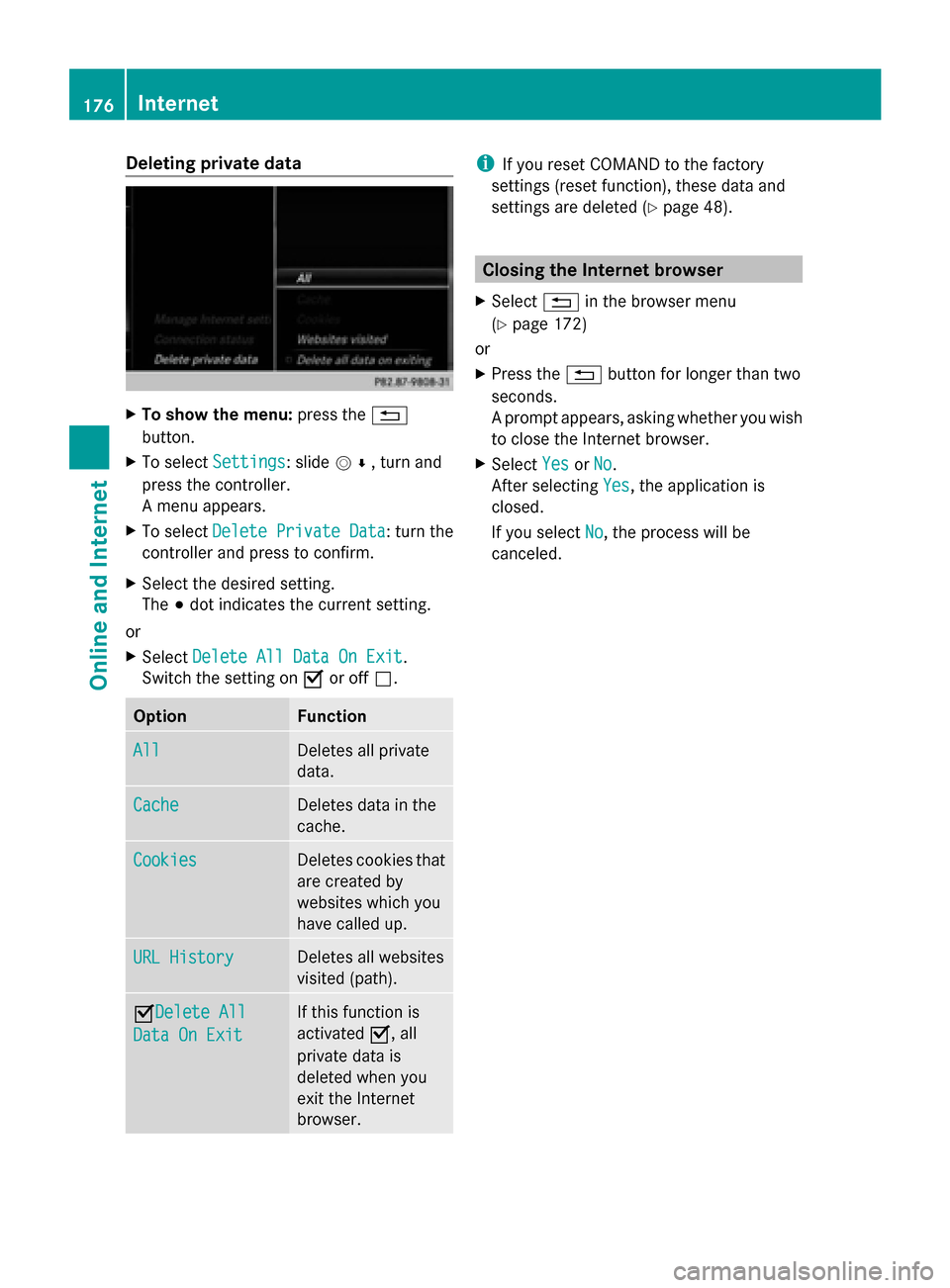
Deleting private data
X
To show the menu: press the0038
button.
X To select Settings
Settings: slide 005200C5, turn and
press the controller.
A menu appears.
X To select Delete Private Data Delete Private Data : turn the
controller and press to confirm.
X Select the desired setting.
The 003Bdot indicates the current setting.
or
X Select Delete All Data On Exit Delete All Data On Exit.
Switch the setting on 0073or off 0053. Option Function
All
All Deletes all private
data.
Cache Cache Deletes data in the
cache.
Cookies Cookies Deletes cookies that
are created by
websites which you
have called up.
URL History URL History Deletes all websites
visited (path).
0073Delete All
Delete All
Data On Exit Data On Exit If this function is
activated
0073, all
private data is
deleted when you
exit the Internet
browser. i
If you reset COMAND to the factory
settings (reset function), these data and
settings are deleted (Y page 48). Closing the Internet browser
X Select 0038in the browser menu
(Y page 172)
or
X Press the 0038button for longer than two
seconds.
A prompt appears, asking whether you wish
to close the Internet browser.
X Select Yes YesorNo
No.
After selecting Yes
Yes, the application is
closed.
If you select No No, the process will be
canceled. 176
InternetOnline and Internet
Page 180 of 278
Radio mode
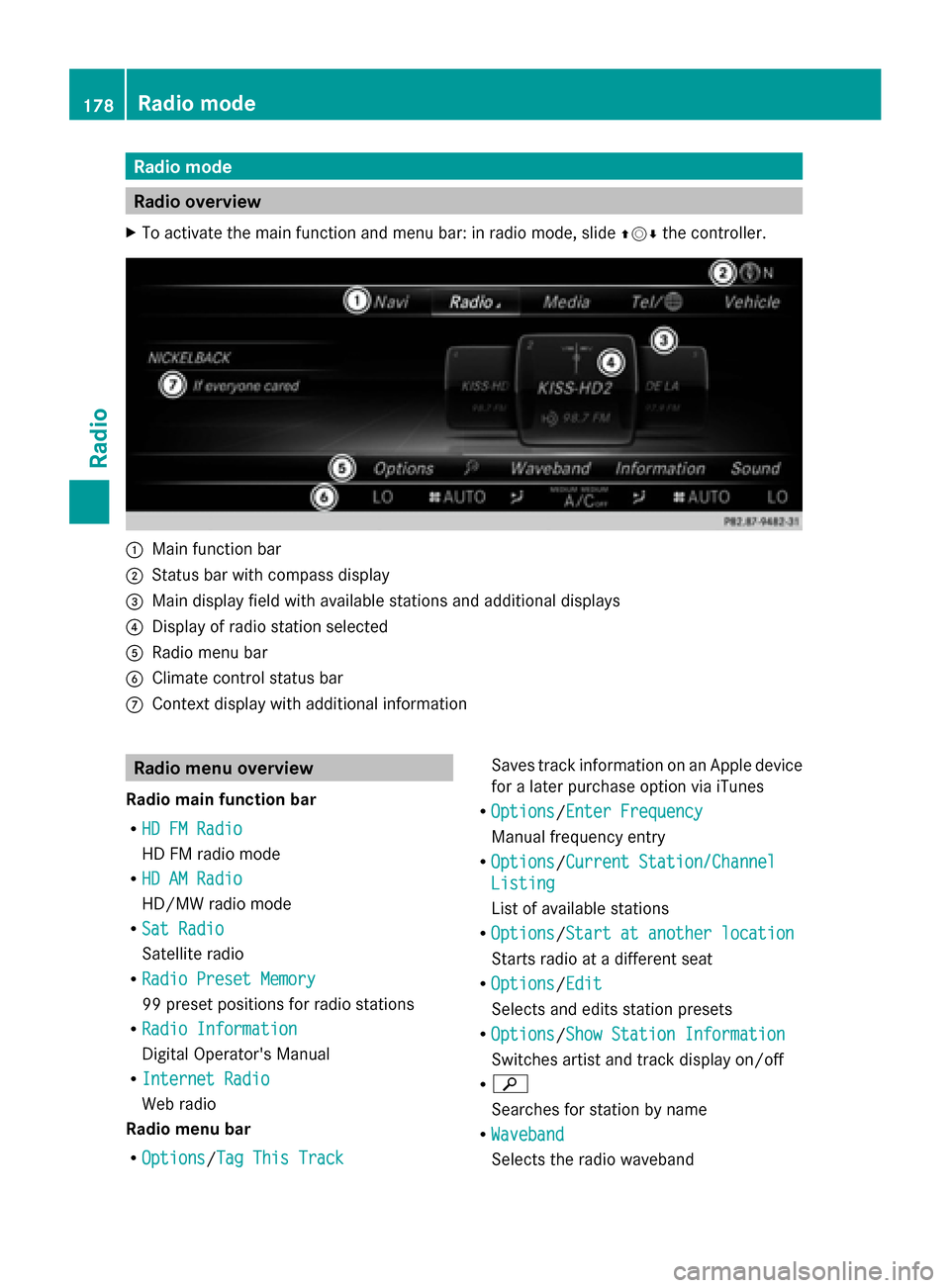
Radio overview
X To activate the main function and menu bar: in radio mode, slide 009700520064the controller. 0043
Main function bar
0044 Status bar with compass display
0087 Main display field with available stations and additional displays
0085 Display of radio station selected
0083 Radio menu bar
0084 Climate control status bar
006B Context display with additional information Radio menu overview
Radio main function bar
R HD FM Radio HD FM Radio
HD FM radio mode
R HD AM Radio HD AM Radio
HD/MW radio mode
R Sat Radio Sat Radio
Satellite radio
R Radio Preset Memory Radio Preset Memory
99 preset positions for radio stations
R Radio Information
Radio Information
Digital Operator's Manual
R Internet Radio Internet Radio
Web radio
Radio menu bar
R Options Options/ Tag This Track
Tag This Track Saves track information on an Apple device
for a later purchase option via iTunes
R Options Options/ Enter Frequency
Enter Frequency
Manual frequency entry
R Options
Options/ Current Station/Channel
Current Station/Channel
Listing
Listing
List of available stations
R Options Options/ Start at another location
Start at another location
Starts radio at a different seat
R Options
Options/ Edit
Edit
Selects and edits station presets
R Options
Options/ Show Station Information
Show Station Information
Switches artist and track display on/off
R 00D3
Searches for station by name
R Waveband Waveband
Selects the radio waveband 178
Radio modeRadio