engine MERCEDES-BENZ S-Class 2014 W222 Owners Manual
[x] Cancel search | Manufacturer: MERCEDES-BENZ, Model Year: 2014, Model line: S-Class, Model: MERCEDES-BENZ S-Class 2014 W222Pages: 434, PDF Size: 29.51 MB
Page 227 of 434
starting position as it is maneuvering into
the parking space.
R a maneuvering distance of at least 3.3 ft
(1.0 m) must be available.
Active Parking Assist can only assist you with
exiting a parking space if you have parked the
vehicle parallel to the direction of travel using
Active Parking Assist.
i If PARKTRONIC detects obstacles, Active
Parking Assist brakes automatically whilst
the vehicle exits the parking space. You are
responsible for braking in good time.
X Start the engine.
X Switch on the turn signal in the direction
you are pulling away.
X Shift the transmission to position Dor R.
The Start Park Assist? Yes: OK No:
Start Park Assist? Yes: OK No:
0038 message appears in the multifunction
display.
X To cancel the procedure: press the
0038 button on the multifunction steering
wheel or pull away.
or
X To exit a parking space using Active
Parking Assist: press the0076button on
the multifunction steering wheel.
The Park Assist Active Accelerate
Park Assist Active Accelerate
and Brake Observe Surroundings and Brake Observe Surroundings
message appears in the multifunction
display.
X Let go of the multifunction steering wheel.
X Pull away, being ready to brake at all times.
Do not exceed a maximum speed of
approximately 6 mph (10 km/h) when
exiting a parking space. Otherwise Active
Parking Assist will be canceled.
X Shift the transmission to position Dor Ras
required or according to the message while
the vehicle is stationary.
Active Parking Assist immediately steers in
the other direction. The Park Assist
Park Assist
Active Accelerate and Brake Active Accelerate and Brake
Observe Observe Surroundings
Surroundings message appears
in the multifunction display. i
You will achieve the best results by
waiting for the steering procedure to
complete before pulling away.
If you back up after activation, the steering
wheel is moved to the straight-ahead
position.
X Drive forwards and back up as prompted by
the PARKTRONIC warning displays, several
times if necessary.
Once you have exited the parking space
completely, the steering wheel is moved to
the straight-ahead position. You hear a tone
and the Park Assist Finished Park Assist Finished message
appears in the multifunction display. You will
then have to steer and merge into traffic on
your own. PARKTRONIC is still available. You
can take over the steering, before the vehicle
has exited the parking space completely. This
is useful, for example when you recognize
that it is already possible to pull out of the
parking space.
Canceling Active Parking Assist X
Stop the movement of the multifunction
steering wheel or steer yourself.
Active Parking Assist will be canceled at
once. The Park Assist Canceled Park Assist Canceled
message appears in the multifunction
display.
or
X Press the PARKTRONIC button
(Y page 220).
PARKTRONIC is switched off and Active
Parking Assist is immediately canceled.
The Park Assist Canceled Park Assist Canceled message
appears in the multifunction display.
Active Parking Assist is canceled
automatically if:
R the electric parking brake is engaged
R transmission position Pis selected
R parking using Active Parking Assist is no
longer possible Driving systems
225Driving and parking Z
Page 228 of 434
R
you are driving faster than 6 mph
(10 km/h)
R a wheel spins, ESP ®
intervenes or fails. The
00E5 warning lamp lights up in the
instrument cluster.
A warning tone sounds. The parking symbol
disappears and the multifunction display
shows the Park Assist Canceled
Park Assist Canceled
message.
When Active Parking Assist is canceled, you
must steer and brake again yourself.
If a system malfunction occurs, the vehicle is
braked to a standstill. To drive on, depress the
accelerator again. Rear view camera
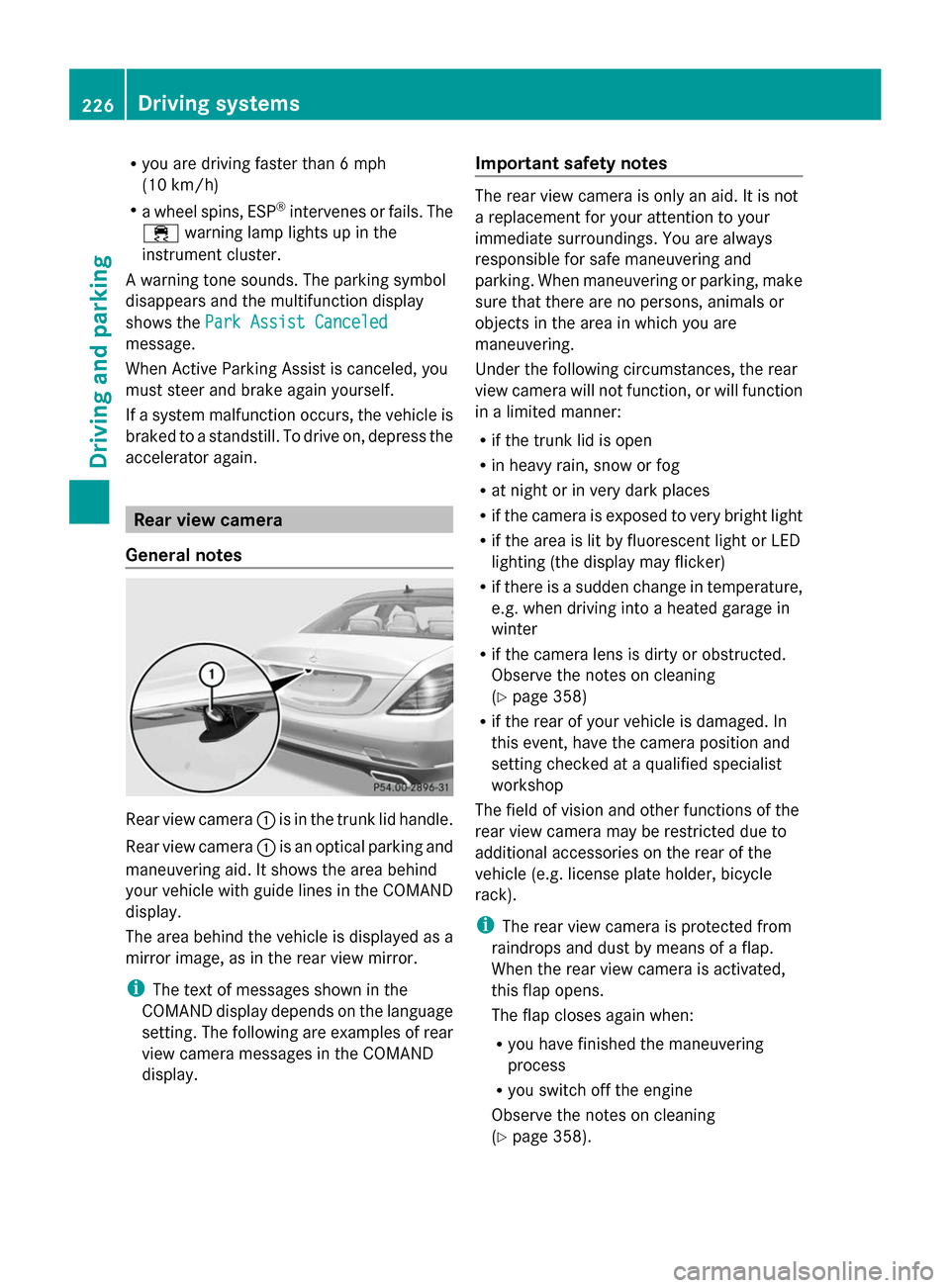
General notes Rear view camera
0043is in the trunk lid handle.
Rear view camera 0043is an optical parking and
maneuvering aid. It shows the area behind
your vehicle with guide lines in the COMAND
display.
The area behind the vehicle is displayed as a
mirror image, as in the rear view mirror.
i The text of messages shown in the
COMAND display depends on the language
setting. The following are examples of rear
view camera messages in the COMAND
display. Important safety notes The rear view camera is only an aid. It is not
a replacement for your attention to your
immediate surroundings. You are always
responsible for safe maneuvering and
parking. When maneuvering or parking, make
sure that there are no persons, animals or
objects in the area in which you are
maneuvering.
Under the following circumstances, the rear
view camera will not function, or will function
in a limited manner:
R
if the trunk lid is open
R in heavy rain, snow or fog
R at night or in very dark places
R if the camera is exposed to very bright light
R if the area is lit by fluorescent light or LED
lighting (the display may flicker)
R if there is a sudden change in temperature,
e.g. when driving into a heated garage in
winter
R if the camera lens is dirty or obstructed.
Observe the notes on cleaning
(Y page 358)
R if the rear of your vehicle is damaged. In
this event, have the camera position and
setting checked at a qualified specialist
workshop
The field of vision and other functions of the
rear view camera may be restricted due to
additional accessories on the rear of the
vehicle (e.g. license plate holder, bicycle
rack).
i The rear view camera is protected from
raindrops and dust by means of a flap.
When the rear view camera is activated,
this flap opens.
The flap closes again when:
R you have finished the maneuvering
process
R you switch off the engine
Observe the notes on cleaning
(Y page 358). 226
Driving syste
msDriving and parking
Page 237 of 434
Important safety notes
ATTENTION ASSIST is only an aid to the
driver. It might not always recognize fatigue
or increasing inattentiveness in time or fail to
recognize them at all. The system is not a
substitute for a well-rested and attentive
driver.
The functionality of ATTENTION ASSIST is
restricted and warnings may be delayed or
not occur at all:
R if the length of the journey is less than
approximately 30 minutes
R if the road condition is poor, e.g. if the
surface is uneven or if there are potholes
R if there is a strong side wind
R if you have adopted a sporty driving style
with high cornering speeds or high rates of
acceleration
R if you are predominantly driving slower
than 37 mph (60 km/h) or faster than
125 mph (200 km/h)
R if you are driving with the active Steer
Assist of DISTRONIC PLUS
R if the time has been set incorrectly
R in active driving situations, such as when
you change lanes or change your speed
ATTENTION ASSIST is reset when you
continue your journey and starts assessing
your tiredness again if:
R you switch off the engine.
R you take off your seat belt and open the
driver's door, e.g. for a change of drivers or
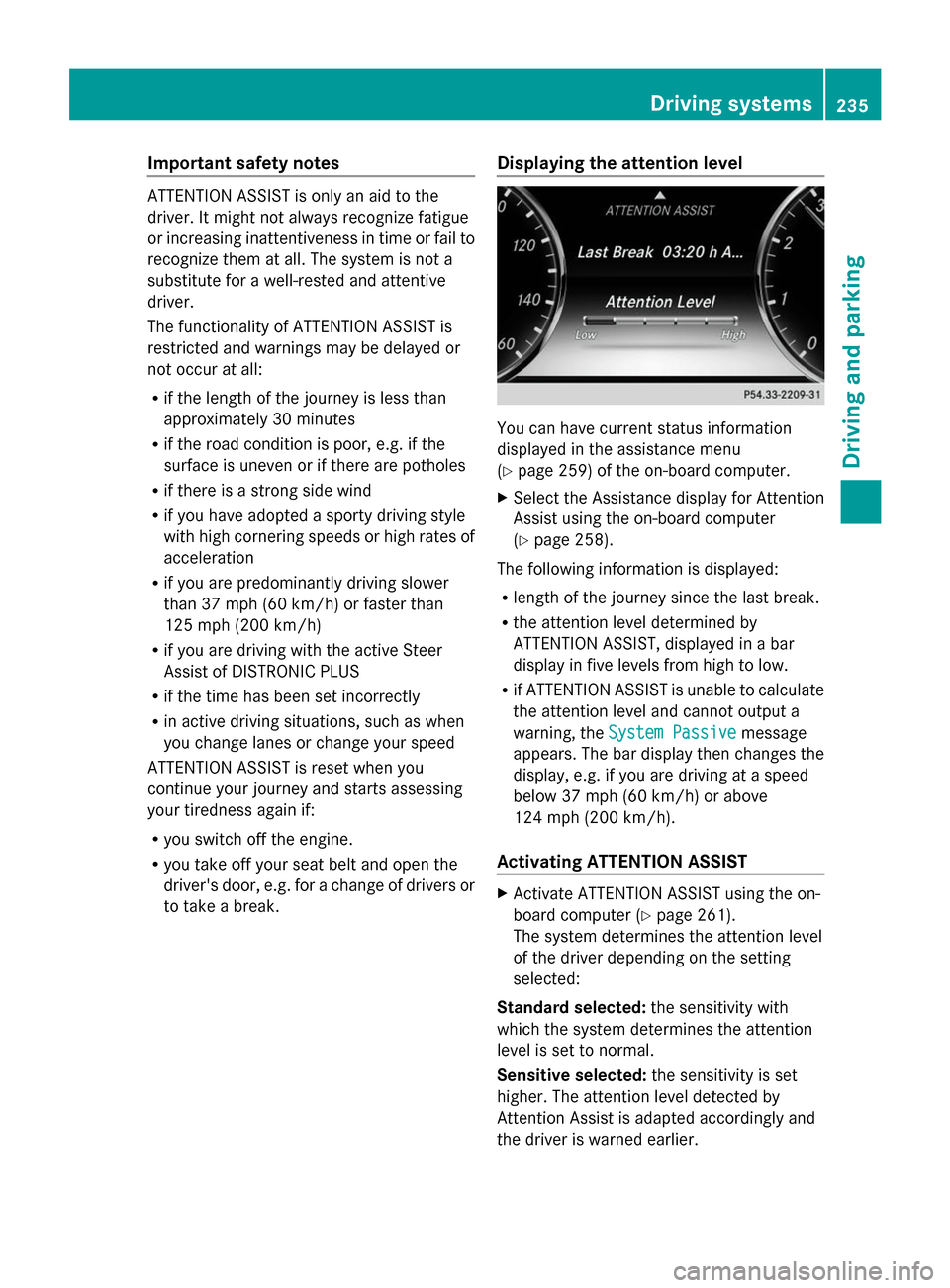
to take a break. Displaying the attention level You can have current status information
displayed in the assistance menu
(Y
page 259) of the on-board computer.
X Select the Assistance display for Attention
Assist using the on-board computer
(Y page 258).
The following information is displayed:
R length of the journey since the last break.
R the attention level determined by
ATTENTION ASSIST, displayed in a bar
display in five levels from high to low.
R if ATTENTION ASSIST is unable to calculate
the attention level and cannot output a
warning, the System Passive System Passive message
appears. The bar display then changes the
display, e.g. if you are driving at a speed
below 37 mph (60 km/h) or above
124 mph (200 km/h).
Activating ATTENTION ASSIST X
Activate ATTENTION ASSIST using the on-
board computer (Y page 261).
The system determines the attention level
of the driver depending on the setting
selected:
Standard selected: the sensitivity with
which the system determines the attention
level is set to normal.
Sensitive selected: the sensitivity is set
higher. The attention level detected by
Attention Assist is adapted accordingly and
the driver is warned earlier. Driving systems
235Driving and parking Z
Page 238 of 434
When ATTENTION ASSIST is deactivated, the
00AD symbol and OFF appear in the
multifunction display in the assistance
display when the engine is running.
When ATTENTION ASSIST has been
deactivated, it is automatically reactivated
after the engine has been stopped. The
sensitivity selected corresponds to the last
selection activated (standard/sensitive).
Warning in the multifunction display If fatigue or increasing lapses in
concentration are detected, a warning
appears in the multifunction display:
Attention Assist: Take a Break! Attention Assist: Take a Break!
In addition to the message shown in the
multifunction display, you will then hear a
warning tone.
X If necessary, take a break.
X Confirm the message by pressing the
0076 button on the steering wheel.
On long journeys, take regular breaks in good
time to allow yourself to rest properly. If you
do not take a break and ATTENTION ASSIST
continues to detect increasing lapses in
concentration, you will be warned again after
15 minutes at the earliest. This will only
happen if ATTENTION ASSIST still detects
typical indicators of fatigue or increasing
lapses in concentration.
If a warning is output in the multifunction
display, a service station search is performed
in COMAND. You can select a service station
and navigation to this service station will then
begin. This function can be activated and
deactivated in COMAND. Night View Assist Plus
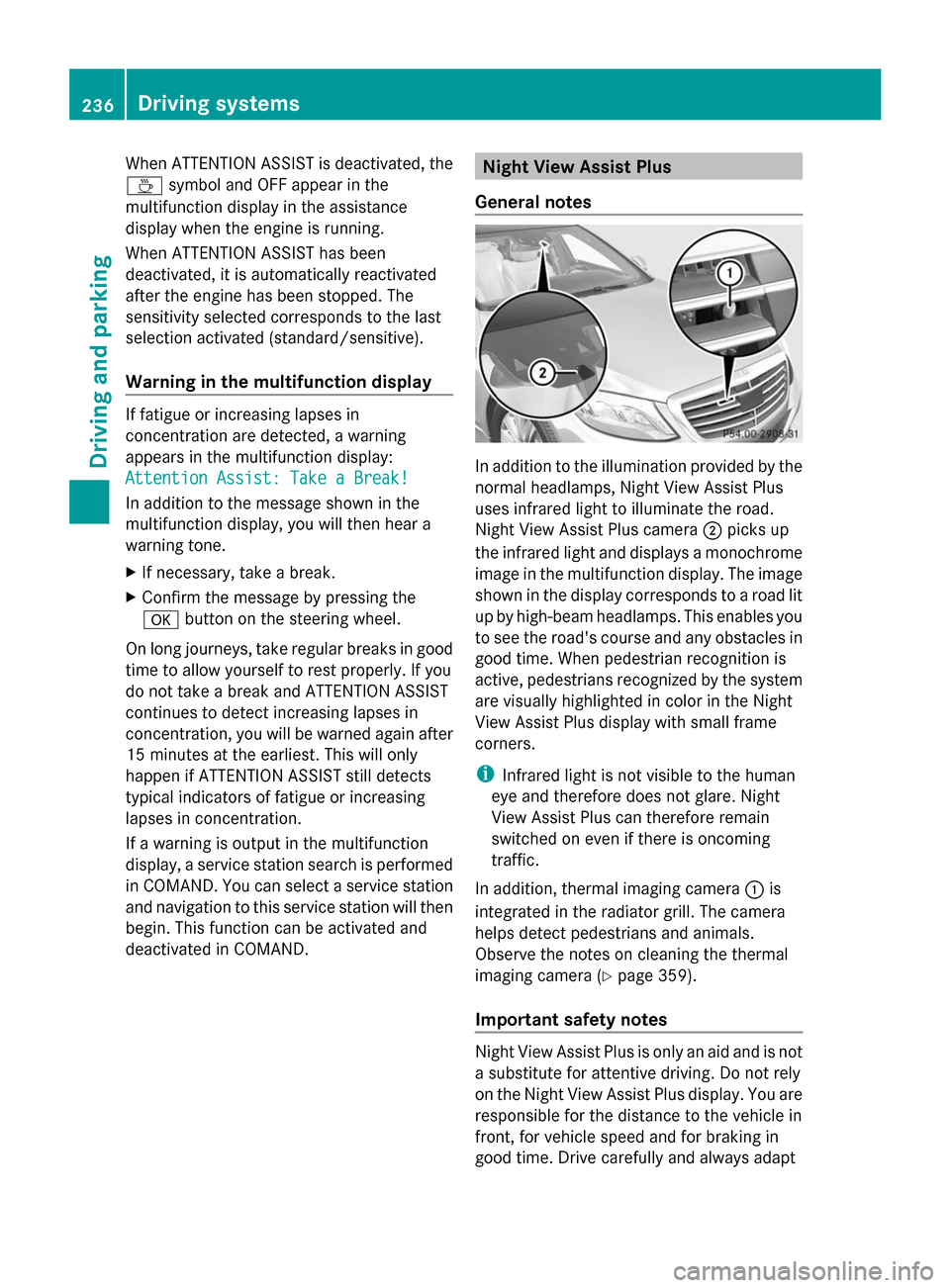
General notes In addition to the illumination provided by the
normal headlamps, Night View Assist Plus
uses infrared light to illuminate the road.
Night View Assist Plus camera 0044picks up
the infrared light and displays a monochrome
image in the multifunction display. The image
shown in the display corresponds to a road lit
up by high-beam headlamps. This enables you
to see the road's course and any obstacles in
good time. When pedestrian recognition is
active, pedestrians recognized by the system
are visually highlighted in color in the Night
View Assist Plus display with small frame
corners.
i Infrared light is not visible to the human
eye and therefore does not glare. Night
View Assist Plus can therefore remain
switched on even if there is oncoming
traffic.
In addition, thermal imaging camera 0043is
integrated in the radiator grill. The camera
helps detect pedestrians and animals.
Observe the notes on cleaning the thermal
imaging camera (Y page 359).
Important safety notes Night View Assist Plus is only an aid and is not
a substitute for attentive driving. Do not rely
on the Night View Assist Plus display. You are
responsible for the distance to the vehicle in
front, for vehicle speed and for braking in
good time. Drive carefully and always adapt236
Driving systemsDriving and parking
Page 240 of 434
Night View Assist Plus can recognize larger
animals such as deer, cows or horses using
typical characteristics.
The system does not detect:
R smaller animals, e.g. dogs and cats
R animals whose silhouette is not clearly
recognizable.
When detected, animals are marked with
small color frame corners. In contrast to
pedestrian recognition, there is no separate
readiness symbol in the multifunction
display.
Switching Night View Assist on/off Activation conditions
You can only activate Night View Assist Plus
if all of the following conditions are met:
R the ignition is switched on (Y page 171) or
the engine has been started.
R the light switch is in the 0058or0058
position.
R reverse gear has not been engaged.
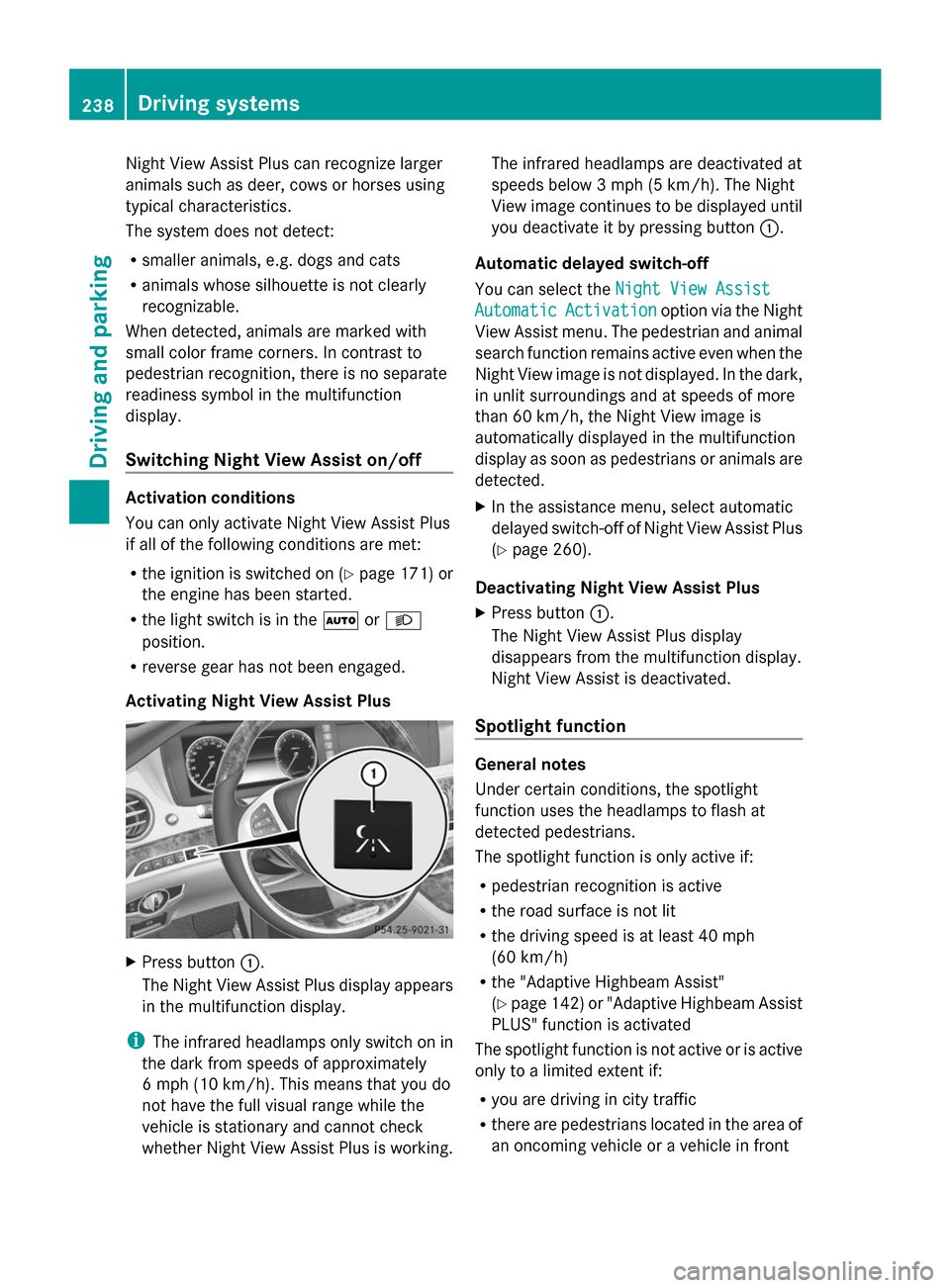
Activating Night View Assist Plus X
Press button 0043.
The Night View Assist Plus display appears
in the multifunction display.
i The infrared headlamps only switch on in
the dark from speeds of approximately
6 mph (10 km/h). This means that you do
not have the full visual range while the
vehicle is stationary and cannot check
whether Night View Assist Plus is working. The infrared headlamps are deactivated at
speeds below 3 mph (5 km/h). The Night
View image continues to be displayed until
you deactivate it by pressing button 0043.
Automatic delayed switch-off
You can select the Night View Assist Night View Assist
Automatic
Automatic Activation
Activation option via the Night
View Assist menu. The pedestrian and animal
search function remains active even when the
Night View image is not displayed. In the dark,
in unlit surroundings and at speeds of more
than 60 km/h, the Night View image is
automatically displayed in the multifunction
display as soon as pedestrians or animals are
detected.
X In the assistance menu, select automatic
delayed switch-off of Night View Assist Plus
(Y page 260).
Deactivating Night View Assist Plus
X Press button 0043.
The Night View Assist Plus display
disappears from the multifunction display.
Night View Assist is deactivated.
Spotlight function General notes
Under certain conditions, the spotlight
function uses the headlamps to flash at
detected pedestrians.
The spotlight function is only active if:
R
pedestrian recognition is active
R the road surface is not lit
R the driving speed is at least 40 mph
(60 km/h)
R the "Adaptive Highbeam Assist"
(Y page 142) or "Adaptive Highbeam Assist
PLUS" function is activated
The spotlight function is not active or is active
only to a limited extent if:
R you are driving in city traffic
R there are pedestrians located in the area of
an oncoming vehicle or a vehicle in front 238
Driving systemsDriving and parking
Page 250 of 434
Useful information
i This Operator's Manual describes all
models and all standard and optional
equipment of your vehicle available at the
time of publication of the Operator's
Manual. Country-specific differences are
possible. Please note that your vehicle may
not be equipped with all features
described. This also applies to safety-
related systems and functions.
i Read the information on qualified
specialist workshops: (Y page 27).Important safety notes
G
WARNING
If you operate information systems and
communication equipment integrated in the
vehicle while driving, you will be distracted
from traffic conditions. You could also lose
control of the vehicle. There is a risk of an
accident.
Only operate the equipment when the traffic
situation permits. If you are not sure that this
is possible, park the vehicle paying attention
to traffic conditions and operate the
equipment when the vehicle is stationary.
You must observe the legal requirements for
the country in which you are currently driving
when operating the on-board computer. G
WARNING
If the instrument cluster has failed or
malfunctioned, you may not recognize
function restrictions in systems relevant to
safety. The operating safety of your vehicle
may be impaired. There is a risk of an
accident.
Drive on carefully. Have the vehicle checked
at a qualified specialist workshop
immediately.
The on-board computer only shows messages
or warnings from certain systems in the multifunction display. You should therefore
make sure your vehicle is operating safely at
all times. Otherwise, a vehicle that is not
operating safely may cause an accident.
For an overview, see the instrument panel
illustration (Y
page 33). Displays and operation
Tachometer
! Do not drive in the overrevving range, as
this could damage the engine.
The red band in the tachometer indicates the
engine's overrevving range.
The fuel supply is interrupted to protect the
engine when the red band is reached. Outside temperature display
You should pay special attention to road
conditions when temperatures are around
freezing point.
The outside temperature display is in the
multifunction display (Y page 250).
Changes in the outside temperature are
displayed after a short delay. 248
Displays and operationOn-board computer and displays
Page 261 of 434
Maintenance menu
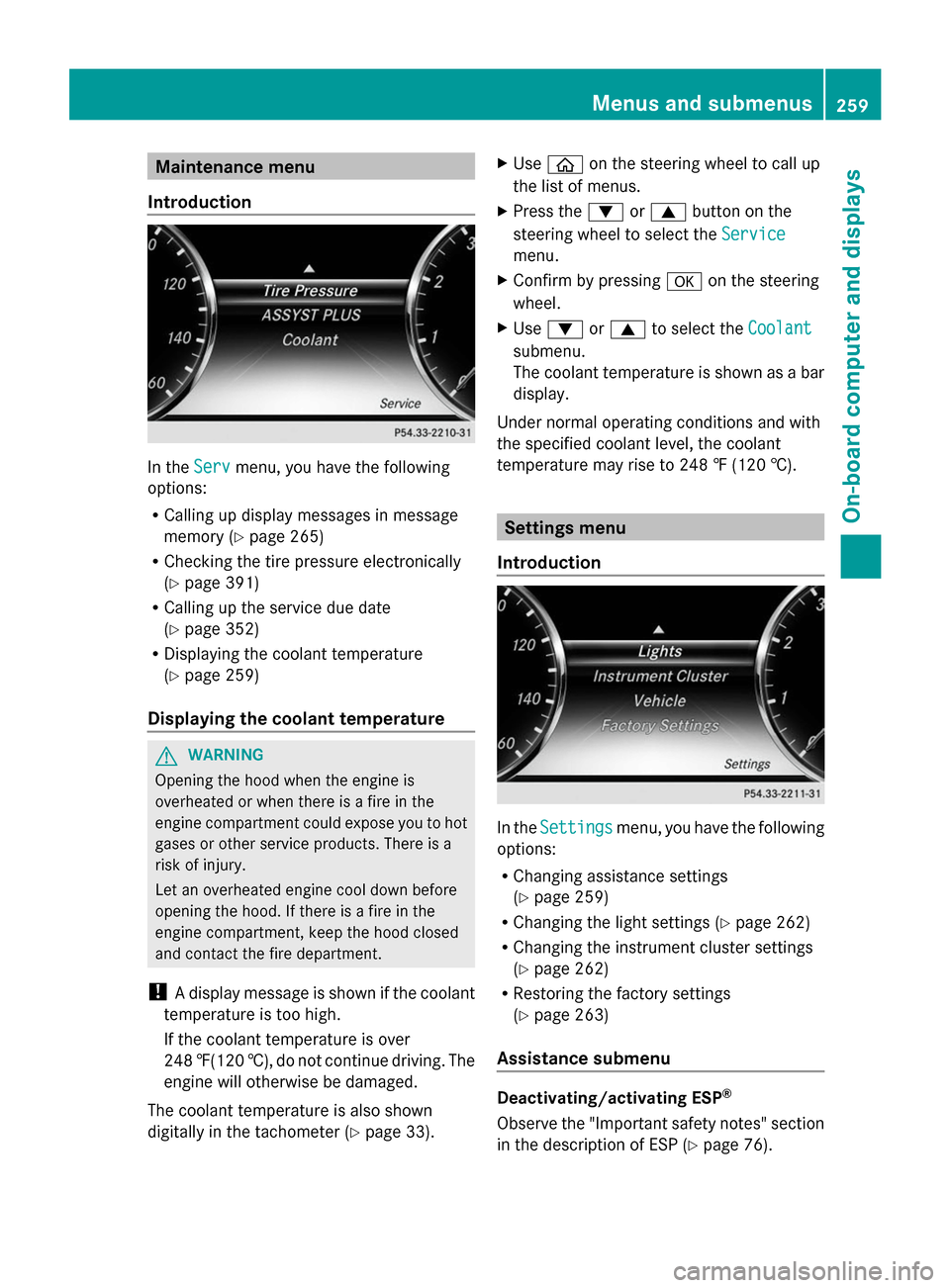
Introduction In the
Serv
Servmenu, you have the following
options:
R Calling up display messages in message
memory (Y page 265)
R Checking the tire pressure electronically
(Y page 391)
R Calling up the service due date
(Y page 352)
R Displaying the coolant temperature
(Y page 259)
Displaying the coolant temperature G
WARNING
Opening the hood when the engine is
overheated or when there is a fire in the
engine compartment could expose you to hot
gases or other service products. There is a
risk of injury.
Let an overheated engine cool down before
opening the hood. If there is a fire in the
engine compartment, keep the hood closed
and contact the fire department.
! A display message is shown if the coolant
temperature is too high.
If the coolant temperature is over
248 ‡(120 †), do not continue driving. The
engine will otherwise be damaged.
The coolant temperature is also shown
digitally in the tachometer (Y page 33).X
Use 00E2 on the steering wheel to call up
the list of menus.
X Press the 0064or0063 button on the
steering wheel to select the Service
Service
menu.
X Confirm by pressing 0076on the steering
wheel.
X Use 0064 or0063 to select the Coolant Coolant
submenu.
The coolant temperature is shown as a bar
display.
Under normal operating conditions and with
the specified coolant level, the coolant
temperature may rise to 248 ‡ (120 †). Settings menu
Introduction In the
Settings Settings menu, you have the following
options:
R Changing assistance settings
(Y page 259)
R Changing the light settings (Y page 262)
R Changing the instrument cluster settings
(Y page 262)
R Restoring the factory settings
(Y page 263)
Assistance submenu Deactivating/activating ESP
®
Observe the "Important safety notes" section
in the description of ESP (Y page 76). Menus and submenus
259On-board computer and displays Z
Page 262 of 434
G
WARNING
If you deactivate ESP ®
, ESP ®
no longer
stabilizes the vehicle. There is an increased
risk of skidding and an accident.
Only deactivate ESP ®
in the situations
described in the following.
It may be best to deactivate ESP ®
in the
following situations:
R when using snow chains
R in deep snow
R on sand or gravel
For further information about ESP ®
, see
(Y page 76).
X Start the engine.
X Use 00E2 on the steering wheel to call up
the list of menus.
X Press the 0064or0063 button on the
steering wheel to select the Settings
Settings
menu.
X Confirm by pressing 0076on the steering
wheel.
X Use 0064 or0063 to select the
Assistance
Assistance submenu.
X Press 0076to confirm.
X Press the 0064or0063 button to select
ESP
ESP.
X Press 0076to confirm.
The current selection is displayed.
X To activate/deactivate: press the0076
button again.
ESP ®
is deactivated if the 00BBwarning lamp
in the instrument cluster lights up
continuously when the engine is running.
If the 00E5 warning lamp lights up
continuously, ESP ®
is not available due to a
malfunction.
Observe the information on warning lamps
(Y page 305).
Observe the information on display messages
(Y page 266). Switching automatic activation of Night
View Assist Plus on/off
X
Use 00E2 on the steering wheel to call up
the list of menus.
X Press the 0064or0063 button on the
steering wheel to select the Settings Settings
menu.
X Confirm by pressing 0076on the steering
wheel.
X Use 0064 or0063 to select the
DriveAssist
DriveAssist submenu.
X Press 0076to confirm.
X Use 0064 or0063 to select Night View
Night View
Assist
Assist.
X Press 0076to confirm.
The current selection is displayed.
X To activate/deactivate: press the0076
button again.
If Night View Assist Plus automatic activation
is switched on, the night vision image is
automatically shown in the multifunction
display if an object is detected.
For further information about Night View
Assist Plus (Y page 238).
Activating/deactivating PRE-SAFE ®
Brake
PRE-SAFE ®
Brake is only available in vehicles
with DISTRONIC PLUS.
X Use 00E2 on the steering wheel to call up
the list of menus.
X Press the 0064or0063 button on the
steering wheel to select the Settings Settings
menu.
X Confirm by pressing 0076on the steering
wheel.
X Use 0064 or0063 to select the
DriveAssist
DriveAssist submenu.
X Press 0076to confirm.
X Press the 0064or0063 button to select
PRE-SAFE Brake
PRE-SAFE Brake. 260
Menus and submenusOn-board computer and displays
Page 266 of 434
X
Press the 0064or0063 button to select
No
No orYes
Yes.
X Press 0076to confirm the selection.
If you have selected Yes
Yes, the multifunction
display shows a confirmation message.
For safety reasons, the Daytime Running
Daytime Running
Lights
Lights function in the Lights
Lights submenu is
only reset if the vehicle is stationary. AMG menu in AMG vehicles
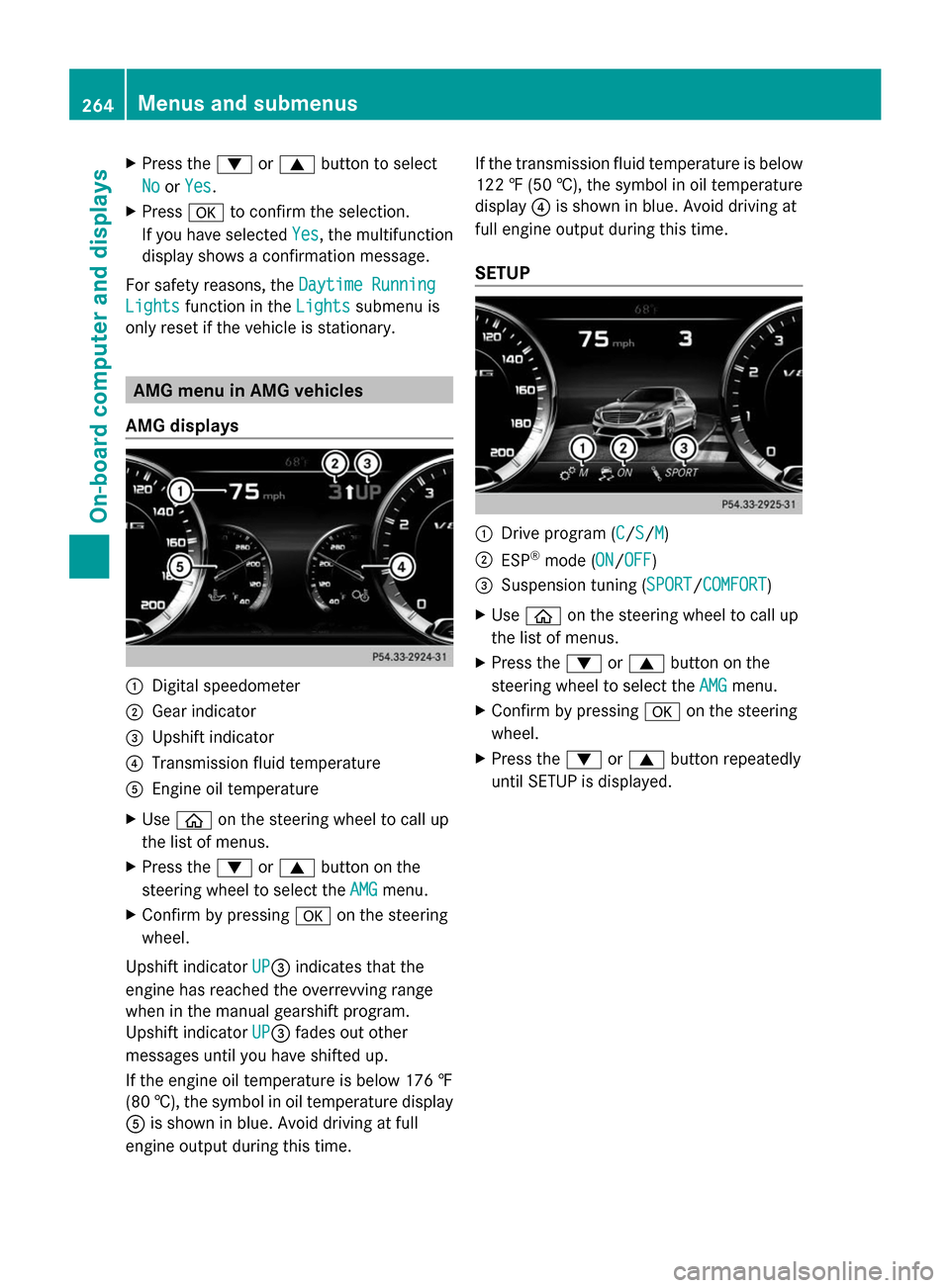
AMG displays 0043
Digital speedometer
0044 Gear indicator
0087 Upshift indicator
0085 Transmission fluid temperature
0083 Engine oil temperature
X Use 00E2 on the steering wheel to call up
the list of menus.
X Press the 0064or0063 button on the
steering wheel to select the AMG
AMG menu.
X Confirm by pressing 0076on the steering
wheel.
Upshift indicator UP
UP0087indicates that the
engine has reached the overrevving range
when in the manual gearshift program.
Upshift indicator UP UP0087fades out other
messages until you have shifted up.
If the engine oil temperature is below 176 ‡
(80 †), the symbol in oil temperature display
0083 is shown in blue. Avoid driving at full
engine output during this time. If the transmission fluid temperature is below
122 ‡ (50 †), the symbol in oil temperature
display 0085is shown in blue. Avoid driving at
full engine output during this time.
SETUP 0043
Drive program (C C/SS/MM)
0044 ESP ®
mode (ON ON/OFFOFF)
0087 Suspension tuning (SPORT SPORT/COMFORT COMFORT)
X Use 00E2 on the steering wheel to call up
the list of menus.
X Press the 0064or0063 button on the
steering wheel to select the AMG
AMGmenu.
X Confirm by pressing 0076on the steering
wheel.
X Press the 0064or0063 button repeatedly
until SETUP is displayed. 264
Menus and submenusOn-board computer and displays
Page 273 of 434
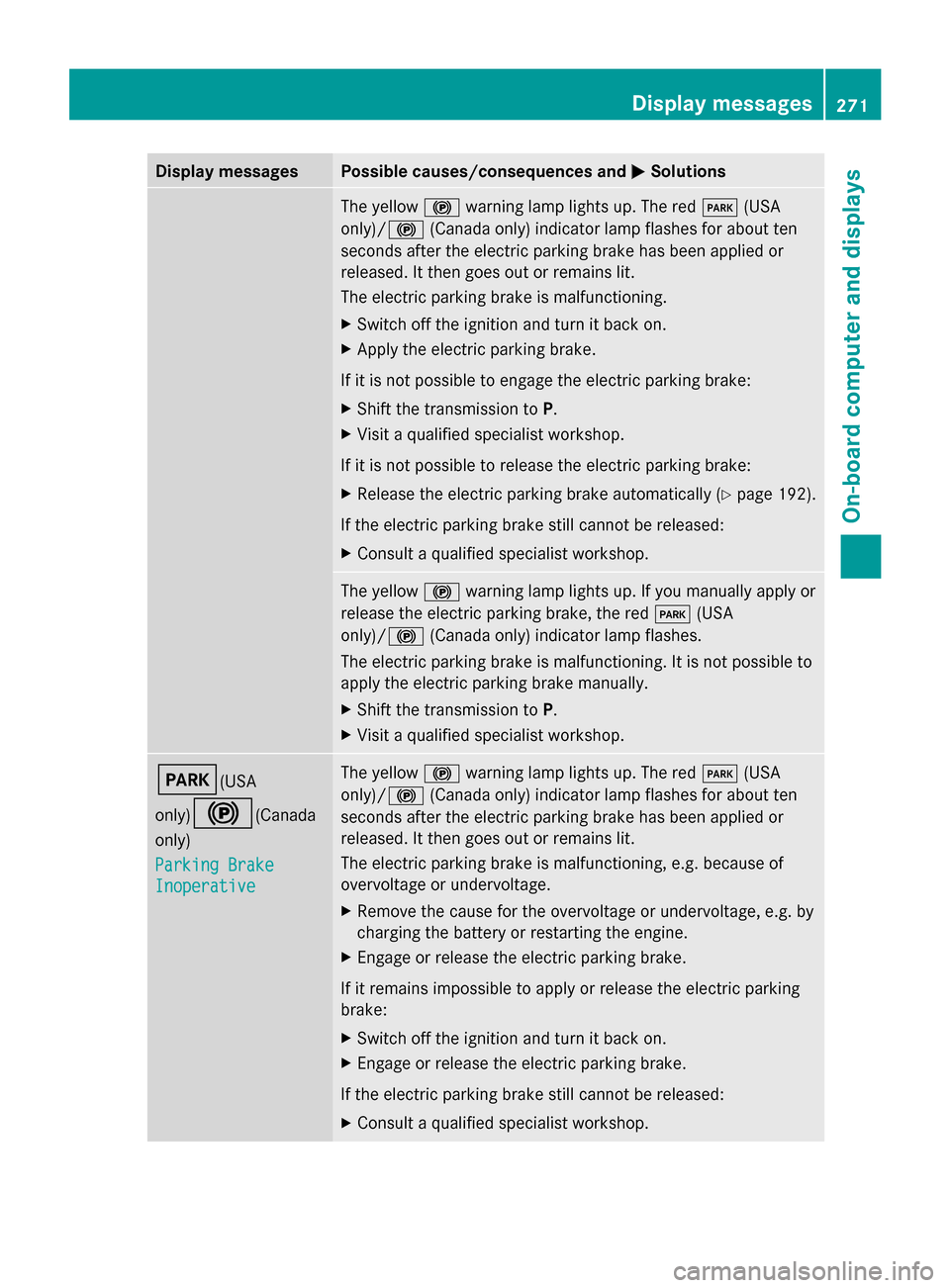
Display messages Possible causes/consequences and
0050
0050Solutions The yellow
0024warning lamp lights up. The red 0049(USA
only)/ 0024(Canada only) indicator lamp flashes for about ten
seconds after the electric parking brake has been applied or
released. It then goes out or remains lit.
The electric parking brake is malfunctioning.
X Switch off the ignition and turn it back on.
X Apply the electric parking brake.
If it is not possible to engage the electric parking brake:
X Shift the transmission to P.
X Visit a qualified specialist workshop.
If it is not possible to release the electric parking brake:
X Release the electric parking brake automatically ( Ypage 192).
If the electric parking brake still cannot be released:
X Consult a qualified specialist workshop. The yellow
0024warning lamp lights up. If you manually apply or
release the electric parking brake, the red 0049(USA
only)/ 0024(Canada only) indicator lamp flashes.
The electric parking brake is malfunctioning. It is not possible to
apply the electric parking brake manually.
X Shift the transmission to P.
X Visit a qualified specialist workshop. 0049(USA
only)
0024(Canada
only)
Parking Brake Parking Brake
Inoperative Inoperative The yellow
0024warning lamp lights up. The red 0049(USA
only)/ 0024(Canada only) indicator lamp flashes for about ten
seconds after the electric parking brake has been applied or
released. It then goes out or remains lit.
The electric parking brake is malfunctioning, e.g. because of
overvoltage or undervoltage.
X Remove the cause for the overvoltage or undervoltage, e.g. by
charging the battery or restarting the engine.
X Engage or release the electric parking brake.
If it remains impossible to apply or release the electric parking
brake:
X Switch off the ignition and turn it back on.
X Engage or release the electric parking brake.
If the electric parking brake still cannot be released:
X Consult a qualified specialist workshop. Display
messages
271On-board computer and displays Z