engine MERCEDES-BENZ S-Class 2015 W222 Owner's Guide
[x] Cancel search | Manufacturer: MERCEDES-BENZ, Model Year: 2015, Model line: S-Class, Model: MERCEDES-BENZ S-Class 2015 W222Pages: 502, PDF Size: 9.59 MB
Page 85 of 502
Only deactivate ESP
®
in the situations descri-
bed in the following.
It may be best to deactivate ESP ®
in the fol-
lowing situations:
R when using snow chains
R in deep snow
R on sand or gravel
i Activate ESP ®
as soon as the situations
described above no longer apply. ESP ®
will
otherwise not be able to stabilize the vehi-
cle if the vehicle starts to skid or a wheel
starts to spin.
! Avoid spinning the driven wheels for an
extended period with ESP ®
deactivated.
You could otherwise damage the drivetrain.
Deactivating/activating ESP ®
You can deactivate or activate ESP ®
via the
on-board computer.
X To deactivate: (Ypage 82).
The å ESP®
OFF warning lamp in the
instrument cluster lights up.
X To activate: (Ypage 82).
The å ESP®
OFF warning lamp in the
instrument cluster goes out.
Characteristics when ESP ®
is deactivated
If ESP ®
is deactivated and one or more wheels
start to spin, the ÷ESP®
warning lamp in
the instrument cluster flashes. In such situa-
tions, ESP ®
will not stabilize the vehicle.
If you deactivate ESP ®
:
R ESP ®
no longer improves driving stability.
R engine torque is no longer limited and the
drive wheels are able to spin.
The spinning of the wheels results in a cut- ting action for better traction on loose sur-faces.
R traction control is still activated.
R ESP ®
still provides support when you
brake. Crosswind Assist (vehicles without
MAGIC BODY CONTROL) General information
Vehicles with MAGIC BODY CONTROL: infor-
mation on stabilizing the vehicle in the event
of crosswind (Y
page 243).
Strong crosswinds can cause your vehicle to
deviate from a straight course. The crosswind
driving assistance function integrated into
ESP ®
significantly reduces these effects.
ESP ®
intervenes automatically according to
the direction and intensity of the crosswinds
affecting your vehicle.
ESP intervenes with stabilizing braking to
assist you in keeping the vehicle in the lane.
Crosswind Assist is active at vehicle speeds
above 50 mph (80 km/h) when driving
straight ahead or cornering gently.
Important safety notes
Crosswind Assist does not work if ESP ®
is
deactivated or disabled because of a mal-
function. EBD (electronic brake force distribu-
tion)
General information EBD monitors and controls the brake pres-
sure on the rear wheels to improve driving
stability while braking.
Important safety notes i
Observe the "Important safety notes" sec-
tion (Y page 76). G
WARNING
If EBD is malfunctioning, the rear wheels can
lock, e.g. under full braking. This increases the risk of skidding and an accident.
You should therefore adapt your driving style
to the different handling characteristics. Have the brake system checked at a qualified spe-
cialist workshop. Driving safety systems
83Safety Z
Page 88 of 502
The braking action of PRE-SAFE
®
Brake is
ended automatically if:
R you maneuver to avoid the obstacle.
R there is no longer a risk of collision.
R there is no longer an obstacle detected in
front of your vehicle. STEER CONTROL
General information STEER CONTROL helps you by transmitting a
noticeable steering force to the steering
wheel in the direction required for vehicle
stabilization.
This steering assistance is provided in partic-
ular if:
R both right wheels or both left wheels are on
a wet or slippery road surface when you
brake.
R the vehicle starts to skid.
Important safety notes i
Observe the "Important safety notes" sec-
tion (Y page 76).
No steering support is provided from STEER
CONTROL, if: R ESP ®
is malfunctioning.
R the lighting is faulty.
Power steering will, however, continue to
function. Protection against theft
Immobilizer
The immobilizer prevents your vehicle from
being started without the correct SmartKey. X To activate with the SmartKey: remove
the SmartKey from the ignition lock.
X To activate with KEYLESS-GO: switch the
ignition off and open the driver's door.
X To deactivate: switch on the ignition. When leaving the vehicle, always take the
SmartKey with you and lock the vehicle. Any-
one can start the engine if a valid SmartKey
has been left inside the vehicle.
i The immobilizer is always deactivated
when you start the engine.
In the event that the engine cannot be star- ted (yet the vehicle's battery is charged),
the system is not operational. Contact an
authorized Mercedes-Benz Center or call
1-800-FOR-MERCedes (in the USA) or
1-800-387-0100 (in Canada). ATA (anti-theft alarm system)
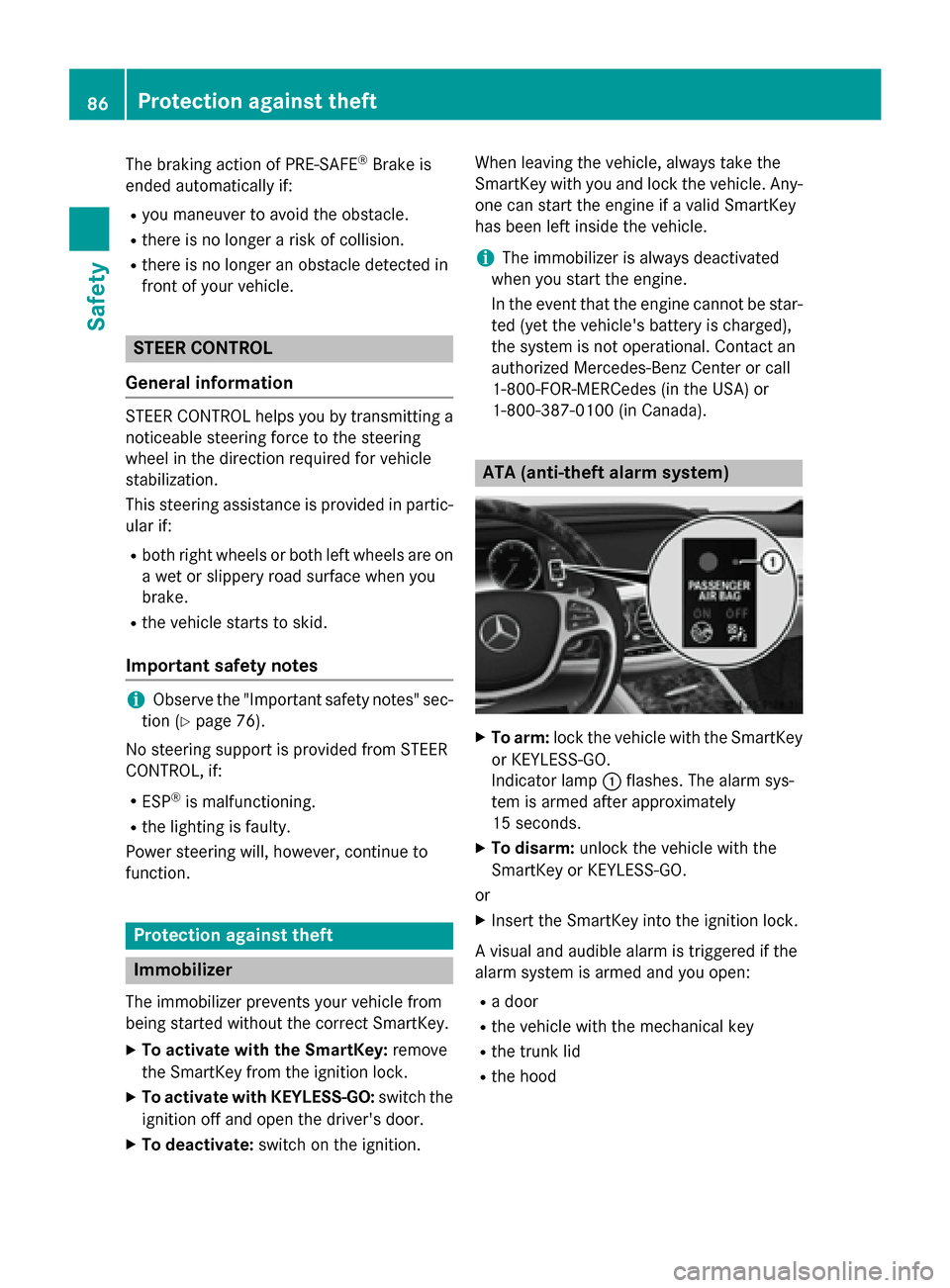
X
To arm: lock the vehicle with the SmartKey
or KEYLESS-GO.
Indicator lamp :flashes. The alarm sys-
tem is armed after approximately
15 seconds.
X To disarm: unlock the vehicle with the
SmartKey or KEYLESS-GO.
or X Insert the SmartKey into the ignition lock.
A visual and audible alarm is triggered if the
alarm system is armed and you open:
R a door
R the vehicle with the mechanical key
R the trunk lid
R the hood 86
Protection against theftSafety
Page 92 of 502
Useful information
i This Operator's Manual describes all
models and all standard and optional equip- ment of your vehicle available at the time of
publication of the Operator's Manual.
Country-specific differences are possible.
Please note that your vehicle may not be
equipped with all features described. This
also applies to safety-related systems and
functions.
i Read the information on qualified special-
ist workshops (Y page 29). SmartKey
Important safety notes
G
WARNING
If children are left unsupervised in the vehicle, they could:
R open the doors, thus endangering other
people or road users.
R get out and disrupt traffic.
R operate the vehicle's equipment.
Additionally, children could set the vehicle in
motion if, for example, they:
R release the parking brake.
R shifting the automatic transmission out of
park position P
R Start the engine.
There is a risk of an accident and injury.
When leaving the vehicle, always take the
SmartKey with you and lock the vehicle. Never
leave children or animals unattended in the
vehicle. Always keep the SmartKey out of
reach of children. G
WARNING
If you attach heavy or large objects to the
SmartKey, the SmartKey could be uninten-
tionally turned in the ignition lock. This could
cause the engine to be switched off. There is a risk of an accident. Do not attach any heavy or large objects to the
SmartKey. Remove any bulky key rings before
inserting the SmartKey into the ignition lock.
! Keep the SmartKey away from strong
magnetic fields. Otherwise, the remote
control function could be affected.
Strong magnetic fields can occur in the
vicinity of powerful electrical installations.
Do not keep the SmartKey: R with electronic devices, e.g. a mobile
phone or another SmartKey
R with metallic objects, e.g. coins or metal
foil
R inside metallic objects, e.g. a metal case
This can affect the functionality of the
SmartKey.
Do not keep the SmartKey in the tempera-
ture-controlled cup holder (Y page 380). On
vehicles with the KEYLESS-GO start function,
do not keep it on the parcel shelf or in the
trunk. Otherwise, the SmartKey may not be
detected, e.g. when starting the engine using the Start/Stop button.
A check which periodically establishes a radio
connection between the vehicle and the
SmartKey determines whether a valid Smart- Key is in the vehicle. This occurs, for example:
R when starting the engine
R whilst driving
R when using HANDS-FREE ACCESS
R when the external door handles are
touched
R during convenience closing 90
SmartKeyOpening and closing
Page 93 of 502
SmartKey functions
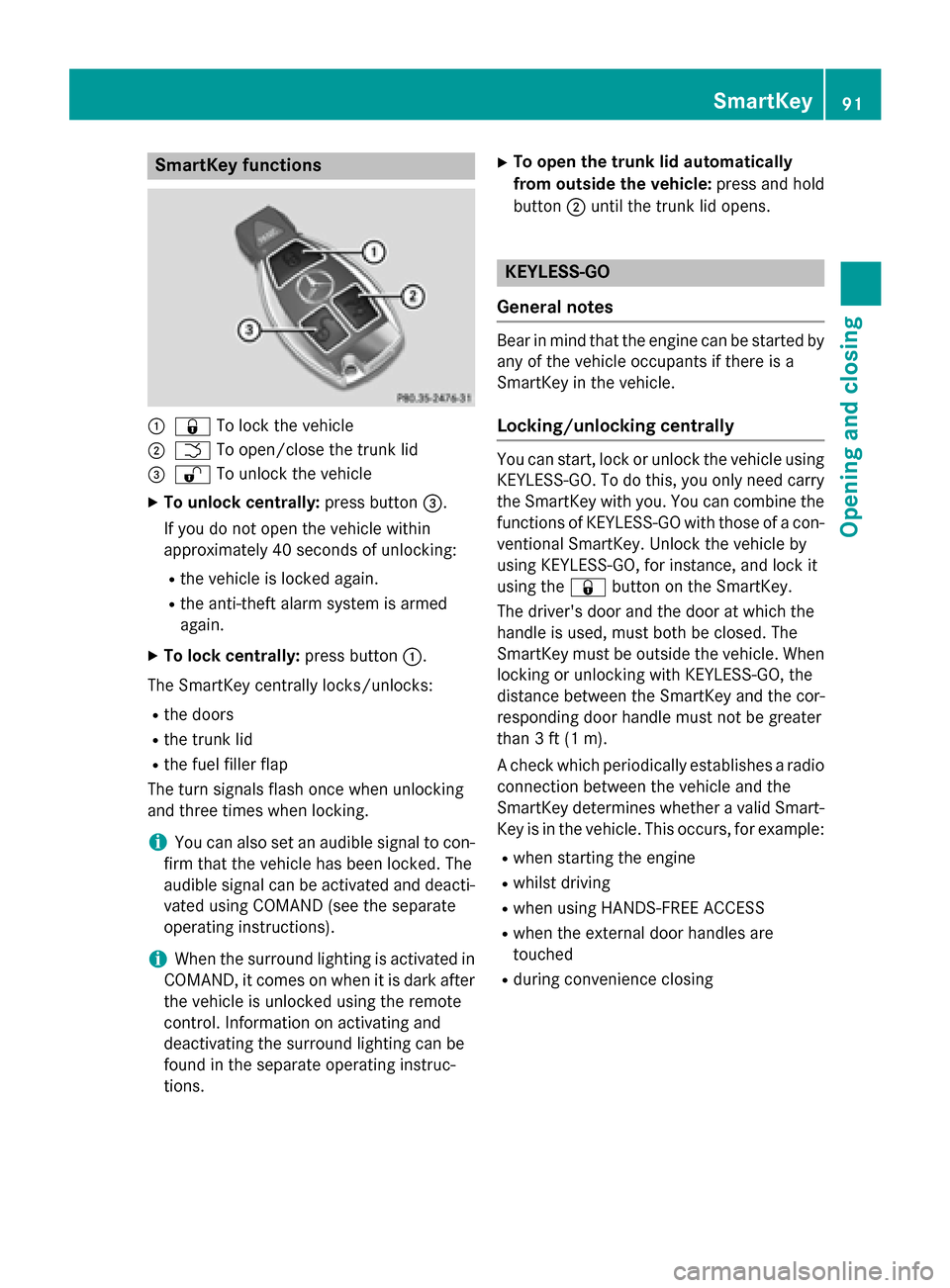
:
& To lock the vehicle
; F To open/close the trunk lid
= % To unlock the vehicle
X To unlock centrally: press button=.
If you do not open the vehicle within
approximately 40 seconds of unlocking:
R the vehicle is locked again.
R the anti-theft alarm system is armed
again.
X To lock centrally: press button:.
The SmartKey centrally locks/unlocks:
R the doors
R the trunk lid
R the fuel filler flap
The turn signals flash once when unlocking
and three times when locking.
i You can also set an audible signal to con-
firm that the vehicle has been locked. The
audible signal can be activated and deacti-
vated using COMAND (see the separate
operating instructions).
i When the surround lighting is activated in
COMAND, it comes on when it is dark after
the vehicle is unlocked using the remote
control. Information on activating and
deactivating the surround lighting can be
found in the separate operating instruc-
tions. X
To open the trunk lid automatically
from outside the vehicle: press and hold
button ;until the trunk lid opens. KEYLESS-GO
General notes Bear in mind that the engine can be started by
any of the vehicle occupants if there is a
SmartKey in the vehicle.
Locking/unlocking centrally You can start, lock or unlock the vehicle using
KEYLESS-GO. To do this, you only need carry
the SmartKey with you. You can combine the
functions of KEYLESS-GO with those of a con- ventional SmartKey. Unlock the vehicle by
using KEYLESS-GO, for instance, and lock it
using the &button on the SmartKey.
The driver's door and the door at which the
handle is used, must both be closed. The
SmartKey must be outside the vehicle. When
locking or unlocking with KEYLESS-GO, the
distance between the SmartKey and the cor-
responding door handle must not be greater
than 3 ft (1 m).
A check which periodically establishes a radio
connection between the vehicle and the
SmartKey determines whether a valid Smart- Key is in the vehicle. This occurs, for example:
R when starting the engine
R whilst driving
R when using HANDS-FREE ACCESS
R when the external door handles are
touched
R during convenience closing SmartKey
91Opening and closing Z
Page 94 of 502
X
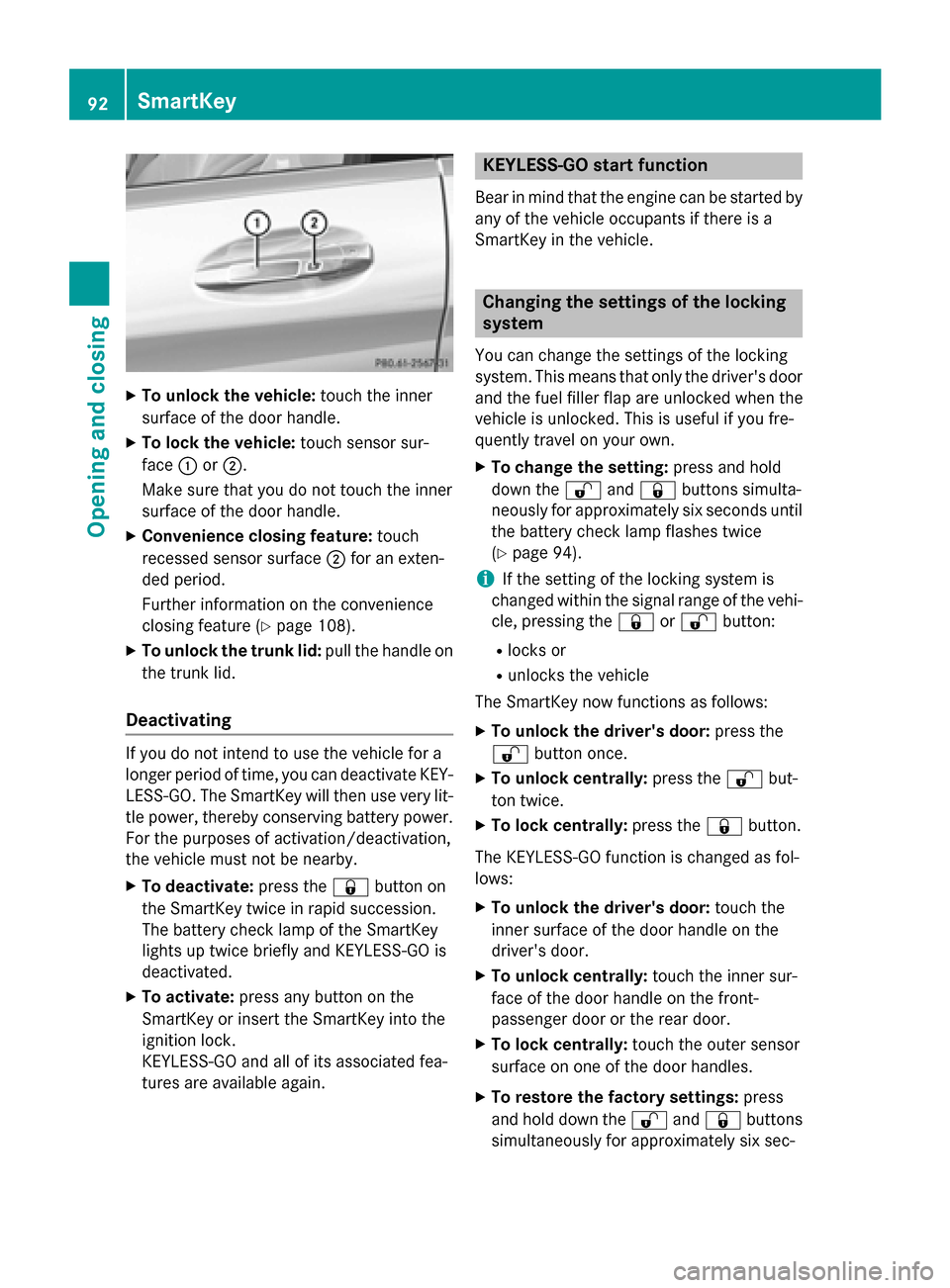
To unlock the vehicle: touch the inner
surface of the door handle.
X To lock the vehicle: touch sensor sur-
face :or;.
Make sure that you do not touch the inner
surface of the door handle.
X Convenience closing feature: touch
recessed sensor surface ;for an exten-
ded period.
Further information on the convenience
closing feature (Y page 108).
X To unlock the trunk lid: pull the handle on
the trunk lid.
Deactivating If you do not intend to use the vehicle for a
longer period of time, you can deactivate KEY- LESS-GO. The SmartKey will then use very lit-
tle power, thereby conserving battery power.
For the purposes of activation/deactivation,
the vehicle must not be nearby.
X To deactivate: press the&button on
the SmartKey twice in rapid succession.
The battery check lamp of the SmartKey
lights up twice briefly and KEYLESS-GO is
deactivated.
X To activate: press any button on the
SmartKey or insert the SmartKey into the
ignition lock.
KEYLESS-GO and all of its associated fea-
tures are available again. KEYLESS-GO start function
Bear in mind that the engine can be started by any of the vehicle occupants if there is a
SmartKey in the vehicle. Changing the settings of the locking
system
You can change the settings of the locking
system. This means that only the driver's door and the fuel filler flap are unlocked when the
vehicle is unlocked. This is useful if you fre-
quently travel on your own.
X To change the setting: press and hold
down the %and& buttons simulta-
neously for approximately six seconds until
the battery check lamp flashes twice
(Y page 94).
i If the setting of the locking system is
changed within the signal range of the vehi- cle, pressing the &or% button:
R locks or
R unlocks the vehicle
The SmartKey now functions as follows:
X To unlock the driver's door: press the
% button once.
X To unlock centrally: press the%but-
ton twice.
X To lock centrally: press the&button.
The KEYLESS-GO function is changed as fol-
lows:
X To unlock the driver's door: touch the
inner surface of the door handle on the
driver's door.
X To unlock centrally: touch the inner sur-
face of the door handle on the front-
passenger door or the rear door.
X To lock centrally: touch the outer sensor
surface on one of the door handles.
X To restore the factory settings: press
and hold down the %and& buttons
simultaneously for approximately six sec- 92
SmartKeyOpening and closing
Page 98 of 502
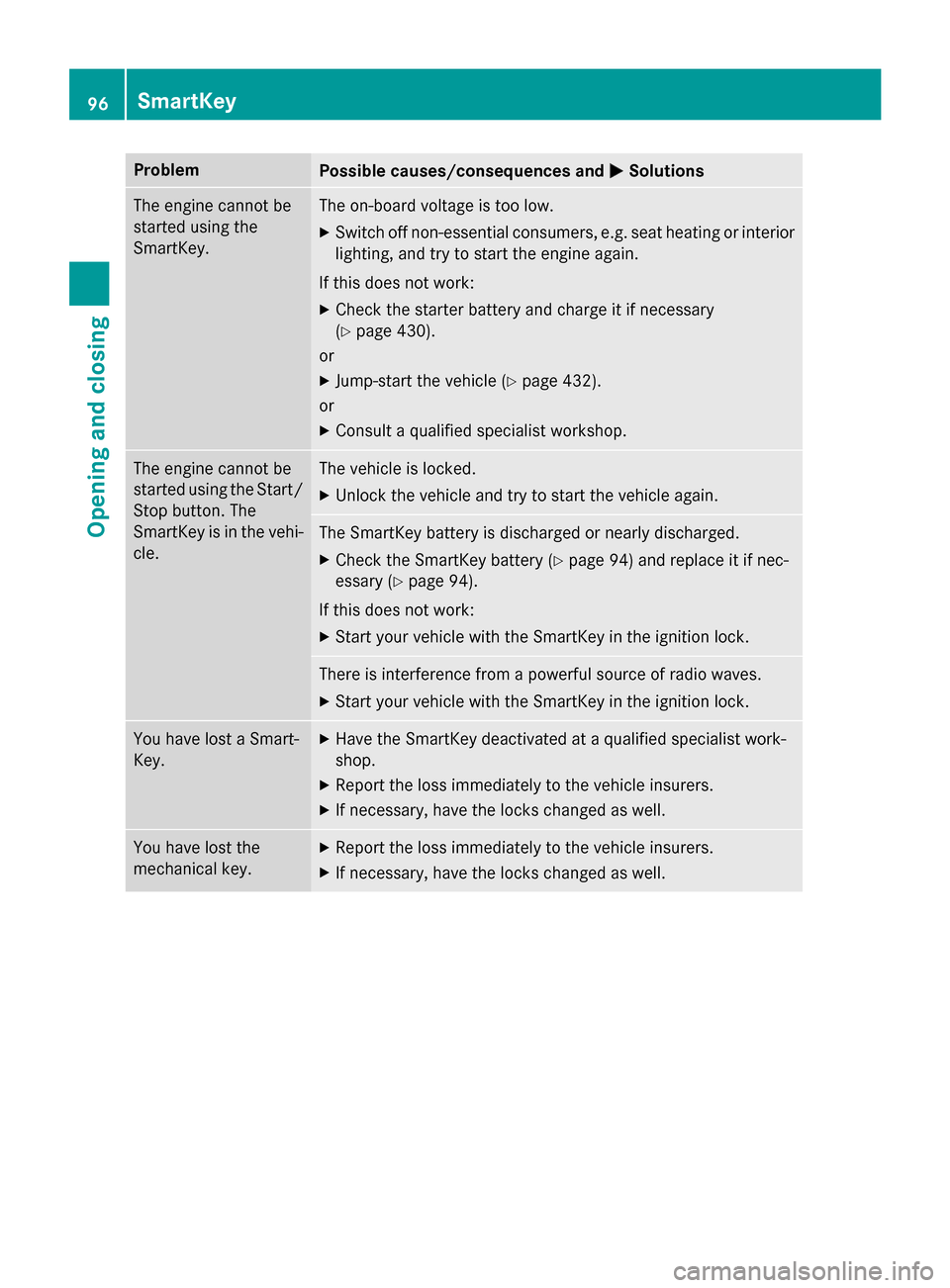
Problem
Possible causes/consequences and
M
MSolutions The engine cannot be
started using the
SmartKey. The on-board voltage is too low.
X Switch off non-essential consumers, e.g. seat heating or interior
lighting, and try to start the engine again.
If this does not work:
X Check the starter battery and charge it if necessary
(Y page 430).
or
X Jump-start the vehicle (Y page 432).
or
X Consult a qualified specialist workshop. The engine cannot be
started using the Start/
Stop button. The
SmartKey is in the vehi-
cle. The vehicle is locked.
X Unlock the vehicle and try to start the vehicle again. The SmartKey battery is discharged or nearly discharged.
X Check the SmartKey battery (Y page 94) and replace it if nec-
essary (Y page 94).
If this does not work:
X Start your vehicle with the SmartKey in the ignition lock. There is interference from a powerful source of radio waves.
X Start your vehicle with the SmartKey in the ignition lock. You have lost a Smart-
Key. X
Have the SmartKey deactivated at a qualified specialist work-
shop.
X Report the loss immediately to the vehicle insurers.
X If necessary, have the locks changed as well. You have lost the
mechanical key. X
Report the loss immediately to the vehicle insurers.
X If necessary, have the locks changed as well. 96
SmartKeyOpening and closing
Page 99 of 502
Doors
Important safety notes
G
WARNING
If children are left unsupervised in the vehicle, they could:
R open the doors, thus endangering other
people or road users.
R get out and disrupt traffic.
R operate the vehicle's equipment.
Additionally, children could set the vehicle in
motion if, for example, they:
R release the parking brake.
R shifting the automatic transmission out of
park position P
R Start the engine.
There is a risk of an accident and injury.
When leaving the vehicle, always take the
SmartKey with you and lock the vehicle. Never
leave children or animals unattended in the
vehicle. Always keep the SmartKey out of
reach of children.
You should preferably place luggage or loads in the trunk. Observe the loading guidelines
(Y page 372). Unlocking and opening doors from
the inside
You can open a door from inside the vehicle
even if it has been locked. You can only open
the rear doors from inside the vehicle if they
are not secured by the child-proof locks
(Y page 75). If the vehicle has been locked
with the SmartKey or with KEYLESS-GO,
opening a door from the inside will trigger the
anti-theft alarm system. Switch off the alarm
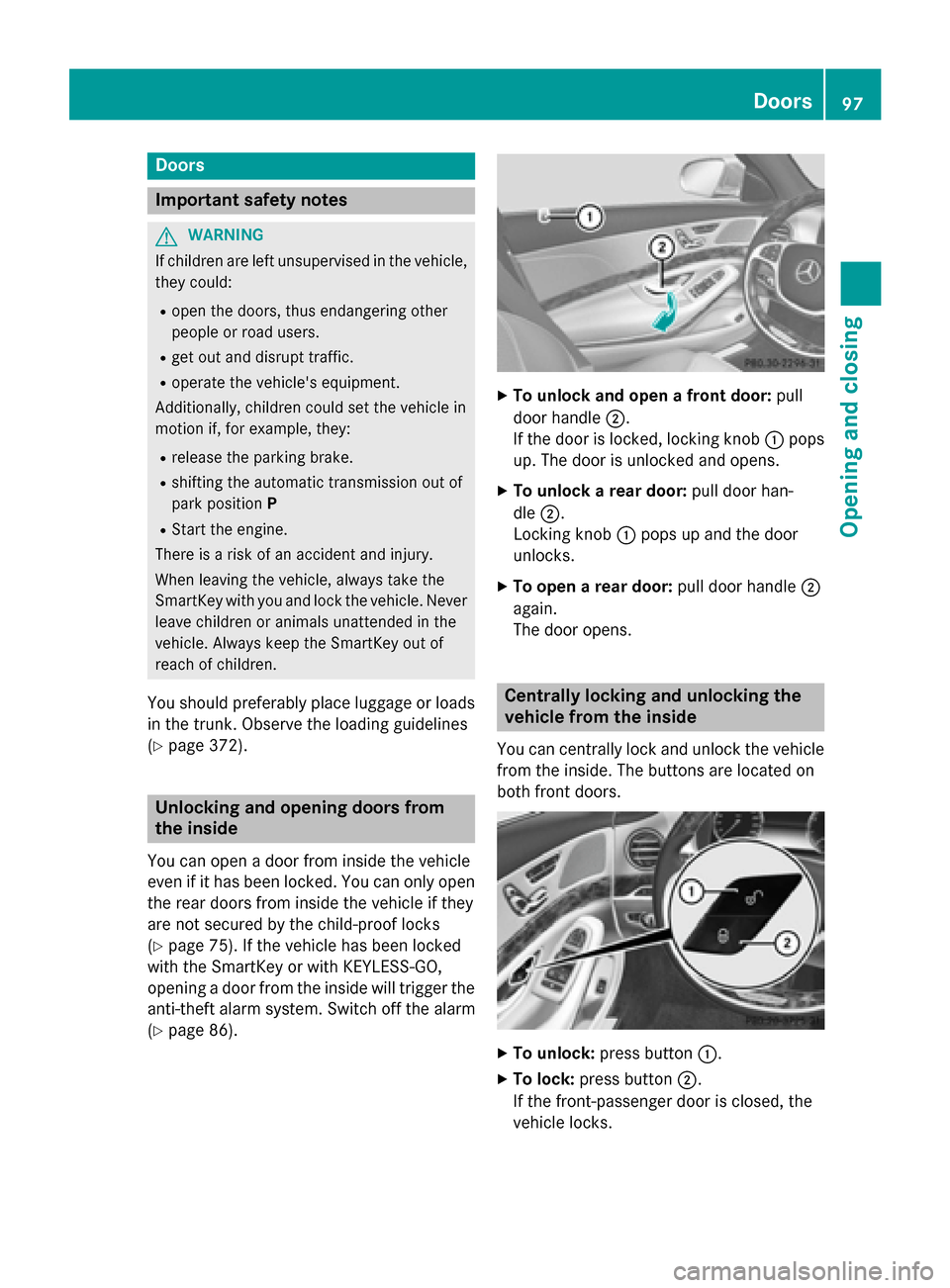
(Y page 86). X
To unlock and open a front door: pull
door handle ;.
If the door is locked, locking knob :pops
up. The door is unlocked and opens.
X To unlock a rear door: pull door han-
dle ;.
Locking knob :pops up and the door
unlocks.
X To open a rear door: pull door handle;
again.
The door opens. Centrally locking and unlocking the
vehicle from the inside
You can centrally lock and unlock the vehicle from the inside. The buttons are located on
both front doors. X
To unlock: press button :.
X To lock: press button ;.
If the front-passenger door is closed, the
vehicle locks. Doors
97Opening and closing Z
Page 103 of 502
If somebody becomes trapped:
R press the Fbutton on the SmartKey, or
R pull or press the remote operating switch
on the driver's door or
R press the closing or locking button on the
trunk lid, or
R pull on the trunk lid handle Opening and closing manually
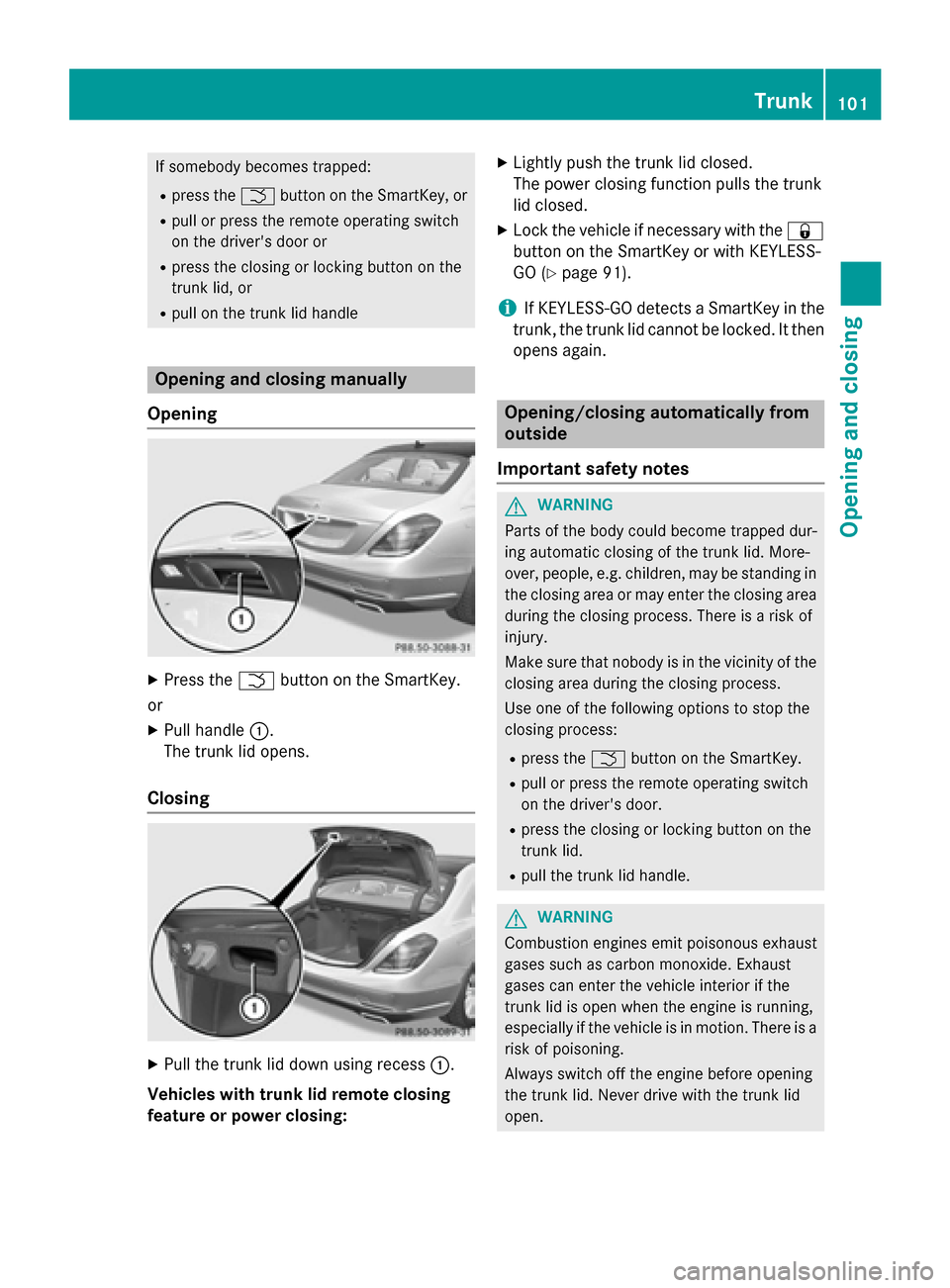
Opening X
Press the Fbutton on the SmartKey.
or X Pull handle :.
The trunk lid opens.
Closing X
Pull the trunk lid down using recess :.
Vehicles with trunk lid remote closing
feature or power closing: X
Lightly push the trunk lid closed.
The power closing function pulls the trunk
lid closed.
X Lock the vehicle if necessary with the &
button on the SmartKey or with KEYLESS-
GO (Y page 91).
i If KEYLESS-GO detects a SmartKey in the
trunk, the trunk lid cannot be locked. It then opens again. Opening/closing automatically from
outside
Important safety notes G
WARNING
Parts of the body could become trapped dur-
ing automatic closing of the trunk lid. More-
over, people, e.g. children, may be standing in the closing area or may enter the closing area
during the closing process. There is a risk of
injury.
Make sure that nobody is in the vicinity of the closing area during the closing process.
Use one of the following options to stop the
closing process:
R press the Fbutton on the SmartKey.
R pull or press the remote operating switch
on the driver's door.
R press the closing or locking button on the
trunk lid.
R pull the trunk lid handle. G
WARNING
Combustion engines emit poisonous exhaust
gases such as carbon monoxide. Exhaust
gases can enter the vehicle interior if the
trunk lid is open when the engine is running,
especially if the vehicle is in motion. There is a risk of poisoning.
Always switch off the engine before opening
the trunk lid. Never drive with the trunk lid
open. Trunk
101Opening and closing Z
Page 105 of 502
!
If the SmartKey is within the rear detec-
tion range of KEYLESS-GO, the following
situations, for example, could lead to the
unintentional opening of the trunk:
R using a car wash
R using a power washer
Make sure that the SmartKey is at least
10 ft (3 m) away from the vehicle.
General notes With KEYLESS-GO and HANDS-FREE
ACCESS, you can open or close the trunk lid
or stop the procedure without using your
hands. This is useful if you have your hands
full. To do this, make a kicking movement
under the bumper with your foot.
Observe the following points:
R Carry your KEYLESS-GO key about your
person. The KEYLESS-GO key must be in
the rear detection range of the vehicle.
R When making the kicking movement, make
sure that you are standing firmly on the
ground and that there is sufficient clear-
ance to the rear of the vehicle. You could
otherwise lose your balance e.g. on ice. R
Always ensure that you only make the kick-
ing movement within the detection range of
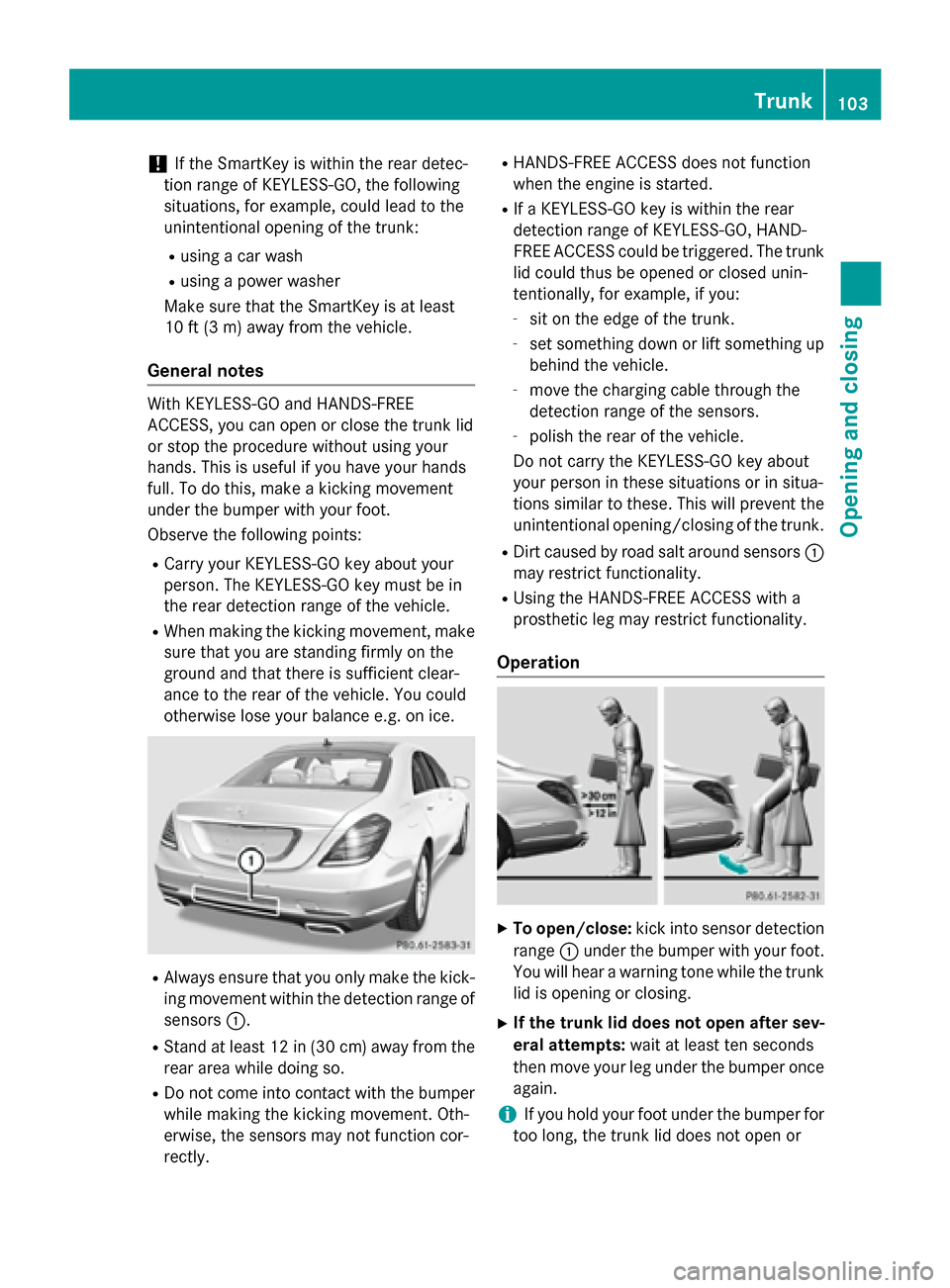
sensors :.
R Stand at least 12 in (30 cm) away from the
rear area while doing so.
R Do not come into contact with the bumper
while making the kicking movement. Oth-
erwise, the sensors may not function cor-
rectly. R
HANDS-FREE ACCESS does not function
when the engine is started.
R If a KEYLESS-GO key is within the rear
detection range of KEYLESS-GO, HAND-
FREE ACCESS could be triggered. The trunk
lid could thus be opened or closed unin-
tentionally, for example, if you:
- sit on the edge of the trunk.
- set something down or lift something up
behind the vehicle.
- move the charging cable through the
detection range of the sensors.
- polish the rear of the vehicle.
Do not carry the KEYLESS-GO key about
your person in these situations or in situa-
tions similar to these. This will prevent the
unintentional opening/closing of the trunk.
R Dirt caused by road salt around sensors :
may restrict functionality.
R Using the HANDS-FREE ACCESS with a
prosthetic leg may restrict functionality.
Operation X
To open/close: kick into sensor detection
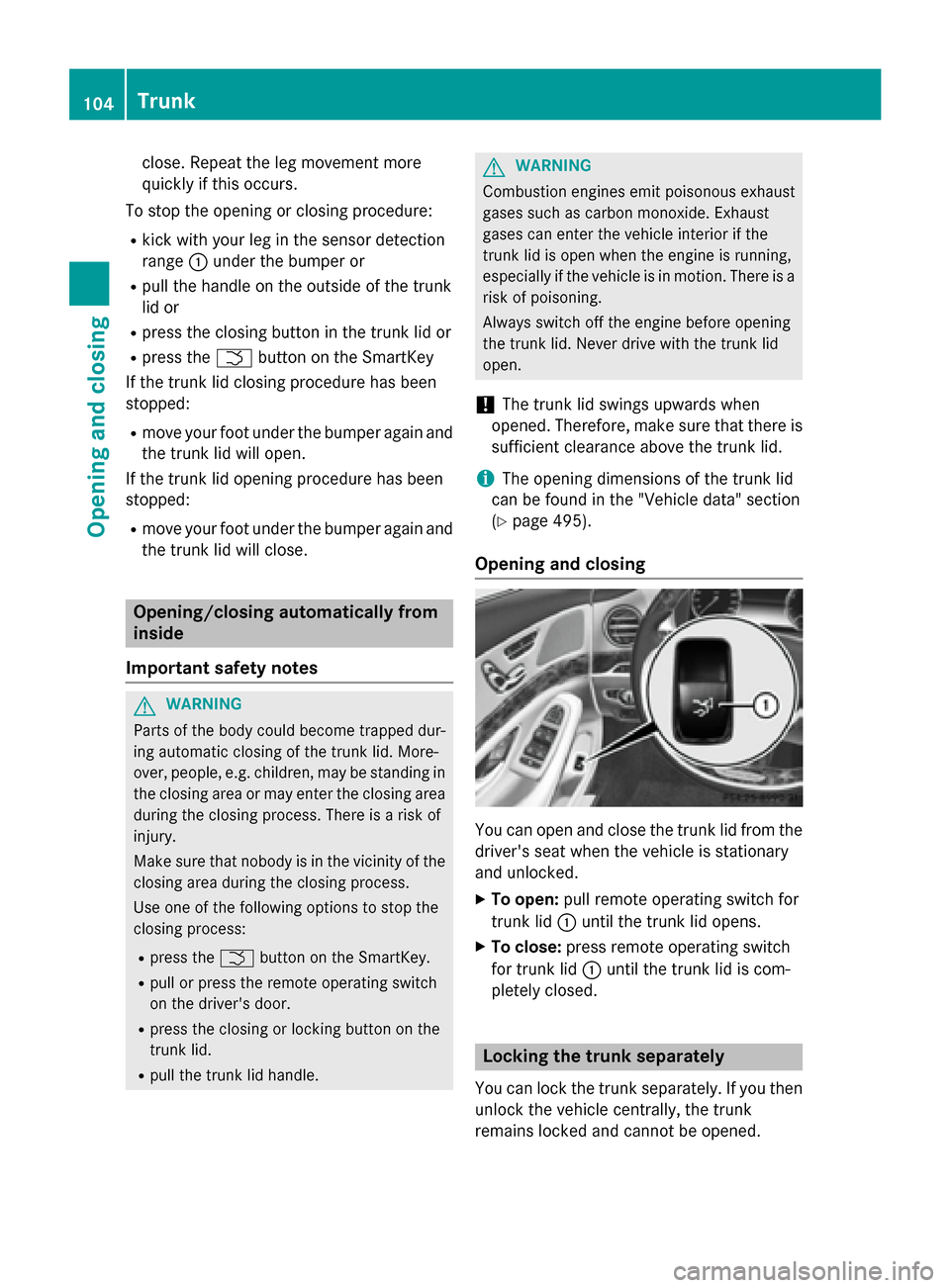
range :under the bumper with your foot.
You will hear a warning tone while the trunk lid is opening or closing.
X If the trunk lid does not open after sev-
eral attempts: wait at least ten seconds
then move your leg under the bumper once
again.
i If you hold your foot under the bumper for
too long, the trunk lid does not open or Trunk
103Opening and closing Z
Page 106 of 502
close. Repeat the leg movement more
quickly if this occurs.
To stop the opening or closing procedure:
R kick with your leg in the sensor detection
range :under the bumper or
R pull the handle on the outside of the trunk
lid or
R press the closing button in the trunk lid or
R press the Fbutton on the SmartKey
If the trunk lid closing procedure has been
stopped:
R move your foot under the bumper again and
the trunk lid will open.
If the trunk lid opening procedure has been
stopped:
R move your foot under the bumper again and
the trunk lid will close. Opening/closing automatically from
inside
Important safety notes G
WARNING
Parts of the body could become trapped dur-
ing automatic closing of the trunk lid. More-
over, people, e.g. children, may be standing in the closing area or may enter the closing area
during the closing process. There is a risk of
injury.
Make sure that nobody is in the vicinity of the closing area during the closing process.
Use one of the following options to stop the
closing process:
R press the Fbutton on the SmartKey.
R pull or press the remote operating switch
on the driver's door.
R press the closing or locking button on the
trunk lid.
R pull the trunk lid handle. G
WARNING
Combustion engines emit poisonous exhaust
gases such as carbon monoxide. Exhaust
gases can enter the vehicle interior if the
trunk lid is open when the engine is running,
especially if the vehicle is in motion. There is a risk of poisoning.
Always switch off the engine before opening
the trunk lid. Never drive with the trunk lid
open.
! The trunk lid swings upwards when
opened. Therefore, make sure that there is
sufficient clearance above the trunk lid.
i The opening dimensions of the trunk lid
can be found in the "Vehicle data" section
(Y page 495).
Opening and closing You can open and close the trunk lid from the
driver's seat when the vehicle is stationary
and unlocked.
X To open: pull remote operating switch for
trunk lid :until the trunk lid opens.
X To close: press remote operating switch
for trunk lid :until the trunk lid is com-
pletely closed. Locking the trunk separately
You can lock the trunk separately. If you then
unlock the vehicle centrally, the trunk
remains locked and cannot be opened. 104
TrunkOpening and closing