engine MERCEDES-BENZ S-Class 2015 W222 Workshop Manual
[x] Cancel search | Manufacturer: MERCEDES-BENZ, Model Year: 2015, Model line: S-Class, Model: MERCEDES-BENZ S-Class 2015 W222Pages: 502, PDF Size: 9.59 MB
Page 154 of 502
X
To switch on the standing lamps: the
SmartKey is not in the ignition lock or it is in position 0.
X Turn the light switch to W(left-hand side
of the vehicle) or X(right-hand side of
the vehicle). Combination switch
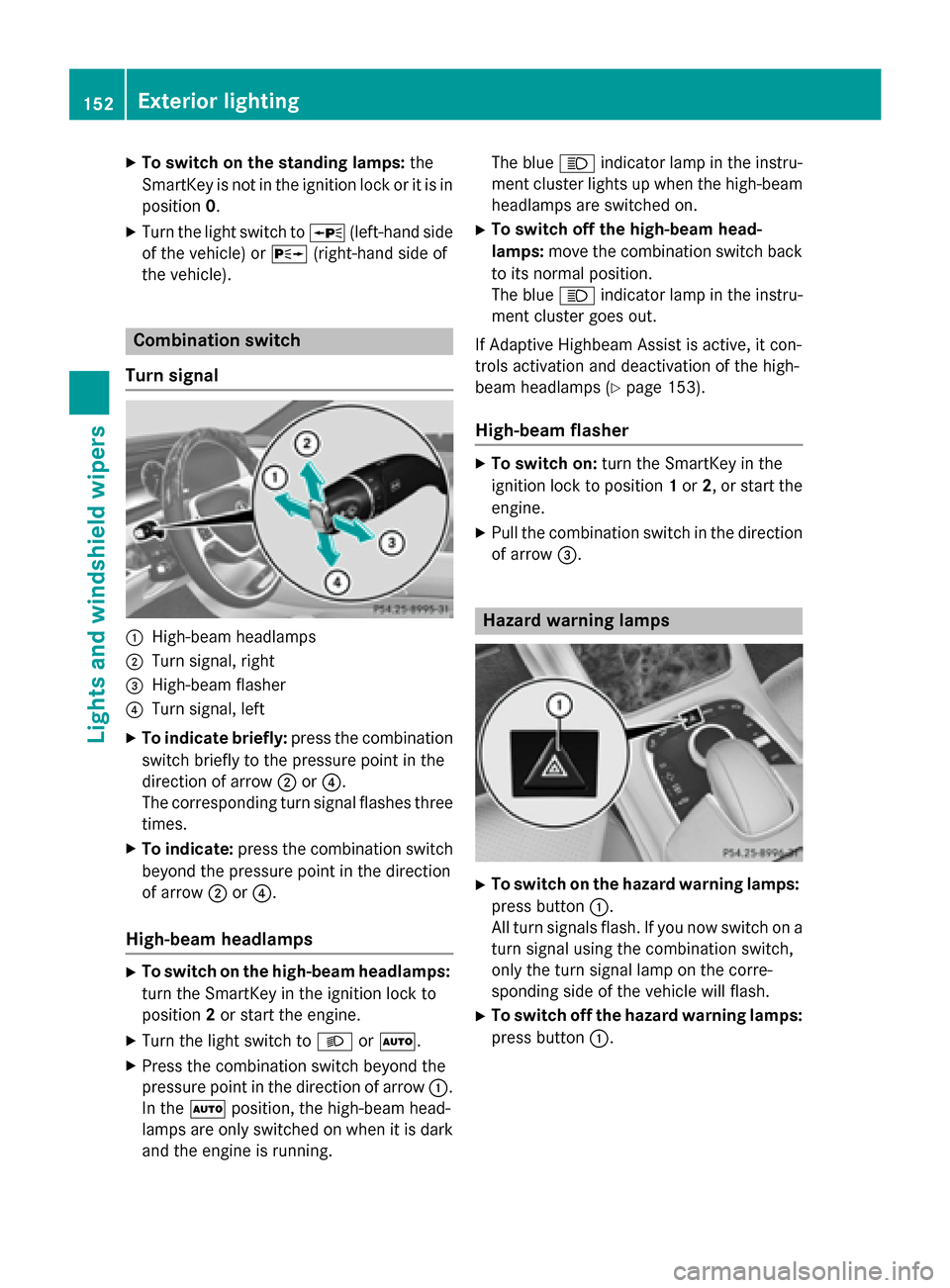
Turn signal :
High-beam headlamps
; Turn signal, right
= High-beam flasher
? Turn signal, left
X To indicate briefly: press the combination
switch briefly to the pressure point in the
direction of arrow ;or?.
The corresponding turn signal flashes three
times.
X To indicate: press the combination switch
beyond the pressure point in the direction
of arrow ;or?.
High-beam headlamps X
To switch on the high-beam headlamps:
turn the SmartKey in the ignition lock to
position 2or start the engine.
X Turn the light switch to LorÃ.
X Press the combination switch beyond the
pressure point in the direction of arrow :.
In the Ãposition, the high-beam head-
lamps are only switched on when it is dark
and the engine is running. The blue
Kindicator lamp in the instru-
ment cluster lights up when the high-beam headlamps are switched on.
X To switch off the high-beam head-
lamps: move the combination switch back
to its normal position.
The blue Kindicator lamp in the instru-
ment cluster goes out.
If Adaptive Highbeam Assist is active, it con-
trols activation and deactivation of the high-
beam headlamps (Y page 153).
High-beam flasher X
To switch on: turn the SmartKey in the
ignition lock to position 1or 2, or start the
engine.
X Pull the combination switch in the direction
of arrow =. Hazard warning lamps
X
To switch on the hazard warning lamps:
press button :.
All turn signals flash. If you now switch on a turn signal using the combination switch,
only the turn signal lamp on the corre-
sponding side of the vehicle will flash.
X To switch off the hazard warning lamps:
press button :.152
Exterior lightingLights and
windshield wipers
Page 160 of 502
prevent you from observing the traffic condi-
tions. Replacing the wiper blades
Important safety notes G
WARNING
If the windshield wipers begin to move while
you are changing the wiper blades, you could be trapped by the wiper arm. There is a risk of
injury.
Always switch off the windshield wipers and
ignition before changing the wiper blades.
! To avoid damaging the wiper blades,
make sure that you touch only the wiper
arm of the wiper.
! Never open the hood if a windshield wiper
arm has been folded away from the wind-
shield.
Hold the windshield wiper arm firmly when you change the wiper blade. If you release
the windshield wiper arm without a wiper
blade and it falls onto the windshield, the
windshield may be damaged by the force of
the impact.
Mercedes-Benz recommends that you have the wiper blades changed at a qualified
specialist workshop.
! Always position the windshield wiper
arms vertically before folding them away
from the windshield. By doing so, you will
avoid damage to the hood.
Replacing the wiper blades (standard
windshield wipers) Moving the wiper arms to a vertical posi-
tion
On vehicles without KEYLESS-GO:
X Turn the SmartKey to position 0in the igni-
tion lock (Y page 189).
X Set the windshield wiper to the °posi-
tion. X
Turn the SmartKey to position 1in the igni-
tion lock (Y page 189).
X As soon as the wiper arms are vertical to
the hood, turn the SmartKey to position 0in
the ignition lock (Y page 189).
X Remove the SmartKey.
X Fold the wiper arms away from the wind-
shield until you feel them snap into place.
On vehicles with KEYLESS-GO: X Switch off the engine.
X Remove your foot from the brake pedal.
X Set the windshield wipers to position °.
X Press the Start/Stop button repeatedly
until the windshield wiper starts.
X When the wiper arms have reached the ver-
tical position, press the Start/Stop button
repeatedly until the windshield wipers stop.
X Fold the wiper arms away from the wind-
shield until you feel them snap into place.
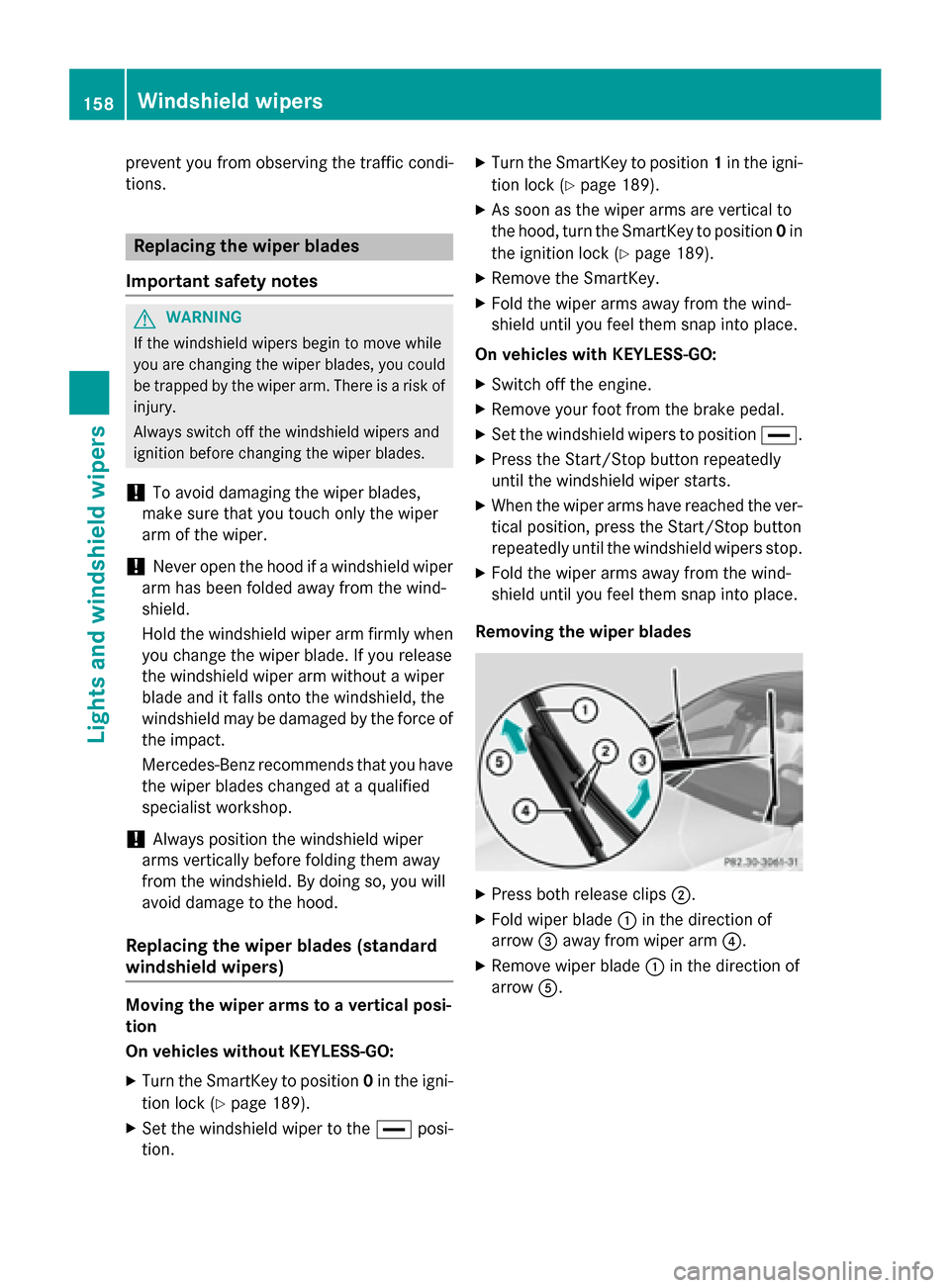
Removing the wiper blades X
Press both release clips ;.
X Fold wiper blade :in the direction of
arrow =away from wiper arm ?.
X Remove wiper blade :in the direction of
arrow A. 158
Windshield wipersLights and windshield wipers
Page 161 of 502
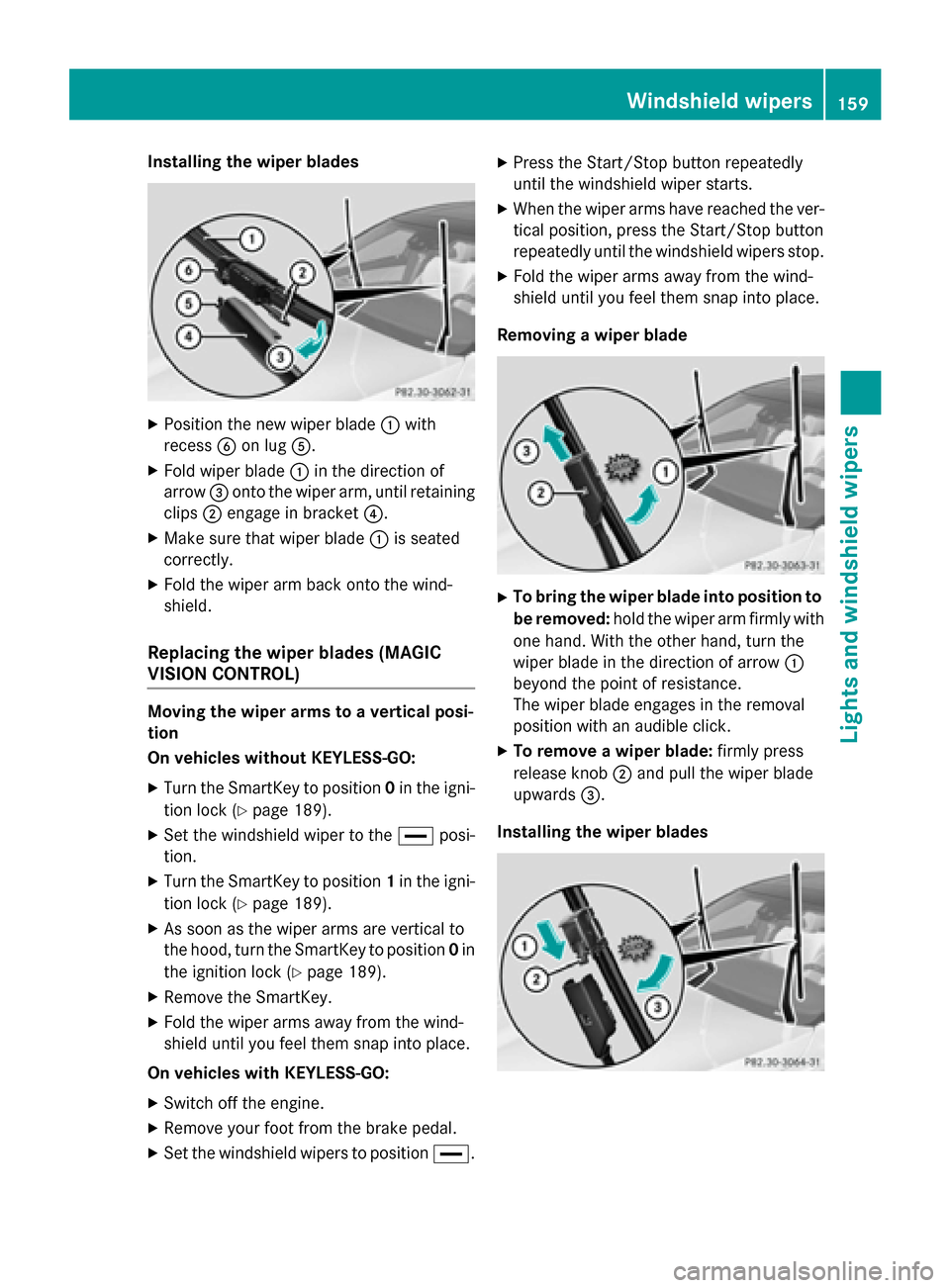
Installing the wiper blades
X
Position the new wiper blade :with
recess Bon lug A.
X Fold wiper blade :in the direction of
arrow =onto the wiper arm, until retaining
clips ;engage in bracket ?.
X Make sure that wiper blade :is seated
correctly.
X Fold the wiper arm back onto the wind-
shield.
Replacing the wiper blades (MAGIC
VISION CONTROL) Moving the wiper arms to a vertical posi-
tion
On vehicles without KEYLESS-GO:
X Turn the SmartKey to position 0in the igni-
tion lock (Y page 189).
X Set the windshield wiper to the °posi-
tion.
X Turn the SmartKey to position 1in the igni-
tion lock (Y page 189).
X As soon as the wiper arms are vertical to
the hood, turn the SmartKey to position 0in
the ignition lock (Y page 189).
X Remove the SmartKey.
X Fold the wiper arms away from the wind-
shield until you feel them snap into place.
On vehicles with KEYLESS-GO: X Switch off the engine.
X Remove your foot from the brake pedal.
X Set the windshield wipers to position °.X
Press the Start/Stop button repeatedly
until the windshield wiper starts.
X When the wiper arms have reached the ver-
tical position, press the Start/Stop button
repeatedly until the windshield wipers stop.
X Fold the wiper arms away from the wind-
shield until you feel them snap into place.
Removing a wiper blade X
To bring the wiper blade into position to
be removed: hold the wiper arm firmly with
one hand. With the other hand, turn the
wiper blade in the direction of arrow :
beyond the point of resistance.
The wiper blade engages in the removal
position with an audible click.
X To remove a wiper blade: firmly press
release knob ;and pull the wiper blade
upwards =.
Installing the wiper blades Windshield wipers
159Lights and windshield wipers Z
Page 163 of 502
Problems with the windshield wipers
Problem
Possible causes/consequences and
M
MSolutions The windshield wipers
are obstructed Leaves or snow, for example, may be obstructing the windshield
wiper movement. The wiper motor has been deactivated.
X Switch off the engine using the Start/Stop button and open the
driver's door.
X Remove the cause of the obstruction.
X Switch the windshield wipers back on. The windshield wipers
fail completely. The windshield wiper drive is malfunctioning.
X Select another wiper speed on the combination switch.
X Have the windshield wipers checked at a qualified specialist
workshop. The wiper motor has been deactivated.
X Switch off the engine using the Start/Stop button and open the
driver's door.
X Remove the cause of the obstruction.
X Switch the windshield wipers back on. For a standard wiper
system only: the wind-
shield washer fluid
from the spray nozzles
no longer hits the cen-
ter of the windshield. The spray nozzles are misaligned.
X Have the spray nozzles adjusted at a qualified specialist work-
shop. Windshield wipers
161Lights and windshield wipers Z
Page 166 of 502
Useful information
i This Operator's Manual describes all
models and all standard and optional equip- ment of your vehicle available at the time of
publication of the Operator's Manual.
Country-specific differences are possible.
Please note that your vehicle may not be
equipped with all features described. This
also applies to safety-related systems and
functions.
i Read the information on qualified special-
ist workshops (Y page 29). Overview of climate control systems
General notes
Observe the settings recommended on the
following pages. The windows could other-
wise fog up.
To prevent the windows from fogging up:
R switch off climate control only briefly
R switch on air-recirculation mode only
briefly
R switch on the cooling with air dehumidifi-
cation function
R switch on the defrost windshield function
briefly, if required
Climate control regulates the temperature
and air humidity in the vehicle interior. The air filter cleans the air, thus improving the inte-
rior climate.
The "Cooling with air dehumidification" func-
tion is only available when the engine is run-
ning. Optimum climate control is only ach-
ieved with the side windows and roof closed.
The residual heat function can only be acti-
vated or deactivated with the ignition
switched off (Y page 177).
i Ventilate the vehicle for a brief period
during warm weather, e.g. using the con-
venience opening feature (Y page 107).
This will speed up the cooling process and the desired interior temperature will be
reached more quickly.
i The integrated filter filters out most par-
ticles of dust and soot and completely fil-
ters out pollen. It also reduces gaseous pol- lutants and odors. A clogged filter reduces
the amount of air supplied to the vehicle
interior. For this reason, you should always observe the interval for replacing the filter,which is specified in the Maintenance
Booklet. As it depends on environmental
conditions, e.g. heavy air pollution, the
interval may be shorter than stated in the
Maintenance Booklet.
i It is possible that the blower may be acti-
vated automatically 60 minutes after the
SmartKey has been removed depending on various factors, e.g. the outside tempera-
ture. The vehicle is then ventilated for
30 minutes to dry the climate control sys-
tem. 164
Overview of climate control systemsClimate control
Page 171 of 502
Notes on using automatic climate
control
Climate control system Below, you can find a number of notes and
recommendations to help you use climate
control optimally.
R Activate climate control using the Ã
rocker switch. The indicator lamp in the
à rocker switch lights up.
R Set the temperature to 72 ‡ (22 †).
R Only use the "Windshield defrosting" func-
tion briefly until the windshield is clear
again.
R Only use air-recirculation mode briefly, e.g.
if there are unpleasant outside odors or
when in a tunnel. The windows could oth-
erwise fog up, since no fresh air is drawn
into the vehicle in air-recirculation mode.
R Use the residual heat function if you want to
heat or ventilate the vehicle interior when
the ignition is switched off. The residual
heat function can only be activated or deac- tivated with the ignition switched off. The
residual heat function is switched off whenthe ignition is switched on.
If you are controlling the rear climate control using the front control panel, note the follow-
ing:
R If you set rear-compartment climate con-
trol using the front control panel, the Y
symbol appears in the rear-compartment
control panel display.
R If the rear-compartment climate control is
set using the front control panel, it cannot
be set at the same time using the rear con- trol panel. If controlling the rear climate
control from the front control panel is
locked, wait five seconds. You will then be
able to control the rear climate control
using the rear control panel.
R After selecting the rear compartment set-
tings, the front climate control can be con-
trolled automatically again via COMAND
after five seconds. Alternatively, you can select "Cancel rear
compartment" in the COMAND air-condi-
tioning function bar.
ECO start/stop function During automatic engine switch-off, the cli-
mate control system only operates at a
reduced capacity. If you require the full cli-
mate control output, you can switch off the
ECO start/stop function by pressing the ECO
button (Y page 194). Operating the climate control sys-
tems Switching climate control on/off
General notes When the climate control is switched off, the
air supply and air circulation are also
switched off. The windows could fog up.
Therefore, switch off climate control only
briefly
Switch on climate control primarily using the
à rocker switch (Y page 171).
Switching the front climate control on
and off using the control panel X
Turn the SmartKey to position 2in the igni-
tion lock (Y page 189).
X To activate: press thetrocker switch
up or down.
The COMAND climate control menu opens.
X Activate climate control via the air-condi-
tioning setting bar in COMAND (see the
separate operating instructions).
X To deactivate: press thetrocker
switch up or down.
The COMAND climate control menu opens.
X Deactivate climate control via the air-con-
ditioning setting bar in COMAND (see the
separate operating instructions). Operating the climate control systems
169Climate control
Page 172 of 502
Switching the rear-compartment cli-
mate control on/off using the front con- trol panel Observe the notes on controlling the rear-
compartment climate control using the front
control panel (Y page 169).
X Turn the SmartKey to position 2in the igni-
tion lock (Y page 189).
X To activate: press thetrocker switch
up or down.
The COMAND climate control menu opens.
X Select "Rear adjustment" in the air-condi-
tioning setting bar (see the separate
COMAND operating instructions).
You can control the rear-compartment cli-
mate control using the front control panel
or COMAND.
X Activate rear-compartment climate control
via the air-conditioning setting bar.
X To deactivate: press thetrocker
switch up or down.
The COMAND climate control menu opens.
X Select "Rear adjustment" in the air-condi-
tioning setting bar (see the separate
COMAND operating instructions).
X Deactivate rear-compartment climate con-
trol via the air-conditioning setting bar.
Switching rear-compartment climate
control on/off using the rear control
panel X
Turn the SmartKey to position 2in the igni-
tion lock (Y page 189).
X To activate: press rocker switch Lup or
down (Y page 165).
The indicator lamp in rocker switch Lgoes
out. All settings are displayed in full in the
rear-compartment display.
X To deactivate: press rocker switch Lup
or down (Y page 165).
The indicator lamp in rocker switch L
lights up. OFF
OFF is displayed in the rear-com-
partment display. Activating/deactivating cooling with
air dehumidification
General notes If you deactivate the "Cooling with air-dehu-
midification" function, the air inside the vehi-
cle will not be cooled. The air inside the vehi-
cle will also not be dehumidified. The win-
dows can fog up more quickly. Therefore,
deactivate the cooling with air-dehumidifica-
tion function only briefly.
The "Cooling with air dehumidification" func-
tion is only available when the engine is run-
ning. The air inside the vehicle is cooled and
dehumidified according to the temperature
selected.
Condensation may drip from the underside of the vehicle when it is in cooling mode. This isnormal and not a sign that there is a malfunc-
tion.
Activating/deactivating cooling with
air dehumidification X
To activate: press theÁrocker switch
up or down.
The indicator lamp above the rocker switch lights up.
or
X Activate the "Cooling with air dehumidifi-
cation" function via COMAND (see the sep-
arate operating instructions).
X To deactivate: press theÁrocker
switch up or down.
The indicator lamp above the rocker switch
goes out.
or X Deactivate the "Cooling with air dehumidi-
fication" function via COMAND (see the
separate operating instructions). 170
Operating the climate control systemsClimate control
Page 179 of 502
Problems with the rear window defroster
Problem
Possible causes/consequences and
M
MSolutions The rear window
defroster has deactiva-
ted prematurely or can-
not be activated. The battery has not been sufficiently charged.
X Switch off any consumers that are not required, e.g. reading
lamps, interior lighting or the seat heating.
When the battery is sufficiently charged, the rear window
defroster can be activated again. Activating/deactivating air-recircula-
tion mode
General notes You can also temporarily deactivate the flow
of fresh air manually if unpleasant odors are
entering the vehicle from outside. The air
already inside the vehicle will then be recir-
culated.
If you switch on air-recirculation mode, the
windows can fog up more quickly, in particu-
lar at low temperatures. Only use air-recircu-
lation mode briefly to prevent the windows
from fogging up.
Activating/deactivating X
Turn the SmartKey to position 2in the igni-
tion lock (Y page 189).
X To activate: press thegrocker switch
up or down.
The indicator lamp in the grocker
switch lights up.
Air-recirculation mode is automatically acti-
vated at high levels of pollution or at high out- side temperatures. The indicator lamp in the
g rocker switch is not lit when automatic
air-recirculation mode is activated. Outside
air is added after about 30 minutes.
X To deactivate: press thegrocker
switch up or down.
The indicator lamp in the grocker
switch goes out. Air-recirculation mode deactivates automati-
cally:
R after approximately five minutes at outside
temperatures below approximately 41 ‡
(5 †)
R after approximately five minutes if cooling
with air dehumidification is deactivated
R after approximately 30 minutes at outside
temperatures above approximately 41 ‡
(5 †) if the "Cooling with air dehumidifica-
tion" function is activated Activating/deactivating the residual
heat function
General notes Vehicles with rear-compartment climate
control:
once the engine is switched off, it is
possible to make use of the residual heat of
the engine to continue heating or ventilating
the rear and front compartment of the vehicle
for approximately 15 minutes. If the "Residual
heat" function is set for only the front or only
the rear compartment, it is possible to con-
tinue heating or ventilating for approximately
30 minutes.
Vehicles without rear-compartment cli-
mate control: once the engine is switched
off, it is possible to make use of the residual
heat of the engine to continue heating or ven- tilating the front compartment of the vehicle
for approximately 30 minutes.
The heating or ventilation time depends on
the temperature that has been set. Operating the climate control systems
177Climate control
Page 183 of 502
Activating the perfume atomizer/ionization
(see separate COMAND operating instruc-
tions).
Activating/deactivating "Pre-entry cli-
mate control via SmartKey" Before "Pre-entry climate control via Smart-
Key" can be switched on, you must activate
the function via COMAND (see separate oper-
ating instructions).
The function may also be activated via the
"Vehicle Homepage" (Y page 220).
X To activate pre-entry climate control
via SmartKey: unlock the vehicle with the
SmartKey or KEYLESS-GO.
The climate control functions are activated
for up to 5 minutes for pre-heating and pre- cooling.
To deactivate "Pre-entry climate control
via SmartKey": "Pre-entry climate control
via SmartKey" switches off automatically
when the engine is started.
The following functions remain active after
the engine is started:
R seat heating (heating)
R seat ventilation (ventilation)
R armrest heating
R perfume atomizer
R Ionization
An activated "Pre-entry climate control via
SmartKey" function can be deactivated using the rocker switch (Y page 183). Operating the climate control systems
181Climate control Z
Page 184 of 502
Problems with "Pre-entry climate control via SmartKey"
Problem
Possible causes/consequences and
M
MSolutions "Pre-entry climate con-
trol via SmartKey" can-
not be switched on or
has switched itself off. The condition of charge of the high-voltage battery is under the
specified minimum condition of charge.
X Start the engine when the vehicle is at a standstill.
The engine powers the electric motor. The electric motor oper-
ates as a generator. The high-voltage battery is being charged.
Further information on charging the high-voltage battery via:
R a mains socket (Y page 212)
R a charging station (Y page 216)
R a wallbox (Y page 215) "Pre-entry climate control via SmartKey" has been started more
than twice with the engine switched off.
X Switch on the engine and let it run for more than ten seconds.
X Try again to switch on "Pre-entry climate control via SmartKey". Pre-entry climate control at time of
departure
Important safety notes G
WARNING
If persons, particularly children are subjected to prolonged exposure to extreme heat or
cold, there is a risk of injury, possibly even
fatal. Never leave children unattended in the
vehicle.
General notes The "Pre-entry climate control at departure
time" function is only available on PLUG-IN
HYBRID vehicles.
You can use the "Pre-entry climate control at
departure time" function to cool or heat the
vehicle interior if the engine is not running.
The "Pre-entry climate control at departure
time" function can be activated regardless of
whether or not the vehicle is connected to an electric power supply. The condition of
charge of the high-voltage battery must be
higher than the specified minimum condition of charge, however. When the vehicle is connected to an electric
power supply, priority is given to charging the
high-voltage battery to the specified mini-
mum charge. "Pre-entry climate control at
departure time" is only activated subse-
quently.
The running time of the "Pre-entry climate
control at departure time" function may be
reduced if:
R the vehicle is not connected to an electric
power supply and
R the high-voltage battery is not fully charged
With active "Pre-entry climate control at
departure time" the condition of charge of the
high-voltage battery can be reduced, even if
the charge cable connector is connected.
When the vehicle is cooled, the following
functions are activated:
R Climate control system
R Blower
R Seat ventilation 182
Operating the climate control systemsClimate control