light MERCEDES-BENZ S CLASS 2016 User Guide
[x] Cancel search | Manufacturer: MERCEDES-BENZ, Model Year: 2016, Model line: S CLASS, Model: MERCEDES-BENZ S CLASS 2016Pages: 438, PDF Size: 13.22 MB
Page 18 of 438

Starting .......................................... 249
When the vehicle is stationary ....... 251
Power locks ......................................... 87
Power washers .................................. 360
Power windows
see Side windows
Pre-entry climate control (via
SmartKey)
Problems (malfunctions) ................ 157
Pre-entry climate control at depar-
ture time
General notes ................................ 157
Pre-entry climate control at time of
departure
Setting departure time ................... 158
Pre-entry climate control via key
General notes ................................ 155
PRE-SAFE ®
(anticipatory occupant
protection)
Display message ............................ 284
Operation ......................................... 59
PRE-SAFE ®
Brake
Activating/deactivating ................. 271
Display message ............................ 284
Function/notes ................................ 75
Important safety notes .................... 76
Warning lamp ................................. 322
PRE-SAFE ®
PLUS (anticipatory
occupant protection PLUS)
Display message ............................ 284
Operation ......................................... 60
Program selector button .................. 173
Protection against theft
ATA (Anti-Theft Alarm system) ......... 78
Immobilizer ...................................... 78
Protection of the environment
General notes .................................. 24
Pulling away
Automatic transmission ................. 165
General notes ................................ 165
Hill start assist ............................... 165
Q
QR code
Mercedes-Benz Guide App ................. 1
Rescue card ..................................... 29
Qualified specialist workshop ........... 28 R Radio
Selecting a station ......................... 265
Radio-wave reception/transmis-
sion in the vehicle
Declaration of conformity ................ 28
Rain closing feature
Panorama sliding sunroof ................ 99
RBS (Recuperative Brake System)
Warning lamp ................................. 315
Reading lamp ..................................... 134
Rear compartment
Activating/deactivating climate
control ........................................... 145
Setting the air distribution ............. 149
Setting the air vents ...................... 160
Setting the airflow ......................... 150
Setting the temperature ................ 148
Stowage compartment .................. 327
Rear lamps
see Lights
Rear seats
Adjusting ....................................... 107
Adjusting a rear reclining seat ....... 107
Overview .......................................... 41
Setting the reclined position .......... 107
Rear view camera
Cleaning instructions ..................... 363
Displays in the COMAND display ... 221
Function/notes ............................. 220
Rear window blind ............................ 334
Rear window defroster
Problem (malfunction) ................... 152
Switching on/off ........................... 151
Rear-view mirror
Anti-glare (manual) ........................ 123
Dipping (automatic) ....................... 124
Recuperative Brake System
Driving safety systems ..................... 44
Important safety notes .................... 44
Refrigerant (air-conditioning sys-
tem)
Important safety notes .................. 432
Refueling
Fuel gauge ....................................... 33
Important safety notes .................. 17716
Index
Page 21 of 438
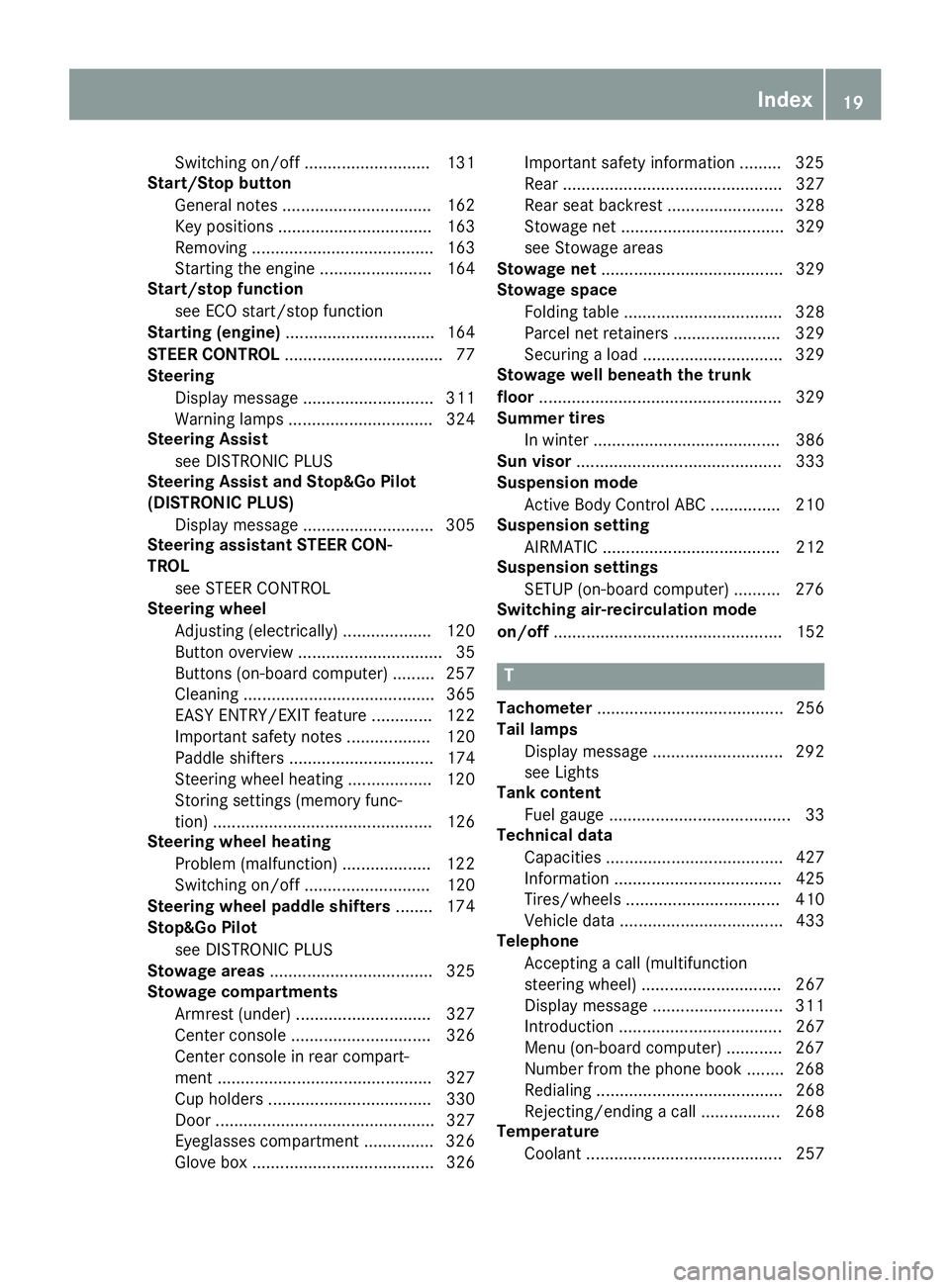
Switching on/off ........................... 131
Start/Stop button
General notes ................................ 162
Key positions ................................. 163
Removing ....................................... 163
Starting the engine ........................ 164
Start/stop function
see ECO start/stop function
Starting (engine) ................................ 164
STEER CONTROL .................................. 77
Steering
Display message ............................ 311
Warning lamps ............................... 324
Steering Assist
see DISTRONIC PLUS
Steering Assist and Stop&Go Pilot
(DISTRONIC PLUS)
Display message ............................ 305
Steering assistant STEER CON-
TROL
see STEER CONTROL
Steering wheel
Adjusting (electrically) ................... 120
Button overview ............................... 35
Buttons (on-board computer) ......... 257
Cleaning ......................................... 365
EASY ENTRY/EXIT feature ............. 122
Important safety notes .................. 120
Paddle shifters ............................... 174
Steering wheel heating .................. 120
Storing settings (memory func-
tion) ............................................... 126
Steering wheel heating
Problem (malfunction) ................... 122
Switching on/off ........................... 120
Steering wheel paddle shifters ........ 174
Stop&Go Pilot
see DISTRONIC PLUS
Stowage areas ................................... 325
Stowage compartments
Armrest (under) ............................. 327
Center console .............................. 326
Center console in rear compart-
ment .............................................. 327
Cup holders ................................... 330
Door ............................................... 327
Eyeglasses compartment ............... 326
Glove box ....................................... 326 Important safety information ......... 325
Rear ............................................... 327
Rear seat backrest ......................... 328
Stowage net ................................... 329
see Stowage areas
Stowage net ....................................... 329
Stowage space
Folding table .................................. 328
Parcel net retainers ....................... 329
Securing a load .............................. 329
Stowage well beneath the trunk
floor .................................................... 329
Summer tires
In w i
nter ........................................ 386
Sun visor ............................................ 333
Suspension mode
Active Body Control ABC ............... 210
Suspension setting
AIRMATIC ...................................... 212
Suspension settings
SETUP (on-board computer) .......... 276
Switching air-recirculation mode
on/off ................................................. 152
T
Tachometer ........................................ 256
Tail lamps
Display message ............................ 292
see Lights
Tank content
Fuel gauge ....................................... 33
Technical data
Capacities ...................................... 427
Information .................................... 425
Tires/wheels ................................. 410
Vehicle data ................................... 433
Telephone
Accepting a call (multifunction
steering wheel) .............................. 267
Display message ............................ 311
Introduction ................................... 267
Menu (on-board computer) ............ 267
Number from the phone book ........ 268
Redialing ........................................ 268
Rejecting/ending a call ................. 268
Temperature
Coolant .......................................... 257 Index 19
Page 32 of 438

These data memories temporarily or perma-
nently store technical information about: R
vehicle's operating state R
incidents R
malfunctions
In general, this technical information docu-
ments the state of a component, a module, a
system or the surroundings.
These include, for example: R
operating conditions of system components,
e.g. fluid levels R
the vehicle's status messages and those of its
individual components, e.g. number of wheel
revolutions/speed, deceleration in move-
ment, lateral acceleration, accelerator pedal
position R
malfunctions and defects in important system
components, e.g. lights, brakes R
vehicle reactions and operating conditions in
special driving situations, e.g. air bag deploy-
ment, intervention of stability control sys-
tems R
ambient conditions, e.g. outside temperature
This data is of an exclusively technical nature
and can be used to: R
assist in recognizing and rectifying malfunc-
tions and defects R
analyze vehicle functions, e.g. after an acci-
dent R
optimize vehicle function
The data cannot be used to trace the vehicle's
movements.
When your vehicle is serviced, technical infor-
mation can be read from the event data memory
and malfunction data memory.
Services include, for example: R
repair services R
service processes R
warranties R
quality assurance
The vehicle is read out by employees of the ser-
vice network (including the manufacturer) using
special diagnostic testers. More detailed infor-
mation is obtained from it, if required.
After a malfunction has been rectified, the infor-
mation is deleted from the malfunction memory
or is continually overwritten.
When operating the vehicle, situations are con-
ceivable in which this technical data, in connec- tion with other information (if necessary, under
consultation with an authorized expert), could
be traced to a person.
Examples include: R
accident reports R
damage to the vehicle R
witness statements
Further additional functions that have been con-
tractually agreed upon with the customer allow
certain vehicle data to be conveyed by the vehi-
cle as well. The additional functions include, for
example, vehicle location in case of an emer-
gency.
COMAND/mbrace If the vehicle is equipped with COMAND or
mbrace, additional data about the vehicle's
operation, the use of the vehicle in certain sit-
uations, and the location of the vehicle may be
compiled through COMAND or the mbrace sys-
tem.
For additional information please refer to the
COMAND User Manual or the Digital Operator's
Manual and/or the mbrace Terms and Condi-
tions.
Event data recorders This vehicle is equipped with an event data
recorder (EDR). This vehicle is equipped with an
event data recorder (EDR). The main purpose of
an EDR is to record, in certain crash or near
crash-like situations, such as an air bag deploy-
ment or hitting a road obstacle, data that will
assist in understanding how a vehicle's systems
performed. The EDR is designed to record data
related to vehicle dynamics and safety systems
for a short period of time, typically 30 seconds
or less.
The EDR in this vehicle is designed to record
such data as: R
How various systems in your vehicle were
operating R
Whether or not the driver and passenger
safety belts were buckled/fastened R
How far (if at all) the driver was depressing the
accelerator and/or brake pedal and R
How fast the vehicle was traveling.30
Introduction
Page 41 of 438
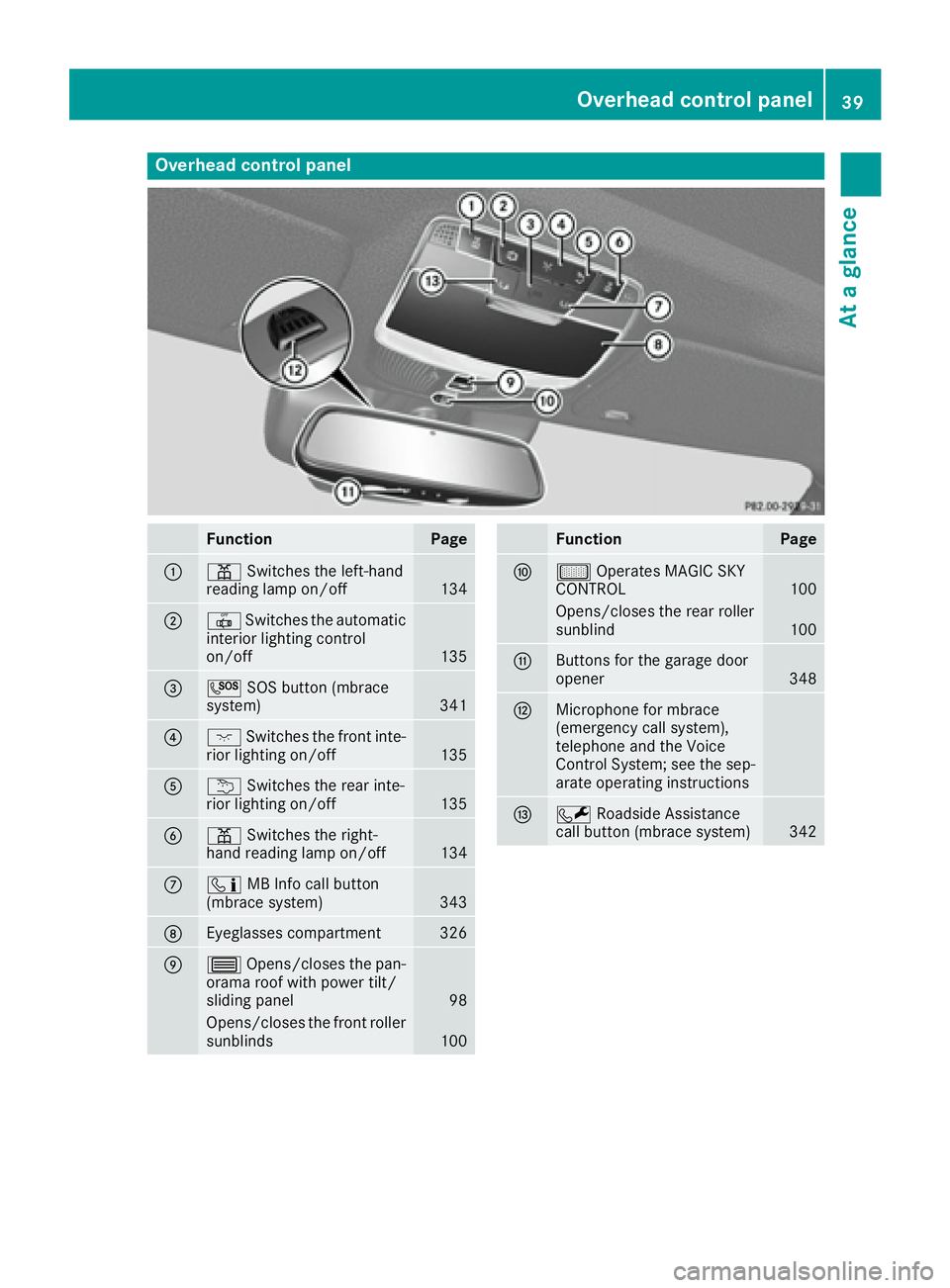
Overhead control panel
Function Page
C
= Switches the left-hand
reading lamp on/off
134
D
3 Switches the automatic
interior lighting control
on/off 135
Page 43 of 438
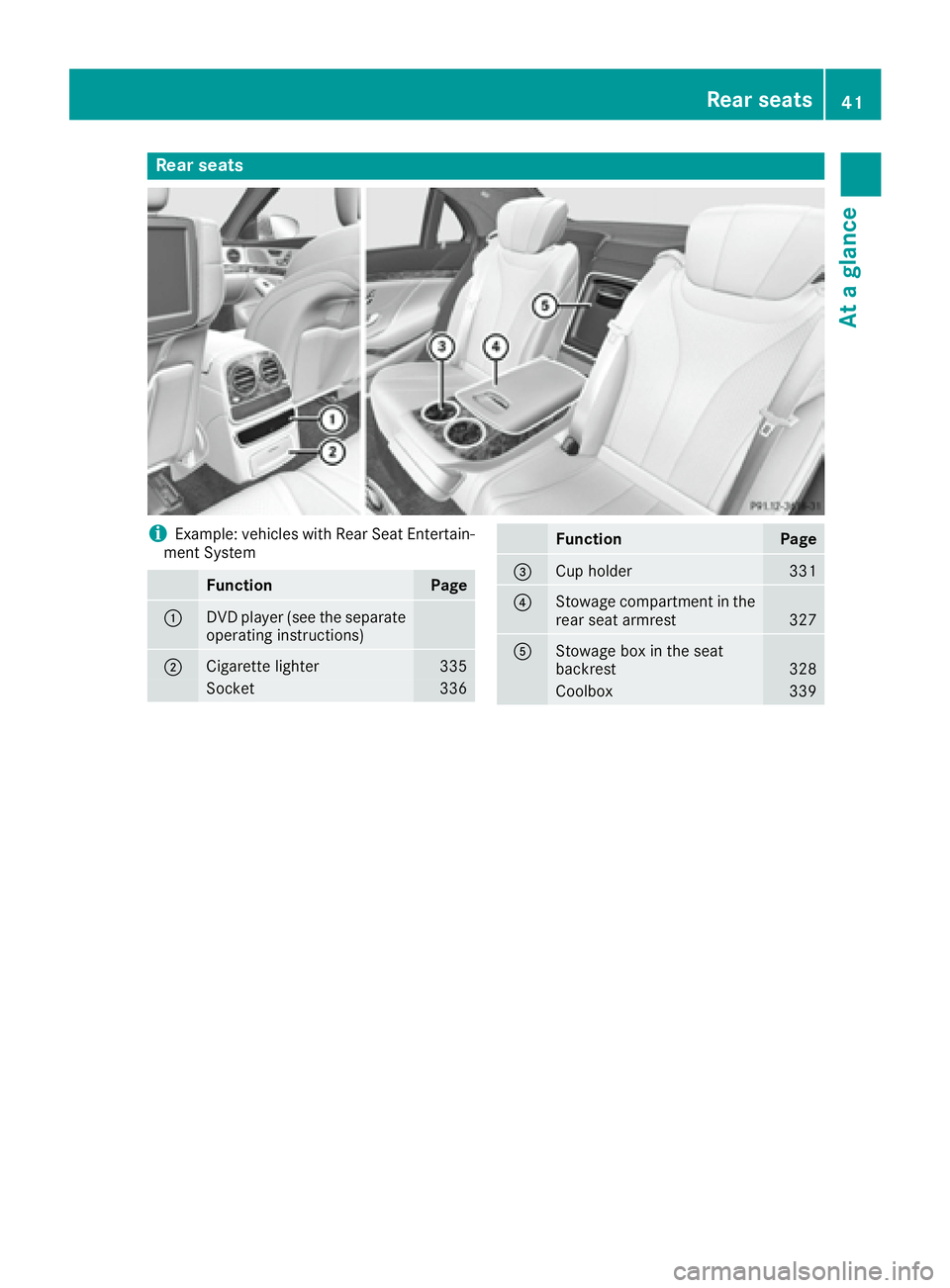
Rear seats
i Example: vehicles with Rear Seat Entertain-
ment System
Function Page
C
DVD player (see the separate
operating instructions)
D
Cigarette lighter 335
Socket 336 Function Page
Page 45 of 438
Deactivate the hybrid system manually if: R
the u restraint system warning lamp in the
instrument cluster lights up after an accident R
the vehicle is badly damaged, e.g. after an
accident, and the restraint system compo-
nents were not activated R
the vehicle is badly damaged and has to be
towed or transported X
If possible, move the vehicle out of the
danger zone: shift the automatic transmis-
sion into position N .X
Release the electric parking brake. X
Roll the vehicle to a safe place and park it
safely.
Get assistance from others if necessary.
i The vehicle is locked automatically when
the ignition is switched on and the wheels are
turning. There is therefore a risk of being
locked out if the vehicle is being pushed or
tested on a dynamometer. X
Switch the ignition off. X
Shift the automatic transmission to park posi-
tion P ( Y
page 170).
Depress the electric parking brake
( Y
page 190).
Secure the vehicle against rolling away
( Y
page 406). X
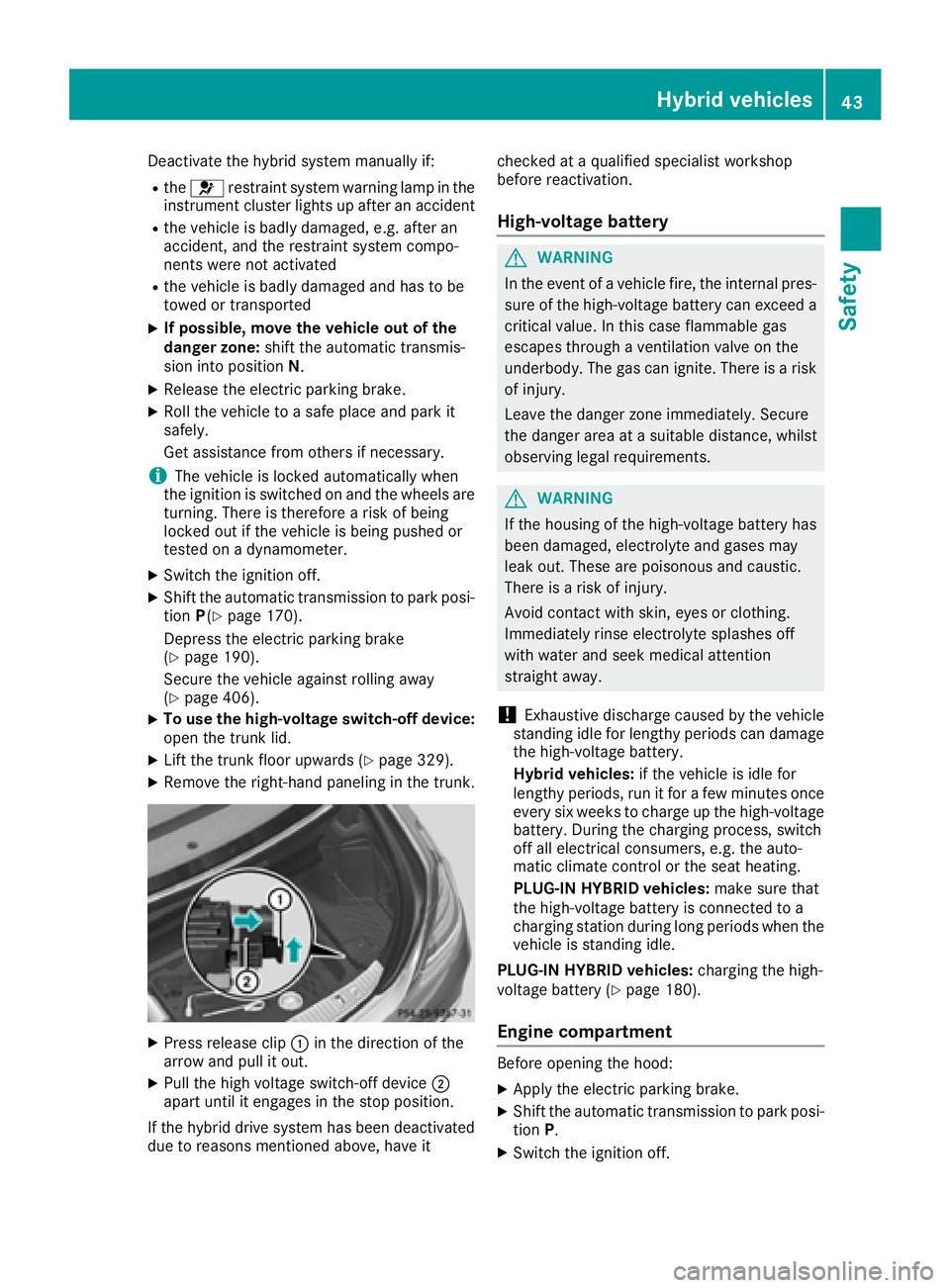
To use the high-voltage switch-off device:
open the trunk lid. X
Lift the trunk floor upwards ( Y
page 329).X
Remove the right-hand paneling in the trunk.
X
Press release clip C in the direction of the
arrow and pull it out. X
Pull the high voltage switch-off device D
apart until it engages in the stop position.
If the hybrid drive system has been deactivated
due to reasons mentioned above, have it checked at a qualified specialist workshop
before reactivation.
High-voltage battery
G WARNING
In the event of a vehicle fire, the internal pres-
sure of the high-voltage battery can exceed a
critical value. In this case flammable gas
escapes through a ventilation valve on the
underbody. The gas can ignite. There is a risk
of injury.
Leave the danger zone immediately. Secure
the danger area at a suitable distance, whilst
observing legal requirements.
G WARNING
If the housing of the high-voltage battery has
been damaged, electrolyte and gases may
leak out. These are poisonous and caustic.
There is a risk of injury.
Avoid contact with skin, eyes or clothing.
Immediately rinse electrolyte splashes off
with water and seek medical attention
straight away.
! Exhaustive discharge caused by the vehicle
standing idle for lengthy periods can damage
the high-voltage battery.
Hybrid vehicles: if the vehicle is idle for
lengthy periods, run it for a few minutes once
every six weeks to charge up the high-voltage
battery. During the charging process, switch
off all electrical consumers, e.g. the auto-
matic climate control or the seat heating.
PLUG-IN HYBRID vehicles: make sure that
the high-voltage battery is connected to a
charging station during long periods when the
vehicle is standing idle.
PLUG-IN HYBRID vehicles: charging the high-
voltage battery ( Y
page 180).
Engine compartment
Before opening the hood: X
Apply the electric parking brake. X
Shift the automatic transmission to park posi-
tion P . X
Switch the ignition off.Hybrid vehicles 43
Safety Z
Page 47 of 438
Information on restraint system operation can
be found under "Triggering of the Emergency
Tensioning Devices and air bags" ( Y
page 57).
For information on children traveling with you in
the vehicle and on child restraint systems, see
"Children in the vehicle" ( Y
page 61).
Important safety notes
G WARNING
Modifications to the restraint system may
cause it to no longer work as intended. The
restraint system may then not perform its
intended protective function and may fail in an
accident or trigger unexpectedly, for example.
This poses an increased risk of injury or even
fatal injury.
Never modify parts of the restraint system.
Never tamper with the wiring, the electronic
components or their software.
If it is necessary to modify an air bag system to
accommodate a person with disabilities, con-
tact an authorized Mercedes-Benz Center for
details. USA only: for further information con-
tact our Customer Assistance Center at
1-800-FOR-MERCedes (1 ‑ 800 ‑ 367 ‑ 6372).
Restraint system warning lamp The functions of the restraint system are
checked after the ignition is switched on and at
regular intervals while the engine is running.
Therefore, malfunctions can be detected in
good time.
The u restraint system warning lamp in the
instrument cluster lights up when the ignition is
switched on. It goes out no later than a few sec-
onds after the vehicle is started. The compo-
nents of the restraint system are in operational
readiness.
A malfunction has occurred if the u restraint
system warning lamp: R
does not light up after the ignition is switched
on R
does not go out after a few seconds with the
engine running R
lights up again while the engine is running
All vehicles, except hybrid vehicles: G WARNING
If restraint system is malfunctioning, restraint
system components may be triggered unin-
tentionally or might not be triggered at all in
the event of an accident with a high rate of
vehicle deceleration. This can affect the Emer-
gency Tensioning Device or air bag, for exam-
ple. This poses an increased risk of injury or
even fatal injury.
Have the restraint system checked and
repaired in a qualified specialist workshop as
soon as possible.
Hybrid vehicles:
G DANGER
If the restraint system is malfunctioning, indi-
vidual restraint system components may be
triggered unintentionally or might not be trig-
gered at all in the event of an accident with a
high rate of vehicle deceleration. This could
affect Emergency Tensioning Devices or air
bags, for example. The vehicle's high-voltage
electrical system may also not be deactivated
as intended in the event of an accident. You
could suffer an electric shock if you touch the
damaged components of the vehicle's high-
voltage electrical system. This poses an
increased risk of injury or even fatal injury.
Have the restraint system checked and
repaired immediately at a qualified specialist
workshop. Immediately switch off the ignition
and remove the SmartKey from the ignition
lock after an accident.Occupant safety 45
Safety Z
Page 48 of 438
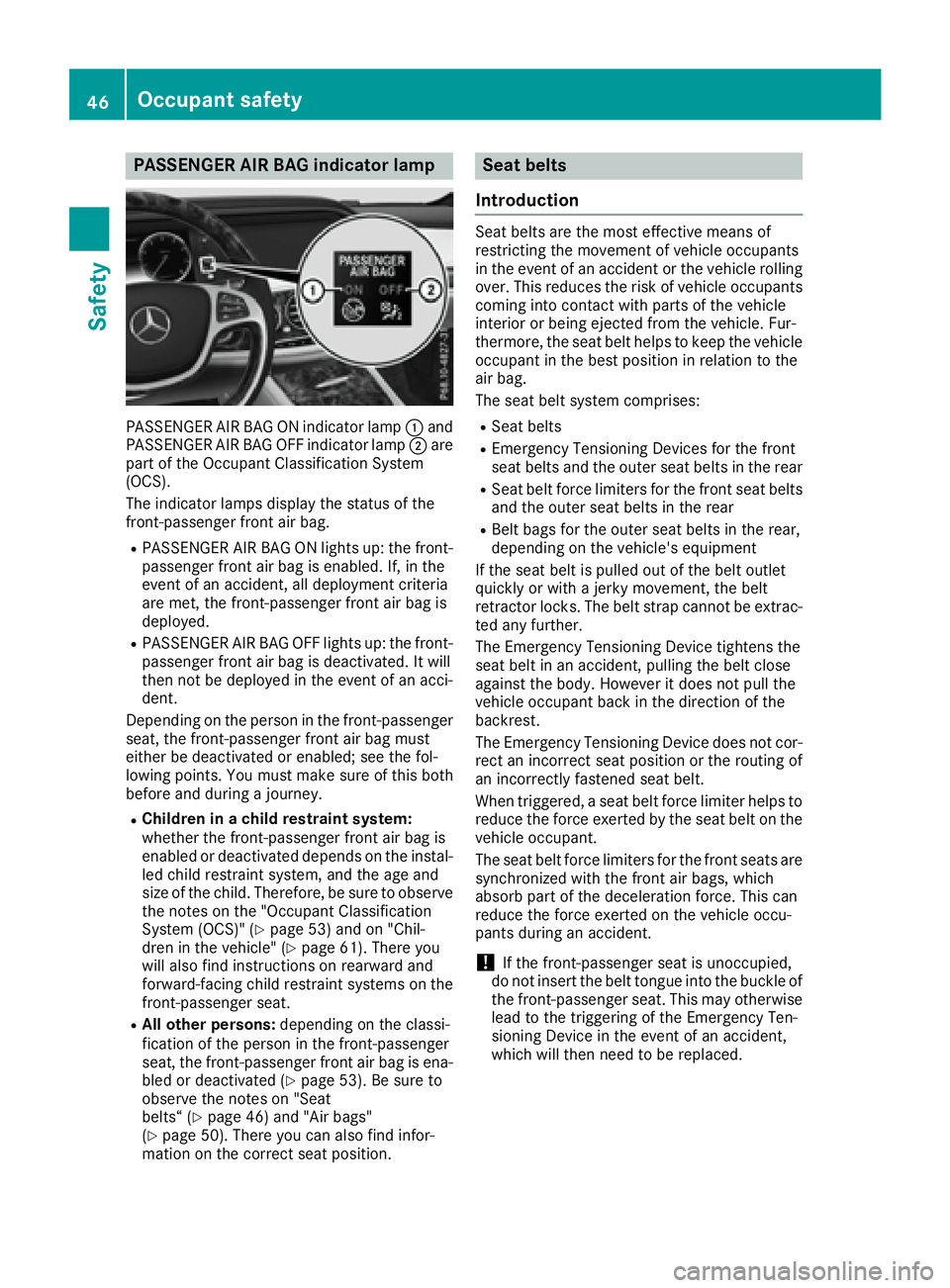
PASSENGER AIR BAG indicator lamp
PASSENGER AIR BAG ON indicator lamp C and
PASSENGER AIR BAG OFF indicator lamp D are
part of the Occupant Classification System
(OCS).
The indicator lamps display the status of the
front-passenger front air bag. R
PASSENGER AIR BAG ON lights up: the front-
passenger front air bag is enabled. If, in the
event of an accident, all deployment criteria
are met, the front-passenger front air bag is
deployed. R
PASSENGER AIR BAG OFF lights up: the front-
passenger front air bag is deactivated. It will
then not be deployed in the event of an acci-
dent.
Depending on the person in the front-passenger
seat, the front-passenger front air bag must
either be deactivated or enabled; see the fol-
lowing points. You must make sure of this both
before and during a journey. R
Children in a child restraint system:
whether the front-passenger front air bag is
enabled or deactivated depends on the instal-
led child restraint system, and the age and
size of the child. Therefore, be sure to observe
the notes on the "Occupant Classification
System (OCS)" ( Y
page 53) and on "Chil-
dren in the vehicle" ( Y
page 61). There you
will also find instructions on rearward and
forward-facing child restraint systems on the
front-passenger seat. R
All other persons: depending on the classi-
fication of the person in the front-passenger
seat, the front-passenger front air bag is ena-
bled or deactivated ( Y
page 53). Be sure to
observe the notes on "Seat
belts“ ( Y
page 46) and "Air bags"
( Y
page 50). There you can also find infor-
mation on the correct seat position. Seat belts
Introduction Seat belts are the most effective means of
restricting the movement of vehicle occupants
in the event of an accident or the vehicle rolling
over. This reduces the risk of vehicle occupants
coming into contact with parts of the vehicle
interior or being ejected from the vehicle. Fur-
thermore, the seat belt helps to keep the vehicle
occupant in the best position in relation to the
air bag.
The seat belt system comprises: R
Seat belts R
Emergency Tensioning Devices for the front
seat belts and the outer seat belts in the rear R
Seat belt force limiters for the front seat belts
and the outer seat belts in the rear R
Belt bags for the outer seat belts in the rear,
depending on the vehicle's equipment
If the seat belt is pulled out of the belt outlet
quickly or with a jerky movement, the belt
retractor locks. The belt strap cannot be extrac-
ted any further.
The Emergency Tensioning Device tightens the
seat belt in an accident, pulling the belt close
against the body. However it does not pull the
vehicle occupant back in the direction of the
backrest.
The Emergency Tensioning Device does not cor-
rect an incorrect seat position or the routing of
an incorrectly fastened seat belt.
When triggered, a seat belt force limiter helps to
reduce the force exerted by the seat belt on the
vehicle occupant.
The seat belt force limiters for the front seats are
synchronized with the front air bags, which
absorb part of the deceleration force. This can
reduce the force exerted on the vehicle occu-
pants during an accident.
! If the front-passenger seat is unoccupied,
do not insert the belt tongue into the buckle of
the front-passenger seat. This may otherwise
lead to the triggering of the Emergency Ten-
sioning Device in the event of an accident,
which will then need to be replaced.46
Occupant safety
Safety
Page 52 of 438
buckle is illuminated and extended after a rear
door is opened.
Releasing seat belts
! Make sure that the seat belt is fully rolled up.
Otherwise, the seat belt or belt tongue will be
trapped in the door or in the seat mechanism.
This could damage the door, the door trim
panel and the seat belt. Damaged seat belts
can no longer fulfill their protective function
and must be replaced. Visit a qualified spe-
cialist workshop. X
Press the release button in the belt buckle,
hold the belt tongue firmly and guide the belt
back.
Seat belt adjustment The seat-belt adjustment is an integral part of
the PRE-SAFE ®
convenience function. This func-
tion adjusts the driver's and front-passenger
seat belt to the upper body of the occupants.
The belt strap is tightened slightly when: R
the belt tongue is engaged in the buckle and R
the ignition is switched on
The seat-belt adjustment will apply a certain
retraction force if any slack is detected between
the vehicle occupant and the seat belt. Do not
hold on to the seat belt tightly while it is adjust-
ing.
You can switch the seat-belt adjustment on and
off using the multimedia system. Information on
activating and deactivating the seat-belt adjust-
ment function can be found in the Digital Oper-
ator's Manual.
Belt warning for the driver and front
passenger The v seat belt warning lamp in the instru-
ment cluster is a reminder that all vehicle occu-
pants must wear their seat belts. It may light up
continuously or flash. In addition, there may be
a warning tone.
Regardless of whether the driver's seat belt has
already been fastened, the v seat belt warn-
ing lamp lights up for six seconds each time the
engine is started. If, after six seconds, the driver
or front-passenger seat belt has not been fas-
tened and the doors are closed, the v seat
belt warning lamp lights up. As soon as the driv-
er's and front-passenger seat belts are fastened or a front door is opened again, the v seat
belt warning lamp goes out.
If the driver's seat belt is not fastened after the
engine is started, an additional warning tone will
sound. The warning tone switches off after six
seconds or once the driver's seat belt is fas-
tened.
If the vehicle's speed exceeds 15 mph
(25 km/h) once and the driver's and front-
passenger seat belts are not fastened, a warning
tone sounds. A warning tone also sounds with
increasing intensity for 60 seconds or until the
driver or front passenger have fastened their
seat belts.
If the driver or front passenger unfasten their
seat belts during the journey, the seat belt warn-
ing is activated again.
Air bags
Introduction The air bag installation point is identified by the
label AIR BAG.
An air bag supplements a correctly fastened
seat belt. However, it is not intended as a sub-
stitute for the seat belt. Air bags provide addi-
tional protection in the event of an accident.
Not all air bags are deployed in an accident. The
various air bag systems work independently of
each other ( Y
page 57).
There is, however, no system available today
that can completely rule out injury or death.
It is also not possible to rule out a risk of injury
caused by an air bag due to the high speed at
which the air bag must be deployed.
Important safety notes
G WARNING
If you do not sit in the correct seat position,
the air bag cannot protect as intended and
could even cause additional injury when
deployed. This poses an increased risk of
injury or even fatal injury.50
Occupant safety
Safety
Page 56 of 438
If it is absolutely necessary to install a child
restraint system on the front-passenger seat, be
sure to observe the correct positioning of the
child restraint system. Never place objects
under or behind the child restraint system, e.g.
cushions. Fully retract the seat cushion length.
The entire base of the child restraint system
must always rest on the seat cushion of the
front-passenger seat. The backrest of the
forward-facing child restraint system must lie as
flat as possible against the backrest of the front-
passenger seat.
The child restraint system must not touch the
roof or be subjected to a load by the head
restraint. Adjust the angle of the seat backrest
and the head restraint position accordingly.
Only then can OCS be guaranteed to function
correctly. Always observe the child restraint sys-
tem manufacturer's installation and operating
instructions.
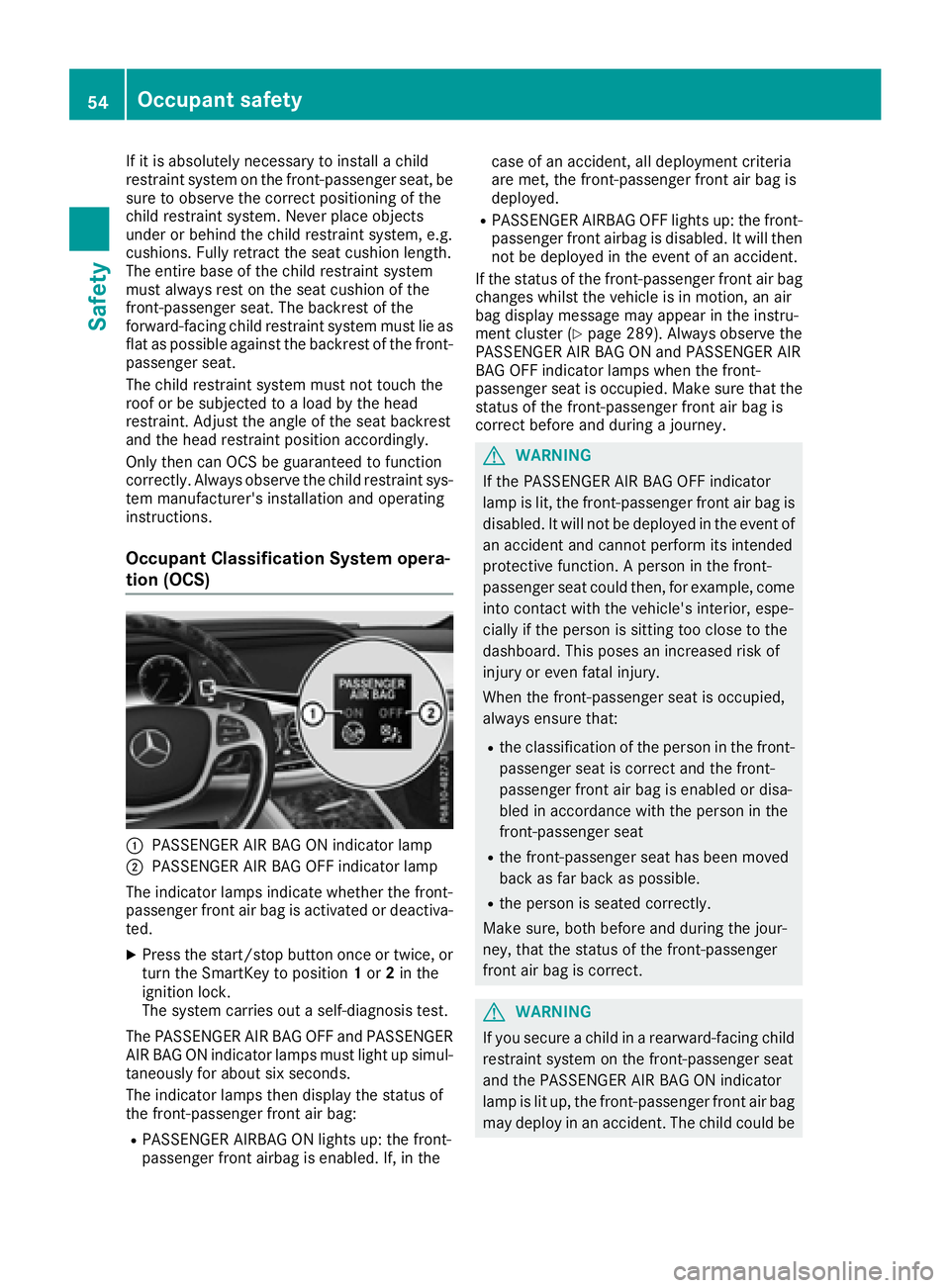
Occupant Classification System opera-
tion (OCS)
C
PASSENGER AIR BAG ON indicator lampD
PASSENGER AIR BAG OFF indicator lamp
The indicator lamps indicate whether the front-
passenger front air bag is activated or deactiva-
ted. X
Press the start/stop button once or twice, or
turn the SmartKey to position 1 or 2 in the
ignition lock.
The system carries out a self-diagnosis test.
The PASSENGER AIR BAG OFF and PASSENGER
AIR BAG ON indicator lamps must light up simul-
taneously for about six seconds.
The indicator lamps then display the status of
the front-passenger front air bag: R
PASSENGER AIRBAG ON lights up: the front-
passenger front airbag is enabled. If, in the case of an accident, all deployment criteria
are met, the front-passenger front air bag is
deployed. R
PASSENGER AIRBAG OFF lights up: the front-
passenger front airbag is disabled. It will then
not be deployed in the event of an accident.
If the status of the front-passenger front air bag
changes whilst the vehicle is in motion, an air
bag display message may appear in the instru-
ment cluster ( Y
page 289). Always observe the
PASSENGER AIR BAG ON and PASSENGER AIR
BAG OFF indicator lamps when the front-
passenger seat is occupied. Make sure that the
status of the front-passenger front air bag is
correct before and during a journey.
G WARNING
If the PASSENGER AIR BAG OFF indicator
lamp is lit, the front-passenger front air bag is
disabled. It will not be deployed in the event of
an accident and cannot perform its intended
protective function. A person in the front-
passenger seat could then, for example, come
into contact with the vehicle's interior, espe-
cially if the person is sitting too close to the
dashboard. This poses an increased risk of
injury or even fatal injury.
When the front-passenger seat is occupied,
always ensure that: R
the classification of the person in the front-
passenger seat is correct and the front-
passenger front air bag is enabled or disa-
bled in accordance with the person in the
front-passenger seat R
the front-passenger seat has been moved
back as far back as possible. R
the person is seated correctly.
Make sure, both before and during the jour-
ney, that the status of the front-passenger
front air bag is correct.
G WARNING
If you secure a child in a rearward-facing child
restraint system on the front-passenger seat
and the PASSENGER AIR BAG ON indicator
lamp is lit up, the front-passenger front air bag
may deploy in an accident. The child could be54
Occupant safety
Safety