tow MERCEDES-BENZ S CLASS 2016 Owner's Manual
[x] Cancel search | Manufacturer: MERCEDES-BENZ, Model Year: 2016, Model line: S CLASS, Model: MERCEDES-BENZ S CLASS 2016Pages: 438, PDF Size: 13.22 MB
Page 191 of 438
i Prevent unauthorized persons from
accessing this data.
Every person who has access to the informa-
tion stated can use the functions on the "My
Mercedes Electric - Vehicle Homepage".
i Information when selling a vehicle or
buying a used vehicle: R
If you sell your vehicle, you are obliged to
delete the vehicle from your personal area
on the "My Mercedes Electric - Vehicle
Homepage". R
If you have bought a used vehicle, it is pos-
sible that the previous owner still has
access to the "My Mercedes Electric - Vehi-
cle Homepage".
Calling up functions The "My Mercedes Electric - Vehicle Homepage"
allows you access to information about your
vehicle and its functions using remote query and
remote configuration.
The following functions can be accessed: R
request the current condition of charge of the
high-voltage battery R
program the departure time ( Y
page 272)R
set or activate the "Pre-entry climate control
at departure time" function (see the separate
COMAND operating instructions)
Information on additional functions and operat-
ing instructions can be found on the "My
Mercedes Electric - Vehicle Homepage".
Connecting the vehicle to the Internet
i This function is not available in all countries
and requires activated access to the mbrace
emergency call system.
The "My Mercedes Electric - Vehicle Homepage"
can be used if the vehicle has a connection to
the Internet via a mobile phone network. The
necessary data is transmitted by radio. The vehi-
cle automatically recognizes whether a connec-
tion to the Internet is possible or not. No presets
are necessary.
i Restrictions in reception are possible if the
vehicle is in an underground car park, for
example. Restrictions may also occur in areas
with poor mobile network coverage. Parking
Important safety notes
G WARNING
Flammable material such as leaves, grass or
twigs may ignite if they come into contact with
hot parts of the exhaust system or exhaust
gas flow. There is a risk of fire.
Park the vehicle so that no flammable mate-
rials come into contact with parts of the vehi-
cle which are hot. Take particular care not to
park on dry grassland or harvested grain
fields.
G WARNING
If you leave children unsupervised in the vehi-
cle, they could set it in motion by, for example: R
release the parking brake. R
shift the automatic transmission out of the
parking position P . R
start the engine.
In addition, they may operate vehicle equip-
ment and become trapped. There is a risk of
an accident and injury.
When leaving the vehicle, always take the
SmartKey with you and lock the vehicle. Never
leave children unsupervised in the vehicle.
! Always secure the vehicle correctly against
rolling away. Otherwise, the vehicle or its driv-
etrain could be damaged.
To ensure that the vehicle is secured against
rolling away unintentionally: R
the electric parking brake must be applied. R
the transmission must be in position P and the
SmartKey must be removed from the ignition
lock. R
the front wheels must be turned towards the
curb on steep uphill or downhill gradients. R
the empty vehicle must be secured at the
front axle with a wheel chock or similar, for
example, on uphill or downhill gradients. R
a laden vehicle must also be secured at the
rear axle with a wheel chock or similar, for
example, on uphill or downhill gradients. Parking 189
Driving and parking Z
Page 192 of 438
Switching off the engine
Important safety notes
G WARNING
The automatic transmission switches to neu-
tral position N when you switch off the engine.
The vehicle may roll away. There is a risk of an
accident.
After switching off the engine, always switch
to parking position P . Prevent the parked vehi-
cle from rolling away by applying the parking
brake.
Using the SmartKey X
Apply the electric parking brake. X
Shift the transmission to position P .X
Turn the SmartKey to position 0 in the ignition
lock and remove it.
The immobilizer is activated.
If you switch the engine off with the trans-
mission in position R or D , the automatic
transmission shifts to N automatically.
If you then open the driver's door or the front-
passenger door or remove the SmartKey from
the ignition, the automatic transmission shifts
to P automatically.
If you want the automatic transmission to
remain in neutral N , e.g. when having the vehicle
cleaned in an automatic car wash with a towing
system: X
Switch on the ignition. X
Depress the brake pedal and keep it
depressed. X
Shift to neutral N .X
Release the brake pedal. X
Release the electric parking brake. X
Switch off the ignition and leave the SmartKey
in the ignition lock.
Using the Start/Stop button X
Apply the electric parking brake. X
Shift the transmission to position P .X
Press the Start/Stop button ( Y
page 162)
The engine stops and all the indicator lamps in
the instrument cluster go out. When the driver's door is closed, this corre-
sponds to SmartKey position 1 . When the
driver's door is open, this corresponds to
SmartKey position 0 : "SmartKey removed".
If you switch the engine off with the transmis-
sion in position R or D , the automatic transmis-
sion shifts to N automatically.
If you then open the driver's or front-passenger
door, the automatic transmission shifts to P
automatically.
If you want the automatic transmission to
remain in neutral N , e.g. when having the vehicle
cleaned in an automatic car wash with a towing
system: X
Switch on the ignition. X
Depress the brake pedal and keep it
depressed. X
Remove the Start/Stop button from the igni-
tion lock. X
Insert the SmartKey into the ignition lock. X
Shift to neutral N .X
Release the brake pedal. X
Release the electric parking brake. X
Switch off the ignition and leave the SmartKey
in the ignition lock.
The engine can be switched off in an emergency
while the vehicle is in motion by pressing and
holding the Start/Stop button for three sec-
onds. This function operates independently of
the ECO start/stop automatic engine switch-off
function.
Electric parking brake
General notes
G WARNING
If you leave children unsupervised in the vehi-
cle, they could set it in motion by, for example: R
release the parking brake. R
shift the automatic transmission out of the
parking position P .R
start the engine.
In addition, they may operate vehicle equip-
ment and become trapped. There is a risk of
an accident and injury.190
Parking
Driving and parking
Page 197 of 438
Limited braking performance on salt-
treated roads If you drive on salted roads, a layer of salt resi-
due may form on the brake discs and brake
pads. This can result in a significantly longer
braking distance. R
In order to prevent any salt build-up, apply the
brakes occasionally while paying attention to
the traffic conditions. R
Carefully depress the brake pedal and the
beginning and end of a journey. R
Maintain a greater distance to the vehicle
ahead.
Servicing the brakes
! The brake fluid level may be too low, if: R
if the red brake warning lamp lights up in
the instrument cluster and R
you hear a warning tone while the engine is
running
Observe additional warning messages in the
multifunction display.
The brake fluid level may be too low due to
brake pad wear or leaking brake lines.
Have the brake system checked immediately.
Consult a qualified specialist workshop to
arrange this.
! Vehicles with 4MATIC: function or per-
formance tests may only be carried out on a 2-
axle dynamometer. If you wish to operate the
vehicle on such a dynamometer, please con-
sult a qualified specialist workshop in
advance. You could otherwise damage the
drive train or the brake system.
! Vehicles with 4MATIC: the ESP ®
system
operates automatically. The engine and the
ignition must therefore be switched off (the
SmartKey must be in position 0 or 1 in the
ignition lock or the Start/Stop button must be
in position 0 or 1 ) if the electric parking brake
is tested on a brake dynamometer.
Braking triggered automatically by ESP ®
may
cause severe damage to the brake system. ! Vehicles without 4MATIC: the ESP ®
sys-
tem operates automatically. The engine and
the ignition must therefore be switched off
(the SmartKey must be in position 0 or 1 in the
ignition lock or the Start/Stop button must be
in position 0 or 1 ) if: R
the electric parking brake is tested using a
brake dynamometer. R
the vehicle is towed with one axle raised.
Braking triggered automatically by ESP ®
may
cause severe damage to the brake system.
All checks and maintenance work on the brake
system must be carried out at a qualified spe-
cialist workshop.
Have brake pads installed and brake fluid
replaced at a qualified specialist workshop.
If the brake system has only been subject to
moderate loads, you should test the functional-
ity of your brakes at regular intervals.
Information on BAS (Brake Assist) ( Y
page 69)
and BAS PLUS (Brake Assist PLUS) ( Y
page 69).
For safety reasons, Mercedes-Benz recom-
mends only installing the following brake disks
and brake pads/linings: R
brake disks that have been approved by
Mercedes-Benz R
brake pads/linings that have been approved
by Mercedes-Benz or that are of an equivalent
standard of quality
Other brake disks or brake pads/linings can
compromise the safety of your vehicle.
Always replace all brake disks and brake pads/
linings on an axle at the same time. Always
install new brake pads/linings when replacing
brake disks.
The vehicle is equipped with lightweight brake
disks to which the wheel assembly with rim and
threaded connection is matched.
The use of brake disks other than those
approved by Mercedes-Benz can change the
track width and is subject to approval, if appli-
cable.
Shock-type loads when handling the brake
discs, such as when changing wheels, can lead
to a reduction in comfort when driving with light-
weight brake discs. Avoid shock-type loads on
the lightweight brake disks, particularly on the
brake plate.
Mercedes-Benz recommends that you only use
brake fluid that has been specially approved for
your vehicle by Mercedes-Benz, or which corre- Driving tips 195
Driving and parking Z
Page 199 of 438
Drive particularly carefully on slippery road sur-
faces. Avoid sudden acceleration, steering and
braking maneuvers. Do not use the cruise con-
trol or DISTRONIC PLUS.
If the vehicle threatens to skid or cannot be
stopped when moving at low speed: X
Shift the transmission to position N .
The outside temperature indicator is not
designed to serve as an ice-warning device and
is therefore unsuitable for that purpose.
Changes in the outside temperature are dis-
played after a short delay.
Indicated temperatures just above the freezing
point do not guarantee that the road surface is
free of ice. The road may still be icy, especially in
wooded areas or on bridges.
You should pay special attention to road condi-
tions when temperatures are around freezing
point.
For more information on driving with snow
chains, see ( Y
page 386).
For more information on driving with summer
tires, see ( Y
page 386).
Observe the notes in the "Winter operation" sec-
tion ( Y
page 386).
Driving systems
Mercedes-Benz Intelligent Drive Mercedes-Benz Intelligent Drive stands for inno-
vative driver assistance and safety systems
which enhance comfort and support the driver in
critical situations. With these intelligent co-ordi-
nated systems Mercedes-Benz has set a mile-
stone on the path towards autonomous driving.
Mercedes-Benz Intelligent Drive embraces all
elements of active and passive safety in one well
thought out system – for the safety of the vehi-
cle occupants and that of other road users.
Further information on driving safety systems
( Y
page 68).
Cruise control
General notes
Cruise control maintains a constant road speed
for you. It brakes automatically in order to avoid
exceeding the set speed. Change into a lower
gear in good time on long and steep downhill gradients. This is especially important if the
vehicle is laden. By doing so, you will make use
of the braking effect of the engine. This relieves
the load on the brake system and prevents the
brakes from overheating and wearing too
quickly.
You can use cruise control if you want to drive at
a steady speed for a prolonged period of time.
You can store any road speed above 20 mph
(30 km/h).
Important safety notes If you fail to adapt your driving style, cruise con-
trol can neither reduce the risk of an accident
nor override the laws of physics. Cruise control
cannot take into account the road, traffic and
weather conditions. Cruise control is only an
aid. You are responsible for the distance to the
vehicle in front, for vehicle speed, for braking in
good time and for staying in your lane.
Do not use cruise control: R
in road and traffic conditions which do not
allow you to maintain a constant speed, e.g. in
heavy traffic or on winding roads R
on slippery road surfaces. Braking or accel-
erating could cause the drive wheels to lose
traction and the vehicle could then skid R
when there is poor visibility, e.g. due to fog,
heavy rain or snow
If there is a change of drivers, advise the new
driver of the speed stored.
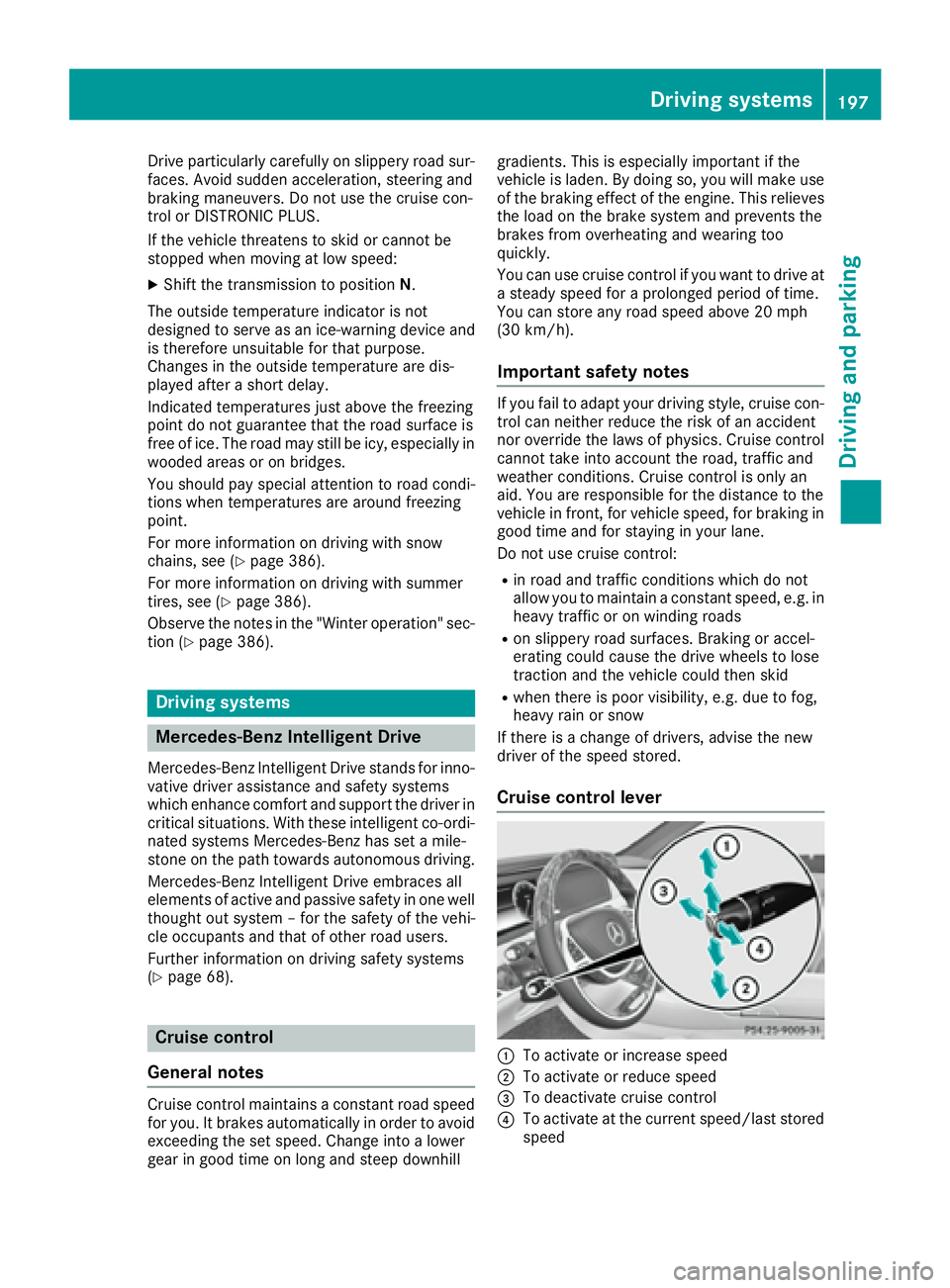
Cruise control lever
C
To activate or increase speed
D
To activate or reduce speed
Page 200 of 438
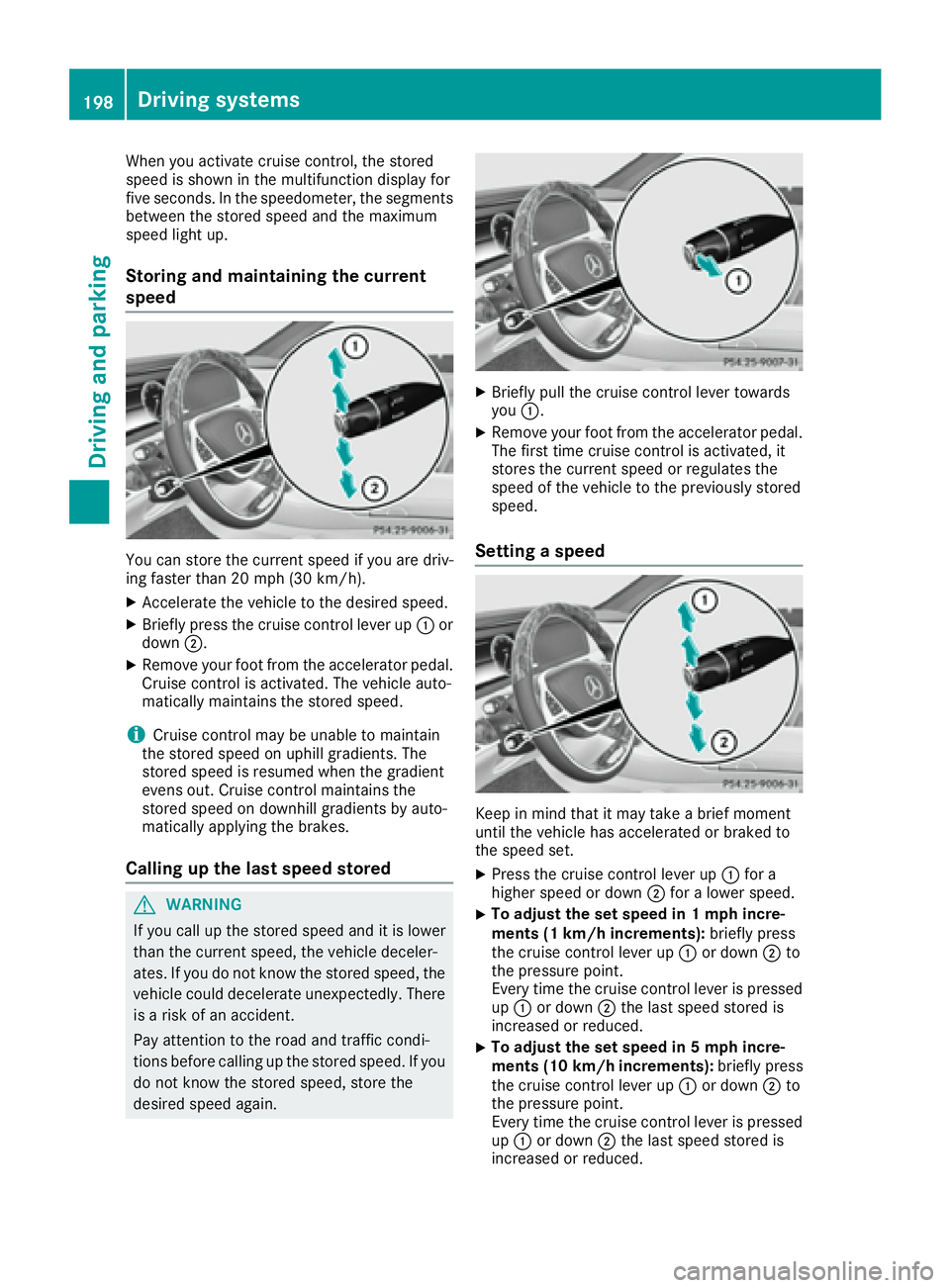
When you activate cruise control, the stored
speed is shown in the multifunction display for
five seconds. In the speedometer, the segments
between the stored speed and the maximum
speed light up.
Storing and maintaining the current
speed
You can store the current speed if you are driv-
ing faster than 20 mph (30 km/ h) .X
Accelerate the vehicle to the desired speed. X
Briefly press the cruise control lever up C or
down D .X
Remove your foot from the accelerator pedal.
Cruise control is activated. The vehicle auto-
matically maintains the stored speed.
i Cruise control may be unable to maintain
the stored speed on uphill gradients. The
stored speed is resumed when the gradient
evens out. Cruise control maintains the
stored speed on downhill gradients by auto-
matically applying the brakes.
Calling up the last speed stored
G WARNING
If you call up the stored speed and it is lower
than the current speed, the vehicle deceler-
ates. If you do not know the stored speed, the
vehicle could decelerate unexpectedly. There
is a risk of an accident.
Pay attention to the road and traffic condi-
tions before calling up the stored speed. If you
do not know the stored speed, store the
desired speed again. X
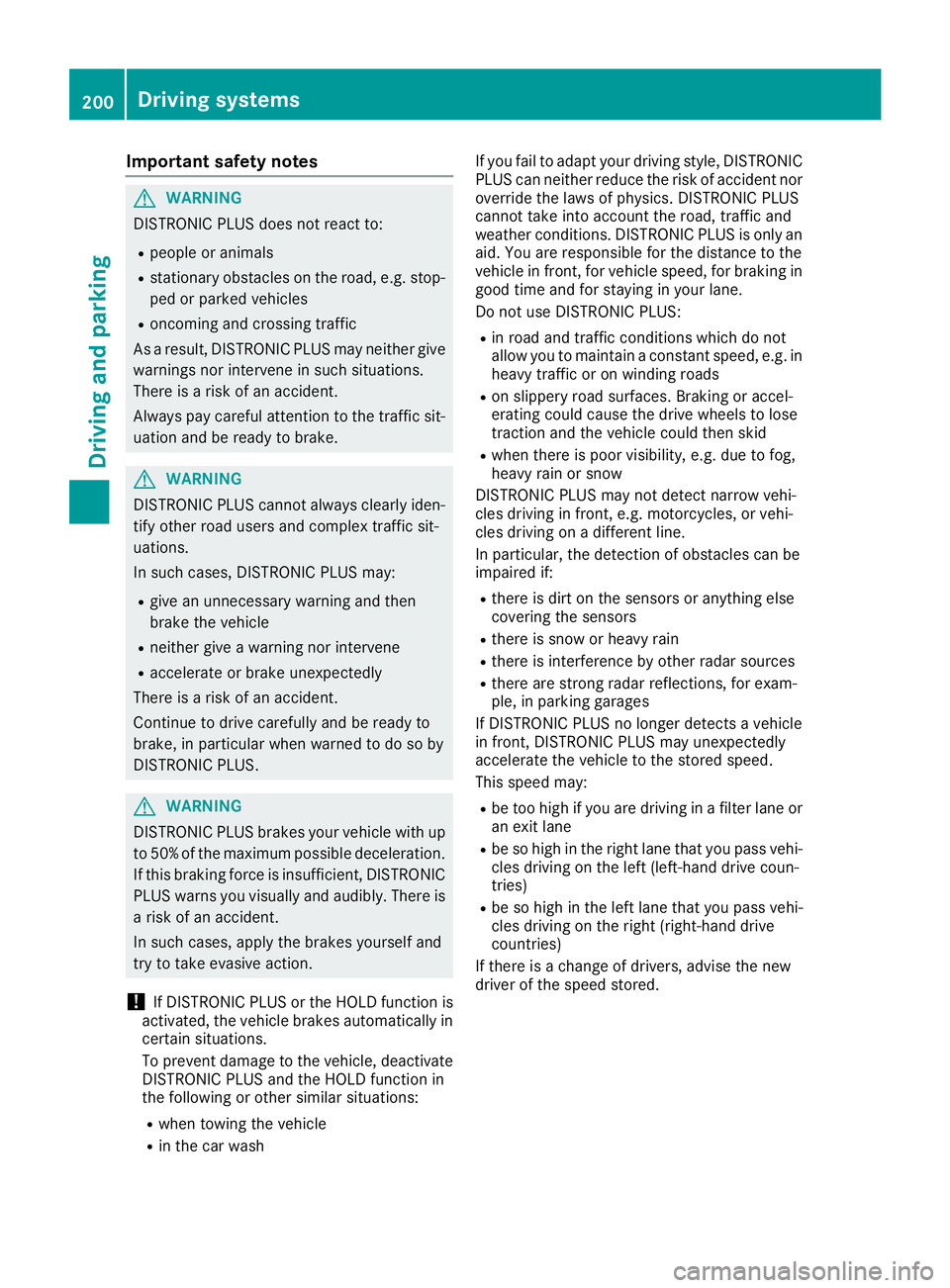
Briefly pull the cruise control lever towards
you C . X
Remove your foot from the accelerator pedal.
The first time cruise control is activated, it
stores the current speed or regulates the
speed of the vehicle to the previously stored
speed.
Setting a speed
Keep in mind that it may take a brief moment
until the vehicle has accelerated or braked to
the speed set. X
Press the cruise control lever up C for a
higher speed or down D for a lower speed.X
To adjust the set speed in 1 mph incre-
ments (1 km/h increments): briefly press
the cruise control lever up C or down D to
the pressure point.
Every time the cruise control lever is pressed
up C or down D the last speed stored is
increased or reduced. X
To adjust the set speed in 5 mph incre-
ments (1 0 km/h increments): briefly press
the cruise control lever up C or down D to
the pressure point.
Every time the cruise control lever is pressed
up C or down D the last speed stored is
increased or reduced.198
Driving systems
Driving and parking
Page 202 of 438
Important safety notes
G WARNIN G
DISTRONI C PLU S does no t reac t to :R
people or animals R
stationary obstacles on th e road , e.g. stop-
ped or parked vehicles R
oncomin g and crossing traffic
As a result , DISTRONI C PLU S may neither giv e
warning s no r interven e in suc h situations.
Ther e is a ris k of an accident.
Always pay careful attention to th e traffic sit -
uation and be read y to brake.
G WARNIN G
DISTRONI C PLU S canno t always clearly iden -
tify other road user s and comple x traffic sit -
uations.
In suc h cases, DISTRONI C PLU S may:R
giv e an unnecessary warning and then
brak e th e vehicl eR
neither giv e a warning no r interven eR
accelerate or brak e unexpectedly
Ther e is a ris k of an accident.
Continue to driv e carefully and be read y to
brake, in particular when warned to do so by
DISTRONI C PLUS.
G WARNIN G
DISTRONI C PLU S brakes your vehicl e wit h up
to 50 %o f the maximum possible deceleration.
If this braking force is insufficient, DISTRONIC
PLUS warns you visually and audibly. There is
a risk of an accident.
In such cases, apply the brakes yourself and
try to take evasive action.
! If DISTRONIC PLUS or the HOLD function is
activated, the vehicle brakes automatically in
certain situations.
To prevent damage to the vehicle, deactivate
DISTRONIC PLUS and the HOLD function in
the following or other similar situations: R
when towing the vehicle R
in the car wash If you fail to adapt your driving style, DISTRONIC
PLUS can neither reduce the risk of accident nor
override the laws of physics. DISTRONIC PLUS
cannot take into account the road, traffic and
weather conditions. DISTRONIC PLUS is only an
aid. You are responsible for the distance to the
vehicle in front, for vehicle speed, for braking in
good time and for staying in your lane.
Do not use DISTRONIC PLUS: R
in road and traffic conditions which do not
allow you to maintain a constant speed, e.g. in
heavy traffic or on winding roads R
on slippery road surfaces. Braking or accel-
erating could cause the drive wheels to lose
traction and the vehicle could then skid R
when there is poor visibility, e.g. due to fog,
heavy rain or snow
DISTRONIC PLUS may not detect narrow vehi-
cles driving in front, e.g. motorcycles, or vehi-
cles driving on a different line.
In particular, the detection of obstacles can be
impaired if: R
there is dirt on the sensors or anything else
covering the sensors R
there is snow or heavy rain R
there is interference by other radar sources R
there are strong radar reflections, for exam-
ple, in parking garages
If DISTR ONIC PLUS no longer detects a vehicle
in front, DISTRONIC PLUS may unexpectedly
accelerate the vehicle to the stored speed.
This speed may: R
be too high if you are driving in a filter lane or
an exit lane R
be so high in the right lane that you pass vehi-
cles driving on the left (left-hand drive coun-
tries) R
be so high in the left lane that you pass vehi-
cles driving on the right (right-hand drive
countries)
If there is a change of drivers, advise the new
driver of the speed stored.200
Driving systems
Driving and parking
Page 204 of 438
Activating at the current speed/last
st ore d speed
G WARNIN G
If you call up th e store d spee d and it differs
from th e curren t speed, th e vehicl e acceler -
ate s or decelerates. If you do no t know th e
store d speed, th e vehicl e could accelerate or
brak e une xp ectedly. Ther e is a ris k of an acci-
dent.
Pay attentio n to th e road and traffic condi-
tions before calling up th e store d speed. If you
do no t know th e store d speed, store th e
desired spee d again .
X
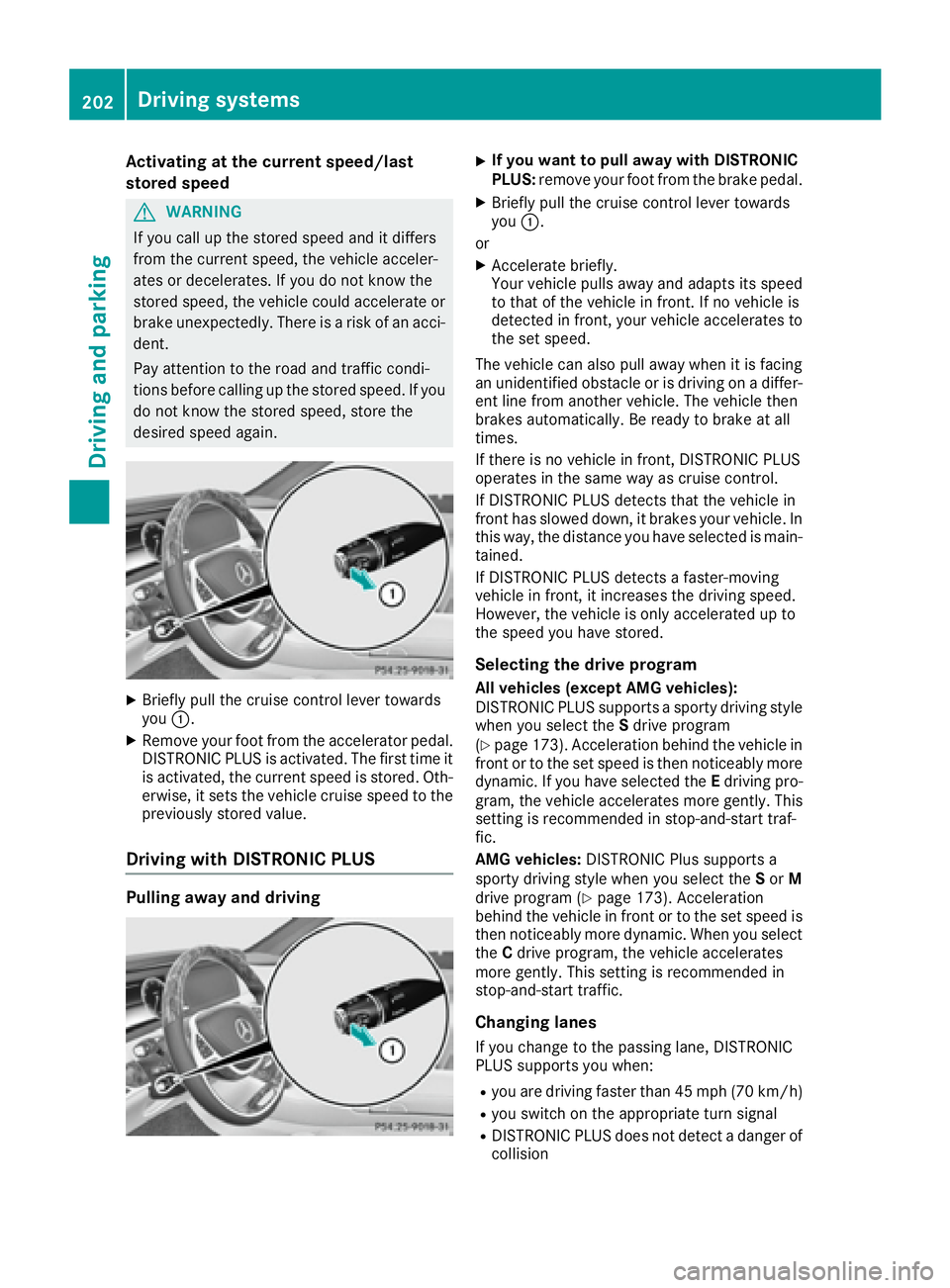
Briefl y pull th e cruise control leve r towards
you C .X
Remove your foo t from th e accelerato r pedal.
DISTRONI C PLU S is activated. The first tim e it
is activated, th e curren t spee d is stored. Ot h-
erwise, it set s th e vehicl e cruise spee d to th e
previously store d value .
Driving with DISTRONIC PLUS
Pulling away and driving X
If you want to pull awa y with DISTRONIC
PLUS : remove your foo t from th e brak e pedal.X
Briefl y pull th e cruise control leve r towards
you C .
or X
Accelerat e briefly.
Your vehicl e pulls away and adapt s its spee d
to that of th e vehicl e in front. If no vehicl e is
detected in front, your vehicl e accelerate s to
th e set speed.
The vehicl e can also pull away when it is facing
an unidentified obstacle or is driving on a differ-
en t lin e from another vehicle. The vehicl e then
brakes automatically. Be read y to brak e at all
times.
If there is no vehicl e in front, DISTRONI C PLU S
operate s in th e same way as cruise control .
If DISTRONI C PLU S detect s that th e vehicl e in
fron t has slowe d down , it brakes your vehicle. In
this way, th e distanc e you have selected is main -
tained.
If DISTRONI C PLU S detect s a faster-moving
vehicl e in front, it increases th e driving speed.
However, th e vehicl e is only accelerate d up to
th e spee d you have stored.
Selecting th e drive programAll veh icles (excep t AMG veh icles):
DISTRONI C PLU S support s a sporty driving style
when you select th e S driv e program
( Y
page 173). Acceleration behind th e vehicl e in
fron t or to th e set spee d is then noticeably mor e
dynamic . If you have select ed th e E d riving pro -
g
ram , th e vehicl e accelerate s mor e gently. This
settin g is recommended in stop-and-star t traf-
fic .
AMG veh icles: DISTRONI C Plus support s a
sporty driving style when you select th e S or M
driv e program ( Y
page 173). Acceleration
behind th e vehicl e in fron t or to th e set spee d is
then noticeably mor e dynamic . When you select
th e C driv e program , th e vehicl e accelerate s
mor e gently. This settin g is recommended in
stop-and-star t traffic.
Changing lanes
If you chang e to th e passing lane , DISTRONI C
PLU S support s you when :R
you are driving faste r than 45 mph (70 km/h)R
you switch on th e appropriat e tur n signalR
DISTRONI C PLU S does no t detect a danger of
collisio n202
Driving systems
Driving and parking
Page 209 of 438
DISTRONIC PLUS at traffic lights with crossing
traffic, for example, could cause your vehicle to
pull away unintentionally.
DISTRONIC PLUS with Steering Assist
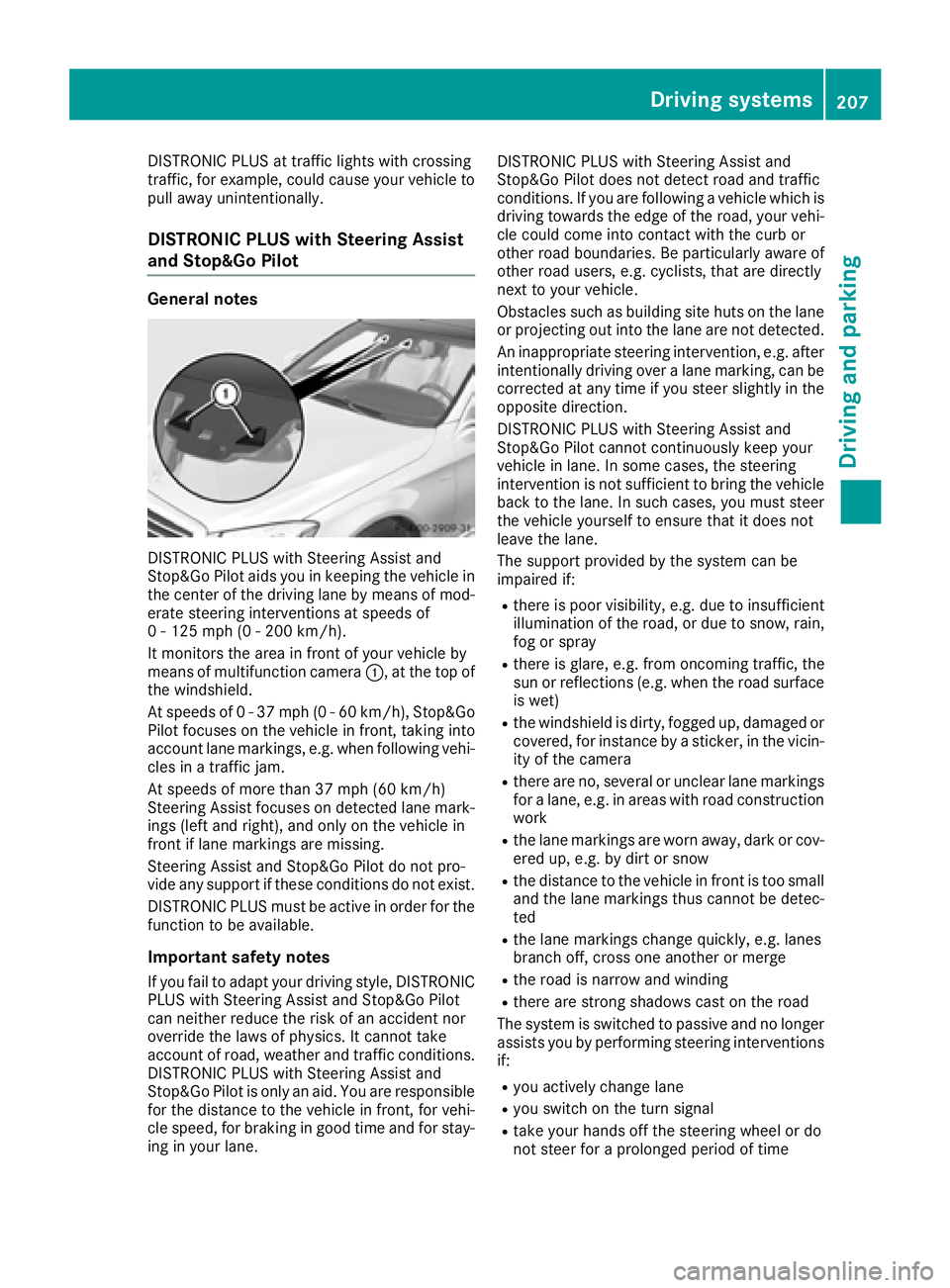
and Stop&Go Pilot General notes
DISTRONIC PLUS with Steering Assist and
Stop&Go Pilot aids you in keeping the vehicle in
the center of the driving lane by means of mod-
erate steering interventions at speeds of
0 - 125 mph (0 - 200 km/h).
It monitors the area in front of your vehicle by
means of multifunction camera C , at the top of
the windshield.
At speeds of 0 - 37 mph (0 - 60 km/h), Stop&Go
Pilot focuses on the vehicle in front, taking into
account lane markings, e.g. when following vehi-
cles in a traffic jam.
At speeds of more than 37 mph (60 km/h)
Steering Assist focuses on detected lane mark-
ings (left and right), and only on the vehicle in
front if lane markings are missing.
Steering Assist and Stop&Go Pilot do not pro-
vide any support if these conditions do not exist.
DISTRONIC PLUS must be active in order for the
function to be available.
Important safety notes
If you fail to adapt your driving style, DISTRONIC
PLUS with Steering Assist and Stop&Go Pilot
can neither reduce the risk of an accident nor
override the laws of physics. It cannot take
account of road, weather and traffic conditions.
DISTRONIC PLUS with Steering Assist and
Stop&Go Pilot is only an aid. You are responsi ble
fo r
the distance to the vehicle in front, for vehi-
cle speed, for braking in good time and for stay-
ing in your lane. DISTRONIC PLUS with Steering Assist and
Stop&Go Pilot does not detect road and traffic
conditions. If you are following a vehicle which is
driving towards the edge of the road, your vehi-
cle could come into contact with the curb or
other road boundaries. Be particularly aware of
other road users, e.g. cyclists, that are directly
next to your vehicle.
Obstacles such as building site huts on the lane
or projecting out into the lane are not detected.
An inappropriate steering intervention, e.g. after
intentionally driving over a lane marking, can be
corrected at any time if you steer slightly in the
opposite direction.
DISTRONIC PLUS with Steering Assist and
Stop&Go Pilot cannot continuously keep your
vehicle in lane. In some cases, the steering
intervention is not sufficient to bring the vehicle
back to the lane. In such cases, you must steer
the vehicle yourself to ensure that it does not
leave the lane.
The support provided by the system can be
impaired if: R
there is poor visibility, e.g. due to insufficient
illumination of the ro ad, or due to snow, rain,
fo g or spray R
there is glare, e.g. from oncoming traffic, the
sun or reflections (e.g. when the road surface
is wet) R
the windshield is dirty, fogged up, damaged or
covered, for instance by a sticker, in the vicin-
ity of the camera R
there are no, several or unclear lane markings
for a lane, e.g. in areas with road construction
work R
the lane markings are worn away, dark or cov-
ered up, e.g. by dirt or snow R
the distance to the vehicle in front is too small
and the lane markings thus cannot be detec-
ted R
the lane markings change quickly, e.g. lanes
branch off, cross one another or merge R
the road is narrow and winding R
there are strong shadows cast on the road
The system is switched to passive and no longer
assists you by performing steering interventions
if: R
you actively change lane R
you switch on the turn signal R
take your hands off the steering wheel or do
not steer for a prolonged period of timeDriving system s 207
Dr ivi ng an d parking Z
Page 211 of 438
Important safety notes
G WARNIN G
When leaving th e vehicle, it can still rol l away
despit e bein g braked by th e HOLD function if:R
there is a malfunction in th e system or in
th e voltag e supply.R
th e HOLD function has been deactivated by
pressin g th e accelerato r pedal or th e brak e
pedal , e.g. by a vehicl e occupant .R
th e electrical system in th e engin e com-
partment, th e battery or th e fuses have
been tampered with. R
th e battery is disconnected
Ther e is a ris k of an accident.
If you wish to exit th e vehicle, always tur n off
th e HOLD function and secure th e vehicl e
against rollin g away.
Further information on deactivating th e HOLD
function ( Y
page 209).
! If DISTRONI C PLU S or th e HOLD function is
activated, th e vehicl e brakes automatically in
certain situations.
To preven t damag e to th e vehicle, deactivat e
DISTRONI C PLU S and th e HOLD function in
th e followin g or other similar situations:R
when towin g th e vehicl eR
in th e car wash
Activation conditions You can activat e th e HOLD function if all of th e
followin g condition s are fulfilled :R
th e vehicl e is stationary.R
th e engin e is runnin g or if it has been auto -
matically switched off by th e ECO start/sto p
function .R
th e driver' s door is closed or your seat belt is
fastened. R
th e electric parking brak e is released.R
th e transmission is in position D , R or N .R
DISTRONI C PLU S is deactivated. Activating the HOLD function X
Mak e sur e that th e activation condition s are
met . X
Depress th e brak e pedal .X
Quickly depress th e brak e pedal further
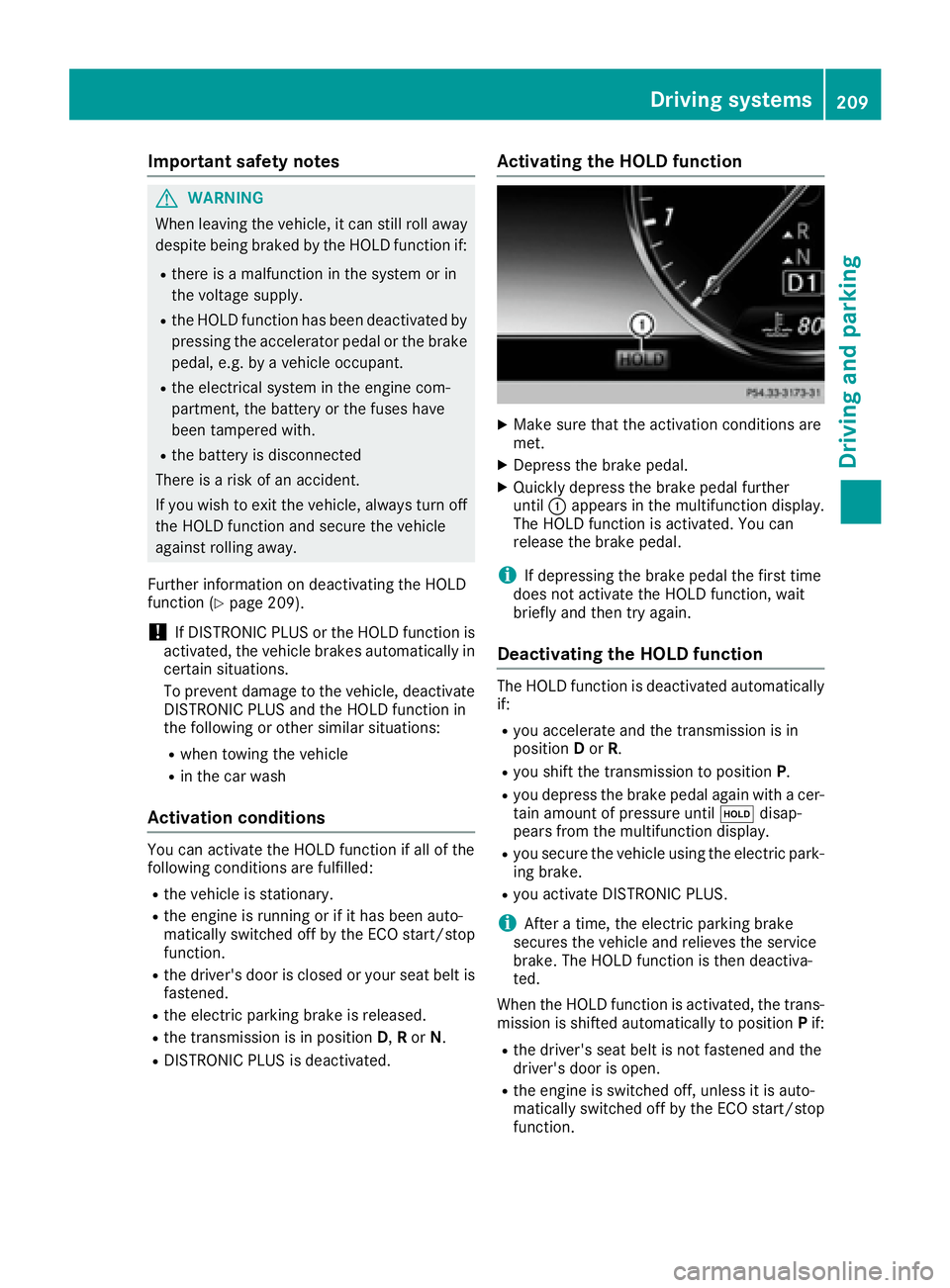
until C appear s in th e multifunction display.
The HOLD function is activated. You can
release th e brak e pedal .
i If depressing th e brak e pedal th e first time
does no t activat e th e HOLD function , wait
briefly and then tr y again .
Deactivating the HOLD function The HOLD function is deactivated automatically
if: R
you accelerate and th e transmission is in
position D or R . R
you shif t th e transmission to position P .R
you depress th e brak e pedal again wit h a cer-
tai n amoun t of pressur e until
Page 215 of 438
Sports tuning The firmer setting of the suspension tuning in
SPORT mode ensures the best possible contact
with the road. Select this mode when employing
a sporty driving style, e.g. on winding country
roads.
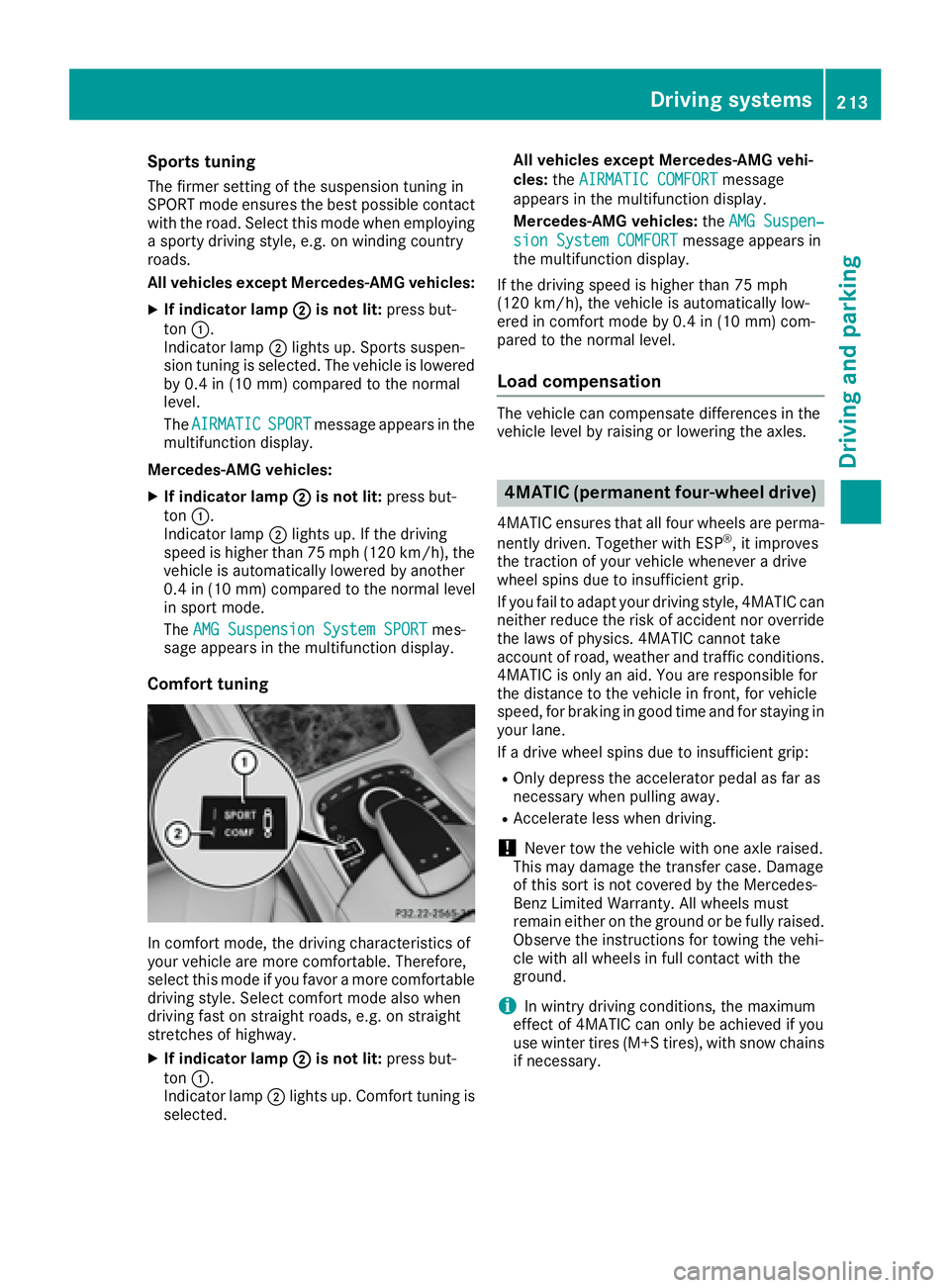
All vehicles except Mercedes-AMG vehicles: X
If indicator lamp D is not lit: press but-
ton C .
Indicator lamp D lights up. Sports suspen-
sion tuning is selected. The vehicle is lowered
by 0.4 in (10 mm) compared to the normal
level.
The AIRMATIC
SPORT message appears in the
multifunction display.
Mercedes-AMG vehicles: X
If indicator lamp D is not lit: press but-
ton C .
Indicator lamp D lights up. If the driving
speed is higher than 75 mph (120 km/h), the
vehicle is automatically lowered by another
0.4 in (10 mm) compared to the normal level
in sport mode.
The AMG Suspension System SPORT mes-
sage appears in the multifunction display.
Comfort tuning
In comfort mode, the driving characteristics of
your vehicle are more comfortable. Therefore,
select this mode if you favor a more comfortable
driving style. Select comfort mode also when
driving fast on straight roads, e.g. on straight
stretches of highway. X
If indicator lamp D is not lit: press but-
ton C .
Indicator lamp D lights up. Comfort tuning is
selected. All vehicles except Mercedes-AMG vehi-
cles: the AIRMATIC COMFORT
message
appears in the multifunction display.
Mercedes-AMG vehicles: the AMG Suspen‐
sion System COMFORT message appears in
the multifunction display.
If the driving speed is higher than 75 mph
(120 km/h), the vehicle is automatically low-
ered in comfort mode by 0.4 in (10 mm) com-
pared to the normal level.
Load compensation The vehicle can compensate differences in the
vehicle level by raising or lowering the axles.
4MATIC (permanent four-wheel drive) 4MATIC ensures that all four wheels are perma-
nently driven. Together with ESP ®
, it improves
the traction of your vehicle whenever a drive
wheel spins due to insufficient grip.
If you fail to adapt your driving style, 4MATIC can
neither reduce the risk of accident nor override
the laws of physics. 4MATIC cannot take
account of road, weather and traffic conditions.
4MATIC is only an aid. You are responsible for
the distance to the vehicle in front, for vehicle
speed, for braking in good time and for staying in
your lane.
If a drive wheel spins due to insufficient grip: R
Only depress the accelerator pedal as far as
necessary when pulling away. R
Accelerate less when driving.
! Never tow the vehicle with one axle raised.
This may damage the transfer case. Damage
of this sort is not covered by the Mercedes-
Benz Limited Warranty. All wheels must
remain either on the ground or be fully raised.
Observe the instructions for towing the vehi-
cle with all wheels in full contact with the
ground.
i In wintry driving conditions, the maximum
effect of 4MATIC can only be achieved if you
use winter tires (M+S tires), with snow chains
if necessary.Driving systems 213
Driving and parking Z