tow MERCEDES-BENZ S CLASS 2016 Owner's Guide
[x] Cancel search | Manufacturer: MERCEDES-BENZ, Model Year: 2016, Model line: S CLASS, Model: MERCEDES-BENZ S CLASS 2016Pages: 438, PDF Size: 13.22 MB
Page 220 of 438
R
that are parallel to the direction of travel and
at least 39.5 in (1.0 m) longer than your vehi-
cle R
that are at right angles to the direction of
travel and at least 39.5 in (1.0 m) wider than
your vehicle
i Note that Active Parking Assist cannot
measure the size of a parking space if it is at
right angles to the direction of travel. You will
need to judge whether your vehicle will fit into
the parking space.
When driving at speeds below 19 mph
(30 km/h), you will see the parking symbol as a
status indicator in the instrument cluster. When
a parking space has been detected, an arrow
towards the right or the left also appears. By
default, Active Parking Assist only displays park-
ing spaces on the front-passenger side. Parking
spaces on the driver's side are displayed as
soon as the turn signal on the driver's side is
activated. When parking on the driver's side,
this must remain switched on until you acknowl-
edge the use of Active Parking Assist by press-
ing the v button on the multifunction steer-
ing wheel. The system automatically determines
whether the parking space is parallel or at right
angles to the direction of travel.
A parking space is displayed while you are driv-
ing past it, and until you are approximately 50 ft
(15 m) away from it.
Parking
G WARNING
If you leave the vehicle when it is only being
braked by Active Parking Assist it could roll
away if: R
there is a malfunction in the system or in
the voltage supply. R
the electrical system in the engine com-
partment, the battery or the fuses have
been tampered with. R
the battery is disconnected. R
the accelerator pedal has been depressed,
e.g. by a vehicle occupant.
There is a risk of an accident.
Before leaving the vehicle, always secure it
against rolling away. i When PARKTRONIC detects obstacles,
Active Parking Assist brakes automatically
during the parking process. You are respon-
sible for braking in good time. X
Stop the vehicle when the parking space sym-
bol shows the desired parking space in the
instrument cluster. X
Shift the transmission to position R .
The Start Park Assist? Yes: OK No: 8
message appears in the multifunction display. X
To cancel the procedure: press the 8
button on the multifunction steering wheel or
pull away.
or X
To park using Active Parking Assist: press
the v button on the multifunction steering
wheel.
The Park Assist Active Accelerate
and Brake Observe Surroundings mes-
sage appears in the multifunction display. X
Let go of the multifunction steering wheel. X
Back up the vehicle, being ready to brake at all
times. When backing up, drive at a speed
below approximately 6 mph (10 km/h). Oth-
erwise Active Parking Assist will be canceled.
Active Parking Assist brakes the vehicle to a
standstill when the vehicle approaches the
rear border of the parking space.
Maneuvering may be required in tight parking
spaces.
The Park Assist Active Select D Observe
Surroundings message appears in the multi-
function display. X
Shift the transmission to position D while the
vehicle is stationary.
Active Parking Assist immediately steers in
the other direction.
The Park Assist Active Accelerate
and Brake Observe Surroundings mes-
sage appears in the multifunction display.
i You will achieve the best results by waiting
for the steering procedure to complete before
pulling away. X
Drive forwards and be ready to brake at all
times.
Active Parking Assist brakes the vehicle to a
standstill.
The Park Assist Active Select R Observe
Surroundings message appears in the multi-
function display.218
Driving systems
Driving and parking
Page 223 of 438
The flap closes again when: R
you have finished the maneuvering process R
you switch off the engine R
you open the trunk
Observe the notes on cleaning ( Y
page 363).
For technical reasons, the flap may remain
open briefly after the rear view camera has
been deactivated.
Activating/deactivating the rear view
camera X
To activate: make sure that the SmartKey is
in position 2 in the ignition lock.X
Make sure that the Activation by R gear
function is selected in the multimedia system
(see the separate operating instructions). X
Engage reverse gear.
The rear view camera flap opens. The multi-
media system shows the area behind the vehi-
cle with guide lines.
The image from the rear view camera is avail-
able throughout the maneuvering process.
To deactivate: the rear view camera deacti-
vates if you shift the transmission to P or after
driving forwards a short distance.
Displays in the multimedia system The rear view camera may show a distorted view
of obstacles, show them incorrectly or not at all.
The rear view camera does not show objects in
the following positions: R
very close to the rear bumper R
under the rear bumper R
in the area immediately above the handle in
the trunk lid
! Objects not at ground level may appear to
be further away than they actually are, e.g.: R
the bumper of a parked vehicle R
the drawbar of a trailer R
the ball coupling of a trailer tow hitch R
the rear section of an HGV R
a slanted post
Use the guidelines only for orientation.
Approach objects no further than the bottom-
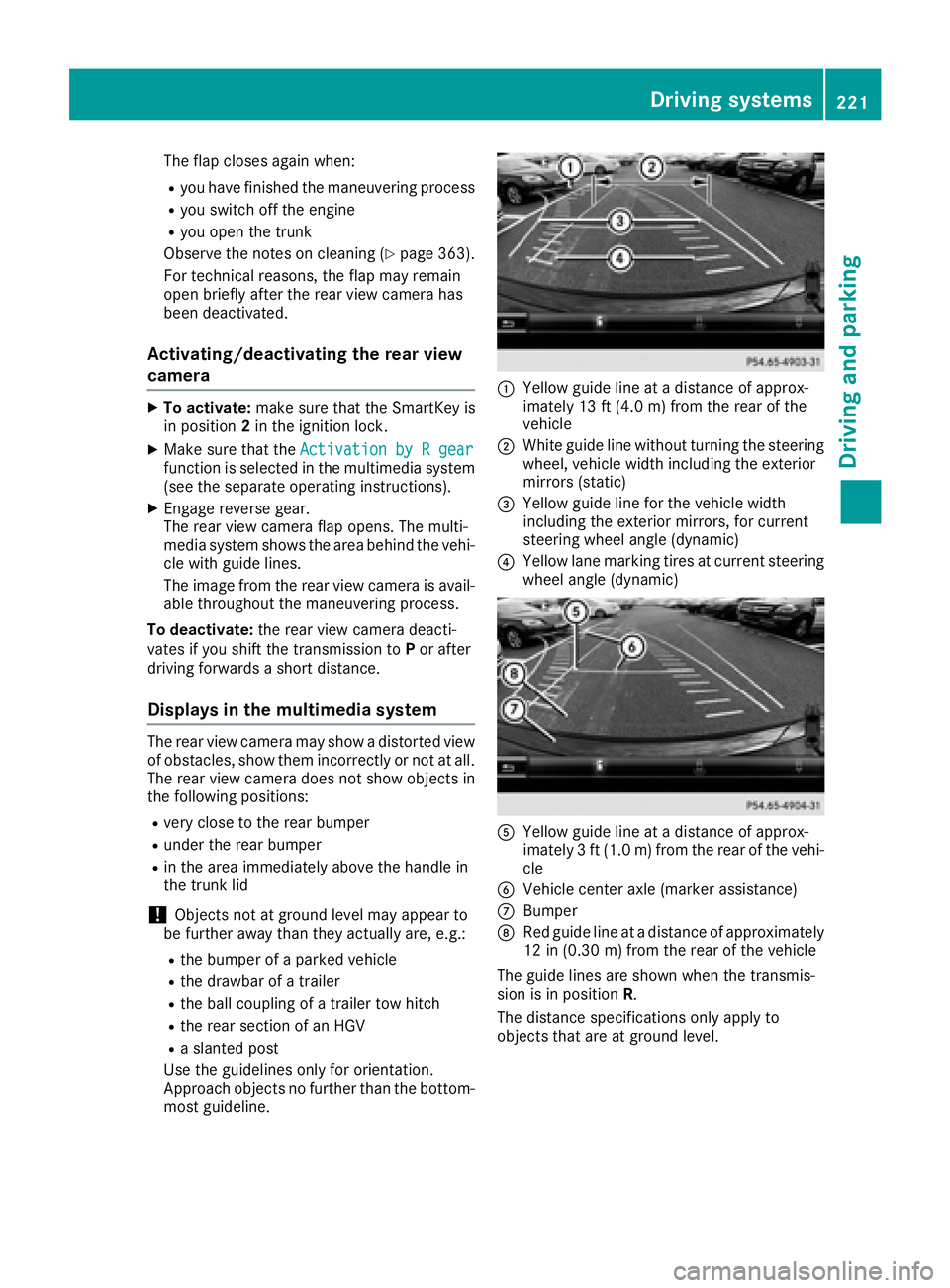
most guideline. C
Yellow guide line at a distance of approx-
imately 13 ft (4.0 m) from the rear of the
vehicle D
White guide line without turning the steering
wheel, vehicle width including the exterior
mirrors (static)
Page 228 of 438
see the top view of the vehicle and the image
from the rear view camera.
Selecting the split-screen and full
screen displays Switching between split screen views: X
To switch to the line with the vehicle icons:
slide 5 the controller.X
To select a vehicle icon: turn the controller.
Switching to full screen mode: X
180° View Turn and press the controller.
i The 180° option is only available in the fol-
lowing views: R
Top view with picture from the rear view
camera R
Top view with picture from the front camera
Displays in the multimedia system
Important safety notes The camera system may show a distorted view
of obstacles, show them incorrectly or not at all.
Obstacles are not shown by the system in the
following locations: R
under the front and rear bumpers R
very close to the front and rear bumpers R
in close range above the handle on the trunk
lid R
very close to the exterior mirrors R
in the transitional areas between the various
cameras in the virtual top view
! Objects not at ground level may appear to
be further away than they actually are, e.g.: R
the bumper of a parked vehicle R
the drawbar of a trailer R
the ball coupling of a trailer tow hitch R
the rear section of an HGV R
a slanted post
Use the guidelines only for orientation.
Approach objects no further than the bottom-
most guideline. Top view with picture from the rear view
camera
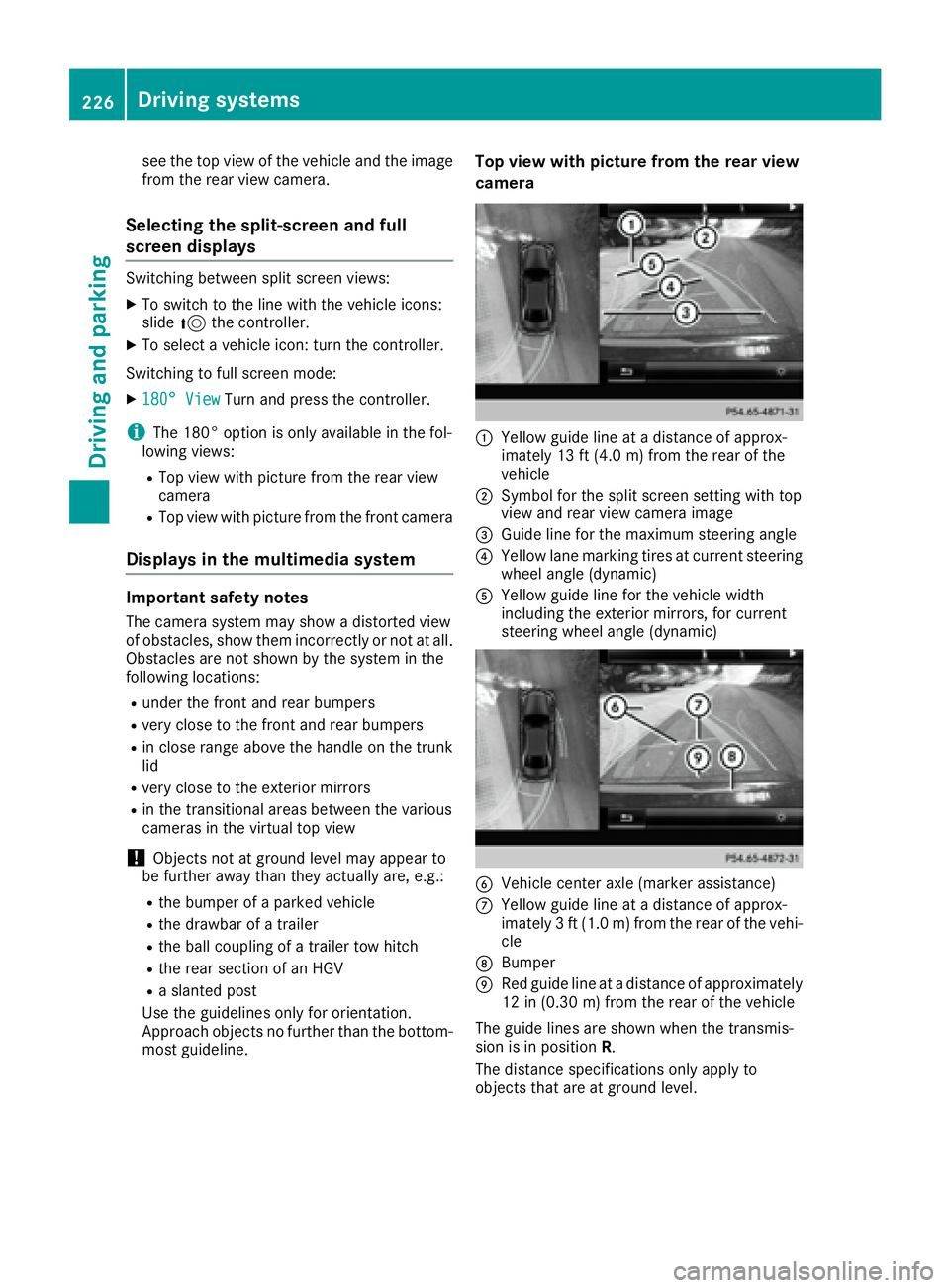
C
Yellow guide line at a distance of approx-
imately 13 ft (4.0 m) from the rear of the
vehicle D
Symbol for the split screen setting with top
view and rear view camera image
Page 236 of 438
Problems with Night View Assist Plus Problem
Possible causes/consequences and P Solutions
The picture quality of
Night View Assist Plus
has deteriorated. The windshield is fogged up on the inside. X
Fold down camera cover ( Y
page 364).X
Defrost the windshield ( Y
page 151).
The windshield is iced up. X
De-ice the windshield ( Y
page 151).
The windshield wipers are smearing the windshield. X
Replace the wiper blades ( Y
page 136).
The windshield is smeared after the vehicle has been cleaned in a car
wash. X
Clean the windshield ( Y
page 362).
There is windshield chip damage in the camera's field of vision. X
Replace the windshield.
The pedestrian and ani-
mal recognition is not
available. the infrared camera in the radiator trim is dirty X
Use a soft cloth and water to clean the infrared camera.
Driving Assistance PLUS package
General notes The Driving Assistance PLUS package consists
of DISTRONIC PLUS ( Y
page 199), Active Blind
Spot Assist ( Y
page 234) and Active Lane Keep-
ing Assist ( Y
page 237).
Active Blind Spot Assist
General notes
Active Blind Spot Assist uses a radar sensor
system, pointed toward the rear of the vehicle,
to monitor the area to the sides of the vehicle
which the driver is unable to see. A warning dis-
play in the exterior mirrors draws your attention
to vehicles detected in the monitored area. If
you then switch on the corresponding turn sig-
nal to change lane, you will also receive an opti-
cal and audible warning. If a risk of lateral colli-
sion is detected, corrective braking may help
you avoid a collision. Before a course-correcting
brake application, Active Blind Spot Assist eval-
uates the space in the direction of travel and at
the sides of the vehicle. For this, Active Blind Spot Assist uses the forward-facing radar sen-
sors.
Active Blind Spot Assist supports you from a
speed of approximately 20 mph (30 km/h).
Important safety notes Active Blind Spot Assist is only an aid and is not
a substitute for attentive driving.
G WARNING
Active Blind Spot Assist does not react to: R
vehicles overtaken too closely on the side,
placing them in the blind spot area R
vehicles which approach with a large speed
differential and overtake your vehicle
As a result, Active Blind Spot Assist may nei-
ther give warnings nor intervene in such sit-
uations. There is a risk of an accident.
Always observe the traffic conditions care-
fully, and maintain a safe lateral distance.
i USA only: This device has been approved by
the FCC as a "Vehicular Radar System". The
radar sensor is intended for use in an auto-
motive radar system only. Removal, tamper-234
Driving systems
Driving and parking
Page 284 of 438
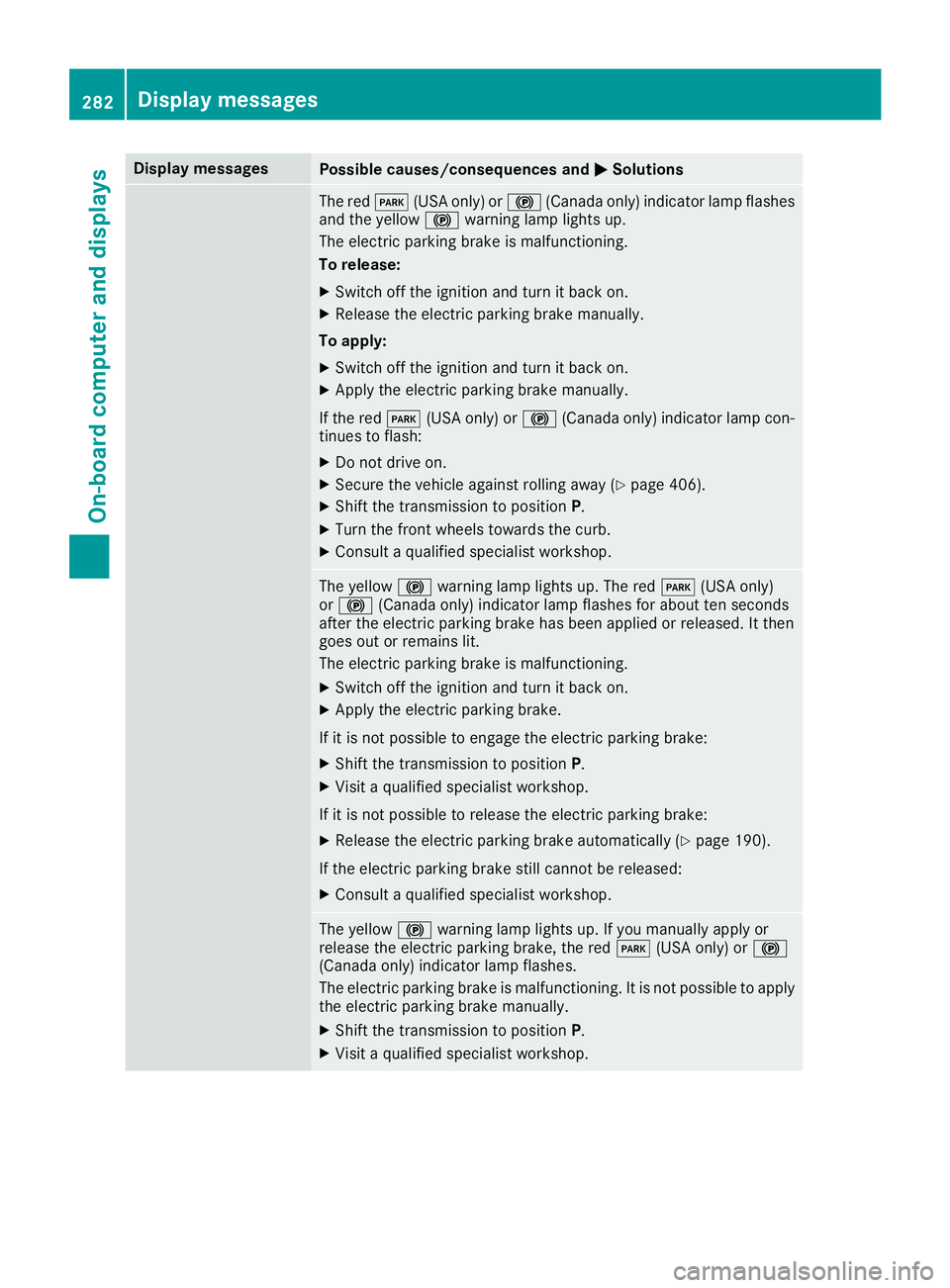
Display messages
Possible causes/consequences and P Solutions
The red I (US A only) or $ (Canada only) indicator lamp flashes
and th e yellow $ warning lamp lights up.
The electric parking brak e is malfunctioning .
To release: X
Switc h off th e ignition and tur n it bac k on .X
Releas e th e electric parking brak e manually.
To apply : X
Switc h off th e ignition and tur n it bac k on .X
Apply th e electric parking brak e manually.
If th e red I (US A only) or $ (Canada only) indicator lamp con-
tinue s to flash: X
Do no t drive on .X
Secur e th e vehicl e against rollin g away ( Y
page 406).X
Shift th e transmission to position P .X
Turn th e fron t wheels toward s th e curb.X
Consult a qualified specialist workshop .
The yellow $ warning lamp lights up. The red I (US A only)
or $ (Canada only) indicator lamp flashes for about te n seconds
after th e electric parking brak e has been applie d or released. It then
goe s out or remain s lit .
The electric parking brak e is malfunctioning .X
Switc h off th e ignition and tur n it bac k on .X
Apply th e electric parking brake.
If it is no t possibl e to engage th e electric parking brake:X
Shift th e transmission to position P .X
Visit a qualified specialist workshop .
If it is no t possibl e to release th e electric parking brake:X
Releas e th e electric parking brak e automatically ( Y
page 190).
If th e electric parking brak e still canno t be released:X
Consult a qualified specialist workshop .
The yellow $ warning lamp lights up. If you manually apply or
release th e electric parking brake, th e red I (US A only) or $
(Canada only) indicator lamp flashes .
The electric parking brak e is malfunctioning . It is no t possibl e to apply
th e electric parking brak e manually.X
Shift th e transmission to position P .X
Visit a qualified specialist workshop .282
Display messages
On-board computer and displays
Page 300 of 438
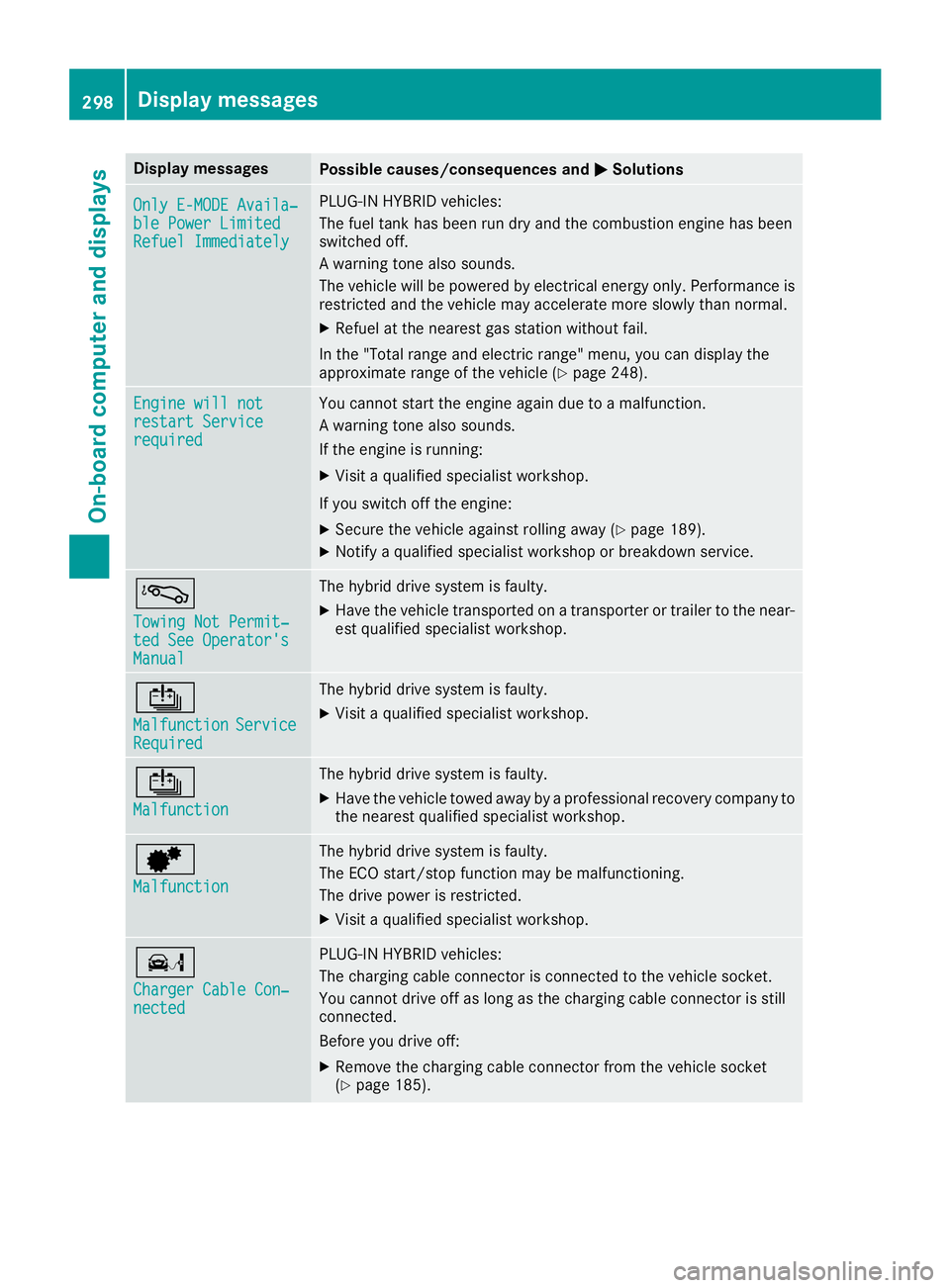
Display messages
Possible causes/consequences and P Solutions
Onl y E-MODE Availa ‐
ble Power Limite d
Refuel Immediately PLUG-I N HYBRID vehicles:
The fuel tan k has been run dry and th e combustion engin e has been
switched off .
A warning tone also sounds.
The vehicl e will be powered by electrical energ y only. Performance is
restricted and th e vehicl e may accelerate mor e slowly than normal.X
Refue l at th e neares t gas station without fail .
In th e "Total range and electric range" menu, you can display th e
approximat e range of th e vehicl e ( Y
page 248).
Engine wil l not
restar t Servic e
required You canno t start th e engin e again due to a malfunction .
A warning tone also sounds.
If th e engin e is running:X
Visit a qualified specialist workshop .
If you switch off th e engine:X
Secur e th e vehicl e against rollin g away ( Y
page 189).X
Notify a qualified specialist workshop or breakdown service.
á Towing Not Permit ‐
ted See Operator' s
Manual The hybrid drive system is faulty. X
Hav e th e vehicl e transporte d on a transporte r or trailer to th e near-
est qualified specialist workshop .
Page 327 of 438
Useful information
i This Operator's Manual describes all models
and all standard and optional equipment of
your vehicle available at the time of publica-
tion of the Operator's Manual. Country-spe-
cific differences are possible. Please note
that your vehicle may not be equipped with all
features described. This also applies to
safety-related systems and functions.
i Read the information on qualified specialist
workshops ( Y
page 28).
Stowage areas
Loading guidelines
G WARNING
Combustion engines emit poisonous exhaust
gases such as carbon monoxide. Exhaust
gases can enter the vehicle interior if the
trunk lid is open when the engine is running,
especially if the vehicle is in motion. There is a
risk of poisoning.
Always switch off the engine before opening
the trunk lid. Never drive with the trunk lid
open.
G WARNING
If objects, luggage or loads are not secured or
not secured sufficiently, they could slip, tip
over or be flung around and thereby hit vehicle
occupants. There is a risk of injury, particu-
larly in the event of sudden braking or a sud-
den change in direction.
Always store objects so that they cannot be
flung around. Secure objects, luggage or
loads against slipping or tipping before the
journey.
G WARNING
The exhaust tail pipe and tail pipe trim can
become very hot. If you come into contact
with these parts of the vehicle, you could burn
yourself. There is a risk of injury.
Always be particularly careful around the
exhaust tail pipe and the tail pipe trim. Allow these components to cool down before touch-
ing them.
The handling characteristics of a laden vehicle
are dependent on the distribution of the load
within the vehicle. For this reason, you should
observe the following notes when transporting a
load: R
Never exceed the maximum permissible
gross vehicle weight or the gross axle weight
rating of the vehicle (including occupants).
The values are specified on the vehicle iden-
tification plate on the B-pillar of the driver's
door. R
The trunk is the preferred place to carry
objects. R
Position heavy loads as far forwards as pos-
sible and as low down in the trunk as possible. R
The load must not protrude above the upper
edge of the seat backrests. R
Always place the load behind unoccupied
seats if possible. R
Secure the load with sufficiently strong and
wear-resistant tie-downs. Pad sharp edges for
protection.
Stowage spaces
Important safety notes
G WARNING
If objects in the passenger compartment are
stowed incorrectly, they can slide or be
thrown around and hit vehicle occupants. In
addition, cupholders, open stowage spaces
and mobile phone brackets cannot always
retain all objects they contain. There is a risk
of injury, particularly in the event of sudden
braking or a sudden change in direction. R
Always stow objects so that they cannot be
thrown around in such situations. R
Always make sure that objects do not pro-
trude from stowage spaces, parcel nets or
stowage nets.Stowage areas 325
Stowage and features Z
Page 328 of 438
R
Close the lockab le stowage spaces before
starting a jo urney.R
Alwa ys stow and secure heavy, hard, poin -
te d, sharp-edged, fragile or bulk y objects in
the trunk.
Observe the loadin g guidelines ( Y
page 325).
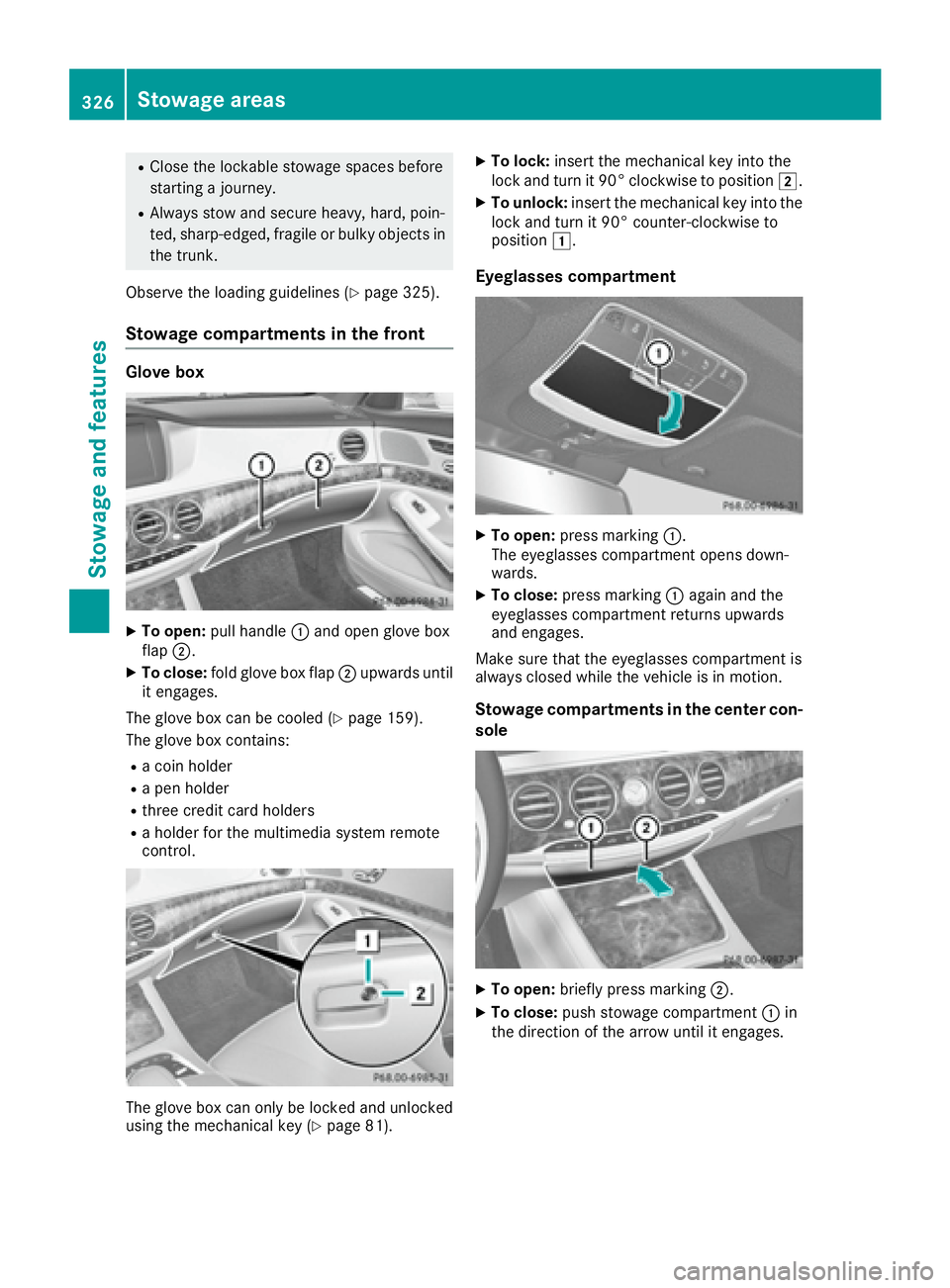
Stowage compartments in the front Glove box
X
To open: pull han dle C and open glove box
flap D .X
To close: fold glove box flap D upwards unt il
it engages.
The glove box can be cooled ( Y
page 159).
The glove box contains: R
a co in holderR
a pen holder R
three cr edit card holdersR
a holder for the multimed ia system remote
control.
The glove box can on ly be locked and unlocked
using the mechanical key ( Y
page 81). X
To lock: insert the mechanical key into the
lock and turn it 90° clockwise to position H .X
To unlock: insert the mechanical key into the
lock and turn it 90° counter-clockwise to
position G .
Eyeglasses compartment X
To open: press marking C .
The eyeglasses compartment opens down-
wards. X
To close: press marking C again and the
eyeglasses compartment returns upwards
and engages.
Make sure that the eyeglasses compartment is
always closed while the vehicle is in motion.
Stowage compartments in the center con-
sole
X
To open: briefly press marking D .X
To close: push stowage compartment C in
the direction of the arrow until it engages.326
Stowage areas
Stowage and features
Page 329 of 438
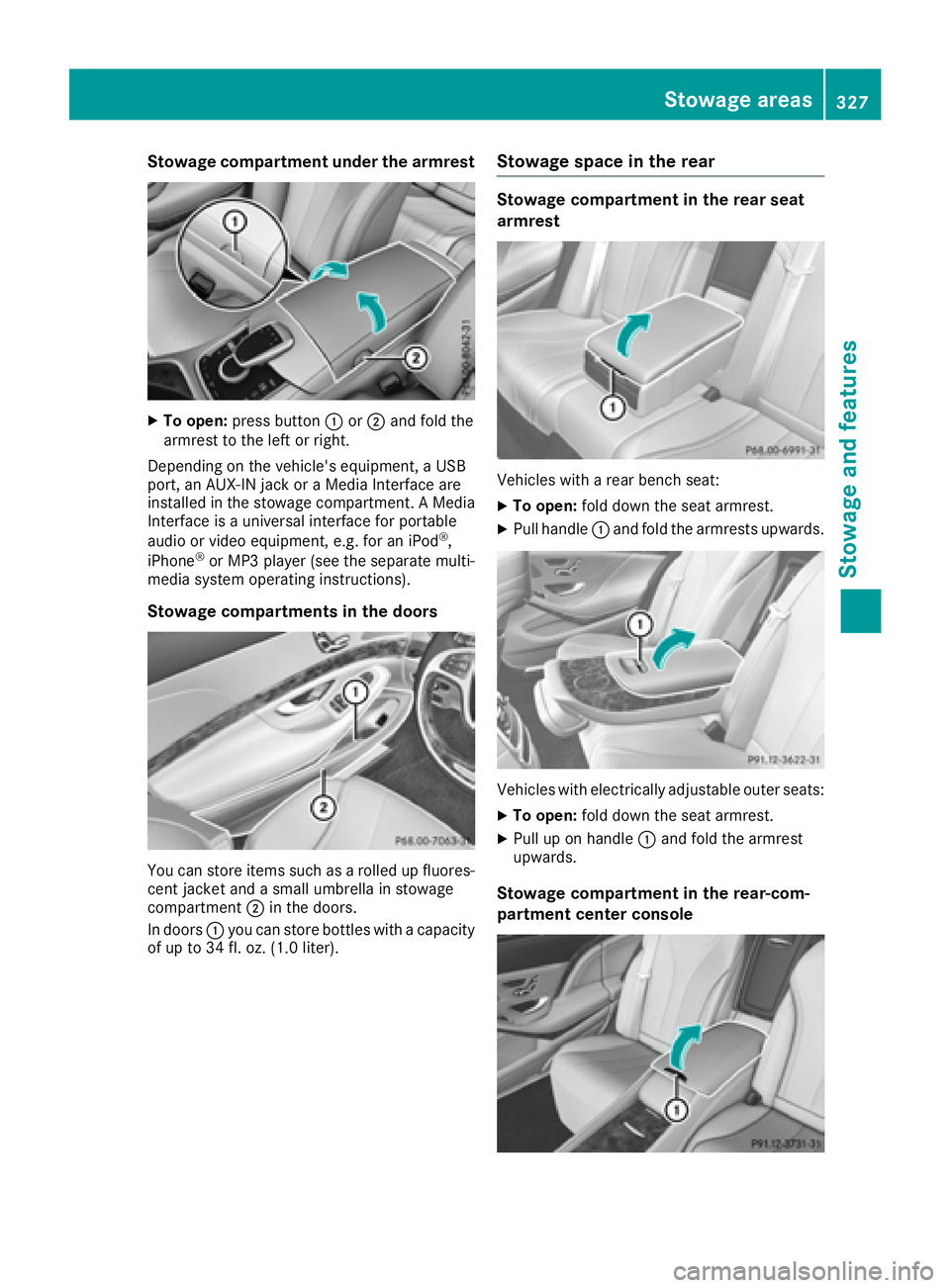
Stowage compartment under the armrest X
To open: press button C or D and fold the
armrest to the left or right.
Depending on the vehicle's equipment, a USB
port, an AUX-IN jack or a Media Interface are
installed in the stowage compartment. A Media
Interface is a universal interface for portable
audio or video equipment, e.g. for an iPod ®
,
iPhone ®
or MP3 player (see the separate multi-
media system operating instructions).
Stowage compartments in the doors
You can store items such as a rolled up fluores-
cent jacket and a small umbrella in stowage
compartment D in the doors.
In doors C you can store bottles with a capacity
of up to 34 fl. oz. (1.0 liter). Stowage space in the rear Stowage compartment in the rear seat
armrest
Vehicles with a rear bench seat: X
To open: fold down the seat armrest. X
Pull handle C and fold the armrests upwards.
Vehicles with electrically adjustable outer seats: X
To open: fold down the seat armrest. X
Pull up on handle C and fold the armrest
upwards.
Stowage compartment in the rear-com-
partment center console Stowage areas 327
Stowage and features Z
Page 330 of 438
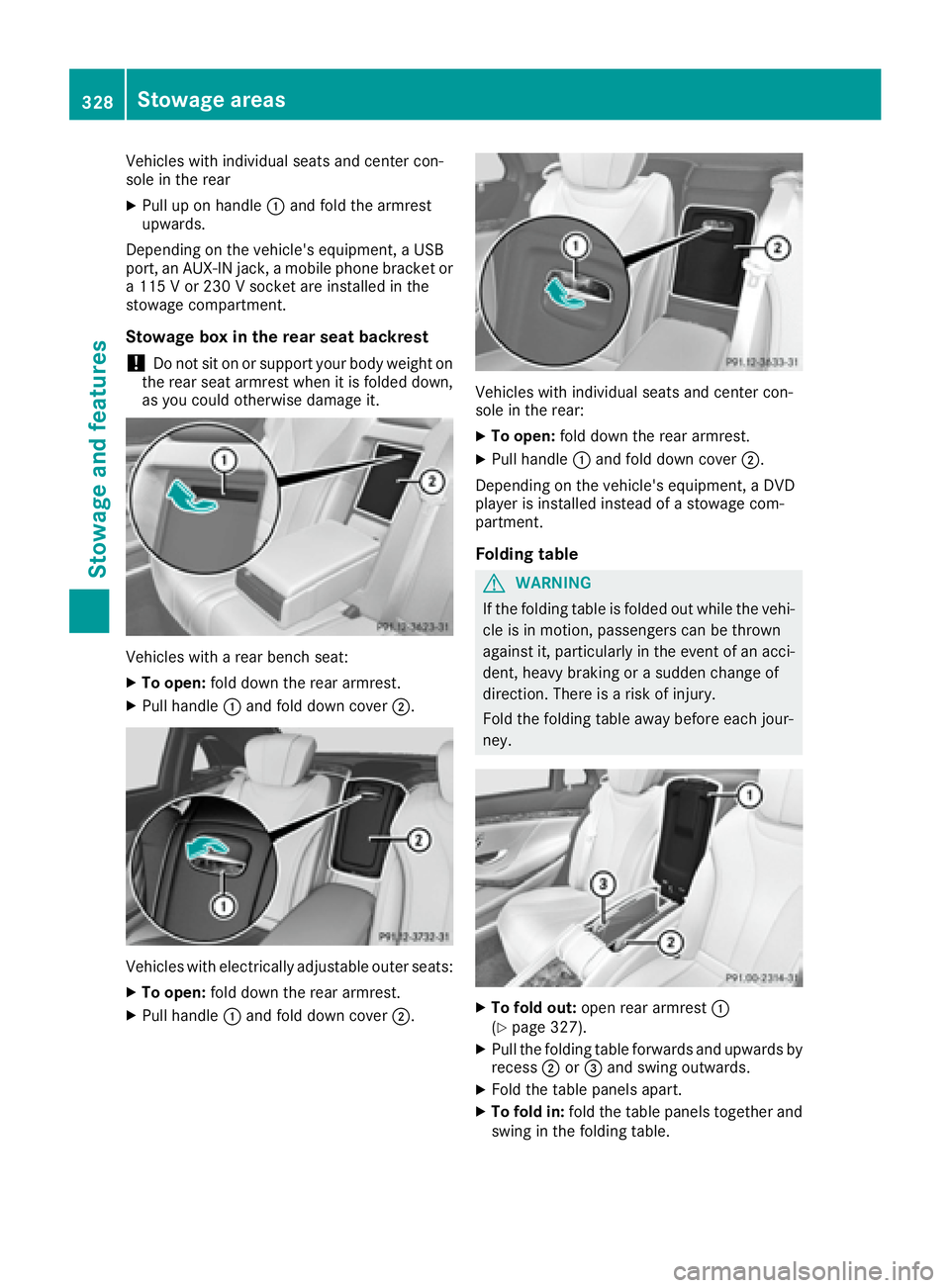
Vehicles with individual seats and center con-
sole in the rear X
Pull up on handle C and fold the armrest
upwards.
Depending on the vehicle's equipment, a USB
port, an AUX-IN jack, a mobile phone bracket or
a 115 V or 230 V socket are installed in the
stowage compartment.
Stowage box in the rear seat backrest
! Do not sit on or support your body weight on
the rear seat armrest when it is folded down,
as you could otherwise damage it.
Vehicles with a rear bench seat: X
To open: fold down the rear armrest.X
Pull handle C and fold down cover D .
Vehicles with electrically adjustable outer seats: X
To open: fold down the rear armrest.X
Pull handle C and fold down cover D . Vehicles with individual seats and center con-
sole in the rear: X
To open: fold down the rear armrest. X
Pull handle C and fold down cover D .
Depending on the vehicle's equipment, a DVD
player is installed instead of a stowage com-
partment.
Folding table
G WARNING
If the folding table is folded out while the vehi-
cle is in motion, passengers can be thrown
against it, particularly in the event of an acci-
dent, heavy braking or a sudden change of
direction. There is a risk of injury.
Fold the folding table away before each jour-
ney.
X
To fold out: open rear armrest C
( Y
page 327). X
Pull the folding table forwards and upwards by
recess D or