Ac rest MERCEDES-BENZ S CLASS 2017 User Guide
[x] Cancel search | Manufacturer: MERCEDES-BENZ, Model Year: 2017, Model line: S CLASS, Model: MERCEDES-BENZ S CLASS 2017Pages: 382, PDF Size: 12.12 MB
Page 22 of 382
Steering wheel
Adjusting (electrically) .................. .1 15
Button overview ............................... 36
Buttons (on-board computer) ......... 211
Cleaning ......................................... 325
EASY ENTRY/EXIT feature ............. 116
Important safety notes .................. 115
Paddle shifters ............................... 156
Steering wheel heating .................. 115
Storing settings (memory func-
tion) ............................................... 120
Steering wheel heating
Problem (malfunction) ................... 116
Switching on/off ........................... 115
Steering wheel paddle shifters ....... .1 56
Stop&Go Pilot
see DISTRONIC PLUS
Stowage areas ................................... 281
Stowage compartments
Armrest (under) ............................ .2 83
Center console .............................. 282
Center console in rear compart-
ment .............................................. 283
Cup holders ................................... 290
Door ............................................... 283
Eyeglasses compartment .............. .2 82
Glove box ....................................... 282
Important safety information ......... 281
Rear ............................................... 283
Rear seat backrest ......................... 284
Stowage net ................................... 285
see Stowage areas
Stowage net ....................................... 285
Stowage space
Bag hooks ...................................... 287
Folding table .................................. 284
Parcel net retainers ....................... 288
Securing a load .............................. 288
Stowage well beneath the trunk
floor .................................................... 289
Summer tires
In winter ........................................ 345
Sun visor ............................................ 292
Suspension mode
Active Body Control ABC .............. .1 80
Suspension setting
AIRMATIC ...................................... 182 Suspension settings
SETUP (on-board computer) .......... 226
Switching air-recirculation mode
on/off ................................................. 140
Sw i
tching on media mode
Via the device list .......................... 278
T Tachometer ........................................ 210
Tail lamps
Display message ............................ 241
Tank content
Fuel gauge ....................................... 35
Technical data
Capacities ...................................... 371
Information .................................... 369
Tires/wheels ................................. 367
Vehicle data ................................... 376
Telephone
Accepting a call (multifunction
steering wheel) .............................. 220
Authorizing a mobile phone (con-
necting) ......................................... 277
Connecting a mobile phone (gen-
eral information) ............................ 277
Display message ............................ 257
Introduction ................................... 219
Menu (on-board computer) ............ 219
Number from the phone book ........ 220
Redialing ........................................ 220
Rejecting/ending a call ................. 220
see also Digital Operator's Man-
ual .................................................. 269
Switching between mobile
phones ........................................... 278
Temperature
Coolant .......................................... 211
Engine oil (on-board computer,
Mercedes-AMG vehicles) ............... 226
Outside temperature ...................... 210
Setting (climate control) ................ 137
Transmission oil (on-board com-
puter, Mercedes-AMG vehicles) ..... 226
Tire pressure
Calling up (on-board computer) ..... 349
Checking manually ........................ 349
Display message ............................ 25220
Index
Page 23 of 382
Maximum ....................................... 348
Not reached (TIREFIT) .................... 330
Notes ............................................. 347
Reached (TIREFIT) .......................... 331
Recommended .............................. .3 46
Using the TIREFIT kit ..................... .3 29
Tire pressure loss warning system
General notes ................................ 352
Important safety notes .................. 352
Restarting ...................................... 352
Tire pressure monitor
Checking the tire pressure elec-
tronically ........................................ 350
Function/notes ............................ .3 49
General notes ................................ 349
Important safety notes .................. 349
Radio type approval for the tire
pressure monitor ........................... 352
Restarting ...................................... 351
Warning lamp ................................. 267
Warning message .......................... 351
TIREFIT kit
Important safety notes .................. 329
Storage location ............................ 327
Tire pressure not reached .............. 330
Tire pressure reached .................... 331
Using ............................................. 329
Tires
Aspect ratio (definition) ................. 361
Average weight of the vehicle
occupants (definition) .................... 360
Bar (definition) ............................... 360
Changing a wheel .......................... 362
Characteristics .............................. 360
Checking ........................................ 343
Curb weight (definition) ................. 361
Definition of terms ......................... 360
Direction of rotation ...................... 363
Display message ............................ 252
Distribution of the vehicle occu-
pants (definition) ............................ 362
DOT (Department of Transporta-
tion) (definition) ............................. 360
DOT, Tire Identification Number
(TIN) ............................................... 360
GAWR (G ross Axl e Weight Rating)
(
definition) ..................................... 361 GVW (Gross Vehicle Weight) (def-
inition) ........................................... 361
GVWR (Gross Vehicle Weight Rat-
ing) (definition) .............................. 361
Important safety notes .................. 343
Increased vehicle weight due to
optional equipment (definition) ...... 361
Information on driving .................... 343
Kilopascal (kPa) (definition) ........... 361
Labeling (overview) ........................ 357
Load bearing index (definition) ...... 362
Load index ..................................... 359
Load index (definition) ................... 361
Maximum load on a tire (defini-
tion) ............................................... 361
Maximum loaded vehicle weight
(definition) ..................................... 361
Maximum permissible tire pres-
sure (definition) ............................. 361
Maximum tire load ......................... 359
Maximum tire load (definition) ....... 361
MOExtended tires .......................... 344
Optional equipment weight (defi-
nition) ............................................ 362
PSI (pounds per square inch) (def-
inition) ........................................... 361
Replacing ....................................... 362
Service life ..................................... 344
Sidewall (definition) ....................... 362
Snow chains .................................. 345
Speed rating (definition) ................ 361
Storing ........................................... 363
Structure and characteristics
(definition) ..................................... 360
Summer tires in winter .................. 345
Temperature .................................. 357
TIN (Tire Identification Number)
(definition) ..................................... 362
Tire bead (definition) ...................... 362
Tire pressure (definition) ................ 362
Tire pressures (recommended) ...... 361
Tire size (data) ............................... 367
Tire size designation, load-bearing
capacity, speed rating .................... 357
Tire trea d ....................................... 344
T ire
tread (definition) ..................... 362
Total load limit (definition) ............. 362
Traction ......................................... 356 Index 21
Page 25 of 382
From inside the vehicle (central
unlocking button) ............................. 83
Upshift indicator (on-board com-
puter, Mercedes-AMG vehicles) ....... 226
USB devices
Connecting to the Media Inter-
face ............................................... 279
V Vanity mirror (in the sun visor) ........ 292
Vehicle
Correct use ...................................... 30
Data acquisition ............................... 31
Display message ............................ 254
Equipment ....................................... 27
Individual settings .......................... 221
Limited Warranty ............................. 31
Loading .......................................... 353
Locking (in an emergency) ............... 84
Locking (SmartKey) .......................... 77
Lowering ........................................ 367
Maintenance .................................... 28
Operating safety .............................. 29
Parking .......................................... 162
Parking for a long period ................ 164
Pulling away ................................... 148
Raising ........................................... 364
Reporting problems ......................... 30
Securing from rolling away ............ 363
Towing away .................................. 338
Transporting .................................. 340
Unlocking (in an emergency) ........... 84
Unlocking (SmartKey) ...................... 77
Vehicle data ................................... 376
Vehicle dimensions ........................... 376
Vehicle emergency locking ................ 84
Vehicle identification number
see VIN
Vehicle identification plate .............. 370
Vehicle level
Active Body Control ABC ............... 180
AIRMATIC ...................................... 182
Display message ............................ 245
Vehicle tool kit .................................. 327
Video
Operating the DVD ......................... 219 see also Digital Operator's Man-
ual .................................................. 269
Video-AUX
Connecting an external video
source ............................................ 279
VIN
Type plate ...................................... 370
W Warning and indicator lamps
ABS ................................................ 261
Brakes ........................................... 260
Check Engine ................................. 264
Coolant .......................................... 264
Distance warning ........................... 266
ESP ®
.............................................. 261
ESP ®
OFF ....................................... 263
Fuel tank ........................................ 264
General notes ................................ 258
Overview .......................................... 35
Parking brake ................................ 263
PASSENGER AIR BAG ...................... 43
Reserve fuel ................................... 264
Restraint system ............................ 263
Seat belt ........................................ 259
Steering ......................................... 268
Tire pressure monitor .................... 267
Warranty .............................................. 27
Washer fluid
Display message ............................ 257
Weather display (COMAND)
see also Digital Operator's Man-
ual .................................................. 269
Wheel and tire combinations
Tires ............................................... 367
Wheel bolt tightening torque ........... 367
Wheel chock ...................................... 363
Wheels
Changing a wheel .......................... 362
Checking ........................................ 343
Cleaning ......................................... 322
Important safety notes .................. 343
Information on driving .................... 343
Interchanging/changing ................ 362
Mounting a new wheel ................... 366
Mounting a wheel .......................... 363
Removing a wheel .......................... 366 Index 23
Page 32 of 382
Diagnostics connection The diagnostic s connection is only intended fo r
th e connection of diagnostic equipmen t at a
qualified specialis t workshop .
G WARNING
If you connec t equipmen t to a diagnostic s
connection in th e vehicle, it may affec t th e
operation of vehicle systems . As a result , th e
operatin g safet y of th e vehicle could be affec -
ted. There is a ris k of an accident.
Only connec t equipmen t to a diagnostic s con-
nection in th e vehicle, whic h is approved fo r
your vehicle by Mercedes-Benz.
G WARNING
Objects in th e driver's footwell can restric t th e
peda l trave l or obstruct a depressed pedal.
The operatin g and road safet y of th e vehicle is
jeopardized. There is a ris k of an accident.
Mak e sur e that all objects in th e vehicle are
stowed correctly, and that they canno t ente r
th e driver's footwell. Install th e floormat s
securely and as specifie d in order to ensur e
sufficien t clearanc e fo r th e pedals. Do no t use
loose floormat s and do no t plac e floormat s on
to p of on e another.
! If th e engin e is switched of f and equipmen t
on th e diagnostic s connection is used , th e
starter battery may discharge.
Connectin g equipmen t to th e diagnostic s con-
nection can lead to emission s monitorin g infor-
mation bein g reset , fo r example. Thi s may lead
to th e vehicle failin g to mee t th e requirements of
th e next emission s test durin g th e main inspec-
tion .
Qualified specialist workshop An authorized Mercedes-Ben z Cente r is a quali-
fie d specialis t workshop . It has th e necessary
specialis t knowledge , tools and qualification s to
correctl y carry out th e wor k require d on your
vehicle. Thi s is especially th e cas e fo r wor k rel -
evant to safety.
Observ e th e note s in th e Maintenance Booklet . Always hav e th e followin g wor k carrie d out at an
authorized Mercedes-Ben z Center:R
wor k relevant to safet yR
servic e and maintenance wor kR
repair wor k R
alterations, installation wor k and modifica-
tion s R
wor k on electronic component s
Correct us eIf you remov e any warnin g stickers , you or oth-
ers could fail to recogniz e certain dangers.
Leave warnin g stickers in position .
Observ e th e followin g information when drivin g
your vehicle: R
th e safet y note s in this manual R
technical dat a fo r th e vehicleR
traffic rule s and regulation sR
laws and safet y standard s pertainin g to moto r
vehicles
Problem s wit h you r vehicleIf you should experience a problem wit h your
vehicle, particularly on e that you believe may
affec t it s saf e operation , we urg e you to contact
an authorized Mercedes-Ben z Cente r immedi-
ately to hav e th e problem diagnosed and recti -
fied. If th e problem is no t resolved to your sat -
isfaction , please discus s th e problem again wit h
an authorized Mercedes-Ben z Cente r or , if nec-
essary, contact us at on e of th e followin g
addresses.
In th e USA
Customer Assistanc e Cente r
Mercedes-Ben z USA, LL C
3 Mercedes Drive
Montvale, NJ 07645-0350
In Canad a
Customer Relation s Departmen t
Mercedes-Ben z Canada, Inc.
98 Vanderhoo f Avenue
Toronto , Ontario M4 G 4C9
Reporting safet y defect s
US A only:30
Operating safety
Introduction
Page 34 of 382
After a malfunction has been rectified, the infor-
mation is deleted from the malfunction memory
or is continually overwritten.
When operating the vehicle, situations are con-
ceivable in which this technical data, in connec-
tion with other information (if necessary, under
consultation with an authorized expert), could
be traced to a person.
Examples include: R
accident reports R
damage to the vehicle R
witness statements
Further additional functions that have been con-
tractually agreed upon with the customer allow
certain vehicle data to be conveyed by the vehi-
cle as well. The additional functions include, for
example, vehicle location in case of an emer-
gency.
COMAND/mbrace If the vehicle is equipped with COMAND or
mbrace, additional data about the vehicle's
operation, the use of the vehicle in certain sit-
uations, and the location of the vehicle may be
compiled through COMAND or the mbrace sys-
tem.
For additional information please refer to the
COMAND User Manual or the Digital Owners
Manual and/or the mbrace Terms and Condi-
tions.
Event data recorders This vehicle is equipped with an event data
recorder (EDR). This vehicle is equipped with an
event data recorder (EDR). The main purpose of
an EDR is to record, in certain crash or near
crash-like situations, such as an air bag deploy-
ment or hitting a road obstacle, data that will
assist in understanding how a vehicle's systems
performed. The EDR is designed to record data
related to vehicle dynamics and safety systems
for a short period of time, typically 30 seconds
or less.
The EDR in this vehicle is designed to record
such data as: R
How various systems in your vehicle were
operating R
Whether or not the driver and passenger
safety belts were buckled/fastened R
How far (if at all) the driver was depressing the
accelerator and/or brake pedal and R
How fast the vehicle was traveling.
These data can help provide a better under-
standing of the circumstances in which crashes
and injuries occur. NOTE: EDR data are recorded
by your vehicle only if a non-trivial crash situa-
tion occurs; no data are recorded by the EDR
under normal driving conditions and no personal
data (e.g. name, gender, age and crash location)
are recorde d. Ho wever, other parties, such as
l aw enforcement could combine the EDR data
with the type of personally identifying data rou-
tinely acquired during a crash investigation.
Access to the vehicle and/or the EDR is needed
to read data that is recorded by an EDR, and
special equipment is required. In addition to the
vehicle manufacturer, other parties that have
the special equipment, such as law enforce-
ment, can read the information by accessing the
vehicle or the EDR.
EDR data may be used in civil and criminal mat-
ters as a tool in accident reconstruction, acci-
dent claims and vehicle safety. Since the Crash
Data Retrieval CDR tool that is used to extract
data from the EDR is commercially available,
Mercedes-Benz USA, LLC ("MBUSA") expressly
disclaims any and all liability arising from the
extraction of this information by unauthorized
Mercedes-Benz personnel.
MBUSA will not share EDR data with others
without the consent of the vehicle owners or, if
the vehicle is leased, without the consent of the
lessee. Exceptions to this representation
include responses to subpoenas by law enforce-
ment; by federal, state or local government; in
connection with or arising out of litigation involv-
ing MBUSA or its subsid iaries and affiliates; or,
a s required by law.
Warning: The EDR is a component of the
Restraint System Module. Tampering with, alter-
ing, modifying or removing the EDR component
may result in a malfunction of the Restraint Sys-
tem Module and other systems.
State laws or regulations regarding EDRs that
conflict with federal regulation are pre-empted.
This means that in the event of such conflict, the
federal regulation governs. As of February 2013,
13 states have enacted laws relating to EDRs.32
Data stored in the vehicle
Introduction
Page 44 of 382

Panic alarm X
To arm: press 3 button C for approx-
imately one second.
A visual and audible alarm is triggered if the
alarm system is armed. X
To disarm: press 3 button C again.
or X
Insert the SmartKey into the ignition lock.
or X
Press the Start/Stop button.
The SmartKey must be in the vehicle.
Occupant safety
Introduction to the restraint system The restraint system can reduce the risk of vehi-
cle occupants coming into contact with parts of
the vehicle's interior in the event of an accident.
The restraint system can also reduce the forces
to which vehicle occupants are subjected during
an accident.
The restraint system comprises: R
seat belt system R
air bags R
child restraint system R
child seat securing systems
The components of the restraint system work in
conjunction with each other. They can only
deploy their protective function if, at all times, all
vehicle occupants: R
have fastened their seat belts correctly
( Y
page 45)R
have adjusted their seat and head restraint
properly ( Y
page 100). As the driver, you also have to make sure that
the steering wheel is adjusted correctly.
Observe the information relating to the correct
driver's seat position ( Y
page 100).
You also have to make sure that an air bag can
inflate properly if deployed ( Y
page 48).
An air bag supplements a correctly worn seat
belt. As an additional safety device, the air bag
increases the level of protection for vehicle
occupants in the event of an accident. For exam-
ple, if, in the event of an accident, the protection
offered by the seat belt is sufficient, the air bags
are not deployed. When an accident occurs, only
the air bags that increase protection in that par-
ticular accident situation are deployed. How-
ever, seat belts and air bags generally do not
protect against objects penetrating the vehicle
from the outside.
Information on restraint system operation can
be found under "Triggering of the Emergency
Tensioning Devices and air bags" ( Y
page 55).
For information on children traveling with you in
the vehicle and on child restraint systems, see
"Children in the vehicle" ( Y
page 59).
Important safety notes
G WARNING
Modifications to the restraint system may
cause it to no longer work as intended. The
restraint system may then not perform its
intended protective function and may fail in an
accident or trigger unexpectedly, for example.
This poses an increased risk of injury or even
fatal injury.
Never modify parts of the restraint system.
Never tamper with the wiring, the electronic
components or their software.
If it is necessary to modify components of the
restraint system to accommodate a person
with disabilities, contact an authorized
Mercedes-Benz Center for details. USA only:
for further information contact our Customer
Assistance Center at 1-800-FOR-MERCedes
(1 ‑ 800 ‑ 367 ‑ 6372).
Mercedes-Benz recommends that you only use
driving aids which have been approved specifi-
cally for your vehicle by Mercedes-Benz.42
Occupant safety
Safety
Page 45 of 382

Restraint system warning lamp The functions of the restraint system are
checked after the ignition is switched on and at
regular intervals while the engine is running.
Therefore, malfunctions can be detected in
good time.
The u restraint system warning lamp in the
instrument cluster lights up when the ignition is
switched on. It goes out no later than a few sec-
onds after the vehicle is started. The compo-
nents of the restraint system are in operational
readiness.
A malfunction has occurred if the u restraint
system warning lamp: R
does not light up after the ignition is switched
on R
does not go out after a few seconds with the
engine running R
lights up again while the engine is running
G WARNING
If the restraint system is malfunctioning,
restraint system components may be trig-
gered unintentionally or may not deploy as
intended during an accident. This can affect
for example the Emergency Tensioning
Device or the air bag. This poses an increased
risk of injury or even fatal injury.
Have the restraint system checked and
repaired in a qualified specialist workshop as
soon as possible.
PASSENGER AIR BAG indicator lamp
PASSENGER AIR BAG ON indicator lamp C and
PASSENGER AIR BAG OFF indicator lamp D are
part of the Occupant Classification System
(OCS). The indicator lamps display the status of the
front-passenger front air bag. R
PASSENGER AIR BAG ON lights up for 60 sec-
onds, subsequently both indicator lamps are
off (PASSENGER AIR BAG ON and OFF): the
front-passenger front air bag is able to deploy
in the event of an accident. R
PASSENGER AIR BAG OFF lights up: the front-
passenger front air bag is deactivated. It will
then not be deployed in the event of an acci-
dent.
If the PASSENGER AIR BAG ON indicator lamp is
off, only the PASSENGER AIR BAG OFF indicator
lamp shows the status of the front-passenger
front air bag. The PASSENGER AIR BAG OFF
indicator lamp may be lit continuously or be off.
Depending on the person in the front-passenger
seat, the front-passenger front air bag must
either be deactivated or enabled; see the fol-
lowing points. You must make sure of this both
before and during a journey. R
Children in a child restraint system:
whether the front-passenger front air bag is
enabled or deactivated depends on the instal-
led child restraint system, and the age and
size of the child. Therefore, be sure to observe
the notes on the "Occupant Classification
System (OCS)" ( Y
page 51) and on "Chil-
dren in the vehicle" ( Y
page 59). There you
w ill also find instructions on rearward and
forward-facing child restraint systems on the
front-passenger seat. R
All other persons: depending on the classi-
fication of the person in the front-passenger
seat, the front-passenger front air bag is ena-
bled or deactivated ( Y
page 51). Be sure to
observe the notes on "Seat
belts“ ( Y
page 43) and "Air bags"
( Y
page 48). There you can also find infor-
mation on the correct seat position.
Seat belts
Introduction
Seat belts are the most effective means of
restricting the movement of vehicle occupants
in the event of an accident or the vehicle rolling
over. This reduces the risk of vehicle occupants
coming into contact with parts of the vehicle
interior or being ejected from the vehicle. Fur-
thermore, the seat belt helps to keep the vehicleOccupant safety 43
Safety Z
Page 46 of 382
occupant in the best position in relation to the
air bag.
The seat belt system comprises: R
Seat belts R
Emergency Tensioning Devices for the front
seat belts and the outer seat belts in the rear R
Seat belt force limiters for the front seat belts
and the outer seat belts in the rear R
Belt bags for the outer seat belts in the rear,
depending on the vehicle's equipment
If the seat belt is pulled out of the belt outlet
quickly or with a jerky movement, the belt
retractor locks. The belt strap cannot be extrac-
ted any further.
The Emergency Tensioning Device tightens the
seat belt in an accident, pulling the belt close
against the body. However it does not pull the
vehicle occupant back in the direction of the
backrest.
The Emergency Tensioning Device does not cor-
rect an incorrect seat position or the routing of
an incorrectly fastened seat belt.
When triggered, a seat belt force limiter helps to
reduce the force exerted by the seat belt on the
vehicle occupant.
The seat belt force limiters for the front seats are
synchronized with the front air bags, which
absorb part of the deceleration force. This can
reduce the force exerted on the vehicle occu-
pants during an accident.
! If the front-passenger seat is unoccupied,
do not insert the belt tongue into the buckle of
the front-passenger seat. This may otherwise
lead to the triggering of the Emergency Ten-
sioning Device in the event of an accident,
which will then need to be replaced.
Important safety notes The use of seat belts and child restraint systems
is required by law in: R
all 50 states R
the U.S. territories R
the District of Columbia R
all Canadian provinces
Even where this is not required by law, all vehicle
occupants should correctly fasten their seat
belts before starting the journey. G WARNING
If the seat belt is not worn correctly, it cannot
perform its intended protective function. An
incorrectly fastened seat belt can also cause
injuries, for example, in the event of an acci-
dent or when braking or changing direction
abruptly. This poses an increased risk of injury
or even fatal injury.
Always ensure that all vehicle occupants have
their seat belts fastened correctly and are sit-
ting properly.
G WARNING
The seat belt does not offer the intended level
of protection if you have not moved the back-
rest to an almost vertical position. When brak-
ing or in the event of an accident, you could
slide underneath the seat belt and sustain
abdomen or neck injuries, for example. This
poses an increased risk of injury or even fatal
injury.
Adjust the seat properly before beginning
your journey. Always ensure that the backrest
is in an almost vertical position and that the
shoulder section of your seat belt is routed
across the center of your shoulder.
G WARNING
Objects next to the front seat that block the
belt buckle or the moving belt anchorage on
the front seat impair the function of the Emer-
gency Tensioning Devices. The Emergency
Tensioning Devices may not function as inten-
ded and the seat belt may no longer provide
the intended protection. This poses an
increased risk of injury or even fatal injury.
Before starting the journey, make sure that
there are no objects around the belt buckle or
between the front seat and door.
G WARNING
Persons less than 5 ft (1.50 m) tall cannot
wear the seat belt correctly without an addi-
tional and suitable restraint system. If the
seat belt is not worn correctly, it cannot per-
form its intended protective function. An44
Occupant safety
Safety
Page 47 of 382
incorrectly fastened seat belt can also cause
injuries, for example, in the event of an acci-
dent or when braking or changing direction
abruptly. This poses an increased risk of injury
or even fatal injury.
For this reason, always secure persons under
5 ft (1.50 m) tall in suitable additional restraint
systems.
If a child younger than twelve years old and
under 5 ft (1.50 m) in height is traveling in the
vehicle: R
always secure the child in a child restraint
system suitable for this Mercedes-Benz vehi-
cle. The child restraint system must be appro-
priate to the age, weight and size of the child R
always observe the instructions and safety
notes on the belt bags for the outer seat belts
in the rear ( Y
page 46)R
always observe the instructions and safety
notes on "Children in the vehicle"
( Y
page 59) in addition to the child restraint
system manufacturer's installation and oper-
ating instructions R
be sure to observe the instructions and safety
notes on the "Occupant classification system
(OCS)" ( Y
page 51)
G WARNING
The seat belts may not perform their intended
protective function if: R
they are damaged, modified, extremely
dirty, bleached or dyed R
the seat belt buckle is damaged or
extremely dirty R
the Emergency Tensioning Devices, belt
anchorages or inertia reels have been modi-
fied.
Seat belts may be damaged in an accident,
although the damage may not be visible, e.g.
due to splinters of glass. Modified or damaged
seat belts may tear or fail, e.g. in an accident.
Modified Emergency Tensioning Devices
could accidentally trigger or fail to deploy
when necessary. This poses an increased risk
of injury or even fatal injury.
Never modify the seat belts, Emergency Ten-
sioning Devices, belt anchorages and inertia reels. Make sure that the seat belts are
undamaged, not worn out and clean. Follow-
ing an accident, have the seat belts checked
immediately at a qualified specialist work-
shop.
Only use seat belts that have been approved for
your vehicle by Mercedes-Benz.
Proper use of the seat belts Observe the safety notes on the seat belt
( Y
page 44).
All vehicle occupants must be wearing the seat
belt correctly before beginning the journey. Also
make sure that all vehicle occupants are always
wearing the seat belt correctly while the vehicle
is in motion.
When fastening the seat belt, always make sure
that: R
the seat belt tongue is only inserted to the belt
buckle belonging to that seat. R
the seat belt is tight across your body.
Avoid wearing bulky clothing, e.g. a winter
coat. R
the seat belt is not twisted.
Only then can the forces which occur be dis-
tributed over the area of the belt. R
the shoulder section of the belt is always
routed across the center of your shoulder.
The shoulder section of the belt must not
come into contact with your neck or be routed
under your arm. Where possible, adjust the
seat belt to the appropriate height. R
the lap belt passes tightly and as low down as
possible across your lap.
The lap belt must always be routed across
your hip joints and not across your abdomen.
This applies particularly to pregnant women.
If necessary, push the lap belt down to your
hip joint and pull it tight using the shoulder
section of the belt. R
the seat belt is not routed across sharp, poin-
ted or fragile objects.
If you have such items located on or in your
clothing, e.g. pens, keys or eyeglasses, store
these in a suitable place. R
only one person is using a seat belt at a time.
Infants and children must never travel sitting
on the lap of a vehicle occupant. In the eventOccupant safety 45
Safety Z
Page 48 of 382
of an accident, they could be crushed
between the vehicle occupant and seat belt. R
objects are never secured with a seat belt if
the seat belt is also being used by one of the
vehicle's occupants.
Also ensure that there are never objects
between a person and the seat, e.g. cushions.
Seat belts are only intended to secure and
restrain vehicle occupants. Always observe the
"Loading guidelines" for securing objects, lug-
gage or loads ( Y
page 281).
Rear beltbags
i Observe the "Important safety notes" sec-
tion ( Y
page 48).
Depending on the vehicle's equipment, the
outer rear seat belts are equipped with a belt
bag. This can be seen from the BELTBAG iden-
tification on the rear seat belt.
G WARNING
In an accident, the beltbag may damage a
child restraint system that is not permitted or
that has not been approved for a beltbag. As a
result, the child restraint system may not be
able to provide the intended level of protec-
tion. This poses an increased risk of injury or
even fatal injury.
For this reason, always secure a child
restraint system with an integrated seat belt
with LATCH-type (ISOFIX). On vehicles with
optional beltbags for the rear seats, only use a
booster seat with an integrated backrest,
which has been tested and approved by
Mercedes-Benz in combination with a belt-
bag. Never use a seat belt equipped with a
beltbag to secure a forward or rearward-
facing child restraint system or a non-
approved booster seat. Contact an authorized
Mercedes-Benz Center for information on
approved child restraint systems.
Further information on child restraint systems
( Y
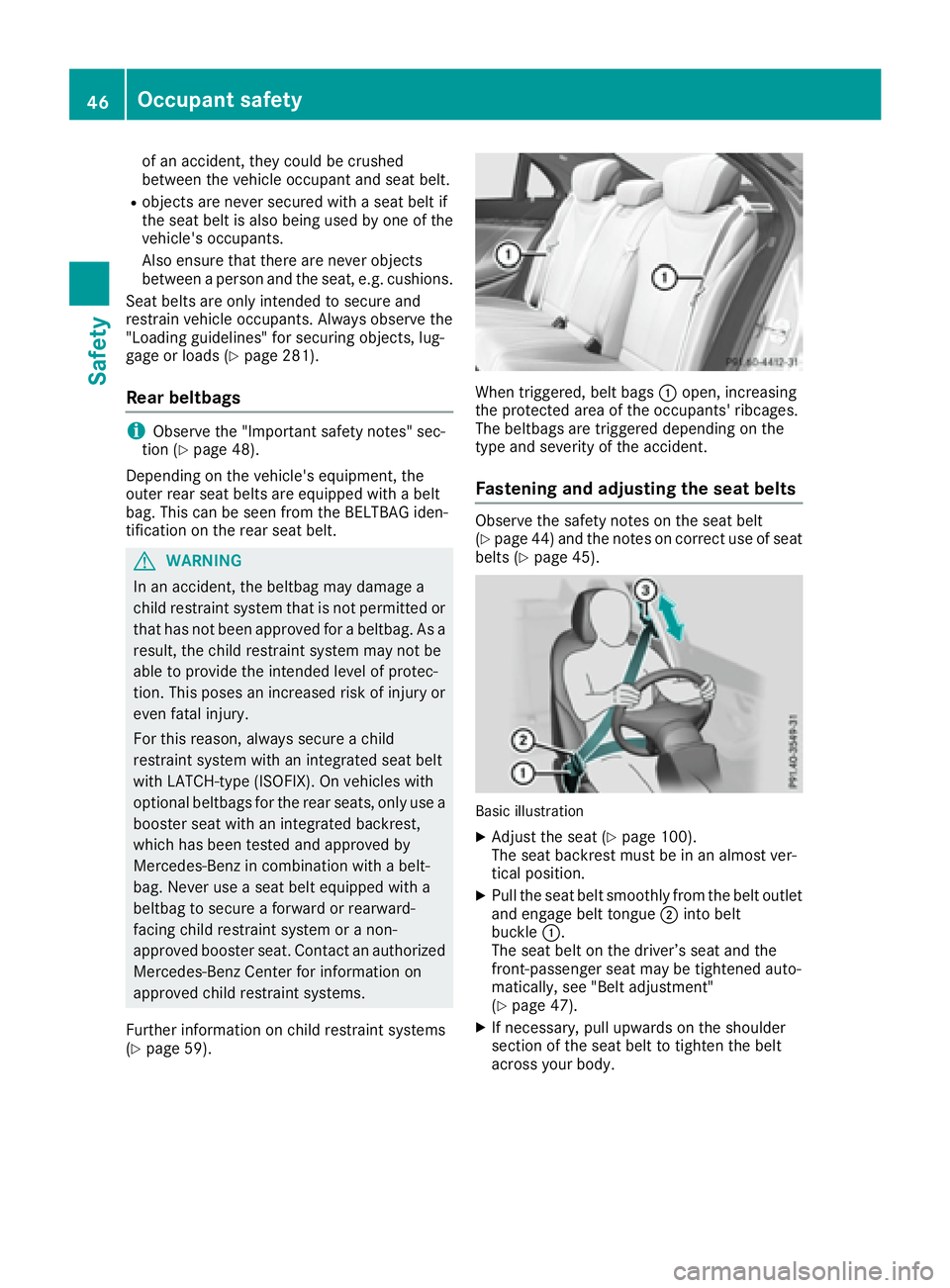
page 59). When triggered, belt bags C open, increasing
the protected area of the occupants' ribcages.
The beltbags are triggered depending on the
type and severity of the accident.
Fastening and adjusting the seat belts Observe the safety notes on the seat belt
( Y
page 44) and the notes on correct use of seat
belts ( Y
page 45).
Basic illustration X
Adjust the seat ( Y
page 100).
The seat backrest must be in an almost ver-
tical position. X
Pull the seat belt smoothly from the belt outlet
and engage belt tongue D into belt
buckle C .
The seat belt on the driver’s seat and the
front-passenger seat may be tightened auto-
matically, see "Belt adjustment"
( Y
page 47). X
If necessary, pull upwards on the shoulder
section of the seat belt to tighten the belt
across your body.46
Occupant safety
Safety