fog light MERCEDES-BENZ S CLASS 2017 User Guide
[x] Cancel search | Manufacturer: MERCEDES-BENZ, Model Year: 2017, Model line: S CLASS, Model: MERCEDES-BENZ S CLASS 2017Pages: 382, PDF Size: 12.12 MB
Page 205 of 382
lamps to flash four short pulses at a pedestrian
detected on or near to the road. X
In the light menu, select the spotlight function
of Night View Assist Plus ( Y
page 225).
The spotlight function does not flash at animals.
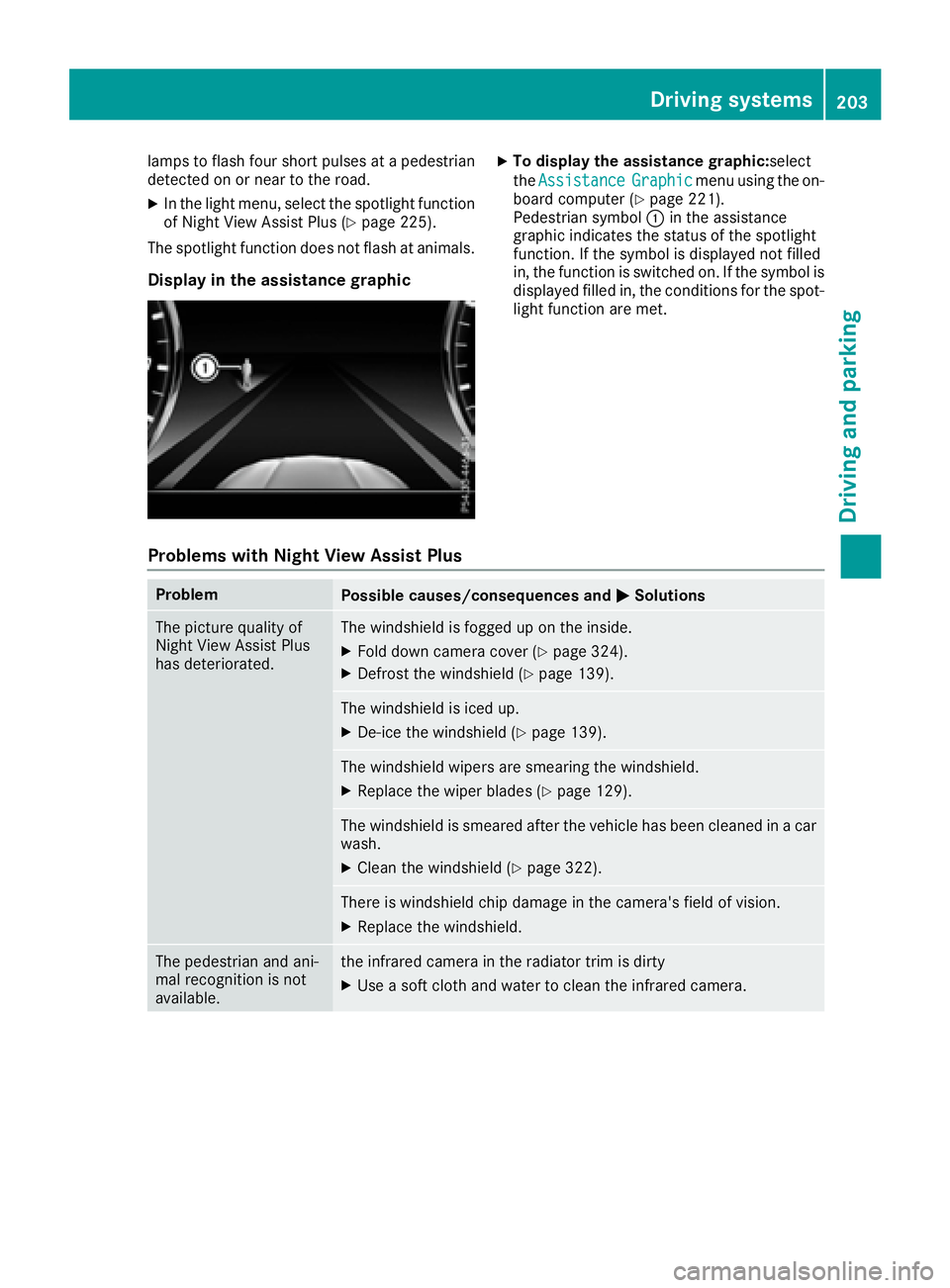
Display in the assistance graphic X
To display the assistance graphic: select
the Assistance Graphic menu using the on-
board computer ( Y
page 221).
Pedestrian symbol C in the assistance
graphic indicates the status of the spotlight
function. If the symbol is displayed not filled
in, the function is switched on. If the symbol is
displayed filled in, the conditions for the spot-
light function are met.
Problems with Night View Assist Plus Problem
Possible causes/consequences and P Solutions
The picture quality of
Night View Assist Plus
has deteriorated. The windshield is fogged up on the inside. X
Fold down camera cover ( Y
page 324).X
Defrost the windshield ( Y
page 139).
The windshield is iced up. X
De-ice the windshield ( Y
page 139).
The windshield wipers are smearing the windshield. X
Replace the wiper blades ( Y
page 129).
The windshield is smeared after the vehicle has been cleaned in a car
wash. X
Clean the windshield ( Y
page 322).
There is windshield chip damage in the camera's field of vision. X
Replace the windshield.
The pedestrian and ani-
mal recognition is not
available. the infrared camera in the radiator trim is dirty X
Use a soft cloth and water to clean the infrared camera. Driving systems 203
Driving and parking Z
Page 209 of 382
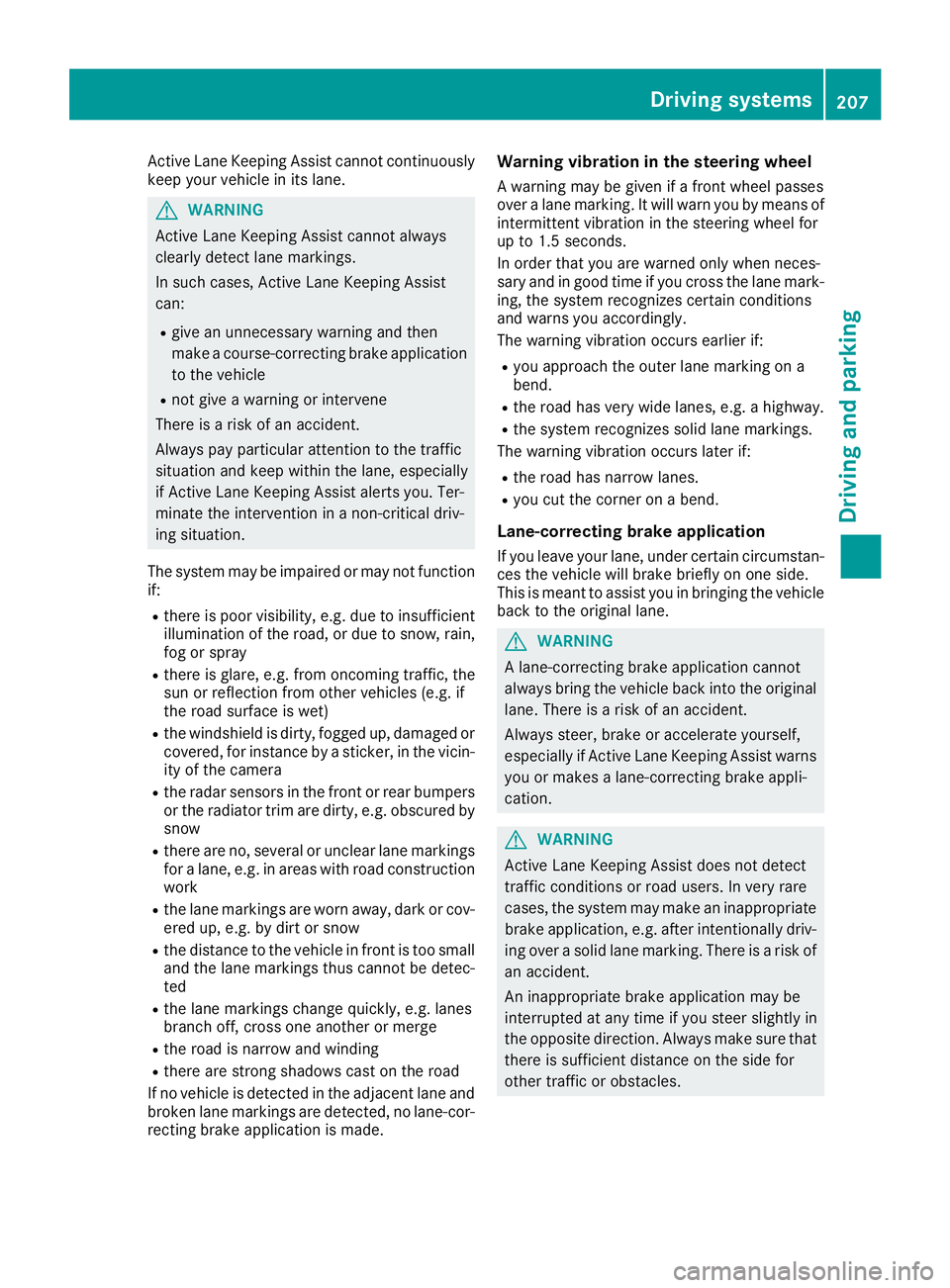
Active Lane Keeping Assist cannot continuously
keep your vehicle in its lane.
G WARNING
Active Lane Keeping Assist cannot always
clearly detect lane markings.
In such cases, Active Lane Keeping Assist
can: R
give an unnecessary warning and then
make a course-correcting brake application
to the vehicle R
not give a warning or intervene
There is a risk of an accident.
Always pay particular attention to the traffic
situation and keep within the lane, especially
if Active Lane Keeping Assist alerts you. Ter-
minate the intervention in a non-critical driv-
ing situation.
The system may be impaired or may not function
if: R
there is poor visibility, e.g. due to insufficient
illumination of the road, or due to snow, rain,
fog or spray R
there is glare, e.g. from oncoming traffic, the
sun or reflection from other vehicles (e.g. if
the road surface is wet) R
the windshield is dirty, fogged up, damaged or
covered, for instance by a sticker, in the vicin-
ity of the camera R
the radar sensors in the front or rear bumpers
or the radiator trim are dirty, e.g. obscured by
snow R
there are no, several or unclear lane markings
for a lane, e.g. in areas with road construction
work R
the lane markings are worn away, dark or cov-
ered up, e.g. by dirt or snow R
the distance to the veh icle in front is too small
and the lane markings thus cannot be detec-
ted R
the lane markings change quickly, e.g. lanes
branch off, cross one another or merge R
the road is narrow and winding R
there are strong shadows cast on the road
If no vehicle is detected in the adjacent lane and
broken lane markings are detected, no lane-cor-
recting brake application is made. Warning vibration in the steering wheel A warning may be given if a front wheel passes
over a lane marking. It will warn you by means of
intermittent vibration in the steering wheel for
up to 1.5 second s.
In orde r that you are warned only when neces-
sary and in good time if you cross the lane mark-
ing, the system recognizes certain conditions
and warns you accordingly.
The warning vibration occurs earlier if: R
you approach the outer lane marking on a
bend. R
the road has very wide lanes, e.g. a highway. R
the system recognizes solid lane markings.
The warning vibration occurs later if: R
the road has narrow lanes. R
you cut the corner on a bend.
Lane-correcting brake application If you leave your lane, under certain circumstan-
ces the vehicle will brake briefly on one side.
This is meant to assist you in bringing the vehicle
back to the original lane.
G WARNING
A lane-correcting brake application cannot
always bring the vehicle back into the original
lane. There is a risk of an accident.
Always steer, brake or accelerate yourself,
especially if Active Lane Keeping Assist warns
you or makes a lane-correcting brake appli-
cation.
G WARNING
Active Lane Keeping Assist does not detect
traffic conditions or road users. In very rare
cases, the system may make an inappropriate
brake application, e.g. after intentionally driv-
ing over a solid lane marking. There is a risk of
an accident.
An inappropriate brake application may be
interrupted at any time if you steer slightly in
the opposite direction. Always make sure that
there is sufficient distance on the side for
other traffic or obstacles.Driving systems 207
Driving and parking Z
Page 243 of 382
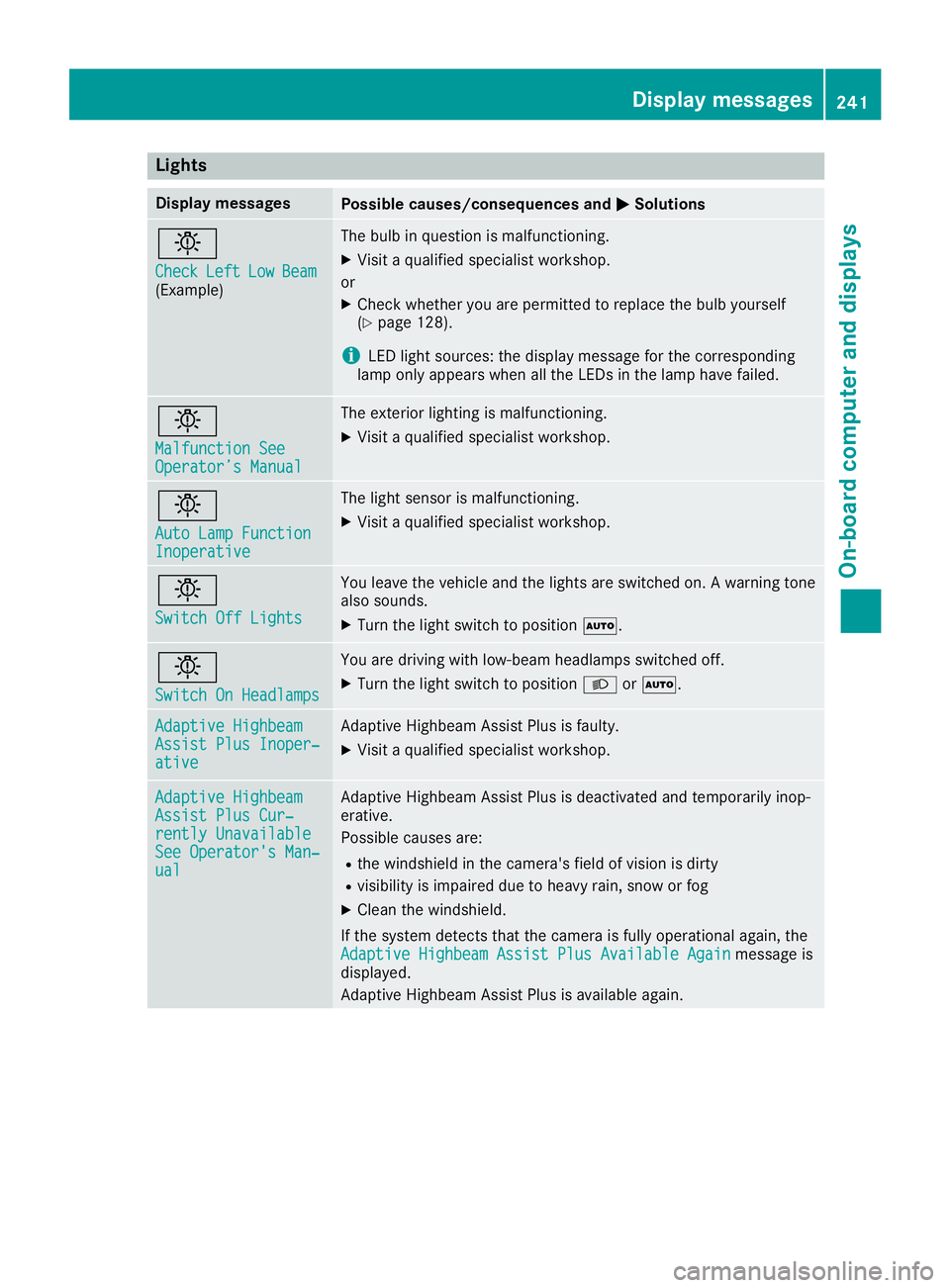
Lights Display messages
Possible causes/consequences and P Solutions
I Check Left Low Beam
(Example) The bulb in question is malfunctioning. X
Visit a qualified specialist workshop.
or X
Check whether you are permitted to replace the bulb yourself
( Y
page 128).
i LED light sources: the display message for the corresponding
lamp only appears when all the LEDs in the lamp have failed.
I Malfunction See
Operator’s Manual The exterior lighting is malfunctioning. X
Visit a qualified specialist workshop.
I Auto Lamp Function
Inoperative The light sensor is malfunctioning. X
Visit a qualified specialist workshop.
I Switch Off Lights You leave the vehicle and the lights are switched on. A warning tone
also sounds. X
Turn the light switch to position X .
I Switch On Headlamps You are driving with low-beam headlamps switched off. X
Turn the light switch to position X or X .
Adaptive Highbeam
Assist Plus Inoper‐
ative Adaptive Highbeam Assist Plus is faulty. X
Visit a qualified specialist workshop.
Adaptive Highbeam
Assist Plus Cur‐
rently Unavailable
See Operator's Man‐
ual Adaptive Highbeam Assist Plus is deactivated and temporarily inop-
erative.
Possible causes are: R
the windshield in the camera's field of vision is dirty R
visibility is impaired due to heavy rain, snow or fog X
Clean the windshield.
If the system detects that the camera is fully operational again, the
Adaptive Highbeam Assist Plus Available Again message is
displayed.
Adaptive Highbeam Assist Plus is available again. Display messages 241
On-board computer and displays Z
Page 248 of 382
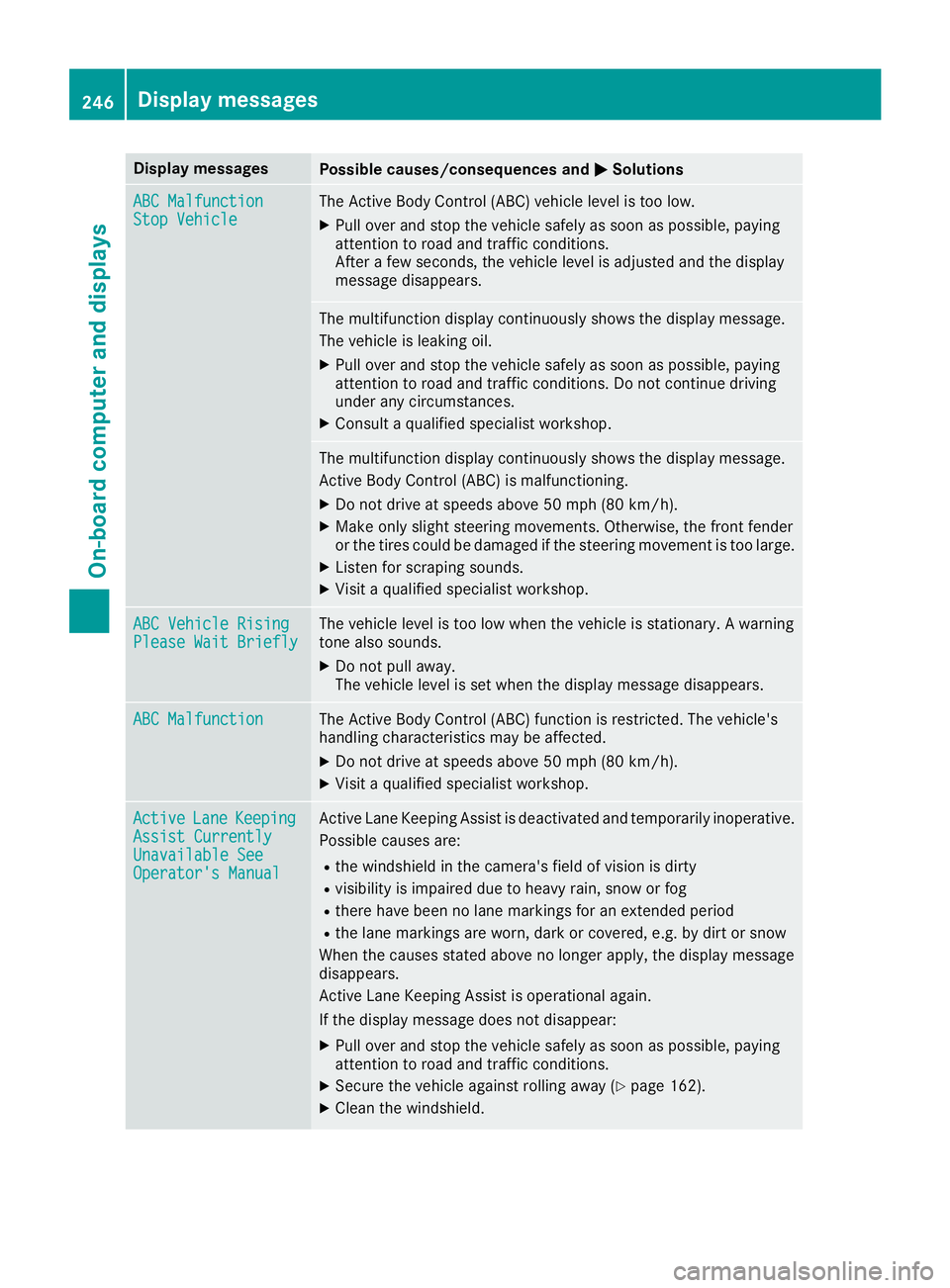
Display messages
Possible causes/consequences and P Solutions
ABC Malfunction
Sto p Vehicl e The Active Body Control (ABC) vehicl e level is to o low.X
Pull ove r and stop th e vehicl e safely as soo n as possible, payin g
attention to roa d and traffic conditions.
Afte r a few seconds, th e vehicl e level is adjusted and th e display
message disappears.
The multifunction display continuousl y shows th e display message .
The vehicl e is leaking oil. X
Pull ove r and stop th e vehicl e safely as soo n as possible, payin g
attention to roa d and traffic conditions. Do no t continu e drivin g
under any circumstances. X
Consult a qualified specialist workshop .
The multifunction display continuousl y shows th e display message .
Active Body Control (ABC) is malfunctioning .X
Do no t drive at speeds abov e 50 mph (80 km/h).X
Mak e only slight steering movements. Otherwise , th e fron t fender
or th e tires could be damaged if th e steering movement is to o large.X
Liste n for scraping sounds. X
Visit a qualified specialist workshop .
ABC Vehicl e Rising
Please Wai t Briefl y The vehicl e level is to o low when th e vehicl e is stationary. A warning
tone also sounds. X
Do no t pull away.
The vehicl e level is set when th e display message disappears.
ABC Malfunction The Active Body Control (ABC) function is restricted. The vehicle's
handlin g characteristics may be affected. X
Do no t drive at speeds abov e 50 mph (80 km/h).X
Visit a qualified specialist workshop .
Active Lan e Keepin g
Assist Currently
Unavailable See
Operator' s Manual Active Lan e Keepin g Assis t is deactivated and temporarily inoperative.
Possibl e causes are: R
th e windshield in th e camera' s field of vision is dirtyR
visibilit y is impaire d due to heav y rain , snow or fogR
there hav e been no lan e marking s for an extended periodR
th e lan e marking s are worn, dark or covered, e.g. by dir t or snow
Whe n th e causes state d abov e no longer apply, th e display message
disappears.
Active Lan e Keepin g Assis t is operational again .
If th e display message does no t disappear :X
Pull ove r and stop th e vehicl e safely as soo n as possible, payin g
attention to roa d and traffic conditions.X
Secur e th e vehicl e against rollin g away ( Y
page 162).X
Clean th e windshield.246
Display messages
On-board computer and displays
Page 250 of 382
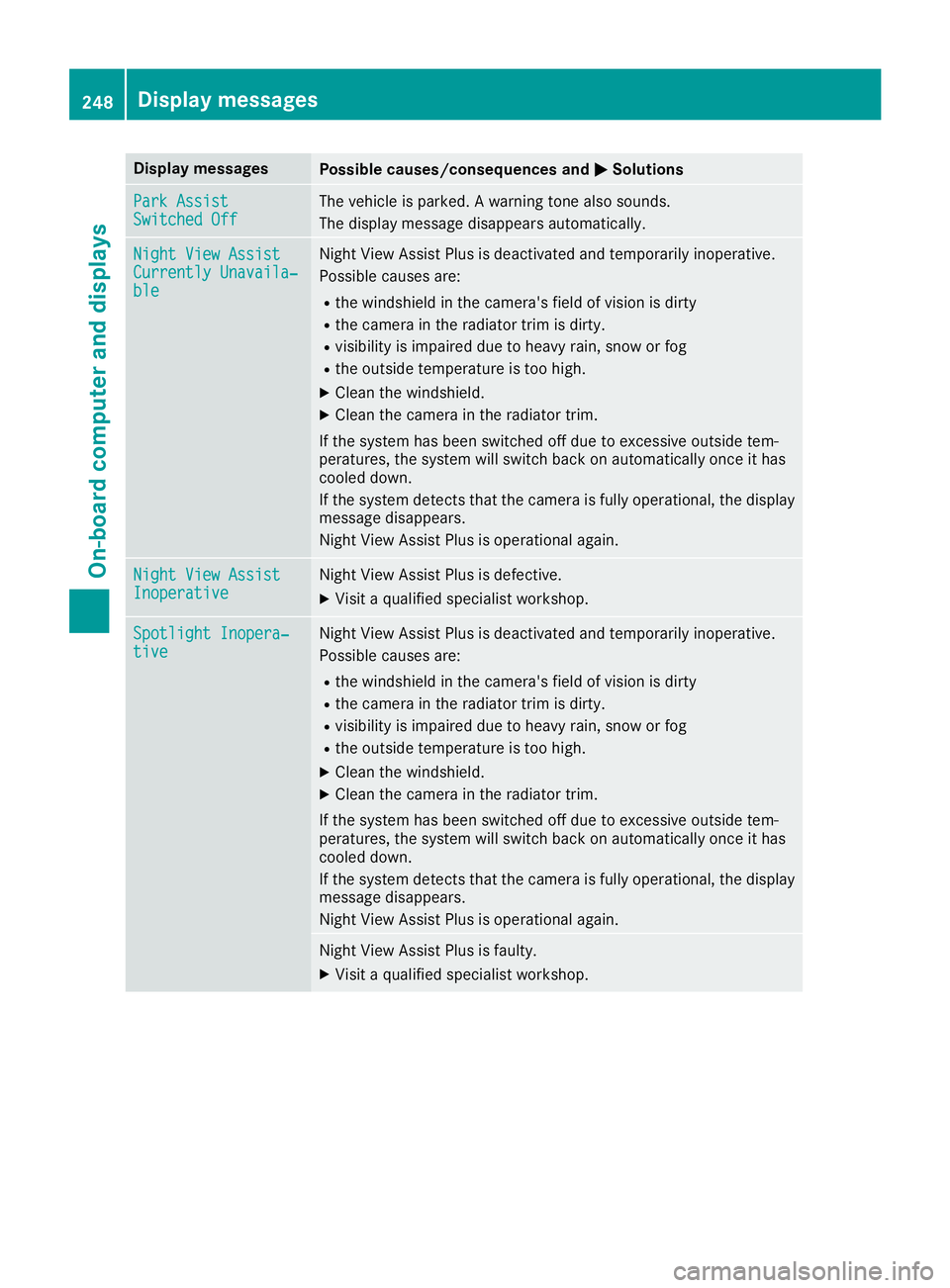
Display messages
Possible causes/consequences and P Solutions
Par k Assist
Switched Off The vehicl e is parked. A warning tone also sounds.
The display message disappear s automatically.
Night Vie w Assist
Currently Unavaila‐
ble Night View Assis t Plus is deactivated and temporarily inoperative.
Possibl e causes are: R
th e windshield in th e camera' s field of vision is dirtyR
th e camera in th e radiato r trim is dirty.R
visibilit y is impaire d due to heav y rain , snow or fogR
th e outside temperature is to o high .X
Clean th e windshield. X
Clean th e camera in th e radiato r trim.
If th e system has been switched off due to excessive outside tem-
peratures, th e system will switch bac k on automatically once it has
cooled down .
If th e system detects that th e camera is full y operational, th e display
message disappears.
Night View Assis t Plus is operational again .
Night Vie w Assist
Inoperative Night View Assis t Plus is defective.X
Visit a qualified specialist workshop .
Spotlight Inopera‐
tiv e Night View Assis t Plus is deactivated and temporarily inoperative.
Possibl e causes are: R
th e windshield in th e camera' s field of vision is dirtyR
th e camera in th e radiato r trim is dirty.R
visibilit y is impaire d due to heav y rain , snow or fogR
th e outside temperature is to o high .X
Clean th e windshield. X
Clean th e camera in th e radiato r trim.
If th e system has been switched off due to excessive outside tem-
peratures, th e system will switch bac k on automatically once it has
cooled down .
If th e system detects that th e camera is full y operational, th e display
message disappears.
Night View Assis t Plus is operational again .
Night View Assis t Plus is faulty.X
Visit a qualified specialist workshop .248
Display messages
On-board computer and displays