ESP MERCEDES-BENZ S CLASS 2017 Owner's Guide
[x] Cancel search | Manufacturer: MERCEDES-BENZ, Model Year: 2017, Model line: S CLASS, Model: MERCEDES-BENZ S CLASS 2017Pages: 382, PDF Size: 12.12 MB
Page 126 of 382
Exterior lighting
General notes USA only: if you wish to drive during the daytime
without lights, switch off the Daytime Run‐
ning Lights function via the on-board com-
puter ( Y
page 225).
Setting the exterior lighting
Setting options Exterior lighting can be set using: R
the light switch ( Y
page 124)R
the combination switch ( Y
page 125)R
the on-board computer ( Y
page 225)
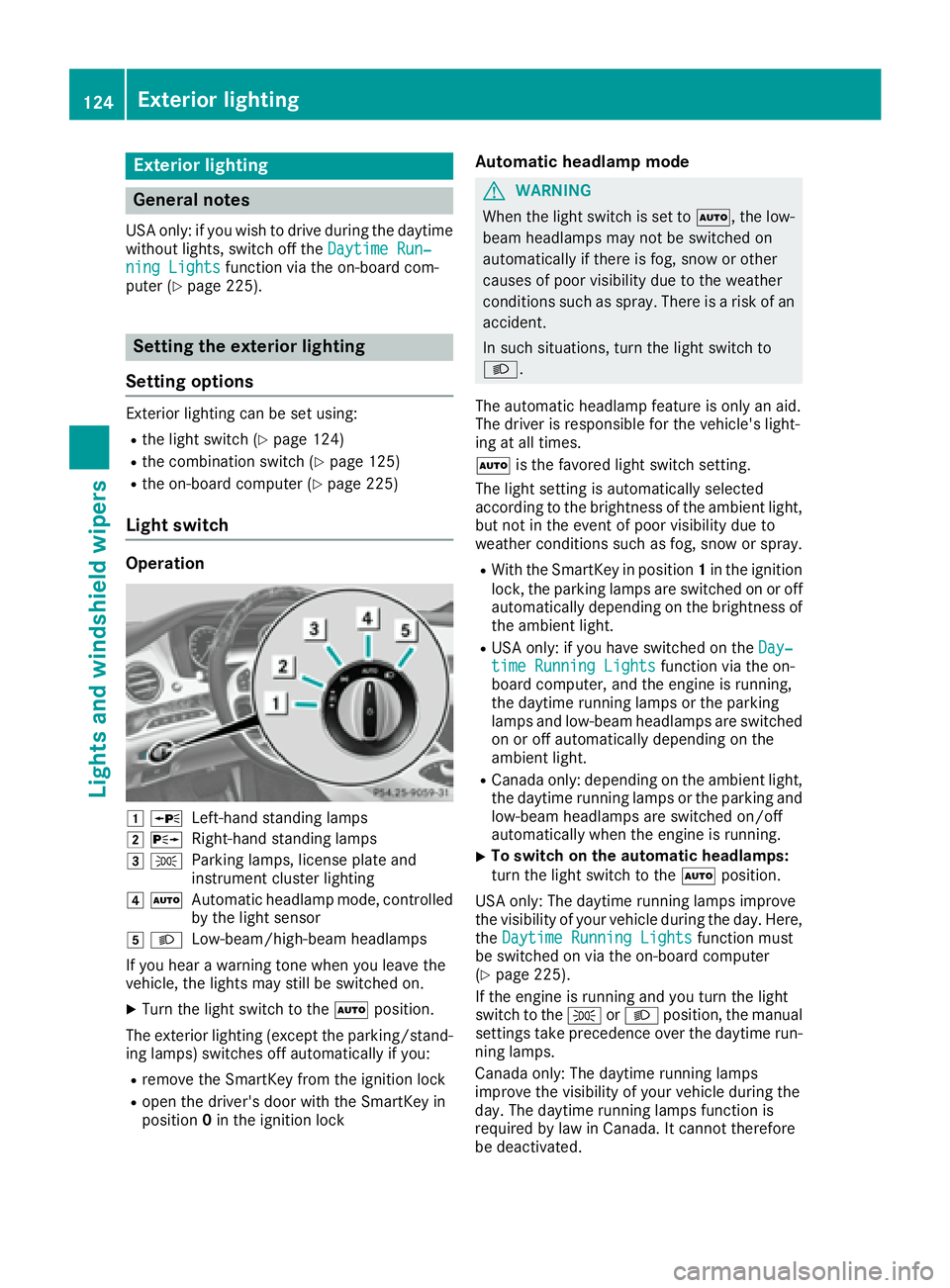
Light switch Operation
G c
Left-hand standing lampsH d
Right-hand standing lampsI `
Parking lamps, license plate and
instrument cluster lightingJ X
Automatic headlamp mode, controlled
by the light sensor
K X
Low-beam/high-beam headlamps
If you hear a warning tone when you leave the
vehicle, the lights may still be switched on. X
Turn the light switch to the X position.
The exterior lighting (except the parking/stand-
ing lamps) switches off automatically if you: R
remove the SmartKey from the ignition lock R
open the driver's door with the SmartKey in
position 0 in the ignition lock Automatic headlamp mode
G WARNING
When the light switch is set to X , the low-
beam headlamps may not be switched on
automatically if there is fog, snow or other
causes of poor visibility due to the weather
conditions such as spray. There is a risk of an
accident.
In such situations, turn the light switch to
X .
The automatic headlamp feature is only an aid.
The driver is responsible for the vehicle's light-
ing at all times.
X is the favored light switch setting.
The light setting is automatically selected
according to the brightness of the ambient light,
but not in the event of poor visibility due to
weather conditions such as fog, snow or spray. R
With the SmartKey in position 1 in the ignition
lock, the parking lamps are switched on or off
automatically depending on the brightness of
the ambient light. R
USA only: if you have switched on the Day‐
time Running Lights function via the on-
board computer, and the engine is running,
the daytime running lamps or the parking
lamps and low-beam headlamps are switched
on or off automatically depending on the
ambient light. R
Canada only: depending on the ambient light,
the daytime running lamps or the parking and
low-beam headlamps are switched on/off
automatically when the engine is running. X
To switch on the automatic headlamps:
turn the light switch to the X position.
USA only: The daytime running lamps improve
the visibility of your vehicle during the day. Here,
the Daytime Running Lights function must
be switched on via the on-board computer
( Y
page 225).
If the engine is running and you turn the light
switch to the ` or X position, the manual
settings take precedence over the daytime run-
ning lamps.
Canada only: The daytime running lamps
improve the visibility of your vehicle during the
day. The daytime running lamps function is
required by law in Canada. It cannot therefore
be deactivated.124
Exterior lighting
Lights and windshield wipers
Page 127 of 382
When the engine is running and the vehicle is
stationary: if you move the selector lever from a
driving position to P , the daytime running lamps
and low-beam headlamps go out after three
minutes.
When the engine is running, the vehicle is sta-
tionary and in bright ambient light: if you turn the
light switch to the ` position, the daytime
running lamps and parking lamps switch on.
If the engine is running and you turn the light
switch to the X position, the manual settings
take precedence over the daytime running
lamps.
Low-beam headlamps
G WARNING
When the light switch is set to X , the low-
beam headlamps may not be switched on
automatically if there is fog, snow or other
causes of poor visibility due to the weather
conditions such as spray. There is a risk of an
accident.
In such situations, turn the light switch to
X .
Even if the light sensor does not detect that it is
dark, the parking lamps and low-beam head-
lamps switch on when the ignition is switched on
and the light switch is set to the X position.
This is a particularly useful function in the event
of rain and fog. X
To switch on the low-beam headlamps:
turn the SmartKey in the ignition lock to posi-
tion 2 or start the engine.X
Turn the light switch to the X position.
The green X indicator lamp in the instru-
ment cluster lights up.
Parking lamps
! If the battery charge is very low, the parking
lamps or standing lamps are automatically
switched off to enable the next engine start.
Always park your vehicle safely and in a well lit
area, in accordance with the relevant legal
stipulations. Avoid using the ` parking
lamps over a period of several hours. If pos-
sible, switch on the right-hand d or left-
hand c standing lamps. X
To switch on the parking lamps: turn the
light switch to the ` position.
The green ` indicator lamp on the instru-
ment cluster lights up.
Standing lamps Switching on the standing lamps ensures the
corresponding side of the vehicle is illuminated. X
To switch on the standing lamps: turn the
SmartKey to position 0 in the ignition lock or
remove the SmartKey. X
Turn the light switch to the c (left-hand
side of the vehicle) or d (right-hand side of
the vehicle) position.
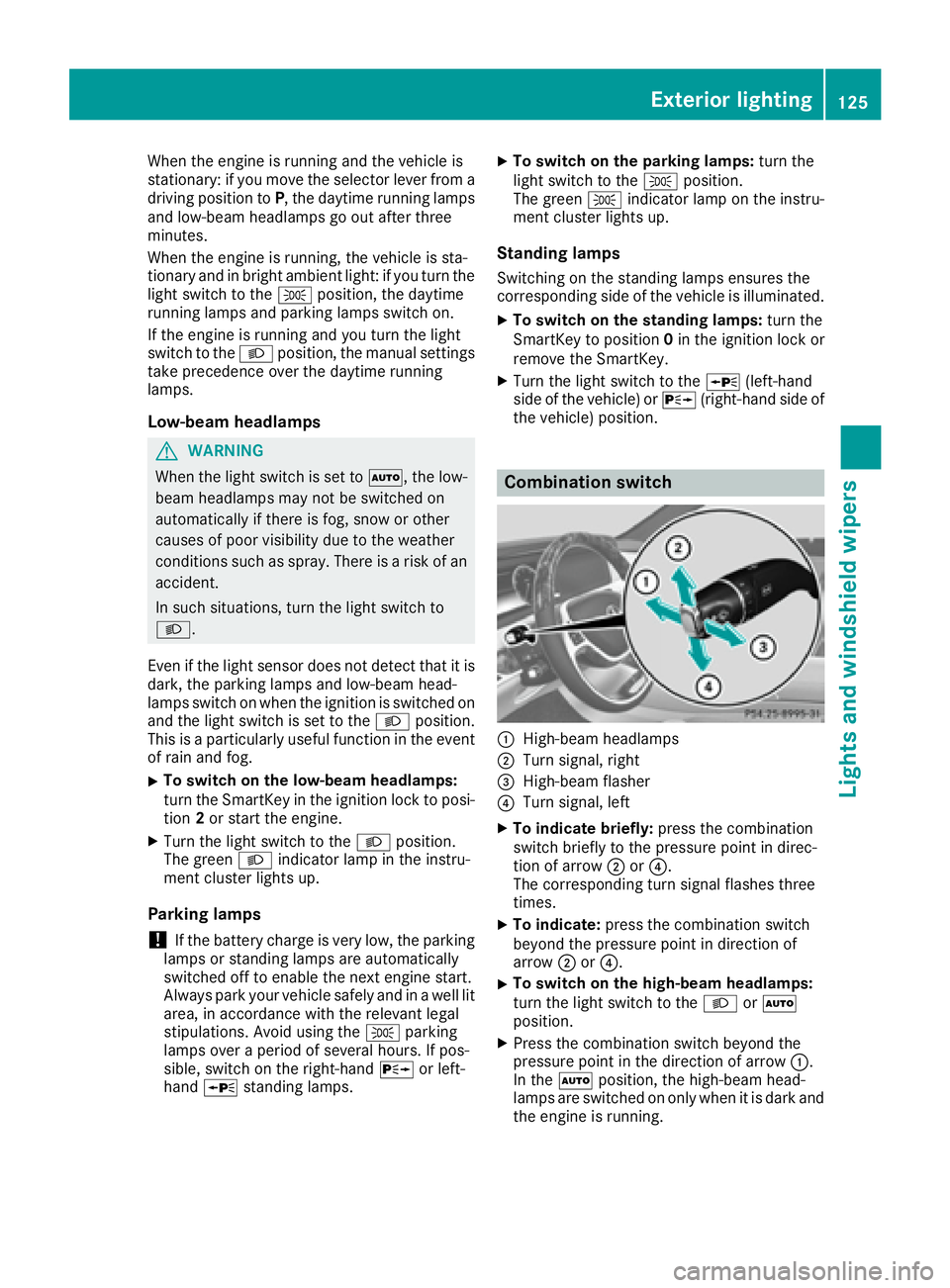
Combination switch
C
High-beam headlamps D
Turn signal, right
Page 129 of 382
or in similar situations, the automatic high-
beam headlamps will not be deactivated or
will be activated regardless. There is a risk of
an accident.
Always carefully observe the traffic conditions
and switch off the high-beam headlamps in
good time.
Adaptive Highbeam Assist Plus cannot take into
account road, weather or traffic conditions.
Adaptive Highbeam Assist Plus is only an aid.
You are responsible for adjusting the vehicle's
lighting to the prevailing light, visibility and traf-
fic conditions.
In particular, the detection of obstacles can be
impaired if: R
there is poor visibility, e.g. due to fog, heavy
rain or snow R
there is dirt on the sensors or anything else
covering the sensors
Switching Adaptive Highbeam Assist
Plus on/off X
To switch on: turn the light switch to the
X position.X
Press the combination switch forwards
beyond the pressure point ( Y
page 125).
The
Page 130 of 382
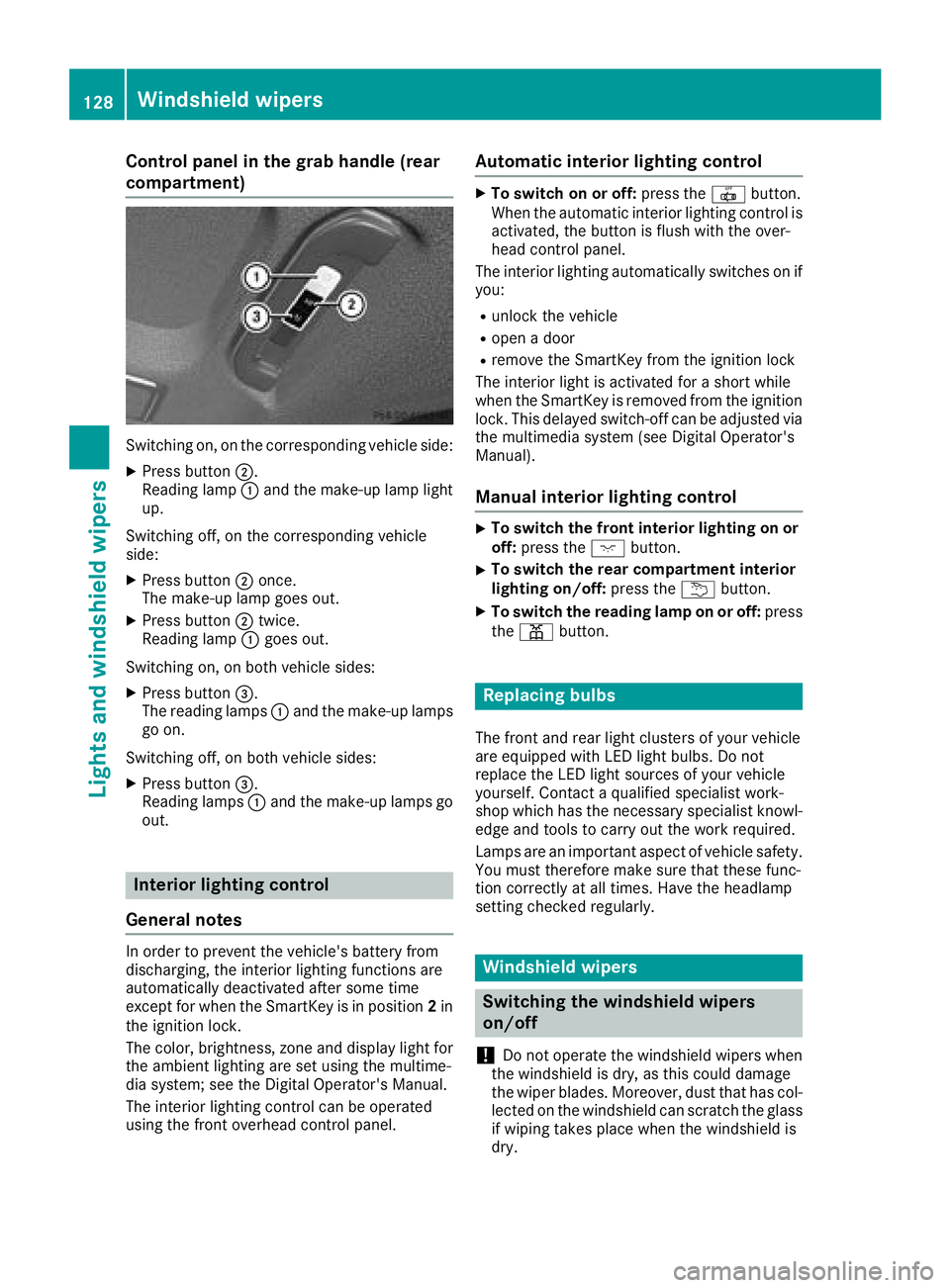
Control panel in the grab handle (rear
compartment)
Switching on, on the corresponding vehicle side: X
Press button D .
Reading lamp C and the make-up lamp light
up.
Switching off, on the corresponding vehicle
side: X
Press button D once.
The make-up lamp goes out. X
Press button D twice.
Reading lamp C goes out.
Switching on, on both vehicle sides: X
Press button
Page 143 of 382
Front control panel X
Turn th e SmartKey to position 0 in th e ignition
loc k or remove it ( Y
page 145).X
To activate: press th e ! or V rocke r
switch up or down .
The indicator lamp in th e ! or V rocke r
switch lights up.
The blowe r will run at a low spee d regardless of
th e airflow setting .
If you activat e th e residual heat function at high
temperatures , only th e ventilation will be acti-
vated. The blowe r run s at medium speed.X
To deactivate: press th e ! or V
rocke r switch up or down .
The indicator lamp in th e ! or V rocke r
switch goes out .
Rear control panel X
Turn th e SmartKey to position 0 in th e ignition
loc k or remove it ( Y
page 145).
The RES T display appear s on th e rear com-
partmen t display.X
To activate: press rocke r switch t up or
down ( Y
page 133).
The indicator lamp in rocke r switch t lights
up. X
To deactivate: press rocke r switch t up or
down ( Y
page 133).
The indicator lamp in rocke r switch t goes
out . RES T goes out on th e rear compartmen t
display.
i If you do no t activat e th e residual heat func-
tion , RES T goes out automatically after fiv e
minute s on th e rear compartmen t display.
Residual heat is deactivated automatically: R
after approximately 30 minute si f the residual
heat function is activated in the front or rear
compartment R
after approximately 15 minutes if the residual
heat function is activated in the front and rear
compartments R
when the ignition is switched on R
if the battery voltage drops Perfume atomizer
Operating the perfume atomizer
G WARNING
If children open the vial, they could drink the
perfume or it could come into contact with
their eyes. There is a risk of injury. Do not
leave children unsupervised in the vehicle.
If the perfume liquid has been drunk, consult
a doctor. If perfume comes into contact with
your eyes or skin, rinse the eyes with clean
water. If you continue to experience difficul-
ties, consult a doctor.
H Environmental note
Full vials must not be dis-
posed of with household
waste. They must be collec-
ted separately and recycled
to protect the environment.
Dispose of full vials in an
environmentally responsible
manner and take them to a
harmful substance collec-
tion point.
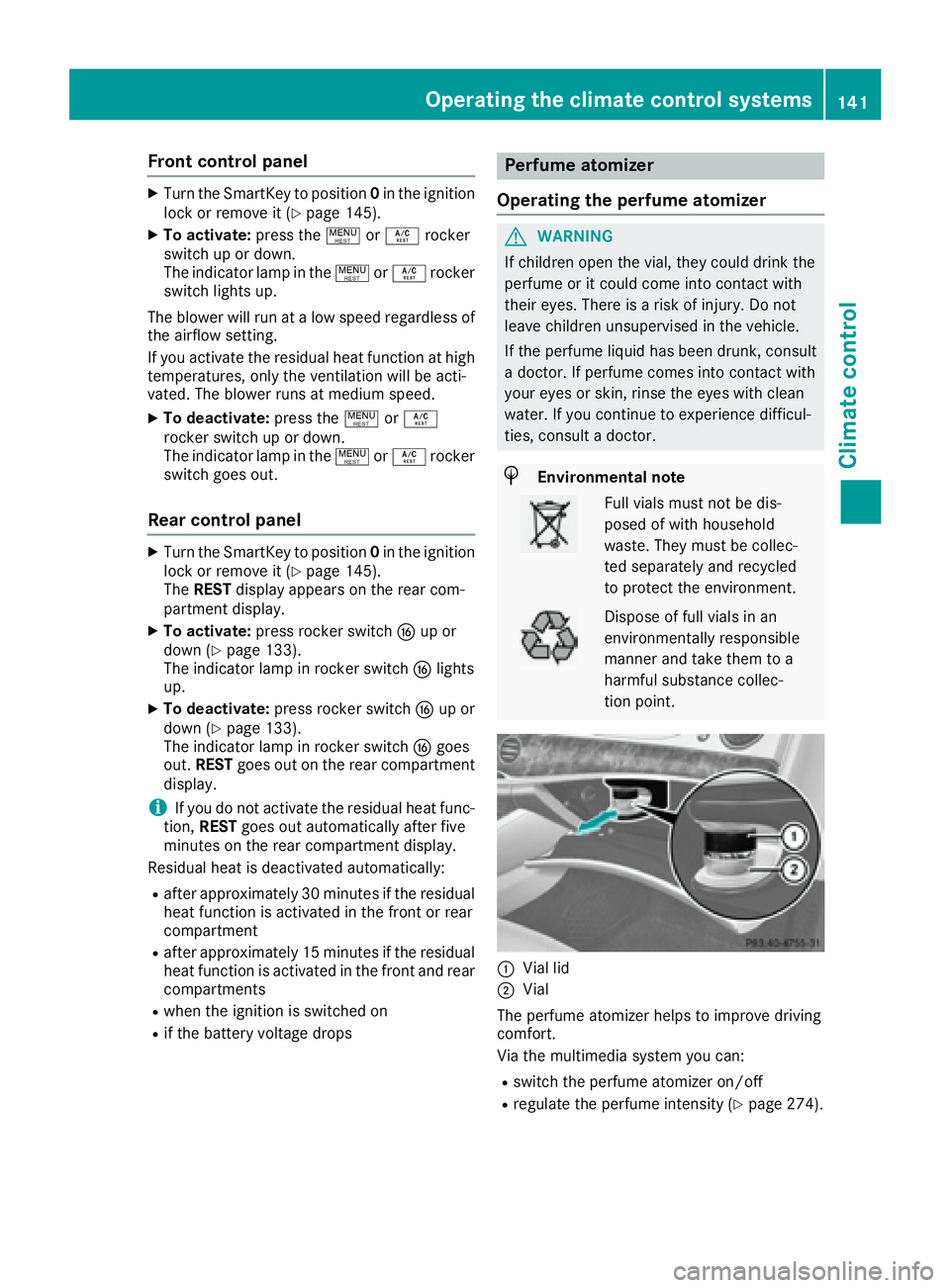
C
Vial lid
D
Vial
The perfume atomizer helps to improve driving
comfort.
Via the multimedia system you can: R
switch the perfume atomizer on/off R
regulate the perfume intensity ( Y
page 274).Operating the climate control systems 141
Climate control Z
Page 147 of 382
There is a risk of fire and an accident. Release
the parking brake fully before driving off.
! Do not warm up the engine with the vehicle
stationary. Drive off immediately. Avoid high
engine speeds and driving at full throttle until
the engine has reached its operating temper-
ature.
Only shift the automatic transmission to the
desired drive position when the vehicle is sta-
tionary.
Where possible, avoid spinning the drive
wheels when pulling away on slippery roads.
You could otherwise damage the drive train.
! At low engine oil temperatures under 68 ‡
(+20 †), the maximum engine speed is limi-
ted in order to protect the engine. To protect
the engine and maintain smooth engine oper-
ation, avoid driving at full throttle when the
engine is cold.
Hybrid vehicles: make sure that you read the
separate operating instructions. Otherwise, you
may not recognize dangers.
SmartKey positions
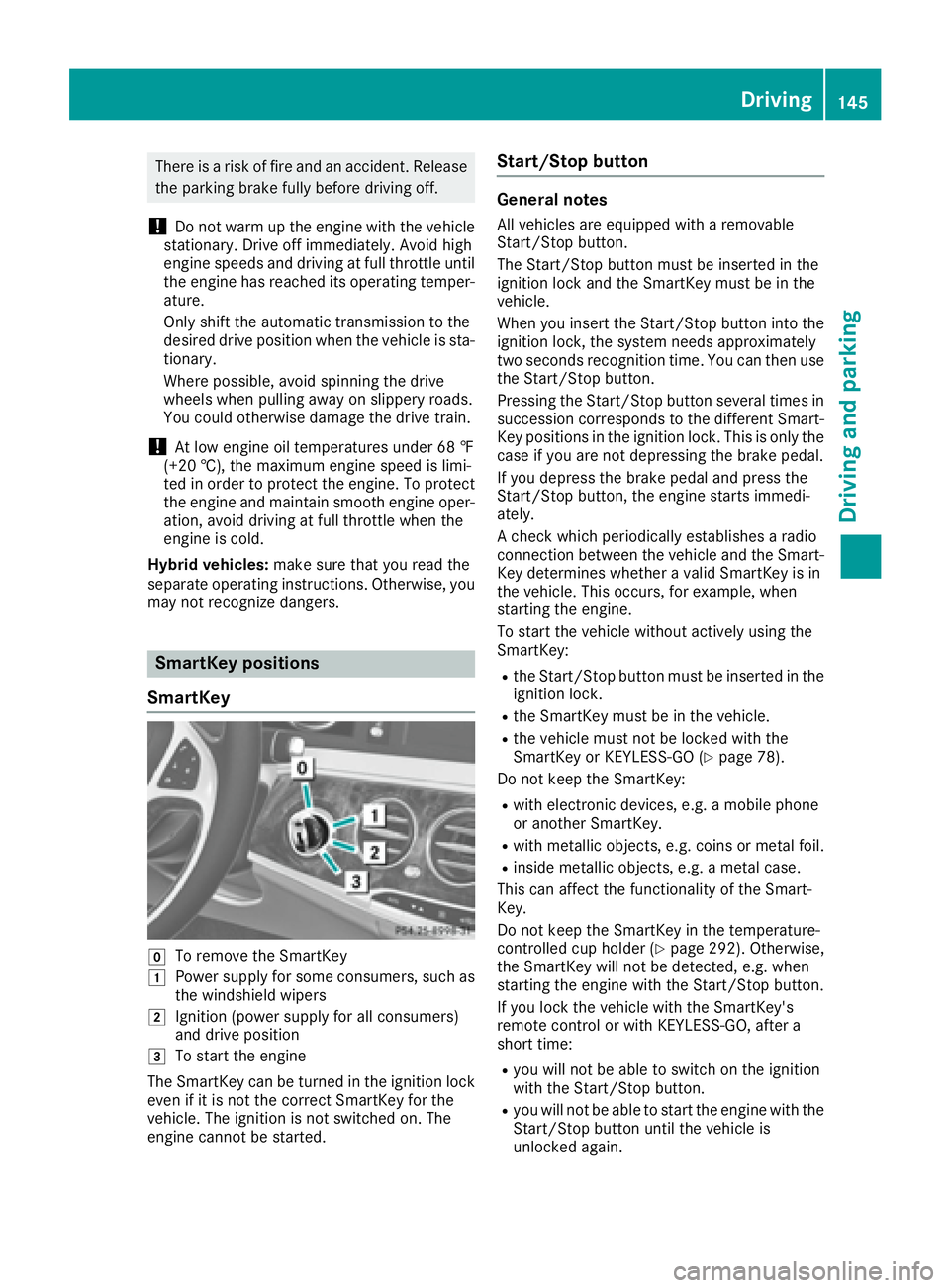
SmartKey
Z
To remove the SmartKey
G
Power supply for some consumers, such as
the windshield wipers
H
Ignition (power supply for all consumers)
and drive position
I
To start the engine
The SmartKey can be turned in the ignition lock
even if it is not the correct SmartKey for the
vehicle. The ignition is not switched on. The
engine cannot be started. Start/Stop button General notes All vehicles are equipped with a removable
Start/Stop button.
The Start/Stop button must be inserted in the
ignition lock and the SmartKey must be in the
vehicle.
When you insert the Start/Stop button into the
ignition lock, the system needs approximately
two seconds recognition time. You can then use
the Start/Stop button.
Pressing the Start/Stop button several times in
succession corresponds to the different Smart-
Key positions in the ignition lock. This is only the
case if you are not depressing the brake pedal.
If you depress the brake pedal and press the
Start/Stop button, the engine starts immedi-
ately.
A check which periodically establishes a radio
connection between the vehicle and the Smart-
Key determines whether a valid SmartKey is in
the vehicle. This occurs, for example, when
starting the engine.
To start the vehicle without actively using the
SmartKey: R
the Start/Stop button must be inserted in the
ignition lock. R
the SmartKey must be in the vehicle. R
the vehicle must not be locked with the
SmartKey or KEYLESS-GO ( Y
page 78).
Do not keep the SmartKey: R
with electronic devices, e.g. a mobile phone
or another SmartKey. R
with metallic objects, e.g. coins or metal foil. R
inside metallic objects, e.g. a metal case.
This can affect the functionality of the Smart-
Key.
Do not keep the SmartKey in the temperature-
controlled cup holder ( Y
page 292). Otherwise,
the SmartKey will not be detected, e.g. when
starting the engine with the Start/Stop button.
If you lock the vehicle with the SmartKey's
remote control or with KEYLESS-GO, after a
short time: R
you will not be able to switch on the ignition
with the Start/Stop button. R
you will not be able to start the engine with the
Start/Stop button until the vehicle is
unlocked again. Driving 145
Driving and parking Z
Page 148 of 382
If you lock the vehicle centrally using the button
on the front door ( Y
page 83), you can continue
to start the engine with the Start/Stop button.
The engine can be switched off while the vehicle
is in motion by pressing and holding the Start/
Stop button for three seconds. This function
operates independently of the ECO start/stop
automatic engine switch-off function.
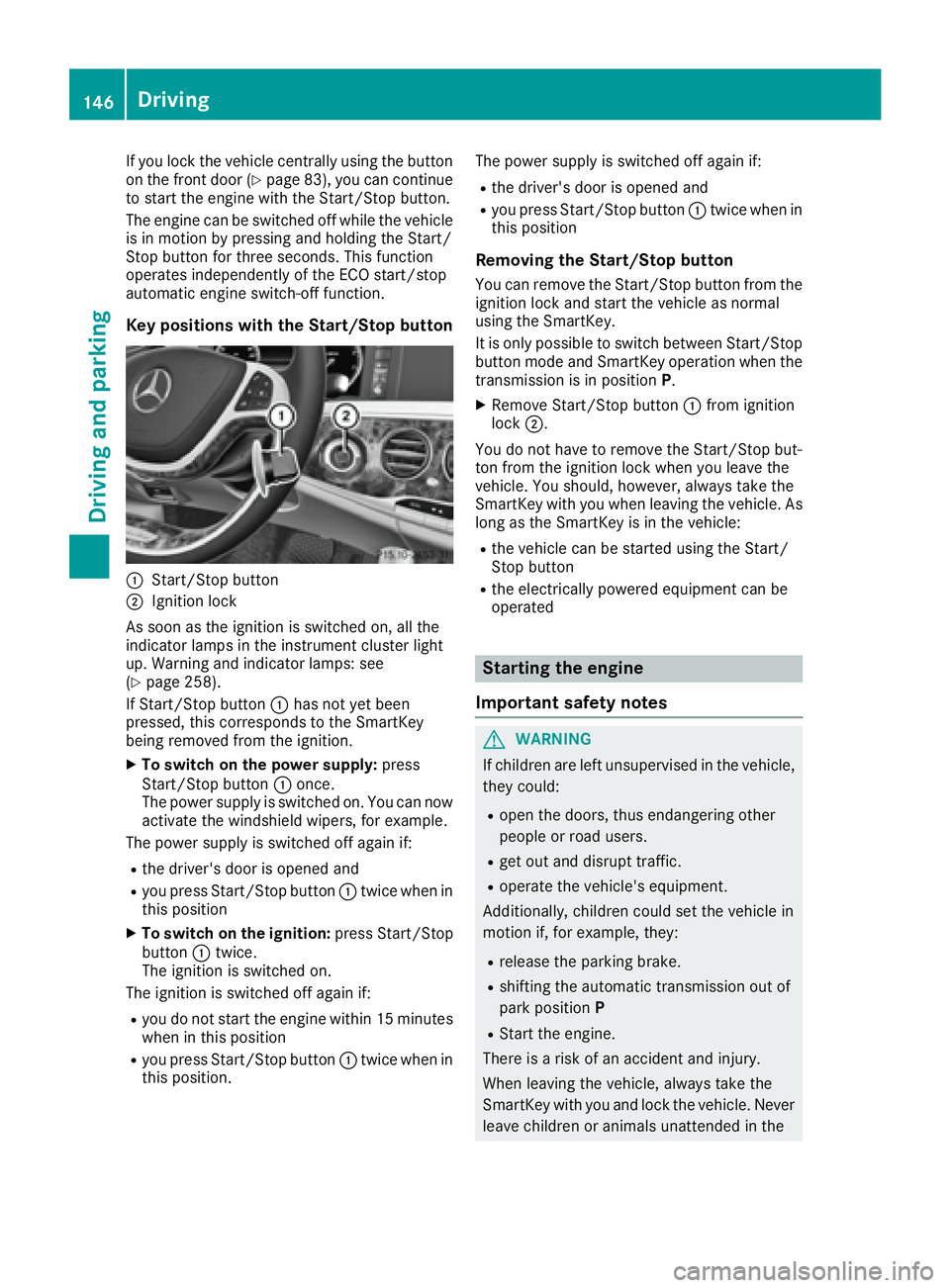
Key positions with the Start/Stop button
C
Start/Stop buttonD
Ignition lock
As soon as the ignition is switched on, all the
indicator lamps in the instrument cluster light
up. Warning and indicator lamps: see
( Y
page 258).
If Start/Stop button C has not yet been
pressed, this corresponds to the SmartKey
being removed from the ignition. X
To switch on the power supply: press
Start/Stop button C once.
The power supply is switched on. You can now
activate the windshield wipers, for example.
The power supply is switched off again if: R
the driver's door is opened and R
you press Start/Stop button C twice when in
this position X
To switch on the ignition: press Start/Stop
button C twice.
The ignition is switched on.
The ignition is switched off again if: R
you do not start the engine within 15 minutes
when in this position R
you press Start/Stop button C twice when in
this position. The power supply is switched off again if: R
the driver's door is opened and R
you press Start/Stop button C twice when in
this position
Removing the Start/Stop button You can remove the Start/Stop button from the
ignition lock and start the vehicle as normal
using the SmartKey.
It is only possible to switch between Start/Stop
button mode and SmartKey operation when the
transmission is in position P .X
Remove Start/Stop button C from ignition
lock D .
You do not have to remove the Start/Stop but-
ton from the ignition lock when you leave the
vehicle. You should, however, always take the
SmartKey with you when leaving the vehicle. As
long as the SmartKey is in the vehicle: R
the vehicle can be started using the Start/
Stop button R
the electrically powered equipment can be
operated
Starting the engine
Important safety notes
G WARNING
If children are left unsupervised in the vehicle,
they could: R
open the doors, thus endangering other
people or road users. R
get out and disrupt traffic. R
operate the vehicle's equipment.
Additionally, children could set the vehicle in
motion if, for example, they: R
release the parking brake. R
shifting the automatic transmission out of
park position P R
Start the engine.
There is a risk of an accident and injury.
When leaving the vehicle, always take the
SmartKey with you and lock the vehicle. Never
leave children or animals unattended in the146
Driving
Driving and parking
Page 150 of 382
R
the panic alarm is not activated R
the hazard warning lamps are switched off R
the hood is closed. R
the doors are closed and locked R
the windows and sliding sunroof are closed
Also make sure that: R
the fuel tank is sufficiently filled R
the starter battery is sufficiently charged
G WARNING
Limbs could be crushed or trapped if the
engine is started unintentionally during ser-
vice or maintenance work. There is a risk of
injury.
Always secure the engine against uninten-
tional starting before carrying out mainte-
nance or repair work.
Make sure that the engine cannot be started via
your smartphone before carrying out mainte-
nance or repairs. You can prevent an engine
start via your smartphone, for example, if you: R
switch on the hazard warning lamps R
do not lock the doors R
open the hood
Pulling away
General notes
G WARNING
If the engine speed is above the idling speed
and you engage transmission position D or R ,
the vehicle could pull away suddenly. There is
a risk of an accident.
When engaging transmission position D or R ,
always firmly depress the brake pedal and do
not simultaneously accelerate.
Depress the accelerator carefully when pulling
away.
The vehicle locks centrally once you have pulled
away. The locking knobs in the doors drop down.
You can open the doors from the inside at any
time.
You can also deactivate the automatic locking
feature ( Y
page 84). It is only possible to shift the transmission from
position P to the desired position if you depress
the brake pedal. Only then is the parking lock
released.
If you do not depress the brake pedal, the
DIRECT SELECT lever can still be moved but the
parking lock remains engaged.
i Upshifts take place at higher engine speeds
after a cold start. This helps the catalytic con-
verter to reach its operating temperature
more quickly.
Information on the automatic release of the
electric parking brake ( Y
page 164).
Hill start assist Hill start assist helps you when pulling away for-
wards or in reverse on an uphill gradient. It holds
the vehicle for a short time after you have
removed your foot from the brake pedal. This
gives you enough time to move your foot from
the brake pedal to the accelerator pedal and to
depress it before the vehicle begins to roll.
G WARNING
After a short time, hill start assist will no lon-
ger brake your vehicle and it could roll away.
There is a risk of an accident and injury.
Therefore, quickly move your foot from the
brake pedal to the accelerator pedal. Never
leave the vehicle when it is held by hill start
assist.
Hill start assist is not active if: R
you are pulling away on a level road or on a
downhill gradient. R
the transmission is in position \\ .R
the electric parking brake is applied. R
ESP ®
is malfunctioning.
ECO start/stop function
Introduction
Hybrid vehicles: observe the notes on the ECO
start/stop function in the separate operating
instructions.
The ECO start/stop function switches the
engine off automatically if the vehicle is stopped
under certain conditions.148
Driving
Dr ivi ng an d parking
Page 153 of 382
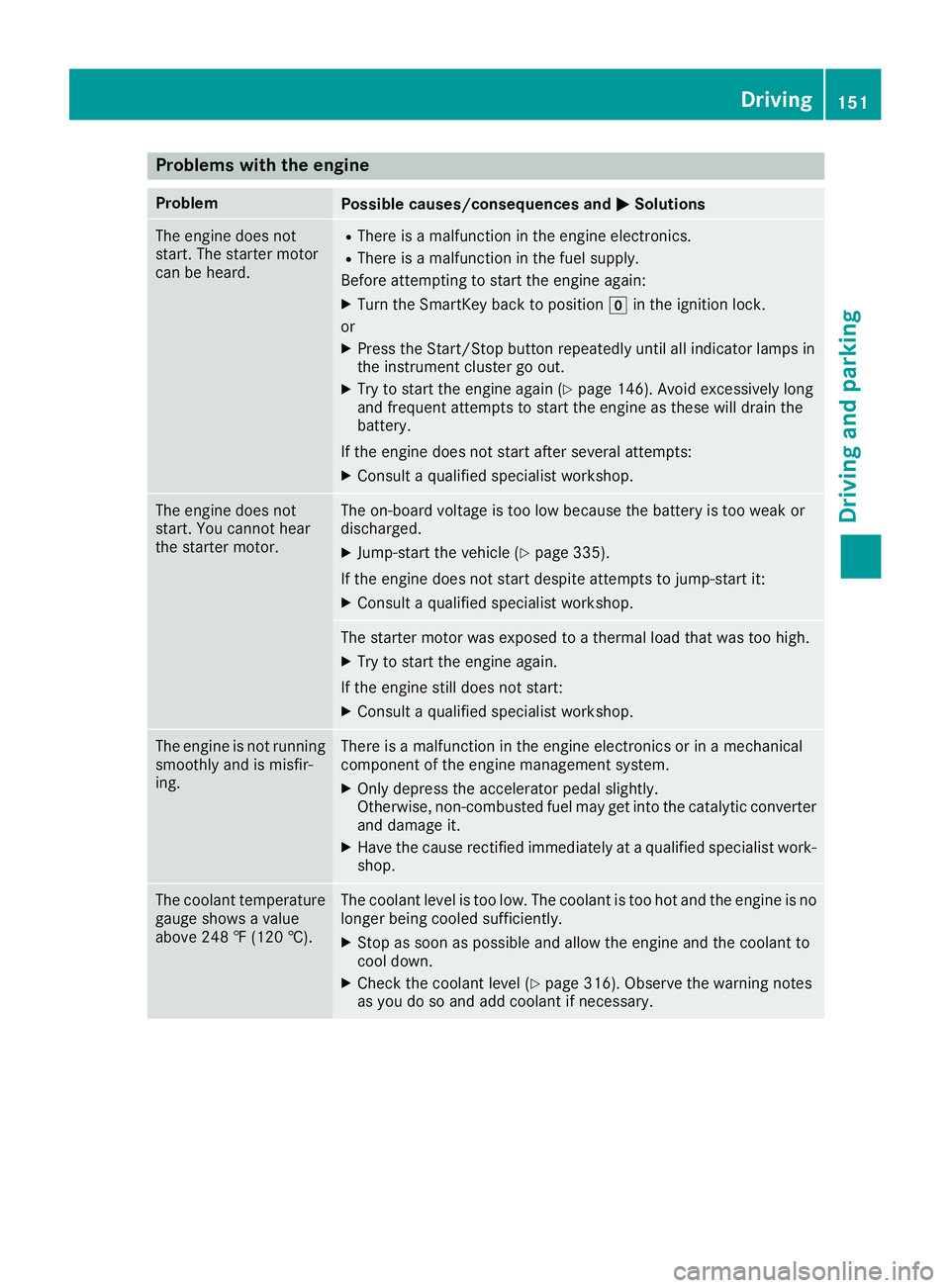
Problems with the engine Problem
Possible causes/consequences and P Solutions
The engine does not
start. The starter motor
can be heard. R
There is a malfunction in the engine electronics. R
There is a malfunction in the fuel supply.
Before attempting to start the engine again: X
Turn the SmartKey back to position Z in the ignition lock.
or X
Press the Start/Stop button repeatedly until all indicator lamps in
the instrument cluster go out. X
Try to start the engine again ( Y
page 146). Avoid excessively long
and frequent attempts to start the engine as these will drain the
battery.
If the engine does not start after several attempts: X
Consult a qualified specialist workshop.
The engine does not
start. You cannot hear
the starter motor. The on-board voltage is too low because the battery is too weak or
discharged. X
Jump-start the vehicle ( Y
page 335).
If the engine does not start despite attempts to jump-start it: X
Consult a qualified specialist workshop.
The starter motor was exposed to a thermal load that was too high. X
Try to start the engine again.
If the engine still does not start: X
Consult a qualified specialist workshop.
The engine is not running
smoothly and is misfir-
ing. There is a malfunction in the engine electronics or in a mechanical
component of the engine management system. X
Only depress the accelerator pedal slightly.
Otherwise, non-combusted fuel may get into the catalytic converter
and damage it. X
Have the cause rectified immediately at a qualified specialist work-
shop.
The coolant temperature
gauge shows a value
above 248 ‡ (120 †). The coolant level is too low. The coolant is too hot and the engine is no
longer being cooled sufficiently. X
Stop as soon as possible and allow the engine and the coolant to
cool down. X
Check the coolant level ( Y
page 316). Observe the warning notes
as you do so and add coolant if necessary. Driving 151
Driving and parking Z
Page 157 of 382
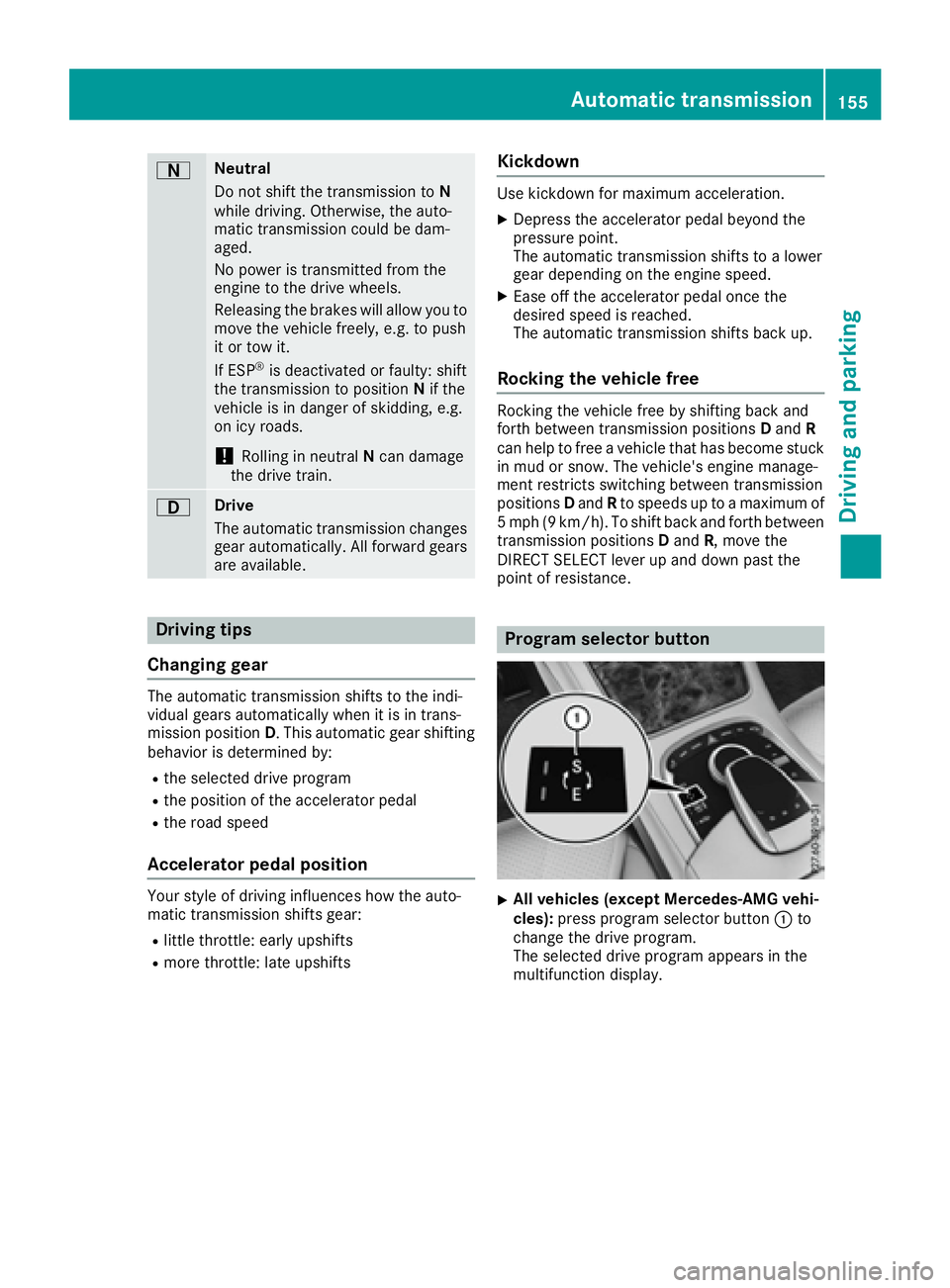
D Neutral
Do not shift the transmission to N
while driving. Otherwise, the auto-
matic transmission could be dam-
aged.
No power is transmitted from the
engine to the drive wheels.
Releasing the brakes will allow you to
move the vehicle freely, e.g. to push
it or tow it.
If ESP ®
is deactivated or faulty: shift
the transmission to position N if the
vehicle is in danger of skidding, e.g.
on icy roads.
! Rolling in neutral N can damage
the drive train.
: Drive
The automatic transmission changes
gear automatically. All forward gears
are available.
Driving tips
Changing gear The automatic transmission shifts to the indi-
vidual gears automatically when it is in trans-
mission position D . This automatic gear shifting
behavior is determined by: R
the selected drive program R
the position of the accelerator pedal R
the road speed
Accelerator pedal position Your style of driving influences how the auto-
matic transmission shifts gear: R
little throttle: early upshifts R
more throttle: late upshifts Kickdown Use kickdown for maximum acceleration. X
Depress the accelerator pedal beyond the
pressure point.
The automatic transmission shifts to a lower
gear depending on the engine speed. X
Ease off the accelerator pedal once the
desired speed is reached.
The automatic transmission shifts back up.
Rocking the vehicle free Rocking the vehicle free by shifting back and
forth between transmission positions D and R
can help to free a vehicle that has become stuck
in mud or snow. The vehicle's engine manage-
ment restricts switching between transmission
positions D and R to speeds up to a maximum of
5 mph (9 km/h). To shift back and forth between
transmission positions D and R , move the
DIRECT SELECT lever up and down past the
point of resistance.
Program selector button
X
All vehicles (except Mercedes-AMG vehi-
cles): press program selector button C to
change the drive program.
The selected drive program appears in the
multifunction display.Automatic transmission 155
Driving an d parking Z