display MERCEDES-BENZ S CLASS 2019 Owners Manual
[x] Cancel search | Manufacturer: MERCEDES-BENZ, Model Year: 2019, Model line: S CLASS, Model: MERCEDES-BENZ S CLASS 2019Pages: 578, PDF Size: 23.31 MB
Page 392 of 578
ForDTSPatents, see http://patents.dts.com.Manufactured under license fromDTS LicensingLimited.DTS,DTS-HD,the Symbol, &DTS andthe Symboltogether areregistered trademarks
ofDTS, Inc.©DTS, Inc. Allrightsreserved.
"Madefor iPod", and "Madefor iPhone," meanthat an electronic accessoryhas been designedtoconnect specificallytoiPod, or iPhone,respectively,and has been certifiedbythe devel‐opertomeet Apple performancestandards.Apple is notresponsibleforthe operation ofthisdevice or its compliance with safety andregula‐torystandards. Please notethatthe use ofthisaccessory with iPod, or iPhone may affect wire‐less performance.
For the USA:iPhone®, iPod®, iPod classic®,
iPod nano®, and iPodtouch®are trademarksofApple Inc.,registered intheU.S. andother coun‐tries. Lightning™ is a trademark of Apple Inc.
For Canada:iPhone, iPod, iPod classic, iPodnano, and iPodtouch are trademarksof AppleInc.,registered intheU.S. andother countries.Lightning is a trademark of Apple Inc.
Cinavia notice:this product uses Cinaviatech‐nologytolimitthe use of unauthorized copies ofsome commercially-producedfilm and videosandtheir soundtracks. When a prohibited use ofan unauthorized copy is detected, a message willbe displayed and playback or copying will be
interrupted. More information about Cinaviatechnology is provided at Cinavia Online Con‐sumer Information Center at http://www.cinavia.com.Torequest additional informa‐tion about Cinaviabymail, send a postcard withyour mailing addressto: Cinavia Consumer Infor‐mation Center, Box 86851,San Diego,CA,92138, USA.
This product incorporates proprietarytechnologyunder license fromVerance Corporation and isprotectedbyU.S.Patent7,369,677andotherU.S. andworldwide patents issued and pendingaswell as copyright and trade secretprotectionfor certain aspects of suchtechnology. Cinavia isa trademarkofVerance Corporation. Copyright2004-2012Verance Corporation. AllrightsreservedbyVerance.Reverse Engineering or dis‐assembly is prohibited.
Inserting a disc
&WARNINGRisk of injuryfrom laserradi‐ation fromthe Blu-ray drive
The Blu-ray drive is a class 1 laser product. Ifyou openthe housing ofthe Blu-ray drive,
390Multimedia system
Page 394 of 578
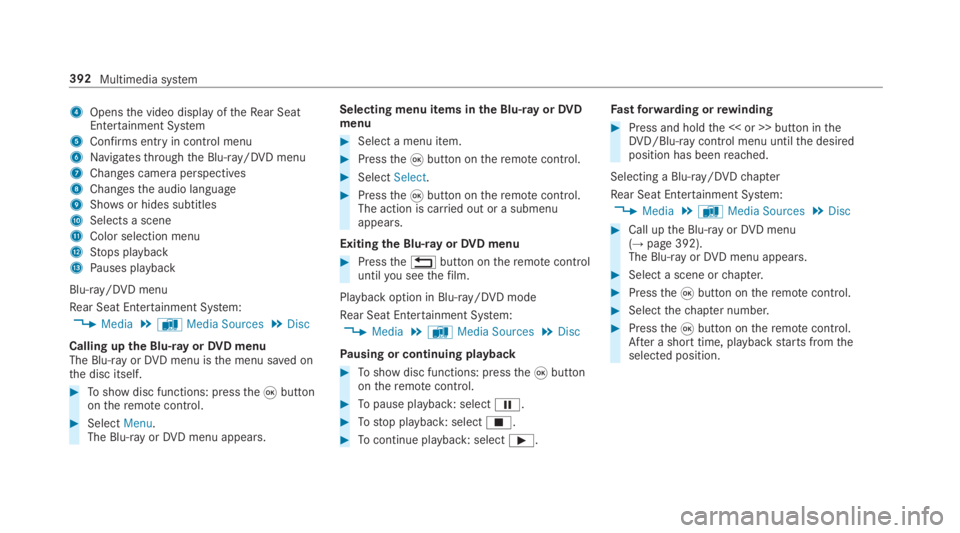
4Opensthe video display oftheRear SeatEntertainment System
5Confirms entryin control menu
6Navigatesthroughthe Blu-ray/DVD menu
7Changes camera perspectives
8Changesthe audio language
9Showsor hides subtitles
ASelects a scene
BColor selection menu
CStops playback
DPauses playback
Blu-ray/DVD menu
Rear Seat Entertainment System:
,Media.àMedia Sources.Disc
Calling upthe Blu-rayorDVD menuThe Blu-ray orDVD menu isthe menu saved onthe disc itself.
#Toshow disc functions: pressthe
Page 397 of 578
ASSYST PLUS service interval display
Function ofthe ASSYST PLUS service intervaldisplay
The ASSYST PLUS service interval display ontheInstrument Display provides information ontheremaining time or distance beforethe nextservice due date.
You can hidethis service message usingtheback button onthe left-hand side ofthesteeringwheel.
Depending on howthevehicle is used,theASSYST PLUS service interval display mayshortenthe service interval, e.g. inthefollowingcases:
RMainly short-distance driving
RWhenthe engine is often leftidlingfor longperiods
RIntheevent of frequent coldstart phases
Mercedes-Benzrecommendsavoiding suchoperating conditions.
You can obtain further information concerningthe servicing ofyourvehicle from aqualified
specialistworkshop, e.g. an authorizedMercedes-Benz Center.
Displayingthe service due date
On-board computer:
,Service.ASSYST PLUS
The next service due date is displayed.
#Toexitthe display:pressthe back buttononthe left-hand side ofthesteering wheel.
Make suretoobservethefollowing furtherrela‐ted subject:
ROperatingthe on-board computer(→page 252).
Information onregular maintenancework
*NOTEPrematurewearthroughfailuretoobserveservice due dates
Serviceworkwhich is not carried out attheright time or incompletelycan leadtoincreasedwear and damagetothevehicle.
#Always observethe prescribed serviceintervals.
#Always havethe prescribed serviceworkcarried out at aqualified specialistworkshop.
Special servicerequirements
The prescribed service interval is based on nor‐mal operation ofthevehicle. Maintenanceworkwill needtobe performed more often ifthevehi‐cle is operated under arduous conditions orincreased loads.
The ASSYST PLUS service interval display is onlyan aid. The driver ofthevehicle bearsresponsi‐bility asregardstowhether maintenanceworkneedstobe performed more oftenthan speci‐fied based onthe actual operating conditionsand/or loads.
Examples of arduous operating conditions:
Rregular city driving with frequent intermedi‐atestops
Rmainly short-distance driving
Maintenance and care395
Page 398 of 578
Rfrequent operation in mountainousterrain oron poorroad surfaces
Rwhenthe engine is often leftidlingfor longperiods
Roperation in particularly dusty conditionsand/or if air-recirculation mode is frequentlyused
Inthese or similar operating conditions, havetheinterior airfilter, engine air cleaner, engine oiland oilfilteretc.changed more frequently. Thetires must bechecked more frequently ifthevehicle is operated under increased loads.Fur‐ther information can be obtained at aqualifiedspecialistworkshop.
Battery disconnection periods
The ASSYST PLUS service interval displaycan only calculatethe service due datewhenthe batteryis connected.
#Notedownthe service due date displayed onthe instrument display before disconnectingthe battery (→page 395).
Engine compartment
Active hood (pedestrian protection)
Operation ofthe active hood (pedestrian pro‐tection)In certain accident situations,therisk of injurytopedestrians can bereducedbythe actuationofthe active hood. Therear area ofthe hood israisedbyapproximately 80 mm.
Forthe drivetotheworkshop,resetthe trig‐gered active hoodyourself. Afterthe active hoodhas been triggered, pedestrian protection maybe limited.
Aqualified specialistworkshop mustre-instatethe full functionality ofthe active hood.
The active hood is notavailable in all countries.
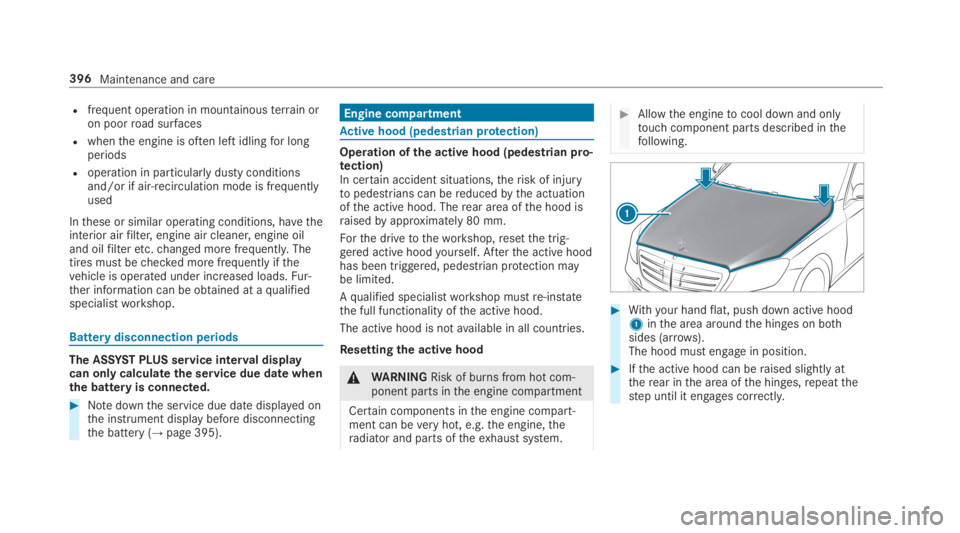
Resettingthe active hood
&WARNINGRisk of burns from hot com‐ponent parts inthe engine compartment
Certain components inthe engine compart‐ment can beveryhot, e.g.the engine,theradiator and parts oftheexhaust system.
#Allowthe enginetocool down and onlytouch component parts described inthefollowing.
#Withyour handflat, push down active hood1inthe area aroundthe hinges on bothsides (arrows).The hood must engage in position.
#Ifthe active hood can beraised slightly attherear inthe area ofthe hinges,repeatthestep until it engages correctly.
396Maintenance and care
Page 402 of 578
RParkthevehicle on a level surface.
RLeavethe enginerunning at idle speed.
On-board computer:
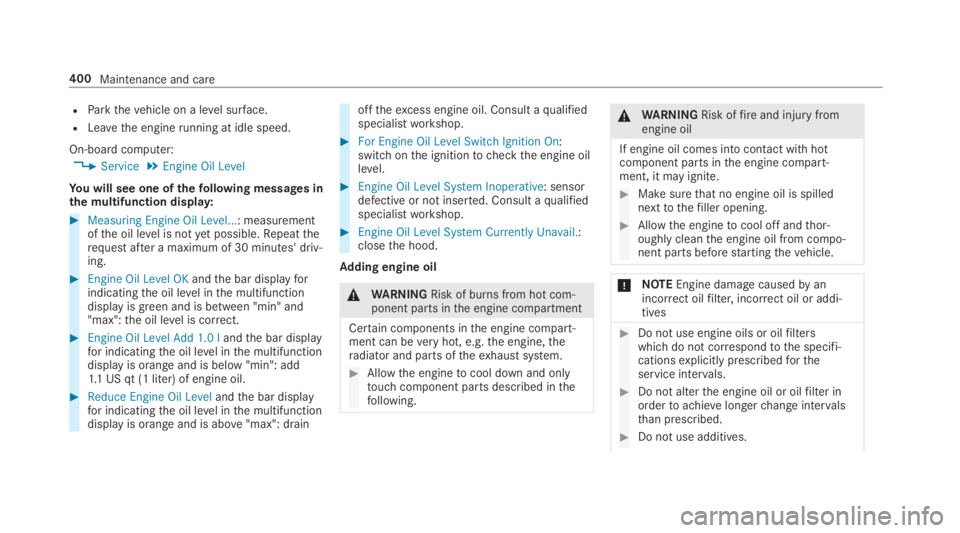
,Service.Engine Oil Level
You will see one ofthefollowing messages inthe multifunction display:
#Measuring Engine Oil Level...: measurementofthe oil level is notyet possible.Repeattherequest after a maximum of 30 minutes' driv‐ing.
#Engine Oil Level OKandthe bar displayforindicatingthe oil level inthe multifunctiondisplay is green and is between "min" and"max":the oil level is correct.
#Engine Oil Level Add 1.0 landthe bar displayfor indicatingthe oil level inthe multifunctiondisplay is orange and is below "min": add1.1 US qt (1 liter) of engine oil.
#Reduce Engine Oil Levelandthe bar displayfor indicatingthe oil level inthe multifunctiondisplay is orange and is above"max": drain
offtheexcess engine oil. Consult aqualifiedspecialistworkshop.
#For Engine Oil Level Switch Ignition On:switch onthe ignitiontocheckthe engine oillevel.
#Engine Oil Level System Inoperative: sensordefective or not inserted. Consult aqualifiedspecialistworkshop.
#Engine Oil Level System Currently Unavail.:closethe hood.
Adding engine oil
&WARNINGRisk of burns from hot com‐ponent parts inthe engine compartment
Certain components inthe engine compart‐ment can beveryhot, e.g.the engine,theradiator and parts oftheexhaust system.
#Allowthe enginetocool down and onlytouch component parts described inthefollowing.
&WARNINGRisk offireand injury fromengine oil
If engine oil comes into contact withhotcomponent parts inthe engine compart‐ment, it may ignite.
#Make surethat no engine oil is spillednexttothefiller opening.
#Allowthe enginetocool off andthor‐oughly cleanthe engine oil from compo‐nent parts beforestartingthevehicle.
*NOTEEngine damagecausedbyanincorrect oilfilter, incorrect oil or addi‐tives
#Do not use engine oils or oilfilterswhich do not correspondtothe specifi‐cationsexplicitly prescribedfortheservice intervals.
#Do not alterthe engine oil or oilfilter inordertoachievelongerchange intervalsthan prescribed.
#Do not use additives.
400Maintenance and care
Page 403 of 578
#Followthe instructions inthe serviceinterval displayregardingthe oilchange.
*NOTEDamagecausedbyaddingtoomuch engine oil
Too much engine oil can damagethe engineorthe catalytic converter.
#Haveexcess engine oilremoved at aqualified specialistworkshop.
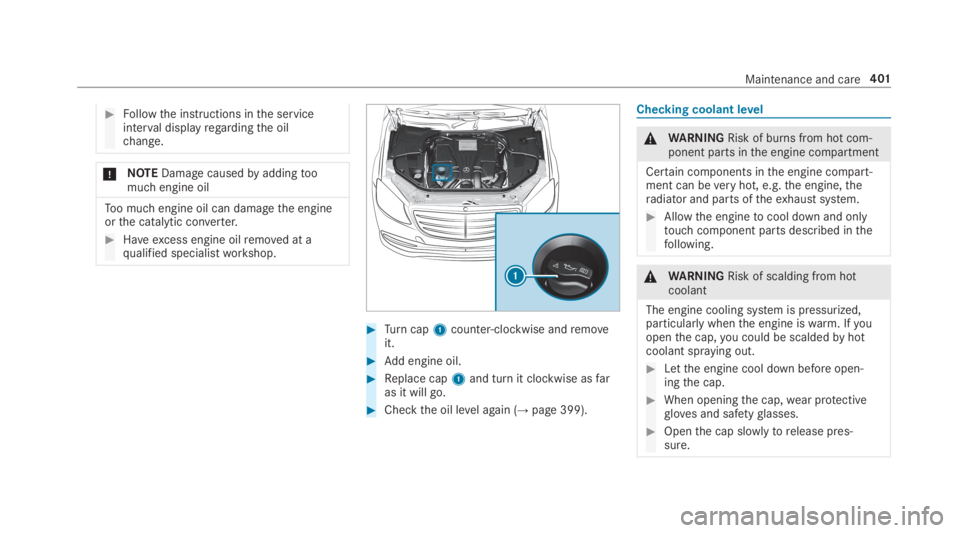
#Turncap1counter-clockwise andremoveit.
#Add engine oil.
#Replace cap1and turn it clockwise asfaras it will go.
#Checkthe oil level again (→page 399).
Checking coolant level
&WARNINGRisk of burns from hot com‐ponent parts inthe engine compartment
Certain components inthe engine compart‐ment can beveryhot, e.g.the engine,theradiator and parts oftheexhaust system.
#Allowthe enginetocool down and onlytouch component parts described inthefollowing.
&WARNINGRisk of scalding from hotcoolant
The engine cooling system is pressurized,particularly whenthe engine iswarm. Ifyouopenthe cap,you could be scaldedbyhotcoolant spraying out.
#Letthe engine cool down before open‐ingthe cap.
#When openingthe cap,wear protectivegloves and safetyglasses.
#Openthe cap slowlytorelease pres‐sure.
Maintenance and care401
Page 404 of 578
#Parkthevehicle on a level surface.
#Checkthe coolanttemperature display intheinstrument cluster.The coolanttemperature must be below158 °F (70 °C).
#If necessary,removethe cover.
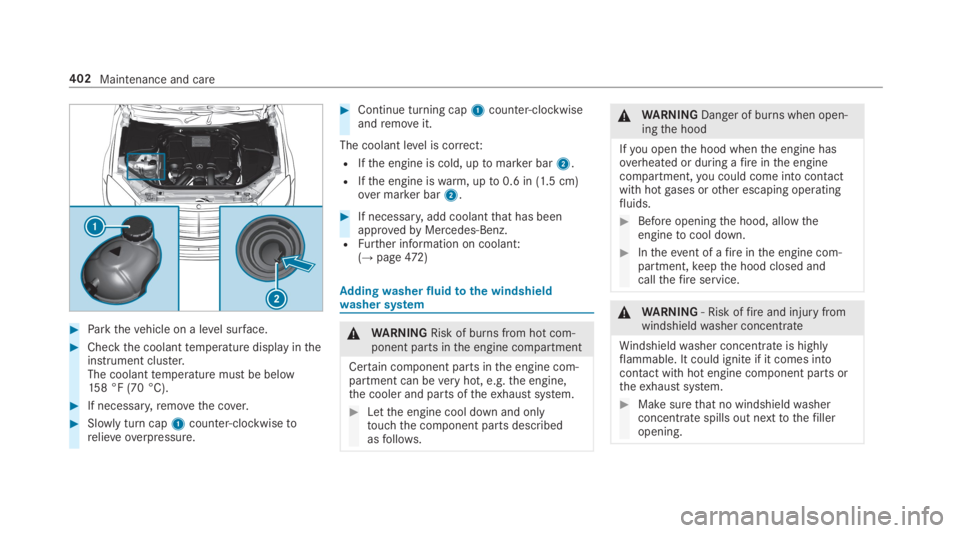
#Slowly turn cap1counter-clockwisetorelieve overpressure.
#Continue turning cap1counter-clockwiseandremoveit.
The coolant level is correct:
RIfthe engine is cold, uptomarker bar2.
RIfthe engine iswarm, upto0.6 in (1.5 cm)over marker bar2.
#If necessary,add coolantthat has beenapprovedbyMercedes-Benz.RFurther information on coolant:(→page472)
Addingwasherfluidtothe windshieldwasher system
&WARNINGRisk of burns from hot com‐ponent parts inthe engine compartment
Certain component parts inthe engine com‐partment can beveryhot, e.g.the engine,the cooler and parts oftheexhaust system.
#Letthe engine cool down and onlytouchthe component parts describedasfollows.
&WARNINGDanger of burns when open‐ingthe hood
Ifyou openthe hood whenthe engine hasoverheated or during afireinthe enginecompartment,you could come into contactwith hotgases orother escaping operatingfluids.
#Before openingthe hood, allowtheenginetocool down.
#Intheevent of afireinthe engine com‐partment,keepthe hood closed andcallthefireservice.
&WARNING‑ Risk offireand injury fromwindshieldwasher concentrate
Windshieldwasher concentrate is highlyflammable. It could ignite if it comes intocontact withhot engine component parts ortheexhaust system.
#Make surethat no windshieldwasherconcentrate spills out nexttothefilleropening.
402Maintenance and care
Page 413 of 578
Observethefollowing information:
Notes on cleaning and careAvoidingvehicle damage
Seat beltsClean with lukewarmand soapywater.RDo not usechemical cleaning agents.
RDo not dry seat beltsbyheatingthemtoover176 °F(80 °C) orexposingthemtodirect sunlight.
DisplayCleanthe surface carefully witha microfiber clothand a suit‐able display care product (TFT/LCD).RSwitchoffthe display and let it cool down.
RDo not use anyother cleaning products.
Plastic trimRClean with a damp microfiber cloth.
RFor heavy soiling: use care productrecommendedforMercedes-Benz.
RDo not attachstickers,films or similar materials.
RDo not allow cosmetics, insectrepellent or sun creamtocome in contact with the plastic trim.
Realwood/triminsertsRClean with a microfiber cloth.
RBlackpiano-lacquer look: clean with a damp clothandsoapywater.
RFor heavy soiling: use care productrecommendedforMercedes-Benz.
Do not use solvent-based cleaning agents, polishes orwaxes.
HeadlinerClean with a brush or dry shampoo.
CarpetUse carpet andtextile cleaning agentsrecommendedforMercedes-Benz.
Maintenance and care411
Page 416 of 578
Tires withrun-flatcharacteristics:
#Observethe information andwarningnotes on MOExtended tires (run-flattires).
Intheevent of aflat tire,thefollowing optionsareavailable depending onyourvehicle's equip‐ment:
RVehicles with MOExtended tires:it is pos‐sibletocontinuethe journeyfor a shortperiod of time. Make sureyou observethenotes on MOExtended tires (run-flat tire)(→page414).
RVehicles with a TIREFIT kit:you canrepairthe tires sothat it is possibletocontinuethejourneyfor a short period of time.Todothis,usethe TIREFIT kit (→page415).
RVehicles with Mercedes me connect:youcan make a callforRoadside Assistance viatheoverhead control panel inthe case of abreakdown (→page 344).
RAllvehicles:changethe wheel(→page 458).
Notes on MOExtended tires (run-flat tire)
&WARNINGRisk of accident when drivingin emergency mode
When driving in emergency mode,the han‐dlingcharacteristics are impaired. e.g. whencornering, when acceleratingstronglyandwhen braking.
#Do notexceedthe permissible maxi‐mum speedfor MOExtended tires.
#Avoid any abruptsteering and drivingmaneuvers aswell as drivingoverobstacles (curbs, pot holes, off-road).This applies, in particular,toa loadedvehicle.
#Stop driving inthe emergency mode ifyou notice:
Rbanging noise
Rvehicle vibration
Rsmoke which smells likerubber
Rcontinuous ESP®intervention
Rcracksin tire sidewalls
#After driving in emergency mode havetherimscheckedbyaqualified special‐istworkshop withregardtotheir furtheruse.
#The defective tire must bereplaced ineverycase.
WithMOExtended tires (run-flat tire),you cancontinuetodriveyourvehicleeven ifthere is atotal loss of pressure in one or more tires. How‐ever,the tire affected must not show any clearlyvisible damage.
You canrecognize MOExtended tiresbytheMOExtended marking which appearsonthe sidewall ofthe tire.
Vehicles with tire pressure monitoring sys‐tem:MOExtended tires may only be used in con‐junction withan activated tire pressure monitor‐ing system.
If a pressure losswarning message appears inthe multifunction display,proceed asfollows:
RCheckthe tirefor damage.
RIf driving on, observethefollowing notes.
414Breakdown assistance
Page 430 of 578
RThevehicle has been loaded ontothe transporter correctly
RThevehicle is secured at allfourwheels with suitabletensioningstraps
RThe maximum permissible speed of35mph (60 km/h) is notexceededwhen transporting
*NOTEDamagetothevehicle from secur‐ing it incorrectly
#After loading,thevehicle must besecured on allfour wheels. Otherwise,thevehicle could be damaged.
#A minimum distance of 4 in (10 cm)upwards and 8 in (20 cm) downwardsmust bekepttothe transport platform.
Transport level is notavailableforthefollowingvehicles:
RMercedes-AMGvehicles
RVehicles with MAGICBODYCONTROL
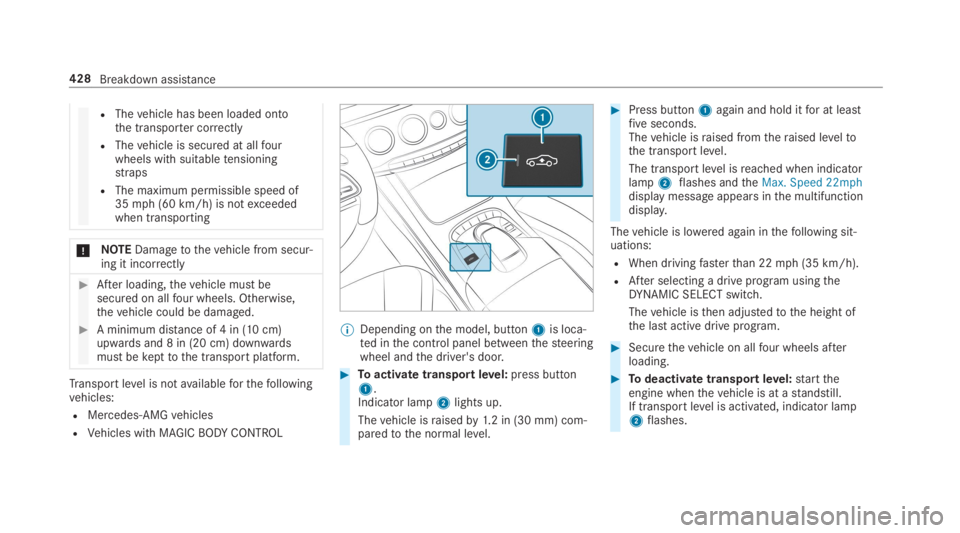
%Depending onthe model, button1is loca‐ted inthe control panel betweenthesteeringwheel andthe driver's door.
#Toactivate transportlevel:press button1.Indicator lamp2lights up.
Thevehicle israisedby1.2 in (30 mm) com‐paredtothe normal level.
#Press button1again and hold itfor at leastfiveseconds.Thevehicle israised fromtheraised leveltothe transport level.
The transport level isreached when indicatorlamp2flashes andtheMax. Speed 22mphdisplay message appears inthe multifunctiondisplay.
Thevehicle is lowered again inthefollowing sit‐uations:
RWhen drivingfasterthan 22mph (35 km/h).
RAfter selecting a drive program usingtheDYNAMIC SELECT switch.
Thevehicle isthen adjustedtothe height ofthe last active drive program.
#Securethevehicle on allfour wheels afterloading.
#Todeactivate transportlevel:starttheengine whenthevehicle is at astandstill.If transportlevel is activated, indicator lamp2flashes.
428Breakdown assistance