center console MERCEDES-BENZ S CLASS 2019 User Guide
[x] Cancel search | Manufacturer: MERCEDES-BENZ, Model Year: 2019, Model line: S CLASS, Model: MERCEDES-BENZ S CLASS 2019Pages: 578, PDF Size: 23.31 MB
Page 360 of 578
Connecting USB devices
*NOTEDamagecausedbyhightempera‐tures
Hightemperatures can damage USB devices.
#Removethe USB device after use andtakeit out ofthevehicle.
The multimedia connection unit isfound inthestowage compartment underthe armrest andhas two USB ports.
Depending onthevehicle's equipment, addi‐tional USB ports can befound inthestowagecompartment ofthe center console and intherear passenger compartment.
#Connectthe USB devicetothe USB port.Playable musicfiles are played back only ifthe corresponding media display is activated.
%Usethe USB port identifiedby
Page 385 of 578
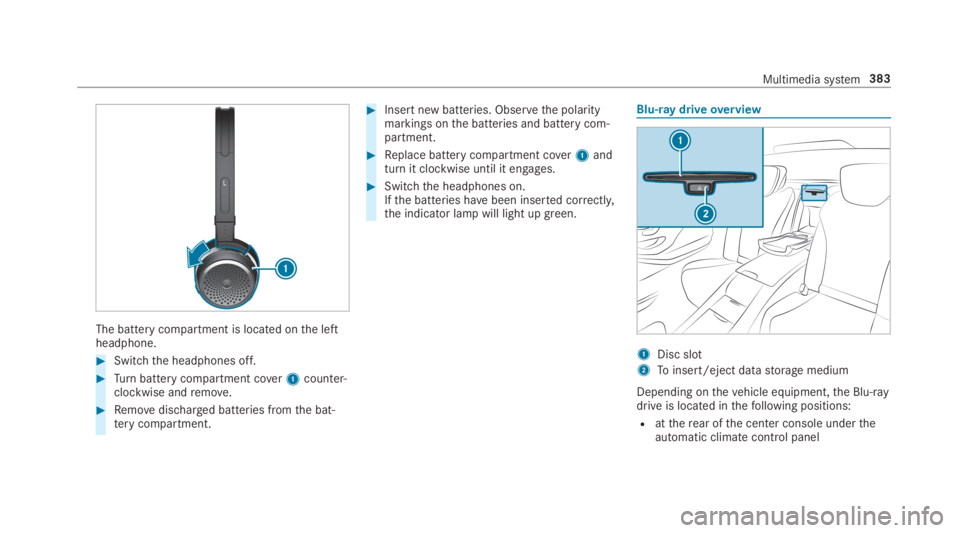
The battery compartment is located onthe leftheadphone.
#Switchthe headphones off.
#Turnbattery compartment cover1counter-clockwise andremove.
#Removedischarged batteries fromthe bat‐terycompartment.
#Insert new batteries. Observethe polaritymarkings onthe batteries and battery com‐partment.
#Replace battery compartment cover1andturn it clockwise until it engages.
#Switchthe headphones on.Ifthe batteries havebeen inserted correctly,the indicator lamp will light up green.
Blu-ray driveoverview
1Disc slot
2Toinsert/eject datastorage medium
Depending onthevehicle equipment,the Blu-raydrive is located inthefollowing positions:
Rattherear ofthe center console undertheautomatic climate control panel
Multimedia system383
Page 390 of 578
Re-establishing an Internet connection
Requirements:RObservetherequirementsforthe Internetfunctions intherear passenger compartment(→page 387).
If an Internetconnection istemporarily discon‐nected, it can bere-established intheRear SeatEntertainment System.
#Call uptheweb browser (→page 350).
#Enter a URL and open it.
Media
Information about media mode intherearpassenger compartmentTheRear Seat Entertainment System includes aBlu-ray drive (→page 383), two USB ports andan HDMI port (→page 384).
Depending onthevehicle model and equipmentlevel,the Blu-raydrive isfound:
Rattherear ofthe center console undertheautomatic climate control panel
Rbetweentherear shelf andthrough-load skibag
Datastorage media and devices supportedbytheRear Seat Entertainment System:
RSD cards
RUSBstorage device
RAudio CD
RData CD
RDataDVD
RVideoDVD
RBD (Blu-raydisc) video
RiPod®
RiPhone®
RMTP devices
RBluetooth®audio
Bluetooth®audio equipment can only beauthorized usingthe multimedia system.
TheRear Seat Entertainment System supports atotal of upto50,000files. TheRear Seat Enter‐
tainment System can also accessfiles onthemultimedia system.
Further information about audio mode(→page 354).
Further information about Bluetooth®audio(→page 364).
is a trademark ofDVDFormat/LogoLicensing Corporation.
388Multimedia system
Page 540 of 578
Air suspensionsee AIRMATIC
Airvents...................................................16 5Adjusting (front) ..................................16 5Adjusting (rear) ....................................16 5Glovebox .............................................166
Airventssee Airvents
Air-recirculation mode............................16 2
Air-water duct.......................................... 403Keeping free ........................................403
Airbag.........................................................38Activation .............................................. 32Belt airbag .............................................36Cushionbag ...........................................38Front airbag (driver, front passenger) ....38Installation locations .............................38Knee airbag ........................................... 38Overview ............................................... 38PASSENGER AIRBAG indicator lamp .....43Protection ..............................................39Side airbag ............................................ 38Window curtain airbag ...........................38
AIRMATIC..................................................215Setting .................................................216Suspension ..........................................215
AlarmseePanic alarm
Alarm systemseeATA (anti-theft alarm system)
AlternativerouteseeRoute
Ambient lightingSetting (multimedia system) ................150
AndroidAuto............................................ 341Connecting a mobile phone ................. 341Ending ................................................. 342Information .......................................... 341Overview .............................................. 341Sound settings .................................... 342Transferredvehicle data ......................342
AnimalsPets inthevehicle ..................................61
Anti-lock braking systemsee ABS (Anti-lock Braking System)
Anti-skidchainssee Snowchains
Anti-theft alarmsystemseeATA (anti-theft alarm system)
Anti-theft protectionImmobilizer ............................................ 90
Anti-theft protectionseeATA (anti-theft alarm system)
Anticipatory occupant protection
see PRE-SAFE®(anticipatory occu‐pant protection)
see PRE-SAFE®PLUS (anticipatoryoccupant protection plus)
Apple CarPlay™....................................... 339
Connecting an iPhone®....................... 340Ending .................................................341Notes .................................................. 340Overview ............................................. 339Sound settings .................................... 340Transferredvehicle data ......................342
AshtrayFront center console ...........................13 4Rear door .............................................134
538Index
Page 544 of 578
Seat belts ............................................41 0Seat cover ............................................41 0Sensors............................................... 409Tailpipes .............................................. 409Washingbyhand ................................. 404Wheels/rims ....................................... 409Windows.............................................. 409Wiper blades .......................................409
Carpet (Care)............................................41 0
Champagneglass....................................131
Change of address.....................................21
Change ofownership................................21
Changing a wheelPreparation .........................................458Raisingthevehicle .............................. 459
Changinggears........................................178Manually ..............................................178
Changing hub caps.................................458
Character entryOnthetouchpad .................................286Usingthe controller ............................. 286
ChargingBattery (vehicle) ..................................423
Mobile phone (wireless) .......................141USB port ..............................................138
Chassis level (MAGICBODYCON‐TROL)Setting .................................................221
Chauffeur mode......................................... 99Fullyreclined position ..........................104Information ............................................ 99Installing/removing headrestraint ......101Movingthe front passenger seat intothechauffeur position .........................100Movingthe front passenger seat intothe normal position .............................102
Child safety lockActivating/deactivating (multimediasystem) ............................................... 293Rear door .............................................. 59Rear side windows................................. 60
Child seatAttaching (notes) ................................... 52Basic instructions ..................................47front-passenger seat (notes) ..................57LATCH-type (ISOFIX) (installing) ............ 53Notes onrisks and dangers ...................48
Securing onthe front passenger seat ....58Securing ontherear seat ...................... 56TopTether ..............................................55
ChildrenAvoiding dangers inthevehicle .............48Basic instructions ..................................47Special seat beltretractor ..................... 53
Chock....................................................... 457Storage location ..................................457
Chocksee Chock
CigarettelighterFront center console ...........................13 5Rear passenger compartment .............135
Cleaningsee Care
Climate controlActivating/deactivatingthe A/Cfunction (control panel) .......................160Activating/deactivatingthe A/Cfunction (multimedia system) ..............16 0Activating/deactivatingthe synchro‐nization function (multimedia sys‐tem) .....................................................16 2
542Index
Page 546 of 578
Coolant (engine)Check level .......................................... 401Filling capacity .....................................473Notes ...................................................472
CopyrightLicenses ................................................ 29Trademarks............................................ 29
Cornering light function..........................14 8
Coversee Side windows
CrossTraffic Alert...................................236
Crosswind AssistFunction/notes ...................................19 5
Crosswind Assistsee MAGICBODYCONTROL
Cruise control.......................................... 200Buttons ................................................ 201Calling up a speed ............................... 201Function .............................................. 200Requirements: .....................................201Selecting ............................................. 201Setting a speed .................................... 201Storing a speed ................................... 201
Switching off ....................................... 201Switching on ........................................201System limitations ...............................200
Cup holder................................................131Installing/removing (center console) ...131Rear passenger compartment (vehi‐cles with arear benchseat) .................13 2Rear passenger compartment (vehi‐cles with electrically adjustablerearseats) ..................................................13 2Removing/installingthe insert (vehi‐cles with electrically adjustablerearseats) ..................................................13 2Switchingthe cooling/heating func‐tion on/off ..........................................13 3
Cushionbag................................................ 38
Customer Assistance Center (CAC).........25
CustomerRelations Department.............25
D
Dashboardsee Cockpit
Dashboard lightingsee Instrument cluster lighting
Data acquisitionVehicle .................................................. 26
Data import/export................................ 294Function/notes ................................... 294Importing/exporting ........................... 294
DatastorageElectronic control units .........................26Online services ......................................27Vehicle .................................................. 26
DateSettingthe time and date automati‐cally ..................................................... 288
Daytimerunning lamp modesee Daytimerunning lights
Daytimerunning lights...........................14 9Switching on/off .................................14 9
Deactivatingthe alarm(ATA)....................91
Dealershipsee Qualified specialistworkshop
Declaration of conformityWirelessvehicle components ................23
Decorativefoil (cleaning instructions)...................................................................406
544Index
Page 569 of 578
see Apple CarPlay™see Mercedes-Benz LinkseeTelephone
Snowchains............................................ 435
Socket (12 V)............................................13 6Front center console ...........................13 6Rear passenger compartment .............136Trunk ...................................................138
Socket (115V)..........................................137Rear passenger compartment .............137
Software update...................................... 296Important system updates ...................297Information .......................................... 296Performing .......................................... 297
Sound
PRE-SAFE®Sound ................................. 46Wheels and tires ..................................434
Sound
see Burmester®surround sound systemsee Sound settings
Sound settings.........................................375Adjustingthe balance/fader ................375
Adjusting treble, mid-range and basssettings ................................................375Automaticvolume adjustment .............375Calls upthe sound menu .....................375Information ..........................................375
Special seat beltretractor........................53
Specialistworkshop..................................24
Speech dialog systemseeVoice Control System
Speed index (tires)..................................449
SpeedometerDigital .................................................. 257
Spotlight functionSwitching on/off.................................24 3
Standby modeActivating/deactivating .......................191Function ..............................................19 0
Standing lights........................................14 5
Start/Stop buttonParkingthevehicle ..............................182Startingthevehicle .............................16 8Switching onthe power supply orignition .................................................167
Start/stop functionsee ECOstart/stop function
Starting assistancesee Jump-startconnection
Startingthe engineseeVehicle
Starting-offaidsee Hillstart assist
StationDeleting ............................................... 369Direct frequency entry ........................ 369Moving ................................................ 369Searching ............................................ 369Setting .................................................369Storing ................................................ 369
Station listCalling up ............................................ 369
Station presetsEditing ................................................. 369Modifying ............................................ 369
STEER CONTROLFunction/notes ...................................19 6
Index567
Page 570 of 578
Steering wheel........................................ 252Adjusting (electrically) ..........................11 3Buttons ................................................ 252Operatingthe memory function ...........11 5Steering wheel heater ..........................11 4
Steering wheel heaterSwitching on/off ..................................11 4
Steering wheel paddle shifters..............178
Stowage areasseeStowage compartment
Stowage compartment...........................12 2Armrest ...............................................12 2Center console ....................................122Door ....................................................12 2Eyeglasses compartment .....................124Foldingtable ........................................124Glovebox .............................................122Parcel net hooks ..................................126Rear armrest ........................................124Rear passenger compartment centerarmrest ................................................12 5Rear seat backrest ..............................12 5
Stowage compartmentsseeStowage compartment
Stowage space underthe trunk floor....12 9
Sulfur content......................................... 469
Sun visorOperating .............................................157
Surround lighting....................................14 9Setting .................................................14 9
SurroundViewsee 360° Camera
SuspensionAdjustingthechassis level (MAGICBODYCONTROL) .................................221Settingthe suspension level (AIR‐MATIC) .................................................216
Suspensionsee AIRMATICsee MAGICBODYCONTROL
Suspension level (AIRMATIC)Setting .................................................216
Switch-off delay timeExterior ................................................14 9Interior .................................................151
Switching onvoice amplificationMultimedia system .............................. 289
Switchingthe surround sound on/off
Burmester®surround sound system ....376
Synchronization functionActivating/deactivating (multimediasystem) ................................................16 2
System settingsActivating/deactivating PIN protec‐tion ...................................................... 295Reset function (multimedia system) ....298Settingthe distance unit ..................... 294Settingthe time and date automati‐cally ..................................................... 288Settingthe time zone .......................... 288Settingthe time/dateformat .............. 288Switching transmission ofthevehicleposition on/off .................................... 289
System settings
see Bluetooth®
see Data import/exportsee Languagesee Software updateseeWi-Fi
568Index