charging MERCEDES-BENZ S CLASS 2019 User Guide
[x] Cancel search | Manufacturer: MERCEDES-BENZ, Model Year: 2019, Model line: S CLASS, Model: MERCEDES-BENZ S CLASS 2019Pages: 578, PDF Size: 23.31 MB
Page 424 of 578
#When givingstarting assistance, alwaysmake surethatyou onlyconnect bat‐teryterminals with identical polarity.
#Duringstarting assistance,you mustobservethe described orderfor con‐necting and disconnectingthe jumpercables.
#Do not connect or disconnectthe bat‐teryclamps whilethe engine isrunning.
&WARNINGRisk ofexplosion duringcharging process andstarting assistance
Duringthecharging process andstartingassistance,the battery mayrelease anexplo‐sivegas mixture.
#Avoidfire, openflames, creating sparksand smoking.
#Make surethatthere is sufficientventi‐lation duringthecharging process andduringstarting assistance.
#Do not leanover a battery.
&WARNINGRisk ofexplosion from a fro‐zen battery
A discharged battery may freeze attempera‐tures slightly aboveor below freezing point.
Duringstarting assistance or batterycharg‐ing, batterygas may bereleased.
#Alwaysthawa frozen batteryoutfirstbeforecharging it or performingstart‐ing assistance.
Ifthe indicator/warning lamps inthe instrumentcluster do not light up at lowtemperatures, it isverylikelythatthe discharged battery has fro‐zen. Inthis caseyou may neither jump-startthevehicle norchargethe battery.
The service life of a batterythat has beenthawed may be dramatically shortened. Thestartingcharacteristics may be impaired, espe‐cially at lowtemperatures.
It isrecommendedthatyou haveathawed bat‐terychecked at aqualified specialistworkshop.
Allvehicles
*NOTEDamagecausedbynumerous orextended attemptstostartthe engine
Numerous orextended attemptstostarttheengine may damagethe catalytic converterduetonon-combusted fuel.
#Avoid numerous andextended attemptstostartthe engine.
Observethefollowing points duringstartingassistance and whenchargingthe battery:
ROnly use undamaged jumper cables/charg‐ing cables with a sufficient cross-section andinsulatedterminal clamps.
RNon-insulated parts oftheterminal clampsmust not come into contact withother metalparts whilethe jumper cable/charging cableis connectedtothe battery/jump-startcon‐nection point.
RThe jumper cable/charging cable must notcome into contact withany parts which maymovewhenthe engine isrunning.
422Breakdown assistance
Page 425 of 578
RAlways make surethat neitheryou northebattery is electrostaticallycharged.
RKeepawayfromfireand openflames.
RDo not leanoverthe battery.
Observethe additionalfollowing points whenchargingthe battery:
ROnly use batterychargerstested andapprovedfor Mercedes-Benz.
RReadthe batterycharger's operating instruc‐tions beforechargingthe battery.
Observethe additionalfollowing points duringstarting assistance:
RStarting assistance may only be providedusing batteries with a nominalvoltage of12V.
RThevehicles must nottouch.
RGasoline engine:Onlyacceptstarting assis‐tance ifthe engine andexhaust system arecold.
Starting assistance andchargingthe12 Vbattery
Requirements:RThevehicle is secured withthe electric park‐ing brake.
RThe transmission is in position].
RThe ignition and all electrical consumers areswitched off.
RThe hood is open.
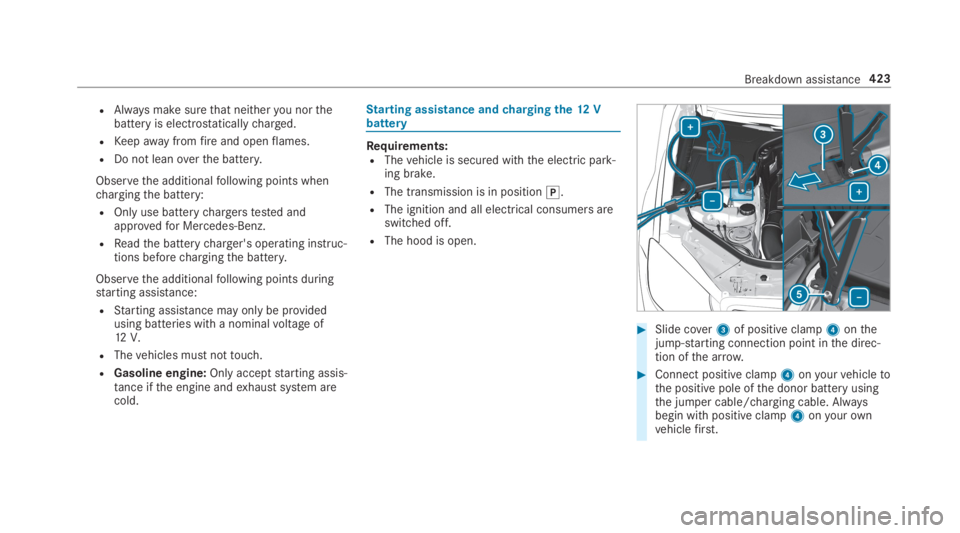
#Slide cover3of positive clamp4onthejump-starting connection point inthe direc‐tion ofthe arrow.
#Connect positive clamp4onyourvehicletothe positive pole ofthe donor battery usingthe jumper cable/charging cable. Alwaysbegin with positive clamp4onyourownvehiclefirst.
Breakdown assistance423
Page 426 of 578
#Duringstarting assistance:starttheengine ofthe donorvehicle andrun at idlespeed.
#Connectthe negative pole ofthe donor bat‐teryandground point5ofyourownvehiclebyusingthe jumper cable/charging cable.Begin withthe donor batteryfirst.
#Duringstarting assistance:starttheengine ofyourownvehicle.
#Duringthecharging process:startthecharging process.
#Duringstarting assistance:letthe enginesrunfor several minutes.
#Duringstarting assistance:before discon‐nectingthe jumper cable, switch on an elec‐trical consumer inyourownvehicle, e.g.therear windowdefroster or lighting.
Whenthestarting assistance/charging processis complete:
#First,removethe jumper cable/chargingcable from ground point5and negativepole ofthe donor battery,then from positiveclamp4and positive pole ofthe donor bat‐
tery. Begin eachtime with the contacts onyourownvehiclefirst.
#Afterremovingthe jumper cable/chargingcable, close cover3of positive clamp4.
Further information can be obtained at aquali‐fied specialistworkshop.
Replacing the12V battery
#Observethe notes onthe12V battery(→page419).
Mercedes-Benzrecommendsthatyou havethe12V batteryreplaced at aqualified specialistworkshop, e.g. at an authorized Mercedes-BenzCenter.
Observethefollowing notes ifyouwanttoreplacethe batteryyourself:
RAlwaysreplace afaulty batterywith a batterywhich meetsthe specificvehiclerequire‐ments.
Thevehicle is equipped with anAGMtechnol‐ogy battery (Absorbent Glass Mat) or a lith‐ium-ion battery.Fullvehicle functionality is
only guaranteed with anAGM battery or lith‐ium-ion battery.For safetyreasons,Mercedes-Benzrecommendsthatyou onlyuse batteries which havebeentested andapprovedforyourvehiclebyMercedes-Benz.
RCarryover detachable parts, such asventhoses, elbowfitting orterminal coversfromthe battery beingreplaced.
RMake surethatthevent hose is alwayscon‐nectedtothe original opening onthe side ofthe battery.
Install anyexisting or supplied cell caps.
Otherwise,gases or battery acid couldescape.
RMake surethat detachable parts arerecon‐nected inthe sameway.
Towstarting ortowingaway
Permittedtowing methods
Plug-inhybrid:observethe notes inthe Supple‐ment. Otherwise,you may notrecognize dan‐gers.
424Breakdown assistance
Page 542 of 578
Steering wheel paddle shifters............178Transmission position display ..............17 7Transmission positions ........................17 7
B
BAS (Brake Assist System).....................192
BatteryCharging (RemoteOnline) ....................17 0SmartKey...............................................64
Batterysee Battery (vehicle)
Battery (vehicle)...................................... 424Charging .............................................. 423Charging (RemoteOnline) ....................17 0Notes ...................................................419Notes (starting assistance andcharging) .............................................421Replacing .............................................424Starting assistance .............................. 423
Beltsee Seat belt
Belt airbagActivation .............................................. 32Function/notes .....................................36
Blind Spot Assist.....................................24 3Function ..............................................24 3Switching on/off .................................24 6System limitations ...............................243
Blu-raydrive (Rear Seat Entertain‐ment System)Overview .............................................383
Bluetooth®............................................... 290Activating/deactivating .......................290Information .......................................... 289
Bluetooth®audioActivating ............................................ 366De-authorizing (de-registering)thedevice .................................................. 366Information .......................................... 364Overview .............................................364Searchingfor a track ........................... 366Searchingfor and authorizingthedevice .................................................. 365Selecting a media player .....................366Switching device via NFC .................... 366
Brake Assist SystemseeBAS (Brake AssistSystem)
BrakefluidNotes ...................................................472
Brakeforce distributionEBD (electronic brakeforce distribu‐tion) .....................................................19 6
BrakesABS (Anti-lockBraking System) ...........19 2Active Brake Assist..............................19 6BAS (Brake AssistSystem) ..................19 2Driving tips ..........................................171EBD (electronic brakeforce distribu‐tion) .....................................................19 6HOLD function .....................................214Limited braking effect (salt-treatedroads) ..................................................171New/replaced brakepads/brakediscs ....................................................17 0Notes on breaking-in a newvehicle .....17 0
Braking assistanceseeBAS (Brake AssistSystem)
BreakdownChanging a wheel ................................ 458Overview ofthe help functions ..............16Roadside Assistance ..............................21
540Index
Page 544 of 578
Seat belts ............................................41 0Seat cover ............................................41 0Sensors............................................... 409Tailpipes .............................................. 409Washingbyhand ................................. 404Wheels/rims ....................................... 409Windows.............................................. 409Wiper blades .......................................409
Carpet (Care)............................................41 0
Champagneglass....................................131
Change of address.....................................21
Change ofownership................................21
Changing a wheelPreparation .........................................458Raisingthevehicle .............................. 459
Changinggears........................................178Manually ..............................................178
Changing hub caps.................................458
Character entryOnthetouchpad .................................286Usingthe controller ............................. 286
ChargingBattery (vehicle) ..................................423
Mobile phone (wireless) .......................141USB port ..............................................138
Chassis level (MAGICBODYCON‐TROL)Setting .................................................221
Chauffeur mode......................................... 99Fullyreclined position ..........................104Information ............................................ 99Installing/removing headrestraint ......101Movingthe front passenger seat intothechauffeur position .........................100Movingthe front passenger seat intothe normal position .............................102
Child safety lockActivating/deactivating (multimediasystem) ............................................... 293Rear door .............................................. 59Rear side windows................................. 60
Child seatAttaching (notes) ................................... 52Basic instructions ..................................47front-passenger seat (notes) ..................57LATCH-type (ISOFIX) (installing) ............ 53Notes onrisks and dangers ...................48
Securing onthe front passenger seat ....58Securing ontherear seat ...................... 56TopTether ..............................................55
ChildrenAvoiding dangers inthevehicle .............48Basic instructions ..................................47Special seat beltretractor ..................... 53
Chock....................................................... 457Storage location ..................................457
Chocksee Chock
CigarettelighterFront center console ...........................13 5Rear passenger compartment .............135
Cleaningsee Care
Climate controlActivating/deactivatingthe A/Cfunction (control panel) .......................160Activating/deactivatingthe A/Cfunction (multimedia system) ..............16 0Activating/deactivatingthe synchro‐nization function (multimedia sys‐tem) .....................................................16 2
542Index
Page 560 of 578
Mercedes-Benz AppsCalling up ............................................ 350Usingvoice control .............................. 350
Mercedes-Benz emergency call sys‐tem........................................................... 346Automatic emergency call ................... 347Information .......................................... 346Information on data processing ...........348Manual emergency call ........................ 347Overview ............................................. 346
Mercedes-Benz Link................................ 338Connecting .......................................... 339Ending ................................................. 339Overview ............................................. 338Using ................................................... 339
Message (multifunction display)see Display message
Message memory....................................478
MessagesVoice commands (Voice Control Sys‐tem) .....................................................274
MessagesseeText messages
Mirrorssee Exterior mirrors
Mobile phoneWirelesscharging ................................14 2Wirelesscharging (rear passengercompartment) ......................................14 2
Mobile phonesee AndroidAutosee Apple CarPlay™see Mercedes-Benz Linksee SecondtelephoneseeTelephone
Mobile phonevoicerecognitionStarting ...............................................333Stopping ..............................................333
Model series............................................ 466
MOExtended tires....................................414
Multifunction cameraROAD SURFACE SCAN ........................ 220
Multifunction displayOverview of displays ............................255
Multifunctionsteering wheelOverview of buttons ............................ 252
Multifunctionsteering wheelseeSteering wheel
Multimedia system..................................278Activating/deactivatingstandbymode ...................................................191Adjuststhevolume .............................. 284Central control elements .....................279Configuring displaysettings ................287ENERGIZING comfort program (over‐view) ....................................................299Enteringcharacters .............................285Favorites ............................................. 282Main functions .................................... 282Overview .............................................278Rear climate control ............................16 2Restoringthefactory settings ............. 298Settingthefootwelltemperature .........161Standby mode function .......................190Startingthe ENERGIZING comfortprogram ..............................................300Switchingthe sound on or off .............284
Multimedia systemseeTouch ControlseeTouchpad
558Index
Page 565 of 578
Headphonesoverview .........................381Information about dynamicrangelimitation ............................................. 393Information about media mode ........... 388Inserting a disc .................................... 390Internet connectivitystatus .................387Internet functionsoverview .................387Operating safety ..................................377Overview .............................................378Overview of massage andworkoutprograms ............................................. 384Overview ofthe sound settings ........... 393Playback option in Blu-ray/DVDmode ................................................... 392Portsoverview .....................................384Re-establishing an Internet connec‐tion ...................................................... 388Rear compartment displayoverview ....379Remotecontroloverview .....................379Resettingtherear seat ........................ 384Selecting afilm/trackin Blu-ray/DVD mode .................................... 393Selecting a massage program .............384Selectingthe scene/chapter in Blu-ray/DVD mode .................................... 392Settingthe language ........................... 386
Switching navigation on ....................... 387Switching offthe display ..................... 386Switching ontheradio ........................ 393Switchingthe display on/off ............... 380SwitchingtoHDMI mode ..................... 393
Rear view camera....................................226Care.................................................... 409Function .............................................. 226Openingthe camera cover (360°Camera) ............................................... 231Settingfavorites (360° Camera) ..........231
Rear windowRoller sunblind .......................................77
Reflective safetyvest..............................413
Refrigerant (air conditioning system)Notes ...................................................474
Refrigerator boxRemoving/installing ............................14 0Using ...................................................13 9
RefuelingRefuelingthevehicle ...........................180
Remotecontrol (Rear Seat Entertain‐ment System)Overview .............................................379Replacing batteries .............................. 381Selecting a display .............................. 380Switchingthe display on/off ............... 380
RemoteOnlineChargingthe battery ............................170Cooling or heatingthevehicle inte‐rior .......................................................169Startingthevehicle .............................17 0
Reporting malfunctionsrelevanttosafety.......................................................... 25
Rescue card............................................... 26
ReserveFuel .....................................................470
Reset function (multimedia system).....298
Residual heatFront ....................................................163Rear passenger compartment .............163
Restoring (factory settings)seeReset function (multimedia system)
Index563
Page 571 of 578
T
TableseeFoldingtable
Tailpipes (Care)........................................ 409
Tank contentFuel .....................................................470Reserve(fuel) ......................................470
Technical dataInformation .......................................... 464Tirepressure monitor ..........................441Vehicle identification plate .................. 466
Telephone........................................ 260, 328Activating functions during a call ........ 333Call andringtonevolume .....................333Calls with several participants .............333Connecting a mobile phone (NearField Communication (NFC)) ...............332Connecting a mobile phone (Pass‐key) .....................................................329Connecting a mobile phone (SecureSimplePairing) .................................... 329De-authorizing a mobile phone ............ 331Disconnecting a mobile phone ............ 331Importing contacts ..............................335
Importing contacts (overview) .............335Incoming call during anexisting call .... 334Information .......................................... 329Interchanging mobile phones .............. 331Menu (on-board computer) .................. 260Mobile phonevoicerecognition .......... 333Notes .................................................. 326Operating modes ................................. 329Reception and transmissionvolume .... 332Switching mobile phones (Near FieldCommunication (NFC)) ........................ 332Telephone menuoverview ...................328Telephone operation ............................ 333Using Near Field Communication(NFC) ...................................................332Voice commands (Voice Control Sys‐tem) .....................................................270Wirelesscharging (mobile phone intherear passenger compartment) .......142Wirelesscharging (mobile phone) ........14 2
Telephonesee Secondtelephone
Telephone numberDialing (on-board computer) ................ 260
Telephony operating modes
Bluetooth®Telephony .......................... 329
Telephony operating modessee Secondtelephone
Temperaturegrade..................................446
Text messages......................................... 337Calling a message sender .................... 338Changingfolders .................................338Composing .......................................... 337Configuringthe displayedtext mes‐sages ................................................... 337Deleting ............................................... 338Drafts .................................................. 338Notes ................................................... 337Options ................................................ 338Outbox ................................................ 338Read-aloud function ............................ 337Reading ...............................................337Replying .............................................. 338Sending ...............................................337Voice commands (Voice Control Sys‐tem) .....................................................274
TimeManual time setting ............................. 288
Index569
Page 578 of 578
Tractiongrade .....................................446Treadwear grade .................................446Unusual handlingcharacteristics ........ 434
Wi-Fi.........................................................290Overview ............................................. 290Setting ................................................. 290Setting up a hotspot ............................ 291
Window curtain airbag............................. 38
Windowssee Side windows
Windows(Care).......................................409
Windshield.......................................152,15 3Infraredreflective ................................15 8Radiowaves ........................................158Replacingthe wiper blades ..................15 2Replacing wiper blades (MAGICVISIONCONTROL) ...............................15 3
WindshieldseeWindshield
Windshield heater...................................16 4
Windshield heatingseeWindshield heater
Windshieldwasher fluid.........................473Notes ...................................................473
Windshieldwasher systemTopping up ...........................................402
Windshield wipersActivating/deactivating .......................151Replacingthe wiper blades ..................15 2Replacing wiper blades (MAGICVISIONCONTROL) ...............................15 3
Winter operationSnowchains ........................................ 435
Wiper bladesCare.................................................... 409Replacing .............................................152Replacing (MAGIC VISIONCONTROL).............................................................153
WirelesschargingFunction/notes ....................................141Mobile phone .......................................14 2Mobile phone (rear passenger com‐partment) ............................................14 2
Wirelessvehicle componentsDeclaration of conformity ...................... 23
Workout programOverview .............................................109
Workshopsee Qualified specialistworkshop
576Index