fuel MERCEDES-BENZ S CLASS 2019 User Guide
[x] Cancel search | Manufacturer: MERCEDES-BENZ, Model Year: 2019, Model line: S CLASS, Model: MERCEDES-BENZ S CLASS 2019Pages: 578, PDF Size: 23.31 MB
Page 178 of 578
Selectingthe drive program
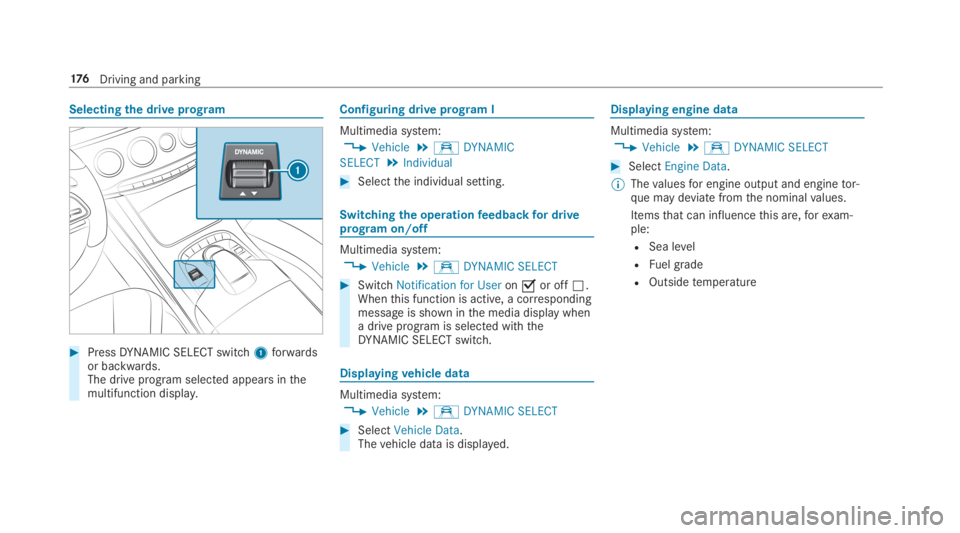
#PressDYNAMIC SELECT switch1forwardsor backwards.The drive program selected appears inthemultifunction display.
Configuring drive program I
Multimedia system:
,Vehicle.eDYNAMIC
SELECT.Individual
#Selectthe individual setting.
Switchingthe operationfeedbackfor driveprogram on/off
Multimedia system:
,Vehicle.eDYNAMIC SELECT
#SwitchNotification for Useronsor offS.Whenthis function is active, a correspondingmessage is shown inthe media display whena drive program is selected withtheDYNAMIC SELECT switch.
Displayingvehicle data
Multimedia system:
,Vehicle.eDYNAMIC SELECT
#SelectVehicle Data.Thevehicle data is displayed.
Displaying engine data
Multimedia system:
,Vehicle.eDYNAMIC SELECT
#SelectEngine Data.
%Thevaluesfor engine output and enginetor‐que may deviate fromthe nominalvalues.
Itemsthat can influencethis are,forexam‐ple:
RSea level
RFuel grade
ROutsidetemperature
176Driving and parking
Page 182 of 578
Using kickdown
Mercedes-AMGvehicles:observethe notes inthe Supplement. Otherwise,you mayfailtorec‐ognize dangers.
#Maximum acceleration:depressthe accel‐erator pedal beyondthe pressure point.
The automatic transmission shifts uptothe nextgear whenthe maximum engine speed isreachedtoprotectthe engine fromoverrevving.
Glide mode function
Plug-inhybrid:observethe notes inthe Supple‐ment. Otherwise,you mayfailtorecognize dan‐gers.
Mercedes-AMGvehicles:observethe notes inthe Supplement. Otherwise,you mayfailtorec‐ognize dangers.
Withan anticipatory drivingstyle,glide modehelpsyoutoreduce fuel consumption.
Glide mode ischaracterizedbythefollowing:
RThe combustion engine is disconnected fromthe drivetrain andthevehicle continuestoroll in neutral.
RThe transmission position[is displayed ingreen inthe multifunction display.
Glide mode is activated ifthefollowing condi‐tions are met:
RDrive program;is selected.
RThe speed is within a suitablerange.
RTheroad's course is suitable, e.g. nosteepuphill or downhill inclines or tight bends.
RYou do not depressthe accelerator or brakepedal.
%Glide mode can also be activated ifyou haveselectedtheEcosettingforthe drive whenin drive program=.
Glide mode is deactivated again if one oftheconditions is no longer met.
Vehicles withActive Distance AssistDISTRONIC:whenActive Distance Assist
DISTRONIC is active,theglide mode function isrestricted.
Refueling
Refuelingthevehicle
&WARNINGRisk offireorexplosion fromfuel
Fuels are highlyflammable.
#Fire, openflames, smoking and creationof sparksmust beavoided.
#Switchoffthe ignition and, ifavailable,thestationary heater, before and whilerefuelingthevehicle.
&WARNINGRisk of injuryfrom fuels
Fuels are poisonous and hazardousto yourhealth.
#Do not swallow fuel or let it come intocontact with skin,eyes or clothing.
#Do not inhale fuelvapor.
18 0Driving and parking
Page 183 of 578
#Keepchildrenawayfrom fuel.
#Keep doors and windowsclosed duringtherefueling process.
Ifyou orother people come into contact withfuel, observethefollowing:
#Immediatelyrinse fuel offyour skin withsoap andwater.
#If fuel comes into contact withyoureyes, immediatelyrinsethemthor‐oughly with cleanwater.Seek medicalattention immediately.
#Ifyou swallow fuel, seek medical atten‐tion immediately.Do not inducevomit‐ing.
#Change immediately out of clothingthathas come into contact withfuel.
&WARNINGRisk offireorexplosion fromelectrostaticcharge
Electrostaticchargecan createsparksandthereby ignite fuelvapors.
#Beforeyou openthe fuelfiller cap ortakehold ofthe pump nozzle,touchthemetallicvehicle body.This discharges any electrostaticchargethat may havebuilt up.
#Do notget intothevehicle again duringtherefueling process.Otherwise, electrostaticchargecouldbuild up again.
*NOTEDamagecausedbythe wrong fuel
Vehicles with agasoline engine:
Even small amounts ofthe wrong fuel couldresult in damagetothe fuel system,theengine andthe emission control system.
#TheRONrequirement is located inthefuelfillerflap.
#Only refuel with low-sulfur unleadedfuel.
This fuel may contain upto10%ethanol.Yourvehicle is suitablefor use with E10 fuel.
Neverrefuel using any ofthefollowing fuels:
RDiesel
RGasoline with morethan10%ethanolbyvolume, e.g. E15, E85, E100
RGasoline with morethan 3% methanolbyvolume, e.g. M15, M30, M85, M100
RGasoline with additives containing metal
Ifyou accidentallyrefuel withthe wrong fuel:
#Do not switchthe ignition on.
#Consult aqualified specialistworkshop.
*NOTEDo not use dieseltorefuelvehi‐cles with agasoline engine.
Ifyou accidentallyrefuel withthe wrong fuel:
RDo not switchthe ignition on. Otherwisefuel can enterthe engine.
Even small amounts ofthe wrong fuelcouldresult in damagetothe fuel systemandthe engine. Therepair costs are high.
#Consult aqualified specialistworkshop.
Driving and parking181
Page 184 of 578
#Havethe fueltank and fuel linesdrained completely.
*NOTEDamagetothe fuel system causedbyoverfilled fueltanks.
#Onlyfillthe fueltank untilthe pumpnozzle switches off.
*NOTEFuel may sprayout whenyouremovethe fuel pump nozzle.
#Onlyfillthe fueltank untilthe pumpnozzle switches off.
Requirements:RThevehicle is unlocked.
%Do notget intothevehicle again duringtherefueling process. Otherwise, electrostaticchargecould build up again.
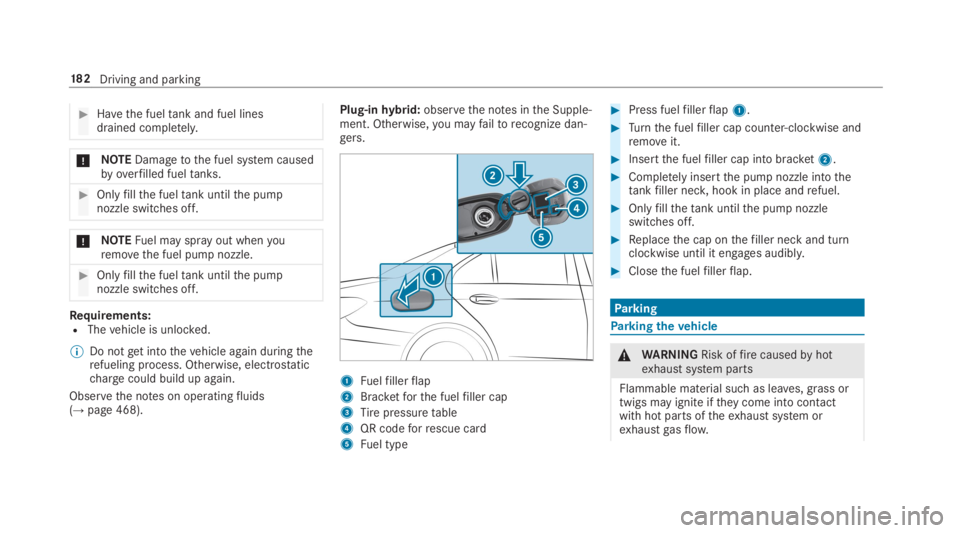
Observethe notes on operatingfluids(→page 468).
Plug-inhybrid:observethe notes inthe Supple‐ment. Otherwise,you mayfailtorecognize dan‐gers.
1Fuelfillerflap
2Bracketforthe fuelfiller cap
3Tirepressuretable
4QR codeforrescue card
5Fuel type
#Press fuelfillerflap1.
#Turnthe fuelfiller cap counter-clockwise andremoveit.
#Insertthe fuelfiller cap into bracket2.
#Completelyinsertthe pump nozzle intothetankfiller neck,hook in place andrefuel.
#Onlyfillthetank untilthe pump nozzleswitches off.
#Replacethe cap onthefiller neck and turnclockwise until it engages audibly.
#Closethe fuelfillerflap.
Parking
Parkingthevehicle
&WARNINGRisk offirecausedbyhotexhaust system parts
Flammable material such as leaves, grass ortwigs may ignite iftheycome into contactwithhot parts oftheexhaust system orexhaustgasflow.
18 2Driving and parking
Page 205 of 578
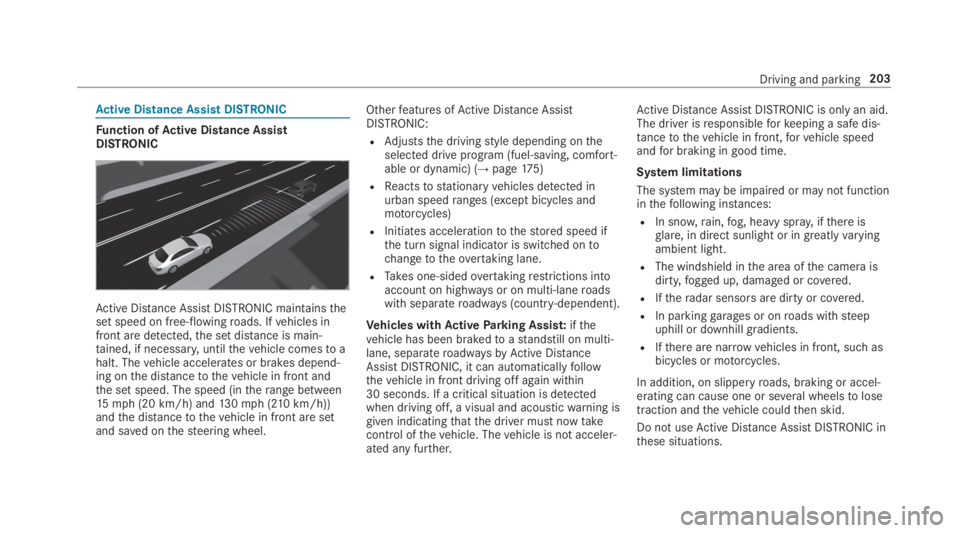
Active Distance Assist DISTRONIC
Function ofActive Distance AssistDISTRONIC
Active Distance AssistDISTRONIC maintainstheset speed on free-flowingroads. Ifvehicles infront are detected,the set distance is main‐tained, if necessary,untilthevehicle comesto ahalt. Thevehicle accelerates or brakes depend‐ing onthe distancetothevehicle in front andthe set speed. The speed (intherange between15mph (20 km/h) and130mph (210km/h))andthe distancetothevehicle in front are setand saved onthesteering wheel.
Otherfeatures ofActive Distance AssistDISTRONIC:
RAdjuststhe drivingstyle depending ontheselected drive program (fuel-saving, comfort‐able or dynamic) (→page175)
RReactstostationaryvehicles detected inurban speedranges (except bicycles andmotorcycles)
RInitiates accelerationtothestored speed ifthe turn signal indicator is switched ontochangetotheovertaking lane.
RTakes one-sidedovertakingrestrictions intoaccount on highways or on multi-laneroadswith separateroadways (country-dependent).
Vehicles withActiveParking Assist:ifthevehicle has been brakedtoastandstill on multi-lane, separateroadwaysbyActive DistanceAssistDISTRONIC, it can automaticallyfollowthevehicle in front driving off again within30 seconds. If a critical situation is detectedwhen driving off, a visual and acousticwarning isgiven indicatingthatthe driver must nowtakecontrol ofthevehicle. Thevehicle is not acceler‐ated any further.
Active Distance AssistDISTRONIC is only an aid.The driver isresponsibleforkeeping a safe dis‐tancetothevehicle in front,forvehicle speedandfor braking in good time.
System limitations
The system may be impaired or may not functioninthefollowing instances:
RIn snow,rain,fog, heavy spray, ifthere isglare, in direct sunlight or in greatlyvaryingambient light.
RThe windshield inthe area ofthe camera isdirty,fogged up, damaged or covered.
RIftheradar sensors are dirty or covered.
RIn parkinggarages or onroads withsteepuphill or downhill gradients.
RIfthere are narrowvehicles in front, such asbicycles or motorcycles.
In addition, on slipperyroads, braking or accel‐erating can cause one or several wheelstolosetraction andthevehicle couldthen skid.
Do not useActive Distance AssistDISTRONIC inthese situations.
Driving and parking203
Page 209 of 578
System limitationsTemporary speedrestrictions (e.g.for a certaintime or duetoweather conditions) cannot beproperlydetectedbythe system. The maximumpermissible speed applyingfor avehicle with atrailer is not detectedbythe system. Inthese sit‐uationsyou must adjustyour speedyourself.
&WARNINGRisk of accident duetoActiveSpeed Limit Assistadaptingthevehicle'sspeed
The speed adoptedbyActive Speed LimitAssistmay betoo high or incorrect in someindividual cases, suchas:
RInthewet or infog
RWhentowing a trailer
#Ensurethatthe driven speed complieswith trafficregulations.
#Adjustthe driving speedtosuit currenttraffic andweather conditions.
Function ofroute-based speed adaptation
%Theavailability ofthefollowing function iscountry-dependent.
When Distance AssistDISTRONIC is active,thefunction adjuststhe speed depending ontherouteevents ahead. Depending onthe drive pro‐gram selected,thevehicle negotiatestherouteevent ahead in a fuel-saving, comfortable ordynamic manner. Whentherouteevent has beenpassed,thevehicle accelerates againtothestored speed. The set distancetothevehicle infront,vehicles detected ahead and speedrestric‐tions ahead aretaken into account.
Route-based speed adjustment canbyconfig‐ured inthe multimedia system (→page 208).
Routeevents ahead are:
RBends
RT-intersections, traffic circles andtollsta‐tions
RTurns andexits
%Whenthetollstation isreached,Active Dis‐tance AssistDISTRONIC adoptsthe speed asthestored speed.
Also,the speed isreduced ifthe turn signaltochange lanes is switched on and one ofthefol‐lowing situations is detected:
RTurning off at intersections
RDriving on slowing-down lanes
RDriving on lanes adjacenttoslowing-downlanes
The driver isresponsibleforchoosingtherightspeed and observingotherroad users. Thisapplies in particulartointersections, traffic cir‐cles and traffic lights, asroute-based speedadaptation does not brakethevehicletoastand‐still.
Whenroute guidance is active,thefirst speedadjustment is carried out automatically. Iftheturn signal indicator is switched on,the selectedroute is confirmed and further speed adjustmentis activated.
Speed adjustment is canceled inthefollowingcases:
RIfthe turn signal indicator is switched offbeforetherouteevent.
Driving and parking207
Page 220 of 578
tem ensuresthe best possible suspension andconstant ground clearance,even witha ladenvehicle. When driving at speed,thevehicle islowered automaticallytoimprove driving safetyandtoreduce fuel consumption. The suspensiontuning is adjusted depending ontheroad sur‐face,vehicle load andthe drive program selec‐ted. TheROAD SURFACE SCAN function detectsareas of unevenness intheroad beforeyou driveoverthembymeans of a multifunction camera.Thisreduceschassis movements. The option ofmanually adjustingthevehicle level is alsoavail‐able.
The damping is tuned individuallyfor each wheeland is affectedbythefollowingfactors:
RThe drivingstyle, e.g. sporty
RTheroad condition, e.g. bumps
RThe individual selection ofthe drive program:C(Sport),A(Comfort),N(CURVE)or;(Economy)
MAGICBODYCONTROL comprises:
RActive Body Control ABC
RROAD SURFACE SCAN
RCurveinclination function CURVE
RAutomatic level control system
RAutomaticvehiclestabilization intheevent ofsidewinds
RSpeed-dependent loweringtoreduce fuelconsumption
RManually selectable high-level settingforgreater ground clearance
RDYNAMIC SELECT switch and level button
218Driving and parking
Page 253 of 578
Instrument Displayoverview
&WARNINGRisk of accident duetoaninstrument display malfunction
Ifthe Instrument Display hasfailed or mal‐functioned,you may notrecognize functionrestrictions applyingtosafetyrelevant sys‐tems.
The operating safety ofyourvehicle may beimpaired.
#Drive on carefully.
#Havethevehiclechecked immediatelyat aqualified specialistworkshop.
Mercedes‑AMGvehicles:observethe notes inthe Supplement. Otherwise,you mayfailtorec‐ognize dangers.
Plug-inhybrid:observethe notes inthe Supple‐ment. Otherwise,you mayfailtorecognize dan‐gers.
Ifthe operating safety ofyourvehicle isimpaired, parkthevehicle safely as soon as pos‐sible. Contact aqualified specialistworkshop.
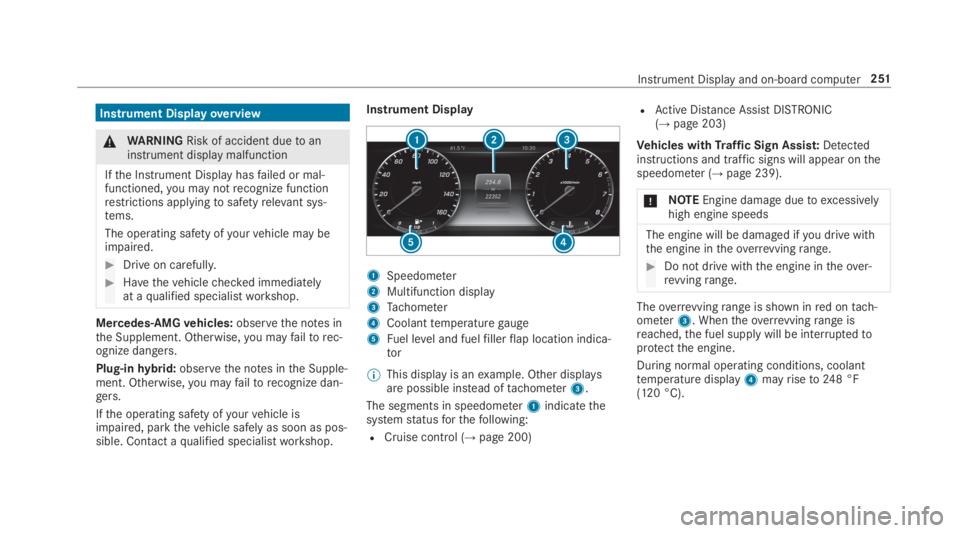
Instrument Display
1Speedometer
2Multifunction display
3Tachometer
4Coolanttemperaturegauge
5Fuel level and fuelfillerflap location indica‐tor
%This display is anexample. Other displaysare possible instead oftachometer3.
The segments in speedometer1indicatethesystemstatusforthefollowing:
RCruise control (→page 200)
RActive Distance AssistDISTRONIC(→page203)
Vehicles withTraffic Sign Assist:Detectedinstructions and traffic signs will appear onthespeedometer (→page 239).
*NOTEEngine damageduetoexcessivelyhigh engine speeds
The engine will be damaged ifyou drive withthe engine intheoverrevvingrange.
#Do not drive with the engine intheover‐revvingrange.
Theoverrevvingrange is shown inred ontach‐ometer3. Whentheoverrevvingrange isreached,the fuel supply will be interruptedtoprotectthe engine.
During normal operating conditions, coolanttemperature display4mayriseto248 °F(120 °C).
Instrument Displayand on-board computer251
Page 259 of 578
RGrayradarwaves nexttovehicle: Blind SpotAssist activated
RGreenradarwaves nexttovehicle: Blind SpotAssist active
RActive Distance AssistDISTRONIC displays(→page 203).
Calling up displaysontheTrip menu
On-board computer:
,Trip
%Whenyou havethestyle settoClassic,youcan view information onthe journey intheleft-hand area ofthe Instrument Display.
#Toselect a display:swipe upwards or down‐wards onthe left-handTouch Control.
DisplaysintheTripmenu:
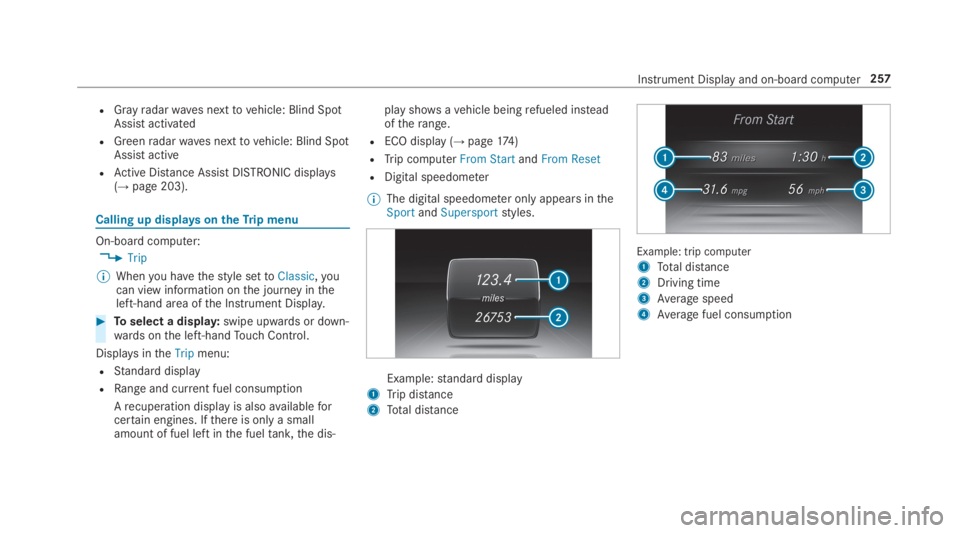
RStandard display
RRange and current fuel consumption
Arecuperation displayis alsoavailableforcertain engines. Ifthere is only a smallamount of fuel left inthe fueltank,the dis‐
play showsavehicle beingrefueled insteadoftherange.
RECO display (→page174)
RTrip computerFrom StartandFrom Reset
RDigital speedometer
%The digital speedometer only appears intheSportandSupersportstyles.
Example:standard display
1Trip distance
2Total distance
Example: trip computer
1Total distance
2Driving time
3Average speed
4Average fuel consumption
Instrument Display and on-board computer257
Page 307 of 578
#Iffavourites havebeen saved already(→page317), selectFrom My Favorites.
#Selectthefavourite.The destination address is shown.
Selecting a POIMultimedia system:
,Navigation.¬Previous and Other
Destinations.POIs
#Selectthe category.
or
#SelectAll Categoriesandthe category.Ifroute guidance is not active:the searchbegins inthe vicinity ofthe currentvehicleposition. The list is sortedbydistance inascending order.
The POIs showthefollowing information:
Rname of POI
Rlinear distancetothe POI
Rthe direction ofthe linear distancetothePOI (arrow) is displayed when searchingforthevehicle's current position#Selectthe POI.
#Route guidance is active:selectthe searchposition priortochoosing a POI (seeexam‐ple).
#If intermediate destinations are set,thesecan also be selected asthe searchpositionafter selectingNear Destination.
Filtering displaysfor POIs
#Enterthe searchterminªSearch:.Theresults list showsrelevant POIs.
#Select¡.Thefirst POI inthe list is highlighted.
#Selectthe POI.
Example: settingthe searchpositionfor theparking category during activeroute guid‐ance
#SelectIn the Vicinity,Near DestinationorAlong the Route.The list shows the located POIs or opens anoverview oftheroute destination afterselectingNear Destination.
#Selectthe POI.
#SelectNear Destination: selectthe inter‐mediate destination orthe destination.
Starting an automaticgasstation search
Requirements:RThe automaticgasstation searchis activateds(→page311).
Driving situationRoute guidance is active. The fuel level inthefueltankreachesthereservefuel level.
TheReserve Fuel Do you want to start a searchfor surrounding gas stations?message is shown.
#SelectYes.The automaticgasstation searchbegins. Theavailablegasstations alongtheroute or inthe vicinity ofthevehicle's current positionare displayed.
#Selectthegasstation.The address ofthegasstation is displayed.
#Ifroute guidance is not active, selectStartRoute Guidance.The selectedgasstation is set asthe desti‐nation.Route guidance begins.
Multimedia system305