high beam MERCEDES-BENZ S CLASS 2019 User Guide
[x] Cancel search | Manufacturer: MERCEDES-BENZ, Model Year: 2019, Model line: S CLASS, Model: MERCEDES-BENZ S CLASS 2019Pages: 578, PDF Size: 23.31 MB
Page 555 of 578
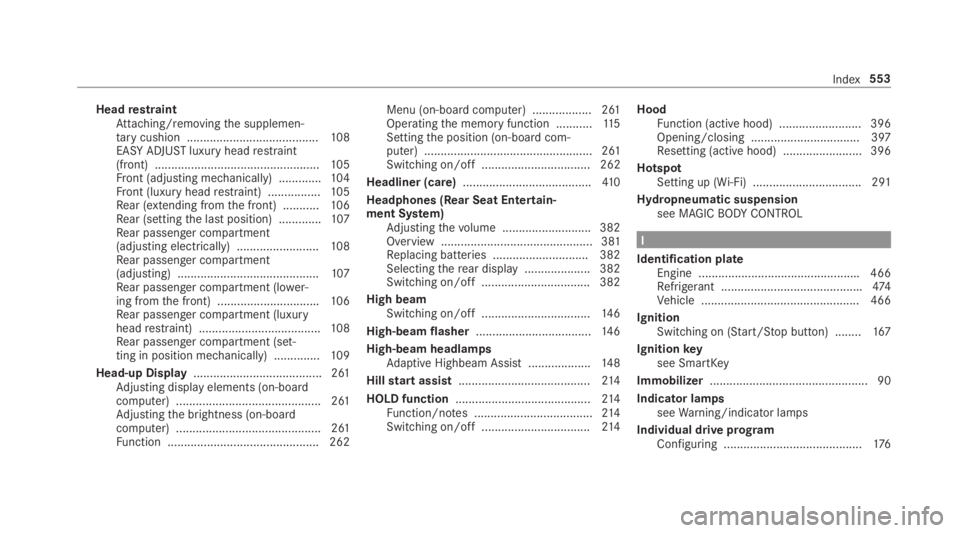
HeadrestraintAttaching/removingthe supplemen‐tarycushion ........................................108EASY ADJUSTluxury headrestraint(front) ..................................................105Front (adjusting mechanically) .............104Front (luxury headrestraint) ................105Rear (extending fromthe front) ...........106Rear (settingthe last position) .............107Rear passenger compartment(adjusting electrically) .........................108Rear passenger compartment(adjusting) ...........................................107Rear passenger compartment (lower‐ing fromthe front) ...............................106Rear passenger compartment (luxuryheadrestraint) .....................................108Rear passenger compartment (set‐ting in position mechanically) ..............109
Head-up Display....................................... 261Adjusting display elements (on-boardcomputer) ............................................ 261Adjustingthe brightness (on-boardcomputer) ............................................ 261Function .............................................. 262
Menu (on-board computer) .................. 261Operatingthe memory function ...........11 5Settingthe position (on-board com‐puter) ................................................... 261Switching on/off ................................. 262
Headliner (care).......................................41 0
Headphones (Rear Seat Entertain‐ment System)Adjustingthevolume ...........................382Overview .............................................. 381Replacing batteries .............................382Selectingtherear display .................... 382Switching on/off .................................382
High beamSwitching on/off .................................14 6
High-beam flasher...................................14 6
High-beam headlampsAdaptive Highbeam Assist ...................148
Hillstart assist........................................214
HOLD function.........................................214Function/notes ....................................214Switching on/off .................................214
HoodFunction (active hood) .........................396Opening/closing ................................. 397Resetting (active hood) ........................ 396
HotspotSetting up (Wi-Fi) ................................. 291
Hydropneumatic suspensionsee MAGICBODYCONTROL
I
Identification plateEngine .................................................466Refrigerant ...........................................474Vehicle ................................................ 466
IgnitionSwitching on (Start/Stop button) ........167
Ignitionkeysee SmartKey
Immobilizer................................................ 90
Indicator lampsseeWarning/indicator lamps
Individual drive programConfiguring ..........................................176
Index553
Page 556 of 578
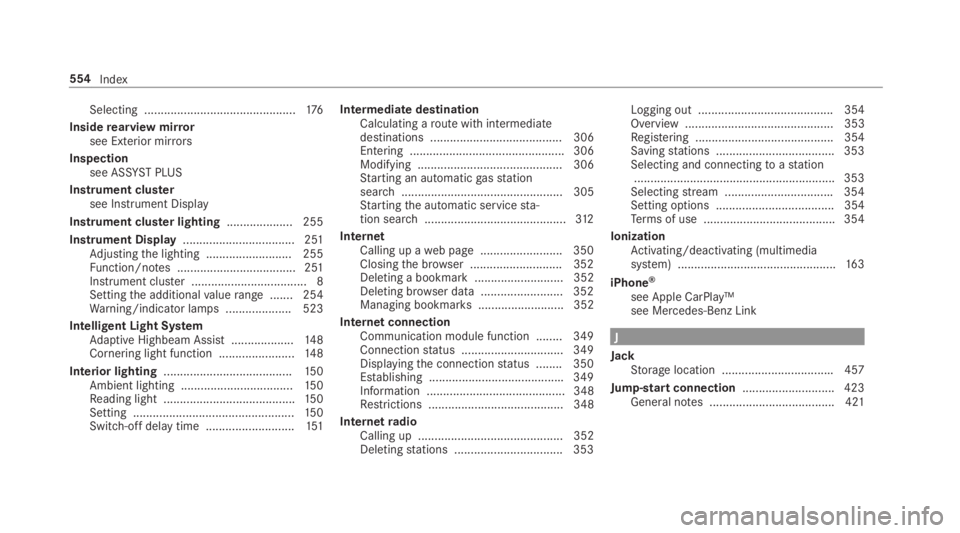
Selecting ..............................................176
Insiderearview mirrorsee Exterior mirrors
Inspectionsee ASSYSTPLUS
Instrument clustersee Instrument Display
Instrument cluster lighting.................... 255
Instrument Display.................................. 251Adjustingthe lighting .......................... 255Function/notes .................................... 251Instrument cluster ................................... 8Settingthe additionalvaluerange ....... 254Warning/indicator lamps .................... 523
Intelligent Light SystemAdaptive Highbeam Assist ...................148Cornering light function .......................14 8
Interior lighting.......................................150Ambient lighting ..................................15 0Reading light ........................................15 0Setting .................................................15 0Switch-off delaytime ...........................151
Intermediate destinationCalculating aroute with intermediatedestinations ........................................ 306Entering ............................................... 306Modifying ............................................ 306Starting an automaticgasstationsearch................................................. 305Startingthe automatic servicesta‐tion search...........................................312
InternetCalling up aweb page .........................350Closingthe browser ............................352Deleting a bookmark........................... 352Deleting browser data .........................352Managing bookmarks .......................... 352
Internet connectionCommunication module function ........ 349Connectionstatus ...............................349Displayingthe connectionstatus ........ 350Establishing .........................................349Information .......................................... 348Restrictions ......................................... 348
InternetradioCalling up ............................................ 352Deletingstations .................................353
Logging out ......................................... 354Overview ............................................. 353Registering .......................................... 354Savingstations .................................... 353Selecting and connectingtoastation.............................................................353Selectingstream .................................354Setting options .................................... 354Terms of use ........................................354
IonizationActivating/deactivating (multimediasystem) ................................................16 3
iPhone®
see Apple CarPlay™see Mercedes-Benz Link
J
JackStorage location ..................................457
Jump-start connection............................423General notes ...................................... 421
554Index
Page 557 of 578
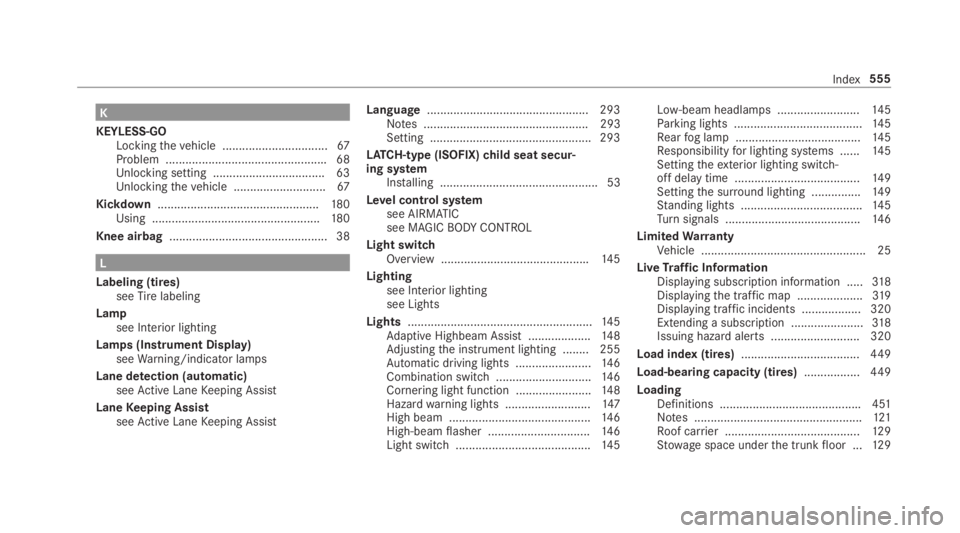
K
KEYLESS-GOLockingthevehicle ................................67Problem .................................................68Unlocking setting .................................. 63Unlockingthevehicle ............................67
Kickdown.................................................180Using ...................................................180
Knee airbag................................................ 38
L
Labeling (tires)seeTirelabeling
Lampsee Interior lighting
Lamps (Instrument Display)seeWarning/indicator lamps
Lane detection (automatic)seeActive LaneKeeping Assist
LaneKeeping AssistseeActive LaneKeeping Assist
Language.................................................293Notes .................................................. 293Setting .................................................293
LATCH-type (ISOFIX)child seat secur‐ing systemInstalling ................................................ 53
Level control systemsee AIRMATICsee MAGICBODYCONTROL
Light switchOverview .............................................145
Lightingsee Interior lightingsee Lights
Lights........................................................14 5Adaptive Highbeam Assist ...................148Adjustingthe instrument lighting ........ 255Automatic driving lights .......................14 6Combination switch.............................14 6Cornering light function .......................14 8Hazardwarning lights ..........................147High beam ...........................................14 6High-beamflasher ...............................146Light switch .........................................14 5
Low-beam headlamps .........................145Parking lights .......................................145Rearfog lamp ......................................14 5Responsibilityfor lighting systems ......14 5Settingtheexterior lighting switch-off delay time ......................................14 9Settingthe surround lighting ...............149Standing lights .....................................145Turnsignals .........................................14 6
LimitedWarrantyVehicle .................................................. 25
LiveTraffic InformationDisplaying subscription information .....318Displayingthe traffic map ....................319Displaying traffic incidents .................. 320Extending a subscription ......................318Issuing hazard alerts ........................... 320
Load index (tires)....................................449
Load-bearing capacity (tires).................449
LoadingDefinitions ...........................................451Notes ...................................................121Roof carrier .........................................12 9Stowage space underthe trunkfloor ...12 9
Index555