mirror MERCEDES-BENZ S CLASS 2019 User Guide
[x] Cancel search | Manufacturer: MERCEDES-BENZ, Model Year: 2019, Model line: S CLASS, Model: MERCEDES-BENZ S CLASS 2019Pages: 578, PDF Size: 23.31 MB
Page 119 of 578
%Depending onthe model, only preset posi‐tion buttons 1 and 2 areavailable.
#Tocall up:press and holdtherelevant pre‐set position button1,2 or 3 untilthe frontseat,thesteering wheel, Head-up Displayand outside mirror are inthestored position.
%Depending onthe model, only preset posi‐tion buttons 1 and 2 areavailable.
%Ifyoureleasethe preset position button,theseat,steering wheel and mirror setting func‐tionsstop immediately.Vehicles withtheActive MulticontourSeatPackage:Settingthe active multicon‐tour seat orthe 4-waylumbar support isstillcarried out.Vehicles withouttheActive MulticontourSeatPackage:Adjustment ofthe 4-waylumbar support isstill carried out.
Memory function intherear passengercompartment
Operatingrear seat viathe memory functionintherear passenger compartment
StoringRear seat settingsfor uptothree people can bestored and called up usingthe memory functionintherear passenger compartment.
Thefollowing settings can bestoredfortherearseats:
RPosition ofthe seat, backrest and headrestraint
RActive multicontour seats:the seat side bol‐sters ofthe seat backrest aswell asthe con‐tour ofthe seat backrest inthe lumbar andshoulderregions
RSeat heating: distribution ofthe heated sec‐tions ofthe seat cushion and seat backrest
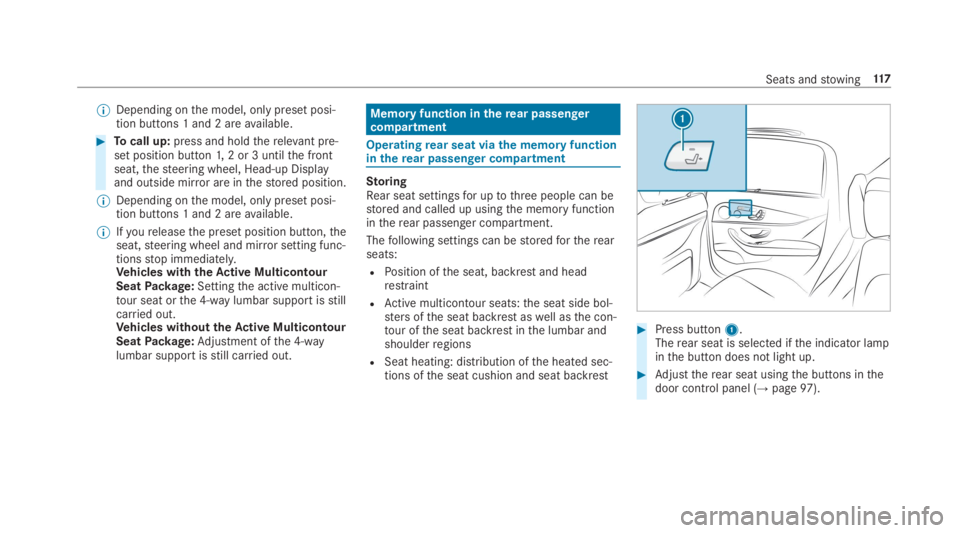
#Press button1.Therear seat is selected ifthe indicator lampinthe button does not light up.
#Adjusttherear seat usingthe buttons inthedoor control panel (→page97).
Seats andstowing117
Page 157 of 578
&WARNINGRisk of accident duetomis‐judgment of distances when usingthepassenger mirror
The outside mirror onthe front-passengersidereflects objects on a smaller scale. Theobjects in view are infact closerthantheyappear.
As aresult,you may misjudgethe distancebetweenyou andtheroad user drivingbehindyou,forexample, whenchanginglanes.
#Therefore, always lookoveryour shoul‐der in ordertoensurethatyou areaware ofthe actual distance betweenyou andtheroad users driving behindyou.
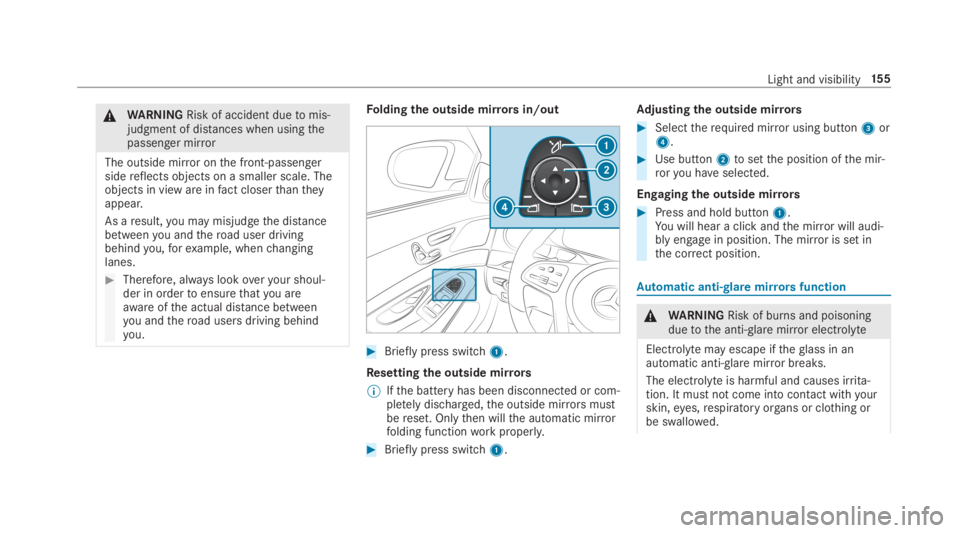
Foldingthe outside mirrorsin/out
#Brieflypress switch1.
Resettingthe outside mirrors
%Ifthe battery has been disconnected or com‐pletely discharged,the outside mirrorsmustbereset. Onlythen willthe automatic mirrorfolding functionworkproperly.
#Brieflypress switch1.
Adjusting the outside mirrors
#Selecttherequired mirror using button3or4.
#Use button2tosetthe position ofthe mir‐roryou haveselected.
Engagingthe outside mirrors
#Press and hold button1.You will hear a click andthe mirror will audi‐bly engage in position. The mirror is set inthe correct position.
Automatic anti-glare mirrorsfunction
&WARNINGRisk of burns and poisoningduetothe anti-glare mirror electrolyte
Electrolyte may escape iftheglass in anautomatic anti-glare mirror breaks.
The electrolyte is harmful and causes irrita‐tion. It mustnot come into contact withyourskin,eyes,respiratory organs or clothing orbe swallowed.
Light and visibility15 5
Page 158 of 578
#Ifyou come into contact with electro‐lyte, observethefollowing:RRinsethe electrolyte fromyour skinand seek medical attention immedi‐ately.
RIf electrolyte comes into contactwithyoureyes,rinsethemthor‐oughly with cleanwater and seekmedical attention immediately.
RIfthe electrolyte is swallowed,immediatelyrinseyour mouth outthoroughly. Do not inducevomiting.Seek medical attention immediately.
RImmediatelychange out of clothingwhich has come into contact withelectrolyte.
RIf an allergicreaction occurs, seekmedical attention immediately.
The insiderearview mirror andthe outside mir‐ror onthe driver's side automatically go intoanti-glare mode if light from a headlamp hitsthesensor onthe insiderearview mirror.
System limitations
The system does not go into anti-glare mode inthefollowing situations:
Rthe engine is switched off
Rreversegear is engaged
Rthe interior lighting is switched on
Function ofthe front-passenger outside mir‐ror parking position
The parking position makes parking easier.
The front-passenger outside mirror tilts down‐wards and shows therear wheel onthe front-passenger side inthefollowing situations:
Rthe parking position isstored (→page156)
Rthe passenger mirror is selected
Rreversegear is engaged
The front-passenger outside mirror moves backtoits original position inthefollowing situations:
Ryou shiftthe transmissiontoanother trans‐mission position
Rat speeds greaterthan 9mph (15 km/h)
Ryou pressthe buttonforthe outside mirroronthe driver's side
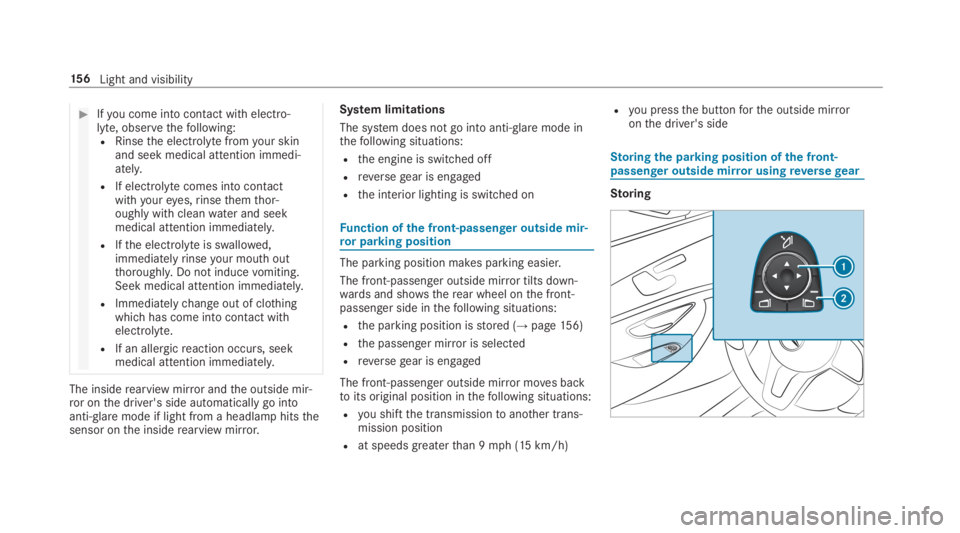
Storingthe parking position ofthe front-passenger outside mirror usingreversegear
Storing
15 6Light and visibility
Page 159 of 578
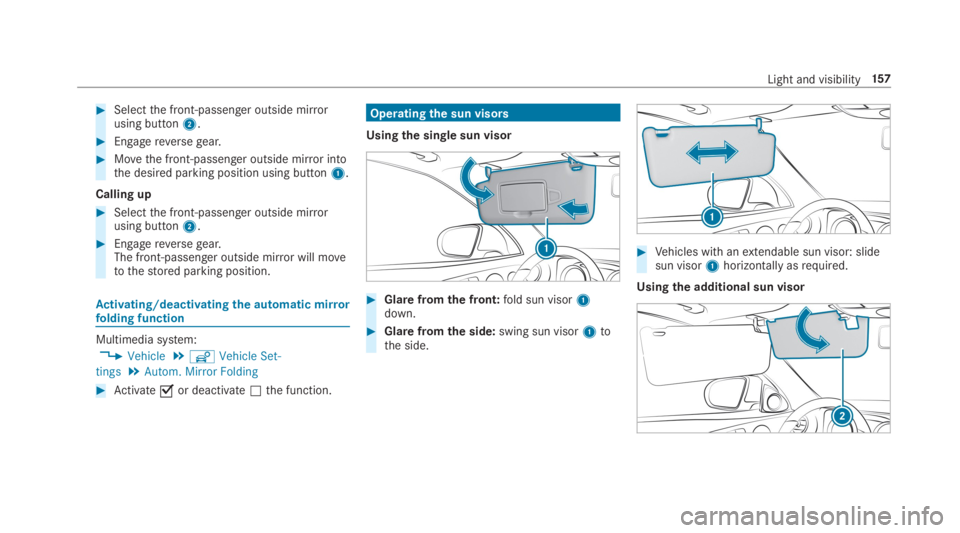
#Selectthe front-passenger outside mirrorusing button2.
#Engagereversegear.
#Movethe front-passenger outside mirror intothe desired parking position using button1.
Calling up
#Selectthe front-passenger outside mirrorusing button2.
#Engagereversegear.The front-passenger outside mirror will movetothestored parking position.
Activating/deactivating the automatic mirrorfolding function
Multimedia system:
,Vehicle.îVehicle Set-
tings.Autom. Mirror Folding
#Activatesor deactivateSthe function.
Operatingthe sun visors
Usingthe single sun visor
#Glarefromthe front:fold sun visor1down.
#Glare fromthe side:swing sun visor1tothe side.
#Vehicles with anextendable sun visor: slidesun visor1horizontallyasrequired.
Usingthe additional sun visor
Light and visibility157
Page 188 of 578
%Please alsoreadthe operating instructionsforthe door drive.
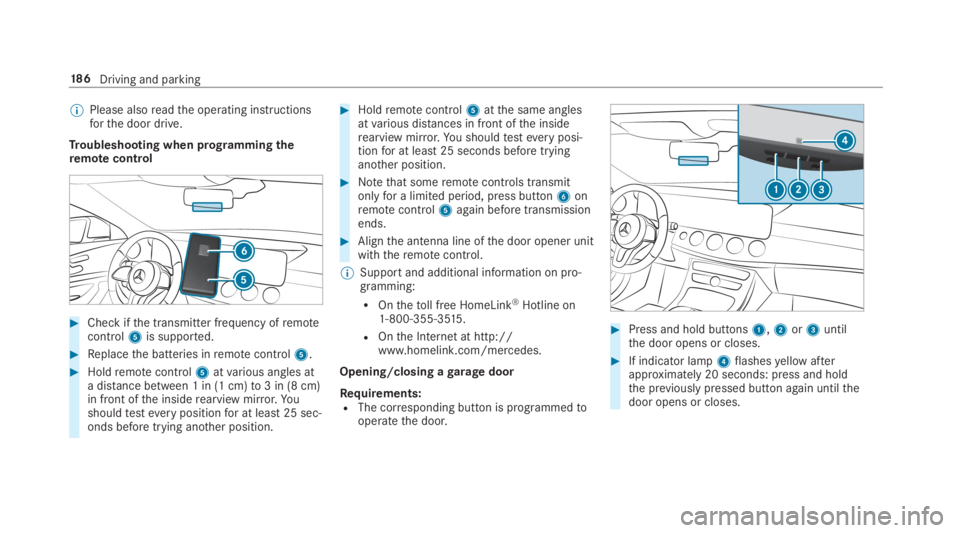
Troubleshooting when programming theremotecontrol
#Check ifthe transmitter frequency ofremotecontrol5is supported.
#Replacethe batteries inremotecontrol5.
#Holdremotecontrol5atvarious angles ata distance between 1 in (1 cm)to3 in (8 cm)in front ofthe insiderearview mirror.Yo ushouldtesteverypositionfor at least25 sec‐onds before trying another position.
#Holdremotecontrol5atthe same anglesatvarious distances in front ofthe insiderearview mirror.You shouldtesteveryposi‐tionfor at least25 seconds before tryinganother position.
#Notethat someremotecontrols transmitonlyfor a limited period, press button6onremotecontrol5again before transmissionends.
#Alignthe antenna line ofthe door opener unitwiththeremotecontrol.
%Support and additional information on pro‐gramming:
ROnthetoll free HomeLink®Hotline on1-800-355-3515 .
ROnthe Internet at http://www.homelink.com/mercedes.
Opening/closing agaragedoor
Requirements:RThe corresponding button is programmedtooperatethe door.
#Press and hold buttons1,2or3untilthe door opens or closes.
#If indicator lamp4flashesyellow afterapproximately 20 seconds: press and holdthe previously pressed button again untilthedoor opens or closes.
18 6Driving and parking
Page 228 of 578
Activating/deactivating audiofadeoutYou can specify whetherthevolume of a mediasource inthe multimedia system istobereduced whenParking AssistPARKTRONIC givesan audiblewarning.
#SelectAudio Fadeout During Warning Tones.
#Activatesor deactivateSthe function.
Reversing camera
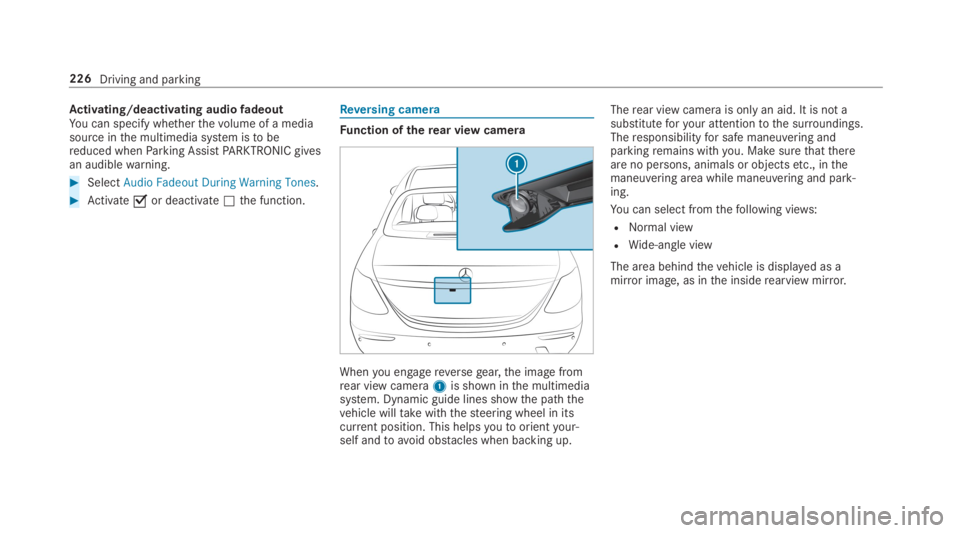
Function oftherear view camera
Whenyou engagereversegear,the image fromrear view camera1is shown inthe multimediasystem. Dynamic guide lines showthe paththevehicle willtakewiththesteering wheel in itscurrent position. This helpsyoutoorientyour‐self andtoavoid obstacles when backing up.
Therear view camera is onlyan aid. It is not asubstituteforyour attentiontothe surroundings.Theresponsibilityfor safe maneuvering andparkingremains withyou. Make surethatthereare no persons, animals or objectsetc., inthemaneuvering area while maneuvering and park‐ing.
You can select fromthefollowing views:
RNormal view
RWide-angle view
The area behindthevehicle is displayed as amirror image, as inthe insiderearview mirror.
226Driving and parking
Page 230 of 578
System limitations
Therear view camera will not function or willonly partially function inthefollowing situations:
RThe trunk lid is open.
RThere is heavyrain, snow orfog.
RThe ambient light conditions are poor, e.g. atnight.
RThe camera lens is obstructed, dirty orfog‐ged up. Observethe notes on cleaningtherear view camera (→page 409).
RThe camera orrear ofyourvehicle is dam‐aged. Inthis case, havethe camera and itsposition and settingchecked at aqualifiedspecialistworkshop.
Thefield of vision andother functions oftherearview camera may berestricted duetoadditionalaccessories ontherear ofthevehicle (e.g.license plate bracket or bicyclerack).
%The contrast ofthe display may be impairedbydirect sunlight orby other light sources,e.g. when driving out of agarage. Inthiscase, pay particular attention.
%Havethe displayrepaired orreplaced if,forexample, pixel errorsconsiderablyrestrict itsuse.
Observethe notes on cleaningtherear viewcamera (→page 409).
360° camera
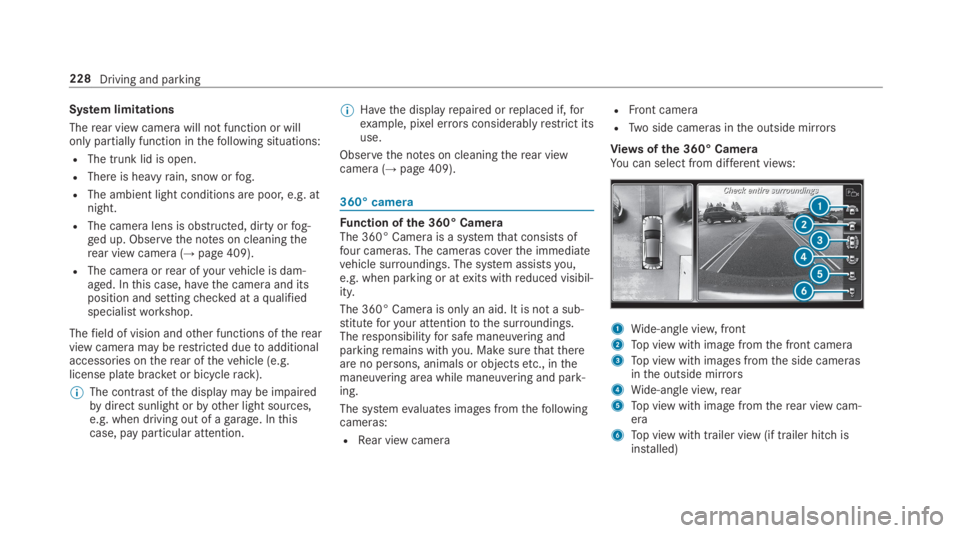
Function ofthe 360° CameraThe 360° Camera is a systemthat consists offour cameras. The cameras coverthe immediatevehicle surroundings. The system assistsyou,e.g. when parking or atexits withreduced visibil‐ity.
The 360° Camera is only an aid. It is not a sub‐stituteforyour attentiontothe surroundings.Theresponsibilityfor safe maneuvering andparkingremains withyou. Make surethatthereare no persons, animals or objectsetc., inthemaneuvering area while maneuvering and park‐ing.
The systemevaluates images fromthefollowingcameras:
RRear view camera
RFront camera
RTwo side cameras inthe outside mirrors
Views ofthe 360° CameraYou can select from different views:
1Wide-angle view,front
2Top view with image fromthe front camera
3Top view with images fromthe side camerasinthe outside mirrors
4Wide-angle view,rear
5Top view with image fromtherear view cam‐era
6Top view with trailer view (if trailer hitch isinstalled)
228Driving and parking
Page 232 of 578
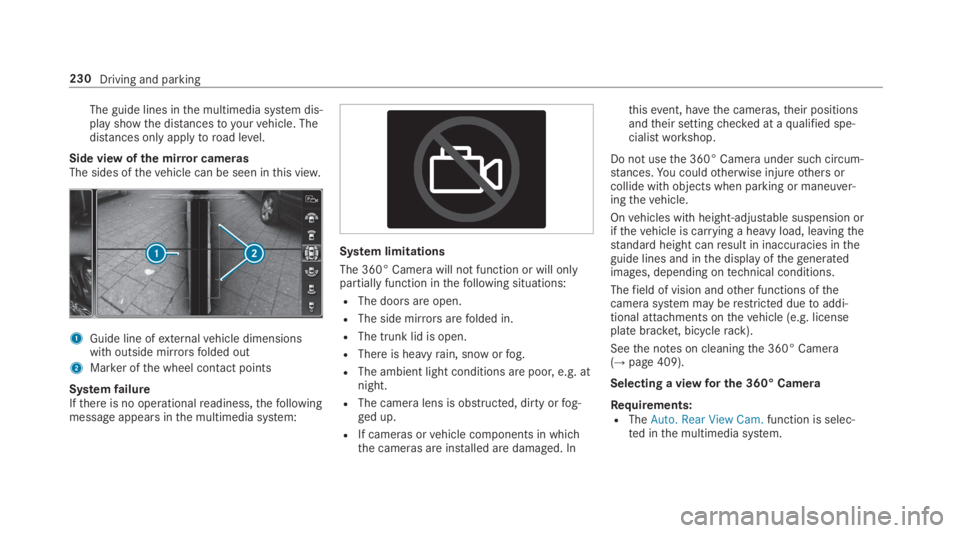
The guide lines inthe multimedia system dis‐play showthe distancestoyourvehicle. Thedistances only applytoroad level.
Side view ofthe mirror camerasThe sides ofthevehicle can be seen inthis view.
1Guide line ofexternalvehicle dimensionswith outside mirrorsfolded out
2Marker ofthe wheel contact points
SystemfailureIfthere is no operationalreadiness,thefollowingmessage appears inthe multimedia system:
System limitations
The 360° Camera will not function or will onlypartially function inthefollowing situations:
RThe doors are open.
RThe side mirrorsarefolded in.
RThe trunk lid is open.
RThere is heavyrain, snow orfog.
RThe ambient light conditions are poor, e.g. atnight.
RThe camera lens is obstructed, dirty orfog‐ged up.
RIf cameras orvehicle components in whichthe cameras are installed are damaged. In
thisevent, havethe cameras,their positionsandtheir settingchecked at aqualified spe‐cialistworkshop.
Do not usethe 360° Camera under such circum‐stances.You couldotherwise injureothers orcollide with objects when parking or maneuver‐ingthevehicle.
Onvehicles with height-adjustable suspension orifthevehicle is carrying a heavy load, leavingthestandard height canresult in inaccuracies intheguide lines and inthe display ofthegeneratedimages, depending ontechnical conditions.
Thefield of vision andother functions ofthecamerasystem may berestricted duetoaddi‐tional attachments onthevehicle (e.g. licenseplate bracket, bicyclerack).
Seethe notes on cleaningthe 360° Camera(→page 409).
Selecting a viewfor the 360° Camera
Requirements:RTheAuto. Rear View Cam.function is selec‐ted inthe multimedia system.
230Driving and parking
Page 245 of 578

Display inthe assistancegraphic
1Spotlight function switched on but not oper‐ating
2Spotlight function switched on and operating
The pedestrian symbol inthe assistance graphicindicatesthestatus ofthe spotlight function. Ifthe pedestrian symbol is displayed dark1,thefunction is switched on. Ifthe symbol is dis‐
played bright2,the conditionsforthe Spotlightfunction are also fulfilled.
System limitationsThe spotlight function does notflash at animals.
The spotlight function is not active or is activeonlytoa limitedextent if:
RYou are driving in city traffic.
RThe pedestrians are located inthe area of anoncomingvehicle or avehicle in front.
Activating/deactivating the spotlight func‐tion
Requirements:RPedestrian detection is active (→page241).
RTheroadwayis not lit.
RThe speed is at least37mph (60 km/h).
RAdaptive Highbeam Assist Plus is switchedon.
If alltherequirements are fulfilled,the headlampflashesfour shortpulses at a pedestrian detec‐ted on or neartotheroadway.
Multimedia system:
,Vehicle.÷.Light Set-
tings.Spotlight
#Activatesor deactivateSthe function.
Blind Spot Assist andActive Blind SpotAssistwithexitwarning
Function of Blind Spot Assist andActiveBlind Spot AssistwithexitwarningBlind Spot Assist andActive Blind Spot Assistuse two lateral,rear-facingradar sensorstomonitorthe area upto130ft(40 m) behindyourvehicle and10ft(3 m) directly nexttoyourvehi‐cle.
If avehicle is detected at speeds above approx‐imately 8mph (12 km/h) andthisvehicle subse‐quentlyentersthe monitoringrange directly nextto yourvehicle,thewarning lamp inthe outsidemirror lights upred.
If avehicle is detected closetothe side ofyourvehicle,theredwarning lamp inthe outside mir‐rorflashes. Ifyou switchonthe turn signal indi‐cator inthe corresponding direction, awarning
Driving and parking243
Page 246 of 578
tone sounds once. Ifthe turn signal indicatorremains switched on, allother detectedvehiclesare indicated onlybytheflashing oftheredwarning lamp.
Ifyouovertake avehiclequickly,nowarning isgiven.
&WARNINGRisk of accident despiteBlindSpot Assist
Blind Spot Assistdoes notreacttovehiclesapproaching andovertakingyou at agreatlydifferent speed.
As aresult, Blind Spot Assist cannotwarndrivers inthis situation.
#Always pay careful attentiontothe traf‐fic situation and maintain a safe dis‐tance atthe side ofthevehicle.
Blind Spot Assist andActive Blind Spot Assistare onlyaids. They mayfailtodetect somevehi‐cles and are no substitutefor attentive driving.Always ensurethatthere is sufficient distancetothe sideforotherroad users and obstacles.
ExitwarningTheexitwarning is an additional function ofBlind Spot Assist and canwarnvehicle occu‐pants about approachingvehicles when leavingthevehicle whenstationary.
&WARNINGRisk of accident despiteexitwarning
Theexitwarningreacts neithertostationaryobjects nortovehicles approachingyou at agreatlydifferent speed.
As aresult,theexitwarning cannotwarndrivers inthese situations.
#Always pay particular attentiontothetraffic situation when openingthe doorsand make surethere is sufficient clear‐ance.
Ifthere is avehicle inthe monitoringrange,thisis indicated inthe outside mirror.If avehicleoccupant opensthe door onthe side withthewarning, awarningtone sounds andthewarninglamp inthe outside mirrorstartstoflash.
This additional function is onlyavailable whenBlind Spot Assist is activated and uptoa maxi‐mum ofthree minutes afterthe ignition hasbeen switched off. Theexitwarning is no longeravailable oncethewarning lamp inthe outsidemirrorflashesthree times.
Theexitwarning is only an aid and not a substi‐tuteforthe attention ofvehicle occupants. Theresponsibilityfor opening and closingthe doorsandfor leavingthevehicleremains withthevehi‐cle occupants.
System limitations
Blind Spot Assist andActive Blind Spot Assistmay be limited inthefollowing situations:
Rifthere is dirt onthe sensors orthe sensorsare obscured
Rin poor visibility, e.g. duetofog, heavyrain orsnow
Rifthere are narrowvehicles, e.g. bicycles ormotorbikes
Riftheroad hasverywide or narrowlanes
Rifvehicles are not driving inthe middle oftheir lane
244Driving and parking