mirror MERCEDES-BENZ S CLASS 2019 Owner's Manual
[x] Cancel search | Manufacturer: MERCEDES-BENZ, Model Year: 2019, Model line: S CLASS, Model: MERCEDES-BENZ S CLASS 2019Pages: 578, PDF Size: 23.31 MB
Page 478 of 578
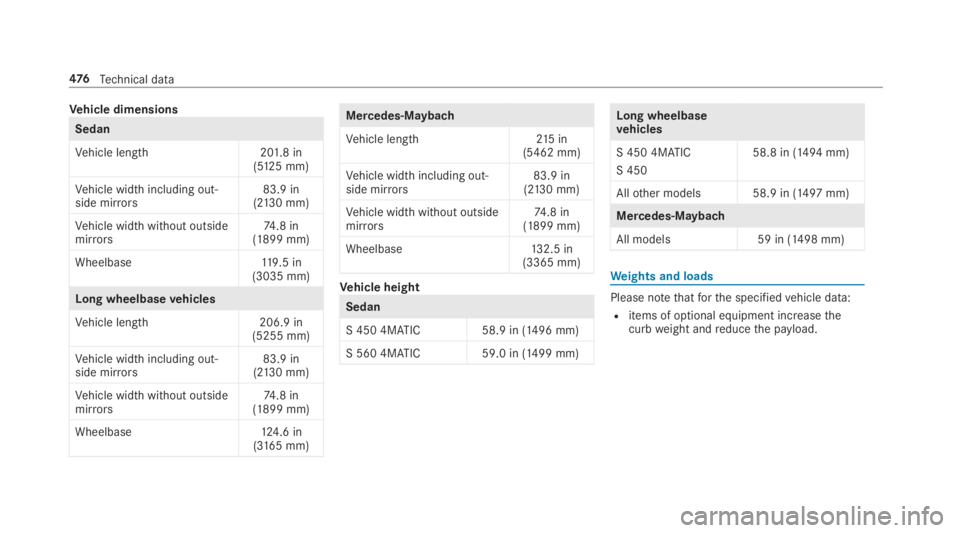
Vehicle dimensions
Sedan
Vehicle length201.8 in(5125 mm)
Vehicle width including out‐side mirrors83.9 in(2130 mm)
Vehicle width without outsidemirrors74.8 in(1899 mm)
Wheelbase119.5 in(3035 mm)
Long wheelbasevehicles
Vehicle length206.9 in(5255 mm)
Vehicle width including out‐side mirrors83.9 in(2130 mm)
Vehicle width without outsidemirrors74.8 in(1899 mm)
Wheelbase124.6 in(3165 mm)
Mercedes‑Maybach
Vehicle length215in(5462 mm)
Vehicle width including out‐side mirrors83.9 in(2130 mm)
Vehicle width without outsidemirrors74.8 in(1899 mm)
Wheelbase132.5 in(3365 mm)
Vehicle height
Sedan
S 450 4MATIC 58.9 in (1496 mm)
S 560 4MATIC 59.0 in (1499 mm)
Long wheelbasevehicles
S 450 4MATIC
S 450
58.8 in (1494 mm)
Allother models 58.9 in (1497 mm)
Mercedes‑Maybach
All models59 in (1498 mm)
Weights and loads
Please notethatforthe specifiedvehicle data:
Ritems of optional equipment increasethecurbweight andreducethe payload.
476Technical data
Page 541 of 578
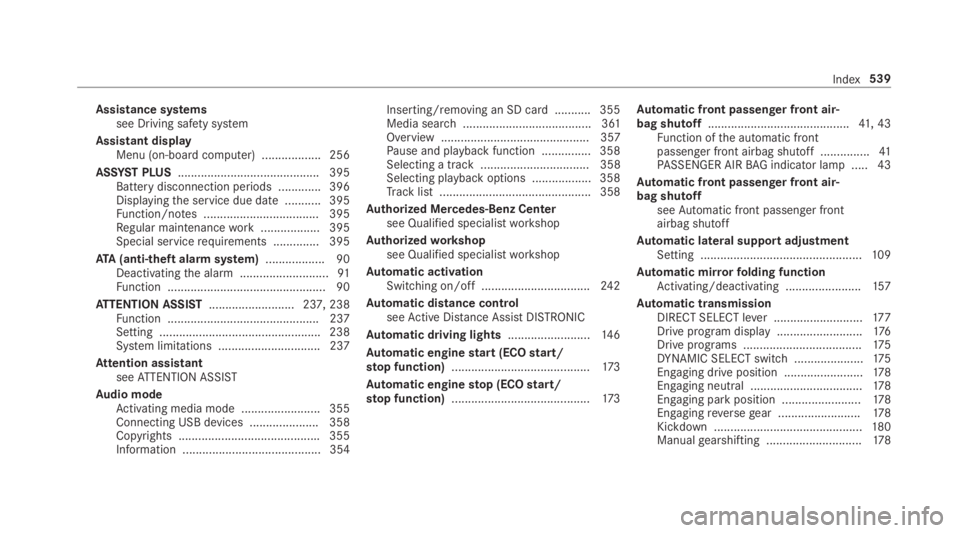
Assistance systemssee Driving safety system
Assistant displayMenu (on-board computer) .................. 256
ASSYST PLUS........................................... 395Battery disconnection periods .............396Displayingthe service due date ........... 395Function/notes ................................... 395Regular maintenancework.................. 395Special servicerequirements .............. 395
ATA(anti-theft alarmsystem).................. 90Deactivatingthe alarm ...........................91Function ................................................ 90
ATTENTION ASSIST.......................... 237, 238Function .............................................. 237Setting ................................................. 238System limitations ...............................237
Attention assistantseeATTENTION ASSIST
Audio modeActivating media mode ........................ 355Connecting USB devices ..................... 358Copyrights ...........................................355Information .......................................... 354
Inserting/removing an SD card ........... 355Media search ....................................... 361Overview ............................................. 357Pause and playback function ...............358Selecting a track ................................. 358Selecting playbackoptions .................. 358Track list .............................................. 358
Authorized Mercedes-Benz Centersee Qualified specialistworkshop
Authorizedworkshopsee Qualified specialistworkshop
Automatic activationSwitching on/off.................................24 2
Automatic distance controlseeActive Distance AssistDISTRONIC
Automatic driving lights.........................14 6
Automatic enginestart (ECOstart/stop function)..........................................173
Automatic enginestop (ECOstart/stop function)..........................................173
Automatic front passenger front air‐bag shutoff...........................................41, 43Function ofthe automatic frontpassenger front airbag shutoff ...............41PASSENGER AIRBAG indicator lamp .....43
Automatic front passenger front air‐bag shutoffseeAutomatic front passenger frontairbag shutoff
Automatic lateral support adjustmentSetting .................................................109
Automatic mirrorfolding functionActivating/deactivating .......................157
Automatic transmissionDIRECT SELECT lever ...........................17 7Drive program display ..........................176Drive programs ....................................175DYNAMIC SELECT switch .....................175Engaging drive position ........................178Engaging neutral ..................................178Engaging parkposition ........................178Engagingreversegear .........................178Kickdown .............................................180Manualgearshifting .............................178
Index539
Page 553 of 578
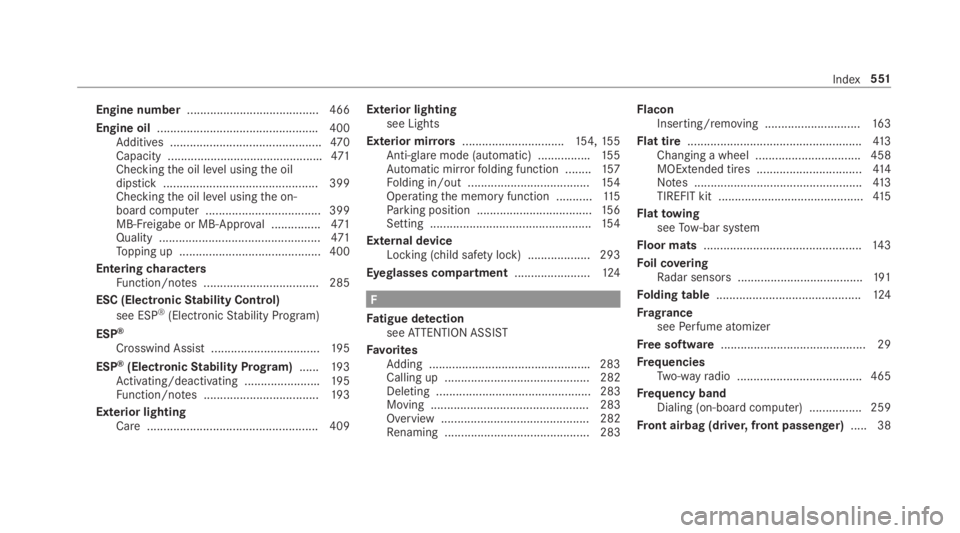
Engine number........................................ 466
Engine oil.................................................400Additives ..............................................470Capacity ...............................................471Checkingthe oil level usingthe oildipstick ............................................... 399Checkingthe oil level usingthe on-board computer ................................... 399MB-Freigabe or MB-Approval ...............471Quality .................................................471Topping up ...........................................400
EnteringcharactersFunction/notes ................................... 285
ESC (ElectronicStability Control)
see ESP®(ElectronicStability Program)
ESP®
Crosswind Assist .................................19 5
ESP®(ElectronicStability Program)......19 3Activating/deactivating .......................195Function/notes ...................................19 3
Exterior lightingCare .................................................... 409
Exterior lightingsee Lights
Exterior mirrors...............................154,15 5Anti-glaremode (automatic) ................155Automatic mirrorfolding function ........157Folding in/out .....................................154Operatingthe memory function ...........11 5Parking position ...................................156Setting .................................................154
External deviceLocking (child safety lock) ...................293
Eyeglasses compartment.......................124
F
Fatigue detectionseeATTENTION ASSIST
FavoritesAdding .................................................283Calling up ............................................ 282Deleting ............................................... 283Moving ................................................ 283Overview ............................................. 282Renaming ............................................ 283
FlaconInserting/removing .............................16 3
Flat tire.....................................................413Changing a wheel ................................ 458MOExtended tires ................................41 4Notes ...................................................413TIREFIT kit ............................................41 5
FlattowingseeTow-bar system
Floor mats................................................14 3
Foil coveringRadar sensors ......................................191
Folding table............................................124
FragranceseePerfume atomizer
Free software............................................ 29
FrequenciesTwo-wayradio ...................................... 465
Frequency bandDialing (on-board computer) ................ 259
Front airbag (driver, front passenger).....38
Index551
Page 556 of 578
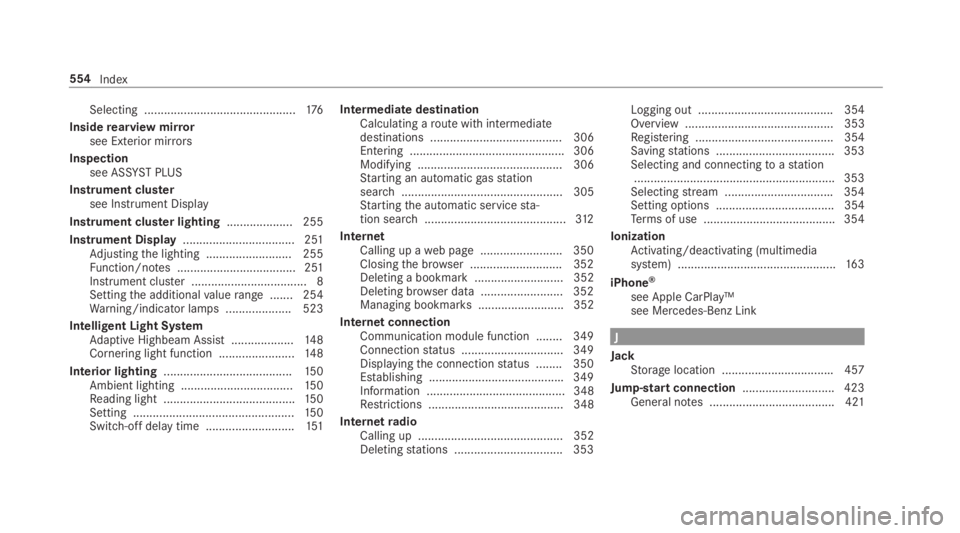
Selecting ..............................................176
Insiderearview mirrorsee Exterior mirrors
Inspectionsee ASSYSTPLUS
Instrument clustersee Instrument Display
Instrument cluster lighting.................... 255
Instrument Display.................................. 251Adjustingthe lighting .......................... 255Function/notes .................................... 251Instrument cluster ................................... 8Settingthe additionalvaluerange ....... 254Warning/indicator lamps .................... 523
Intelligent Light SystemAdaptive Highbeam Assist ...................148Cornering light function .......................14 8
Interior lighting.......................................150Ambient lighting ..................................15 0Reading light ........................................15 0Setting .................................................15 0Switch-off delaytime ...........................151
Intermediate destinationCalculating aroute with intermediatedestinations ........................................ 306Entering ............................................... 306Modifying ............................................ 306Starting an automaticgasstationsearch................................................. 305Startingthe automatic servicesta‐tion search...........................................312
InternetCalling up aweb page .........................350Closingthe browser ............................352Deleting a bookmark........................... 352Deleting browser data .........................352Managing bookmarks .......................... 352
Internet connectionCommunication module function ........ 349Connectionstatus ...............................349Displayingthe connectionstatus ........ 350Establishing .........................................349Information .......................................... 348Restrictions ......................................... 348
InternetradioCalling up ............................................ 352Deletingstations .................................353
Logging out ......................................... 354Overview ............................................. 353Registering .......................................... 354Savingstations .................................... 353Selecting and connectingtoastation.............................................................353Selectingstream .................................354Setting options .................................... 354Terms of use ........................................354
IonizationActivating/deactivating (multimediasystem) ................................................16 3
iPhone®
see Apple CarPlay™see Mercedes-Benz Link
J
JackStorage location ..................................457
Jump-start connection............................423General notes ...................................... 421
554Index
Page 559 of 578
Massage settingsResetting ..............................................110
Mattefinish (cleaning instructions)...... 405
Maximum loadrating..............................448
Maximum permissible loadCalculationexample ............................444Determining ........................................443
Maximum tire pressure..........................448
MechanicalkeyInserting/removing ...............................64Unlockingthe trunk lid ..........................75
MediaMenu (on-boardcomputer) .................. 260Searching ............................................ 361Starting cinema mode .........................367
Media displayNotes ...................................................278
Media InterfaceActivating ............................................ 362Information .......................................... 361Overview .............................................363
Media modeActivating ............................................ 355
Media playbackOperating (on-board computer) ........... 260
Media searchStarting ................................................ 361
Media sourceSelecting (on-board computer) ............ 260
Memory functionHead-up Display — Calling upstoredsettings ................................................11 5Head-up Display —Storing settings ......11 5Operating .............................................11 5Outside mirrors— Calling upstoredsettings ................................................11 5Outside mirrors—Storing settings .......115Seat — Calling upstored settings .........11 5Seat —Storing settings ........................11 5Steering wheel — Calling up savedsettings ................................................11 5Steering wheel — Saving settings .........11 5
Memory function intherearpassenger compartmentOperatingrear seats ............................11 7Operatingthe front passenger seatandrear seat ........................................11 9
Menu (on-board computer)Assistant display................................. 256Designs ............................................... 254Head-up Display ................................... 261Maintenance ....................................... 256Media .................................................. 260Navigation ........................................... 258Overview ............................................. 252Radio ...................................................259Telephone ............................................ 260Trip ...................................................... 257
Mercedes me connect............................ 344Accident and breakdown manage‐ment .................................................... 345Arranging a service appointment ........ 345Callingthe Mercedes-Benz CustomerCenter ................................................. 344Information .......................................... 343Making a call viatheoverhead con‐trol panel ............................................. 344Service call withthe me button ........... 344Transferred data ..................................345
Mercedes-AMGvehiclesNotes ...................................................167
Index557
Page 560 of 578
Mercedes-Benz AppsCalling up ............................................ 350Usingvoice control .............................. 350
Mercedes-Benz emergency call sys‐tem........................................................... 346Automatic emergency call ................... 347Information .......................................... 346Information on data processing ...........348Manual emergency call ........................ 347Overview ............................................. 346
Mercedes-Benz Link................................ 338Connecting .......................................... 339Ending ................................................. 339Overview ............................................. 338Using ................................................... 339
Message (multifunction display)see Display message
Message memory....................................478
MessagesVoice commands (Voice Control Sys‐tem) .....................................................274
MessagesseeText messages
Mirrorssee Exterior mirrors
Mobile phoneWirelesscharging ................................14 2Wirelesscharging (rear passengercompartment) ......................................14 2
Mobile phonesee AndroidAutosee Apple CarPlay™see Mercedes-Benz Linksee SecondtelephoneseeTelephone
Mobile phonevoicerecognitionStarting ...............................................333Stopping ..............................................333
Model series............................................ 466
MOExtended tires....................................414
Multifunction cameraROAD SURFACE SCAN ........................ 220
Multifunction displayOverview of displays ............................255
Multifunctionsteering wheelOverview of buttons ............................ 252
Multifunctionsteering wheelseeSteering wheel
Multimedia system..................................278Activating/deactivatingstandbymode ...................................................191Adjuststhevolume .............................. 284Central control elements .....................279Configuring displaysettings ................287ENERGIZING comfort program (over‐view) ....................................................299Enteringcharacters .............................285Favorites ............................................. 282Main functions .................................... 282Overview .............................................278Rear climate control ............................16 2Restoringthefactory settings ............. 298Settingthefootwelltemperature .........161Standby mode function .......................190Startingthe ENERGIZING comfortprogram ..............................................300Switchingthe sound on or off .............284
Multimedia systemseeTouch ControlseeTouchpad
558Index
Page 563 of 578
Parking positionExterior mirrors...................................15 6Storingthe position ofthe front-passenger outside mirror usingreversegear ........................................15 6
PASSENGER AIRBAGstatus displayseeAutomatic front passenger frontairbag shutoff
PayloadCalculationexample ............................444Determiningthe maximum ..................443
Pedestrian protectionseeActive hood (pedestrian protection)
Pennant holderseePennantstaff
Pennantstaff...........................................143
PerfumeseePerfume atomizer
Perfume atomizer....................................16 3Inserting/removingtheflacon .............163Setting .................................................16 3
Perfume vialseePerfume atomizer
Permittedtowing methods.....................424
Personalizationsee User profile
Pets in thevehicle.....................................61
Phone booksee Contacts
PictureformatsseeVideo mode
Picture settingsseeVideo mode
PIN protectionActivating/deactivating .......................295
Plastic trim (Care)....................................410
Playback optionsSelecting ............................................. 358
POISelecting ............................................. 305
POI symbolsSelecting ............................................. 322
Ports (Rear Seat Entertainment Sys‐tem)Overview ............................................. 384
Power closing functionDoor ...................................................... 69Trunk lid .................................................71
Power supplySwitching on (Start/Stop button) ........167
Powerwasher (care)...............................404
Power windowssee Side windows
PRE-SAFE®(anticipatory occupantprotection).................................................46Function ................................................ 46
PRE-SAFE®Sound ................................. 46Reversing measures .............................. 46
PRE-SAFE®PLUS (anticipatoryoccu‐pant protection plus)................................ 46Function ................................................ 46Reversing measures .............................. 46
Preventative occupant protection sys‐tem
see PRE-SAFE®(anticipatory occu‐pant protection)
Previous destinationsSelecting .............................................304
Index561