lights MERCEDES-BENZ S CLASS 2019 Owner's Manual
[x] Cancel search | Manufacturer: MERCEDES-BENZ, Model Year: 2019, Model line: S CLASS, Model: MERCEDES-BENZ S CLASS 2019Pages: 578, PDF Size: 23.31 MB
Page 150 of 578
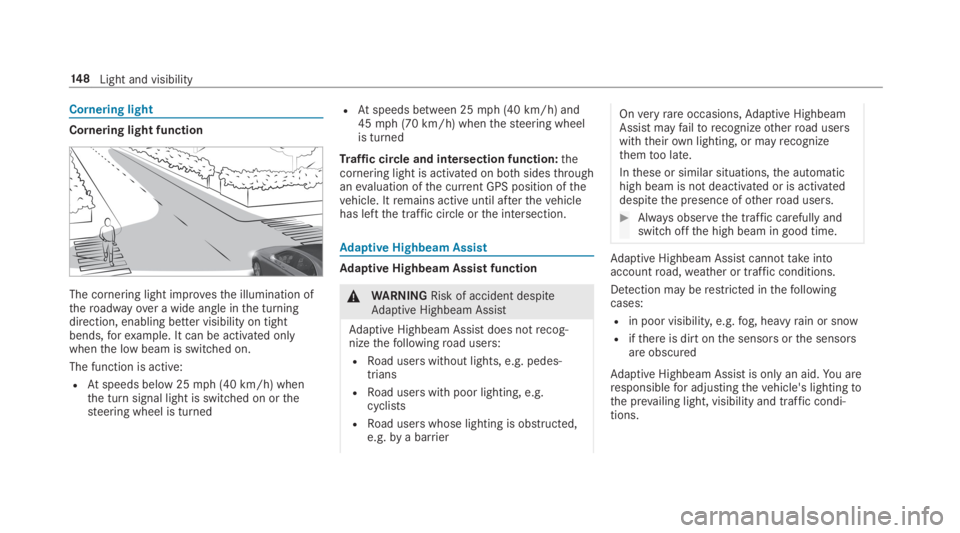
Cornering light
Cornering light function
The cornering light improvesthe illumination oftheroadwayover a wide angle inthe turningdirection, enabling better visibility on tightbends,forexample. It can be activated onlywhenthe low beam is switched on.
The function is active:
RAtspeeds below 25mph (40 km/h) whenthe turn signal light is switched on orthesteering wheel is turned
RAtspeeds between 25mph (40 km/h) and45mph (70 km/h) whenthesteering wheelis turned
Traffic circle and intersection function:thecornering light is activated on bothsidesthroughanevaluation ofthe current GPS position ofthevehicle. Itremains active until afterthevehiclehas leftthe traffic circle orthe intersection.
Adaptive Highbeam Assist
Adaptive Highbeam Assist function
&WARNINGRisk of accident despiteAdaptive Highbeam Assist
Adaptive Highbeam Assist does notrecog‐nizethefollowingroad users:
RRoad users without lights, e.g. pedes‐trians
RRoad users with poor lighting, e.g.cyclists
RRoad users whose lighting is obstructed,e.g.bya barrier
Onveryrareoccasions,Adaptive HighbeamAssist mayfailtorecognizeotherroad userswiththeirown lighting, or mayrecognizethemtoo late.
Inthese or similar situations,the automatichigh beam is not deactivated or is activateddespitethe presence ofotherroad users.
#Always observethe traffic carefully andswitch offthe high beam in good time.
Adaptive Highbeam Assist cannottakeintoaccountroad,weather or traffic conditions.
Detection may berestricted inthefollowingcases:
Rin poor visibility,e.g.fog, heavyrain or snow
Rifthere is dirt onthe sensors orthe sensorsare obscured
Adaptive Highbeam Assist is onlyan aid.You areresponsiblefor adjustingthevehicle's lightingtothe prevailing light, visibility and traffic condi‐tions.
14 8Light and visibility
Page 152 of 578
vehicle is unlocked. Whenyoustartthevehicle,the surround lighting is deactivated andtheautomatic driving lights are activated.
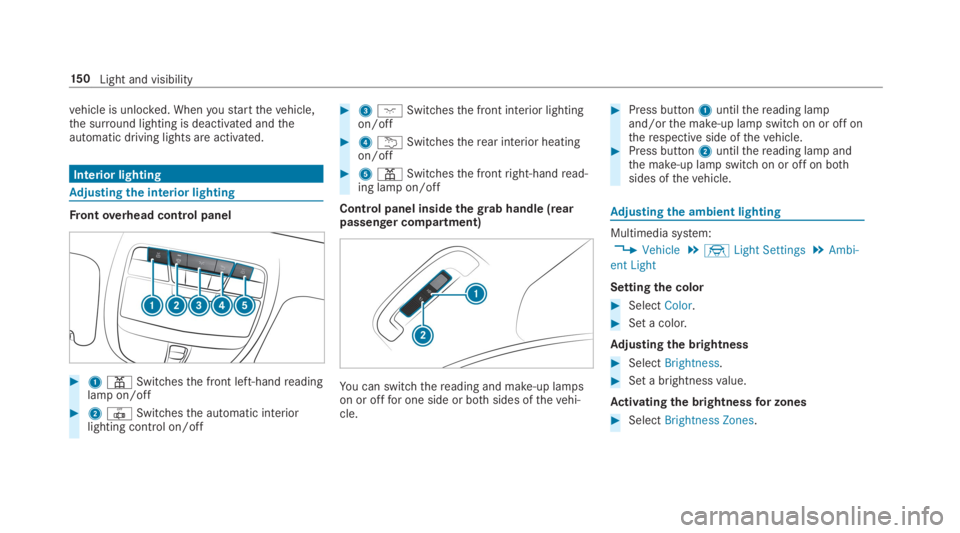
Interior lighting
Adjusting the interior lighting
Frontoverhead control panel
#1=Switchesthe front left-handreadinglamp on/off
#23Switchesthe automatic interiorlighting control on/off
#3JSwitchesthe front interior lightingon/off
#4BSwitchestherear interior heatingon/off
#5=Switchesthe frontright-handread‐ing lamp on/off
Control panel insidethegrab handle (rearpassenger compartment)
You can switchthereading and make-up lampson or offfor one side or bothsides ofthevehi‐cle.
#Press button1untilthereading lampand/orthe make-up lamp switch on or off ontherespective side ofthevehicle.#Press button2untilthereading lamp andthe make-up lamp switch on or off on bothsides ofthevehicle.
Adjusting the ambient lighting
Multimedia system:
,Vehicle.÷Light Settings.Ambi-
ent Light
Settingthe color
#SelectColor.
#Set a color.
Adjusting the brightness
#SelectBrightness.
#Set a brightnessvalue.
Activating the brightnessfor zones
#SelectBrightness Zones.
15 0Light and visibility
Page 172 of 578
RThestarter battery is sufficientlycharged.
%You can also setthetemperature withyoursmartphone. Information on Mercedes meconnect andother services: http://www.mercedes.meThis function is notavailablefor all models.
Chargingthe batterybefore commencingyour journey
%This function is notavailable in all countries.
RIfthevehicle battery is discharged,youreceivea message onyour smartphone.
RYou canthenstartthevehicle withthesmartphonetochargethe battery.
RThevehicle is automatically switched offafterten minutes.
Ensurethefollowing beforestartingthe engine:
RThe legalstipulations inthe area whereyourvehicle is parked allow enginestarting viasmartphone.
RIt is safetostart andrunthe engine whereyourvehicle is parked.
RThe fueltank is sufficientlyfilled.
Startingthevehicle
&WARNINGRisk of crushing or entrap‐ment duetounintentionalstarting oftheengine
Limbs could be crushed or trapped iftheengine isstarted unintentionally duringservice or maintenancework.
#Always securethe engine against unin‐tentionalstarting before carrying outmaintenance orrepairwork.
Requirements:RParkposition]is selected.
RThe anti-theft alarm system is not activated.
RThe panic alarm is not activated.
RThe hazardwarning lights are switched off.
RThe hood is closed.
RThe doors are closed and locked.
RThe windowsand sliding sunroof are closed.
#Startthevehicle usingthe smartphone:
RAftereveryvehiclestart,the enginerunsforten minutes.
RYou can carryout a maximum of two consec‐utivestarting attempts. Thevehicle must bestarted once withthe SmartKeybefore tryingtostartthevehicle again withthe smart‐phone.
RYou canstopthevehicle again at any time.
RFurther information can befound inthesmartphone app.
Securingthe engine againststarting beforecarrying out maintenance orrepairwork:#Switch onthe hazardwarning lights.
or
#Unlockthe doors.
or
#Open a side window orthe sliding sunroof.
Breaking-in notes
Mercedes-AMGvehicles:observethe notes inthe Supplement. Otherwise,you mayfailtorec‐ognize dangers.
17 0Driving and parking
Page 177 of 578
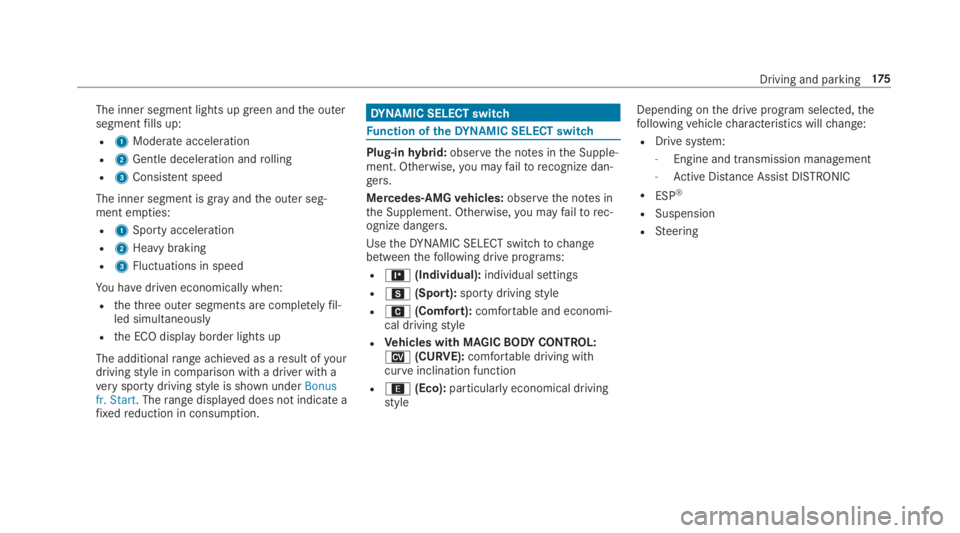
The inner segment lights up green andthe outersegmentfills up:
R1Moderate acceleration
R2Gentle deceleration androlling
R3Consistent speed
The inner segment is grayandthe outer seg‐ment empties:
R1Sporty acceleration
R2Heavy braking
R3Fluctuations in speed
You havedriven economically when:
Rthethree outer segments are completelyfil‐led simultaneously
Rthe ECO display border lights up
The additionalrange achieved as aresult ofyourdrivingstyle in comparison with a driver with averysporty drivingstyle is shown underBonusfr. Start. Therange displayed does not indicate afixedreduction in consumption.
DYNAMIC SELECT switch
Function oftheDYNAMIC SELECT switch
Plug-inhybrid:observethe notes inthe Supple‐ment. Otherwise,you mayfailtorecognize dan‐gers.
Mercedes-AMGvehicles:observethe notes inthe Supplement. Otherwise,you mayfailtorec‐ognize dangers.
UsetheDYNAMIC SELECT switchtochangebetweenthefollowing drive programs:
R=(Individual):individual settings
RC(Sport):sporty drivingstyle
RA(Comfort):comfortable and economi‐cal drivingstyle
RVehicles with MAGICBODYCONTROL:N(CURVE):comfortable driving withcurveinclination function
R;(Eco):particularly economical drivingstyle
Depending onthe drive program selected,thefollowingvehiclecharacteristics willchange:
RDrive system:
-Engine and transmission management
-Active Distance AssistDISTRONIC
RESP®
RSuspension
RSteering
Driving and parking175
Page 187 of 578
R4112A-MUAHL5 (Canada)
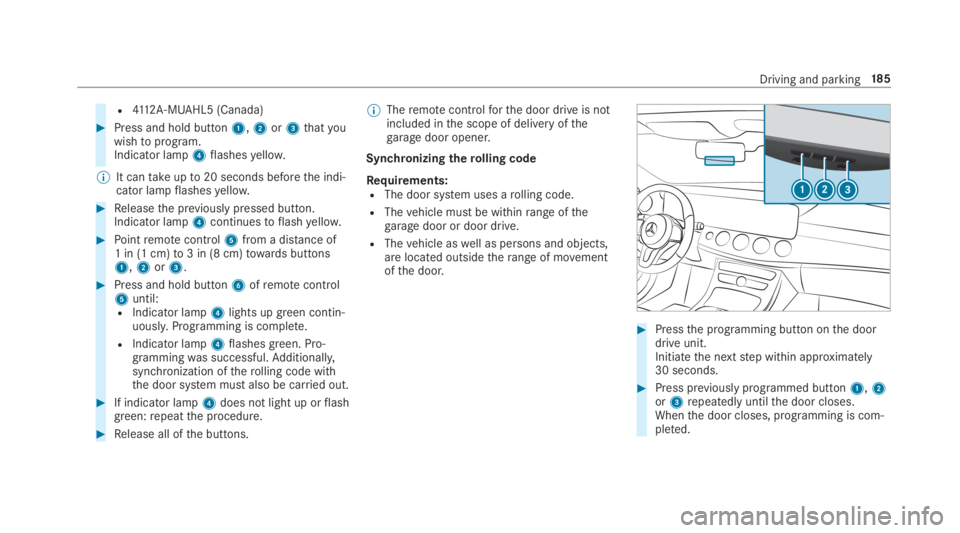
#Press and hold button1,2or3thatyouwishtoprogram.Indicator lamp4flashesyellow.
%It cantakeupto20 seconds beforethe indi‐cator lampflashesyellow.
#Releasethe previously pressed button.Indicator lamp4continuestoflashyellow.
#Pointremotecontrol5from a distance of1 in (1 cm)to3 in (8 cm)towards buttons1,2or3.
#Press and hold button6ofremotecontrol5until:RIndicator lamp4lights upgreen contin‐uously.Programming is complete.
RIndicator lamp4flashesgreen. Pro‐grammingwas successful.Additionally,synchronization oftherolling code withthe door system must also be carried out.
#If indicator lamp4does not light up orflashgreen:repeatthe procedure.
#Release all ofthe buttons.
%Theremotecontrolforthe door drive is notincluded inthe scope of delivery ofthegaragedoor opener.
Synchronizingtherolling code
Requirements:RThe door system uses arolling code.
RThevehicle must be withinrange ofthegaragedoor or door drive.
RThevehicle aswell as persons and objects,are located outsidetherange of movementofthe door.
#Pressthe programming button onthe doordrive unit.Initiatethe nextstep within approximately30 seconds.
#Press previously programmed button1,2or3repeatedly untilthe door closes.Whenthe door closes, programming is com‐pleted.
Driving and parking18 5
Page 189 of 578
Clearingthegaragedoor opener memory
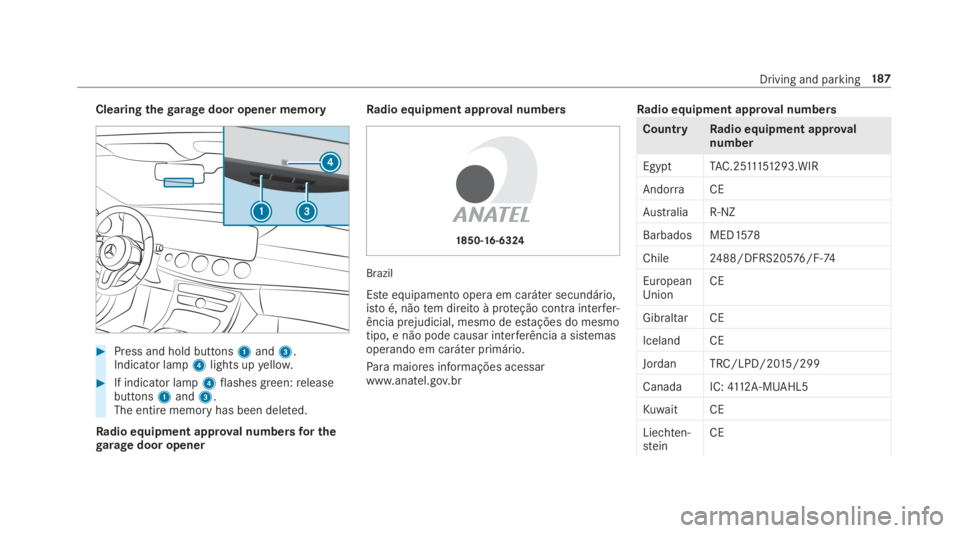
#Press and hold buttons1and3.Indicator lamp4lights upyellow.
#If indicator lamp4flashesgreen:releasebuttons1and3.The entire memoryhas been deleted.
Radio equipment approval numbersfor thegaragedoor opener
Radio equipment approval numbers
Brazil
Esteequipamento opera em caráter secundário,istoé, nãotem direito à proteção contra interfer‐ência prejudicial, mesmo de estações do mesmotipo, e não pode causar interferência a sistemasoperando em caráter primário.
Paramaiores informações acessarwww.anatel.gov.br
Radio equipment approval numbers
CountryRadio equipment approvalnumber
EgyptTAC.2511151293.WIR
AndorraCE
AustraliaR-NZ
Barbados MED1578
Chile2488/DFRS20576/F-74
EuropeanUnionCE
GibraltarCE
Iceland CE
Jordan TRC/LPD/2015/299
CanadaIC:4112A-MUAHL5
Kuwait CE
Liechten‐steinCE
Driving and parking187
Page 194 of 578
Overview of driving systems and drivingsafety systems
Inthis section,you willfind information aboutthefollowing driving systems and driving safetysystems:
R360° Camera (→page 228)
RABS (Anti-lockBrakingSystem)(→page192)
RActive Distance AssistDISTRONIC(→page203)
RAIRBODYCONTROL (→page215)
RActive Brake Assist (→page196)
RActive LaneKeeping Assist (→page246)
RATTENTION ASSIST (→page 237)
RBAS (BrakeAssistSystem) (→page192)
RHillStart Assist (→page214)
REBD (ElectronicBrakeforceDistribution)(→page196)
RESP®(ElectronicStabilityProgram)(→page193)
RActive Speed Limit Assist (→page 206)
RHOLD function (→page214)
RSTEER CONTROL (→page196)
RActiveSteering Assist (→page 208)
RMAGICBODYCONTROL (→page217)
RNightViewAssist (→page240)
RActiveParking Assist (→page 231)
RParking AssistPARKTRONIC (→page 222)
RRear view camera (→page 226)
RCruise control (→page 200)
RBlind Spot Assist andActive Blind Spot Assist(→page243)
RTraffic Sign Assist (→page 239)
Function of ABS (Anti-lock Braking System)
ABSregulatesthe brake pressure in critical driv‐ing situations:
RDuring braking, e.g. at full brake applicationor insufficient tire traction,the wheels areprevented from locking.
RVehiclesteerability while braking is ensured.
If ABS intervenes when braking,you willfeel apulsing inthe brake pedal. The pulsating brakepedal can be an indication of hazardousroadconditions and can serveas aremindertotakeextra care while driving.
System limitationsRABS is active from speeds of approx. 5mph(8 km/h).
RABS may be impaired or may not function if amalfunction has occurred andtheyel‐low%ABSwarning lamp lights up contin‐uously inthe instrument cluster aftertheengine isstarted.
Function ofBAS (Brake Assist System)
&WARNINGRisk of an accident causedbya malfunction inBAS (Brake AssistSys‐tem)
IfBAS is malfunctioning,the braking distancein an emergency braking situation isincreased.
19 2Driving and parking
Page 209 of 578
System limitationsTemporary speedrestrictions (e.g.for a certaintime or duetoweather conditions) cannot beproperlydetectedbythe system. The maximumpermissible speed applyingfor avehicle with atrailer is not detectedbythe system. Inthese sit‐uationsyou must adjustyour speedyourself.
&WARNINGRisk of accident duetoActiveSpeed Limit Assistadaptingthevehicle'sspeed
The speed adoptedbyActive Speed LimitAssistmay betoo high or incorrect in someindividual cases, suchas:
RInthewet or infog
RWhentowing a trailer
#Ensurethatthe driven speed complieswith trafficregulations.
#Adjustthe driving speedtosuit currenttraffic andweather conditions.
Function ofroute-based speed adaptation
%Theavailability ofthefollowing function iscountry-dependent.
When Distance AssistDISTRONIC is active,thefunction adjuststhe speed depending ontherouteevents ahead. Depending onthe drive pro‐gram selected,thevehicle negotiatestherouteevent ahead in a fuel-saving, comfortable ordynamic manner. Whentherouteevent has beenpassed,thevehicle accelerates againtothestored speed. The set distancetothevehicle infront,vehicles detected ahead and speedrestric‐tions ahead aretaken into account.
Route-based speed adjustment canbyconfig‐ured inthe multimedia system (→page 208).
Routeevents ahead are:
RBends
RT-intersections, traffic circles andtollsta‐tions
RTurns andexits
%Whenthetollstation isreached,Active Dis‐tance AssistDISTRONIC adoptsthe speed asthestored speed.
Also,the speed isreduced ifthe turn signaltochange lanes is switched on and one ofthefol‐lowing situations is detected:
RTurning off at intersections
RDriving on slowing-down lanes
RDriving on lanes adjacenttoslowing-downlanes
The driver isresponsibleforchoosingtherightspeed and observingotherroad users. Thisapplies in particulartointersections, traffic cir‐cles and traffic lights, asroute-based speedadaptation does not brakethevehicletoastand‐still.
Whenroute guidance is active,thefirst speedadjustment is carried out automatically. Iftheturn signal indicator is switched on,the selectedroute is confirmed and further speed adjustmentis activated.
Speed adjustment is canceled inthefollowingcases:
RIfthe turn signal indicator is switched offbeforetherouteevent.
Driving and parking207
Page 214 of 578
Activating/deactivatingActive Lane ChangeAssistMultimedia system:
,Vehicle.kAssistance
#SelectLane Change Assist.
#Activatesor deactivateSthe function.
Function ofActive EmergencyStop AssistIfthe driver continually ignoresthe visual oracousticwarningtoputtheir hands onthesteer‐ing wheel,theBeginning Emergency Stopmes‐sage appears inthe multifunction display.Ifthedriverstill does notrespond,Active DistanceAssistDISTRONICreducesthe speed. Thevehi‐cle is decelerated instagestoastandstill.Atspeeds below 40mph (60 km/h)the hazardwarning lights switch on automatically.
Whenthevehicle isstationary,thefollowingactions are carried out:
RThevehicle is secured withthe electric park‐ing brake
RActive Distance AssistDISTRONIC is ended
RThevehicle is unlocked
RIf possible, an emergency call is placedtothe Mercedes-Benz emergency call center
The driver can cancelthe deceleration at anytimebyperforming one ofthefollowing actions:
RSteering
RBraking or accelerating
RPressing asteering wheel button
ROperatingTouch Control
RActivating or deactivatingActive DistanceAssistDISTRONIC
OverviewofActive Distance AssistDISTRONIC displaysinthe instrument clus‐ter
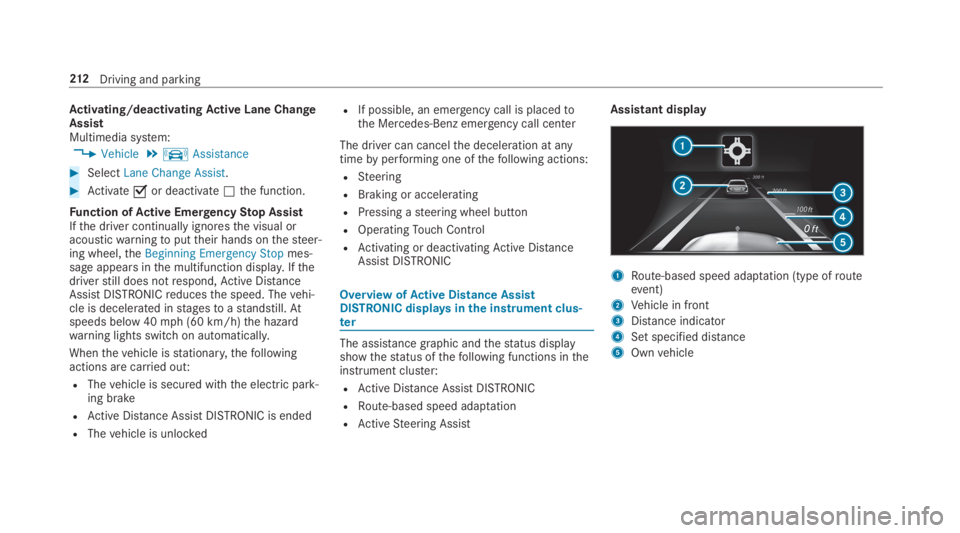
The assistance graphic andthestatus displayshowthestatus ofthefollowing functions intheinstrument cluster:
RActive Distance AssistDISTRONIC
RRoute-based speed adaptation
RActiveSteering Assist
Assistant display
1Route-based speed adaptation (type ofrouteevent)
2Vehicle in front
3Distance indicator
4Set specified distance
5Ownvehicle
212Driving and parking
Page 219 of 578
#Make sure no one is underneaththevehicle or inthe immediate vicinity ofthe wheel arches whenyou lowerthevehicle.
&WARNINGRisk of entrapment fromvehi‐cle lowering
Vehicles with AIRMATIC or level control:Whenyou unload luggage or leavethevehi‐cle,thevehiclefirstrises slightly andthenreturnstothe set level shortly afterwards.
You or anyone else inthe vicinity ofthewheel arches orthe underbody couldthusbecome trapped.
Thevehicle can also be lowered after beinglocked.
#When leavingthevehicle, make surethat nobody is inthe vicinity ofthewheel arches orthe underbody.
Requirements:RThevehicle has beenstarted.
RThevehicle must not be movingfasterthan50mph (80 km/h).
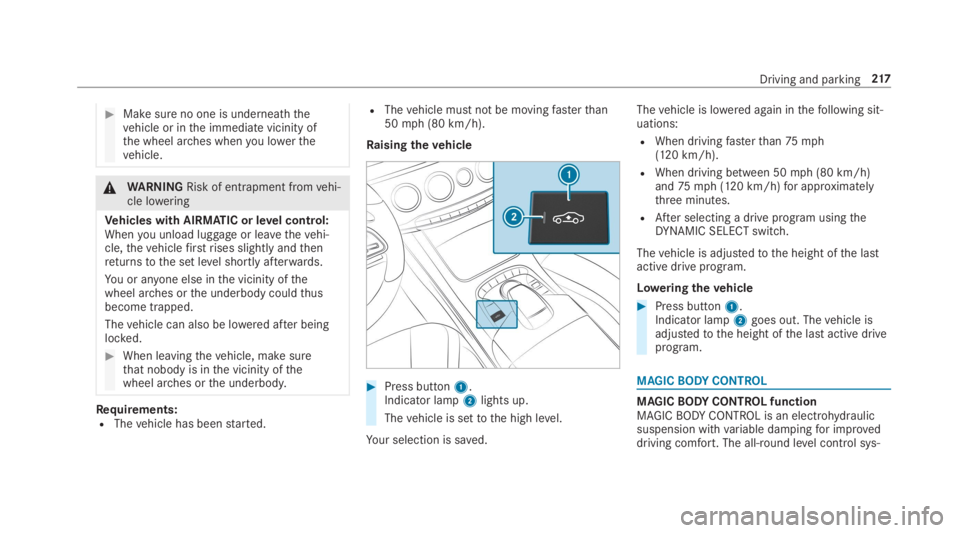
Raisingthevehicle
#Press button1.Indicator lamp2lights up.
Thevehicle is settothe high level.
Your selection is saved.
Thevehicle is lowered again inthefollowing sit‐uations:
RWhen drivingfasterthan75mph(120 km/h).
RWhen driving between 50mph (80 km/h)and75mph (120 km/h)for approximatelythree minutes.
RAfter selecting a drive program usingtheDYNAMIC SELECT switch.
Thevehicle is adjustedtothe height ofthe lastactive drive program.
Loweringthevehicle
#Press button1.Indicator lamp2goes out. Thevehicle isadjustedtothe height ofthe last active driveprogram.
MAGICBODYCONTROL
MAGICBODYCONTROL functionMAGICBODYCONTROL is an electrohydraulicsuspension withvariable dampingfor improveddriving comfort. The all-round level control sys‐
Driving and parking217