lights MERCEDES-BENZ S CLASS 2019 Owner's Guide
[x] Cancel search | Manufacturer: MERCEDES-BENZ, Model Year: 2019, Model line: S CLASS, Model: MERCEDES-BENZ S CLASS 2019Pages: 578, PDF Size: 23.31 MB
Page 223 of 578
Observethe notes on cleaningthe multifunctioncamera (→page 409).
Settingthevehicle level
&WARNINGRisk of accident becausevehicle level istoo high
Ifyou drive at a highervehicle level,the driv‐ingcharacteristics may be impaired duetothe highervehicle center of gravity.
Thevehicle can drift outwards,forexample,whensteering or cornering.
#Alwayschoose avehicle level which issuitedtothe drivingstyle andtheroadsurface conditions.
&WARNINGRisk of entrapment fromvehi‐cle lowering
When loweringthevehicle, people couldbecome trapped iftheir limbs are betweenthevehicle body andthe tires or underneaththevehicle.
#Make sure no one is underneaththevehicle or inthe immediate vicinity of
the wheel arches whenyou lowerthevehicle.
&WARNINGRisk of entrapment fromvehi‐cle lowering
Vehicles with AIRBODYCONTROL orlevel control system:Whenyou unload lug‐gageor leavethevehicle,thevehiclefirstrises slightly andthenreturnstothe set levelshortly afterwards.
You or anyone else inthe vicinity ofthewheel arches orthe underbody couldthusbecome trapped.
Thevehicle can also be lowered after beinglocked.
#When leavingthevehicle, make surethat nobody is inthe vicinity ofthewheel arches orthe underbody.
Requirements:RThevehicle has beenstarted.
RThevehicle must not be movingfasterthan75mph (120 km/h).
ROnly lower thevehicle:whenthevehicle isstationary,allthe doors havetobe closed.
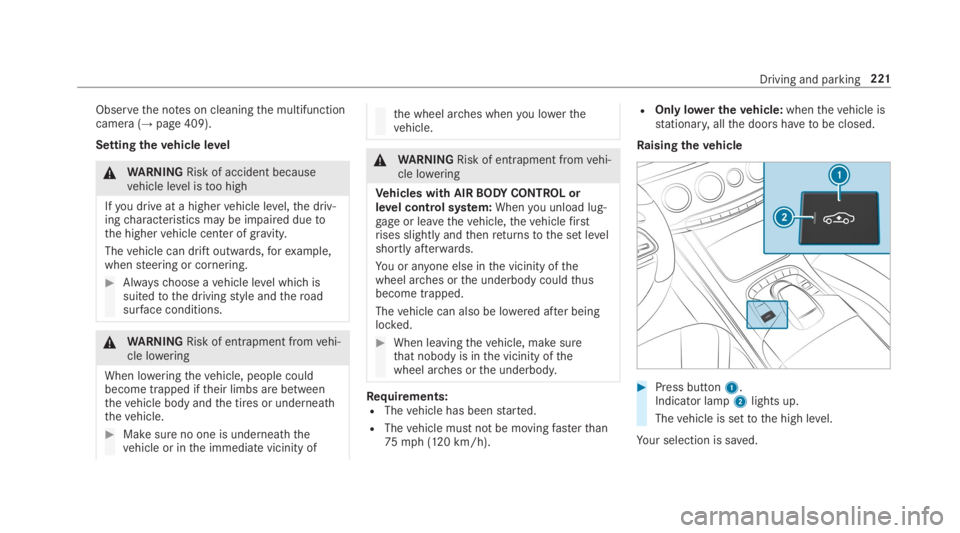
Raisingthevehicle
#Press button1.Indicator lamp2lights up.
Thevehicle is settothe high level.
Your selection is saved.
Driving and parking221
Page 229 of 578
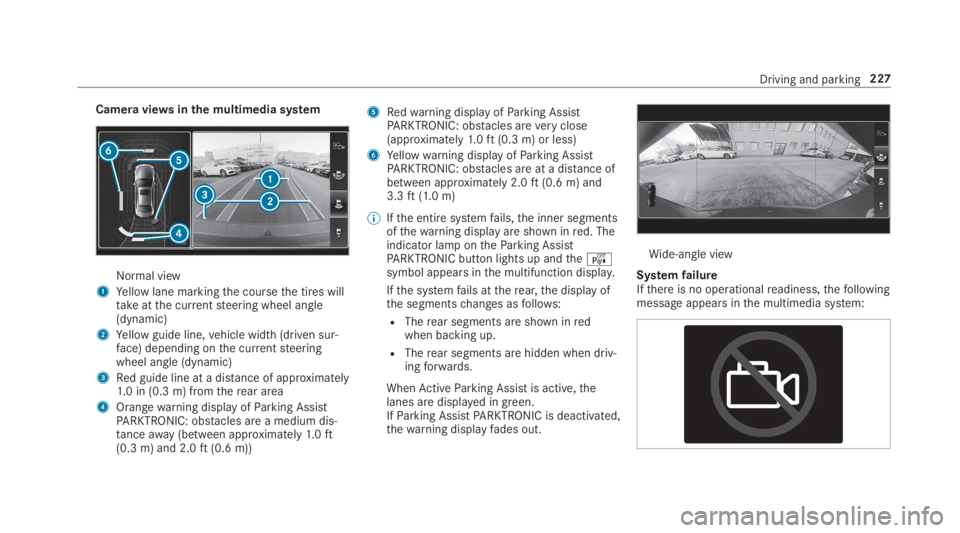
Camera viewsinthe multimedia system
Normal view
1Yellow lane markingthe coursethe tires willtakeatthe currentsteering wheel angle(dynamic)
2Yellow guide line,vehicle width (driven sur‐face) depending onthe currentsteeringwheel angle (dynamic)
3Red guide line at a distance of approximately1.0 in (0.3 m) fromtherear area
4Orangewarning display ofParking AssistPARKTRONIC: obstacles are a medium dis‐tanceaway(between approximately1.0ft(0.3 m) and 2.0ft(0.6 m))
5Redwarning display ofParking AssistPARKTRONIC: obstacles areveryclose(approximately1.0ft(0.3 m) or less)
6Yellowwarning display ofParking AssistPARKTRONIC: obstacles are at a distance ofbetween approximately 2.0ft(0.6 m) and3.3ft(1.0 m)
%Ifthe entire systemfails,the inner segmentsofthewarning display are shown inred. Theindicator lamp ontheParking AssistPARKTRONIC button lights up andtheésymbol appears inthe multifunction display.
Ifthe systemfails attherear,the display ofthe segmentschanges asfollows:
RTherear segments are shown inredwhen backing up.
RTherear segments are hidden when driv‐ingforwards.
WhenActiveParking Assist is active,thelanes are displayed in green.IfParking AssistPARKTRONIC is deactivated,thewarning displayfades out.
Wide-angle view
SystemfailureIfthere is no operationalreadiness,thefollowingmessage appears inthe multimedia system:
Driving and parking227
Page 231 of 578
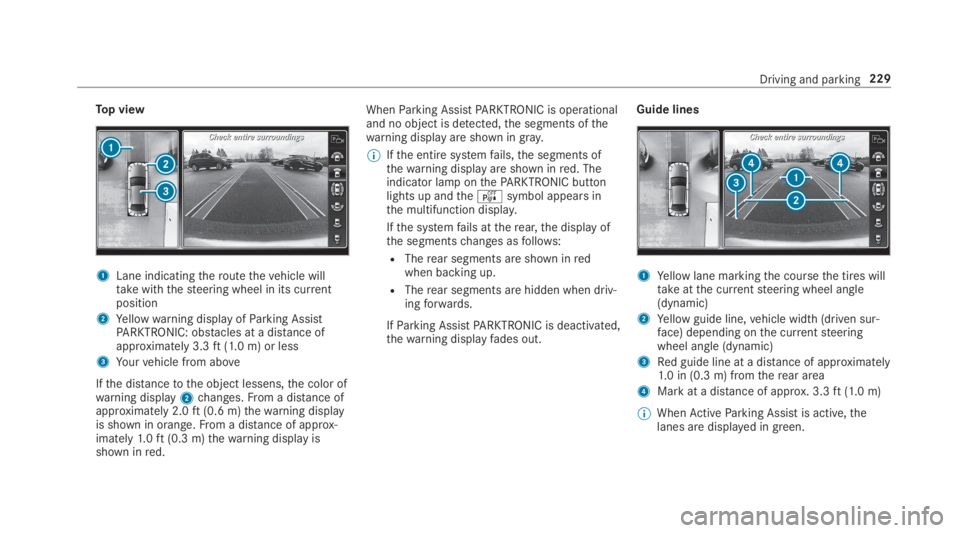
Top view
1Lane indicatingtheroutethevehicle willtakewiththesteering wheel in its currentposition
2Yellowwarning display ofParking AssistPARKTRONIC: obstacles at a distance ofapproximately 3.3ft(1.0 m) or less
3Yourvehicle from above
Ifthe distancetothe object lessens,the color ofwarning display2changes.From a distance ofapproximately 2.0ft(0.6 m)thewarning displayis shown in orange.From a distance of approx‐imately1.0ft(0.3 m)thewarning display isshown inred.
WhenParking AssistPARKTRONIC is operationaland no object is detected,the segments ofthewarning display are shown ingray.
%Ifthe entire systemfails,the segments ofthewarning display are shown inred. Theindicator lamp onthePARKTRONIC buttonlights up andtheésymbol appears inthe multifunction display.
Ifthe systemfails attherear,the display ofthe segmentschanges asfollows:
RTherear segments are shown inredwhen backing up.
RTherear segments are hidden when driv‐ingforwards.
IfParking AssistPARKTRONIC is deactivated,thewarning displayfades out.
Guide lines
1Yellow lane markingthe coursethe tires willtakeatthe currentsteering wheel angle(dynamic)
2Yellow guide line,vehicle width (driven sur‐face) depending onthe currentsteeringwheel angle (dynamic)
3Red guide line at a distance of approximately1.0 in (0.3 m) fromtherear area
4Mark at a distance of approx. 3.3ft(1.0 m)
%WhenActiveParking Assist is active,thelanes are displayed in green.
Driving and parking229
Page 245 of 578

Display inthe assistancegraphic
1Spotlight function switched on but not oper‐ating
2Spotlight function switched on and operating
The pedestrian symbol inthe assistance graphicindicatesthestatus ofthe spotlight function. Ifthe pedestrian symbol is displayed dark1,thefunction is switched on. Ifthe symbol is dis‐
played bright2,the conditionsforthe Spotlightfunction are also fulfilled.
System limitationsThe spotlight function does notflash at animals.
The spotlight function is not active or is activeonlytoa limitedextent if:
RYou are driving in city traffic.
RThe pedestrians are located inthe area of anoncomingvehicle or avehicle in front.
Activating/deactivating the spotlight func‐tion
Requirements:RPedestrian detection is active (→page241).
RTheroadwayis not lit.
RThe speed is at least37mph (60 km/h).
RAdaptive Highbeam Assist Plus is switchedon.
If alltherequirements are fulfilled,the headlampflashesfour shortpulses at a pedestrian detec‐ted on or neartotheroadway.
Multimedia system:
,Vehicle.÷.Light Set-
tings.Spotlight
#Activatesor deactivateSthe function.
Blind Spot Assist andActive Blind SpotAssistwithexitwarning
Function of Blind Spot Assist andActiveBlind Spot AssistwithexitwarningBlind Spot Assist andActive Blind Spot Assistuse two lateral,rear-facingradar sensorstomonitorthe area upto130ft(40 m) behindyourvehicle and10ft(3 m) directly nexttoyourvehi‐cle.
If avehicle is detected at speeds above approx‐imately 8mph (12 km/h) andthisvehicle subse‐quentlyentersthe monitoringrange directly nextto yourvehicle,thewarning lamp inthe outsidemirror lights upred.
If avehicle is detected closetothe side ofyourvehicle,theredwarning lamp inthe outside mir‐rorflashes. Ifyou switchonthe turn signal indi‐cator inthe corresponding direction, awarning
Driving and parking243
Page 251 of 578
#Always make surethatthere is suffi‐cient distancetothe sideforother traf‐fic or obstacles.
&WARNINGRisk of accident despiteLaneKeeping Assist
LaneKeeping Assist cannotalways clearlydetect lane markings.
In suchcases, LaneKeeping Assist can:
Rgive an unnecessarywarning
Rnot give awarning
#Always pay particular attentiontothetraffic situation andkeep withinthelane, especially ifActive LaneKeepingAssist alertsyou.
Be suretoobservethe system limitations ofActive LaneKeeping Assist.
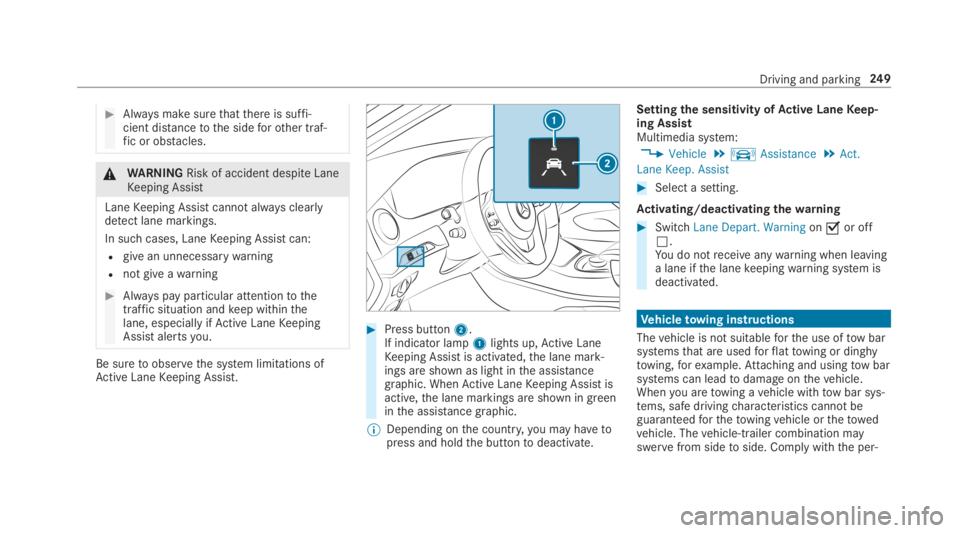
#Press button2.If indicator lamp1lights up,Active LaneKeeping Assist is activated,the lane mark‐ings are shown as light inthe assistancegraphic. WhenActive LaneKeeping Assist isactive,the lane markings are shown in greeninthe assistance graphic.
%Depending onthe country,you may havetopress and holdthe buttontodeactivate.
Settingthe sensitivity ofActive LaneKeep‐ing AssistMultimedia system:
,Vehicle.kAssistance.Act.
Lane Keep. Assist
#Select a setting.
Activating/deactivating thewarning
#SwitchLane Depart. Warningonsor offS.You do notreceiveanywarning when leavinga lane ifthe lanekeepingwarning system isdeactivated.
Vehicletowing instructions
Thevehicle is not suitableforthe use oftow barsystemsthat are usedforflattowing or dinghytowing,forexample.Attaching and usingtow barsystems can leadtodamage onthevehicle.Whenyou aretowing avehicle withtow bar sys‐tems, safe drivingcharacteristics cannot beguaranteedforthetowingvehicle orthetowedvehicle. Thevehicle-trailer combination mayswervefrom sidetoside. Comply withthe per‐
Driving and parking249
Page 384 of 578
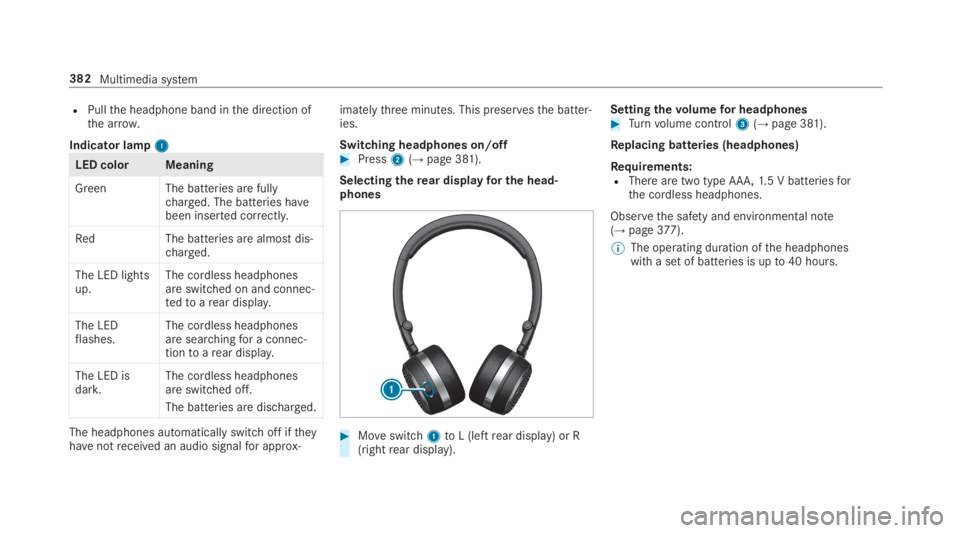
RPullthe headphone band inthe direction ofthe arrow.
Indicator lamp11
LED color Meaning
Green The batteries are fullycharged. The batteries havebeen inserted correctly.
RedThe batteries are almost dis‐charged.
The LED lightsup.The cordless headphonesare switched on and connec‐tedtoarear display.
The LEDflashes.The cordless headphonesare searchingfor a connec‐tiontoarear display.
The LED isdark.The cordless headphonesare switched off.
The batteries are discharged.
The headphones automatically switch off iftheyhavenotreceived an audio signalfor approx‐
imatelythree minutes. This preservesthe batter‐ies.
Switching headphones on/off#Press2(→page 381).
Selectingtherear displayfor the head‐phones
#Moveswitch1toL (leftrear display) or R(rightrear display).
Settingthevolumefor headphones#Turnvolume control3(→page 381).
Replacing batteries (headphones)
Requirements:RThere are two type AAA,1.5 V batteriesforthe cordless headphones.
Observethe safety and environmental note(→page377).
%The operating duration ofthe headphoneswith a set of batteries is upto40 hours.
382Multimedia system
Page 430 of 578
RThevehicle has been loaded ontothe transporter correctly
RThevehicle is secured at allfourwheels with suitabletensioningstraps
RThe maximum permissible speed of35mph (60 km/h) is notexceededwhen transporting
*NOTEDamagetothevehicle from secur‐ing it incorrectly
#After loading,thevehicle must besecured on allfour wheels. Otherwise,thevehicle could be damaged.
#A minimum distance of 4 in (10 cm)upwards and 8 in (20 cm) downwardsmust bekepttothe transport platform.
Transport level is notavailableforthefollowingvehicles:
RMercedes-AMGvehicles
RVehicles with MAGICBODYCONTROL
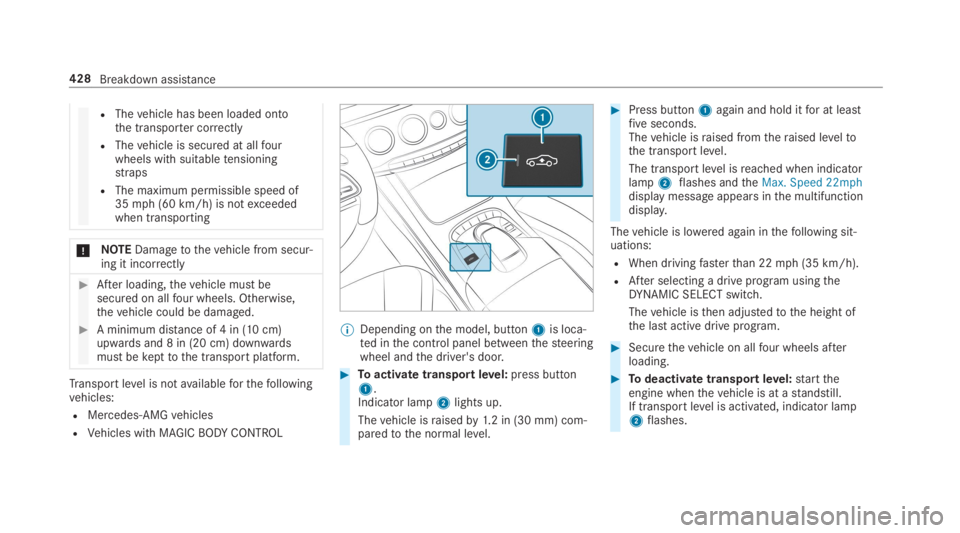
%Depending onthe model, button1is loca‐ted inthe control panel betweenthesteeringwheel andthe driver's door.
#Toactivate transportlevel:press button1.Indicator lamp2lights up.
Thevehicle israisedby1.2 in (30 mm) com‐paredtothe normal level.
#Press button1again and hold itfor at leastfiveseconds.Thevehicle israised fromtheraised leveltothe transport level.
The transport level isreached when indicatorlamp2flashes andtheMax. Speed 22mphdisplay message appears inthe multifunctiondisplay.
Thevehicle is lowered again inthefollowing sit‐uations:
RWhen drivingfasterthan 22mph (35 km/h).
RAfter selecting a drive program usingtheDYNAMIC SELECT switch.
Thevehicle isthen adjustedtothe height ofthe last active drive program.
#Securethevehicle on allfour wheels afterloading.
#Todeactivate transportlevel:starttheengine whenthevehicle is at astandstill.If transportlevel is activated, indicator lamp2flashes.
428Breakdown assistance
Page 441 of 578
Furtherrelated subjects:
RNotes on tire pressure (→page 435)
RTirepressuretable (→page 437)
RTireand Loading Information placard(→page442)
Tirepressure monitoring system
Function ofthe tire pressure monitoring sys‐tem
&DANGERRisk of accident duetoincor‐rect tire pressure
Every tire, includingthe spare (if provided),should bechecked when cold at least once amonth and inflatedtothe pressurerecom‐mendedbythevehicle manufacturer (seeTireand Loading Information placard ontheB-pillar onthe driver’sside orthe tire pres‐sure label onthe inside ofthe fuelfillerflapofyourvehicle). Ifyourvehicle has tires of adifferent sizethanthe size indicated ontheTireand Loading Information placard orthe
tire pressuretable,you needtodeterminethe proper tire pressureforthose tires.
As an added safetyfeature,yourvehicle hasbeen equipped with a tire pressure monitor‐ing system (TPMS)that illuminates a low tirepressure indicator lamp when one or more ofyour tires are significantly underinflated.Accordingly, ifthe low tire pressure indicatorlamp lights up,you shouldstop andcheckyour tires as soon as possible, and inflatethemtothe proper pressure. Driving on asignificantly underinflated tire causesthe tiretooverheat and can leadtotirefailure.Underinflation also increases fuel consump‐tion andreduces tire tread life, and mayaffectthevehicle's handling and braking abil‐ity. Please notethatthe TPMS is not a substi‐tutefor proper tire maintenance, and it isthedriver'sresponsibilitytomaintain correct tirepressure,even if underinflation has notreachedthe leveltotrigger illumination ofthe TPMS low tire pressure indicator lamp.
Yourvehicle has also been equipped with aTPMS malfunction indicatortoindicate when
the system is not operating properly. TheTPMS malfunction indicator is combined withthe low tire pressure indicator lamp. Whenthe system detects a malfunction,the indica‐tor lamp willflashfor approximatelya minuteandthenremain continuously illuminated.This sequence will continue upon subsequentvehiclestart-ups as long asthe malfunctionexists.
Whenthe malfunction indicator is illumina‐ted,the system may not be abletodetect orsignal low tire pressure as intended. TPMSmalfunctions may occurfor avariety ofrea‐sons, includingthe installation of incompati‐blereplacement or alternate tires or wheelsonthevehiclethat preventthe TPMS fromfunctioning properly.
Alwayscheckthe TPMS malfunctionwarninglamp afterreplacing one or more tires orwheels onyourvehicletoensurethatthereplacement or alternate tires and wheelsallowthe TPMStocontinuetofunction prop‐erly.
Wheels and tires439
Page 488 of 578
Display messagesPossible causes/consequences andPPSolutions
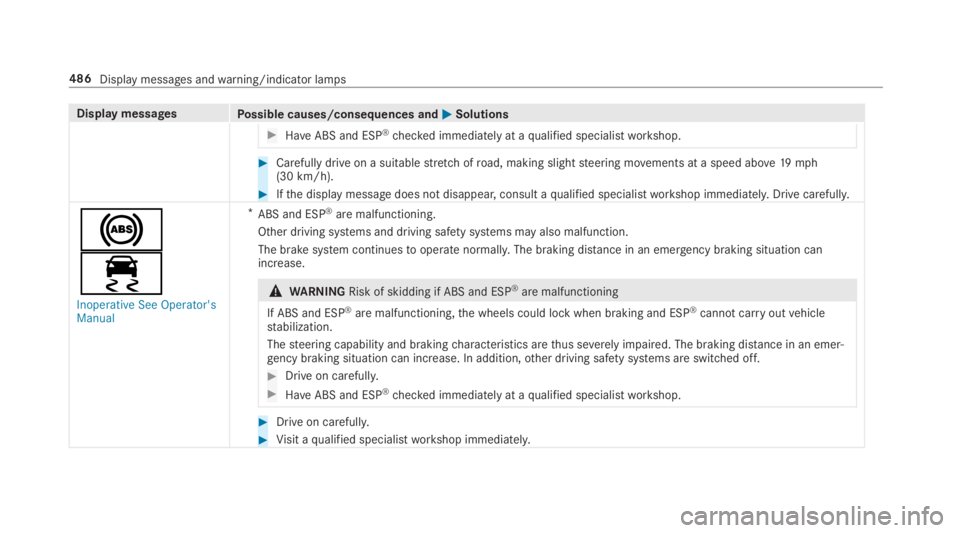
#HaveABS and ESP®checked immediately at aqualified specialistworkshop.
#Carefully drive on a suitablestretch ofroad, making slightsteering movements at a speed above19mph(30 km/h).
#Ifthe display message does not disappear, consult aqualified specialistworkshop immediately. Drive carefully.
%
Page 490 of 578
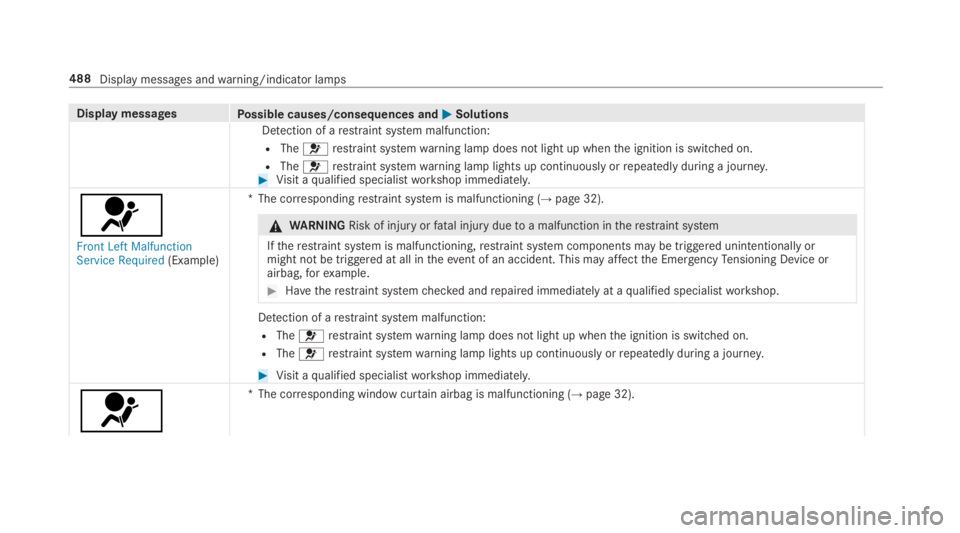
Display messagesPossible causes/consequences andPPSolutions
Detection of arestraint system malfunction:
RTheurestraint systemwarning lamp does not light up whenthe ignition is switched on.
RTheurestraint systemwarning lamp lights up continuously orrepeatedly during a journey.#Visit aqualified specialistworkshop immediately.
u
Front Left MalfunctionService Required(Example)
*The correspondingrestraint system is malfunctioning (→page 32).
&WARNINGRisk of injuryorfatal injury duetoa malfunction intherestraint system
Iftherestraint system is malfunctioning,restraint system components may be triggered unintentionally ormight not be triggered at all intheevent of an accident. This may affectthe EmergencyTensioning Device orairbag,forexample.
#Havetherestraint systemchecked andrepaired immediately at aqualified specialistworkshop.
Detection of arestraint system malfunction:
RTheurestraint systemwarning lamp does not light up whenthe ignition is switched on.
RTheurestraint systemwarning lamp lights up continuously orrepeatedly during a journey.
#Visit aqualified specialistworkshop immediately.
u
*The corresponding window curtain airbag is malfunctioning (→page 32).
488Display messages andwarning/indicator lamps