reset MERCEDES-BENZ S CLASS 2019 Owner's Manual
[x] Cancel search | Manufacturer: MERCEDES-BENZ, Model Year: 2019, Model line: S CLASS, Model: MERCEDES-BENZ S CLASS 2019Pages: 578, PDF Size: 23.31 MB
Page 328 of 578
%The automatically selected map scale can bechanged manuallyfor a short time. The set‐ting isreset automatically after afew sec‐onds.
Displayingthe satellite mapMultimedia system:
,Navigation.ZOptions.Map
Content
#SwitchSatellite Maponsor offS.
or
#If satellite map display6isavailable inthemap menu, switch it onsor offS(→page 320).Switched ons: satellite maps are displayedin map scales of 2 mi (2 km) or less.
Switched offS: satellite maps are not dis‐played in map scales from 2 mi (2 km)to10mi (10 km).
%Satellite mapsforthese map scales are notavailable in all countries.
Displayingweather information
Requirements:RMercedes me connect isavailable.
RYou havea user accountforthe Mercedesme portal.
RThe service isavailable.
RThe service has been activated at an author‐ized Mercedes-Benz Center.
Further information can befound at: http://www.mercedes.me
Multimedia system:
,Navigation.ZOptions.Map
Content
#ActivateWeather Informations.
or
#Ifweather information display6isavailableinthe map menu, activates(→page 320)it.Currentweather information is displayed onthe navigation map, e.g.temperature orcloud cover.
%Weather information is notavailable in allcountries.
Calling upthe Digital Operator's Manual(navigation)
Calling up information on navigationMultimedia system:
,Navigation.ZOptions.Naviga-
tion Info
#Selectthetopic.
Telephone
Telephony
Notes ontelephony
&WARNINGRisk of distraction from oper‐ating integrated communication equip‐ment whilethevehicle is in motion
Ifyou operate communication equipmentintegrated inthevehicle when driving,youwill be distracted fromthe traffic situation.
326Multimedia system
Page 340 of 578
#Tostartthe dictation function:press onthe central control element.The appforthe dictation function is loaded.
Iftherewas no prior Internet connection, aconnection is now established.
#Saythe message.The dictation ends automatically afteryouhavefinished speaking.
Afterthevoice message has been processed,it is shown astext.
#Toreplace a message:selectReplace mes-sage.Thetextthat has been dictated and shownonthe display isreset and can be dictatedagain.
Editingtext
#Selecttheword.
#Tocall upthe correction menu:press onthe central control element.
Thefollowing options areavailable:
RAdjustingthe capitalization ofwords (ifsupportedbythecharacter set)
RExpandingthechoice ofwords
RDeletingthe selection
RRecording a new dictation
#Toleavethe menu:selectDone.
Sendingtext messages
#SelectSend Text Message.
Replyingtoatext messageMultimedia system:
,Phone.iText Message
#Openthetext message.
#Selectp.
#SelectReply.
Calling atext message senderMultimedia system:
,Phone.iText Message
#Openthetext message.
#Selectp.
#SelectCall Sender.
Deletingtext messagesMultimedia system:
,Phone.iText Message
#Selectp.
#Todelete atext message:selectDelete.#Outbox
or
#SelectDrafts.
Mercedes-Benz link
Overview of Mercedes-Benz LinkUsing Mercedes-Benz Link,various functionsand selected mobile phone apps can be transfer‐redtothe media display.
The Mercedes-Benz Link control box supplemen‐taryequipment isrequiredforthis.You canobtainthis at an authorized Mercedes-Benz Cen‐ter.
%The Mercedes-Benz Link control box usesthe Android operating system.
338Multimedia system
Page 345 of 578
Thefollowing system information is transmitted:
RSoftwarerelease ofthe multimedia system
RSystem ID (anonymized)
The transfer ofthis data is usedtooptimize com‐munication betweenthevehicle andthe mobilephone.
Todothis, andtoassign severalvehiclestothemobile phone, avehicle identifier israndomlygenerated.
This has no connectiontothevehicle identifica‐tion number (VIN) and is deleted whenthe multi‐media system isreset (→page 298).
Thefollowing drivingstatus data is transmitted:
RTransmission position engaged
RDistinction between parking,standstill,roll‐ing and driving
RDay/night mode ofthe instrument cluster
The transfer ofthis data is usedtoalter howcontent is displayedtocorrespondtothe drivingsituation.
Thefollowing position data is transmitted:
RCoordinates
RSpeed
RCompass direction
RAcceleration direction
This datais only transferred whilethe navigationsystem is active in ordertoimproveit (e.g. so itcan continue functioning when in a tunnel).
Mercedes me connect
Notes on Mercedes me connect
Mercedes me connect providesthefollowingservices:
RAccident and breakdown management (mebutton)
RConcierge Service (whenthe service is acti‐vated), appointmentrequests or similar (mebutton)
RMercedes-Benz emergency call system (auto‐matic emergency call or SOS button)
The Mercedes-Benz Customer Center andtheMercedes-Benz emergency call center areavaila‐bleforyou aroundthe clock.
The me button andthe SOS button can befoundonthevehicle'soverhead control panel(→page 344).
You can also callthe Mercedes-Benz CustomerCenter usingthe multimedia system(→page 344).
Please notethat Mercedes me connect is aMercedes-Benz service. In emergencies, alwayscallthe national emergency servicesfirst usingthestandard national emergency service phonenumbers. In emergencies,you can also usetheMercedes-Benz emergency call system(→page 346).
Observethe conditions of usefor Mercedes meconnect andother services. These can beobtained inthe Mercedes me portal: https://me.secure.mercedes-benz.com
Multimedia system343
Page 370 of 578
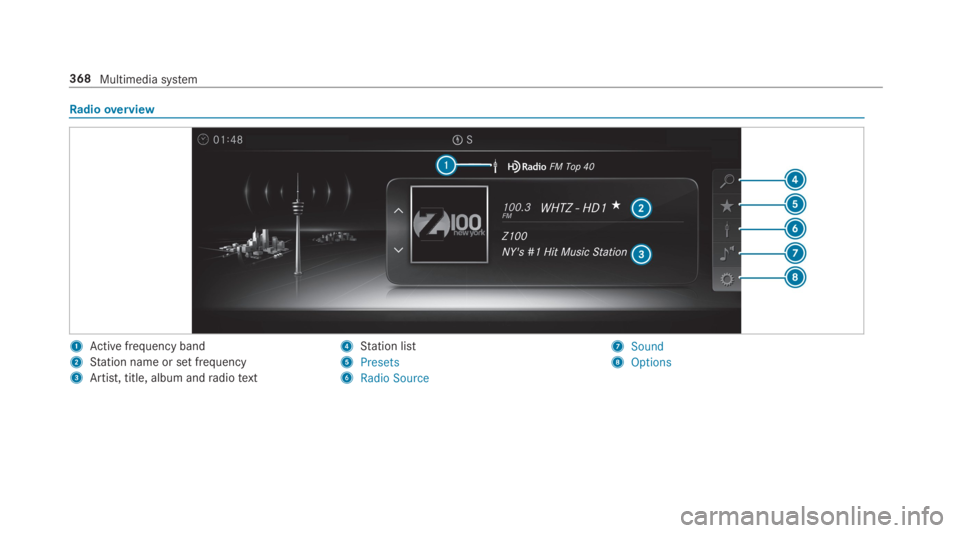
Radiooverview
1Active frequency band
2Station name or set frequency
3Artist, title, album andradiotext
4Station list
5Presets
6Radio Source
7Sound
8Options
368Multimedia system
Page 372 of 578
#SelectMove Highlighted Station.
#Select a memorypreset.
Deletingstations:
#Highlight a preset entry and navigatetotheleft.
#SelectDelete Highlighted Station.
#SelectYes.
Tagging music tracks
Multimedia system:
,Radio
Ifradiostations providetherelevant information,this function allowsyoutotransfer informationonthe music track currently playingtoan
Apple®device.You canthen purchasethe audio
file fromtheiTunesStore®.
#Select♫→ Tag This Song.The track information is saved.
Activating/deactivatingradiotext
Multimedia system:
,Radio.ZOptions.Display Radio
Text Information
#Activatesor deactivateSthe function.
Satelliteradio
Information onthe satelliteradio
SIRIUS XM®satelliteradio offersmorethan175digital-qualityradiochannels providing100%commercial-free music, sports, newsand enter‐tainment,forexample. SIRIUS XM satelliteradioemploysafleet of high-performance satellitestobroadcast aroundthe clockthroughoutthe USAand Canada. The satelliteradio program isavail‐ablefor a monthlyfee. Information aboutthis
can be obtained from a Sirius XM®Service Cen‐ter and at http://www.siriusxm.com (USA) orhttp://www.siriusxm.ca (Canada).
%Sirius, XM and allrelated marksand logosare trademarksof Sirius XMRadio Inc. andits subsidiaries. Allother marks,channel
names and logos arethe property oftheirrespectiveowners. Allrightsreserved.
SatelliteradiorestrictionsSatelliteradio mode may betemporarily unavail‐able or interruptedfor avariety ofreasons.These include environmental ortopographicalconditions beyondthe control of Mercedes-BenzUSA,LLC. Thus, operation at certain locationsmay not be possible.
Registering satelliteradio
Requirements:RSatelliteradio equipment
RRegistration with a satelliteradio provider
RIfregistration is not included when purchas‐ingthe system,your credit card details willberequiredtoactivateyour account
37 0Multimedia system
Page 374 of 578
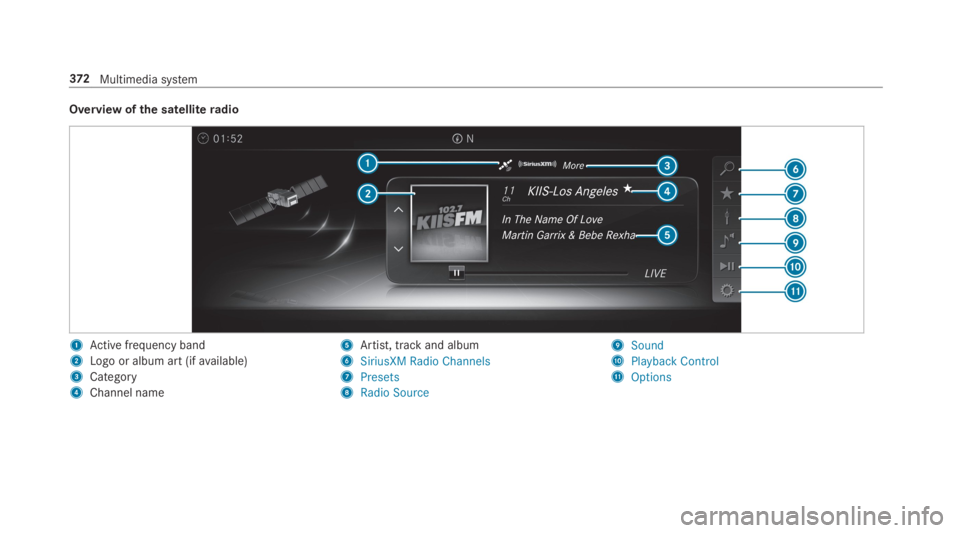
Overview ofthe satelliteradio
1Active frequency band
2Logo or album art (ifavailable)
3Category
4Channel name
5Artist, track and album
6SiriusXM Radio Channels
7Presets
8Radio Source
9Sound
APlayback Control
BOptions
372Multimedia system
Page 386 of 578
Rbetweentherear shelf andthrough-load skibag
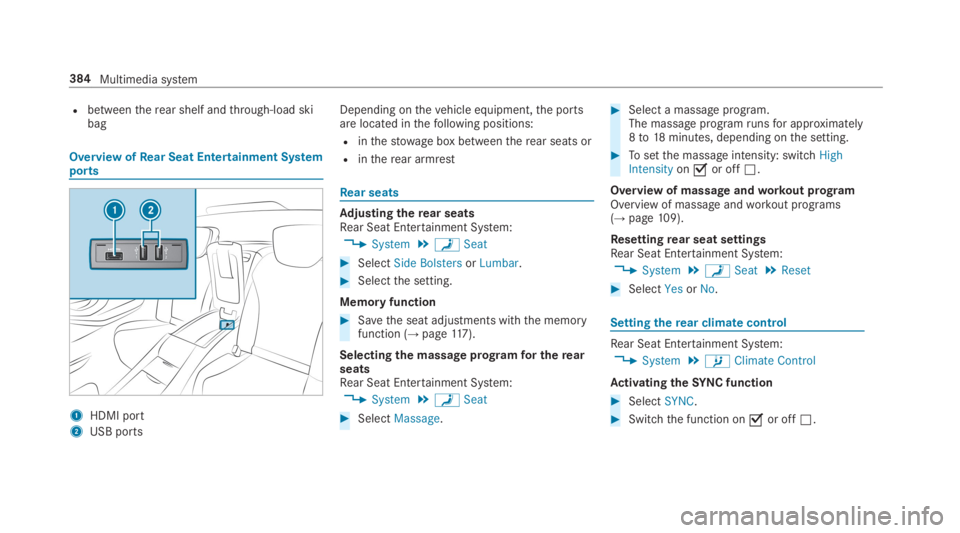
Overview ofRear Seat Entertainment Systemports
1HDMI port
2USB ports
Depending onthevehicle equipment,the portsare located inthefollowing positions:
Rinthestowage box betweentherear seats or
Rintherear armrest
Rear seats
Adjusting therear seatsRear Seat Entertainment System:
,System.aSeat
#SelectSide BolstersorLumbar.
#Selectthe setting.
Memory function
#Savethe seat adjustments withthe memoryfunction (→page117).
Selecting the massage programfor therearseatsRear Seat Entertainment System:
,System.aSeat
#SelectMassage.
#Select a massage program.The massage programrunsfor approximately8to18minutes, depending onthe setting.
#Tosetthe massage intensity: switchHighIntensityonsor offS.
Overview of massageandworkout programOverview of massage andworkout programs(→page109).
Resettingrear seat settingsRear Seat Entertainment System:
,System.aSeat.Reset
#SelectYesorNo.
Settingtherear climate control
Rear Seat Entertainment System:
,System.bClimate Control
Activating theSYNCfunction
#SelectSYNC.
#Switchthe function onsor offS.
384Multimedia system
Page 398 of 578
Rfrequent operation in mountainousterrain oron poorroad surfaces
Rwhenthe engine is often leftidlingfor longperiods
Roperation in particularly dusty conditionsand/or if air-recirculation mode is frequentlyused
Inthese or similar operating conditions, havetheinterior airfilter, engine air cleaner, engine oiland oilfilteretc.changed more frequently. Thetires must bechecked more frequently ifthevehicle is operated under increased loads.Fur‐ther information can be obtained at aqualifiedspecialistworkshop.
Battery disconnection periods
The ASSYST PLUS service interval displaycan only calculatethe service due datewhenthe batteryis connected.
#Notedownthe service due date displayed onthe instrument display before disconnectingthe battery (→page 395).
Engine compartment
Active hood (pedestrian protection)
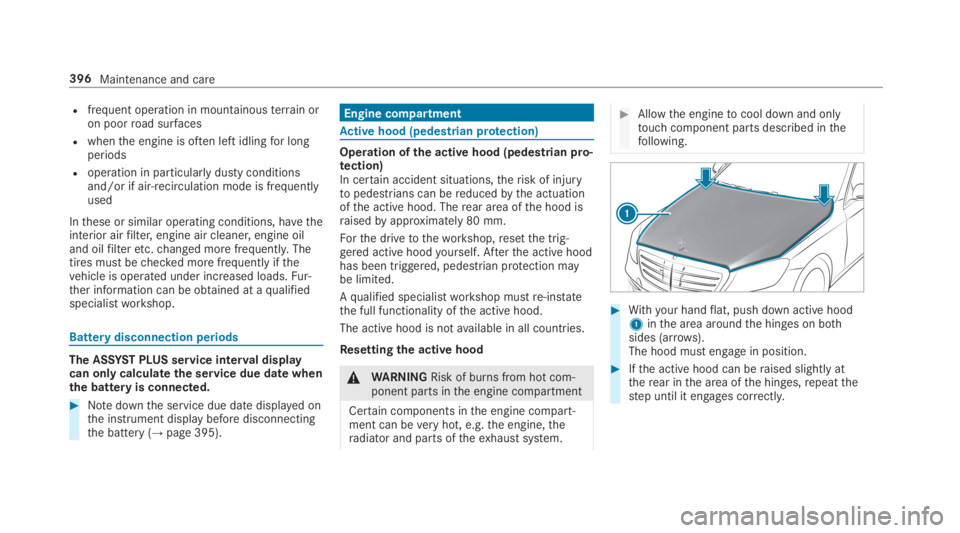
Operation ofthe active hood (pedestrian pro‐tection)In certain accident situations,therisk of injurytopedestrians can bereducedbythe actuationofthe active hood. Therear area ofthe hood israisedbyapproximately 80 mm.
Forthe drivetotheworkshop,resetthe trig‐gered active hoodyourself. Afterthe active hoodhas been triggered, pedestrian protection maybe limited.
Aqualified specialistworkshop mustre-instatethe full functionality ofthe active hood.
The active hood is notavailable in all countries.
Resettingthe active hood
&WARNINGRisk of burns from hot com‐ponent parts inthe engine compartment
Certain components inthe engine compart‐ment can beveryhot, e.g.the engine,theradiator and parts oftheexhaust system.
#Allowthe enginetocool down and onlytouch component parts described inthefollowing.
#Withyour handflat, push down active hood1inthe area aroundthe hinges on bothsides (arrows).The hood must engage in position.
#Ifthe active hood can beraised slightly attherear inthe area ofthe hinges,repeatthestep until it engages correctly.
396Maintenance and care
Page 538 of 578
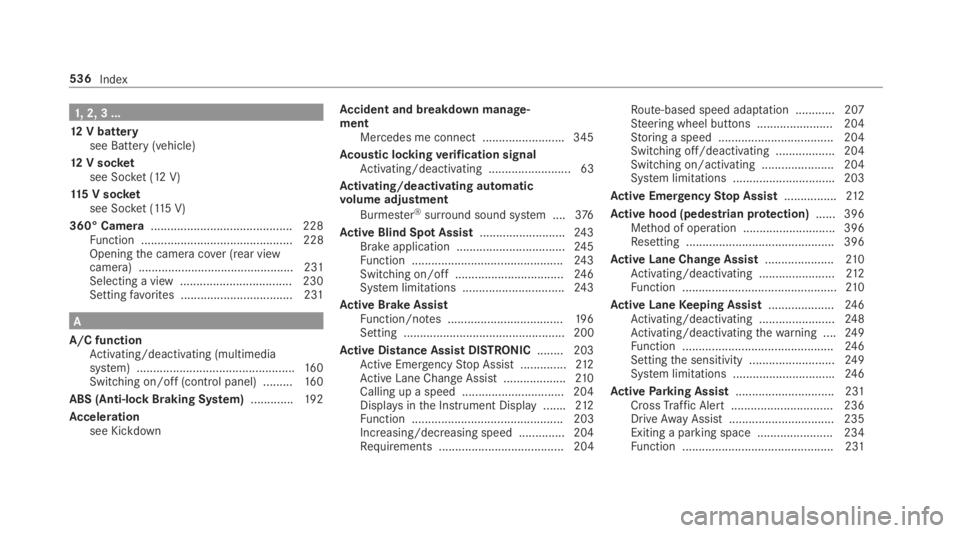
1,2, 3 ...
12V batterysee Battery (vehicle)
12V socketsee Socket (12 V)
115 V socketsee Socket (115V)
360° Camera........................................... 228Function .............................................. 228Openingthe camera cover (rear viewcamera) ............................................... 231Selecting a view .................................. 230Settingfavorites ..................................231
A
A/C functionActivating/deactivating (multimediasystem) ................................................16 0Switching on/off (control panel) .........16 0
ABS (Anti-lock Braking System).............192
Accelerationsee Kickdown
Accident and breakdown manage‐mentMercedes me connect .........................345
Acoustic lockingverification signalActivating/deactivating ......................... 63
Activating/deactivating automaticvolume adjustment
Burmester®surround sound system ....376
Active Blind Spot Assist..........................24 3Brake application .................................24 5Function ..............................................24 3Switching on/off .................................24 6System limitations ...............................243
Active Brake AssistFunction/notes ...................................19 6Setting ................................................. 200
Active Distance Assist DISTRONIC........ 203Active EmergencyStop Assist ..............212Active Lane Change Assist...................210Calling up a speed ...............................204Displays inthe Instrument Display .......212Function .............................................. 203Increasing/decreasing speed .............. 204Requirements ...................................... 204
Route-based speed adaptation ............207Steering wheel buttons ....................... 204Storing a speed ................................... 204Switching off/deactivating .................. 204Switching on/activating ......................204System limitations ...............................203
Active EmergencyStop Assist................212
Active hood (pedestrian protection)...... 396Method of operation ............................396Resetting ............................................. 396
Active Lane Change Assist.....................210Activating/deactivating .......................212Function ...............................................210
Active LaneKeeping Assist....................24 6Activating/deactivating .......................248Activating/deactivatingthewarning ....24 9Function ..............................................24 6Settingthe sensitivity ..........................24 9System limitations ...............................246
ActiveParking Assist.............................. 231CrossTraffic Alert ............................... 236DriveAwayAssist................................ 235Exiting a parking space .......................234Function .............................................. 231
536Index
Page 552 of 578
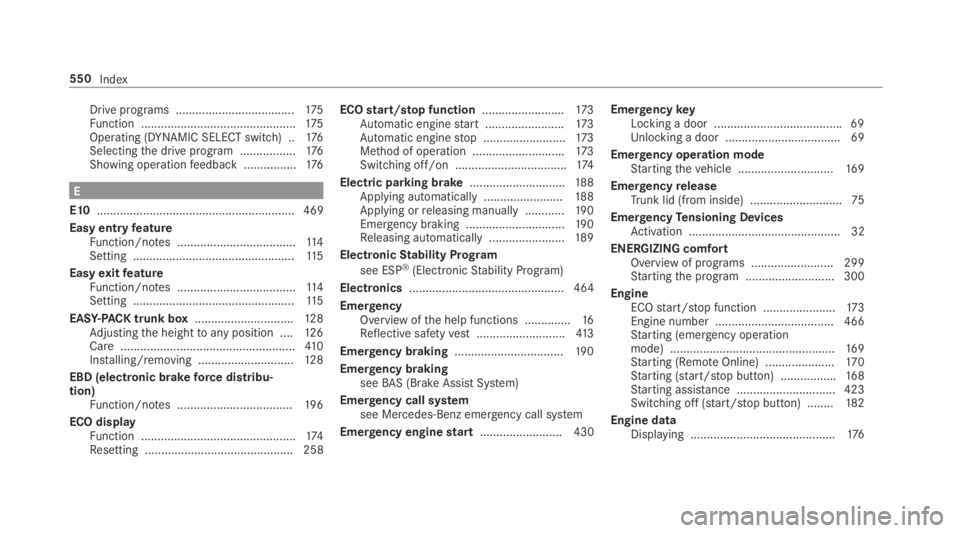
Drive programs ....................................175Function ...............................................175Operating (DYNAMIC SELECT switch) ..176Selectingthe drive program .................176Showing operationfeedback ................176
E
E10............................................................ 469
Easy entryfeatureFunction/notes ....................................11 4Setting .................................................11 5
EasyexitfeatureFunction/notes ....................................11 4Setting .................................................11 5
EASY-PACKtrunk box..............................12 8Adjustingthe heighttoany position ....12 6Care .....................................................410Installing/removing .............................12 8
EBD (electronic brakeforce distribu‐tion)Function/notes ...................................19 6
ECO displayFunction ...............................................174Resetting ............................................. 258
ECOstart/stop function.........................173Automatic enginestart ........................173Automatic enginestop .........................173Method of operation ............................173Switching off/on ..................................174
Electric parking brake.............................188Applying automatically ........................188Applying orreleasing manually ............19 0Emergency braking ..............................19 0Releasing automatically .......................189
ElectronicStability Program
see ESP®(ElectronicStability Program)
Electronics............................................... 464
EmergencyOverview ofthe help functions ..............16Reflective safetyvest...........................413
Emergency braking.................................19 0
Emergency brakingseeBAS (Brake AssistSystem)
Emergency call systemsee Mercedes-Benz emergency call system
Emergency enginestart......................... 430
EmergencykeyLocking a door .......................................69Unlocking a door ...................................69
Emergency operation modeStartingthevehicle .............................16 9
EmergencyreleaseTrunk lid (from inside) ............................75
EmergencyTensioning DevicesActivation .............................................. 32
ENERGIZING comfortOverview of programs .........................299Startingthe program ........................... 300
EngineECOstart/stop function ......................173Engine number .................................... 466Starting (emergency operationmode) ..................................................16 9Starting (RemoteOnline) .....................17 0Starting (start/stop button) .................168Starting assistance .............................. 423Switching off (start/stop button) ........182
Engine dataDisplaying ............................................176
550Index