stop start MERCEDES-BENZ S CLASS 2019 Owner's Manual
[x] Cancel search | Manufacturer: MERCEDES-BENZ, Model Year: 2019, Model line: S CLASS, Model: MERCEDES-BENZ S CLASS 2019Pages: 578, PDF Size: 23.31 MB
Page 287 of 578
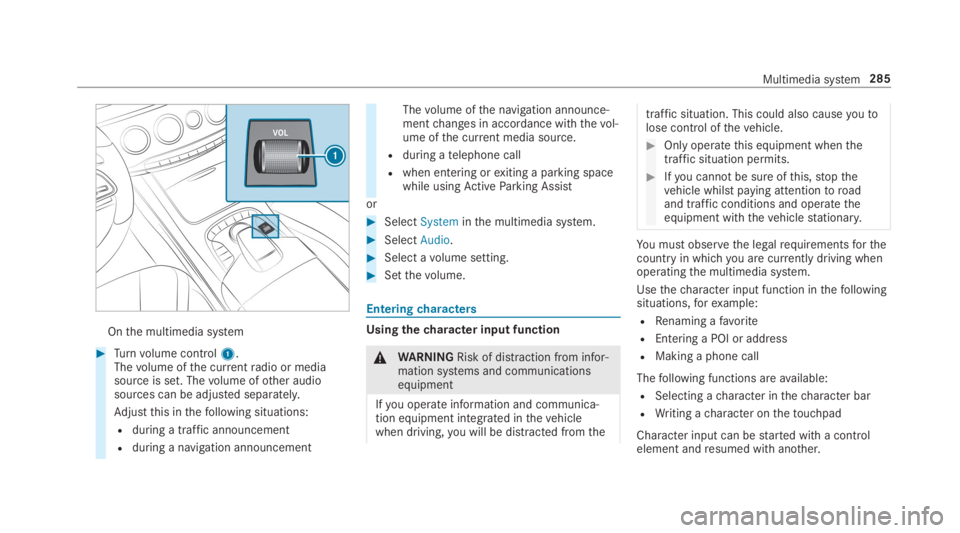
Onthe multimedia system
#Turnvolume control1.Thevolume ofthe currentradio or mediasource is set. Thevolume ofother audiosources can be adjusted separately.
Adjustthis inthefollowing situations:
Rduring a traffic announcement
Rduring a navigation announcement
Thevolume ofthe navigation announce‐mentchanges in accordance withthevol‐ume ofthe current media source.
Rduring atelephone call
Rwhen entering orexiting a parking spacewhile usingActiveParking Assist
or
#SelectSysteminthe multimedia system.
#SelectAudio.
#Select avolume setting.
#Setthevolume.
Enteringcharacters
Usingthecharacter input function
&WARNINGRisk of distraction from infor‐mation systems and communicationsequipment
Ifyou operate information and communica‐tion equipment integrated inthevehiclewhen driving,you will be distracted fromthe
traffic situation. This could also causeyoutolose control ofthevehicle.
#Only operatethis equipment whenthetraffic situation permits.
#Ifyou cannot be sure ofthis,stopthevehicle whilst paying attentiontoroadand traffic conditions and operatetheequipment withthevehiclestationary.
You must observethe legalrequirementsforthecountry in whichyou are currently driving whenoperatingthe multimedia system.
Usethecharacter input function inthefollowingsituations,forexample:
RRenaming afavorite
REntering a POI or address
RMaking a phone call
Thefollowing functions areavailable:
RSelecting acharacter inthecharacter bar
RWriting acharacter onthetouchpad
Character input can bestarted with a controlelement andresumed with another.
Multimedia system285
Page 309 of 578
Multimedia system:
,Navigation.Way Points and Info
#SelectStart New Route Guidance.Theroute is calculated withthe set inter‐mediate destinations.
Selecting a contactfor destination entry
Requirements:RA mobile phone is connectedtothe multime‐dia system (→page 329).
RContacts havebeen downloaded(→page 334).
Multimedia system:
,Navigation.¬Previous and Other
Destinations.Contacts
#Selectthe contact.The contact details are displayed.
#Selectthe address.
Filtering displaysfor contacts
#Enter a name ortelephone number,forexam‐ple, intothe searchfield.
#Select¡.Thefirst contact inthe list is highlighted.
#Selectthe contact.
#Selectthe address.
Enteringgeo-coordinatesMultimedia system:
,Navigation.¬Previous and Other
Destinations.Geo-coordinates
#Entergeo-coordinates as latitude and longi‐tude coordinates in degrees, minutes andseconds.The map shows the position.
#Confirmthe entry.
#Tocalculate aroute:selectStart RouteGuidance.
#If aroute has already been created, selectStart New Route GuidanceorSet as WayPoint.
Enteringthe destination as a 3wordaddress
Requirements:RSearchingfor a destination using 3wordaddresses is possible inthe online search(→page 302).
RThere is an Internet connection.
%Searchingfor a destination using 3wordaddresses is not possible in all countries.
Multimedia system:
,Navigation.ªEnter Destination
#SelectOnline Search.
#Enterthe destination address as a 3wordaddress. Separate each ofthewords with afullstop.The searchresults are displayed.
#Selectthe destination inthe list.The destination address is shown. Theroutecan be calculated.
Multimedia system307
Page 314 of 578
#SelectYes.The automaticgasstation searchbegins. Theavailablegasstations alongtheroute or inthe vicinity are displayed.
#Selectthegasstation.#Whenthere is noroute,thegasstation is setasthe destination.
or
#Whenthere is aroute,thegasstation is setasthe next intermediate destination.
Startingthe automatic servicestationsearch
Requirements:RATTENTION ASSIST andtheSuggest RestAreafunction are activated (→page 238).
Driving situationTheATTENTION ASSIST Do you want to searchfor a rest area?message is shown.
#SelectYes.The servicestation search starts. Theavaila‐ble servicestations alongtheroute or inthe
vicinity ofthevehicle's current position aredisplayed.
#Selectthe servicestation.The servicestation address is displayed.#Ifroute guidance is not active, selectStartRoute Guidance.The selected servicestation is set as a desti‐nation.Route guidance begins.
or
#Ifroute guidance is active, selectStart NewRoute GuidanceorSet as Next Way Point.Start New Route Guidance:the selectedservicestation is set as a new destination.The previous destination and all intermediatedestinations are deleted.Route guidancetothe servicestation begins.
Set as Next Way Point:the selected servicestation is set asthe next intermediate desti‐nation.Route guidance begins.
Route guidance
Notes onroute guidance
&WARNINGRisk of distraction from oper‐ating integrated communication equip‐ment whilethevehicle is in motion
Ifyou operate communication equipmentintegrated inthevehicle when driving,youwill be distracted fromthe traffic situation.This could also causeyoutolose control ofthevehicle.
#Only operatethis equipment whenthetraffic situation permits.
#Ifyou cannot be sure ofthis,stopthevehicle whilst paying attentiontoroadand traffic conditions and operatetheequipment withthevehiclestationary.
You must observethe legalrequirementsforthecountry in whichyou are currently driving whenoperatingthe multimedia system.Route guidance begins once aroute has beencalculated.
312Multimedia system
Page 335 of 578
Further information ontherecommendedrecep‐tion and transmissionvolume: http://www.mercedes-benz.com/connect
Adjusting the call andringtonevolumeMultimedia system:
,System.õAudio.Phone
#SelectCall VolumeorRingtone Volume.
#Setthevolume.
Starting/stopping mobile phonevoicerecog‐nition
Requirements:RThe mobile phone is connectedtothe multi‐media system (→page 329).
Starting mobile phonevoicerecognition
#Press and holdthe
Page 397 of 578
ASSYST PLUS service interval display
Function ofthe ASSYST PLUS service intervaldisplay
The ASSYST PLUS service interval display ontheInstrument Display provides information ontheremaining time or distance beforethe nextservice due date.
You can hidethis service message usingtheback button onthe left-hand side ofthesteeringwheel.
Depending on howthevehicle is used,theASSYST PLUS service interval display mayshortenthe service interval, e.g. inthefollowingcases:
RMainly short-distance driving
RWhenthe engine is often leftidlingfor longperiods
RIntheevent of frequent coldstart phases
Mercedes-Benzrecommendsavoiding suchoperating conditions.
You can obtain further information concerningthe servicing ofyourvehicle from aqualified
specialistworkshop, e.g. an authorizedMercedes-Benz Center.
Displayingthe service due date
On-board computer:
,Service.ASSYST PLUS
The next service due date is displayed.
#Toexitthe display:pressthe back buttononthe left-hand side ofthesteering wheel.
Make suretoobservethefollowing furtherrela‐ted subject:
ROperatingthe on-board computer(→page 252).
Information onregular maintenancework
*NOTEPrematurewearthroughfailuretoobserveservice due dates
Serviceworkwhich is not carried out attheright time or incompletelycan leadtoincreasedwear and damagetothevehicle.
#Always observethe prescribed serviceintervals.
#Always havethe prescribed serviceworkcarried out at aqualified specialistworkshop.
Special servicerequirements
The prescribed service interval is based on nor‐mal operation ofthevehicle. Maintenanceworkwill needtobe performed more often ifthevehi‐cle is operated under arduous conditions orincreased loads.
The ASSYST PLUS service interval display is onlyan aid. The driver ofthevehicle bearsresponsi‐bility asregardstowhether maintenanceworkneedstobe performed more oftenthan speci‐fied based onthe actual operating conditionsand/or loads.
Examples of arduous operating conditions:
Rregular city driving with frequent intermedi‐atestops
Rmainly short-distance driving
Maintenance and care395
Page 428 of 578
Towingthevehicle with bothaxles ontheground
#Observethe notes onthe permittedtowingmethods (→page 424).
#Make surethatthe battery is connected andcharged.
Whenthe battery is discharged,thefollowingactions cannot be performed:
Rthe engine cannotbestarted
Rthe electric parking brake cannotbereleasedor applied
Rthe automatic transmission cannotbe shiftedtoposition\\or]
%Ifthe automatic transmission cannotbe shif‐tedtoposition\\, orthe multifunction dis‐play inthe instrument cluster does not showanything, havethevehicle transportedaway(→page 427). Atowingvehicle with liftingequipment isrequiredforvehicle transporta‐tion.
*NOTEDamagedueto towingawayatexcessively high speeds orover long dis‐tances
The drivetrain could be damaged whentow‐ing atexcessively high speeds orover longdistances.
#Atowing speed of 30mph (50 km/h)must not beexceeded.
#Atowing distance of 30 miles (50 km)mustnot beexceeded.
&WARNINGRisk of accident whentowingavehicle which istoo heavy
Ifthevehicle beingtow-started ortowedawayis heavierthanthe permissible grossmass ofyourvehicle,thefollowing situationscan occur:
RThetowingeye may become detached.
RThevehicle/trailer combination mayswerveorevenoverturn.
#If anothervehicle istow-started ortowedaway, itsweight must notexceed
the permissible gross mass ofyourownvehicle.
If avehicle must betow-started ortowedaway,itsweight must notexceedthe permissible grossmass ofthetowingvehicle.
#Information onthe permissible gross mass ofthevehicle can befound onthevehicle iden‐tification plate (→page 466).
#Do not openthe driver's door or frontpassenger door,otherwisethe automatictransmission automatically shiftstoposition].#Installthetowingeye (→page 429).
#Fastenthetow bar.
*NOTEDamageduetoincorrect connec‐tion
#Only connectthetowrope ortow bartothetowingeyes.
#Deactivatethe automatic locking mechanism(→page 68).
426Breakdown assistance
Page 441 of 578
Furtherrelated subjects:
RNotes on tire pressure (→page 435)
RTirepressuretable (→page 437)
RTireand Loading Information placard(→page442)
Tirepressure monitoring system
Function ofthe tire pressure monitoring sys‐tem
&DANGERRisk of accident duetoincor‐rect tire pressure
Every tire, includingthe spare (if provided),should bechecked when cold at least once amonth and inflatedtothe pressurerecom‐mendedbythevehicle manufacturer (seeTireand Loading Information placard ontheB-pillar onthe driver’sside orthe tire pres‐sure label onthe inside ofthe fuelfillerflapofyourvehicle). Ifyourvehicle has tires of adifferent sizethanthe size indicated ontheTireand Loading Information placard orthe
tire pressuretable,you needtodeterminethe proper tire pressureforthose tires.
As an added safetyfeature,yourvehicle hasbeen equipped with a tire pressure monitor‐ing system (TPMS)that illuminates a low tirepressure indicator lamp when one or more ofyour tires are significantly underinflated.Accordingly, ifthe low tire pressure indicatorlamp lights up,you shouldstop andcheckyour tires as soon as possible, and inflatethemtothe proper pressure. Driving on asignificantly underinflated tire causesthe tiretooverheat and can leadtotirefailure.Underinflation also increases fuel consump‐tion andreduces tire tread life, and mayaffectthevehicle's handling and braking abil‐ity. Please notethatthe TPMS is not a substi‐tutefor proper tire maintenance, and it isthedriver'sresponsibilitytomaintain correct tirepressure,even if underinflation has notreachedthe leveltotrigger illumination ofthe TPMS low tire pressure indicator lamp.
Yourvehicle has also been equipped with aTPMS malfunction indicatortoindicate when
the system is not operating properly. TheTPMS malfunction indicator is combined withthe low tire pressure indicator lamp. Whenthe system detects a malfunction,the indica‐tor lamp willflashfor approximatelya minuteandthenremain continuously illuminated.This sequence will continue upon subsequentvehiclestart-ups as long asthe malfunctionexists.
Whenthe malfunction indicator is illumina‐ted,the system may not be abletodetect orsignal low tire pressure as intended. TPMSmalfunctions may occurfor avariety ofrea‐sons, includingthe installation of incompati‐blereplacement or alternate tires or wheelsonthevehiclethat preventthe TPMS fromfunctioning properly.
Alwayscheckthe TPMS malfunctionwarninglamp afterreplacing one or more tires orwheels onyourvehicletoensurethatthereplacement or alternate tires and wheelsallowthe TPMStocontinuetofunction prop‐erly.
Wheels and tires439
Page 487 of 578
Display messagesPossible causes/consequences andPPSolutions
RExtended country driving withoutother traffic, e.g. inthe desert
Driving systems and driving safety systems may be malfunctioning ortemporarily unavailable.
Oncethe cause ofthe problem is no longer present, driving systems and driving safety systems will beavailableagain.
Ifthe display message does not disappear:
#Pullover andstopthevehicle safely as soon as possible, paying attentiontoroad and traffic conditions.
#Clean all sensors (→page 409).
#Restartthe engine.
%
Page 493 of 578
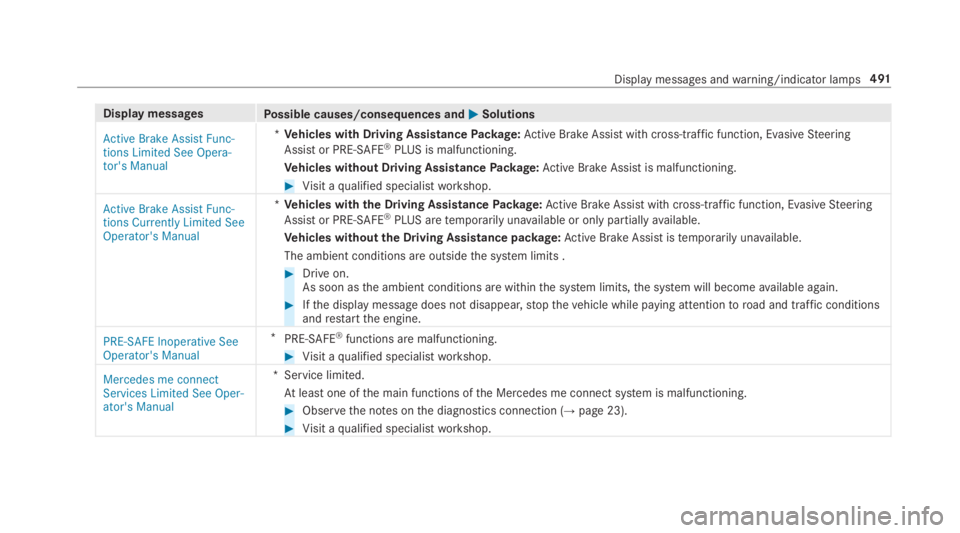
Display messagesPossible causes/consequences andPPSolutions
Active Brake Assist Func-tions Limited See Opera-tor's Manual
*Vehicles with Driving AssistancePackage:Active Brake Assistwith cross-traffic function, EvasiveSteering
Assist or PRE‑SAFE®PLUS is malfunctioning.
Vehicles without Driving AssistancePackage:Active Brake Assistis malfunctioning.
#Visit aqualified specialistworkshop.
Active Brake Assist Func-tions Currently Limited SeeOperator's Manual
*Vehicles withthe Driving AssistancePackage:Active Brake Assistwith cross-traffic function, EvasiveSteering
Assist or PRE‑SAFE®PLUS aretemporarily unavailable or only partiallyavailable.
Vehicles withoutthe Driving Assistance package:Active Brake Assististemporarily unavailable.
The ambient conditions are outsidethe system limits .
#Drive on.As soon asthe ambient conditions are withinthe system limits,the system will becomeavailable again.
#Ifthe display message does not disappear,stopthevehicle while paying attentiontoroad and traffic conditionsandrestartthe engine.
PRE-SAFE Inoperative SeeOperator's Manual
*PRE‑SAFE®functions are malfunctioning.
#Visit aqualified specialistworkshop.
Mercedes me connectServices Limited See Oper-ator's Manual
*Service limited.
Atleast one ofthe main functions ofthe Mercedes me connect system is malfunctioning.
#Observethe notes onthe diagnostics connection (→page 23).
#Visit aqualified specialistworkshop.
Display messages andwarning/indicator lamps491
Page 495 of 578
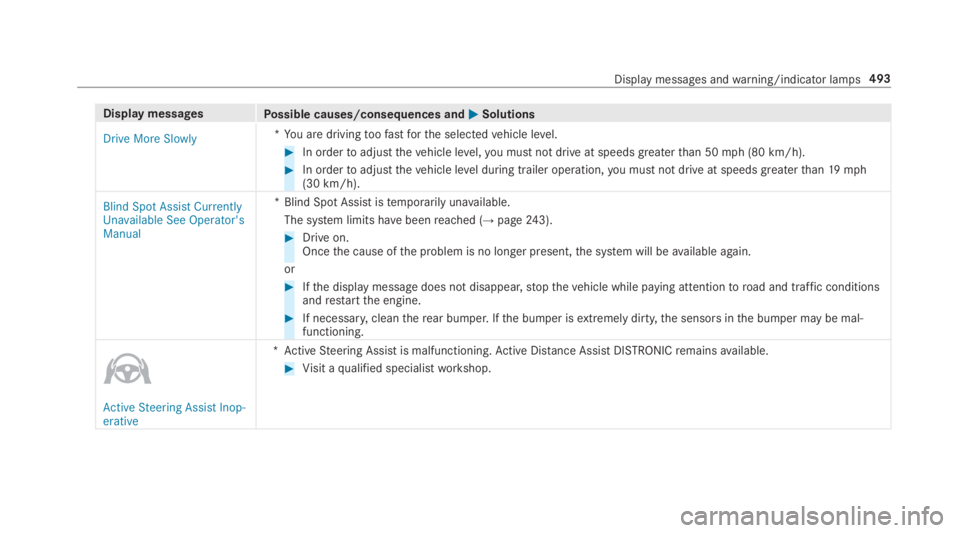
Display messagesPossible causes/consequences andPPSolutions
Drive More Slowly*You are drivingtoofastforthe selectedvehicle level.
#In ordertoadjustthevehicle level,you must not drive at speeds greaterthan 50mph (80 km/h).
#In ordertoadjustthevehicle level during trailer operation,you must not drive at speeds greaterthan19mph(30 km/h).
Blind Spot Assist CurrentlyUnavailable See Operator'sManual
*Blind Spot Assist istemporarily unavailable.
The system limits havebeenreached (→page243).
#Drive on.Oncethe cause ofthe problem is no longer present,the system will beavailable again.
or
#Ifthe display message does not disappear,stopthevehicle while paying attentiontoroad and traffic conditionsandrestartthe engine.
#If necessary,cleantherear bumper. Ifthe bumper isextremelydirty,the sensors inthe bumper may be mal‐functioning.
Active Steering Assist Inop-erative
*ActiveSteering Assist is malfunctioning.Active Distance AssistDISTRONICremainsavailable.
#Visit aqualified specialistworkshop.
Display messages andwarning/indicator lamps493