engine MERCEDES-BENZ S CLASS 2019 Service Manual
[x] Cancel search | Manufacturer: MERCEDES-BENZ, Model Year: 2019, Model line: S CLASS, Model: MERCEDES-BENZ S CLASS 2019Pages: 578, PDF Size: 23.31 MB
Page 217 of 578
RThe engine isrunning or has been automati‐cally switched offbythe ECOstart/stopfunction.
RThe electric parking brake isreleased.
RActive Distance AssistDISTRONIC is deacti‐vated.
RThe transmission is in position[,^or\\.
Activating the HOLD function
#Depressthe brake pedal and after a shorttimequickly depress further untilthe
Page 227 of 578
Afterthe engine isrestarted, obstacles must bedetected again before a newwarning can beissued.
System limitationsThe system limitationsforParking AssistPARKTRONIC applyfor passive side impact pro‐tection.
Thefollowing objects are not detected,forexam‐ple:
RPedestrians who approachthevehicle fromthe side
RObjects placed nexttothevehicle
Deactivating/activatingParking AssistPARKTRONIC
*NOTERisk of an accident from objectsat closerange
Parking AssistPARKTRONIC may not detectcertain objects at closerange.
#When parking or maneuveringthevehi‐cle, pay particular attentiontoanyobjects which are aboveor belowthesensors, e.g.flower pots or drawbars.
Thevehicle orother objects couldoth‐erwise be damaged.
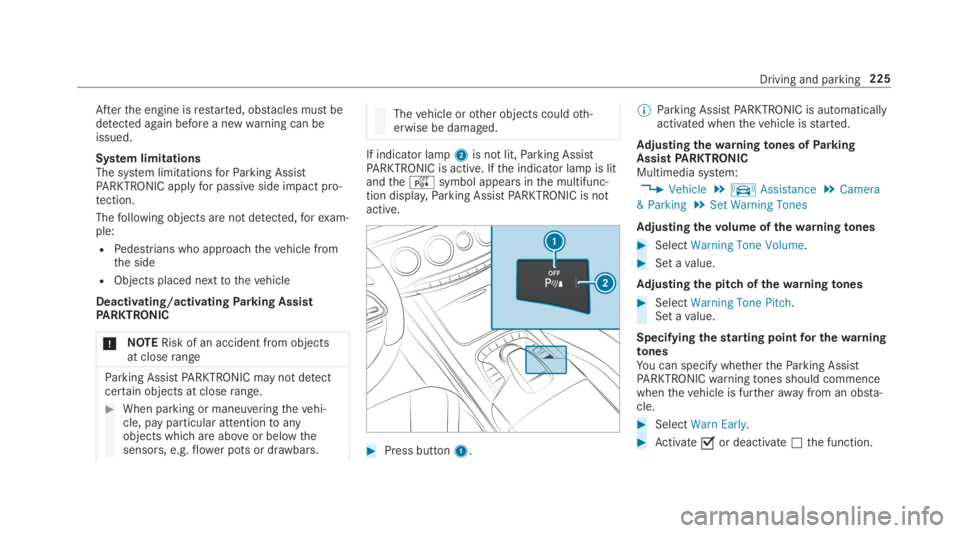
If indicator lamp2is not lit,Parking AssistPARKTRONIC is active. Ifthe indicator lamp is litandtheésymbol appears inthe multifunc‐tion display,Parking AssistPARKTRONIC is notactive.
#Press button1.
%Parking AssistPARKTRONIC is automaticallyactivated whenthevehicle isstarted.
Adjusting thewarningtones ofParkingAssistPARKTRONICMultimedia system:
,Vehicle.kAssistance.Camera
& Parking.Set Warning Tones
Adjusting thevolume ofthewarningtones
#SelectWarning Tone Volume.
#Set avalue.
Adjusting the pitch of thewarningtones
#SelectWarning Tone Pitch.Set avalue.
Specifyingthestarting pointfor thewarningtonesYou can specify whethertheParking AssistPARKTRONICwarningtones should commencewhenthevehicle is furtherawayfrom an obsta‐cle.
#SelectWarn Early.
#Activatesor deactivateSthe function.
Driving and parking225
Page 253 of 578
Instrument Displayoverview
&WARNINGRisk of accident duetoaninstrument display malfunction
Ifthe Instrument Display hasfailed or mal‐functioned,you may notrecognize functionrestrictions applyingtosafetyrelevant sys‐tems.
The operating safety ofyourvehicle may beimpaired.
#Drive on carefully.
#Havethevehiclechecked immediatelyat aqualified specialistworkshop.
Mercedes‑AMGvehicles:observethe notes inthe Supplement. Otherwise,you mayfailtorec‐ognize dangers.
Plug-inhybrid:observethe notes inthe Supple‐ment. Otherwise,you mayfailtorecognize dan‐gers.
Ifthe operating safety ofyourvehicle isimpaired, parkthevehicle safely as soon as pos‐sible. Contact aqualified specialistworkshop.
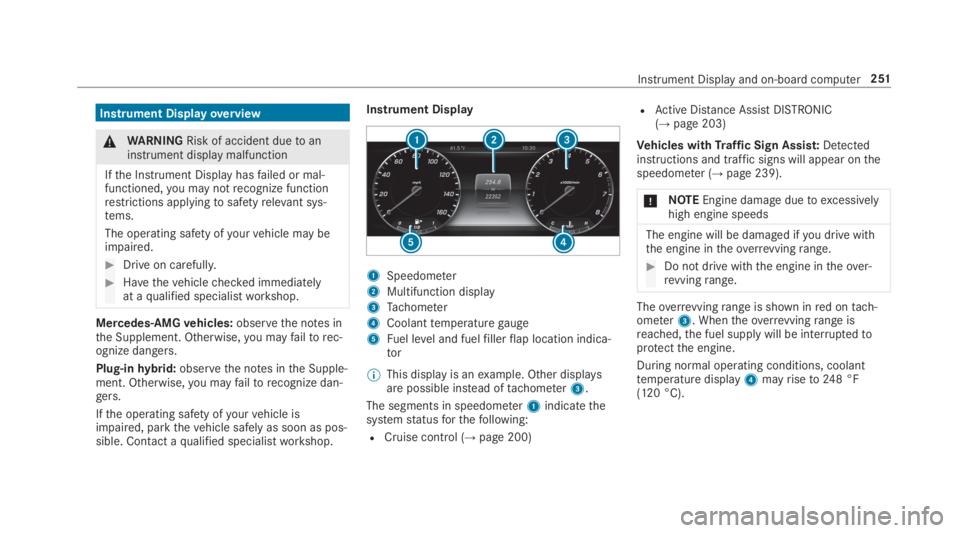
Instrument Display
1Speedometer
2Multifunction display
3Tachometer
4Coolanttemperaturegauge
5Fuel level and fuelfillerflap location indica‐tor
%This display is anexample. Other displaysare possible instead oftachometer3.
The segments in speedometer1indicatethesystemstatusforthefollowing:
RCruise control (→page 200)
RActive Distance AssistDISTRONIC(→page203)
Vehicles withTraffic Sign Assist:Detectedinstructions and traffic signs will appear onthespeedometer (→page 239).
*NOTEEngine damageduetoexcessivelyhigh engine speeds
The engine will be damaged ifyou drive withthe engine intheoverrevvingrange.
#Do not drive with the engine intheover‐revvingrange.
Theoverrevvingrange is shown inred ontach‐ometer3. Whentheoverrevvingrange isreached,the fuel supply will be interruptedtoprotectthe engine.
During normal operating conditions, coolanttemperature display4mayriseto248 °F(120 °C).
Instrument Displayand on-board computer251
Page 254 of 578
&WARNINGDanger of burns when open‐ingthe hood
Ifyou openthe hood whenthe engine hasoverheated or during afireinthe enginecompartment,you could come into contactwith hotgases orother escaping operatingfluids.
#Before openingthe hood, allowtheenginetocool down.
#Intheevent of afireinthe engine com‐partment,keepthe hood closed andcallthefireservice.
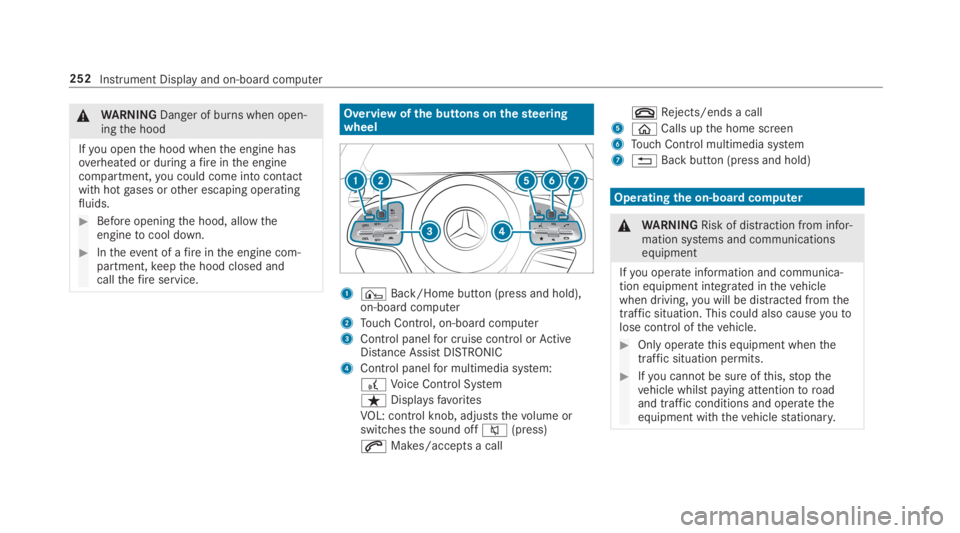
Overview ofthe buttons onthesteeringwheel
1¤Back/Home button (press and hold),on-board computer
2Touch Control, on-board computer
3Control panelfor cruise control orActiveDistance AssistDISTRONIC
4Control panelfor multimedia system:
£Voice Control System
ßDisplaysfavorites
VOL: control knob, adjuststhevolume orswitchesthe sound offc(press)
aMakes/accepts a call
vRejects/ends a call
5
Page 259 of 578
RGrayradarwaves nexttovehicle: Blind SpotAssist activated
RGreenradarwaves nexttovehicle: Blind SpotAssist active
RActive Distance AssistDISTRONIC displays(→page 203).
Calling up displaysontheTrip menu
On-board computer:
,Trip
%Whenyou havethestyle settoClassic,youcan view information onthe journey intheleft-hand area ofthe Instrument Display.
#Toselect a display:swipe upwards or down‐wards onthe left-handTouch Control.
DisplaysintheTripmenu:
RStandard display
RRange and current fuel consumption
Arecuperation displayis alsoavailableforcertain engines. Ifthere is only a smallamount of fuel left inthe fueltank,the dis‐
play showsavehicle beingrefueled insteadoftherange.
RECO display (→page174)
RTrip computerFrom StartandFrom Reset
RDigital speedometer
%The digital speedometer only appears intheSportandSupersportstyles.
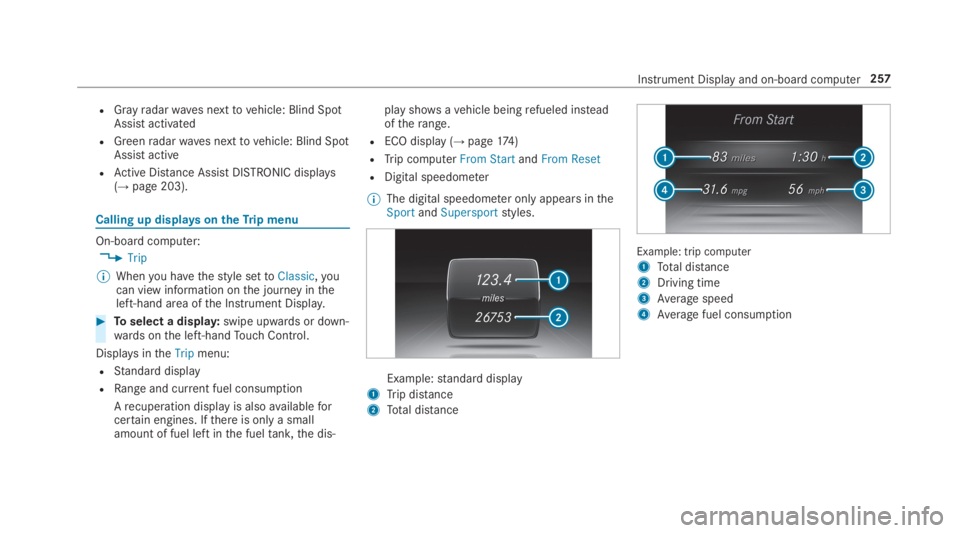
Example:standard display
1Trip distance
2Total distance
Example: trip computer
1Total distance
2Driving time
3Average speed
4Average fuel consumption
Instrument Display and on-board computer257
Page 278 of 578
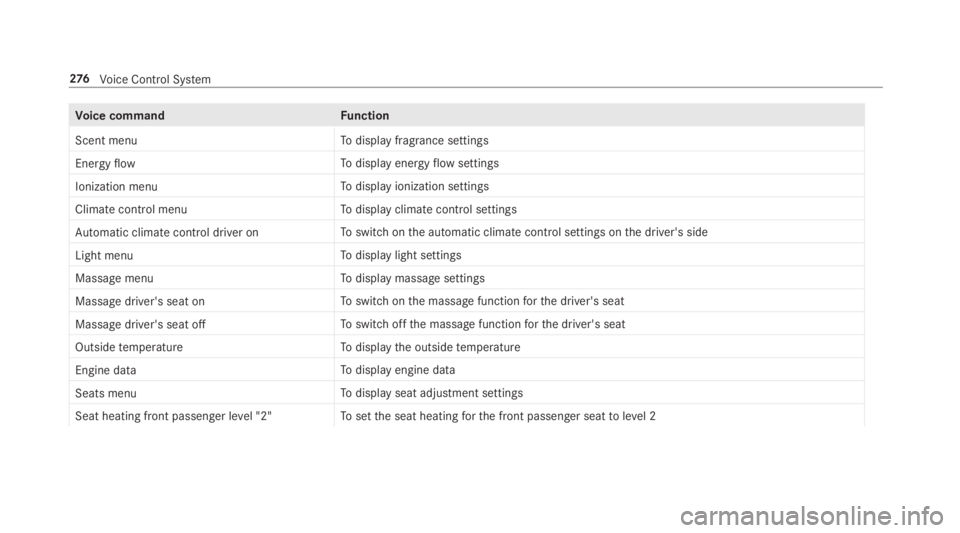
Voice commandFunction
Scent menuTodisplay fragrance settings
Energy flowTodisplay energyflowsettings
Ionization menuTodisplay ionization settings
Climate control menuTodisplay climate control settings
Automatic climate control driver onToswitch onthe automatic climate control settings onthe driver's side
Light menuTodisplay light settings
Massage menuTodisplay massage settings
Massage driver's seat onToswitch onthe massage functionforthe driver's seat
Massage driver's seat offToswitch offthe massage functionforthe driver's seat
Outside temperatureTodisplaythe outsidetemperature
Engine dataTodisplay engine data
Seats menuTodisplay seat adjustment settings
Seat heating front passenger level "2"Tosetthe seat heatingforthe front passenger seattolevel 2
276Voice Control System
Page 300 of 578
As soon as an updateisavailablefor download,a corresponding message appearsonthe mediadisplay.
You havethefollowing selection options:
RDownload
The update will be downloaded inthe back‐ground.
RDetails
Information aboutthe pending systemupdate is displayed.
RLater
The update can be downloaded manually at alater time (→page 297).
Ifthe download is completed andthe update isreadyfor installation,you will be informed ofthisafterthe next ignition cycle,forexample.
%Parkthevehicle safely in a suitable locationbeforestartingthe installation.
Requirementsforthe installation:
RThe ignition is switched on.
RThe engine is notrunning.
RNotes andwarnings havebeenread andaccepted.
RThe parking brake is applied.
If allrequirements are met,the update will beinstalled. The multimedia system cannotbeoperated whilethe update is being installed andvehicle functions arerestricted.
If errorsshould occur duringthe installation,themultimedia system automatically attemptstorestorethe previousversion. Ifrestoration ofthepreviousversion is not possible, a symbolappears onthe center console display.Pleaseconsult aqualified specialistworkshoptoresolvethe problem.
Reset function
Multimedia system:
,System.Reset
Personal data is deleted,forexample:
RStation presets
RConnected mobile phones
#SelectYes.
If PIN protection is activated, a promptappearsasking ifyou also wishtorestorethistothefac‐torysettings during areset.
#SelectYes.
#Enterthe current PIN.The PIN isreset.
or
#SelectNo.The current PINstaysthe same afterreset‐ting.
%Ifyou haveforgottenyour PIN, an authorizedMercedes-Benz Center can deactivatethePIN protectionforyou.
A promptappears again asking whetheryoureally wishtoreset.
#SelectYes.The multimedia system isresettothefactorysettings.
298Multimedia system
Page 392 of 578
ForDTSPatents, see http://patents.dts.com.Manufactured under license fromDTS LicensingLimited.DTS,DTS-HD,the Symbol, &DTS andthe Symboltogether areregistered trademarks
ofDTS, Inc.©DTS, Inc. Allrightsreserved.
"Madefor iPod", and "Madefor iPhone," meanthat an electronic accessoryhas been designedtoconnect specificallytoiPod, or iPhone,respectively,and has been certifiedbythe devel‐opertomeet Apple performancestandards.Apple is notresponsibleforthe operation ofthisdevice or its compliance with safety andregula‐torystandards. Please notethatthe use ofthisaccessory with iPod, or iPhone may affect wire‐less performance.
For the USA:iPhone®, iPod®, iPod classic®,
iPod nano®, and iPodtouch®are trademarksofApple Inc.,registered intheU.S. andother coun‐tries. Lightning™ is a trademark of Apple Inc.
For Canada:iPhone, iPod, iPod classic, iPodnano, and iPodtouch are trademarksof AppleInc.,registered intheU.S. andother countries.Lightning is a trademark of Apple Inc.
Cinavia notice:this product uses Cinaviatech‐nologytolimitthe use of unauthorized copies ofsome commercially-producedfilm and videosandtheir soundtracks. When a prohibited use ofan unauthorized copy is detected, a message willbe displayed and playback or copying will be
interrupted. More information about Cinaviatechnology is provided at Cinavia Online Con‐sumer Information Center at http://www.cinavia.com.Torequest additional informa‐tion about Cinaviabymail, send a postcard withyour mailing addressto: Cinavia Consumer Infor‐mation Center, Box 86851,San Diego,CA,92138, USA.
This product incorporates proprietarytechnologyunder license fromVerance Corporation and isprotectedbyU.S.Patent7,369,677andotherU.S. andworldwide patents issued and pendingaswell as copyright and trade secretprotectionfor certain aspects of suchtechnology. Cinavia isa trademarkofVerance Corporation. Copyright2004-2012Verance Corporation. AllrightsreservedbyVerance.Reverse Engineering or dis‐assembly is prohibited.
Inserting a disc
&WARNINGRisk of injuryfrom laserradi‐ation fromthe Blu-ray drive
The Blu-ray drive is a class 1 laser product. Ifyou openthe housing ofthe Blu-ray drive,
390Multimedia system
Page 397 of 578
ASSYST PLUS service interval display
Function ofthe ASSYST PLUS service intervaldisplay
The ASSYST PLUS service interval display ontheInstrument Display provides information ontheremaining time or distance beforethe nextservice due date.
You can hidethis service message usingtheback button onthe left-hand side ofthesteeringwheel.
Depending on howthevehicle is used,theASSYST PLUS service interval display mayshortenthe service interval, e.g. inthefollowingcases:
RMainly short-distance driving
RWhenthe engine is often leftidlingfor longperiods
RIntheevent of frequent coldstart phases
Mercedes-Benzrecommendsavoiding suchoperating conditions.
You can obtain further information concerningthe servicing ofyourvehicle from aqualified
specialistworkshop, e.g. an authorizedMercedes-Benz Center.
Displayingthe service due date
On-board computer:
,Service.ASSYST PLUS
The next service due date is displayed.
#Toexitthe display:pressthe back buttononthe left-hand side ofthesteering wheel.
Make suretoobservethefollowing furtherrela‐ted subject:
ROperatingthe on-board computer(→page 252).
Information onregular maintenancework
*NOTEPrematurewearthroughfailuretoobserveservice due dates
Serviceworkwhich is not carried out attheright time or incompletelycan leadtoincreasedwear and damagetothevehicle.
#Always observethe prescribed serviceintervals.
#Always havethe prescribed serviceworkcarried out at aqualified specialistworkshop.
Special servicerequirements
The prescribed service interval is based on nor‐mal operation ofthevehicle. Maintenanceworkwill needtobe performed more often ifthevehi‐cle is operated under arduous conditions orincreased loads.
The ASSYST PLUS service interval display is onlyan aid. The driver ofthevehicle bearsresponsi‐bility asregardstowhether maintenanceworkneedstobe performed more oftenthan speci‐fied based onthe actual operating conditionsand/or loads.
Examples of arduous operating conditions:
Rregular city driving with frequent intermedi‐atestops
Rmainly short-distance driving
Maintenance and care395
Page 398 of 578
Rfrequent operation in mountainousterrain oron poorroad surfaces
Rwhenthe engine is often leftidlingfor longperiods
Roperation in particularly dusty conditionsand/or if air-recirculation mode is frequentlyused
Inthese or similar operating conditions, havetheinterior airfilter, engine air cleaner, engine oiland oilfilteretc.changed more frequently. Thetires must bechecked more frequently ifthevehicle is operated under increased loads.Fur‐ther information can be obtained at aqualifiedspecialistworkshop.
Battery disconnection periods
The ASSYST PLUS service interval displaycan only calculatethe service due datewhenthe batteryis connected.
#Notedownthe service due date displayed onthe instrument display before disconnectingthe battery (→page 395).
Engine compartment
Active hood (pedestrian protection)
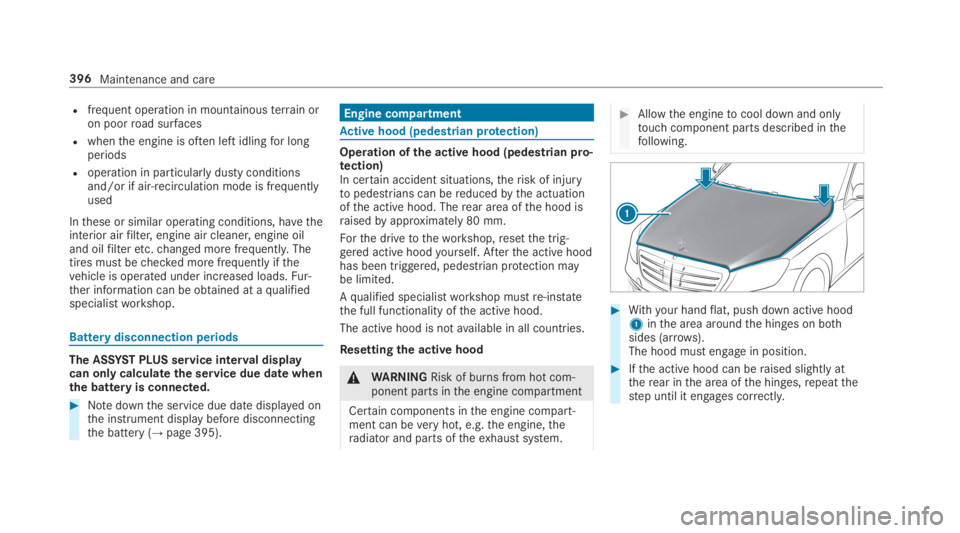
Operation ofthe active hood (pedestrian pro‐tection)In certain accident situations,therisk of injurytopedestrians can bereducedbythe actuationofthe active hood. Therear area ofthe hood israisedbyapproximately 80 mm.
Forthe drivetotheworkshop,resetthe trig‐gered active hoodyourself. Afterthe active hoodhas been triggered, pedestrian protection maybe limited.
Aqualified specialistworkshop mustre-instatethe full functionality ofthe active hood.
The active hood is notavailable in all countries.
Resettingthe active hood
&WARNINGRisk of burns from hot com‐ponent parts inthe engine compartment
Certain components inthe engine compart‐ment can beveryhot, e.g.the engine,theradiator and parts oftheexhaust system.
#Allowthe enginetocool down and onlytouch component parts described inthefollowing.
#Withyour handflat, push down active hood1inthe area aroundthe hinges on bothsides (arrows).The hood must engage in position.
#Ifthe active hood can beraised slightly attherear inthe area ofthe hinges,repeatthestep until it engages correctly.
396Maintenance and care