wheel MERCEDES-BENZ S CLASS 2019 Workshop Manual
[x] Cancel search | Manufacturer: MERCEDES-BENZ, Model Year: 2019, Model line: S CLASS, Model: MERCEDES-BENZ S CLASS 2019Pages: 578, PDF Size: 23.31 MB
Page 263 of 578
wards onthe left-handTouch Controltoselectthe desiredtelephone number.
#Pressthe left-handTouch Control.Thetelephone number is dialed.
Thefollowing displaysmay appear instead ofthetelephone numbers dialed:
RPlease Wait...:the application isstarting.
When a Bluetooth®connectiontothe mobilephone is not established,the menuforauthorizing and connecting a mobile phone isdisplayed onthe multimedia system(→page 329).
RImporting Contacts...:the contacts fromthemobile phone or from astorage medium arebeing imported.
Accepting/rejecting a callWhenyoureceivea call,theIncoming Call -mes‐sage appears onthe Head-up Display.
#Swipe upwards or downwards onthe left-handTouch Control and selecta(Accept)orv(Reject).
#Pressthe left-handTouch Control.
The call may be accepted/rejected usingtheaorvbuttons onthesteering wheel.
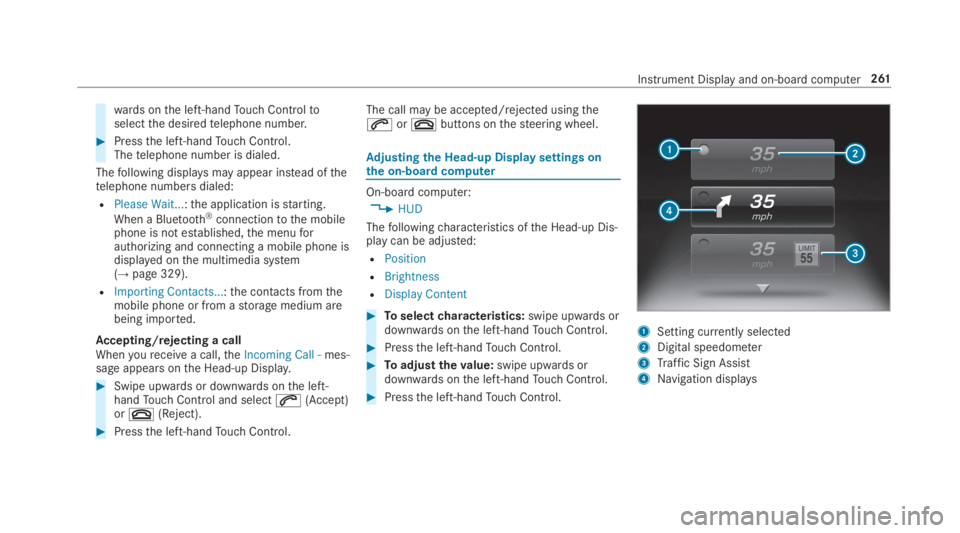
Adjusting the Head-up Displaysettings onthe on-boardcomputer
On-board computer:
,HUD
Thefollowingcharacteristics ofthe Head-up Dis‐play can be adjusted:
RPosition
RBrightness
RDisplay Content
#Toselectcharacteristics:swipe upwards ordownwards onthe left-handTouch Control.
#Pressthe left-handTouch Control.
#Toadjustthevalue:swipe upwards ordownwards onthe left-handTouch Control.
#Pressthe left-handTouch Control.
1Setting currently selected
2Digital speedometer
3Traffic Sign Assist
4Navigation displays
Instrument Display and on-board computer261
Page 265 of 578
Notes on operating safety
&WARNINGRisk of distraction from infor‐mation systems and communicationsequipment
Ifyou operate information and communica‐tion equipment integrated inthevehiclewhen driving,you will be distracted fromthetraffic situation. This could also causeyoutolose control ofthevehicle.
#Only operatethis equipment whenthetraffic situation permits.
#Ifyou cannot be sure ofthis,stopthevehicle whilst paying attentiontoroadand traffic conditions and operatetheequipment withthevehiclestationary.
&WARNINGRisk of distraction from oper‐ating mobile communication equipmentwhilethevehicle is in motion
Ifyou operate mobile communication equip‐ment when driving,you will be distracted
fromthe traffic situation. This could alsocauseyoutolose control ofthevehicle.
#Only operatethis equipment whenthevehicle isstationary.
Foryourown safety, alwaysobservethefollow‐ing points when operating mobile communica‐tions equipment and especiallyyourvoice con‐trol system:
RObservethe legalrequirementsforthe coun‐try in whichyou are driving.
RWhile driving, only operate mobile communi‐cations equipment andyourvoice controlsystem whenthe traffic conditions permit it.You mayotherwise be distracted fromthetraffic conditions and cause an accident,injuringyourself andothers.
RIfyou usethevoice control system in anemergencyyourvoice canchange andyourtelephone call, e.g. an emergency call, canthereby be unnecessarily delayed.
RFamiliarizeyourself withthevoice controlsystem functions beforestartingthe journey.
Operation
Overview of operation oftheVoice ControlSystem onthe multifunctionsteering wheel
TheVoice Control System is operational approx‐imatelythirty seconds afterthe ignition isswitched on.
Voice Control System263
Page 266 of 578
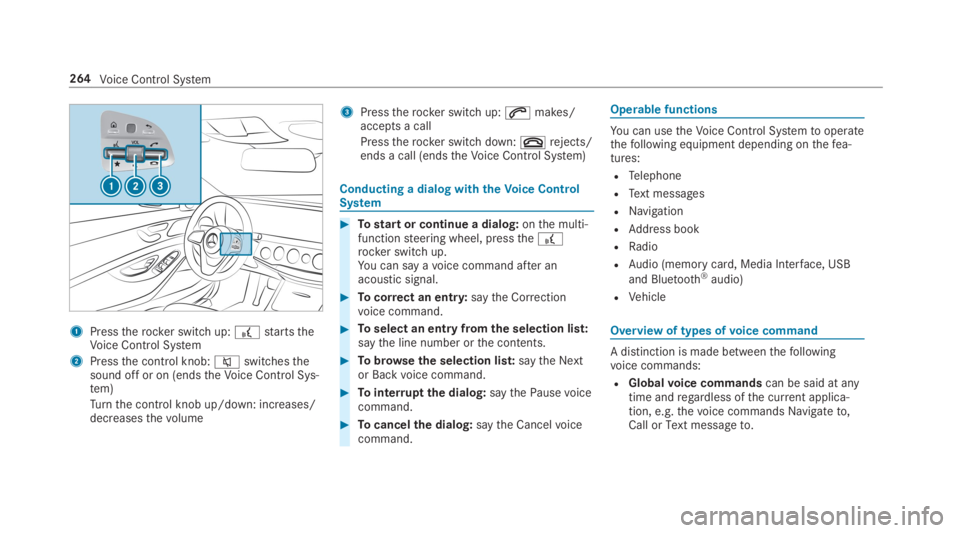
1Presstherocker switch up:£startstheVoice Control System
2Pressthe control knob:cswitchesthesound off or on (endstheVoice Control Sys‐tem)
Turnthe control knob up/down: increases/decreasesthevolume
3Presstherocker switch up:amakes/accepts a call
Presstherocker switch down:vrejects/ends a call (endstheVoice Control System)
Conducting a dialog withtheVoice ControlSystem
#Tostart or continue a dialog:onthe multi‐functionsteering wheel, pressthe£rocker switch up.You can say avoice command after anacoustic signal.
#Tocorrect an entry:saytheCorrectionvoice command.
#Toselect an entry fromthe selection list:saythe line number orthe contents.
#Tobrowsethe selection list:saytheNextorBackvoice command.
#Tointerruptthe dialog:saythePausevoicecommand.
#Tocancelthe dialog:saytheCancelvoicecommand.
Operable functions
You can usetheVoice Control Systemtooperatethefollowing equipment depending onthefea‐tures:
RTelephone
RText messages
RNavigation
RAddress book
RRadio
RAudio (memory card, Media Interface, USB
and Bluetooth®audio)
RVehicle
Overview of types ofvoice command
A distinction is made betweenthefollowingvoice commands:
RGlobalvoice commandscan be said at anytime andregardless ofthe current applica‐tion, e.g.thevoice commandsNavigate to,CallorText message to.
264Voice Control System
Page 267 of 578
RApplication-specificvoice commandsareonlyavailableforthe active application.
OncetheVoice Control System isstarted anautocue is shown. Apart fromtheavailablevoicecommandsforthe application currently active,this also citesexamplevoice commandsforother applications which are not active. Inthisway,you will befamiliar morequickly withtheavailablevoice commands. The list can be scrol‐led or it can be operatedbyspeech orthe con‐troller/touchpad.
Information onthe language setting
You canchangethe language oftheVoice Con‐trol System viathe system language settings. Ifthe set system language is not supportedbytheVoice Control System, English will be selected.
TheVoice Control System isavailable in English,French,Portuguese and Spanish.
UsingtheVoice Control System effectively
Features of audible help functions
Youreceiveinformation and helpforthefollow‐ingtopics:
ROptimum operation:saythebrief instruc-tionvoice command.
RCurrent application:onthe multifunctionsteering wheel, pressthe£rocker switchup and saytheHelpvoice command.
RContinued dialog:saytheHelpvoice com‐mand during avoice dialog.
RSpecific function:sayvoice commandsforthe desired function, e.g.Help telephone.
Notes on howtoimprovespeechquality
IftheVoice Control System does not understandyou:
Ronly operatetheVoice Control System fromthe driver's seat.
Rsaythevoice commands coherently andclearly, but do notexaggeratethewords.
Ravoid loud noisesthat cause interferencewhile making avoice command entry, e.g.the blower.
Avoicetag inthe address book is notrecog‐nized:
Ronly createsensible address book entries inthe system/mobile phone, e.g. enter sur‐name andfirst name inthe correctfield.
Rdo not use any abbreviations, unnecessaryspaces or specialcharacters.
If astation list entryis notrecognized:
RsaytheRead out station listvoice command.
Essentialvoice commands
Overview of switchvoice commands
Switchvoice commands can be usedtoopencertain applications. Thevoice command selec‐tion can be usedregardless ofthe applicationthat is currently active.
Voice Control System265
Page 280 of 578
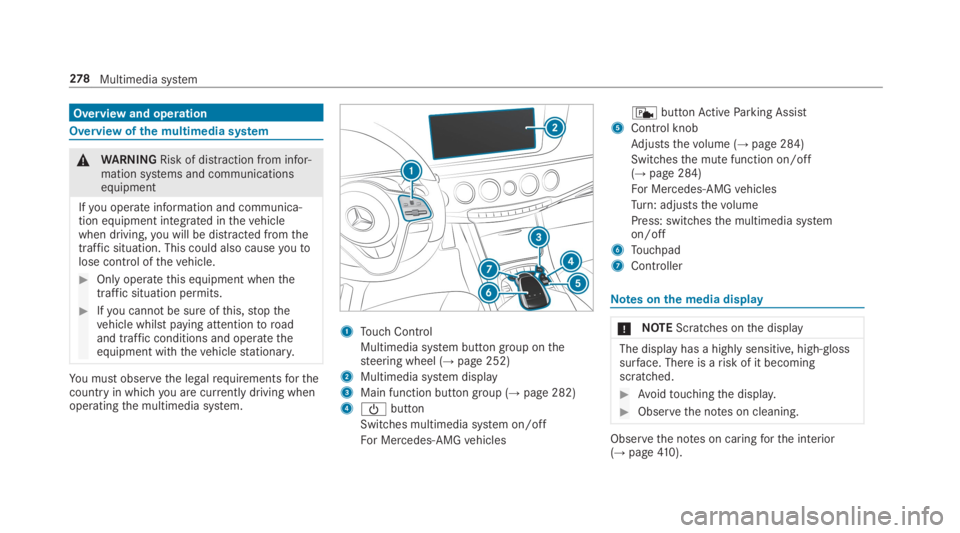
Overview and operation
Overview ofthe multimedia system
&WARNINGRisk of distraction from infor‐mation systems and communicationsequipment
Ifyou operate information and communica‐tion equipment integrated inthevehiclewhen driving,you will be distracted fromthetraffic situation. This could also causeyoutolose control ofthevehicle.
#Only operatethis equipment whenthetraffic situation permits.
#Ifyou cannot be sure ofthis,stopthevehicle whilst paying attentiontoroadand traffic conditions and operatetheequipment withthevehiclestationary.
You must observethe legalrequirementsforthecountry in whichyou are currently driving whenoperatingthe multimedia system.
1Touch Control
Multimedia system button group onthesteering wheel (→page 252)
2Multimedia system display
3Main function button group (→page 282)
4
Page 286 of 578
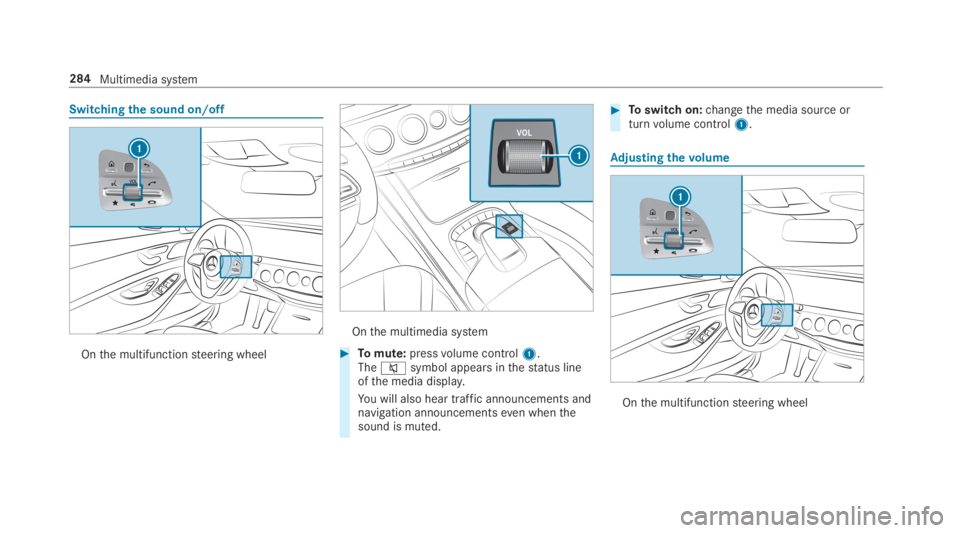
Switchingthe sound on/off
Onthe multifunctionsteering wheel
Onthe multimedia system
#Tomute:pressvolume control1.Thecsymbol appears inthestatus lineofthe media display.
You will also hear traffic announcements andnavigation announcementseven whenthesound is muted.
#Toswitch on:changethe media source orturnvolume control1.
Adjusting thevolume
Onthe multifunctionsteering wheel
284Multimedia system
Page 291 of 578
#Confirmchanges whenexitingthe menu.
The date is set automatically via GPS.
Activating/deactivatingvoice amplificationtotherear passenger compartment
RequirementsMercedes-Maybachvehicles andvehicleswith a long wheelbase only
RYourvehicle is equipped withthe Burmester®
surround sound system orthe Burmester®
high-end 3D surround sound system.
RThe ignition is switched on.
RDoors, side windowsandthe panoramaroofwith power tilt/sliding panel are closed.
Multimedia system:
,System.Audio.Voice Amplification
to Rear
The function supports communication betweenthe driver/front passenger andvehicle occu‐pants intherear passenger compartment. Whenvoice amplificationtorear passenger compart‐
ment is activated,the signals picked upbythemicrophone are amplified and played backoverthe speakers intherear passenger compart‐ment, depending uponvehicle noise levels. Anautomatic adjustment occurs based on speakervolume and ambient noise in ordertoimprovespeech intelligibility and maintainthe natural‐ness of speech.
#Activatesor deactivateSthe function.
Connectivity
Switching transmission ofthevehicle posi‐tion on/offMultimedia system:
,System.öConnectivity
#SelectTransmit Vehicle Pos..
#Activatesor deactivateSthe function.
Bluetooth®
Information about Bluetooth®
Bluetooth®technology is astandardfor short-range wireless data transfer uptoapproximately32.8ft(10 m).
You can use Bluetooth®toconnectyour mobilephonetothe multimedia system and usethefol‐lowing functions,forexample:
Rhands-free system with accesstothefollow‐ing options:
-contacts (→page334)
-call lists (→page 336)
-text messages
RInternet connection
Rlisteningtomusic via Bluetooth®audio(→page 364)
Rtransferring business cards (vCards) intothevehicle
Bluetooth®is aregistered trademark of Blue‐tooth Special Interest Group (SIG) Inc.
Multimedia system289
Page 301 of 578
Fit & Healthy
ENERGIZING comfort
ENERGIZING comfort programoverviewProgramoverview
ProgramFunction
RefreshCan maketargetedchangestothe interior climatetorefreshvehicle occupants. Cooling airflowand ioniza‐tion purifythe air. Thevehicle interior is illuminated with cool colors andthe seats areventilated.
WarmthCan increasethe comfort level ofthe occupants. Thevehicle's panel, seat andsteering wheel heater pro‐duce a cozywarmth. The air is purified using ionization and a pleasant fragrance isreleased. Thevehicleinterior is illuminated withwarmlighting.
VitalityCan counteractfatigue in monotonous driving situations.Fast-paced music and a vitalizing massagepro‐vide invigoratingstimulationforthevehicle occupants. The air is purified using ionization and a pleasantfragrance isreleased. Thevehicle interior is illuminated in astimulating hue andthe seat isventilated.
PleasureCan promotea positive mood inthe occupants. Moderatelyfastmusic is played and a massage program isactivated. The air is purified using ionization and a pleasant fragrance isreleased. Thevehicle interior isilluminated with amicable lighting.
Multimedia system299
Page 317 of 578
Switching navigation announcements on/off
Requirements:RRoute guidance is active.
#Toswitch off:pressthevolume control onthe multifunctionsteering wheel during anavigation announcement (→page 284).
or
#Pressthevolume control onthe center con‐sole during a navigation announcement(→page 284).TheVoice Guidance has been deactivated.message appears.
or
#Showthe navigation menu (→page 301).
#Select!Voice Guidance.The symbolchangesto#.#Toactivate:select#Voice Guidance.The current navigation announcement isplayed.
%Inthefollowing situations, navigationannouncements are switched on automati‐cally:
RA newroute guidance isstarted.
RTheroute isrecalculated.
%You can add and call upthis function as afavoriteunderVoice Guidance On/Off.
Switching navigation announcements on/offduring a phone call
#SelectSystem.
#SelectõAudio.
#SelectNavigation and Traffic Announce-ments.
#SwitchVoice Guidance During CallonsoroffS.
Adjusting thevolume of navigationannouncements
Requirements:RRoute guidance is active.
#Onthe multifunctionsteering wheel oronthe multimedia system:turnthevolume
control onthe multifunctionsteering wheelduring a navigation announcement.
or
#Turnthevolume control onthe center con‐sole during a navigation announcement(→page 284).
%Inthefollowing situations,thevolume israisedtothe maximumvolume or loweredtothe minimumvolume:
RA newroute guidance isstarted.
RTheroute isrecalculated.
%The minimumvolume can be individually setat an authorized Mercedes-Benz Center.
#Via system settings:selectSystem.
#SelectõAudio.
#SelectNavigation and Traffic Announce-ments.
#SelectVoice Guidance Volume.
#Setthevolume.#Toswitch audiofadeout on/offduringnavigation announcements:selectSystem.
#SelectõAudio.
Multimedia system315
Page 350 of 578
Ending an unintentional emergency call
#Selectvonthe multifunctionsteeringwheel. Depress buttonfor several seconds.
Data transfer ofthe Mercedes-Benz emer‐gency call system
Intheevent of an automatic or manual emer‐gency callthefollowing data is transmitted,forexample:
RVehicle's GPS position data
RGPS position data ontheroute (afew300feet(hundred meters) beforethe inci‐dent)
RDirection of travel
RVehicle identification number
RVehicle drive type
RNumber of people determinedtobe inthevehicle
RWhether Mercedes me connect isavailableor not
RWhetherthe emergency callwas initiatedmanually or automatically
RTime ofthe accident
RLanguage setting onthe multimedia system
Data transmitted isvehicle information.For anyquestions aboutthe collection, use and sharingofthe eCall system data, please contact MBU‐SA's Customer Assistance Center at 800-FOR-MERC.
For Canada, please contact MBC's CustomerAssistance Center at 1-800-387-000.
Customerrequestsfor covered informationshould be submitted viathe samechannels.
For accident clarification purposes,thefollowingmeasures can betaken uptoan hour aftertheemergency call has been initiated:
RThe currentvehicle position can be called up
RAvoice connectiontothevehicle occupantscan be established
Online and Internet functions
Internet connection
Information on connectingtothe Internet
&WARNINGRisk of distraction from infor‐mation systems and communicationsequipment
Ifyou operate information and communica‐tion equipment integrated inthevehiclewhen driving,you will be distracted fromthetraffic situation. This could also causeyoutolose control ofthevehicle.
#Only operatethis equipment whenthetraffic situation permits.
#Ifyou cannot be sure ofthis,stopthevehicle whilst paying attentiontoroadand traffic conditions and operatetheequipment withthevehiclestationary.
You must observethe legalrequirementsforthecountry in whichyou are currently driving whenoperatingthe multimedia system.
348Multimedia system