light MERCEDES-BENZ S CLASS 2019 Manual PDF
[x] Cancel search | Manufacturer: MERCEDES-BENZ, Model Year: 2019, Model line: S CLASS, Model: MERCEDES-BENZ S CLASS 2019Pages: 578, PDF Size: 23.31 MB
Page 219 of 578
#Make sure no one is underneaththevehicle or inthe immediate vicinity ofthe wheel arches whenyou lowerthevehicle.
&WARNINGRisk of entrapment fromvehi‐cle lowering
Vehicles with AIRMATIC or level control:Whenyou unload luggage or leavethevehi‐cle,thevehiclefirstrises slightly andthenreturnstothe set level shortly afterwards.
You or anyone else inthe vicinity ofthewheel arches orthe underbody couldthusbecome trapped.
Thevehicle can also be lowered after beinglocked.
#When leavingthevehicle, make surethat nobody is inthe vicinity ofthewheel arches orthe underbody.
Requirements:RThevehicle has beenstarted.
RThevehicle must not be movingfasterthan50mph (80 km/h).
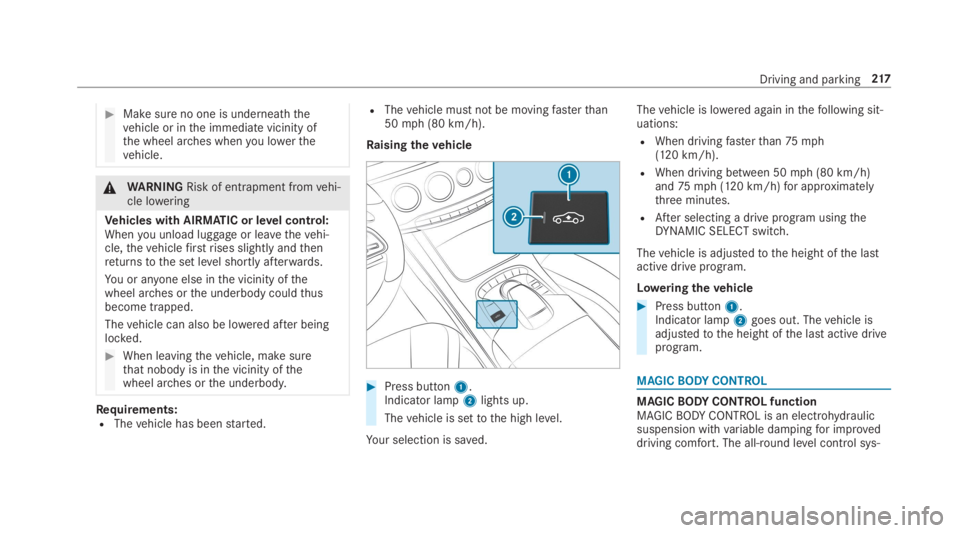
Raisingthevehicle
#Press button1.Indicator lamp2lights up.
Thevehicle is settothe high level.
Your selection is saved.
Thevehicle is lowered again inthefollowing sit‐uations:
RWhen drivingfasterthan75mph(120 km/h).
RWhen driving between 50mph (80 km/h)and75mph (120 km/h)for approximatelythree minutes.
RAfter selecting a drive program usingtheDYNAMIC SELECT switch.
Thevehicle is adjustedtothe height ofthe lastactive drive program.
Loweringthevehicle
#Press button1.Indicator lamp2goes out. Thevehicle isadjustedtothe height ofthe last active driveprogram.
MAGICBODYCONTROL
MAGICBODYCONTROL functionMAGICBODYCONTROL is an electrohydraulicsuspension withvariable dampingfor improveddriving comfort. The all-round level control sys‐
Driving and parking217
Page 222 of 578
Crosswind Assist
The crosswindstabilization:
ROperatesbychanging wheel loadsthroughadjustingthe ABC springstruts.
RReduces disruptions when drivingstraightahead.
RSupports countersteering.
RIs active inthe speedrange between 50mph(80 km/h) and130mph (210km/h) whendrivingstraight ahead or corneringgently.
Function ofROAD SURFACE SCAN
%This function is notavailable in all countries.
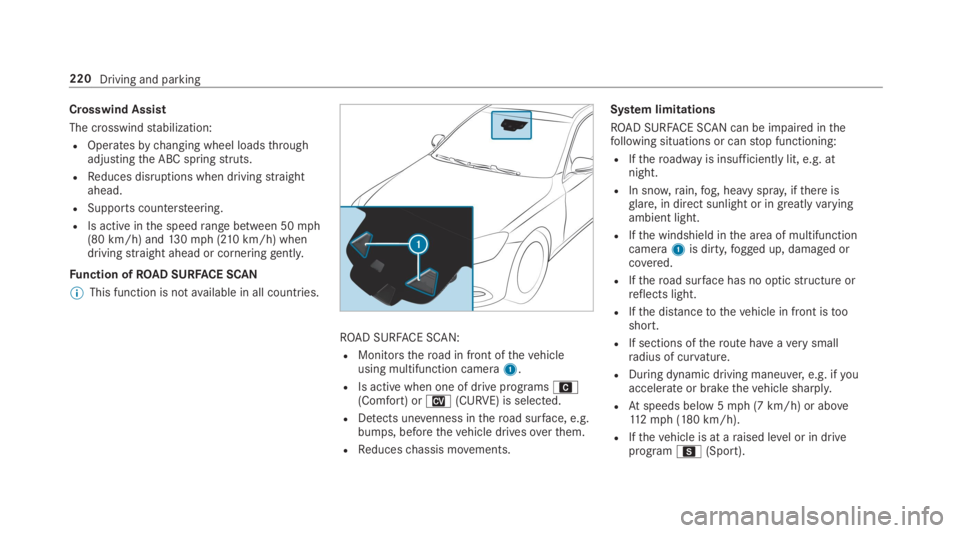
ROAD SURFACE SCAN:
RMonitorstheroad in front ofthevehicleusing multifunction camera1.
RIs active when one of drive programsA(Comfort) orN(CURVE) is selected.
RDetects unevenness intheroad surface, e.g.bumps, beforethevehicle drivesoverthem.
RReduceschassis movements.
System limitations
ROAD SURFACE SCAN can be impaired inthefollowing situations or canstop functioning:
RIftheroadwayis insufficiently lit, e.g. atnight.
RIn snow,rain,fog, heavy spray, ifthere isglare, in direct sunlight or in greatlyvaryingambient light.
RIfthe windshield inthe area of multifunctioncamera1is dirty,fogged up, damaged orcovered.
RIftheroad surface has no opticstructure orreflects light.
RIfthe distancetothevehicle in front istooshort.
RIf sections oftheroute haveaverysmallradius of curvature.
RDuring dynamic driving maneuver,e.g. ifyouaccelerate or brakethevehicle sharply.
RAtspeeds below 5mph (7 km/h) or above112mph (180 km/h).
RIfthevehicle is at araised level or in driveprogramC(Sport).
220Driving and parking
Page 223 of 578
Observethe notes on cleaningthe multifunctioncamera (→page 409).
Settingthevehicle level
&WARNINGRisk of accident becausevehicle level istoo high
Ifyou drive at a highervehicle level,the driv‐ingcharacteristics may be impaired duetothe highervehicle center of gravity.
Thevehicle can drift outwards,forexample,whensteering or cornering.
#Alwayschoose avehicle level which issuitedtothe drivingstyle andtheroadsurface conditions.
&WARNINGRisk of entrapment fromvehi‐cle lowering
When loweringthevehicle, people couldbecome trapped iftheir limbs are betweenthevehicle body andthe tires or underneaththevehicle.
#Make sure no one is underneaththevehicle or inthe immediate vicinity of
the wheel arches whenyou lowerthevehicle.
&WARNINGRisk of entrapment fromvehi‐cle lowering
Vehicles with AIRBODYCONTROL orlevel control system:Whenyou unload lug‐gageor leavethevehicle,thevehiclefirstrises slightly andthenreturnstothe set levelshortly afterwards.
You or anyone else inthe vicinity ofthewheel arches orthe underbody couldthusbecome trapped.
Thevehicle can also be lowered after beinglocked.
#When leavingthevehicle, make surethat nobody is inthe vicinity ofthewheel arches orthe underbody.
Requirements:RThevehicle has beenstarted.
RThevehicle must not be movingfasterthan75mph (120 km/h).
ROnly lower thevehicle:whenthevehicle isstationary,allthe doors havetobe closed.
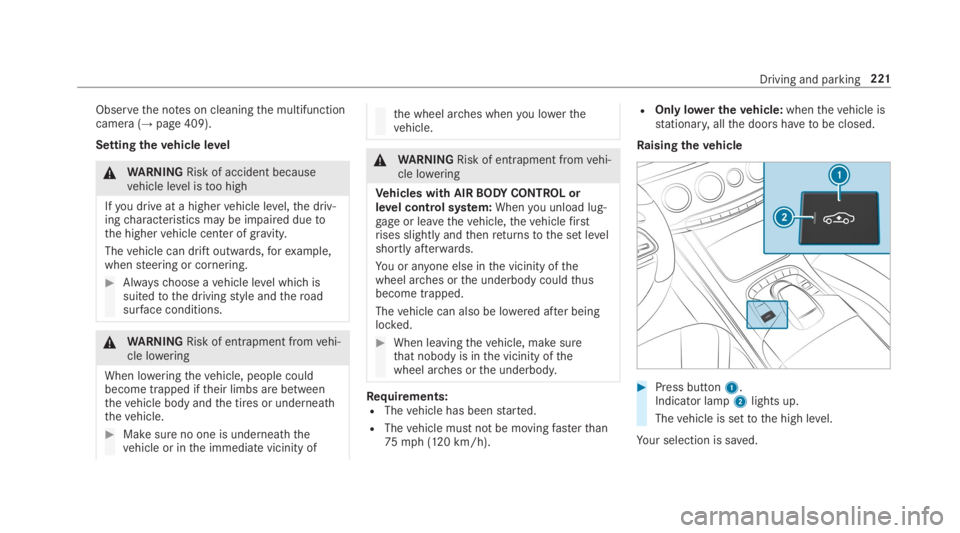
Raisingthevehicle
#Press button1.Indicator lamp2lights up.
Thevehicle is settothe high level.
Your selection is saved.
Driving and parking221
Page 226 of 578
light upyellow orred, depending onthe distancetothe obstacle.
Segment color depending on distance
ColorLateral distance incm
YellowApprox. 30 - 60
RedApprox. < 30
In orderfor lateral front orrear segmentstobedisplayed,thevehicle mustfirst travel a distanceof at least half ofthevehicle length. Oncethevehicle has traveledthe length ofthevehicle, allofthe lateral front andrear segments can be dis‐played.
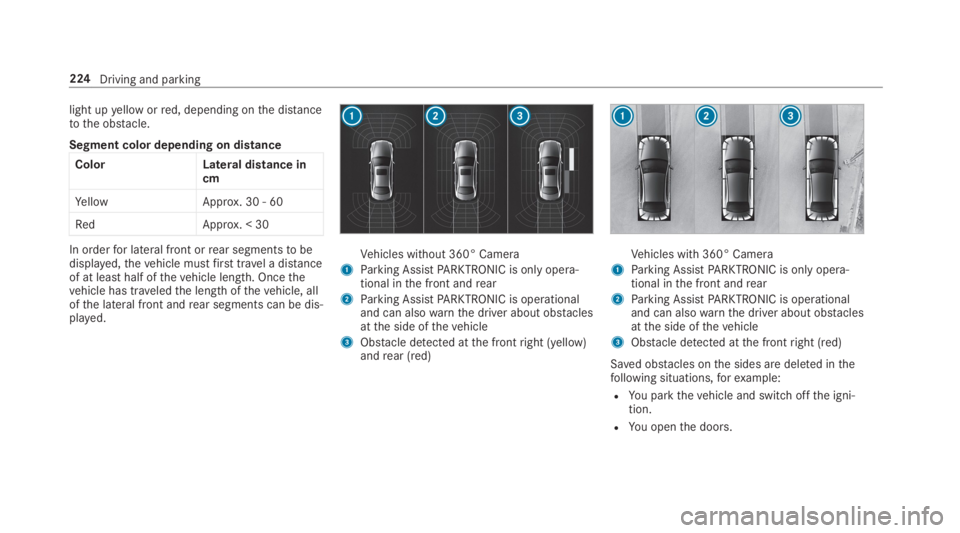
Vehicles without 360° Camera
1Parking AssistPARKTRONIC is only opera‐tional inthe front andrear
2Parking AssistPARKTRONIC is operationaland can alsowarnthe driver about obstaclesatthe side ofthevehicle
3Obstacle detected atthe frontright (yellow)andrear (red)
Vehicles with 360° Camera
1Parking AssistPARKTRONIC is only opera‐tional inthe front andrear
2Parking AssistPARKTRONIC is operationaland can alsowarnthe driver about obstaclesatthe side ofthevehicle
3Obstacle detected atthe frontright (red)
Saved obstacles onthe sides are deleted inthefollowing situations,forexample:
RYou parkthevehicle and switch offthe igni‐tion.
RYou openthe doors.
224Driving and parking
Page 229 of 578
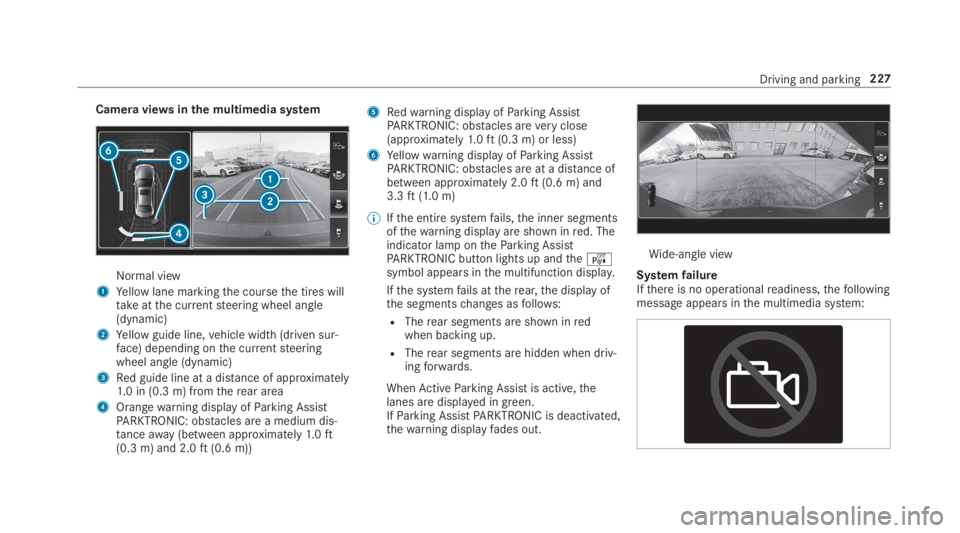
Camera viewsinthe multimedia system
Normal view
1Yellow lane markingthe coursethe tires willtakeatthe currentsteering wheel angle(dynamic)
2Yellow guide line,vehicle width (driven sur‐face) depending onthe currentsteeringwheel angle (dynamic)
3Red guide line at a distance of approximately1.0 in (0.3 m) fromtherear area
4Orangewarning display ofParking AssistPARKTRONIC: obstacles are a medium dis‐tanceaway(between approximately1.0ft(0.3 m) and 2.0ft(0.6 m))
5Redwarning display ofParking AssistPARKTRONIC: obstacles areveryclose(approximately1.0ft(0.3 m) or less)
6Yellowwarning display ofParking AssistPARKTRONIC: obstacles are at a distance ofbetween approximately 2.0ft(0.6 m) and3.3ft(1.0 m)
%Ifthe entire systemfails,the inner segmentsofthewarning display are shown inred. Theindicator lamp ontheParking AssistPARKTRONIC button lights up andtheésymbol appears inthe multifunction display.
Ifthe systemfails attherear,the display ofthe segmentschanges asfollows:
RTherear segments are shown inredwhen backing up.
RTherear segments are hidden when driv‐ingforwards.
WhenActiveParking Assist is active,thelanes are displayed in green.IfParking AssistPARKTRONIC is deactivated,thewarning displayfades out.
Wide-angle view
SystemfailureIfthere is no operationalreadiness,thefollowingmessage appears inthe multimedia system:
Driving and parking227
Page 230 of 578
System limitations
Therear view camera will not function or willonly partially function inthefollowing situations:
RThe trunk lid is open.
RThere is heavyrain, snow orfog.
RThe ambient light conditions are poor, e.g. atnight.
RThe camera lens is obstructed, dirty orfog‐ged up. Observethe notes on cleaningtherear view camera (→page 409).
RThe camera orrear ofyourvehicle is dam‐aged. Inthis case, havethe camera and itsposition and settingchecked at aqualifiedspecialistworkshop.
Thefield of vision andother functions oftherearview camera may berestricted duetoadditionalaccessories ontherear ofthevehicle (e.g.license plate bracket or bicyclerack).
%The contrast ofthe display may be impairedbydirect sunlight orby other light sources,e.g. when driving out of agarage. Inthiscase, pay particular attention.
%Havethe displayrepaired orreplaced if,forexample, pixel errorsconsiderablyrestrict itsuse.
Observethe notes on cleaningtherear viewcamera (→page 409).
360° camera
Function ofthe 360° CameraThe 360° Camera is a systemthat consists offour cameras. The cameras coverthe immediatevehicle surroundings. The system assistsyou,e.g. when parking or atexits withreduced visibil‐ity.
The 360° Camera is only an aid. It is not a sub‐stituteforyour attentiontothe surroundings.Theresponsibilityfor safe maneuvering andparkingremains withyou. Make surethatthereare no persons, animals or objectsetc., inthemaneuvering area while maneuvering and park‐ing.
The systemevaluates images fromthefollowingcameras:
RRear view camera
RFront camera
RTwo side cameras inthe outside mirrors
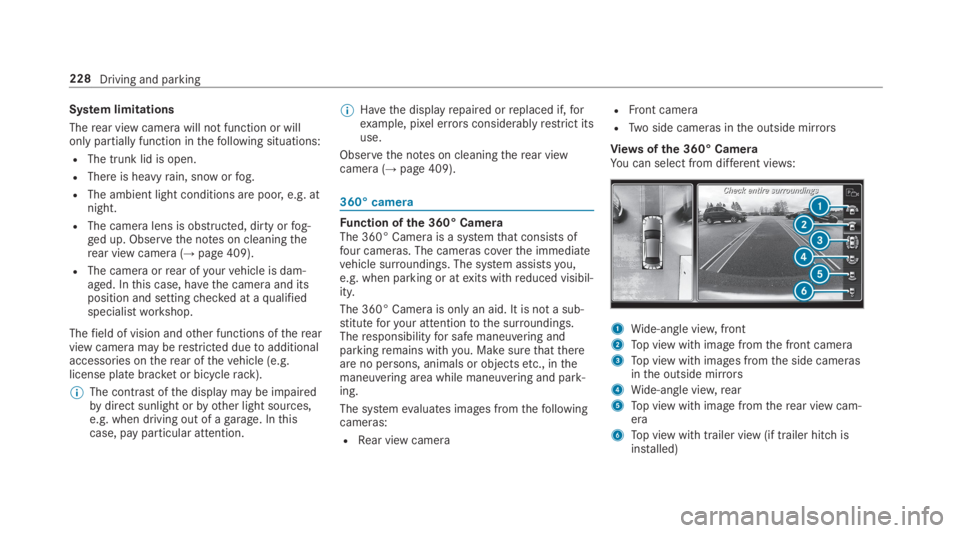
Views ofthe 360° CameraYou can select from different views:
1Wide-angle view,front
2Top view with image fromthe front camera
3Top view with images fromthe side camerasinthe outside mirrors
4Wide-angle view,rear
5Top view with image fromtherear view cam‐era
6Top view with trailer view (if trailer hitch isinstalled)
228Driving and parking
Page 231 of 578
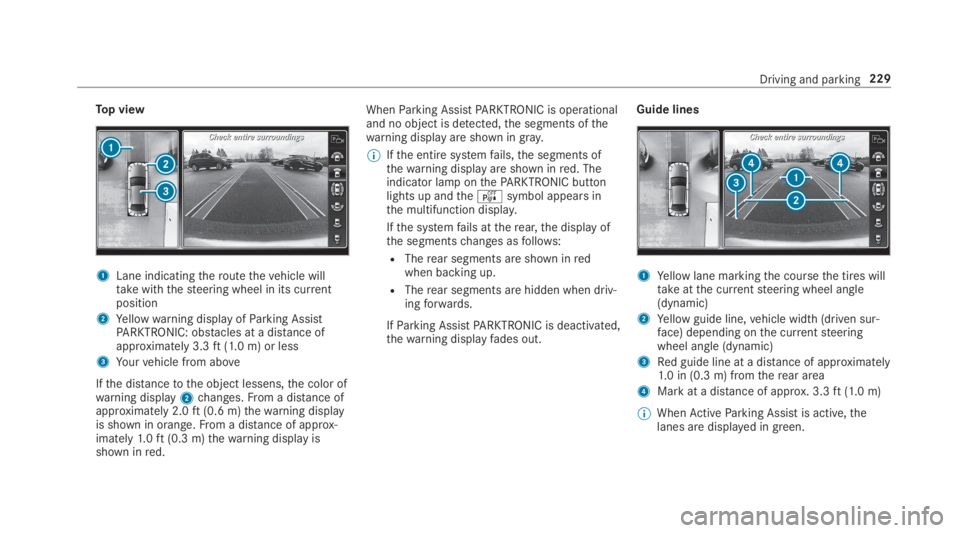
Top view
1Lane indicatingtheroutethevehicle willtakewiththesteering wheel in its currentposition
2Yellowwarning display ofParking AssistPARKTRONIC: obstacles at a distance ofapproximately 3.3ft(1.0 m) or less
3Yourvehicle from above
Ifthe distancetothe object lessens,the color ofwarning display2changes.From a distance ofapproximately 2.0ft(0.6 m)thewarning displayis shown in orange.From a distance of approx‐imately1.0ft(0.3 m)thewarning display isshown inred.
WhenParking AssistPARKTRONIC is operationaland no object is detected,the segments ofthewarning display are shown ingray.
%Ifthe entire systemfails,the segments ofthewarning display are shown inred. Theindicator lamp onthePARKTRONIC buttonlights up andtheésymbol appears inthe multifunction display.
Ifthe systemfails attherear,the display ofthe segmentschanges asfollows:
RTherear segments are shown inredwhen backing up.
RTherear segments are hidden when driv‐ingforwards.
IfParking AssistPARKTRONIC is deactivated,thewarning displayfades out.
Guide lines
1Yellow lane markingthe coursethe tires willtakeatthe currentsteering wheel angle(dynamic)
2Yellow guide line,vehicle width (driven sur‐face) depending onthe currentsteeringwheel angle (dynamic)
3Red guide line at a distance of approximately1.0 in (0.3 m) fromtherear area
4Mark at a distance of approx. 3.3ft(1.0 m)
%WhenActiveParking Assist is active,thelanes are displayed in green.
Driving and parking229
Page 232 of 578
The guide lines inthe multimedia system dis‐play showthe distancestoyourvehicle. Thedistances only applytoroad level.
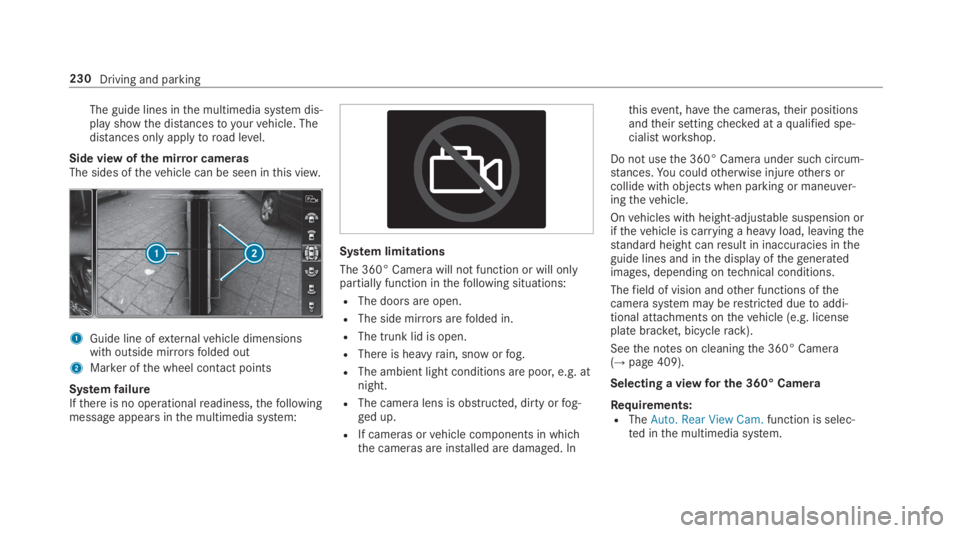
Side view ofthe mirror camerasThe sides ofthevehicle can be seen inthis view.
1Guide line ofexternalvehicle dimensionswith outside mirrorsfolded out
2Marker ofthe wheel contact points
SystemfailureIfthere is no operationalreadiness,thefollowingmessage appears inthe multimedia system:
System limitations
The 360° Camera will not function or will onlypartially function inthefollowing situations:
RThe doors are open.
RThe side mirrorsarefolded in.
RThe trunk lid is open.
RThere is heavyrain, snow orfog.
RThe ambient light conditions are poor, e.g. atnight.
RThe camera lens is obstructed, dirty orfog‐ged up.
RIf cameras orvehicle components in whichthe cameras are installed are damaged. In
thisevent, havethe cameras,their positionsandtheir settingchecked at aqualified spe‐cialistworkshop.
Do not usethe 360° Camera under such circum‐stances.You couldotherwise injureothers orcollide with objects when parking or maneuver‐ingthevehicle.
Onvehicles with height-adjustable suspension orifthevehicle is carrying a heavy load, leavingthestandard height canresult in inaccuracies intheguide lines and inthe display ofthegeneratedimages, depending ontechnical conditions.
Thefield of vision andother functions ofthecamerasystem may berestricted duetoaddi‐tional attachments onthevehicle (e.g. licenseplate bracket, bicyclerack).
Seethe notes on cleaningthe 360° Camera(→page 409).
Selecting a viewfor the 360° Camera
Requirements:RTheAuto. Rear View Cam.function is selec‐ted inthe multimedia system.
230Driving and parking
Page 241 of 578
Traffic Sign Assist
Function ofTraffic Sign Assist
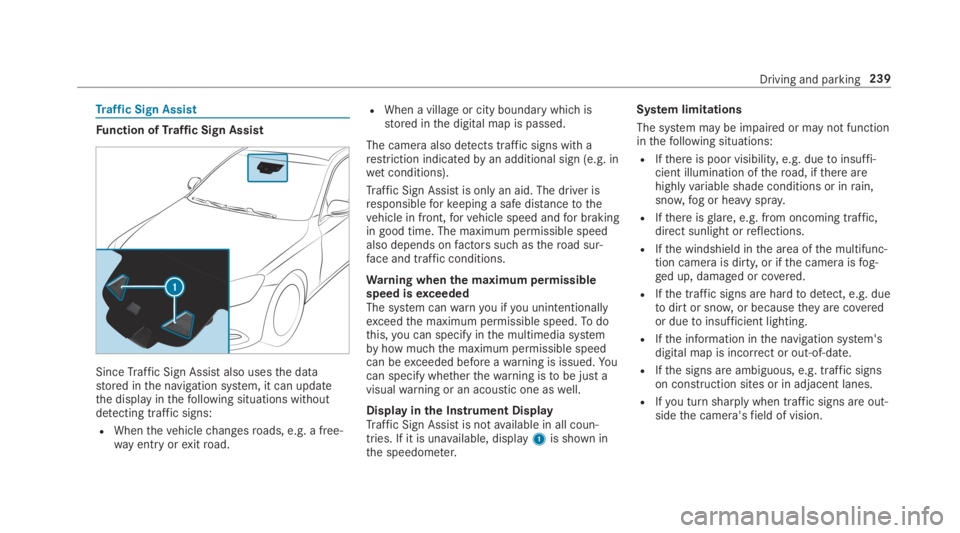
SinceTraffic Sign Assistalso usesthe datastored inthe navigation system, it can updatethe display inthefollowing situations withoutdetecting traffic signs:
RWhenthevehiclechangesroads, e.g. a free‐way entry orexitroad.
RWhen a village or city boundary which isstored inthe digital map is passed.
The camera also detects traffic signs with arestriction indicatedbyan additional sign (e.g. inwet conditions).
Traffic Sign Assistis only an aid. The driver isresponsibleforkeeping a safe distancetothevehicle in front,forvehicle speed andfor brakingin good time. The maximum permissible speedalso depends onfactors suchastheroad sur‐face and traffic conditions.
Warning whenthe maximum permissiblespeed isexceededThe system canwarnyou ifyou unintentionallyexceedthe maximum permissible speed.Todothis,you can specify inthe multimedia systembyhow muchthe maximum permissible speedcan beexceeded before awarning is issued.Yo ucan specify whetherthewarning istobe just avisualwarning or an acoustic one aswell.
Display inthe Instrument DisplayTraffic Sign Assistis notavailable in all coun‐tries. If it is unavailable, display1is shown inthe speedometer.
System limitations
The system may be impaired or may not functioninthefollowing situations:
RIfthere is poor visibility, e.g. duetoinsuffi‐cient illumination oftheroad, ifthere arehighlyvariable shade conditions or inrain,snow,fog or heavy spray.
RIfthere isglare, e.g. from oncoming traffic,direct sunlight orreflections.
RIfthe windshield inthe area ofthe multifunc‐tion camera is dirty, or ifthe camera isfog‐ged up, damaged or covered.
RIfthe traffic signs are hardtodetect, e.g. duetodirt or snow,or becausetheyare coveredor duetoinsufficient lighting.
RIfthe information inthe navigation system'sdigital map is incorrect or out-of-date.
RIfthe signs are ambiguous, e.g. traffic signson construction sites or in adjacent lanes.
RIfyou turn sharply when traffic signs are out‐sidethe camera'sfield of vision.
Driving and parking239
Page 243 of 578
camera1helps detect pedestrians and ani‐mals.
NightViewAssistis only an aid. The driver isresponsibleforthe distancetothevehicle infront,forvehicle speed,for braking in good timeandforstaying in lane.
%As infrared light is not visibletothe humaneye, NightViewAssistcanremain activatedwhenthere is oncoming traffic.The infrared headlamps switch on inthedark from speeds of approximately 5mph(10 km/h). This meansthat, whilestation‐ary,you do not havethe full visualrange andcannotcheck whether NightViewAssistisworking.
System limitationsNightViewAssistcannot displayobjects directlyin front of or directly nexttothevehicle. It maybethe casethat objects are highlighted aswellas pedestrians or animals.
The system may be impaired or may not functioninthefollowing instances:
Rin poor visibility, e.g. snow,rain,fog or heavyspray.
Rthe windshield is dirty inthe vicinity ofthecamera.
Rthe camera isfogged up, damaged or cov‐ered.
Rthe infrared camera intheradiator grill isdamaged, dirty,fogged up or covered.
Ron bends, on hilltops or in dips.
Rat high ambienttemperatures.
Function of pedestrian and animal detectionof NightViewAssistNightViewAssistcan detect pedestrians usingtypicalcharacteristics, e.g.the body contoursand posture of a personstanding upright.
Largeanimals, e.g. deer, cowsor horses, canalso be detected. Smaller animals, e.g. dogs orcats, are not detected.
Pedestrian and animal detection is automaticallyswitched on whenthefollowingrequirementsare fulfilled:
RNightViewAssistis activated.
RThe driving speed is at least 5mph(10 km/h).
RIt is dark.
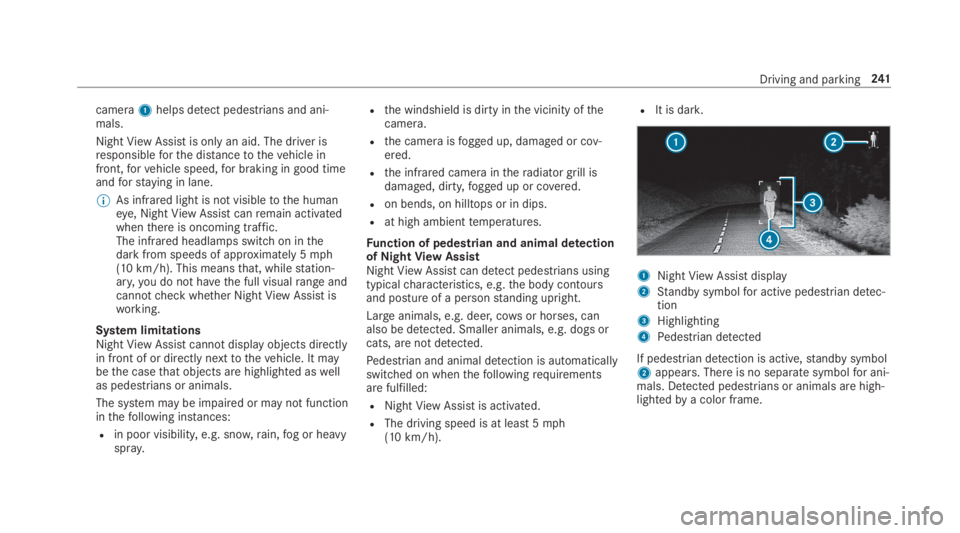
1NightViewAssistdisplay
2Standby symbolfor active pedestrian detec‐tion
3Highlighting
4Pedestrian detected
If pedestrian detection is active,standby symbol2appears. There is no separate symbolfor ani‐mals. Detected pedestrians or animals are high‐lightedbya color frame.
Driving and parking241