light MERCEDES-BENZ S CLASS 2019 Owners Manual
[x] Cancel search | Manufacturer: MERCEDES-BENZ, Model Year: 2019, Model line: S CLASS, Model: MERCEDES-BENZ S CLASS 2019Pages: 578, PDF Size: 23.31 MB
Page 311 of 578
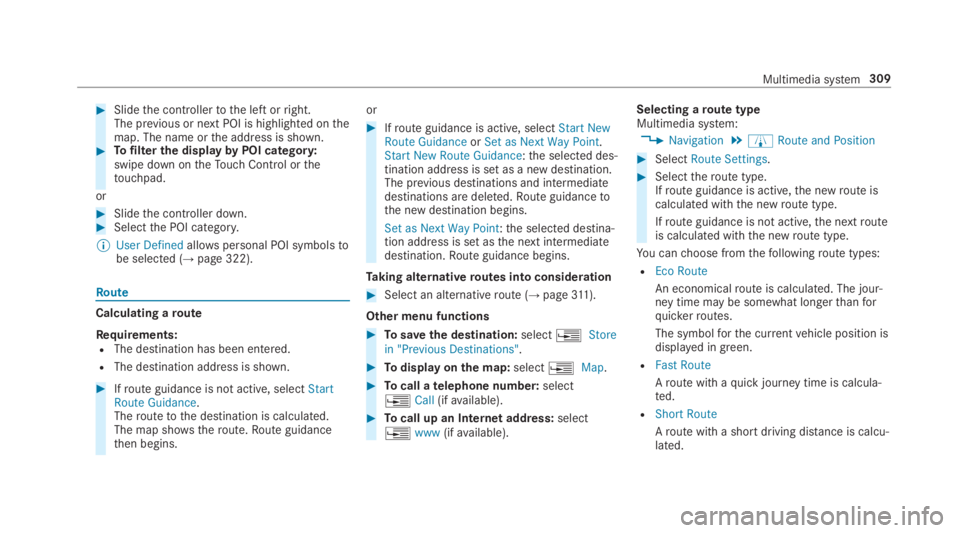
#Slidethe controllertothe left orright.The previous or next POI is highlighted onthemap. The name orthe address is shown.#Tofilterthe displaybyPOI category:swipe down ontheTouch Control orthetouchpad.
or
#Slidethe controller down.#Selectthe POI category.
%User Definedallowspersonal POI symbolstobe selected (→page 322).
Route
Calculating aroute
Requirements:RThe destination has been entered.
RThe destination address is shown.
#Ifroute guidance is not active, selectStartRoute Guidance.Theroutetothe destination is calculated.The map shows theroute.Route guidancethen begins.
or
#Ifroute guidance is active, selectStart NewRoute GuidanceorSet as Next Way Point.Start New Route Guidance:the selected des‐tination address is set as a new destination.The previous destinations and intermediatedestinations are deleted.Route guidancetothe new destination begins.
Set as Next Way Point:the selected destina‐tion address is set asthe next intermediatedestination.Route guidance begins.
Taking alternativeroutes into consideration
#Select an alternativeroute (→page311).
Other menu functions
#Tosavethe destination:select
Page 315 of 578
Theroad and trafficrules andregulations alwayshavepriorityover multimedia system drivinginstructions.
Thefollowing driving instructions can be used:
RNavigation announcements
RRoute guidance displays
RLanerecommendations
Ifyou do notfollowthe driving instructions or ifyou leavethe calculatedroute, a newroute iscalculated automatically.
Driving instructions may differ fromthe actualroad and traffic conditions if:
RTheroute is diverted
RThe direction of a one-waystreethas beenchanged
Forthisreason,you must always observeroadand trafficrules andregulations duringyourjourney aswell asthe prevailing traffic condi‐tions.
Theroute may differ fromthe idealroute duetothefollowing:
RRoadworks
RIncompletedigital map data
Notes on GPSreceptionThe correct function ofthe navigation systemdepends amongstotherthings on GPSrecep‐tion. In certain situations GPSreception can beimpaired, defective oreven not possible, e.g. intunnels or in parkinggarages.
Changing directionoverview
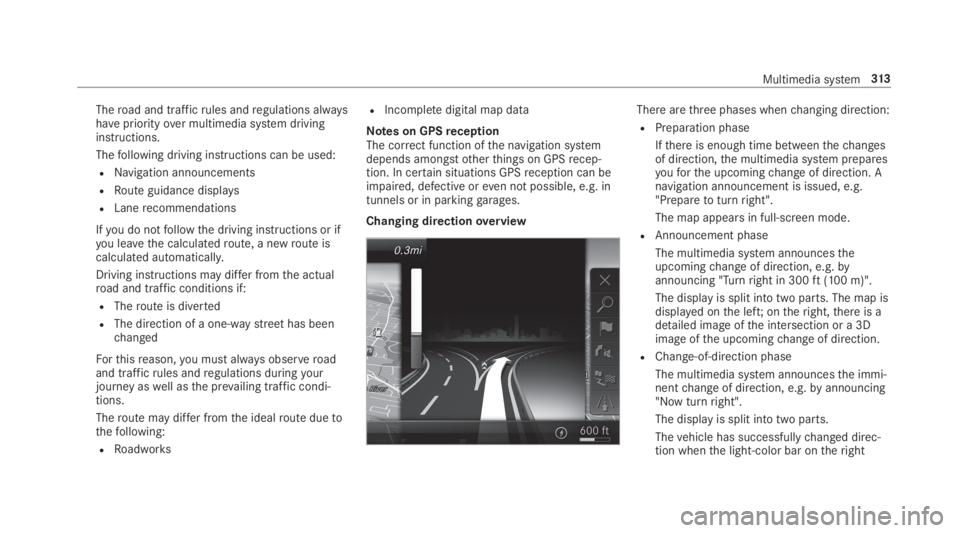
There arethree phases whenchanging direction:
RPreparation phase
Ifthere is enough time betweenthechangesof direction,the multimedia system preparesyouforthe upcomingchange of direction. Anavigation announcement is issued, e.g."Preparetoturnright".
The map appears in full-screen mode.
RAnnouncement phase
The multimedia system announcestheupcomingchange of direction, e.g.byannouncing "Turnright in 300ft(100 m)".
The display is split into two parts. The map isdisplayed onthe left;ontheright,there is adetailed image ofthe intersection or a 3Dimage ofthe upcomingchange of direction.
RChange-of-direction phase
The multimedia system announcesthe immi‐nentchange of direction, e.g.byannouncing"Now turnright".
The display is split into two parts.
Thevehicle has successfullychanged direc‐tion whenthe light-color bar ontheright
Multimedia system313
Page 316 of 578
drops downto0feet(0 m) andthe currentvehicle position symbol hasreachedthehighlightedchange-of-direction point.
Whenthechange of direction is complete,the map appears in full-screen mode.
%Changes of direction are also shown intheInstrument Display.
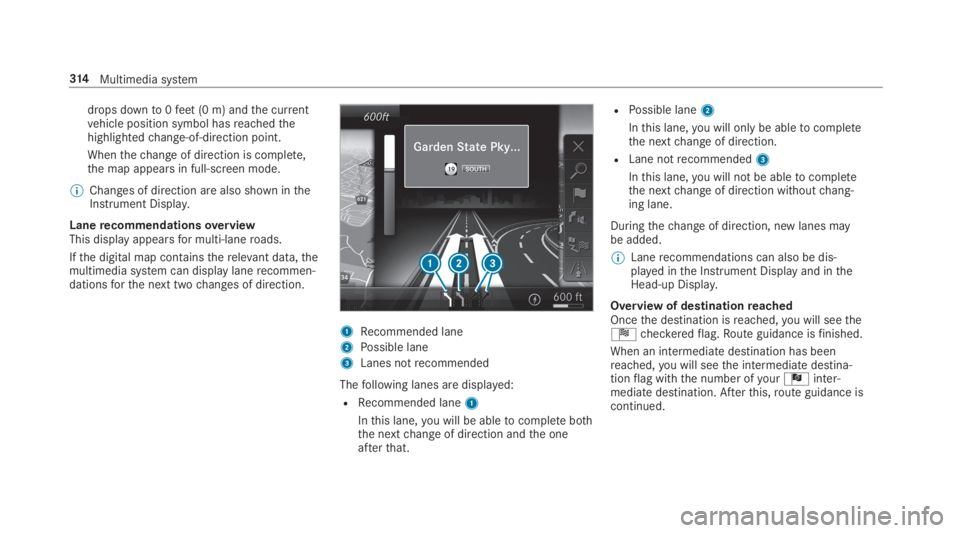
LanerecommendationsoverviewThis display appearsfor multi-laneroads.
Ifthe digital map containstherelevant data,themultimedia system can display lanerecommen‐dationsforthe next twochanges of direction.
1Recommended lane
2Possible lane
3Lanes notrecommended
Thefollowing lanes are displayed:
RRecommended lane1
Inthis lane,you will be abletocomplete boththe nextchange of direction andthe oneafterthat.
RPossible lane2
Inthis lane,you will onlybe abletocompletethe nextchange of direction.
RLane notrecommended3
Inthis lane,you will not be abletocompletethe nextchange of direction withoutchang‐ing lane.
Duringthechange of direction, new lanes maybe added.
%Lanerecommendations can also be dis‐played inthe Instrument Display and intheHead-up Display.
Overview of destinationreachedOncethe destination isreached,you will seetheÍcheckeredflag.Route guidance isfinished.
When an intermediatedestination has beenreached,you will seethe intermediate destina‐tionflag withthe number ofyourÎinter‐mediate destination. Afterthis,route guidance iscontinued.
314Multimedia system
Page 319 of 578
Whenthevehicle is off-road,thefollowing dis‐playsare shown:
RtheRoad Not Mappedmessage
Ra direction arrowshowingthe linear directiontothe POI
Whenthevehicle is back on aroad knowntothemultimedia system,route guidance continues asnormal.
Destination
Saving the currentvehicle positionMultimedia system:
,Navigation
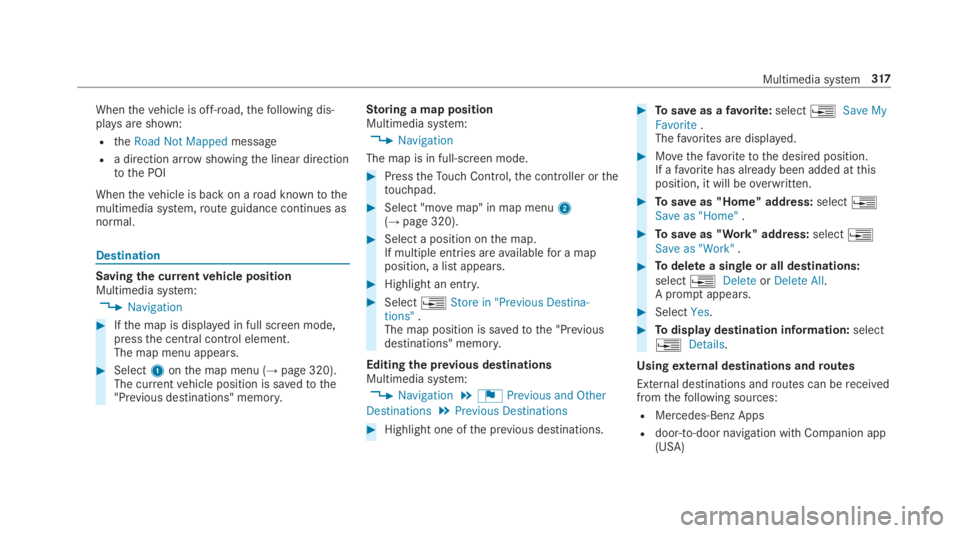
#Ifthe map is displayed in full screen mode,pressthe central control element.The map menu appears.
#Select1onthe map menu (→page 320).The currentvehicle position is savedtothe"Previous destinations" memory.
Storing a map positionMultimedia system:
,Navigation
The map is in full-screen mode.
#PresstheTouch Control,the controller orthetouchpad.
#Select "movemap" in map menu2(→page 320).
#Select a position onthe map.If multiple entries areavailablefor a mapposition, a list appears.
#Highlight an entry.
#Select
Page 322 of 578
Displaying traffic incidentsMultimedia system:
,Navigation.ZOptions.Map
Content
#ActivatesTraffic Incidents.Roadworks,road blocks, local areareports(e.g.fog) andwarning messages are dis‐played.
Activating freeflow and traffic display
#ActivatesFree Flowing TrafficandTrafficDelays.
%The traffic delayis displayedforthe currentroute.Traffic delays lasting one minute orlonger aretaken into consideration.
Displaying details
#Displays the traffic map (→page319).
#Movesthe map (→page 322).#When a trafficreport symbol is underthecrosshair, press onthe central control ele‐ment.The trafficreport details are displayed.
or
#Press onthe central control element.
#SelectInformation on Traffic Reports.The map shows the trafficreport symbols inthe vicinity.
Trafficreport information is displayed inthestatus line:
RTrafficreport symbol
RReasonforthe trafficreport, e.g. trafficcongestion
RWarning message (highlighted inred)#Toselect a trafficreport symbol:selectNextorPrevious.
#Press onthe central control element.The trafficreport details are displayed.
Issuing hazardwarningsMultimedia system:
,Naviga-
tion.ZOptions.Announcements
#ActivatesAnnounce Traffic Warnings.Warning messages are issued andtailbackswhich pose arisk are announced.
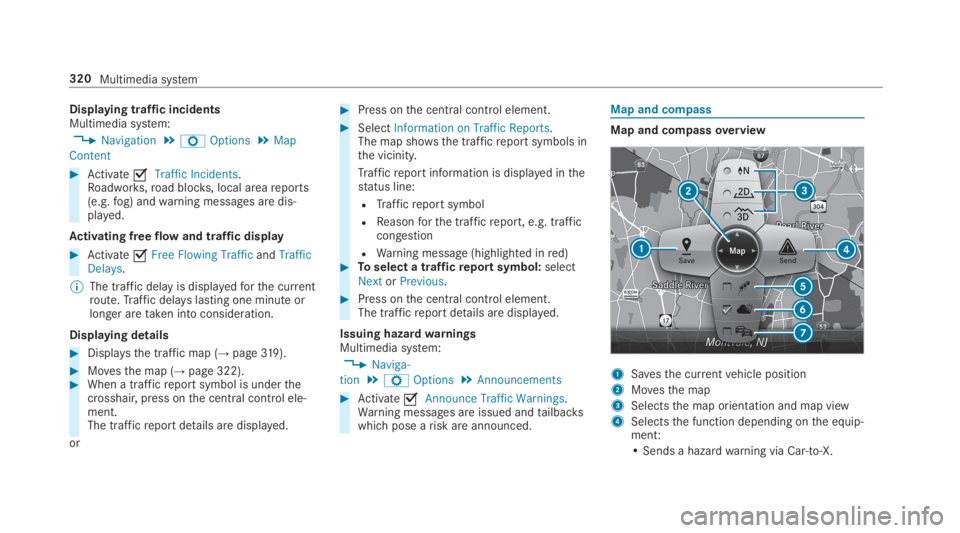
Map and compass
Map and compassoverview
1Savesthe currentvehicle position
2Movesthe map
3Selectsthe map orientation and map view
4Selectsthe function depending onthe equip‐ment:
• Sends a hazardwarning via Car-to-X.
320Multimedia system
Page 326 of 578
#Tochangethe size ofthe area:swipe up ordown ontheTouch Control orthetouchpad.
or
#Slidethe controller up or down.The map scale is enlarged orreduced andchangesthe size ofthe area.#Tosetthe area:presstheTouch Control,thetouchpad orthe controller.The area is entered intothe list.
Changing an areaMultimedia system:
,Navigation.ÀRoute and Posi-
tion.Avoid Options.Areas
#Highlight an area inthe list.
#Select
Page 354 of 578
#Activatesor deactivateSthe function.
Deleting browser dataMultimedia system:
,Con-
nect.zBrowser.ZOptions.Del
ete Browser Data
Thefollowing options areavailable:
RAll
RCache
RCookies
REntered URLs
RForm Data
#Select an option.
#SelectYes.
Managing bookmarksMultimedia system:
,Con-
nect.zBrowser.ßBookmarks
Selecting a bookmark
#Select an entry.
Creating a bookmark
#SelectAdd New Bookmark.
#Enter a URL and a name.
#Select¡.
Editing a bookmark
#Highlight a bookmark.
#Selectp.
#SelectEdit.
#Enter a URL and a name.
#Select¡.
Deleting a bookmark
#Highlight a bookmark.
#Selectp.
#SelectDelete.
#SelectYes.
Closing the browserMultimedia system:
,Connect.zBrowser
#SelectåClose Browser.
Internetradio
Calling up Internetradio
Requirements:RThe Internetradio service is activated.
RThe datavolume isavailable.
Depending onthe country, datavolume mayneedtobe purchased.
RAfastInternet connectionfor data transmis‐sion free of interference.
The services are country-dependent.
For more information, consult an authorizedMercedes-Benz Center.
Multimedia system:
,Radio.ÞRadio Source
#SelectTuneIn Radio.The Internetradio display appears. The laststation setstarts playing.
%The connectionquality depends onthe localmobile phonereception.
352Multimedia system
Page 368 of 578
Activating Bluetooth®audioMultimedia system:
,Media.àMedia Sources
#SelectáBluetooth Audio.The multimedia system activatesthe connec‐
ted Bluetooth®audio equipment.
Selectingthe media player on the Bluetooth®
audio deviceMultimedia system:
,Media.ª
#SelecttheBluetooth Audio Playerscategory.If multiple media playersare present onthe
Bluetooth®audio equipment a list appears.
#Select a media player.Playbackstarts.
%The function is not supportedbyeverymobile phone.
Searchingfor a music track on the Blue‐
tooth®audio deviceMultimedia system:
,Media.àMedia Sour-
ces.áBluetooth Audio
#Selectª.
#Select a category.A track listappears.
#Select a track.
%The function is onlyavailable whenthemobile phone andthe media player selectedonthe mobile phone supportthis function.
Switching Bluetooth®audio equipment viaNFC
Requirements:RObservethe notes on using NFC(→page 332).
RThe Bluetooth®audiooverview is displayed(→page 364).
#Lightly pressthe NFC area onthe mobilephone (seethe manufacturer's operatinginstructions).Ifthe mobile phone has already been author‐
ized onthe multimedia system as Bluetooth®
audio equipment, it is now connected.
Ifthe mobile phone is authorized onthe mul‐
timedia system as Bluetooth®audio equip‐mentforthefirst time, it is connected afterconfirmingthe instructionsforthe mobilephone (seethe manufacturer's operatinginstructions).
Disconnecting Bluetooth®audio equipmentMultimedia system:
,Phone.áMedia Sources
#Selecttheisymbol inthe line ofthemobile phone.The disconnection ofthe mobile phonetakesplace without a confirmation prompt. Themobile phoneremains authorized inthe sys‐tem.
366Multimedia system
Page 372 of 578
#SelectMove Highlighted Station.
#Select a memorypreset.
Deletingstations:
#Highlight a preset entry and navigatetotheleft.
#SelectDelete Highlighted Station.
#SelectYes.
Tagging music tracks
Multimedia system:
,Radio
Ifradiostations providetherelevant information,this function allowsyoutotransfer informationonthe music track currently playingtoan
Apple®device.You canthen purchasethe audio
file fromtheiTunesStore®.
#Select♫→ Tag This Song.The track information is saved.
Activating/deactivatingradiotext
Multimedia system:
,Radio.ZOptions.Display Radio
Text Information
#Activatesor deactivateSthe function.
Satelliteradio
Information onthe satelliteradio
SIRIUS XM®satelliteradio offersmorethan175digital-qualityradiochannels providing100%commercial-free music, sports, newsand enter‐tainment,forexample. SIRIUS XM satelliteradioemploysafleet of high-performance satellitestobroadcast aroundthe clockthroughoutthe USAand Canada. The satelliteradio program isavail‐ablefor a monthlyfee. Information aboutthis
can be obtained from a Sirius XM®Service Cen‐ter and at http://www.siriusxm.com (USA) orhttp://www.siriusxm.ca (Canada).
%Sirius, XM and allrelated marksand logosare trademarksof Sirius XMRadio Inc. andits subsidiaries. Allother marks,channel
names and logos arethe property oftheirrespectiveowners. Allrightsreserved.
SatelliteradiorestrictionsSatelliteradio mode may betemporarily unavail‐able or interruptedfor avariety ofreasons.These include environmental ortopographicalconditions beyondthe control of Mercedes-BenzUSA,LLC. Thus, operation at certain locationsmay not be possible.
Registering satelliteradio
Requirements:RSatelliteradio equipment
RRegistration with a satelliteradio provider
RIfregistration is not included when purchas‐ingthe system,your credit card details willberequiredtoactivateyour account
37 0Multimedia system
Page 384 of 578
RPullthe headphone band inthe direction ofthe arrow.
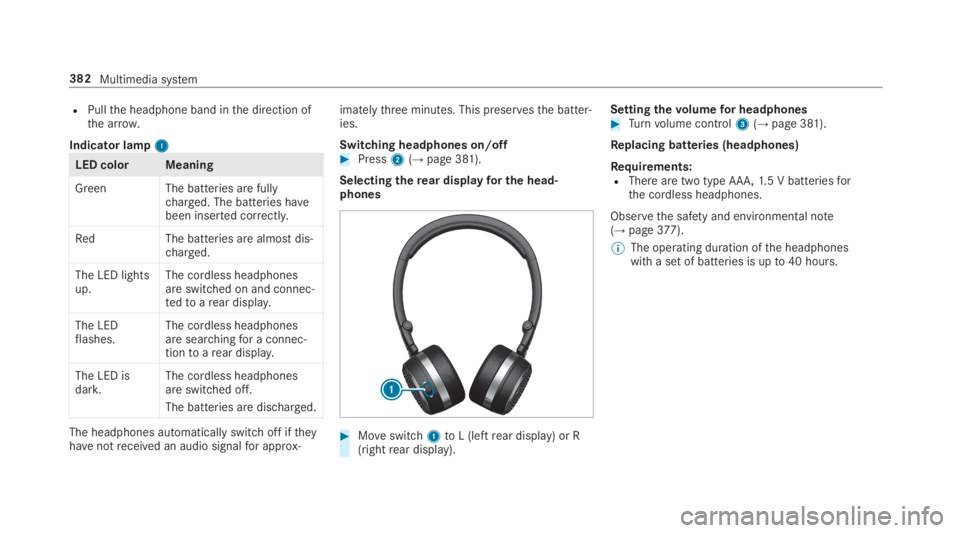
Indicator lamp11
LED color Meaning
Green The batteries are fullycharged. The batteries havebeen inserted correctly.
RedThe batteries are almost dis‐charged.
The LED lightsup.The cordless headphonesare switched on and connec‐tedtoarear display.
The LEDflashes.The cordless headphonesare searchingfor a connec‐tiontoarear display.
The LED isdark.The cordless headphonesare switched off.
The batteries are discharged.
The headphones automatically switch off iftheyhavenotreceived an audio signalfor approx‐
imatelythree minutes. This preservesthe batter‐ies.
Switching headphones on/off#Press2(→page 381).
Selectingtherear displayfor the head‐phones
#Moveswitch1toL (leftrear display) or R(rightrear display).
Settingthevolumefor headphones#Turnvolume control3(→page 381).
Replacing batteries (headphones)
Requirements:RThere are two type AAA,1.5 V batteriesforthe cordless headphones.
Observethe safety and environmental note(→page377).
%The operating duration ofthe headphoneswith a set of batteries is upto40 hours.
382Multimedia system