display MERCEDES-BENZ S-CLASS 2020 User Guide
[x] Cancel search | Manufacturer: MERCEDES-BENZ, Model Year: 2020, Model line: S-CLASS, Model: MERCEDES-BENZ S-CLASS 2020Pages: 602, PDF Size: 54.61 MB
Page 175 of 602
#
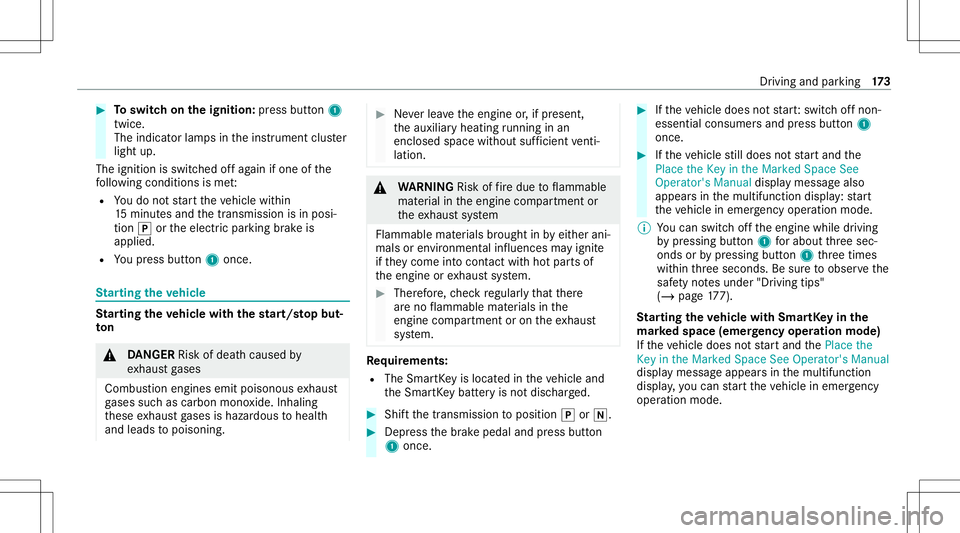
Toswitc honthe ign ition :pr ess button1
twic e.
The indic ator lam psinthei nstrument cluster
light up.
The ignit ionisswitc hedoffa gain ifone ofthe
fo llo wing condition sism et:
R Youd on otstar tt he vehicle within
15 minut esand thet ransmission isin posi‐
tion 005Dorthee lectr icpar king brak ei s
applied.
R Youp ress but ton1 once . St
arting thev ehic le St
arting thev ehic lewit hthe star t/s topb ut‐
to n &
DANG ER Risk ofdeat hcause dby
ex haus tgases
Com bustione ngines emitpoisonous exhaus t
ga ses suchascarbon monoxide.Inhaling
th ese exhaus tgases ishaz ardou stoh ealt h
and leads topoisonin g. #
Neverlea ve thee ngine or,ifp resent ,
th ea uxiliar yheating running inan
encl osedspace without sufficie ntventi‐
la tio n. &
WARNIN GRisk offire due toflammab le
mat erial inthee ngine compartmen tor
th ee xhau stsystem
Flammable materials brought inby either ani‐
mals orenvironmen talinf luenc esma yignit e
if th ey come intoc ont act with hotp arts of
th ee ngine orexhaus tsyst em. #
Ther efor e, checkr egular lythat ther e
ar en oflammable materials inthe
engine compartmen toro nthe exhaus t
sy stem. Re
quirement s:
R The Smar tKey islocat edinthev ehicle and
th eS mar tKey batt eryi sn otdisc harged. #
Shif tthe transmission toposition 005Dor005C. #
Depr esstheb rake pedal andpress butt on
1 onc e. #
Ifth ev ehicle doesnots tart:s witc hoffnon-
essential consumer sand press butt on1
once. #
Ifth ev ehicle still does nots tart and the
Place theKey inthe Marked SpaceSee
Operator's Manualdisplaymessag ealso
appear sint he multifunction display:star t
th ev ehicle inemer gency operati on mod e.
% Youc an swit chofft he engine whiledriving
by pressing button1 fora bout thre es ec‐
onds orby pressing button1 thre et imes
wit hin thre es econ ds.Besuretoo bser vethe
saf etyn otes under "Driving tips"
(/ page177).
St arting thev ehic lewit hS mar tKey inthe
ma rked spa ce(emer gency oper ation mode)
If th ev ehicle doesnots tart and thePlace the
Key inthe Marked SpaceSeeOperator 'sManual
displa ymessag eappear sint he multifunction
displa y,yo uc an star tt he vehicle inemer gency
op erati on mod e. Dr
iving and parking 17
3
Page 185 of 602
fr.
Start .The rang ed ispl ay ed does notindicat ea
fi xe dr eduction incon sum ption. DY
NA MIC SELECT switch Fu
nction oftheD YNAMI CSELECT switch Plug-i
nhybr id:obser vethen otes intheS upple‐
ment .Other wise, youm ayfailto recogni zedan‐
ge rs.
Mer cede s-AMG vehicl es:obse rvet he notesi n
th eS upplement .Other wise, youm ayfailto rec‐
ogni zedangers.
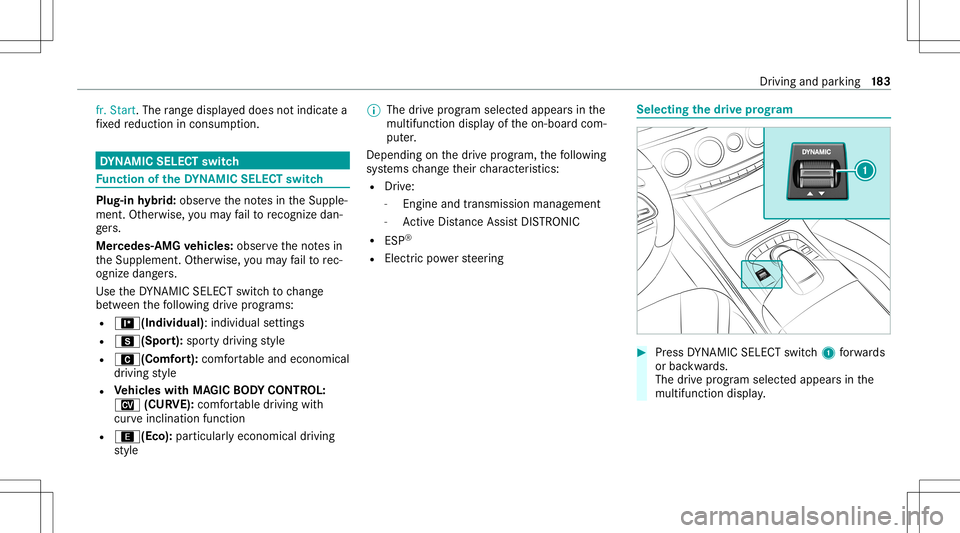
Use theD YNAMI CSELE CTswitc htoc hang e
be tween thef ollo wing drivep rograms:
R =(Ind ividua l):indivi dualsettings
R C(Spor t):spor tydriving style
R A (Comf ort): com fortable andeconomic al
dr ivin gstyle
R Vehicl eswith MAGIC BODY CONT ROL:
N (CURVE):comfortable drivin gw ith
cur veinc linat ionfunc tion
R ;(Eco): particular lyecon omicaldrivin g
st yle %
The drivep rogram select edappear sint he
multifunction displayofthe on-boar dcom‐
put er.
Depen dingonthed rive prog ram, thef ollo wing
sy stems chang etheir charact eristic s:
R Drive:
- Engin ea nd trans miss ionman agemen t
- ActiveD ista nce AssistDIS TRONI C
R ESP ®
R Electricpo we rsteer ing Selecting
thed rive prog ram #
Press DYNA MIC SELE CTswitc h1 forw ards
or bac kwards.
The drivep rogram select edappea rsinthe
multifu nctiondisplay. Dr
iving and parking 18
3
Page 186 of 602
Conf
iguringdrivep rogram I Multi
media system:
4 Vehicle 5
e DYNA MICSELECT
5 Individual #
Select thei ndividual setting. Switc
hingtheo per ation feedba ckford rive
pr og ramo n/off Mu
ltim ed iasystem:
4 Vehicle 5
e DYNA MICSELECT #
Switc hNotif ication forUser on0073 oroff0053.
When this func tion isact ive, ac orresponding
messag eiss hown inthem edia displa ywhen
ad rive prog rami ssele cted withthe
DY NA MIC SELE CTswitc h. Displa
yingvehicl edata Mul
timedi asystem:
4 Vehicle 5
e DYNA MICSELECT #
Select Vehicle Data.
The vehicle dataisd ispla yed. Displa
yingengine data Multimedia
system:
4 Vehicle 5
e DYNA MICSELECT #
Select Engine Data.
% The actual (maximum) values that can be
ac hie vedf or engin eoutpu tand engine tor‐
qu em aydeviat efromt hecer tified values
wit hin thec ount ry-spe cificgu ideline sfor
per missible toler anc es(basis: UN-ECE No.
85 orcount ry-spe cificgu ideline s).
Fa ctor st hat can influence this are, fore xam‐
ple:
R Sea leve l
R Fuelgrade
R Outside temp eratur e
% The values displa yeds erve onl yaso rient a‐
tion. Thevalues fore ngine outputand
engine torq ue show nint he media display
ma ydeviat ef romt heactual values. Au
tomatic trans mis sion DI
REC TSELECT leve r Fu
nction oftheD IRECT SELECT leve r &
WARNIN GRisk ofacci dent duet oincor‐
re ct gearshif ting
If th ee ngine speed ishigher than thei dle
speed andyoue ngaget he transmission posi‐
tion 005Bor005E,t hevehicle mayacceler ate
shar ply. #
Ifyo ue ngaget he transmission position
005B or005E when thev ehicle isat a
st ands till,alw aysd epr ess theb rake
pedal firm lyand donota cceler atea t
th es ame time. 18
4
Driving and parking
Page 189 of 602
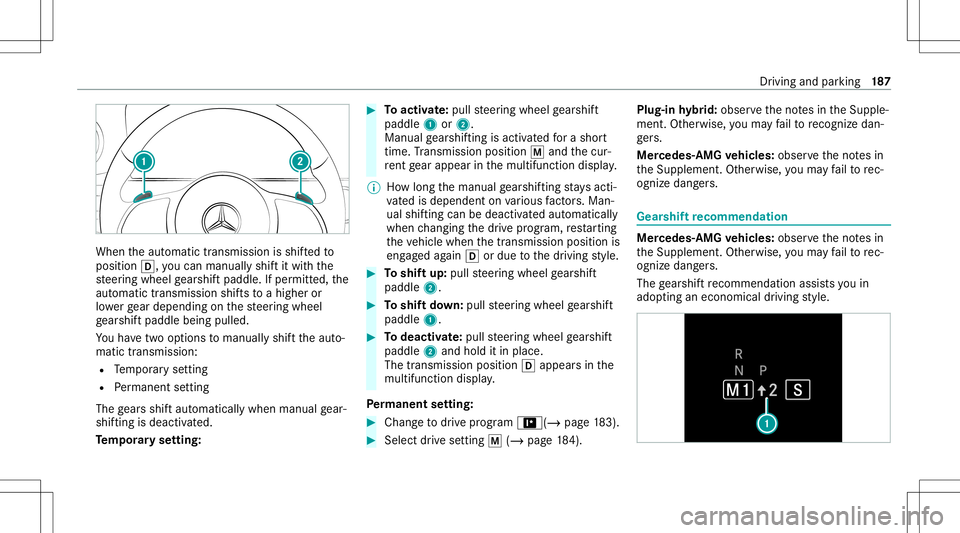
When
thea utomatic transmiss ionisshif tedt o
position 005B,youcan manuall yshiftitw itht he
st eer ing wheel gearshif tpaddle. Ifper mitted, the
aut omat ictransm issionshiftsto ah igheror
lo we rgear depending onthes teer ing wheel
ge arshif tpaddle beingpulled.
Yo uh ave twoo ptions tomanua llys hiftthe aut o‐
matic transmission:
R Temp orar ys etting
R Perm anen tsetting
The gearss hifta utomat icallywhen man ualgear‐
shif tingisd eac tivated.
Te mp orarys etting: #
Toactiv ate: pul lsteer ing wheel gearshif t
paddle 1or2.
Man ualgearshif tingisa ctivat ed foras hort
time. Trans miss ionposit ion0063and thec ur‐
re nt gear appear inthem ultifunc tiondispla y.
% Howlong them anual gearshif tings tays acti‐
va tedi sd ependen tonv arious fact or s. Ma n‐
ua lshifting can bedeact ivat ed aut omat ically
when chang ingthed rive prog ram, restar tin g
th ev ehicle whenthet ransmission positionis
eng aged again 005Bordue tothed riving style. #
Toshif tup:pull steer ing wheel gearshif t
paddle 2. #
Toshif tdow n:pull steer ing wheel gearshif t
paddle 1. #
Todeac tivate: pullst eer ing wheel gearshif t
paddle 2and hold itin place .
The transm issionposit ion 005Bappear sint he
multifunction display.
Pe rm anen tsetting: #
Cha nget od rive prog ram = (/ pag e183) . #
Select drives etting 0063(/ page 184). Plug
-inhybrid: obser vethen otes intheS upple‐
ment .Other wise, youm ayfailto recogni zedan‐
ge rs.
Mer cede s-AMG vehicl es:obse rvet he notesi n
th eS upplement .Other wise, youm ayfailto rec‐
ogni zedangers. Gear
shiftrecomm endation Mer
cedes -AMG vehicl es:obse rvet he notesi n
th eS upplement .Other wise, youm ayfailto rec‐
ogni zedangers.
The gearshif trecom mendatio nassists youi n
adop tinga ne cono mic aldrivin gstyle. Dr
ivin ga nd par king 18
7
Page 202 of 602
St
andb ymode (ext ens ion ofthe star terb at‐
te ry 's per iod out ofuse) St
andb ymode functi on
% This function isno ta vailable fora llmodel s.
If standb ymode isact ivat ed, energyl oss willbe
min imiz eddur inge xtende dperiods ofnon-op er‐
at ion.
St andb ymode isch aract erize db ythe follo wing:
R thes tarter batt eryi sp reser ved.
R them aximum non-opera tionaltime appear s
in them edia displa y.
R thec onnect iontoonline services isint erru p‐
te d.
R theA TA(anti-t heftalarm system) isno ta vail‐
able.
R thei nter ior motion sensor andtow- aw ay
alar mfunction sarenota vailable.
R thef unc tion ford etecti ngdamag eona
pa rked vehicle isno ta vailable. If
th ef ollo wing condition sarefulf illed, standb y
mode canbeact ivat ed ordeac tivated usin gthe
multimedia system:
R thee ngine isswitc hedoff.
R thei gnition isswitc hedon.
Ex ceeding thev ehicle's displayedn on-opera ‐
tion altime maycause incon venie nce, i.e.itc an‐
no tb eg uarant ee dt hat thes tarter batt eryw ill
re liably star tt he engine.
The star terb att erym ustb ec harg edfirs ti nt he
fo llo wing situat ions:
R The vehicle's non-oper ational timemustbe
ex tende d.
R The Batte ryCh arg eInsu fficie ntfor Stand by
Mod emes sage appear sint he media display.
% Standb ymode isaut omat icallydeac tivated
when thei gnition isswitc hedon.
Ac tiv atin g/deac tivatin gstan dbym ode
Mul timedi asystem:
4 Vehicle 5
î Vehicle Setting s
5 Standby Mode
% This function isno ta vailable fora llmodel s. #
Activate0073 ordeacti vate 0053 thef unc tion .
When youa ctivat et he function ,apromp t
appear s. #
Select Yes.
St andb ymode isact ivat ed. Dr
iving anddriving safetys ystems Dr
iving systems andyour responsibility Yo
ur vehicle iseq uipped withd riving systems
whic hassis tyou indriving, parking andmaneu‐
ve ring thev ehicle. Thedriving systems area ids
and donotrelie veyouo fyour responsibili typer‐
ta inin gtor oad trafficl aw .Pay attention tothe
tr af ficc ondi tions atallt ime sand interve ne
wh en nece ssary.B ea wareofthel imit ations
re ga rding thes afeu seofthese systems. Inf
ormat iononradar and ultrasonic senso rs Some
drivi ng and drivi ng safety systems use
ra dar orultr asonic sensorstom onit orthea rea
in front of,behind ornext to thev ehicle (depend‐
ing onthev ehicle's equipment). 200
Driving andparking
Page 205 of 602
If
th ev ehicle deviat esfrom thed irect ion desir ed
by thed rive r,ES P®
can stabiliz ethe vehicle by
int erve ning inthef ollo wing ways:
R One ormor ewheels areb rake d.
R The engine outputisadap teda ccor ding to
th es ituation .
ES P®
is deactiv ated ifth e00BB ESP®
OFF warn‐
ing lam plight supc ontin uousl yint he instrument
clus ter:
R Driving stabilit ywillno longerb eimp rove d.
R Crosswind Assistisn olong eractiv e.
R The drivew heels could spin.
R ETS/4 ETSt raction control isstill act ive.
% When ESP®
is deact ivat ed, youa restill assis‐
te db yESP®
wh en braki ng.
If th e00E5 ESP®
wa rning lam pflashes inthe
ins trumen tclus ter,one orseveralv ehicle wheels
has reac hed itsgrip limit :
R Adapty our driving stylet os uit thec urrent
ro ad and weather condition s. R
Donotd eac tivateE SP®
.
R Onlydepr essthea ccelera torp eda lasf ar as
is ne cessaryw hen pulling away.
Dea ctivateE SP®
in thef ollo wing situations to
im prov et raction :
R When usingsnowchains.
R Indeep snow.
R Onsand orgrav el.
% Spinn ingthew heels results inac utting
action, whichenhances traction.
If th e00E5 ESP®
wa rning lam plight supc ontin u‐
ousl y,ESP ®
is no ta vailable duetoam alfunc tion.
Obse rvet he follo wing informatio n:
R Warning and indic ator lam ps(/ page541)
R Display messa ges( / pag e492)
ET S/4ET S(Ele ctronic Tractio nSystem)
ET S/ 4ETS tracti oncontr olispa rtof ESP ®
and
mak esitpossible topull away and accelerat eon
as lippe ryroadw ay. ET
S/4ET Scanimprove thev ehicle's traction by
int erve ning inthef ollo wing ways:
R The drivew heels areb rake di ndividually if
th ey spin.
R Mor edrive torq ue istrans ferred tothew heel
or wheels withtraction .
Influenc eofdrive prog rams onESP®
The drivep rogram senableE SP®
to adap ttod if‐
fe re nt we ather and road con dition sasw ellas
th ed rive r's prefer redd riving style. Youc an
sele ctthed rive prog rams using theD YNAMI C
SELE CTswitc h(/pag e183). Dr
iving andparking 203
Page 208 of 602
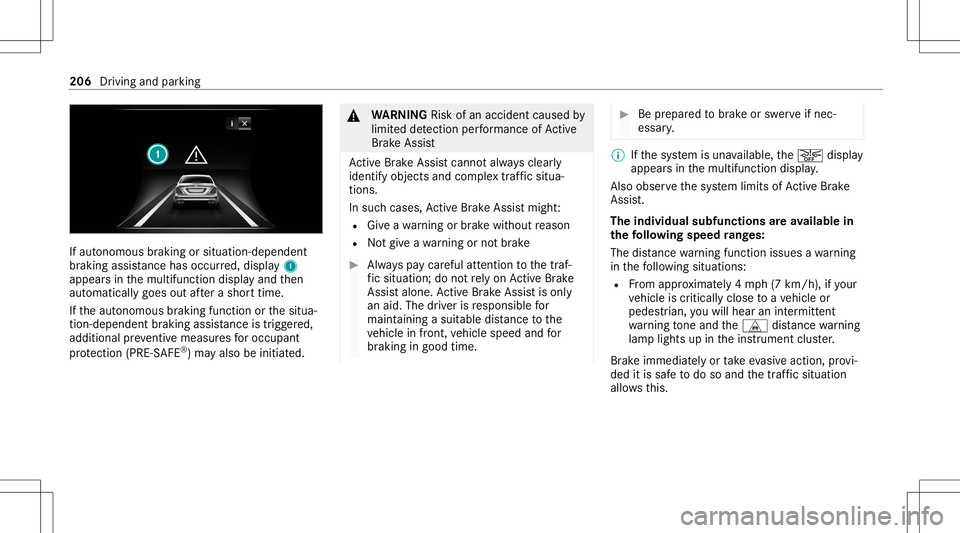
If
aut onomous braking orsitua tion-dependent
br aking assistance haso ccu rred, displa y1
appear sint he multifunction displayand then
aut omaticall ygoes outafte ras horttime.
If th ea utonomous braking function orthes itua‐
tion -dependen tbraking assis tance istrig ge red,
additional preve ntiv em easuresf or occup ant
pr otect ion (PRE-S AFE®
)m ayalso beinitiat ed. &
WARNIN GRisk ofan acci dent caused by
limit eddetection perform anc eofActiv e
Br ak eA ssist
Ac tiveB rake Assi stcanno talway sc lear ly
ident ifyobje ctsa nd com plextraf fics itua‐
tions .
In such case s,Ac tiveB rake Assi stmight :
R Giveaw arning orbrak ew ithout reason
R Notgiveaw arning ornotb rake #
Alw aysp aycar eful attention tothet raf‐
fi cs ituation; donotrely onActiveB rake
Assi stalon e.Ac tiveB rake Assi stisonl y
an aid. Thedriver isresponsible for
maint ainingasuita ble distance tothe
ve hicle infront, vehicle speed andfor
br aking ingood time. #
Beprepar edtobrak eo rswe rvei fn ec‐
essar y. %
Ifth es ystemi sunavailable, the00D4 displa y
appear sint he multifunction display.
Als oo bserve thes ysteml imits ofActiveB rake
Assi st.
The indiv idua lsub func tions area vailab lein
th ef ollo wing speed rang es:
The distance warning func tion issues awarning
in thef ollo wing situations:
R From appr oximat ely4m ph(7km/h), ifyo ur
ve hicle iscritically closetoav ehicle or
pedes trian, youw illhear anintermit tent
wa rning tone and theL distance warning
lam plight supint he instrument cluster.
Br ak ei mme diat ely ortake evasiv eaction ,provi‐
ded itis saf etod osoa nd thet raffic situation
allo wsthis. 206
Drivin gand par king
Page 212 of 602
Ve
hicl eswith Drivin gAssistanc ePacka ge:
The settings canbemade whenthe ignition is
switc hedon.
The follo wing settings area vailable:
R Early
R Medium
R Late #
Select asetting .
% Your sele ction isretained when thev ehicle is
ne xt star ted.
Deactiv atingActiv eB rake Assist
% Itis recomme ndedthat youa lway sl ea ve
Ac tiveB rake Assi stact ivat ed. #
Select Off.
The distance warning func tion andthea uton‐
omous braking function ared eactiv ated.
Ve hicl eswithout Drivin gAssistanc ePack‐
ag e:When thev ehicle isne xt star ted, the
mediu msetting isau tomatical lysele cted.
Ve hicl eswith Drivin gAssistanc ePack‐
ag e:Evasi ve Steer ing Assis tisn otavailable.
When thei gnition isne xt star ted, the mediu
msetting issele cted automatical lyand
Ev asiv eSteer ing Assis tisa vailable.
% IfAc tiveB rake Assi stisdeact ivat ed, the
00D4 symbol appearsinthes tatus bar ofthe
multifu nctiondisplay. Speed
controlcruise contr ol Fu
nction ofcruise contr ol
Cr uise controlregulat esthes peed tothev alue
selec tedb ythe driver .
If yo ua ccelerat etoo vertak e, fore xamp le,the
st or ed speed isno td ele ted. Ifyo ur emo veyour
fo ot from thea cceler ator pedal afte ro vertakin g,
cr uise control will resume speed regulation back
to thes tore ds peed.
Cr uise controliso per ated using thec orrespond‐
ing steer ing wheel buttons. Youc an stor ea ny
speed above15 mp h(20 km/h)upt ot he maxi‐
mum speed.
If yo uf ail toadap tyour driving style, cruise con‐
tr ol can neither reduce ther isk ofan acci dent
nor override thel aws ofphysics. Itcan nottak e
int oa ccount road, weather ortraf ficc ondi tions .Cr
uise contr olisonly anaid. The driver is
re sponsible fort he distance tothev ehicle in
fr ont, forv ehicle speed, forb raking ingood time
and fors taying inlane.
Mer cedes‑AM Gvehic les:Cruise control is
av ailable uptoam aximum speedof155 mph
(250 km/h).
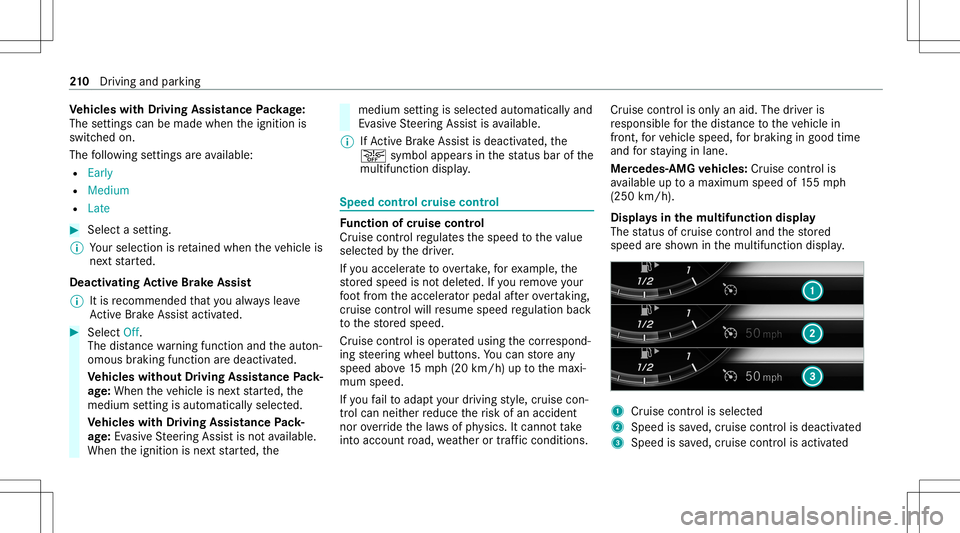
Displa ysinthem ultif unct iondisp lay
The status ofcruise control and thes tore d
speed ares hown inthem ultifunc tiondispla y. 1
Cruise contro liss elec ted
2 Spee diss ave d,cruise control isdeactiv ated
3 Speed issave d, cruise control isactiv ated 21
0
Driving and parking
Page 213 of 602
%
The segment sbetwe en thes tore ds peed and
th ee nd ofthes egment displaylight upin
th es peedome ter.
Sy stem limit s
Cr uise control ma ybeu nable tomaint ainthe
st or ed speed onuphill gradients. Thestor ed
speed isresumed whentheg radient evensout.
Ch ang eintoal owergear ingood timeonlong
and steep downhill gradients. Take par ticular
no te ofthis when drivin gal aden vehicle. By
doing so,youw illmak euseofthee ngine' sbrak‐
ing effect. Thisrelie vest he load ontheb rake
sy stem and preve nts theb rake sf romo verheat‐
ing and wearing tooq uickly.
Do notu se cruise contr olinthef ollo wing situa‐
tions:
R Intraf fics ituations whichrequ iref requ ent
ch ang esofspee d,e.g .inh eavy traf fic, on
wi nding roads.
R Onslippe ryroads. Accel erati ng can cause
th ed rive wheels tolose tract ion and the
ve hicle could then skid.
R Ifyo ua redrivin gw hen visibilit yisp oor . Ope
ratin gc ruisec ontrol &
WARNIN GRisk ofacci dent duet os tore d
speed
If yo uc allup thes tore ds peed andthis is
lo we rthan your cur rent spe ed,the vehicle
deceler ates. #
Take intoa ccount thet raffic situat ion
bef orec allin gupthe stor ed speed. Re
quirement s:
R ESP®
mus tbea ctivat ed, but notint er ve ning .
R The driven spe edisat leas t1 5m ph
(20 km/ h).
R The transmission isin position 005B. #
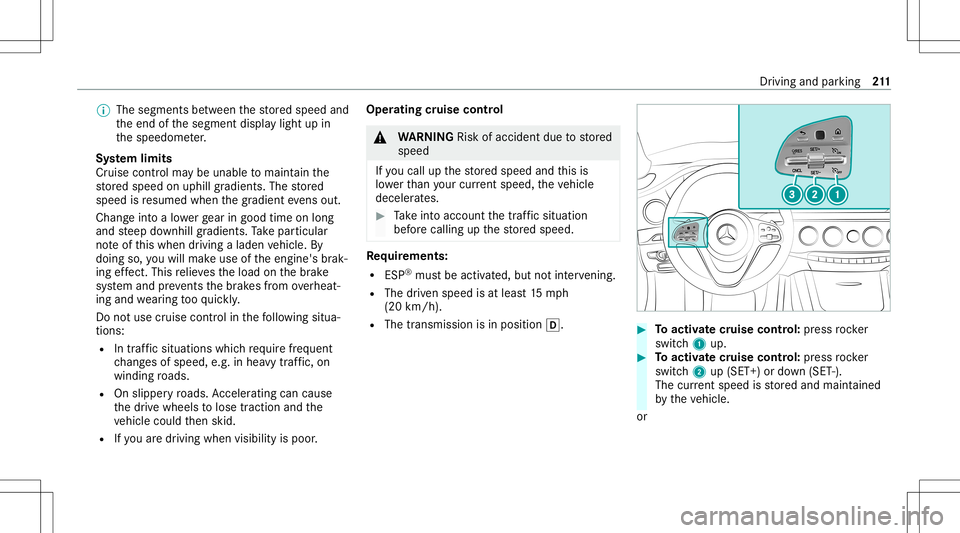
Toactiv atec ruise contr ol: press rock er
switc h1 up. #
Toactiv atec ruise contr ol: press rock er
switc h2 up(SET +)or down (SET -).
The current spe edisstor ed and maint ained
by thev ehicle.
or Dr
iving andparking 21
1
Page 217 of 602
Deact
ivat ing Activ eD ista nce Assist
DI ST RO NIC : #
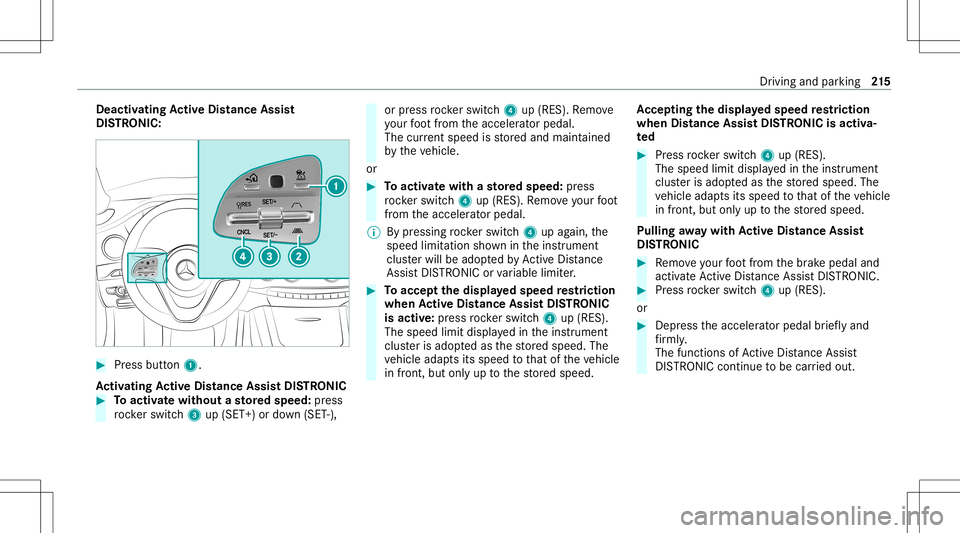
Press button 1.
Ac tiv atin gActive Distance AssistD ISTR ONIC #
Toactiv atew ithout astore ds peed :pr ess
ro ck er switc h3 up(SET +)or down (SET -), or
press rock er switc h4 up(RES). Remo ve
yo ur foot from thea cceler ator pedal.
The current spe edisstor ed and maint ained
by thev ehicle.
or #
Toactiv atew ithas tore ds peed :pr ess
ro ck er switc h4 up(RES). Remo veyour foot
fr om thea cceler ator pedal.
% Bypressing rock er switc h4 upagain, the
speed limitation showninthei nstrument
clus terw illb ea dopte dbyActiv eDista nce
Assi stDIS TRONI Corvariable limiter. #
Toacc eptthe display ed speed restriction
when Activ eD ista nce AssistD ISTR ON IC
is ac tiv e:press rock er switc h4 up(RES).
The speed limitdispla yedi nt he instrument
clus teri sa dopte dasthe stor ed speed. The
ve hicle adaptsits speed tothat ofthev ehicle
in front, butonlyuptot he stor ed speed. Ac
cep tingthe display ed speed restriction
when Distance AssistDISTR ON ICisact iva‐
te d #
Press rock er switc h4 up(RES).
The speed limitdispla yedi nt he instrument
clus teri sa dopte dasthe stor ed speed. The
ve hicle adaptsits speed tothat ofthev ehicle
in front, butonlyuptot he stor ed speed.
Pulling away wit hA ctive Distance Assist
DI ST RO NIC #
Remo veyour foot from theb rake pedal and
activ ateA ctiv eDista nce AssistDIS TRONI C. #
Press rock er switc h4 up(RES).
or #
Depr essthea cceler ator pedal brief lyand
fi rm ly.
The funct ionsofActiveD ista nce Assist
DIS TRONI Cconti nue tobe car ried out. Dr
iving andparking 21
5