phone MERCEDES-BENZ S-CLASS 2020 Service Manual
[x] Cancel search | Manufacturer: MERCEDES-BENZ, Model Year: 2020, Model line: S-CLASS, Model: MERCEDES-BENZ S-CLASS 2020Pages: 602, PDF Size: 54.61 MB
Page 360 of 602
If
Ac cid ent and Brea kdo wnManag eme ntis
cal ledv iathev oice contr olsystem and no
ser vice hasbeen activated, but thed atap rotec‐
tion queryh asbeen confirm ed, thef ollo wing
dat acan also becalled upfrom thev ehicle by
th eM ercedes- BenzCustomer Cent er:
R Current vehicle location
% Atthet ime ofgoing topress, this func tion is
te ch nica llynotyet available butcan besup‐
por tedi nt he futur e.
If th ed atap rotection prom pthas been reject ed
th ef ollo wing dataist ransm itted:
R Reason fort he initiation ofthec all
R Rejecti onofthed atap rotection prom pt Mer
cede smeconnec t No
teso nM ercedes meconnect
Mer cedes meconn ectprov ides thef ollo wing
ser vices:
R Accid ent and brea kdo wnmana gement (me
butt on) R
Concierg eService (whe nthe ser vice isacti‐
va ted), appointm entrequ ests or similar (me
butt on)
R Mer cedes- Benzemergency callsyst em (aut o‐
matic emergency calland SOS button)
The Mercede s-BenzCustomer Centerand the
Mer cedes-Ben zemer gency callcent erare availa‐
ble fory ou around thec lock.
The mebutt onand theS OS butt oncan befound
on thev ehicle's overhead control panel
(/ page355).
Yo uc an also calltheM ercedes- BenzCustomer
Cent erusi ng them ultimedia system
(/ page356).
Please note that Mer cedesme connectisa
Mer cedes-Ben zservic e.In emer gencie s,alwa ys
cal lthe national emergency service sfirst using
th es tandar dnation alemer gency service phone
num bers.Ine me rgenci es,youc an also usethe
Mer cedes-Ben zemer gency callsyst em
(/ page359).
Obser vethec onditions ofuse forM ercedes me
connect andother services. These canbe obt
ained intheM ercedes meportal:htt ps:/ /
me. secur e.mercedes -benz.com
Inf orma tion onMer cedes meconnect acci‐
dent andbreakd ownm anagemen t
The accident and brea kdo wnmanag eme ntcan
incl udet he follo wing functions:
R Supplem enttotheM ercedes- Benzemer‐
ge ncy callsyst em (/ page359)
If neces sary,thec ontact per son atthe
Mer cedes-Ben zemer gency callcent erfor‐
wa rdst he call toMer cedes meconn ect
br eakdo wnand accident management. For‐
wa rding thec allisho we vern otpossi bleinall
countr ies.
R Breakdo wnassi stanc ebyam echan icon
loc atio nand/ orthet ow ing away ofthev ehi‐
cle tothen ear esta uthor ized Mercedes- Benz
Cent er
Yo um aybe charge df or these services.
Mor einfor mation aboutMercedes meconnect
ser vices canbeobt ained intheM ercedes me
por tal:htt ps:/ /me .secure.m ercedes -benz.com 358
Multim ediasystem
Page 361 of 602
Data
trans ferre dd uring Mer cedes mecon‐
ne ct cal lservice s
Th ed atat ransf erredd uring aM ercedes mecon‐
nec tcall depends onther eason thec allwasini‐
tiat ed, whic hservice isselect edinthev oice
contr olsystem and whic hMercedes meconnect
ser vices area ctiv ated.
Whic hdatai st ransf erredf or thes ervices canbe
ta ke nf romt hecur rently valid term so fuse.
These canbeobt ained intheM ercedes mepor‐
ta l:htt ps:/ /me .secure.m ercedes -benz.com Mer
cedes-B enzemer gency callsystem Inf
orma tion ontheM ercedes- Benzemer‐
ge ncy callsystem
Yo ur vehicle iseq uipped withthe Mer cedes-Benz
emer gency callsyst em ("eCall ").This featur ecan
help save lives inthee vent ofan acciden t.eCall
in no wayreplaces assistance prov ided from
dialing 911.
The Mercedes-B enzemer gency callsyst em is
av ailable fora tlea st teny ear sstar ting from the
manuf acturingdate. Mer
cedes-Benz eCallonl yfunctions inareas
wher emobilephone coverage isavailable from
th ew ireless service prov ider s.Ins ufficie ntnet‐
wo rkcoverage from thew ireless service prov id‐
er sm ayresult inan emerg encycallnotb eing
tr ansmitt ed.
eCal lisas tandar dfeatur einy our Mer cedes-
Benz vehicle. Inorder tofunction asintended ,
th es ystemr elies onthet ransmission ofdat a
de tailed inthe" Mer cedes- Benzemergency call
sy stem datatransmiss ion"sectionthat follo ws
( / pag e361).
To disable eCall,acustomer mustvisit an
au thor ized Mercedes-B enzService depar tment
to deactiv atet he vehicle's communication mod‐
ule.
Deactiv ationofthis mod ulepreve nts the
act ivat ion ofanya nd allMer cedes mecon‐
nect services. Aftert he dea ctivatio no f
eC all,automati ceme rgency calland manua l
emer gency callwill notb ea vailab le.
The igniti onmus tbes witched onbef orea na uto‐
matic emergency callcan be made.
% eCallisa ctivateda tthe fact or y. %
eCall canbedeactiv ated byan aut hor ized
Mer cedes-Ben zdealer .Please note that in
th ee vent ow ner shipo fthe vehicle istrans‐
fe rred toano ther ow ner inits deacti vated
st at e, eCall willremain deactivated unles s
th en ew owner visits an author ized
Mer cedes-B enzdealer shiptoreact ivat et he
sy stem.
Ov ervie wo fthe Mer cedes-Be nzeme rgency
call system
eCall canhelp toreduce thet ime between an
acciden tand thea rrival of emer gency service s
at thes iteo fthe accident. Ithelps locatean
acciden tsitei np laces that ared ifficul tto
acc ess. However,eve nifa vehicle iseq uipped
wit he Cal l,th is does notm ean thes ystemi sO N.
As suc h,eCall doesnotreplace dialing911i nt he
eve ntofan acci dent.
The eme rgency callcan be made automatical ly
( / pag e360) ormanuall y(/pag e360).Onl y
mak eemer gency callsifyo uo rother sa rein
need ofrescue.
Onl ym akee merg ency callsifyo uo rother sa re
in need ofrescue. Donotm akea ne merg ency Multimedia
system 359
Page 362 of 602
cal
lint he eve ntofab reak do wn oras imilar sit‐
ua tio n.
Di spl aysi nt he media display :
SOS READY :eCa llav ailable
SO SN OTREA DY:t heignition isno to no reCall
is no ta vailable.
Dur ing anact ivee mer gency call,0053 appe ars
in thed ispla y.
Yo uc an find mor einfor ma tiono nthe regional
av ailabilit yofeCall at:h ttps ://ww w.me rced es-
ben z-mobi le.com /extra /eca ll/
% Ifth er ei sam alfunct ioninthee mer gency
cal lsyst em (e.g. amalfunct ionwiththe
speak er,m icrophone, airbag,SOS butt on), a
cor responding messageappea rsinthem ul‐
tifun ction displa yofthe instrument cluster.
Tr igg ering anaut omat icemer gency call
Re quirement s
R The ignit ionisswitc hedon.
R The star terb att eryi ss ufficie ntlyc har ged.
If re stra int systems suchasairbags orEmer ‐
ge ncy Tensi oni ng Device shave been activated af
te ra na ccide nt,theM ercedes- Benzemer‐
ge ncy callsystemm ayaut omaticall yinitiat ean
emer gency call.
The eme rgency callhas been made:
R Avoice connec tionismade totheM ercedes-
Benz emergency callcent er.
R Am essage witha cciden tdatai st ransm itted
to theM ercedes- Benzemergency callcent er.
The Mercedes-Be nzeme rgency callcent er
can trans mit thev ehicle position datatoo ne
of thee mer gency callcent ers.
The SOS button intheo verhead control panel
fl ashes untilth ee mer gency callisf inished.
It is no tp ossibl et oimmed iatelye nd anaut o‐
matic emergency call.
If no conne ctioncan be made tothee mer gency
ser vice seithe r,ac orresponding message
appea rsinthem edia displa y. #
Dialthe local emergency num bero ny our
mobile phone. If
an emer gency callhas been initiat ed:
R Remain inthev ehicle ifth er oad andtraffic
condi tions permit yout od osou ntil avoice
connec tionises tablished withthe emer‐
ge ncy callcent eroperator.
R Bas edon thec all, theo per ator decides
whe ther itis neces sarytoc allr escue teams
and/ orthep olice tothea cciden tsite.
R Ifno vehicle occupant answers, an ambu‐
lance issent tothev ehicle immediat ely.
Tr igg ering am anual emer gency call #
Press and hold theS OS butt onintheo ver‐
head controlpanel fora tlea st one second.
The emer gency callhas been ma de:
R Avoice connec tionismade totheM ercedes-
Benz emergency callcent er.
R Am essage witha cciden tdatai st ransm itted
to theM ercedes- Benzemergency callcent er.
The Mercedes-Be nzeme rgency callcent er
can trans mit thev ehicle position datatoo ne
of thee mer gency callcent ers. 36
0
Mu ltimed iasystem
Page 363 of 602
R
Remain inthev ehicle ifth er oad andtraf fic
condi tions permit yout od osou ntil avoice
connec tionises tablished withthe emer‐
ge ncy callcent erser vice prov ider .
R Ontheb asis ofthec all, thes ervice prov ider
decide swhether itis neces sarytoc allr es‐
cue teams and/ orthep olice tothea cciden t
sit e.
If no con nect ioncan bemade tothee mer gency
ser vice seithe r,ac orresponding message
appea rsinthem edia displa y. #
Dialthe local emergency num bero ny our
mobile phone.
Ending anunint entional emergency call #
Select 0076onthem ultifunc tionsteer ing
wheel. Depressbutt onfors eve rals eco nds.
Data transf eroftheM ercedes- Benzemer‐
ge ncy callsystem
In thee vent ofan automatic ormanua lemer‐
ge ncy callthe follo wing dataist ransmit ted, for
ex am ple:
R Vehicle's GPSposition data R
GPS position dataonthe route( afew
(hun dred meters)b efor et he incident)
R Direction oftra vel
R Vehicle identif ication number
R Vehicle drivet ype
R Number ofpeop lede term ined tobe inthe
ve hicle
R Whe ther Mer cedes meconnect isavailable
or not
R Whe ther thee mer gency callwas initia ted
manually oraut omatically
R Time ofthea cciden t
R Languag esetting on them ultimedia system
Dat atransmit tedi sv ehicle information. Fora ny
qu estion sabout thec ollect ion,useand shar ing
of thee Call system data,please contact MBU‐
SA 'sCus tomer Assis tance Center at800-F OR-
MER C.
Fo rC anada ,plea secont actMBC's Customer
Assis tance Center at1-800-38 7-0100.
Cu stomer requ ests forc overed information
should besubmitt edvia thes ame chann els. Fo
ra ccide ntclar ificatio npurposes ,the follo wing
measur escan betake nu ptoa nh our afte rt he
emer gency callhas been initia ted:
R The current vehicle position canbecalled up.
R Avoice connec tiontothev ehicle occupants
can beestablished Online
andInterne tfunctions Int
erne tc onnection Inf
ormat iononconnecting totheI nterne t &
WARNIN GRisk ofdist ra ction from infor‐
mati onsystems andcomm unication s
eq uipment
If yo uo per atei nfor mat ionand comm unic a‐
tio ne quipme ntintegratedi nt he vehicle
when driving, youw illbe distract edfrom the
tr af fics ituation. Thiscouldalso cau seyout o
lose control of thev ehicle. #
Onlyoper atet his equipme ntwhen the
tr af fics ituation per mits. Mu
ltimed iasystem 36
1
Page 368 of 602
Tu
neIn radio Cal
ling up Inte rn et Radio
Re quirement s:
R The Interne tR adio service isactiv ated.
R The datavolume isavailable.
De pen dingo nthe countr y,dat avolume may
need tobe pur chased.
R AfastInter ne tc onnection ford atat ransmis‐
sion free ofinterfere nce.
The service sarecou ntry-dependen t.
Fo rm orei nfor mation, consultanauthor ized
Mer cedes-B enzCent er.
Multimedia system:
4 Radio 5
Þ Radio Source #
Select TuneIn Radio.
The Interne tR adio displayappear s.The last
st atio nsetstar ts pla ying .
% The connectionq ualit ydepen dson thel ocal
mobile phonerecep tion. In
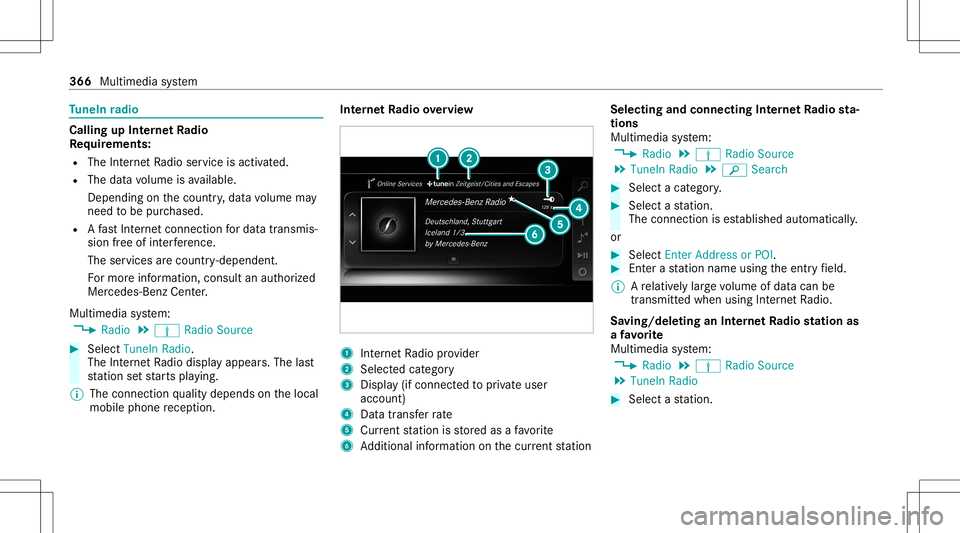
te rn et Radio overview 1
Interne tR adio prov ider
2 Selec tedc ategor y
3 Displa y(ifcon nectedt op riva te user
accoun t)
4 Datatransf errate
5 Current statio niss tore da saf avorite
6 Addition alinf ormation onthec urrent statio n Select
ingand connect ingInterne tR adio sta‐
tion s
Mul timedi asystem:
4 Radio 5
Þ Radio Source
5 TuneIn Radio5
00D3 Search #
Select acategor y. #
Select astatio n.
The connectionise stablish edaut omati cally.
or #
Select EnterAddress orPOI . #
Enteras tatio nn ameusingthe entr yfield.
% Arelativ elyl arge volume ofdat acan be
transmit tedw hen using Interne tR adio.
Sa ving/ deleting anInterne tR adio station as
af avo rite
Multimedia system:
4 Radio 5
Þ Radio Source
5 TuneIn Radio #
Select astatio n. 366
Multimed iasystem
Page 369 of 602
#
Press and hold thec ent ralc on trol elemen t
unt ilan audible signalsound s.
The ß symbol appearsbythe statio n
nam e. #
Select ß Favorites.
The listo fsave dfavo rite statio nsappear s.
or #
Creat eana ccoun tfor theo nline prov ider
(T uneIn radio) andthen log inon them ulti‐
media system.
Yo ur favo rite sa reimpor tedt ot he multimedia
sy stem.
Dele ting favo rite s #
Select ß Favorites. #
Select astatio n. #
Press and hold thec ent ralc on trol elemen t
unt ilan audible signalsound s.
The ß symbol bythes tatio nn amed isap‐
pear s. Se
tting Interne tR adio options
Multi media system:
4 Radio 5
Þ Radio Source
5 TuneIn Radio5
Z Option s
The follo wing option sareavailable:
R Select Stream:s electthe stre am qualit y.
R Login toTuneIn Account :log into your
Tu neIn user acco unt.
R Log OutofA ccou nt:logouto fyour TuneIn
us er acco unt. #
Select anoptio n. Med
ia Au
dio mode In
fo rm ation onthea udiomod e &
WARNIN GRisk ofdist ra ction whenhan‐
dl ing data stor ag em edia
If yo uh andle adatas torage medium while
dr iving, your att entio nisd iver tedf romt he tr
af ficc ondi tions .Thisc ouldalso cau seyou
to lose control of thev ehicle. #
Onlyhandle adatas tora ge medium
when thev ehicle isstatio nary. Pe
rm issible file systems:
R FAT32
R exFA T
R NTFS
Pe rm issible datastorage medium:
R SD card
R USB stor ag ed evice
R iPod ®
/iPhone ®
R MTP devices
R Blue tooth®
audio equipme nt
% Obse rvet he follo wing notes:
R The multimedia system suppor tsat otal
of up to50,000 files.
R Dat astorage media upto2T Ba resup ‐
por ted( 32‑ bitaddr essspace). Multimedia
system 36
7
Page 376 of 602
#
Todeac tivatef ull-sc reen mod e:press the
to uc hpad.
Cha nging videosettings
Mult imed iasystem:
4 Media 5
Z Option s
5 Picture Format
The follo wing picturef ormats area vailable:
R Automat ic
R 16:9
R 4:3
R Zoom #
Select apicturef ormat.
Ad jus tingthe brightne ssmanu ally
If th eAutom aticpictur eformat isswitc hedoff,
yo uc an adj ustthe brightness yourself . #
Select Bright ness. #
Adjus tthe brightness. Media
search St
arting them ediasear ch
Multimedia system:
4 Media 5
ª Search
Depen dingonthec onnect edmedia sourcesand
fi les, thef ollo wing categor iesarel iste d:
R Current TrackList
R Keyword Search
R Playlists
R Artists
R Albums
R Track s
R Folders
R Music Genres
R Year
R Composers
R Videos
R Podcast s(Apple ®
de vices)
R Audiobook s(Apple ®
de vices) #
Select acategor y. %
The categor iesarea vailable assoon asthe
ent irem edia content hasb eenr ead inand
analyzed . Media
Interface Inf
orma tion abou tthe Media Interface
Media Inte rface isau niversal interface fort he
con nection ofmobile audioequipm ent.Themul‐
time dias ystemh astwoU SBpor ts.The USB
por tsarel ocat edinthes towa ge com partment
unde rthe armr est.
Suppor tedd evices
The Med iaInt erface allo ws yout oc onnect the
fo llo wing datastorage media:
R iPod ®
R iPhone ®
R MP3 player
R USB devices
Fo rd etails and alisto fsuppor tedd evices, visit
our websit eathttp:// www .mercedes-
benz .com/c onnect.Follo wthe instructions in
th e" Media Interface" secti on. 37
4
Multimedia system
Page 380 of 602
Multimedia
system:
4 Media 5
à Media Sources
5 á Bluetoot hAudio
Au thorizing anew Bluetoo th®
audio devic e #
Select ¥. #
Select AddNew Bluetooth AudioDevice. #
Select StartSearch onSystem .
De tected audioe quipme ntisdispl ayed inthe
de vice list. #
Select aBluetooth®
audio devic e.
Au thor ization star ts.Ac odeisd ispla yedo n
th em ultimedia system and onthem obile
phone. #
Ifth ec odes arei dentic al,con firm onthe
audio equipme nt.
The audio equipme ntiscon necteda nd play‐
bac kstarts.
Select ingprev iousl yauthor ized Bluetooth®
audio equipment #
Select ¥. #
Select aBluetooth®
audio devic e. Es
tablis hingaconnect ionfrom theB lue‐
to oth®
audio equipment
The Blue tooth®
de vice name ofthem ultimedia
sy stem isMB BLUE TOOTH XXXXX. #
Select Search fromDevic e. #
Startt he aut hor ization onthea udio equip‐
ment (seemanuf acturer'soper ating instruc‐
tion s).
Ac ode isdispla yedo nthe multimedia sys‐
te ma ndonthea udio device. #
Conf irmo nbothd evices ifth ec odes are
identic al.
The audio equipment iscon nect edand play‐
bac kstarts.
Wi th some audioequipment, playbac kmustb e
initially star tedo nthe device itself sothat the
multime diasystem can playthe audio files.
% Device -specif icinf ormatio nonauthor izin g
and connectingB luetooth®
-cap ablemob ile
pho nes can beobt ained athttps ://
ww w.mer cedes-be nz-mobile.com/ orfrom
an author ized Mercedes-B enzCent er. Ac
tiv atin gBluetooth®
audio
Mul timedi asystem:
4 Media 5
à Media Sources #
Select áBluetoot hAudio.
The multimedia system activ ates thec onnec‐
te dB luetooth®
audio equipme nt.
Select ingthem ediapla yero nthe Blue tooth®
audio devic e
Mul timedi asystem:
4 Media 5
ª #
Select theBluetoot hAudio Players categor y.
If multip lemedia players arep resen tonthe
Blue tooth®
audio equipme ntalista ppear s. #
Select amediap laye r.
Pla ybac kstarts.
% Thef unction isno ts uppo rted byeve ry
mobil ephone. 37
8
Multimedia system
Page 381 of 602
Sear
ching foram usictrack on the Blue ‐
to oth®
audio devic e
Mul timedi asystem:
4 Media 5
à Media Sources
5 á Bluetoot hAudio #
Select ª. #
Select acategor y.
At rack list appear s. #
Select atrac k.
% The funct ionisonl yavailable when the
mobil ephone andthem edia players ele cted
on them obile phone suppor tthis function .
Switc hingBluetooth®
audio equipment via
NFC
Re quirement s:
R Obser vethen otes on using NFC
(/ page344).
R The Blue tooth®
audio overviewi sd ispla yed
( / pag e377). #
Ligh tlyp ress theN FCarea on them obile
phone (seethem anuf actur er'soper ating
ins truction s).
If th em obile phone hasalready been author‐
ized onthem ultimedia system asBlue tooth®
audio equipme nt,iti sn ow con nected.
If th em obile phone isaut hor ized onthem ul‐
timedia system asBlue tooth®
audio equip‐
men tfor thef irst time ,iti sc onne cted afte r
conf irming thei nstruction sfor them obile
phone (seethem anuf actur er'soper ating
ins truction s).
Disconnec tingBluetooth®
audio equipment
Mul timedi asystem:
4 Phone 5
á Media Sources #
Select thei symbol inthel ine ofthe
mobil ephone.
The disconnection ofthem obile phone take s
place without aconfirm atio npromp t.The
mob ilep hone remains author ized inthes ys‐
te m. St
arting cinema mode Mul
timedi asystem:
4 Media 5
à Media Sources
5 Loudspeaker AudioSource
In cinem amode, amedia sourcecon nect edto
th eR ear Seat Entertainm entSystem issimult a‐
neousl yplaye di nt he multimedia system. #
Select theR ear Seat Entertainm entSystem
de vice.
The media sourceisalso playedo nthe multi‐
media system. Ra
dio Sw
itchin gonthe radio Mu
ltimed iasystem:
4 Radio #
Alternativ ely:press the002A button.
The radio displa yappear s.Yo uw illhear the
las tstatio np laye do nthe lastfrequ ency
band select ed. Multimedia
system 37
9
Page 385 of 602
Multimedia
system:
4 Radio 5
Þ Radio Source
5 SiriusXM Radio5
Z Option s #
Select ServiceInformation.
The service information screen appear s
sho wing ther adio IDand thec urrent sub‐
scr iptio ns tatus . #
Establish atelephone connection . #
Followt he ser vice staf f's instruct ions.
The activatio nproce ss ma ytakeu ptoten
minut es.
% Youc an also have thes atellit eservice acti‐
va tedo nline .Tod oso,please visithttp://
www .siriusxm. com(USA)orhtt p://
www .siriusxm. ca(Canada).
Switc hingonsat ellit eradio
Multi media system:
4 Radio 5
Þ Radio Source #
Select SiriusXM Radio. Multimedia
system 383