display MERCEDES-BENZ S-CLASS 2020 Repair Manual
[x] Cancel search | Manufacturer: MERCEDES-BENZ, Model Year: 2020, Model line: S-CLASS, Model: MERCEDES-BENZ S-CLASS 2020Pages: 602, PDF Size: 54.61 MB
Page 335 of 602
Map
andcom pass Map
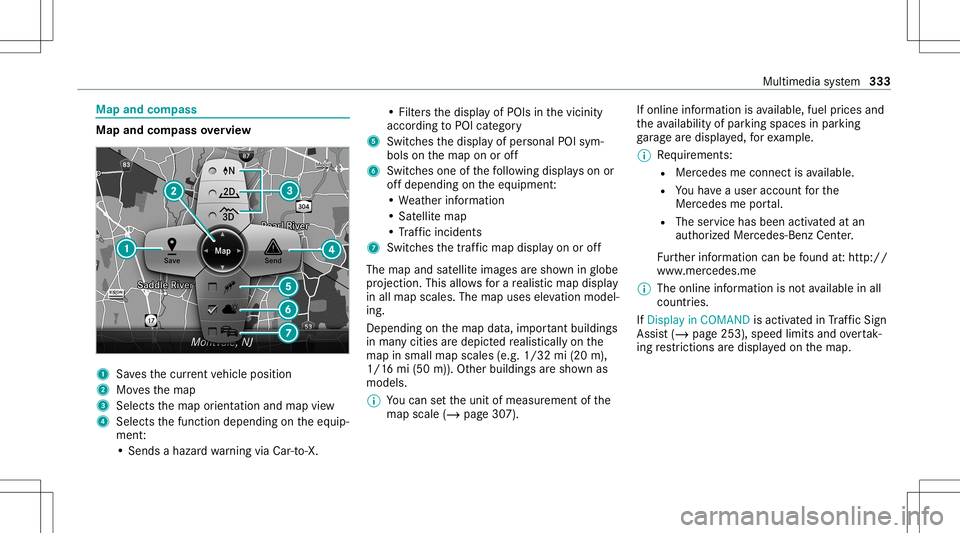
andcom pass overview 1
Savest he cur rent vehicle position
2 Movest he map
3 Selects them aporient ation andmap view
4 Select sthe function depending onthee quip‐
ment :
•S ends ahazar dwarning viaCar -to-X . •F
ilter st he displa yofPOIs inthev icinit y
accor dingtoPOI categor y
5 Switc hesthed ispla yofpersonal POIsym‐
bols onthem apon oroff
6 Switc hesone ofthef ollo wing displa yson or
of fd epending onthee quipment :
•W eather information
•S atellit em ap
•T raffic incide nts
7 Switchest he traffic map displa yono roff
The map andsatellit eimag esares hown inglobe
pr oject ion.This allowsforar ealis ticmap display
in all map scales. Themap uses elevatio nm odel‐
ing .
Dep endingonthem apdat a,im por tant buildi ngs
in ma nyciti esared epicted realis ticallyo nthe
map insmall mapscales (e.g.1/32 mi(20 m),
1/1 6mi(50 m)). Other buildings ares hown as
model s.
% Youc an setthe unit ofmeasur ementofthe
map scale (/page307). If
online information isavailable, fuelprice sand
th ea vailabilit yofparkin gspac esinpar king
ga rage ared ispla yed, fore xamp le.
% Requiremen ts:
R Mer cedes meconnectisa vailable.
R Youh ave auser accoun tfor the
Mer cedes meportal.
R The service hasbeen activat ed atan
aut hor ized Mercedes -Benz Cent er.
Fu rther information canbefound at:h ttp: //
www .merced es.me
% The onlinei nfor mat ionisno ta vailable inall
coun tries.
If Dis play inCOMA NDisact ivat ed inTraf ficS ign
Assi st(/ pag e253) ,speed limits andovertak‐
ing restrictions ared ispl ay ed on them ap. Multimedia
system 333
Page 351 of 602
Making
acall from thec all list
Multi media system:
4 Phone 5
ø Recent Calls #
Select anumber .
The callismade. Te
xt messag es Ov
ervie wo ftex tm essag efunctions
If th ec onnect edmobile phonesuppor tsthe
MAP Bluetooth®
pr ofile, thet extm essage func‐
tions canbeuse donthe multimedia system.
Yo uc an obt ain further information aboutset‐
ting sand suppor tedf unc tion sofBlue tooth®
-
cap ablemob ilep hones from anauthor ized
Mer cedes-B enzCent eror at:h ttps://
www .mercedes-ben z-mobile.com/
Some mobile phones requ iref urther settings
af te rb eing connect edtothem ultimedia system
(see manuf acturer'soper ating instruction s).
Ne wm essag esarei dentif iedbythei sym‐
bol inthem edia displa yand anaudible signal. Depen
dingonthem obile phone, them ultimedia
sy stem onlydispla ysnewi nco ming text mes ‐
sa ge so rthe 100n ewesttex tm essage s.
Conf iguringthet extm essag esdispla yed
Multimedia system:
4 Phone 5
Z Option s5
Text Message
5 Message Display #
Select p.
Am enu withthe follo wing option siss hown:
R AllMessage s
R New andUnread Message s
R New Message s
R Off (The text mes sage sa renotd ispla yed
aut omat ically.) #
Select anoption.
% The setting maynotbe acti veunt ilth e
mobil ephone isreconnect ed. Re
ading text messag es
Multimedia system:
4 Phone 5
i TextMessage
Re ading atextm essag e #
Select atextm essage .
The messag etextisd ispl ay ed.
Using ther ead -alo ud func tion #
Select atextm essage . #
Select Read Alou d.
The text mes sage isread aloud.
Com posingand send ingatextm essag e
Multimedia system:
4 Phone 5
i TextMessage #
Select WriteNewTextMessage.
Ad ding arecipient #
Select PresstoAdd Recipien t. #
Select thec ontact.
Di ctating text #
Select PresstoDictat e. Multimedia
system 34
9
Page 353 of 602
#
Ifyo uc anno tb es ureo fthis, stop the
ve hicle whilstpaying attention toroad
and trafficc ondi tions andoperate the
eq uipment withthe vehicle statio nary. Using
Mercedes-Benz Link,various functions
and select edmobile phoneappscanbetransf er‐
re dt ot he media display.
The Mercedes-B enzLink controlb ox supplemen ‐
ta ry equipment isrequ ired fort his. Youc an
obt ain this at an aut hor ized Mercedes -Benz Cen‐
te r.
% The Mercedes-B enzLink controlb ox uses
th eA ndroid oper ating system.
% The service prov ider isresponsible fort hese
apps andthes ervices andcontent conne c‐
te dt oit.
Connecting Mercedes-B enzLink withthe
mu ltim edia system #
Conn ecttheM ercedes- BenzLinkcontrol bo x
wit hthe ç USBportofthe multimedia
connect ionunit using asuitable connect ing
cable. %
Asuitable connect ingcable isavailable sep‐
ar atelya tana uthor izedM erced es-Ben zCen‐
te r.
Using Mercedes-Benz Link
Re quirement s:
R The Mercedes- BenzLink con trol bo xisc on‐
nec tedw itht he multimedia system using the
ç USBport.
Multimedi asyst em:
4 Connec t5
Mercedes- BenzLink #
Select MBLink.
The mobile phonefunctionsand apps are
av ailable andshownonthem edia displa y.
Yo uc an find mor einfor ma tionint he Mer cedes-
Benz Linkcontr olbo xo per ating instruction s.
Ending Mercedes-Benz Link
Multimedia system:
4 Connec t5
Mercedes- BenzLink #
Select Disconnect.
The connect ionisended. The
mobile phonecontinues tobe supplied
wit he lect ricity .
or #
Disco nnect thec onnect ingcable between
th eM ercedes- BenzLinkcontrol bo xa nd the
multime diasystem.
% Mer cedes- Benzrecomme ndsdisconnecti ng
th ec onnect ingcable onlyw hen thev ehicle
is statio nary. App
leCar Play® Ov
ervie wo fAppleCar Play® &
WARNIN GRisk ofdist ra ction from infor‐
mati onsystems andcomm unication s
eq uipment
If yo uo per atei nfor mat ionand comm unic a‐
tio ne quipme ntintegratedi nt he vehicle
when driving, youw illbe distract edfrom the
tr af fics ituation. Thiscouldalso cau seyout o
lose control of thev ehicle. Multimedia
system 35
1
Page 362 of 602
cal
lint he eve ntofab reak do wn oras imilar sit‐
ua tio n.
Di spl aysi nt he media display :
SOS READY :eCa llav ailable
SO SN OTREA DY:t heignition isno to no reCall
is no ta vailable.
Dur ing anact ivee mer gency call,0053 appe ars
in thed ispla y.
Yo uc an find mor einfor ma tiono nthe regional
av ailabilit yofeCall at:h ttps ://ww w.me rced es-
ben z-mobi le.com /extra /eca ll/
% Ifth er ei sam alfunct ioninthee mer gency
cal lsyst em (e.g. amalfunct ionwiththe
speak er,m icrophone, airbag,SOS butt on), a
cor responding messageappea rsinthem ul‐
tifun ction displa yofthe instrument cluster.
Tr igg ering anaut omat icemer gency call
Re quirement s
R The ignit ionisswitc hedon.
R The star terb att eryi ss ufficie ntlyc har ged.
If re stra int systems suchasairbags orEmer ‐
ge ncy Tensi oni ng Device shave been activated af
te ra na ccide nt,theM ercedes- Benzemer‐
ge ncy callsystemm ayaut omaticall yinitiat ean
emer gency call.
The eme rgency callhas been made:
R Avoice connec tionismade totheM ercedes-
Benz emergency callcent er.
R Am essage witha cciden tdatai st ransm itted
to theM ercedes- Benzemergency callcent er.
The Mercedes-Be nzeme rgency callcent er
can trans mit thev ehicle position datatoo ne
of thee mer gency callcent ers.
The SOS button intheo verhead control panel
fl ashes untilth ee mer gency callisf inished.
It is no tp ossibl et oimmed iatelye nd anaut o‐
matic emergency call.
If no conne ctioncan be made tothee mer gency
ser vice seithe r,ac orresponding message
appea rsinthem edia displa y. #
Dialthe local emergency num bero ny our
mobile phone. If
an emer gency callhas been initiat ed:
R Remain inthev ehicle ifth er oad andtraffic
condi tions permit yout od osou ntil avoice
connec tionises tablished withthe emer‐
ge ncy callcent eroperator.
R Bas edon thec all, theo per ator decides
whe ther itis neces sarytoc allr escue teams
and/ orthep olice tothea cciden tsite.
R Ifno vehicle occupant answers, an ambu‐
lance issent tothev ehicle immediat ely.
Tr igg ering am anual emer gency call #
Press and hold theS OS butt onintheo ver‐
head controlpanel fora tlea st one second.
The emer gency callhas been ma de:
R Avoice connec tionismade totheM ercedes-
Benz emergency callcent er.
R Am essage witha cciden tdatai st ransm itted
to theM ercedes- Benzemergency callcent er.
The Mercedes-Be nzeme rgency callcent er
can trans mit thev ehicle position datatoo ne
of thee mer gency callcent ers. 36
0
Mu ltimed iasystem
Page 368 of 602
Tu
neIn radio Cal
ling up Inte rn et Radio
Re quirement s:
R The Interne tR adio service isactiv ated.
R The datavolume isavailable.
De pen dingo nthe countr y,dat avolume may
need tobe pur chased.
R AfastInter ne tc onnection ford atat ransmis‐
sion free ofinterfere nce.
The service sarecou ntry-dependen t.
Fo rm orei nfor mation, consultanauthor ized
Mer cedes-B enzCent er.
Multimedia system:
4 Radio 5
Þ Radio Source #
Select TuneIn Radio.
The Interne tR adio displayappear s.The last
st atio nsetstar ts pla ying .
% The connectionq ualit ydepen dson thel ocal
mobile phonerecep tion. In
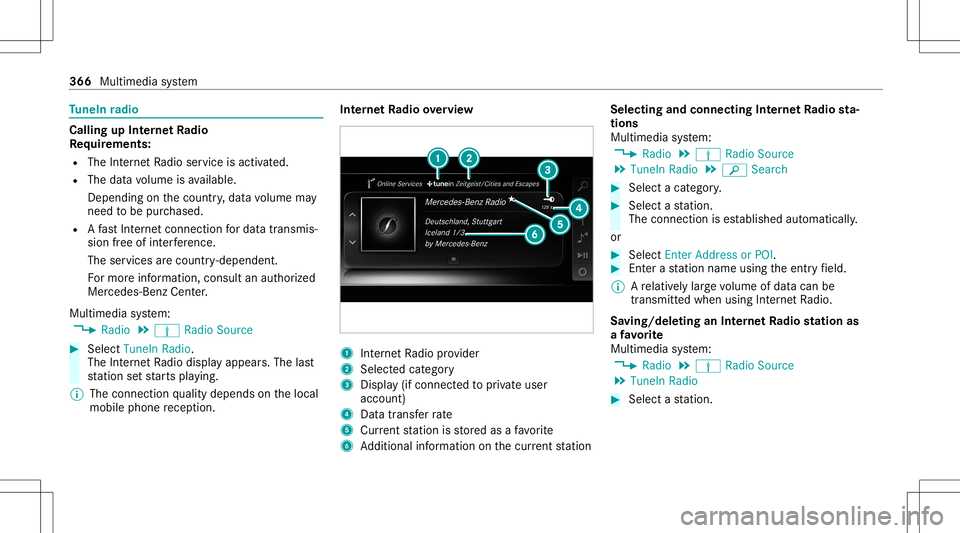
te rn et Radio overview 1
Interne tR adio prov ider
2 Selec tedc ategor y
3 Displa y(ifcon nectedt op riva te user
accoun t)
4 Datatransf errate
5 Current statio niss tore da saf avorite
6 Addition alinf ormation onthec urrent statio n Select
ingand connect ingInterne tR adio sta‐
tion s
Mul timedi asystem:
4 Radio 5
Þ Radio Source
5 TuneIn Radio5
00D3 Search #
Select acategor y. #
Select astatio n.
The connectionise stablish edaut omati cally.
or #
Select EnterAddress orPOI . #
Enteras tatio nn ameusingthe entr yfield.
% Arelativ elyl arge volume ofdat acan be
transmit tedw hen using Interne tR adio.
Sa ving/ deleting anInterne tR adio station as
af avo rite
Multimedia system:
4 Radio 5
Þ Radio Source
5 TuneIn Radio #
Select astatio n. 366
Multimed iasystem
Page 373 of 602
The
multimedia connection unitisfound inthe
st ow agec om par tment unde rthe armr esta nd
has twoU SBpor ts.
Depen dingonthev ehicle's equipment, addi‐
tional USBportscan befound inthes towa ge
com partment ofthec ent ercon sole andinthe
re ar passe nger com partment . #
Con nectthe USB device totheU SBpor t.
Pla yable music files arep laye db acko nlyi f
th ec orresponding mediadisplayisa ctiv ated.
% Use theU SBpor tidentif iedbyç touse
Ap ple CarPla y™and Android Auto.
% Dep endingonthev ehicle equipment ther ei s
an additional USBportint he rear passe nger
com partment .Ports that arel abeled witha
bat tery symbol canonly beused tocharge
USB devices.
Selec tingatrack inthem ediapla yba ck
Multimedia system:
4 Media
Selecting atrack by skipping toatrack #
Toskip backwards orforw ards toa
tr ac k: navig ateu po rdow n. Sel
ecting atrack usin gthe cur rent trac kl ist #
Select 00D3. #
Select Current TrackList. #
Select atrack .
Selec tingplaybac koptions
Multimedia system:
4 Media 5
Z Option s
Pla ying backsimilar trac ks #
Select Play Simi larT racks.
At rack list wit hs imilar trac ks iscreat edand
pla yedb ack.
Pla ybac kmode #
Select Random Mode-Current Playlist.
The current trac kl isti sp laye di nr and om
or der . #
Selec tRand omMode-Current Medium.
All trac ks on thea ctiv edatas torage medium
ar ep laye di nr and om order . #
Selec tNo rma lTrack Sequ ence.
The current trac kl isti sp laye di nt he order it
appear sonthe dat astora ge medium. Contr
olling media playbac k
Multimedia system:
4 Media 5
Y Playback Control
Ab arwit hp laybac kcontrols issho wn. #
Topause playbac k:sel ect and conf irm
Y with thec ent ralc on trol elemen t.
The 00CF symbol isdispla yed. #
Toresume playbac k:select andconf irm
Y again withthe cent ralc on trol elemen t.
The 00D0 symbol isdispla yed.
To fast forw ard/r ewind #
Move00CF onthet imelin e.
To hide theplaybac kcontrols #
Press the0038 button. Vi
deo mode Sw
itchin gtov ideo mode
Multimedia system:
4 Media 5
à Media Sources #
Select adatas torage medium. Multimedia
system 37
1
Page 374 of 602
#
Sea rchf or and select videofiles orpla ylists
wit hvideo files.
Pla yable video files arep laye db ack.
The multimedia system suppor tsthef ollo wing
fo rm ats :
R MPE G
R AVI,DivX, MKV
R MP4, M4V
R WMV
% Ifth ev ehicle istra veling faster than 3m ph
(5 km/ h)thev ideo imageish idden from the
dr iver .Ifa vailable, thec hannel andprogr am
inf ormation iscontin uously displayed.
Due tothel arge variet yo favailable video
fi les rega rding encoder s,sam pling ratesa nd
dat atransf errates, pla ybac kcanno tbeg uar‐
ant eed.
Vi deos uptoFullHD (1920 x1080 )are sup‐
por ted.
Cop y-pr otect edvideo files orDRM (Digital
Rights Management)enc rypte dfiles cannot
be playedb ack. 37
2
Multimedia system
Page 384 of 602
#
Select Move Highlighte dStati on. #
Select amemo ryprese t.
Dele ting station s: #
Highl ightaprese te ntr yand navig atet ot he
lef t. #
Select Delete HighlightedStation. #
Selec tYes. Ta
gging musictrac ks Multimedia
system:
4 Radio
If ra dio statio nsprov ide ther ele vant informati on,
th is func tion allowsyout ot rans feri nfor mation
on them usic trac kc urrently play ing toan
App le®
de vic e.Youc an then pur chase thea udio
fi le from thei Tune sS tore ®
. #
Select ♫→Tag This Song.
The trac ki nfor mation issave d. Ac
tiv atin g/deac tivatin gradio text Multimedia
system:
4 Radio 5
Z Option s
5 Display RadioTextInformation #
Activate0073 ordeacti vate 0053 thef unc tion . Sat
ellit eradio Inf
ormation onthes atellit eradio
SIRIUS XM®
sat elliteradio offers mor ethan 175
digit al-quality radio chann elsprov iding 100%
commer cial-free musi c,spor ts,news and enter‐
ta inm ent,for exam ple. SIRIUS XMsatellit eradio
em ploysaflee tofhigh-per form anc esatellit esto
br oadcas taround thec lockthrough outtheU SA
and Canada. Thesatellit eradio program isavail‐
able foram onthlyf ee. Information aboutthis
can beobt ained from aSirius XM®
Ser vice Cen‐
te ra nd athttp://www .siriusxm.com (USA)or
http://www .siriusxm.ca (Canada ).
% Sirius ,XMa ndallrelat ed mar ksand logos
ar et rademar ksofSir ius XM Radio Inc.and
its subsidiar ies.Allother mar ks,c hannel names
andlogosarethep roper tyof their
re spectiv eowne rs.A llrights reser ved.
Sat ellit eradio restriction s
Sat ellit eradio mode maybetem por arily una vail‐
able orinterru pte dfor av ariety of reason s.
Thes einc lude environ men talo rtopogr aphical
condition sbeyond thec ontrol of Mer cedes- Benz
US A,LLC. Thus, operation atcer tain locat ions
ma ynotbe possible .
Re gis tering sat ellit eradio
Re quirement s:
R Satellit eradio equipme nt
R Regis tration withas atellit eradio prov ider
R Ifre gis tration isno tincluded whenpurchas‐
ing thes ystem, your credit cardd etails will
be requ ired toact ivat ey our account 382
Multimedia system
Page 393 of 602
Re
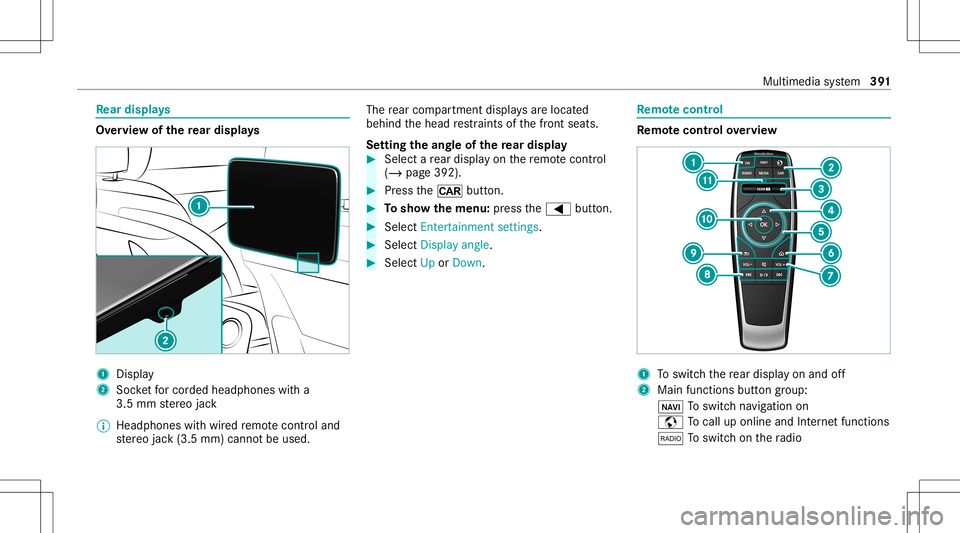
ar displa ys Ov
ervie wo fthe rear displa ys 1
Display
2 Socketfor cor ded headphones witha
3.5 mm ster eo jack
% Headphones withw ired remo tecontr oland
st er eo jack(3.5 mm) cannotbe used. The
rear com partment displa ysarel oc ated
behin dthe head restra int so fthe front seats.
Se tting thea ngleof ther ear disp lay #
Select ar ear displ ayon ther emo tecontr ol
(/ page 392) . #
Press the/ button. #
Tosho wthemen u:press the0059 button. #
Select Entert ainment settings . #
Select Display angle. #
Select UporDown. Re
mo tecont rol Re
mo tecont rolo verview 1
Toswitc hthe rear displa yona nd off
2 Main function sbutton grou p:
00CB Toswitc hnavigation on
z Tocal lupo nline and Interne tfuncti ons
002A Toswitc honthe radio Multimedia
system 39
1
Page 400 of 602
Dep
endingonthes etting, thep rogram will run
fo rb etwe en 15 and 30min utes. Ad
jus tingthe ambi entlighti ng inthe rear
passe nger comp artment Re
ar Seat Entertainm entSystem:
4 System 5
Ambien tLight #
Chang ethe settings.
% Forinfor mation aboutadju sting thea mbient
lighting (/page156). Ac
tiv atin g/deac tivatin gthe pane lheatin g Re
ar Seat Entertainm entSystem:
4 System 5
b Panel Heatin g #
Activateo rdeacti vate function. Ad
jus tingthe entertainme ntsystem settings Re
ar Seat Entertainm entSystem:
4 System 5
Entert ainment Systemsettings
Se tting thed isplayb right ness #
Sele ctDis play settings. #
Sele ctBright ness. #
Adjus tthe brightness.
Ti lting thed isplay #
Sele ctDis play settings. #
Sele ctDis play angle . #
Tilt th ed ispla yUp orDown.
Se tting thed isplayd esig n #
Sele ctDis play settings. #
Sele ctDay Design, Night DesignorAut o-
mat ic.
Ad jus tingthe equal izer #
Select Aud iosetting s. #
Select Equalize r. #
Setthe equalizer . %
Forfurther information aboutthee qualizer
(/ page387).
Ac tiv atin gaudi ooncabin #
Select Aud iosetti ngs. #
Select Switch the speake rsource onoroff.
If th ef unc tion isswitc hedon,thec urrent
med iasou rcei so utput viathev ehicle's
speak ers. Se
tting thel angu age Re
ar Seat Entertainm entSystem:
4 System #
Select Language . #
Setthe desir edlanguag e. Switc
hingofft he display Re
ar Seat Entertainm entSystem:
4 System #
Select Display Off.
The displa yiss witc hed off. 398
Multimedia system