lights MERCEDES-BENZ S CLASS 2022 Owner's Manual
[x] Cancel search | Manufacturer: MERCEDES-BENZ, Model Year: 2022, Model line: S CLASS, Model: MERCEDES-BENZ S CLASS 2022Pages: 610, PDF Size: 19.8 MB
Page 238 of 610
R
Ifapedes trian orcyclis tis no tde tected as
su ch ,e.g. due tospecial clothing orother
object s.
R Ifth edr iver's seat beltisno tfa stened.
R Oncurveswit hatight radius.
% The ActiveBr ak eAssi stsensor sadjus taut o‐
matically whileacer tain dis tance isbe ing
dr iven afte rth eve hicle hasbeen delivered.
Ac tiveBr ak eAssi stisuna vailable oronl y
par tiall yav ailable during thete ac h-in proc‐
ess.
Se tting Activ eBr ak eAs sist
Re quirement s:
R The ignit ionisswitc hedon.
Multime diasystem:
4 © 5
Set ting s5
Assist ance
5 Avoid collision 5
Act ive Brak eAssist #
Select thedesir edsetting.
The setting isretained when theengine is
ne xt star ted. Deactiv
atingActiv eBr ak eAs sist
% Itis recomme ndedthat youalw ayslea ve
Ac tiveBr ak eAssi stact ivat ed. #
Select Off.
The distance warning func tion,th eaut ono‐
mous braking function andtheEv asiv eSt eer‐
ing Assis tar edeactiv ated.
When theengine isne xt star ted, themedium
se tting isaut omaticall yselect ed.
% IfAc tiveBr ak eAssi stisdeact ivat ed, the
00D4 symbol appearsinthest atus barofthe
multifu nctiondisplay. Tr
af fic Sign Assis t Fu
nction ofTraf fic Sign Assis t
Tr af fic Sign Assistdetects traf fic sig ns with the
multifu nctioncameraand comparesthis wit h
inf ormatio nin thedigit alna vig ation map.It
assis tsyouby displa yingdetected spe edlimits
and overtakin gre strictions onthedr iver displa y
and ontheHead-up Display.The system can
issue awa rning when youexc eed themaximum
per missible speed. In
some countries, thesy stem can prov ide you
wit hfur ther func tionsand canwarnyouwhen
yo uar eappr oachingpedes trian cross ingsor
when youar eabout todrive pas tst op signs or
re dlights unintentionall y.
The camer aalso detects and analyzes traf fic
signs withare striction indicated byan addit ional
sign (e.g.when wet).
Tr af fic Sign Assistonl yvisualizes selectedsigns
on thedr iver displa y.Ac tua ltr af fic sig ns and
spe edlimits have prior ity ove rtr af fic sig ns and
spe edlimits shownonthedr iver displa y.
Als oob ser vethefo llo wing informatio n:
R Selec ta speed adaptedto thetraf fic, sur‐
ro und ingsand weather condition s
R Obse rveactual traffic sign s
R Obser veapplic abletraffic ru les and regula‐
tions
Obser vetheno teson driving systems andyour
re sponsibili ty;yo uma yot her wise failto recog‐
nize dangers(/ page 210). 23
6
Driving and parking
Page 240 of 610
pur
pose, information from thedigit alroad map
of thena vig ation system isused. Depen dingon
th ecur rent situa tionand theassumed route, the
displa ymessag eis sho wnupto380 yds(350 m)
in adv ance. TheAssista ncemenu canalso dis‐
pla ya dyna micvisualizatio nof thespeed limits
ahead.
If Traf fic Sign Assistcanno tde term ine thecur‐
re ntly applica ble ma ximu mperm issible speed
(e.g. duetomissi ngsigns), thefo llo wing displa y
appear son thedr iver displa y: Tr
af fic Sign Assistisno tav ailable inall coun ‐
tr ies. Ifth eve hicle isin acountr ywher eTr af fic
Sig nAssi stisno tsuppor ted, this isdispla yed
continu ously .
% Also observe theinf ormation ondispla ymes‐
sag esinTraf fic Sign Assist(/ pag e495 ). Wa
rning when thema xim um permis sible
speed isexc eeded
The system can warnyouif yo uunin tentio nally
exc eed themaximum permissible speed.Todo
th is, youcan spec ifyinthemultimedia system
by howmuc hth emaximum permissible speed
can beexc eeded beforeawa rning isissued. You
can setth ewa rning tovisu alonly (the traf fic
sign flashes thre etimes onthedr iver displa y)or
visual andacous tic,including awa rning tone.
Ad diti onalfunc tions ofTraf fic Sign Assis t
(count ry-spec ific )
Wa rning forno -en try sign s:Traf fic Sign Assist
can warnyouif yo udr ive th ewr ong waydo wn a
sec tion ofroad, forex am ple onfree wa yacc ess
ro ads orone-w aystre ets.
Wa rning atpedes trian crossings: Ifyo u
appr oachpedes trian cross ings,prov ided that
pedes trians arein thedang erzon eor aremo ving
to wa rdsit, Traf fic Sign Assistcan warnyouup to
a spee dof appr oximat ely44 mph(70 km/h).
Wa rning atstop signs: Traf fic Sign Assistcan
wa rnyouup toaspee dof appr oximat ely44 mph
(70 km/ h)ifyo uar eabout todrive pas ta st op sign
unint ention ally.Fo rth is to be possible, the
signs mustbe clear ,fo rex am ple ifth esy stem
de tects mor eth an onestop sign, orast op sign
can beconf irmed using thedigit alna vig ation
map. Nowarning can beissued ifse veraldif fer‐
ent signs arede tected.
Wa rning atredlights: Traf fic Sign Assistcan
wa rnyouup toaspee dof appr oximat ely44 mph
(70 km/ h)ifyo uar eabout todrive th ro ugh are d
light unintentio nally.
The follo wing condition smus tbe fulf illed:
R Severaltr af fic lights have been detected.
R Alltraf fic lights detected arere d.
R Atleas tone ofthere dtraf fic lights detected
is on thefront passeng erside beside the
ve hicle's ownlane.
R The traf fic lights arein thefo llo wing
seq uenc e(fr om topto bottom): red, yello w,
gr ee n. 23
8
Drivin gand parking
Page 241 of 610
%
Ifth efunc tion isavailable, youcan activat e
or deac tivateth ewa rnings atpedes trian
cr ossin gs,stop signs andredlights inthe
Tr af fic Sign Assistmenu under Further Warn-
ings (/page239) .
Sy stem limit s
The system maybe impair edorma yno tfunc tion
par ticular lyin thefo llo wing situat ions:
R Ifvisibilit yis poor ,e.g. due toinsuf ficie ntillu ‐
mina tionofthero ad, high lyvariable shade
con dition s,rain, sno w,fog, swir ling dustor
hea vyspr ay.
R Ifth er eis glar e, e.g .fr om oncom ingtraffic,
di re ct sunli ght orreflect ions.
R Ifth ewindshield inthear ea ofthemultifunc ‐
tion camer ais dir ty,or ifth ecamer ais fog‐
ge dup, damag edorcovered.
R Iftraf fic sig ns aredifficult todetect, e.g.
beca useth ey aredir ty,co vered, faded, cov‐
er ed withice, damag ed,badly position ed,
poor lylit or twis ted. R
Activetraf fic sig ns with LED displ aysma yno t
be detected cor rectly oratalldu eto tech ni‐
cal fact or s, su ch astransm issionfreq uenc y.
R Ifth einf ormation onthena vig ation system's
digit almap isincor rect, incom plet eor out of
dat e.
R Ifsigns orthero ad layo ut isambig uous,e.g.
traf fic sig ns inroadw orks ,at exits and
ra mp s,in neighbor inglanes orpar alle lro ads.
R Ifsign sdo notcon form tothest andar d.
R Ifsign sor road layo uts arespec ific to the
cou ntryand devia tefrom thero uteguidan ce
in thena vig ation system, e.g.ator beyond
cons tructi onsite s.
R Aftershar ptur ns and tight curves, when traf‐
fi c sig ns areou tsid eth ecamer a'sfield of
vision.
R Ifyo uove rtak eve hicles withtraf fic sig ns
whi chareaf fixe dor att ached tothem. Se
tting Traf fic Sign Assis t
Mult imed iasystem:
4 © 5
Set ting s5
Assist ance
5 Assist ance 5
Traffic SignAssist
Ac tiv atin gor deac tivatin gthe speedwarning #
Activateor deacti vate Spee dLim itWa rning .
Se tting thetype ofwa rning #
Selec t´ next to Spee dLim itWa rning. #
Select Visual& Aud ible or Vis ual.
Se tting thewarning threshold
This value determ ines thespeed atwhic ha
wa rning isissued whenexceeded. #
Setth edesir edspeed underWarnin gThresh-
old.
Ac tiv atin gor deac tivatin gfur ther functions
of Traf fic Sign Assis t #
Activateor deacti vate Furthe rWa rnings .
The available function sar eact ivat ed ordeac ‐
tiv ated. Dr
ivin gand parking239
Page 242 of 610
Se
tting thety pe ofwa rning forfur ther func‐
tio ns #
Select ´ next to Furthe rWa rnings . #
Sele ctVis ual& Aud ibleor Vis ual. Tr
af fic ligh tvie w Inf
orma tion abou tth etraf fic ligh tvie w
The traffic light viewsu ppo rts th edr iver when
wa itin gin front ofare dlight bydispla yingthe
came raimag eon thecent raldispla y.The cam‐
er aimag eis displa yedwhen thedr iver isthefirs t
ve hicle infront ofthere dlight andfaded out
when theve hicle drives off.
Displa yingtraf fic ligh tvie w
Re quirement s:
R The Traff icLight Viewoption isswitc hedon.
R Atraf fic light viewisavailable.
Mult imed iasystem:
4 © 5
Set ting s5
Assist ance
5 Assist ance 5
Traffic LightView
% This function isno tav ailable inall coun tries. If
th eve hicle isin firs tpo sitio nat atraf fic light,
th ecamer aimag ewit htraf fic light viewissho wn
in thecent raldispla y.
When theve hicle pullsaway,th ecamer aimag e
is faded out. #
ActivateD ordeacti vate E Traffic
Light View.
Using other availab lefuncti ons #
Select Z. #
Select OnReq uestor Automa tic.
If On Req uestis setand atraf fic light viewis
av ailable, theTap Here forTraffic LightView
messag eis displa yed. The camera imageis
sho wnafte rconf irmation ofthemessag e.
When Autom aticisset,th ecamer aimag eis
aut omaticall ydispla yedwhen thetraf fic light
vie wisavailable. Ov
ervie wof thetraf fic ligh tda ta ser vice &
WARNIN GRisk ofan acci dent orinju ry
due todis traction, incorrect ormissing
dat a
The traf fic light informati ondispl ayisan aid
and cannotre place theobser vatio nof the
act ual drivin gsit uatio n. #
Keep theactual traffic situat ioncon‐
st ant lyin view when approachingatraf‐
fi c light and whench ang inglane s. #
Avoid prolong edviewing oftheIns tru‐
ment Displa yand Head-up Display. The
traf fic lights andcountdo wnofremaini ng
time 1until thene xt green phase aresho wnin
th edr iver displa y. 24
0
Driving and parking
Page 290 of 610
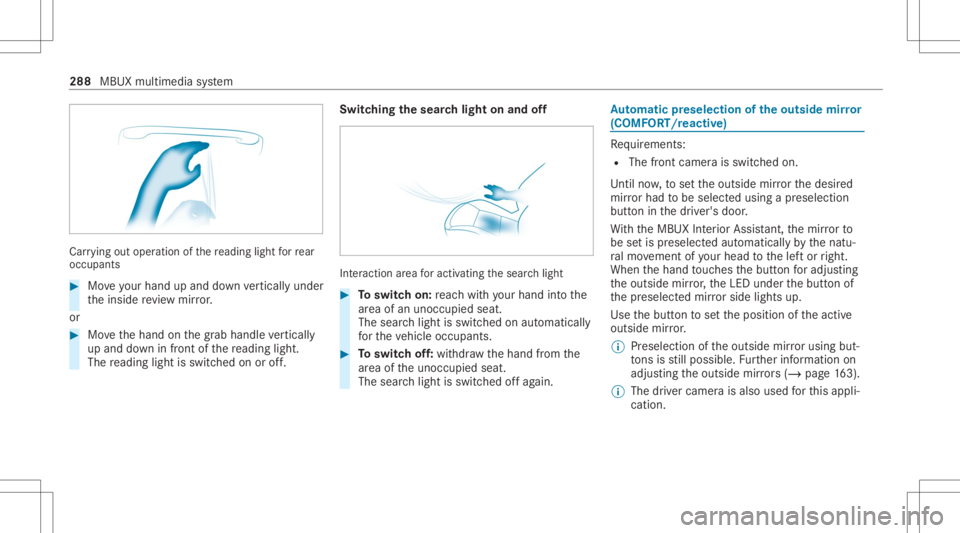
Car
rying out oper ation ofthere ading lightforre ar
occ upant s #
Moveyour han dup and down verticall yunder
th einside revie wmir ror.
or #
Movethehand onthegr ab handle verticall y
up and down infront ofthere adin glight .
The readin glight isswit ched on oroff. Switc
hingthesear chlight onand off Int
eract ion area foractiv ating thesear chlight #
Toswitc hon: reac hwit hyo ur han dint oth e
ar ea ofan uno ccupied seat.
The sear chlight isswitc hedonaut omat ically
fo rth eve hicle occupants. #
Toswitc hof f:wit hdr aw thehand from the
ar ea oftheunocc upied seat.
The sear chlight isswitc hedoffag ain. Au
tomatic pres elec tio nof the outsi de mir ror
(COMF ORT/r eact ive) Re
quiremen ts:
R The front camera isswitc hedon.
Unti lno w, tosetth eoutside mirrorth edesir ed
mir rorhad tobe select edusing apr eselect ion
butt oninthedr iver's door .
Wi th theMBUX Interior Assis tant, themir rorto
be setis preselect edaut omatic allybythenatu‐
ra lmo vement ofyour head tothelef tor right.
When thehand touc hes thebutt onforadju sting
th eoutside mirror,th eLED under thebutt onof
th epr eselect edmir rorside lights up.
Use thebutt ontosetth eposition oftheactiv e
outside mirror.
% Preselection oftheoutside mirrorusi ng but‐
to ns isstill possible .Fu rther information on
adjus tingtheoutside mirrors (/ pag e16 3).
% Thedr iver came raisalso used forth is appli‐
cat ion. 288
MBUXmultim ediasystem
Page 306 of 610
Ac
tiv atin gaco mmut errout e
% Ause rpr ofile has been creat edand Allow
Destinatio nSugge stions hasbeen activated
in theuser option s(/ page292). Route
guidan ceisno tact ive. #
Select Z inthena vig ation menu. #
Select Route. #
ActivateActiv ateCommu terRoute .
The navig ation system automaticall yde tects
th at theve hicle ison acommut erroute.
Fo rth edail ycomm uter route, traf fic inci ‐
dents onthero utear ealso repor tedwhen
dr iving without activero uteguidan ce. #
Toselect ordele teaco mmut errout e:
sele ctStart or00A4.
Av oiding orusing routesec tions ,e.g. high‐
wa ysorferries #
Selec tZ inthena vig ation menu. #
Select Route. #
Select AvoidOption s. #
Activateor deacti vate theavo idop tion . Ac
tiv atin gro ut eguidanc ewith augment ed
re ality #
Tapon ¨ inthemap.
The indicat orlam plights upblue.
The ARcamer a'svideo imageis sho wninthe
centr aldispl aybef oreatur ning maneuv er.
The video imageincludes additional informa‐
tion . #
Toretur nto thena vig ation map:tap on
¨ again.
The indicat orlam pis no tlit.
Sho wing proper tyinf ormat ionforro uteguid‐
ance withaugment edreality
Ro ad guidan cewithaugmen tedre alit yis act iva‐
te d. #
Select Zinthena vig ation menu. #
Select View. #
Select Augmen tedReality Video. #
ActivateStree tNa mes andHouseNumbe rs.
Dur ing routeguidan ce,theactiv ated option s
ar esho wnasadditional information inthe
came raimag e. Using
mapfunct ions Multim
ediasystem:
4 © 5
Navigation
Incr easing mapscale #
When themap issho wn, taptwice quickl y
wit hone fing er on thecent raldispla y.
Decr easing mapsca le #
Whe nth emap isdispla yed, tapth ecent ral
displa ywit htw ofing ers.
Mo ving the map #
Whe nth emap isdispla yed, swipe inany
dir ect ion withone fing er on thecent raldis‐
pla y. #
Torese tth ema pto the current vehicl e
posi tion: select\ Center . 30
4
MBUX multimedi asy stem
Page 503 of 610
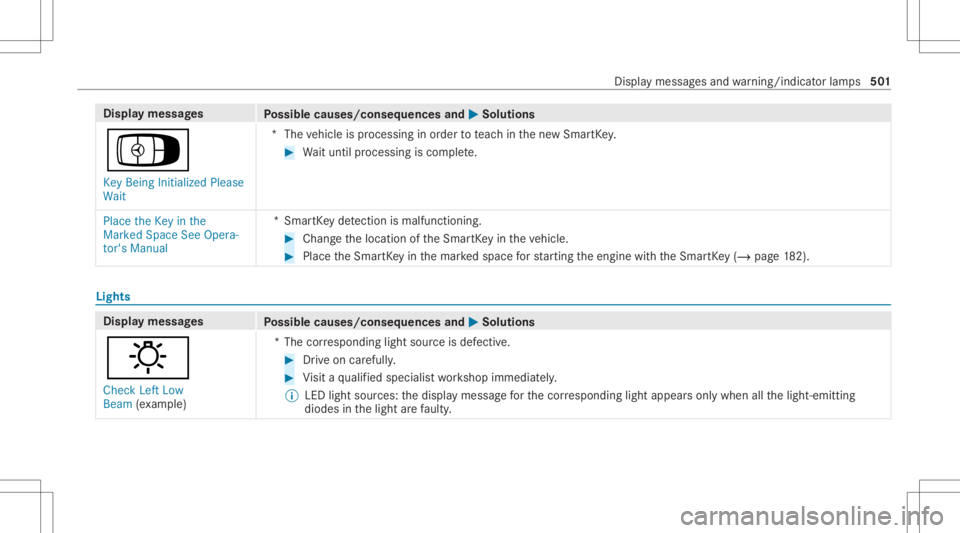
Disp
laymes sages
Possible causes/conseq uencesand0050 0050
Solutions
Á Key Being Initialized Please
Wait *T
hevehicle isprocessing inorder toteac hin thene wSmar tKey . #
Waitunt ilpr oces sing iscom plete.
Place theKey inthe
Marked SpaceSeeOpera-
tor's Manual *S
mar tKey detection ismal functi oning. #
Chang eth elocation oftheSmar tKey intheve hicle. #
Place theSmar tKey inthemar kedspace forst ar tin gth eengine withth eSmar tKey (/ pag e18 2). Lig
hts Dis
playmess ages
Possible causes/conseq uencesand0050 0050
Solutions
: Check LeftLow
Beam (exa mp le) *T
hecor responding lightsourceisdef ectiv e. #
Drive on car efully . #
Visit aqu alif ied spec ialistwo rkshop immediat ely.
% LED lightsour ces: thedispla ymessag efo rth ecor responding lightappea rsonl ywhen allthelight- emitt ing
diodes inthelight arefa ulty . Dis
playmes sagesand warning/ indic ator lam ps 50
1
Page 504 of 610
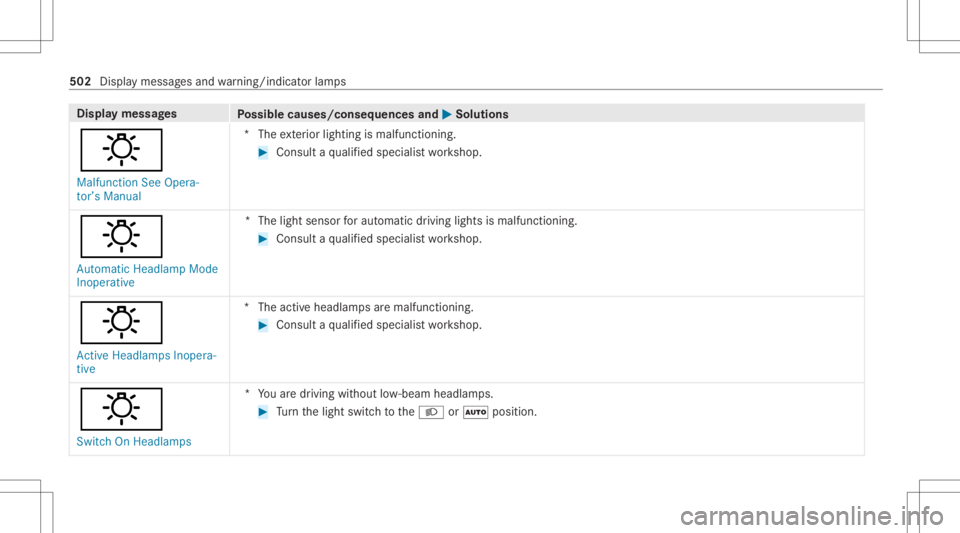
Disp
laymes sages
Possible causes/conseq uencesand0050 0050
Solutions
: Malfunct ionSee Opera-
tor’s Manual *T
heexterior lighting ismalfunct ioning. #
Consult aqu alif ied spec ialistwo rkshop.
: Automatic HeadlampMode
Inoperative *T
helight sensor forau tomatic driving lightsismalfu nctioning. #
Consu ltaqu alif ied spec ialistwo rkshop.
: Act ive Headla mpsInopera-
tive *T
heactiv eheadla mpsar emalfunctioning. #
Consult aqu alif ied spec ialistwo rkshop.
: Switch OnHeadla mps *Y
ouaredr iving without low- beam headlam ps. #
Turn thelight switc hto the0058 or0058 position . 502
Displa ymessag esand warning/ indic ator lam ps
Page 505 of 610
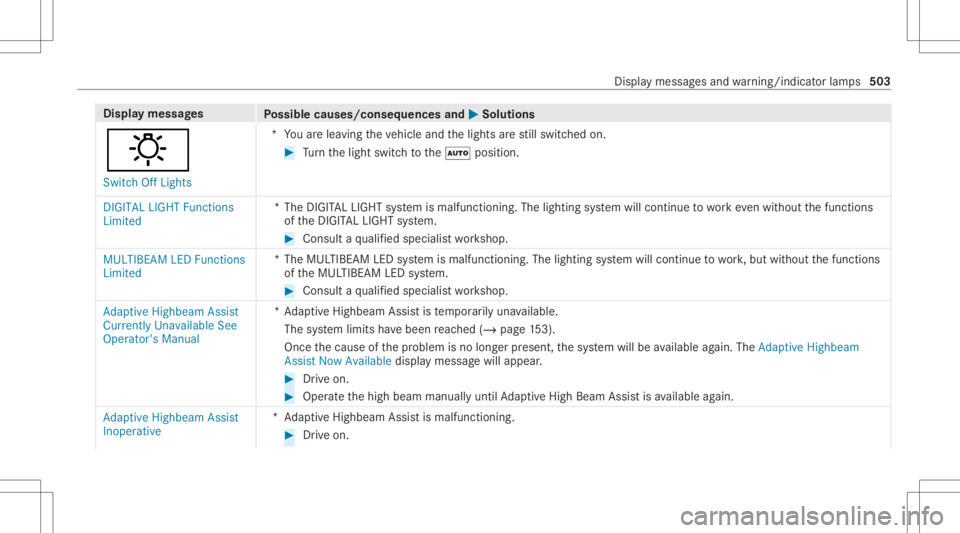
Disp
laymes sages
Possible causes/conseq uencesand0050 0050
Solutions
: Switc hOff Lights *Y
ouarelea ving theve hicle andthelights arest ill switc hedon. #
Turn thelight switc hto the0058 position .
DIGITA LLIGHT Functions
Limited *T
heDIGIT ALLIGHT system ismalfunct ioning.Thelighting system will continue towo rkeve nwi thout thefunc tions
of theDIGIT ALLIGHT system. #
Consult aqu alif ied spec ialistwo rkshop.
MULTIBEA MLED Funct ions
Limited *T
heMUL TIBEA MLED system ismalfunct ioning.Thelighting system will continue towo rk,but without thefunc tions
of theMUL TIBEAMLED system. #
Consult aqu alif ied spec ialistwo rkshop.
Adaptive Highbeam Assist
Currently UnavailableSee
Operator's Manual *A
dap tiveHighbeam Assistis temp orarily una vailable.
The system limits have been reac hed (/page15 3).
Once thecause ofthepr oblem isno long erpresent ,th esy stem will beavailable again. TheAdap tiveHig hbeam
As sist Now Available displaymes sagewill appear . #
Drive on . #
Operat eth ehigh beam manually untilAdaptiveHig hBeam Assis tis available again.
Adap tiveHig hbeam Assist
In oper ative *A
daptiveHighbeam Assistis malfunc tioning. #
Drive on. Displa
ymessag esand warning/ indic ator lam ps 503
Page 575 of 610
AIRM
ATIC
Se tting.. .................................................2 49
Suspe nsion........... ............................ ..... 248
Alar m
see Panic alar m
Al ar m system
see ATA(anti-t heftal ar m system)
All-wheel drive
see 4MA TIC
Alt ernativ ero ute
see Route
Amb ientlighting
Se tting (MB UXmult imed iasystem).. ..... 158
Andr oidAuto
see Smar tphone integr ation
Animals Pets intheve hicle ................................... 72
Ant i-loc kbr ak ing system
see ABS(An ti-loc kBr akin gSy stem)
Anti-skid chains
see Snowch ains
Anti -thef tpr otection
Imm obiliz er...................................... ...... 100 Ant
i-thef tpr otection
see ATA(anti-t heftal ar m system)
Anticipat oryoccupant protection
see PRE- SAFE®
(anticip ator yoccu‐
pa nt protect ion)
see PRE-S AFE®
PL US (antic ipatory
occupant protect ion plus)
Apple CarPla y®
see Smar tphon eint egr ation
Assis tance systems
see Drivin gsaf etysy stem
ASS YSTPL US
Batt erydi sconne ctionpe riods... ........... 330
Displa yingtheser vice duedate............ 329
Fu nctio n/no tes.<0011001100110011001100110011001100110011001100110011001100110011
0011001100110011001100110011001100110011001100110011001100110011
0011001100110011> 329
Re gular maint enance work<0011001100110011001100110011001100110011001100110011001100110011
0011001100110011> 329
Spec ialser vice requ iremen ts............ .... 329
ATA (anti-thef tala rm system)
Ac tivati ng/d eactiv ating theint erior
mo tion sensor .................................... ... 102
Ar ming /disarm ing theto w- aw ay
alar m.....................................................1 01
Dea ctivating thealar m...........................1 01
Fu nctio n...<0011001100110011001100110011001100110011001100110011001100110011
0011001100110011001100110011001100110011> <0011001100110011001100110011001100110011001100110011001100110011
001100110011>100 Fu
nctio nof theint erior motion sensor ...101
The tow- aw ay alar mfun ction .................1 01
AT TENTI ONASSIST
Sy stem limits. ........................................2 16
AT TENTI ONASSIST wit hmi crosleep
de tection
Fu nctio n...<0011001100110011001100110011001100110011001100110011001100110011
00110011001100110011001100110011> <0011001100110011001100110011001100110011001100110011001100110011
001100110011001100110011> 216
At tention assistant
see ATTENTION ASSISTwit hmicr o‐
sleep detection
Au gment edreality
Fu nctio non theHead-up Display.... .......2 74
Au thorized Mercedes- BenzCenter
see Qualif iedspec ialistwo rkshop
Au thorized workshop
see Qualif iedspecialis two rkshop
Au tomatic co-dr iver airb agshu toff
Fu nctio nof co-d rive rairb agshut off..... ... 53
Au tomatic distanc eco ntr ol
se eAc tiveDis tance AssistDIS TRONI C
Au tomatic drivin glights..... ...................... 148
Au tomatic engine star t(E CO star t/
sto pfunc tion)<0011001100110011001100110011001100110011001100110011001100110011
0011001100110011001100110011001100110011001100110011001100110011
0011001100110011001100110011> .....190 Inde
x57
3