light MERCEDES-BENZ S CLASS 2022 Workshop Manual
[x] Cancel search | Manufacturer: MERCEDES-BENZ, Model Year: 2022, Model line: S CLASS, Model: MERCEDES-BENZ S CLASS 2022Pages: 610, PDF Size: 19.8 MB
Page 156 of 610
wit
hth eir ownlighti ng,orma yre cogni ze
th em toolat e.
In these, orinsimilar situation s,theaut o‐
matic highbeam willnotbe deactiv ated or
will beactiv ated despit eth epr esenc eof
ot her road user s. #
Alw aysobser vethero ad and traffic
condi tions carefu llyand switchof fth e
high beam ingood time. Ad
aptiveHig hbeam Assis tcan notta ke into
acc ount road, weather ortraf fic condi tions.
De tection maybe restrict ed inthefo llo wing
cases :
R Inpoor visibilit y,e.g. fog, hea vyrain or sno w
R Ifth er eis dir ton thesensor sor thesensor s
ar eobscur ed
Ad aptiveHig hbeam Assis tis on lyan aid. Youar e
re sponsible foradju sting theve hicle's lighting to
th epr eva iling light,visibilit yand traffic condi ‐
tions . Ad
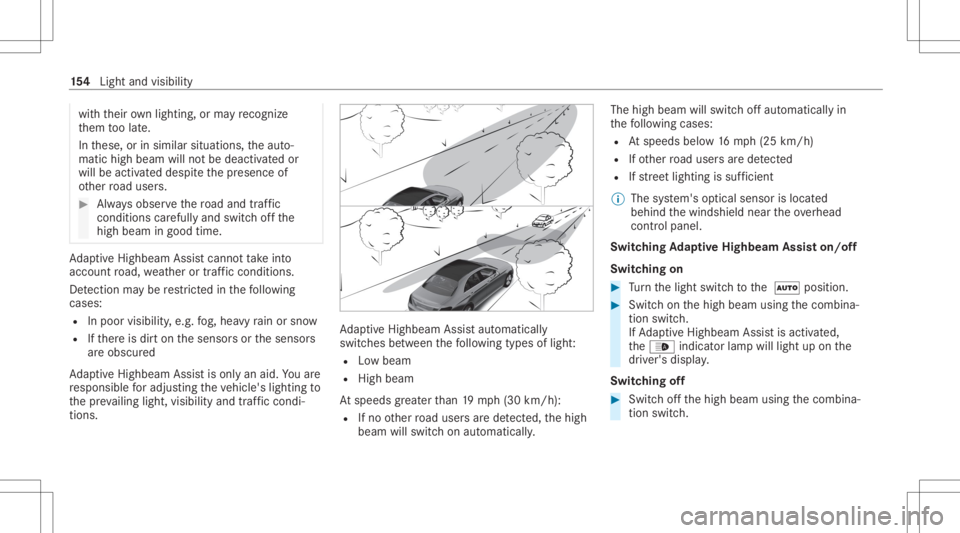
aptiveHig hbeam Assis taut omat ically
swit ches between thefo llo wing types oflight :
R Lowbeam
R High beam
At speeds great erthan 19 mp h(3 0km/h):
R Ifno other road user sar ede tected, thehigh
beam willswitc hon aut omaticall y. The
high beam willswitc hof faut omaticall yin
th efo llo wing cases :
R Atspeeds below16 mp h(25 km/h)
R Ifot her road user sar ede tected
R Ifstre et light ingissuf ficie nt
% The system's optical sensor islocat ed
behind thewindshield neartheove rhead
con trol panel.
Switc hingAdaptiv eHighb eamAssiston/ off
Swi tching on #
Turn thelight switc hto the 0058 position . #
Switc hon thehigh beam usingthecombin a‐
tion switc h.
If Ad aptiveHig hbeam Assis tis act ivat ed,
th e00CE indicat orlam pwill light upon the
dr iver's displa y.
Switc hingoff #
Switc hof fth ehigh beam usingthecombin a‐
tion switc h. 15
4
Light andvisib ility
Page 157 of 610
Ad
aptiv eHighb eamAssistPlus Ad
aptiv eHighb eamAssistPlus functi on
(C anada) &
WARNIN GRisk ofacci dent despite
Ad aptiveHig hbeam Assis tPlus
Ad aptiveHig hbeam Assis tPlus does not
re act to:
R Road user swit hout lights,e.g .pedes ‐
tr ians
R Road user swit hpoor lighting,e.g .
cy clis ts
R Road user swhos elight ingisobs truct ed,
e.g .by abar rier
On very rare occasions, AdaptiveHig hbeam
As sis tPlus mayfa ilto recogni zeother road
user swit hth eir ownlighti ng,orma yre cog‐
nize them toolat e.
In these, orinsimilar situation s,theaut o‐
matic highbeam willnotbe deactiv ated or
will beactiv ated despit eth epr esenc eof
ot her road user s. #
Alw aysobser vethero ad and traffic
condi tions carefu llyand switchof fth e
high beam ingood time. Ad
aptiveHig hbeam Assis tPlus cannotta ke into
acc ount road, weather ortraf fic condi tions.
De tection maybe restrict ed inthefo llo wing
cases :
R Inpoor visibilit y,e.g. fog, hea vyrain or sno w
R Ifth er eis dir ton thesensor sor thesensor s
ar eobscur ed
Ad aptiveHig hbeam Assis tPlus ison lyan aid.
Yo uar ere sponsible foradju sting theve hicle's
lighting tothepr ev ailin glight ,visi bilit yand traf‐
fi c condi tions. Ad
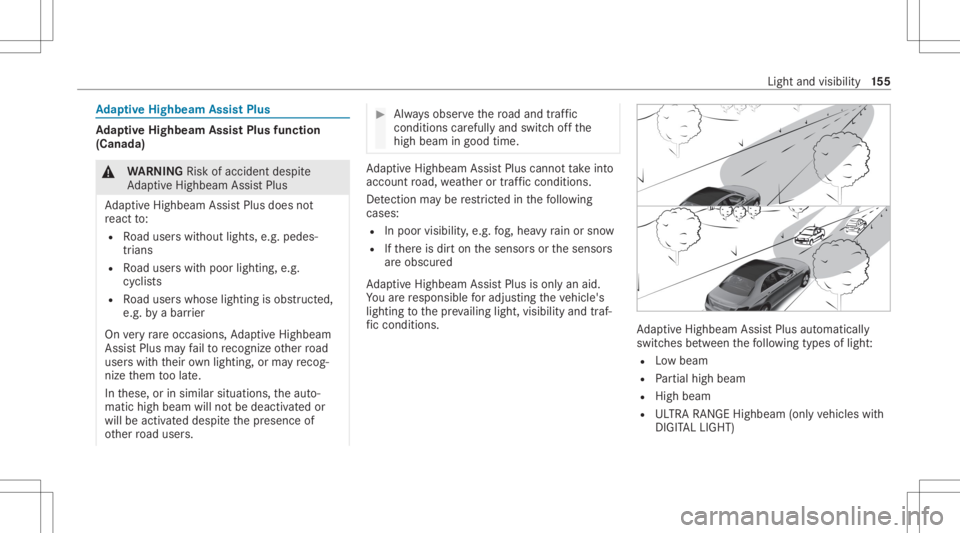
aptiveHig hbeam Assis tPlus automat ically
swit ches between thefo llo wing types oflight :
R Lowbeam
R Partial high beam
R High beam
R ULTRA RANGE Highbeam(onlyve hicles with
DIGIT ALLIGHT) Light
andvisibili ty15
5
Page 158 of 610
UL
TRA RANGE Highbeam increases thebr ight‐
ness ofthecon eof light totheleg allyper mitt ed
maximum.
Pa rtial high beam doesnotinc lude other road
user sin thehigh beam area. Itdoes notblind
th em but enables fullhigh beam illumination for
th edr iver apar tfr om theex clu ded vehicles.
At speeds below16 mp h(25 km/h) orwhen
th er eis suf ficie ntstre et light ing:
R The partial high beam andthehigh beam will
be switc hedoffaut omaticall y.
At speeds great erthan 19 mp h(30 km/h):
R Ifno other road user sar ede tected, thehigh
beam willswitc hon aut omaticall y.
R Ifot her road user sar ede tected, thepar tial
high beam willswitc hon aut omaticall y.
At speeds above25 mph(40 km/h):
R Ifno other road user sar ede tected on a
st ra ight road, ULTRA RANGEHighbeam will
be swit ched on aut omaticall y.
R Ifot her road user sar ede tected, thepar tial
high beam willswitc hon aut omaticall y. R
Ifhighly reflect ive signs arede tected, ULTRA
RANG EHigh beamwillbe swi tched offau to‐
matical ly.
% The system's optical sensor islocat ed
behind thewindshield neartheove rhead
con trol panel.
Switc hingAdaptiv eHighb eamAssistPlus
on/ off(C anada)
Swi tching on #
Turn thelight switc hto the 0058 position . #
Switc hon thehigh beam usingthecombin a‐
tion switc h.
When thehigh beam isswitc hedonaut omat‐
icall yin thedar k,the00CE indicat orlam p
will light upon thedr iver's displa y.
Switc hingoff #
Switc hof fth ehigh beam usingthecombin a‐
tion switc h. Switc
hingtheda ytime running lampson/of f Multimedia
system:
4 © 5
Set ting s5
Light
5 MULTIB EAMLED #
Switc hth eDaytime RunningLampson/off.
% Invehicles withDIGIT ALLIGHT headlamps,
th eInt ellig entLight System can beswitc hed
on and offin theDIGITA LLIGHT menu. Se
tting theex terior light ingswitc h-of fdela y
tim e Re
quirement s:
R The light switc his in the0058 position .
Multimedia system:
4 © 5
Set ting s5
Light
5 Interior/ex teriorlighting
5 Extern alLightin gDelay #
Setth eswitc h-offdela ytime.
When theve hicle's engine isswitc hedoff,
th eex terior lighting willbeactiv ated forth e
se ttime. 15
6
Light andvisib ility
Page 159 of 610
Ac
tiv atin g/deac tivatin gthe locat orlighti ng Re
quirement s:
R The light switc his in the0058 position .
Multimedia system:
4 © 5
Set ting s5
Light
5 Interior/E xterior Lightin g #
Activateor deacti vate Locator Lighting.
When thefunc tion isactiv ated, theex terior light‐
ing will light upfor40 seconds afte rth eve hicle
is unloc ked. When youst ar tth eve hicle, the
locat orlight ingisswitc hedoffand automat ic
dr ivin glight sar eact ivat ed. Int
erior light ing Ad
jus tingthe inte rior light ing 1
004A
Switches thefront interior lighting
on/ off
2 0042
Switchesthere ar interior light ing
on /of f
3 0033
Switches aut omatic interior lighting
con trol on/ off #
Toswitc hre ading lampson/ off:hold your
han dund erthere spectiv ere adin glam p4
or 5. Oper
ating unit insid eth egr ab handle (rear
passe nger comp artment) 1
003D
Readin glam pon there spectiv eside of
th eve hicle
2 0042
Rear interior light ing #
Toswitc hre ading lampson: press butt on
1.
The readin glam p,theint erior lighting inthe
gr ab han dleand thedome lampon the
re spectiv eside oftheve hicle willlight up. Light
andvisibili ty15
7
Page 160 of 610
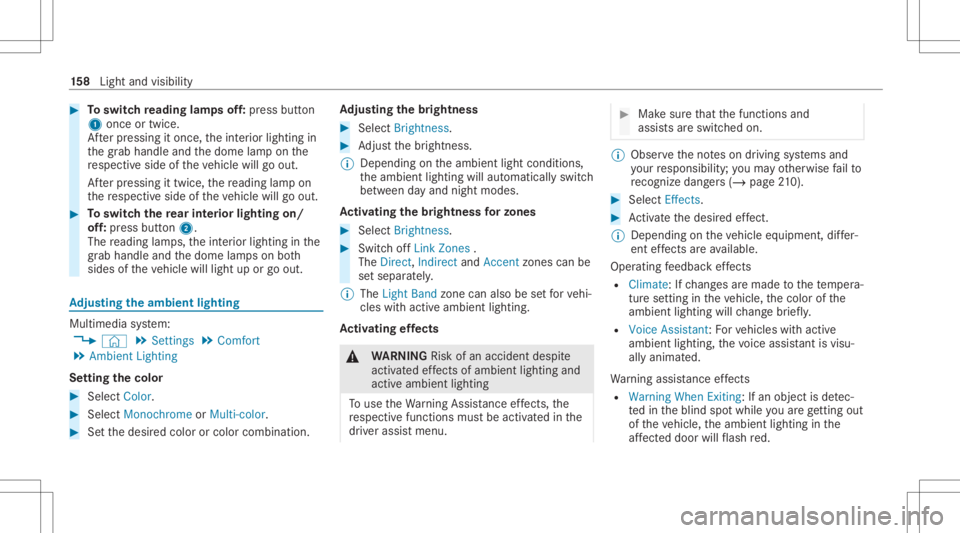
#
Toswitc hre ading lampsoff:pr ess butt on
1 once ortwice.
Af terpr essing itonce, theint erior lighting in
th egr ab handle andthedome lampon the
re spectiv eside oftheve hicle willgoout.
Af terpr essing ittwice, there adin glam pon
th ere spectiv eside oftheve hicle willgoout. #
Toswitc hth ere ar int erior lighting on/
of f:pr ess butt on2.
The readin glam ps,theint erior lighting inthe
gr ab han dleand thedome lampson both
sides oftheve hicle willlight uporgo out. Ad
jus tingthe ambi entlighti ng Mu
ltimed iasystem:
4 © 5
Set ting s5
Comfort
5 Ambien tLightin g
Se tting thecolor #
Sele ctColor. #
Sele ctMon ochrom eor Multi -color. #
Setth edesir edcolor orcolor combin ation. Ad
jus tingthe brightne ss #
Select Bright nes s. #
Adjus tth ebr ightn ess.
% Depen dingontheambient lightconditions ,
th eambient lightingwillautomaticall yswitc h
be tween dayand night modes.
Ac tiv atin gthe brightne ssforzon es #
Select Brightne ss. #
Swi tchof fLi nk Zones .
The Direct,Indi rect andAccent zonescan be
se tsep arately .
% The Light Band zonecanalso be setfo rve hi‐
cles withactiv eambient lighting.
Ac tiv atin gef fects &
WARNIN GRisk ofan acci dent despite
act ivat ed effects ofamb ient lighti ngand
acti veambie ntlight ing
To use theWa rning Assista nce effects, the
re spectiv efunctions mustbe activ ated inthe
dr iver assis tmenu. #
Mak esur eth at thefunc tionsand
assis tsareswitc hedon. %
Obser vetheno teson driving systems and
yo ur responsibili ty;yo uma yot her wise failto
re cogni zedangers(/ page 210). #
Select Effects . #
Activateth edesir edeffect.
% Depe nding ontheve hicle equipment, differ‐
ent effects areav ailable.
Operatin gfe edbac kef fects
R Clima te:Ifch ang esaremade tothete mp era‐
tur ese tting intheve hicle, thecolor ofthe
ambie ntlight ingwill chang ebr ief ly.
R Voice Assistant: Forve hicles withactiv e
ambient lighting,thevo ice assis tant isvis u‐
al ly ani ma ted.
Wa rning assis tance effects
R Warning WhenExiting :If an obje ctisde tec‐
te din theblind spotwhile youar eget ting out
of theve hicle, theambient lightinginthe
af fect ed doo rwi llflash red. 15
8
Light andvisib ility
Page 161 of 610
Fu
rther information ontheex itwa rning
(/ page24 2).
R Active Lane Kee ping Assi st:If th er eis a
wa rning from ActiveLa ne Keeping Assist,th e
act ive ambie ntlight ingwill flash red.
Fu rther information onActiveLa ne Keeping
Assis t(/ page24 6).
R Active BrakeAssist:If th er eis an Active
Br ak eAssi stwa rning, theactiv eambient
lighting inthecent erofthedashboard will
fl ash bright red.
Fu rther information ontheAc tiveBr ak e
Assi st(/ pag e23 1).
R Active Blind SpotAssist: Invehicles with
activ eambient lighting,theambient lighting
on theaf fect ed sidewi llflash redifth er eis a
wa rning from ActiveBli nd Spo tAssi st.
Fu rther information ontheAc tiveBli nd Spo t
Assi st(/ pag e24 2).
Gree ting
R When youget intoth eve hicle, aspecial color
animation willplay. Multi-color
Animation
R The chosen color combinat ionwill chang eat
pr edef inedint erva ls.
% Invehicles withactiv eambient lighting,an
animation willbeplayed.
% The desir edoper ating feedbac kand warning
assis tance canbeacti vatedor deactiv ated
via the´ symbol. Dependingonthe
eq uipment, differe nt operati ng feedbac kand
wa rning assis tance effects areav ailable.
% Ifth ebr ightn essissetto alow leve l,wa rning
animat ionswillbedispla yedat ahigher
basic brightn ess. Switc
hingtheint erior light ingswitc h-of f
dela ytim eon/of f Multi
media system:
4 © 5
Set ting s5
Light
5 Interior/ex teriorlighting
5 Interior Lightin gDelay #
Switc hInt erior Lightin gDelay onoroff.
When this func tion isact ive, theint erior light‐
ing will light upfora shor ttime afte rth e
ve hicle isloc ked. Light
andvisibility 15
9
Page 162 of 610
Wi
ndshield wiperandwindshield washer
sy stem Switc
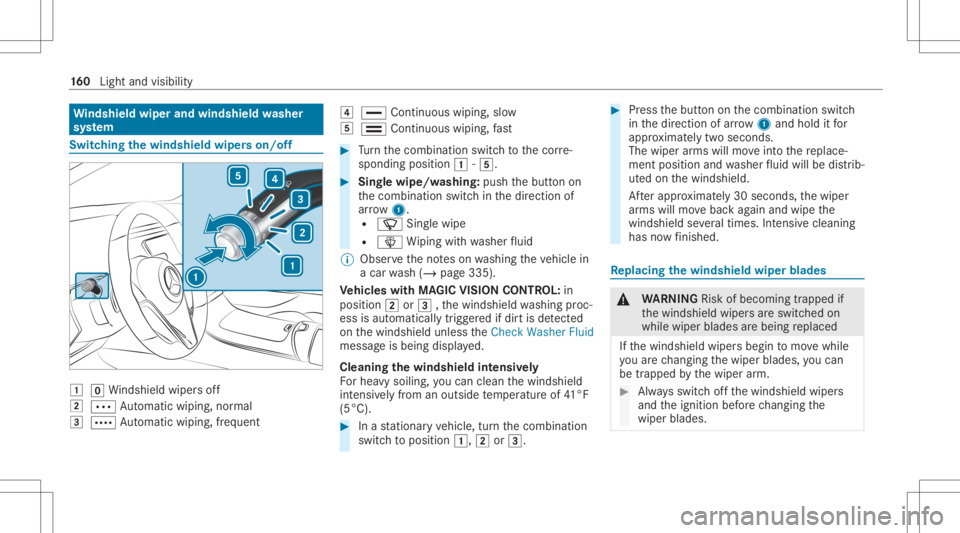
hingthewindsh ieldwiper son/of f 0047
005AWindsh ield wipe rs off
0048 0062 Automatic wiping, normal
0049 0063 Automatic wiping, freq uent 004A
00AA Continuo uswip ing, slow
004B 00A9 Continuo uswip ing, fast #
Turn thecombin ationswitchto thecor re‐
sponding position0047-004B. #
Sing lewipe/w ashing: pushthebutt onon
th ecombin ationswitchin thedir ect ion of
ar row 1.
R 00D3 Singlewipe
R 00D4 Wiping withwa sher fluid
% Obs erve theno teson washing theve hicle in
a car wash (/ page335).
Ve hicl eswith MAGIC VISIONCONTR OL:in
posi tion 0048or0049 ,th ewindshield washing proc‐
ess isaut omaticall ytrigg ered ifdir tis de tected
on thewindshield unlesstheCheck Washer Fluid
messag eis being displayed.
Cleaning thewindsh ieldintensiv ely
Fo rhea vysoil ing, youcan clean thewindshield
int ensiv elyfrom anoutside temp eratur eof 41°F
(5°C). #
Inast atio naryve hicle, turnth ecombin ation
switc hto position 0047,0048or0049. #
Press thebutt ononthecombin ationswitch
in thedir ect ion ofarrow 1and hold itfor
appr oximat elytw oseco nds.
The wiper arms will moveintoth ere place‐
ment position andwasher fluid will bedistrib‐
ut ed on thewindshield.
Af terapp roxima tely 30 seconds ,th ewiper
ar ms will movebac kag ain and wipe the
winds hieldseveraltim es. Inte nsi vecle ani ng
ha sno wfinis hed . Re
plac ingthe windsh ield wiper blades &
WARNIN GRisk ofbeco ming trap ped if
th ewindshield wipersar eswitc hedon
while wiper blades arebeing replaced
If th ewindshield wipersbegin tomo vewhile
yo uar ech ang ingthewiper blades, youcan
be trapped bythewiper arm. #
Alw aysswitc hof fth ewindshield wipers
and theignition beforech ang ingthe
wiper blades. 16
0
Light andvisib ility
Page 164 of 610
#
Foldthewiper arms backont oth ewind‐
shield. #
Switc hon theignition . #
Press the00D4 buttononthecombin ation
switc h.
The wiper arms will retur nto theor iginal
position . #
Switc hth eignition off.
% Chec kth econ dition ofthewiper blades reg‐
ular lyand replace them ifth er eis visible
damag eor con tinual smear ing. Maint
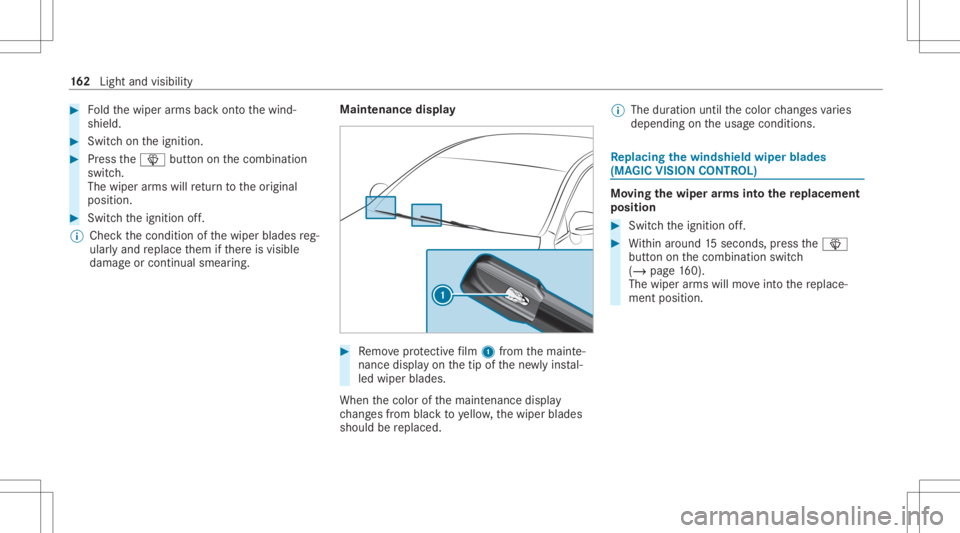
enance display #
Remo veprotect ive film 1 from themaint e‐
nanc edispla yon thetip ofthene wlyins tal‐
led wiper blades.
When thecolor ofthemaint enanc edispla y
ch ang esfrom blac kto yello w, thewiper blades
should bereplaced. %
The duration untilthecolor chang esvaries
depending ontheusag econ ditions . Re
plac ingthe windsh ield wiper blades
(MA GIC VISIONCO NTR OL) Mo
vingthe wiper arms intothe replac eme nt
pos ition #
Swi tchth eignition off. #
Within around 15seconds, press the00D4
butt ononthecombin ationswitch
(/ page16 0).
The wiperarms willmo veintoth ere place‐
ment position . 16
2
Light andvisib ility
Page 165 of 610
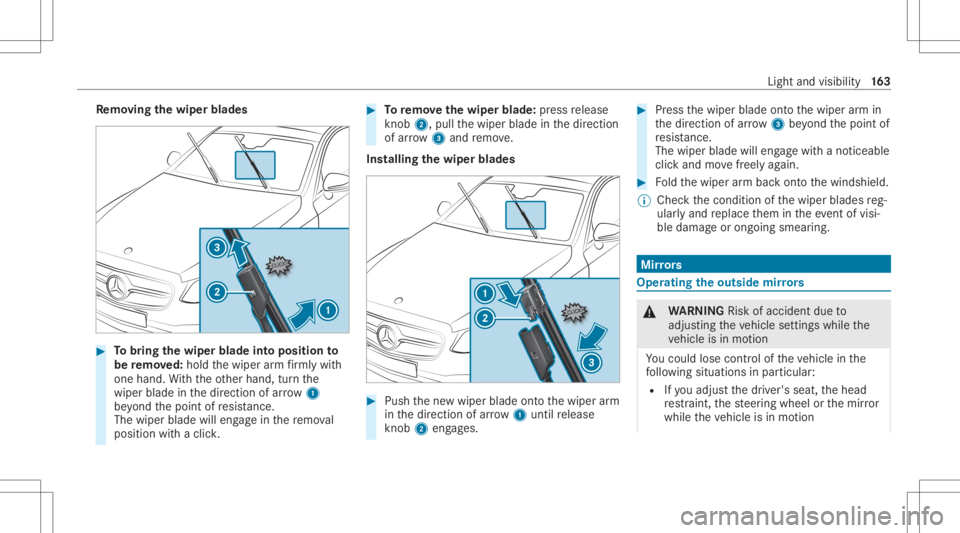
Re
mo ving the wiper blade s #
Tobring thewiper bladeint oposit ionto
be remo ved: hol dth ewiper arm firm lywith
one hand. With theot her hand, turnth e
wiper bladeinthedir ect ion ofarrow 1
be yond thepoint ofresis tance.
The wipe rbl ad ewi lleng agein there mo val
position withaclic k. #
Toremo vethewiper blade:press release
kn ob 2, pull thewiper bladeinthedir ect ion
of arrow 3and remo ve.
Ins tallin gth ewiper blades #
Push thene wwiper bladeontoth ewiper arm
in thedir ect ion ofarrow 1untilre lease
kn ob 2 eng ages. #
Press thewiper bladeontoth ewiper arm in
th edir ect ion ofarrow 3beyond thepoint of
re sis tance.
The wipe rbl ad ewi lleng agewi th ano tic eable
clic kand movefreely again. #
Foldthewiper arm bac kont oth ewindshield.
% Chec kth econ dition ofthewiper blades reg‐
ular lyand replace them intheev ent ofvisi‐
ble damag eor ongoin gsmear ing. Mir
rors Oper
ating theout side mirrors &
WARNIN GRisk ofacci dent dueto
adjus tingth eve hicle settin gswhile the
ve hicle isin mo tion
Yo uco uld lose contro lof theve hicle inthe
fo llo wing situat ionsinpar ticular :
R Ifyo uadj ustth edr iver's seat, thehead
re stra int ,th esteer ing wheel orthemir ror
while theve hicle isin mo tion Light
andvisibili ty16
3
Page 166 of 610
R
Ifyo ufa sten your seat beltwhile theve hi‐
cle isin mo tion #
Beforest ar tin gth eengine: Inpar ticular ,
adjus tth edr iver's seat, head restra int ,
st eer ing wheel andmirror,and fasten
yo ur seat belt. &
WARNIN GRisk ofacci dent dueto mis‐
judgment ofdis tance when using the
fr ont-passe nger mir ror
The outside mirroron thefront passeng er
side reflect sobjec tson asmaller scale.The
objec tsinvie warein fact clos erthan they
appear . #
Ther efor e, alw ayslook over your sho ul‐
der tocheckth eactual distance
be twee nyo uand thero ad user stra vel‐
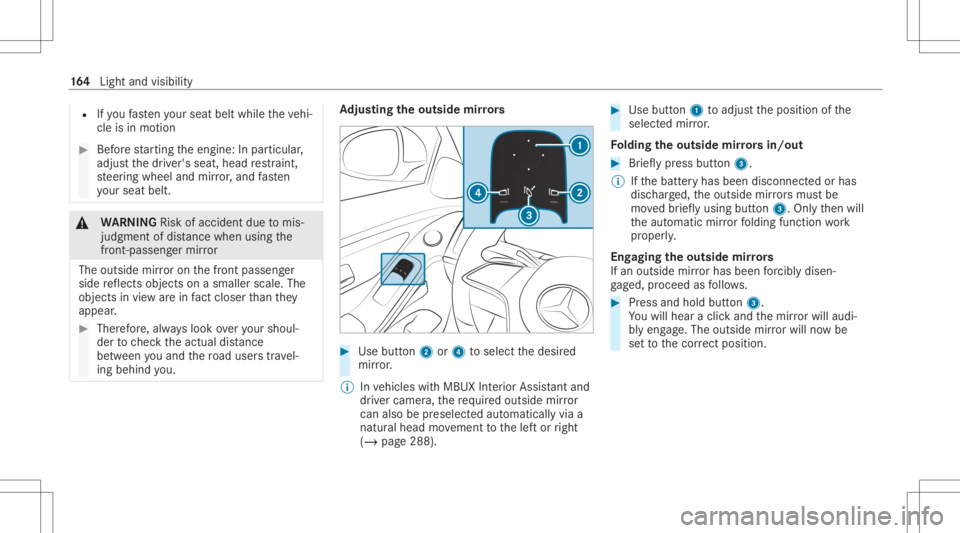
ing behin dyo u. Ad
jus tingthe outsi de mir rors #
Use button2 or4 toselect thedesir ed
mir ror.
% Invehicles withMBUX Interior Assis tant and
dr iver cam era, there qu ired outs idemirror
can also be prese lect ed automatical lyvia a
natur alhead movement tothelef tor right
(/ page288). #
Use button1 toadj ustth eposition ofthe
select edmir ror.
Fo lding theout side mirrors in/out #
Brief lypress butt on3.
% Ifth ebatt eryhas been discon nectedorhas
disc harged, theoutside mirrors mus tbe
mo vedbr ief lyusing button3. Onlyth en will
th eaut omatic mirrorfo lding function work
pr oper ly.
Eng aging theout side mirrors
If an outsid emir rorhas been forc ibl ydisen ‐
ga ge d, proceed asfollo ws . #
Press and hold button3.
Yo uwill hear aclic kand themir rorwil lau di‐
bl yeng age. The outsi demir rorwil lno wbe
se tto thecor rect pos ition. 16
4
Light andvisib ility