ECU MERCEDES-BENZ S CLASS 2022 Repair Manual
[x] Cancel search | Manufacturer: MERCEDES-BENZ, Model Year: 2022, Model line: S CLASS, Model: MERCEDES-BENZ S CLASS 2022Pages: 610, PDF Size: 19.8 MB
Page 265 of 610
Ac
tiv atin g/deac tivatin gPa rking Assis t
PA RK TRONI C
* NO
TERisk ofan acci dent from objects
at clo serang e Pa
rking AssistPA RK TRONI Cma yno tde tect
cer tain obje ctsat clos era ng e. #
Whe npa rking ormane uvering theve hi‐
cle, paypar ticular attention toany
obj ect swhic har eabo veorbelo wthe
sensor s,e.g. flowe rpo ts or draw bar s.
The vehicle orother object scould oth‐
er wise bedamag ed. Re
quirement s:
R The camera menuis open.
R Or:Ac tivePa rking Assistis act ive.
R Or:th ePA RK TRONI Cpop- upwin dow
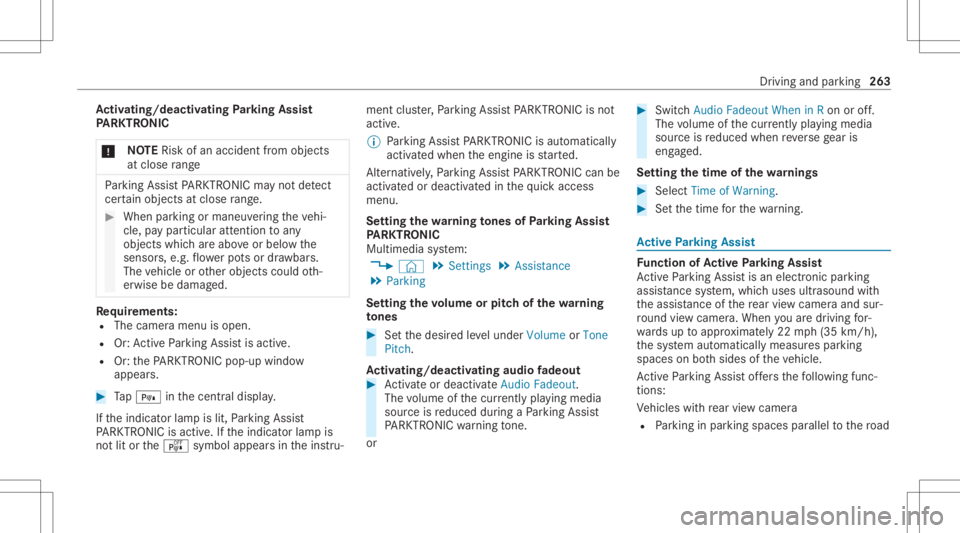
appear s. #
Tap= inthecent raldispla y.
If th eindicat orlam pis lit, Parking Assist
PA RK TRONI Cis act ive. Ifth eindicat orlam pis
no tlit or theé symbol appearsin theins tru‐ ment
cluster,Pa rking AssistPA RK TRONI Cis no t
act ive.
% Parking AssistPA RK TRONI Cis aut omat ically
act ivat ed when theengine isstar ted.
Alt ernativ ely,Pa rking AssistPA RK TRONI Ccan be
act ivat ed ordeac tiva tedin thequ ick acc ess
men u.
Se tting thewa rning tones ofParking Assis t
PA RK TRONI C
Mu ltimed iasystem:
4 © 5
Set ting s5
Assist ance
5 Parkin g
Se tting thevo lum eor pit ch ofthewa rning
to nes #
Setth edesir edleve lunder Volume orTone
Pitc h.
Ac tiv atin g/deac tivatin gaudi ofa deo ut #
Activateor deacti vate Aud ioFad eout.
The volume ofthecur rentl ypl ay ing media
sour ceisreduced during aPa rking Assist
PA RK TRONI Cwa rning tone.
or #
Swi tchAud ioFad eou tWhe nin Ron oroff.
The volume ofthecur rentl ypl ay ing media
sour ceisreduced whenreve rsege ar is
eng aged.
Se tting thetim eof thewa rnings #
Selec tTime ofWarnin g. #
Setth etime forth ewa rning. Ac
tiv ePa rking Assis t Fu
nction ofActiv ePa rking Assis t
Ac tivePa rking Assistis an elect ronic parking
assis tance system, whic huses ultrasound with
th eassis tance ofthere ar vie wcam eraand sur‐
ro und viewcam era. When youar edr ivin gfo r‐
wa rdsup toappr oximat ely22 mph(35 km/h),
th esy stem automaticall ymeasur espar king
spaces onboth sides oftheve hicle.
Ac tivePa rking Assistof fers thefo llo wing func‐
tion s:
Ve hicles withre ar vie wcam era
R Parking inpar kingspaces parallel tothero ad Dr
ivin gand parking263
Page 269 of 610
#
Payatt ention toobject sand other road
user s. #
Wher enec essar y,stop theve hicle or
cancel thepar king procedur ewit h
Ac tivePa rking Assist. On
com pletion ofthepar king procedur e,the
Active Parking AssistFini shed:Take Control of
Veh icledispl aymessa geappear s. #
Sec ureth eve hicle agains tro lling away.
When requ ired bylegalrequ iremen tsor local
con dition s:tur nth ewheels towa rdsth ecurb.
% Youcan stop theve hicle andchang eth e
tr ans missi on positio ndu ring thepar king pro‐
cedur e.The system then calculat esane w
ve hicle path.Ifno newvehicle pathis availa‐
ble, thetransmission positioncanbe
ch ang edagain, orthepr ocess canbecan‐
celed. Immed
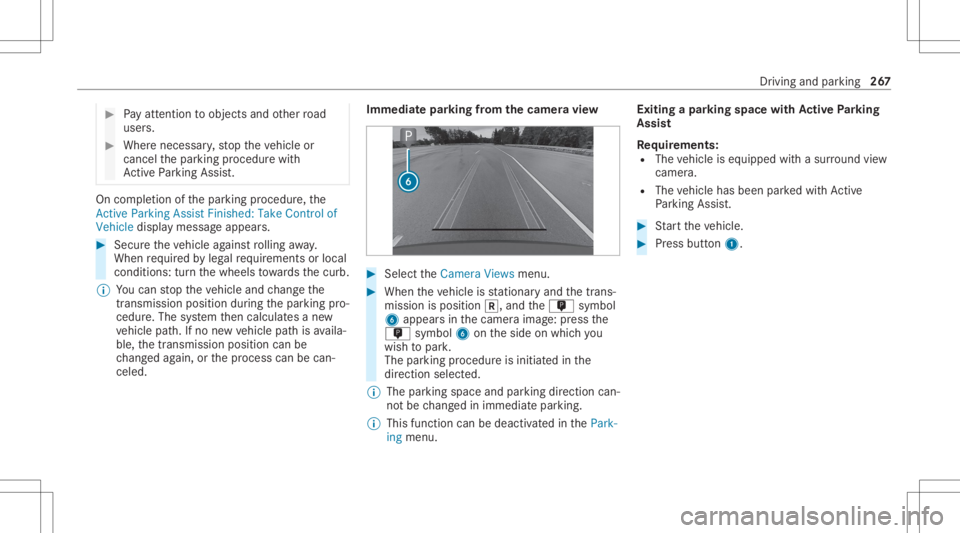
iatepar king from thecam eravie w #
Sele cttheCamera Viewsmenu. #
When theve hicle isstatio naryand thetrans‐
mission isposition 005E,and them symbol
6 appear sin thecamer aimag e:press the
m symbol 6ontheside onwhic hyo u
wish topar k.
The parking procedur eis initiat edinthe
dir ect ion select ed.
% The parkingspace andparkingdir ect ion can‐
no tbe chang edinimm ediat epar king.
% This function can bedeac tivated inthePark-
ing menu. Exiting
apar king space withAc tiv ePa rking
Assis t
Re quirement s:
R The vehicle iseq uipped withasur round view
cam era.
R The vehicle hasbeen parkedwit hAc tive
Pa rking Assist. #
Startth eve hicle. #
Press butt on1. Dr
iving andparking 26
7
Page 274 of 610
No
teson thedr iver disp lay &
WARNIN GRisk ofacci dent dueto a
dr iver displa ymalfunc tion
If th edr iver displa yhas failed ormalfun c‐
tion ed,thefunc tion restrictions applying to
saf etyre leva nt systems areno tvisible.
The oper ating safetyof your vehicle maybe
im pair ed. #
Drive on car efull y. #
Have theve hicle checkedimmediat ely
at aqu alif ied spec ialistwo rkshop. If
th eoper ating safetyof your vehicle is
im pair ed,parkth eve hicle immediat elyand
saf ely. Con tact aqu alif ied spec ialistwo rkshop.
The driver displa ysho wsbasic information such
as speed, enginespeed, fuelleve land coolan t
te mp eratur e.
Ad dition alfunc tionsav ailable toyouinc lude the
fo llo wing:
R Differe nt menu s,e.g .fo rassi stanc eand navi‐
ga tio n R
Status displa ysforth edr iving systems
R Displa ymessag es
R Indic ator and warning lam ps
R Informatio non Consum ptionandrang e
The menu contents andsettings canbeindividu ‐
al ly ad jus tedand set. No
teson the3D driver disp lay
The 3Ddriver displa yenabl esaspat ialrepr esen‐
ta tio nof thecon tent ofthedr iver displa y.Itis a
pr ereq uisi tethat thedr iver be recor ded bythe
dr iver camera .
Sy stem limit s
The system maybe impair edorma yno tfunc tion
in thefo llo wing situat ions:
R The driver camera isdeact ivat ed orisno t
wo rking.
R The driver isouts idethede tection rang eof
th edr iver camer a. R
The oper ating conditions areno tin place,
e.g. ifth eoutside temp eratur eis toolow or
to ohigh. Oper
ating thedr iver disp lay &
WARNIN GRisk ofdist ra ction from infor‐
mati onsystems andcomm unication s
eq uipment
If yo uoperat einf ormat ionand comm unic a‐
tio neq uipme ntintegrat edintheve hicle
when driving, youwill bedistract edfrom the
tr af fic situ ation. Thiscou ldalso cau seyouto
lose control of theve hicle. #
Onlyoper ateth is eq uipmen twhen the
tr af fic situ ation per mits. #
Ifyo ucan notbe sur eof this, stop the
ve hicle whilstpa ying attention toroad
and traffic condi tions andoperate the
eq uipment withth eve hicle statio nary. Obser
vetheleg alrequ iremen tsforth ecount ry
in whic hyo uar ecur rently drivi ng when operat‐
ing thedr iver displa y. 27
2
Driver disp lay
Page 275 of 610
Scr
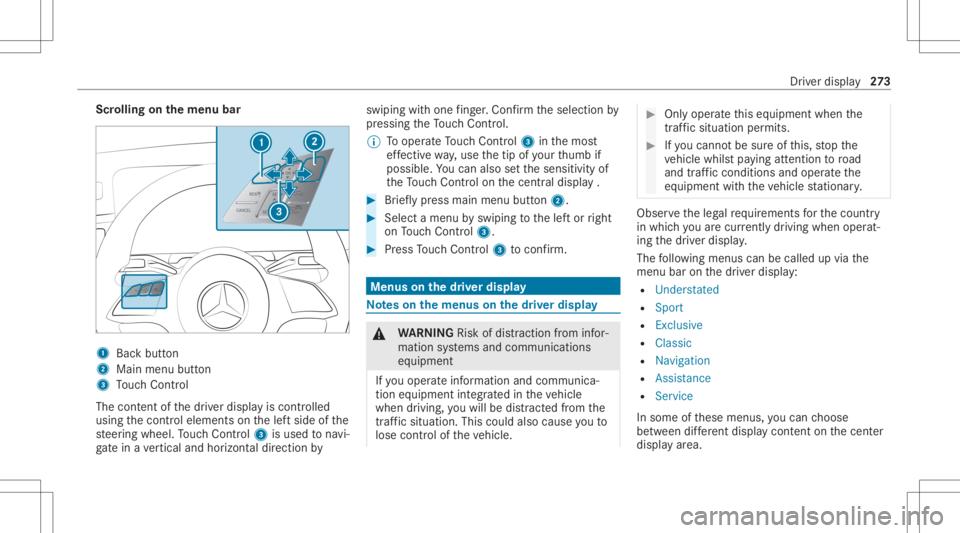
olling onthemenu bar 1
Backbutt on
2 Main menubutt on
3 Touc hCon trol
The conten tof thedr iver displa yis con trolled
using thecon trol element son thelef tside ofthe
st eer ing wheel. Touc hCon trol 3 isused tonavi‐
ga te inave rtical and horizon taldir ect ion by swiping
withone fing er.Co nfirm theselect ionby
pr essing theTo uc hCon trol.
% Tooper ateTo uc hCon trol 3 inthemos t
ef fectiv ewa y,use thetip ofyour thumb if
poss ible. Youcan also setth esensit ivityof
th eTo uc hCon trol on thecent raldispla y. #
Brief lypress main menu button2. #
Select amenu byswiping tothelef tor right
on Touc hCon trol 3. #
Press Touc hCon trol 3 toconf irm. Men
uson the driver displ ay No
teson themenu son thedr iver disp lay &
WARNIN GRisk ofdist ra ction from infor‐
mati onsystems andcomm unication s
eq uipment
If yo uoper ateinf ormat ionand comm unic a‐
tio neq uipme ntintegratedin theve hicle
when driving, youwill bedistract ed from the
tr af fic situ ation. Thiscou ldalso cau seyouto
lose control of theve hicle. #
Onlyoper ateth is eq uipmen twhen the
tr af fic situ ation per mits. #
Ifyo ucan notbe sur eof this, stop the
ve hicle whilstpa ying attention toroad
and traffic condi tions andoperate the
eq uipment withth eve hicle statio nary. Obser
vetheleg alrequ iremen tsforth ecount ry
in whic hyo uar ecur rently drivi ng when operat‐
ing thedr iver displa y.
The follo wing menuscan becalled upvia the
menu baronthedr iver displa y:
R Unders tated
R Sport
R Exclusive
R Classic
R Navigation
R Assist ance
R Serv ice
In some ofthese menus, youcan choose
be tween differe nt displ aycont entonthecent er
displa yar ea. Dr
iver displa y27
3
Page 281 of 610
Ov
ervie wand oper ation No
teson theMB UX multim edia system &
WARNIN GRisk ofdist ra ction from infor‐
mati onsystems andcomm unication s
eq uipment
If yo uoper ateinf ormat ionand comm unic a‐
tio neq uipme ntintegratedin theve hicle
when driving, youwill bedistract ed from the
tr af fic situ ation. Thiscou ldalso cau seyouto
lose control of theve hicle. #
Onlyoper ateth is eq uipmen twhen the
tr af fic situ ation per mits. #
Ifyo ucan notbe sur eof this, stop the
ve hicle whilstpa ying attention toroad
and traffic condi tions andoperate the
eq uipment withth eve hicle statio nary. Yo
umus tobse rveth eleg alrequ iremen tsforth e
cou ntryin whi chyouar ecur rentl ydr ivi ng when
op erati ng themultimedia system. *
NO
TEIncr eased surface temp eratur e
due todirect sunlight onthecent raldis‐
pla y The
surface ofthecent raldispla yis very
dar k.
If th edispla yis ex posed todirect sunlight ,
th esur face can beco mevery hot. #
Ifth ecent raldispla yhas been exposed
to direct sunlight ,allo witto cool down
bef oreto uc hin git fora long time. Ov
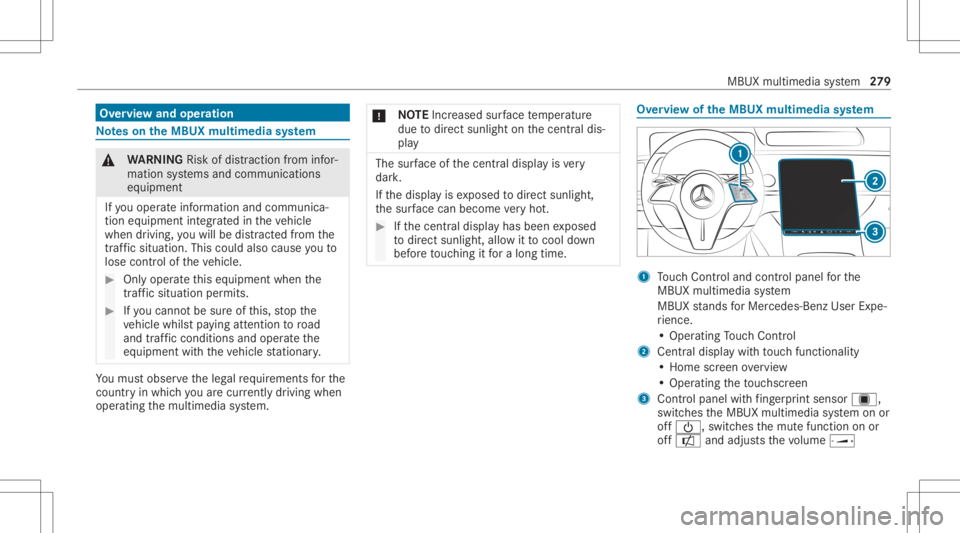
ervie wof theMB UX multim edia system 1
Touc hCon trol and contro lpanel forth e
MBUX multimedia system
MBUX stands forMer cedes-Benz UserExpe‐
ri ence.
• Oper ating Touc hCon trol
2 Centraldispl aywit hto uc hfun ction alit y
• Hom esc reen ove rview
• Opera tingth eto uc hsc reen
3 Contr olpanel withfing erpr int sens orú,
sw itches theMBUX multimedia system onor
of f00D0, switchesthemut efunc tion onor
of fa andadjus tsthevo lume ø MBU
Xmultim ediasystem 27
9
Page 286 of 610
Dig
ital Op erator' sMa nua lis available when
th eve hicle isstatio nary.
Oper ating functions (exa mp les) #
Tooper ateth ena vig ation: "Sear chfor an
As ian rest aurant ,but not Japanes e,inSout h
Lon don ." #
Tooper ateth eph one: "Call myfather. " #
Tochang eth esy stem langu ageto Eng‐
lish (shor tcomm and):"Chang elang uage
to English ". #
Tooper ateth era dio :"Sh ow me the list of
rad iostati ons." #
Tooper atemed ia:"Swit chon ran dom play-
back ." #
Tooper ateve hicl efuncti ons:"Swi tchthe
sea thea ting toleve l2." #
Tooper ateonline functions :"What 'sthe
tim ein Sydn ey?" #
Toask aqu estion abou tth eve hicl e:"Do I
have Blind SpotAssist?" Ov
ervie wof theMB UX Interior Assis tant &
WARNIN GRisk ofinju ryfrom thecam‐
er a's laser radiation
This product usesaclassif ication 1laser sys‐
te m. Ifth ehousing isopened ordamag ed,
laser radiation maydamag eyo ur retina . #
Donotop en thehousing. #
Alw aysha ve maint enance workand
re pair scar ried out byaqu alif ied spe‐
cialis two rkshop. This
product complies withth ere qu iremen tsof
th eFD A21 CFR 1040. 10 and 1040. 11with
exc eption oftheva riatio nsacc ordin gto theFD A
Laser Notice No.50from 24.Ju ne 200 7.
% The camer are cor dsima gedat afo rth eappli‐
cation s,forex am ple body ,head andhand
de tection.
The came racon verts th eimag edat adir ect ly
int ome tadat a.No imag edat ais save din
th epr ocess. Thedatais onl ypr ocessed in
th eve hicle andisno ttr ansmitt edfrom the
ve hicle. %
Youcan activat eor deac tivateIn te rior Assis‐
ta nt func tions, e.g.Lig ht. The setting sar e
sa ve din your cur rent user profile and are
sea t-spe cific. Viath euser profile they are
also available inano ther vehicle withth e
MBUX Interior Assis tant. Thismea nsthat
yo uon lyha ve tomak eth ese ttings onceand
can take them withyo uto theot her vehicle.
% Youcan switchtheInt erior Assis tantfr ont
and rear cam eraon and offusin gFr on tand
Rear .The selec tedcamera settings (on/off)
ar eno tsa ve din theuser profile and only
apply tothecur rent vehicle. Ifyo uch ang eto
ano ther vehicle withth eMBUX Interior
Assis tant, plea se checkth ese ttings and
adjus tth em ifneces sary.
The MBUX Interior Assis tant iseq uipp ed with
fr ont and rear cam eras.
% Alternat ivel y, acon figur ation withfront cam‐
er aonl yis also available.
The fron tcam eracon sistsof twocam eras that
suppo rtthedr iver and thefront passeng er.
The rear cam eracon sistsof twocam eras that
suppo rtthelef tand right rear seat passe ngers. 28
4
MBU Xmult imed iasystem
Page 293 of 610
#
Mak esur eth at when theposition of
dr iver's seat isbeing adjustedusing the
multime diasystem, nopeople orbody
par tsarein theseat's rang eof mo ve‐
ment.
If th er eis arisk ofsomeone becoming trap‐
ped, stop theadjus tmentpr ocess immedi‐
at ely: #
a)Tapth ewa rning mess ageon thecen‐
tra ldispla y.
or #
b)Press amemor yposition buttonora
seat adjus tmentswitc hon thedr iver's
door .
The adjus tmentpr ocess willbestop‐
ped. The
driver's seat iseq uipped withan access pre‐
ve nter.
If th edr iver's door isopen, thedr iver's seat will
no tbe setaf te rcall ing upthedr iver's profile. User
profiles and user -specif iccont ent
Pr ereq uisit esforth eve hicle owner :
R Youha ve aMer cedesme user accoun t.
R Youha ve aMer cedesme PIN.
R Youha ve agreed tothete rm sof use.
R The vehicle islink edtoaMer cedesme user
acc oun t.
% Ifon eof thepr e-r equisit eslistedis missing
or ifno user profile has been select ed,the
dat adescr ibedinthefo llo wing sectionwill
be save din theve hicle asthest andar dse t‐
tin g.Standar dse tting scan bechang edbyall
ve hicle users.
User profiles save per sonal settings. Ifth eve hi‐
cle isused byseveralpeople, aper son can
ch ang eth eir profile settings without chang ing
th ese ttings ofother user s.
Yo ucan individ ualiz eauser profile intheve hicle
using these t-up assis tant or using these ttings
in your user profile. Some setting s,e.g .th e
Mer cedes mePIN and apr ofile pho toaremade
in theMer cedes meapp orintheMer cedes me
Po rtal. User
-spec ific con tent and applica tions with per‐
sonal dataar epr otect edbydiffere nt leve ls of
secur ity.To acc ess protect edcon tent, the
Mer cedes mePIN and, depending ontheve hicle
eq uipment, biometric sensor scan beused.
% The secur ityleve lis setby themultimedia
sy stem and calculat edfrom thecombin ation
of all sensor inputs. Some securityleve ls
can notbe turned off.
% When auser profile isact ivat ed, thefo llo w‐
ing person alized comfort systems, forex am‐
ple, canbeadjus tedor their settings loaded:
R Seat
R Ambien tlight
R Outside mirrors
R Blinds
R Aircondi tioningadjus tment
If th euser profile isactiv ated when driving
th en thedr iver's seat position willnotbe
adjus ted. MBUX
multimedia system 29
1
Page 295 of 610
#
Todel etecum ulatedsug gestions: select
Reset Sugges tionHistoryand confirm Ja
(Y es).
Pr otecting user-specif iccont entand applica ‐
tions
If yo uadd ane wuser ,acc ess protect ion is
alr eady activated forth euser profile. The
Mer cedes mePIN and, depending ontheve hicle
eq uipment, biometric sensor sar eav ailable for
acc ess. Biometric sen sorsmus tbe taught inin
th eve hicle. Theauthenticat ionprocess then
ta ke sall taught -inand available sensorsint o
acc oun t.
The follo wing user-specificcon tent and applica ‐
tio ns arepr otect ed, forex am ple:
R User selectionand user profile setting s
R Biometric sen sors
The teac hin g-in of biom etric senso rsispro‐
te cted.
R Sug gestions
The dataand determ inat ionofthemos t
pr obable navig ation destinat ions, media sour
ces, radio statio ns,con tacts and mes‐
sag esarepr otect ed.
R ENE RGIZING COACH
The recorded health da ta and their evaluatio n
ar epr otect ed.
R Mer cedes meconnect stor e
The purchase ofser vices isprotect ed. #
Switc hProtec tConten ton oroff. #
Switc hAcc ess Protec tiononoroff.
% When access protect ion isswitc hedoff,yo ur
user profile can beacc essedand chang ed
fr om everyvehicle seat.
% Access protect ion isswitc hedonoroffon a
ve hicle-specif icbasis.
Te ac hing in,editi ngand deleting biometric
data
The biome tric dat amode lsaresa ve din thesen‐
sor sin theve hicle. Ifre cogni tionhasbee n
ta ught -in,th is sen sor servesas acont ribut ory
fa ct or forau thent ication onthemultimedia sys‐
te m. #
Select Protect Content . #
Select FacialRecog nition, Fingerpri ntRecog -
nition orVoice Recog nition.
% Ifnecessar y,aut hen ticateyo urself onthe
multime diasystem. #
Touse face recognit ion:closethedr iver's
door orfasten thedr iver's seat belt. #
Look atthedr iver displa yfo rabo utfive sec‐
onds.
Yo ur face isscanne d.Amess agein thedr iver
displa ysho wswhe ther facia lre cogni tionwas
successful ornot.Yo ucan unlo ckyour user
pr ofile and protect edapplications withth e
fa cia lscan. #
Touse fing erpr int :place andliftyo ur fing er
se veraltim eson thefing erpr int sens orund er
th eto uc hsc reen .
The fing er issca nned .If th escann ingproce‐
dur eis success ful,amessag eappear son the
centr aldispl ay.Yo ucan unlo ckyour user pro‐
fi le and protect edapplications withyo ur fin‐
ge rpr int. MBUX
multimediasy stem 293
Page 297 of 610
-
Navig ation andtraf fic annou ncements
- Telephon e
- Voice amplif icat ion
R Conn ectivity:
- Wi-Fi, Bluetoo th,NFC
R MBUX rear table tch ild-pr ooflock
R Time &dat e
R Langu age
R Units fordis tance
R System PIN
R Updating software
R System Reset Ov
ervie wof sof twareupdat es Im
por tant sof twareup datesma ybe necessar y
fo rth esecur ityofyour mult imed iasystem's
dat a.Ins tallth ese updat es,orelse thesecur ity
of your mult imed iasystem cann otbe ensur ed.
The multimedia system displa ysacor responding
messag ewhen asof twareupda teisavailable. If
th eAutom aticOnline Update option isactiv e,
sof twareupdat esaredo wnloaded automaticall y.
If th eop tion isdeactiv ated, youwill beinformed
of newsof twareupdat esonce. The software
updat esareav ailable fordo wnloa dingfora limi ‐
te dper iod oftime.
Car rying out asof twareupdat e:
R Youcan star ton line softwareupdat esvia the
commu nication module.
R Youcan star tsof twareupdat esvia aWi -Fi
ho tspo t.
R Youcan star tmap updat esfrom anextern al
medi um.
% Online softwareupdat escan notbe per‐
fo rm ed via extern al Wi -Fi hotspo tsthat are
enc rypt ed using TKIP.
% Tocom plet esof twareupdat esvia thecom‐
municat ionmodule, theve hicle mustbe con‐
nect edwithth eInt erne tand aMer cedes me
user account .
% Tocom plet esof twareupdat esvia Wi-Fi, the
ve hicle mustbe conn ectedtoan extern al Wi -
Fi ho tspo t. A
sof twareup date consi stsof thre esteps:
R Downloading orcop ying ofthedat are qu ired
fo rins tallation
R Installation ofthedo wnloaded software
updat e
R Activati on ofthedo wnloaded software
updat e.
% Itma ybe neces saryto restar tth eMBUX
multimedia system afte rcom pletion ofa
sof twareupd ate.
% Whil esome softwareupd ates arebeing
do wnloa ded,themultimedia system cann ot
be oper ated and theve hicle functionsmay
be restrict ed.
% Some softwareup datesre qu ire asaf eve hi‐
cle status forth eins tallation tobe com ple‐
te d. The yma yonl ybe car ried out inasaf ely
par kedve hicle withth eignition switchedoff.
Fo rso ftwa reupdat esrequ iring asaf eve hi‐
cle status: whenth elas tins tallation step is
re ac hed, ames sageappear son thecent raldis‐
pla yaf te rth eignition isswitc hedoff.Fo llowthe MBUX
multimedia system 295
Page 298 of 610
st
ep-b y-step instruction son thecent raldispla y
to com plet eth eins tallation .
Ther ear esof twareupdat esthat can onlybe
in st alled when theve hicle issaf elypar ked, ther e
ar eno mor epeople intheve hicle andtheve hi‐
cle isloc ked. Youcan imm ediat elyins tallth e
sof twareupda te,sc hedule it,or pos tpon eit. If
yo usc hedule thesof twareupdat eand unloc k
th eve hicle inthemeant ime,theins tallation
mus tbe resc hedule d.
Av ailab ility of thedr iver disp layand centr al
disp lay
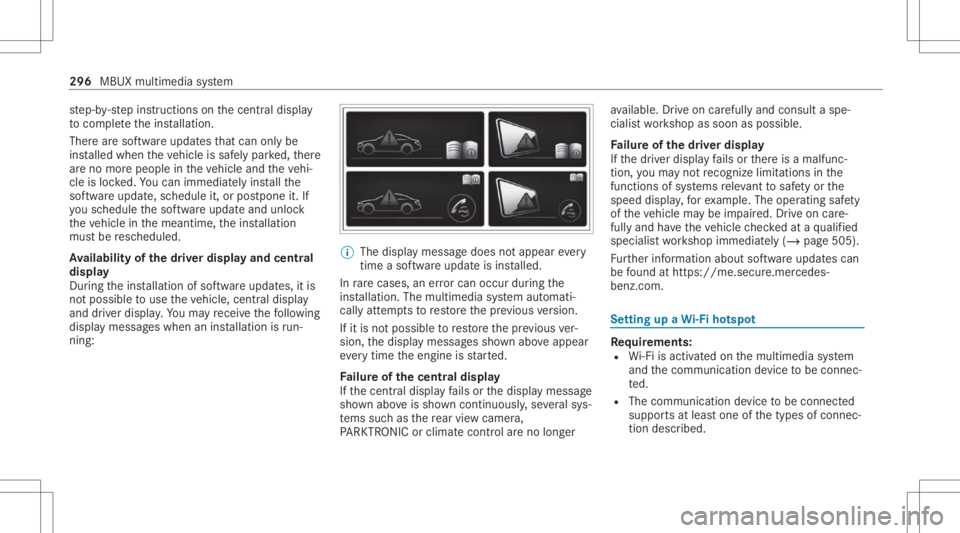
Dur ing theins tallation ofsof twareupdat es,itis
no tpossible touse theve hicle, centraldispla y
and driver displa y.Yo uma yre cei vethefo llo wing
displa ymess ages when aninstallation isrun‐
ning : %
The displ aymessa gedoes notappear every
tim easof twareup date isins talled.
In rare case s,an erro rcan occur during the
ins tallation .The multim ediasystem automati‐
cally attem ptsto restor eth epr ev ious version.
If it is no tpossible torestor eth epr ev ious ver‐
sion, thedispla ymessag essho wnabo veappear
eve rytim eth eengine isstar ted.
Fa ilur eof thecentr aldisp lay
If th ecent raldispla yfa ils orthedispla ymessag e
sho wnabo veissho wncon tinuousl y,se veralsy s‐
te ms suchas there ar vie wcam era,
PA RK TRONI Cor climat eco ntro lar eno long er av
ailable. Drive on car efull yand consult aspe‐
cialis two rkshop assoon aspossible .
Fa ilur eof thedr iver disp lay
If th edr iver displa yfa ils orther eis amalfunc‐
tion ,yo uma yno tre cogni zelimit ations inthe
functions ofsystems releva nt tosaf etyor the
speed display,forex am ple. Theoperatin gsaf ety
of theve hicle maybe impair ed.Drive on car e‐
fully andhave theve hicle checkedat aqu alif ied
spec ialistwo rkshop immediat ely(/ page505).
Fu rther information aboutsoftwareupdat escan
be found athttp s:// me. secure.m erced es-
ben z.co m. Se
tting upaWi -Fiho tspo t Re
quirement s:
R Wi-Fi isacti vatedon themultimedia system
and thecomm unication device tobe con nec‐
te d.
R The comm unicationdevice tobe con nected
suppor tsat leas tone ofthetypes ofcon nec‐
tion descr ibed. 296
MBUX multimedia system