check engine MERCEDES-BENZ S-Class CABRIOLET 2017 A217 Owner's Guide
[x] Cancel search | Manufacturer: MERCEDES-BENZ, Model Year: 2017, Model line: S-Class CABRIOLET, Model: MERCEDES-BENZ S-Class CABRIOLET 2017 A217Pages: 338, PDF Size: 8.14 MB
Page 182 of 338
The system does not detect:
Rsmaller animals, e.g. dogs and cats
Ranimals whose silhouette is not clearly rec-
ognizable
When detected, animals are marked with small
color frame corners. In contrast to pedestrian
recognition, there is no separate readiness sym-
bol in the multifunction display.
Activating/deactivating Night View
Assist Plus
Activation conditions
You can only activate Night View Assist Plus if all
of the following conditions are met:
Rthe ignition is switched on (Ypage 124) or the
engine has been started.
Rthe light switch is in the ÃorL posi-
tion.
Rreverse gear has not been engaged.
Activating/deactivating
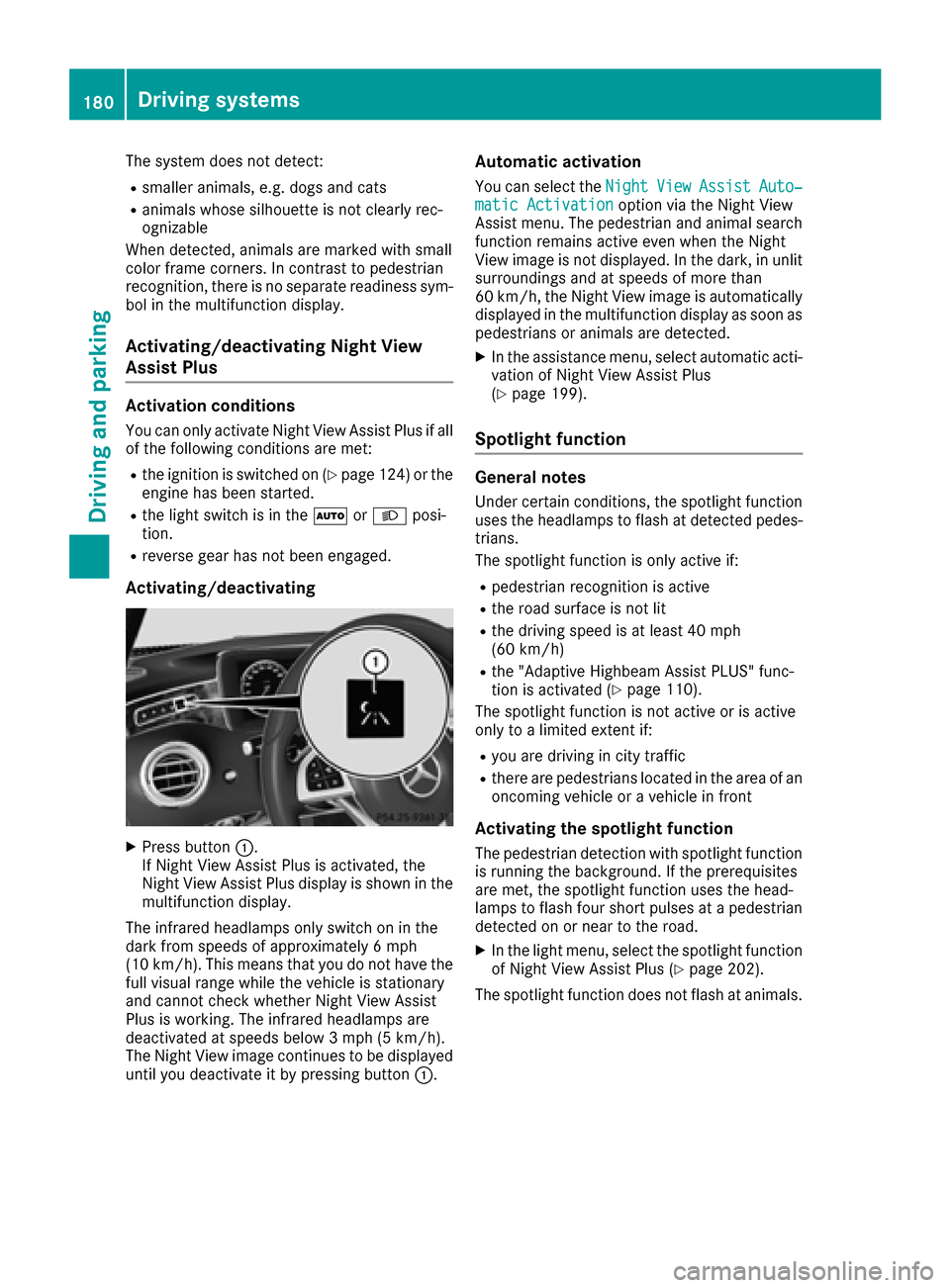
XPress button :.
If Night View Assist Plus is activated, the
Night View Assist Plus display is shown in the multifunction display.
The infrared headlamps only switch on in the
dark from speeds of approximately 6 mph
(10 km/h) . This means that you do not have the
full visual range while the vehicle is stationary
and cannot check whether Night View Assist
Plus is working. The infrared headlamps are
deactivated at speeds below 3 mph (5 km/h).
The Night View image continues to be displayed
until you deactivate it by pressing button :.
Automatic activation
You can select theNightViewAssistAuto‐matic Activationoption via the Night View
Assist menu. The pedestrian and animal search function remains active even when the Night
View image is not displayed. In the dark, in unlit
surroundings and at speeds of more than
60 km/h, the Night View image is automatically
displayed in the multifunction display as soon as
pedestrians or animals are detected.
XIn the assistance menu, select automatic acti-
vation of Night View Assist Plus
(
Ypage 199).
Spotlight function
General notes
Under certain conditions, the spotlight function
uses the headlamps to flash at detected pedes- trians.
The spotlight function is only active if:
Rpedestrian recognition is active
Rthe road surface is not lit
Rthe driving speed is at least 40 mph
(60 km/h)
Rthe "Adaptive Highbeam Assist PLUS" func-
tion is activated (Ypage 110).
The spotlight function is not active or is active
only to a limited extent if:
Ryou are driving in city traffic
Rthere are pedestrians located in the area of an
oncoming vehicle or a vehicle in front
Activating the spotlight function
The pedestrian detection with spotlight function is running the background. If the prerequisites
are met, the spotlight function uses the head-
lamps to flash four short pulses at a pedestrian
detected on or near to the road.
XIn the light menu, select the spotlight function
of Night View Assist Plus (Ypage 202).
The spotlight function does not flash at animals.
180Driving systems
Driving and parking
Page 189 of 338
Important safety notes
GWARNING
If you operate information systems and com-
munication equipmen tintegrate din th evehi-
cle while driving ,you will be distracte dfrom
traffic conditions. You could also lose control
of th evehicle. Ther eis aris kof an accident.
Only operate th eequipmen twhen th etraffic
situation permits. If you are no tsur ethat this
is possible ,park th evehicl epayin gattention
to traffic condition sand operate th eequip-
men twhen th evehicl eis stationary.
You must observ eth elegal requirements for th e
country in whic hyou are currentl ydriving when
operating th eon-board computer.
GWARNIN G
If th einstrumen tcluste rhas faile dor mal-
functioned, you may no trecognize function
restriction sin systems relevan tto safety. The
operating safet yof your vehicl emay be
impaired .Ther eis aris kof an accident.
Drive on carefully. Hav eth evehicl echecke d
at aqualified specialist workshop immedi-
ately.
If th eoperating safet yof your vehicl eis
impaired ,pull ove ras soo nas it is saf eto do so.
Contac t aqualified specialist workshop.
The on-board computer only shows message sor
warning sfrom certain systems in th emultifunc-
tion display. You should therefor emak esur e
your vehicl eis operating safely at all times .
Fo ran overview, see th einstrumen tpanel illus-
tration (
Ypage 34).
Displays and operation
Instrument cluster lighting
The ligh tsensor in th einstrumen tcluste rauto -
matically control sth ebrightness of th emulti-
function display. In daylight, th edisplays in th e
instrumen tcluste rare illuminated. Adimming
function is no tpossible in daylight.
The lighting in th einstrumen tcluster, in th edis-
plays and th econtrol sin th evehicl einterior can
be adjusted usin gth ebrightness control knob. The brightness control is locate
dbetween th e
instrumen tcluste rand th emultimedia system
display (
Ypage 35).
XTurn thebrightness control knob clockwise or
counter-clockwise.
If you tur nth eligh tswitch (
Ypage 107) to th e
T, ÃorL position ,th ebrightness
will depend upon th ebrightness of th eambi -
en tlight.
Speedometer segments
The segments in th espeedometer indicat e
whic hspee drange is available.
RCruis econtrol activated (Ypage 149):
The segments ligh tup from th estore dspee d
to th een dof th escale.
RDISTRONI CPLU Sactivated (Ypage 150):
On eor two segments in th eset spee drange
ligh tup.
RDISTRONI CPLU Sdetects avehicl ein fron t
moving mor eslowly than th estore dspeed:
The segments between th espee dof th evehi-
cle in fron tand th estore dspee dligh tup.
Tachometer
!
Do no tdriv ein th eoverrevving range, as this
could damag eth eengine.
The red ban din th etachometer indicates th e
engine's overrevving range.
The fuel suppl yis interrupted to protect th e
engin ewhen th ered ban dis reached.
Outside temperature display
You should pay special attention to road condi-
tion swhen temperatures are aroun dfreezing
point.
Bea rin min dthat th eoutside temperature dis-
play indicates th etemperature measured and
does no trecord th eroad temperature.
The outside temperature display is in th emulti-
function display (
Ypage 189).
Ther eis ashort delay before achang ein outside
temperature is shown in th emultifunction dis-
play.
Displays and operation187
On-board computer and displays
Z
Page 200 of 338
Assistance graphic menu
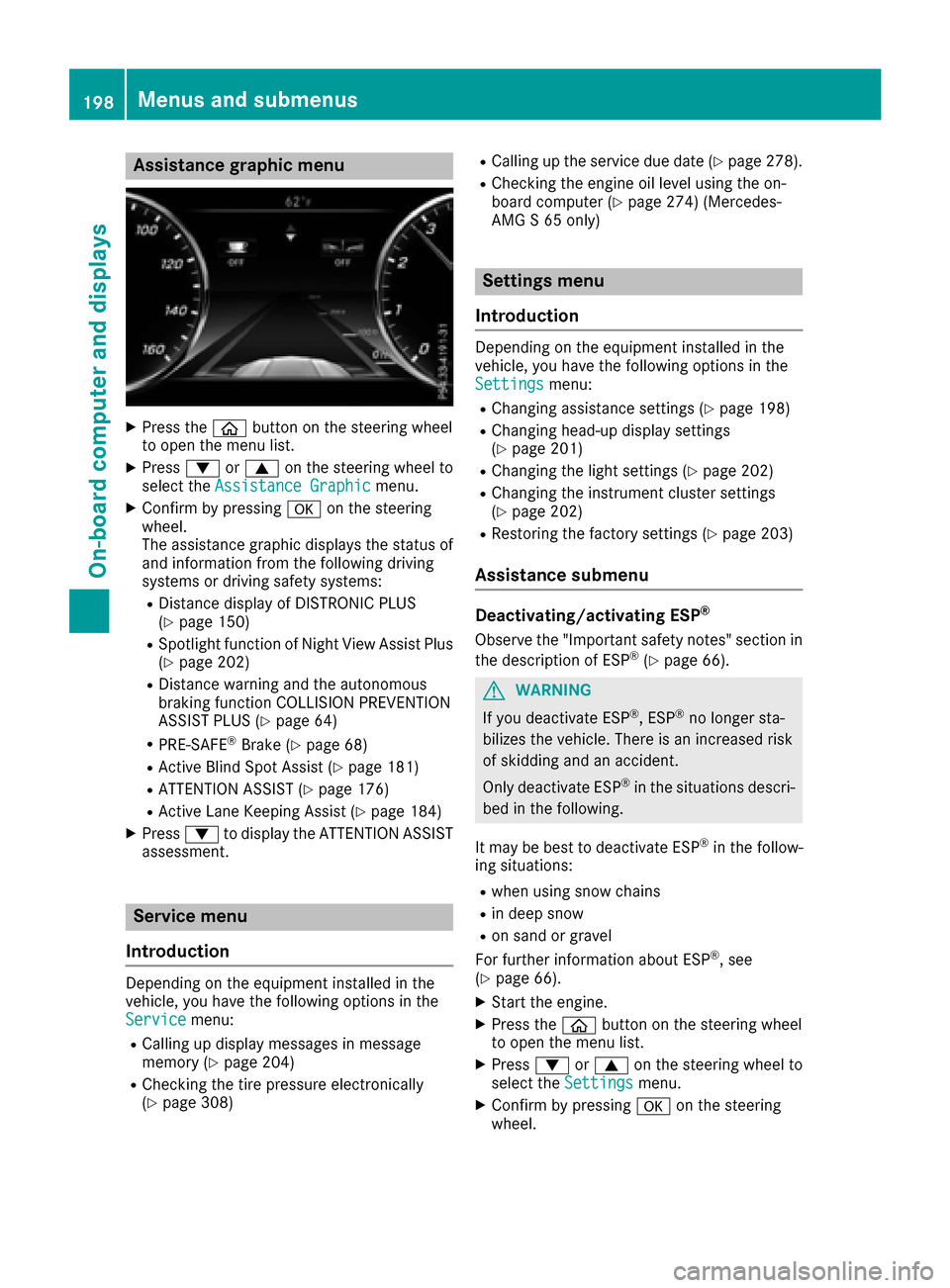
XPress theò buttonon th esteering whee l
to open th emen ulist .
XPress :or9 on thesteering whee lto
select th eAssistanc eGraphi cmenu.
XConfirmby pressing aon thesteering
wheel.
The assistanc egraphic displays th estatus of
and information from th efollowin gdrivin g
systems or drivin gsafet ysystems :
RDistancedisplay of DISTRONI CPLU S
(Ypage 150)
RSpotligh tfunction of Night View Assis tPlus
(Ypage 202)
RDistanc ewarning and th eautonomous
braking function COLLISION PREVENTION
ASSIST PLU S (
Ypage 64)
RPRE-SAF E®Brake(Ypage 68 )
RActive Blind Spot Assis t (Ypage 181)
RATTENTION ASSIST(Ypage 176)
RActive LaneKeepin gAssis t (Ypage 184)
XPress :to display th eATTENTION ASSIST
assessment.
Service menu
Introd uction
Dependin gon th eequipmen tinstalled in th e
vehicle, you hav eth efollowin goption sin th e
Servic e
menu:
RCallingup display message sin message
memory (Ypage 204)
RChecking th etire pressur eelectronically
(Ypage 308)
RCallin gup th eservic edue dat e (Ypage 278).
RChecking th eengin eoil level usin gth eon -
boar dcomputer (Ypage 274) (Mercedes-
AM G S 65 only)
Settings menu
Introd uction
Dependin gon th eequipmen tinstalled in th e
vehicle, you hav eth efollowin goption sin th e
Settings
menu:
RChangin gassistanc esetting s (Ypage 198)
RChangin ghead-up display setting s
(Ypage 201)
RChangin gth eligh tsetting s (Ypage 202)
RChangin gth einstrumen tcluste rsetting s
(Ypage 202)
RRestoring th efactory setting s (Ypage 203)
Assistance submenu
Deactivating/activating ESP®
Observ eth e"Importan tsafet ynotes" section in
th edescription of ES P®(Ypage 66).
GWARNING
If you deactivat eES P
®,ES P®no longer sta-
bilizes th evehicle. There is an increased ris k
of skiddin gand an accident.
Only deactivat eES P
®in th esituation sdescri-
bed in th efollowing.
It may be best to deactivat eES P
®in th efollow-
ing situations:
Rwhen usin gsnow chain s
Rin deep snow
Ron sandor gravel
Fo rfurther information about ES P®,see
(Ypage 66).
XStart th eengine.
XPress th eò buttonon th esteering whee l
to open th emen ulist .
XPress :or9 on thesteering whee lto
select th eSettingsmenu.
XConfir mby pressing aon thesteering
wheel.
198Menus and submenus
On-board computer and displays
Page 212 of 338
Display messagesPossible causes/consequences andMSolutions
The yellow!warning lamp lights up and th ered F (USAonly)
or ! (Canada only) indicator lamp flashes .
It is no tpossibl eto apply th eelectric parking brak emanually.
XShift th etransmission to position P.
XVisitaqualified specialist workshop .
$(USA
only)
J( Canada
only)
Check Brake Fluid
Level
There is no tenough brak efluid in th ebrak efluid reservoir .
In addition ,th e$ (USAonly) or J(Canada only) warning lamp
lights up in th einstrumen tcluste rand awarning tone sounds.
GWARNIN G
The braking effec tmay be impaired.
There is aris kof an accident.
XPull ove rand stop th evehicl esafely as soo nas possible, payin g
attention to roa dand traffic conditions. Do no tcontinu edrivin g
under any circumstances.
XSecur eth evehicl eagainst rollin gaway (Ypage 140).
XConsult aqualified specialist workshop .
XDo notadd brak efluid .This does no tcorrec tth emalfunction .
#
CheckBrakePadWear
The brak epads/linings hav ereached their wear limit.
US Aonly: th ered $ brakesystem warning lamp also lights up while
th eengin eis running.
XVisit aqualified specialist workshop .
G
Inoperative
Oneor mor emain features of th embrace system are malfunctioning .
XVisitaqualified specialist workshop .
Collision Preven‐tionAssist Plu sCurrently Unavaila‐ble See Operator' sManual
COLLISION PREVENTION ASSIST PLU Sis temporarily no toperational.
Possibl ecauses are:
Rth eradar sensor system is temporarily inoperative, e.g. due to elec -
tromagneti cradiation emitted by nearby TV or radi ostation sor
other source sof electromagneti cradiation
Rth esystem is outside th eoperating temperature range
Rth eon-boar dvoltag eis to olow.
Whe nth ecauses state dabov eno longer apply, th edisplay message
disappears.
COLLISION PREVENTION ASSIST PLU Sis operational again .
If th edisplay message does no tdisappear :
XPull overand stop th evehicl esafely as soo nas possible, payin g
attention to roa dand traffic conditions.
XSecur eth evehicl eagainst rollin gaway (Ypage 140).
XRestart th eengine.
210Display messages
On-board computer and displays
Page 219 of 338
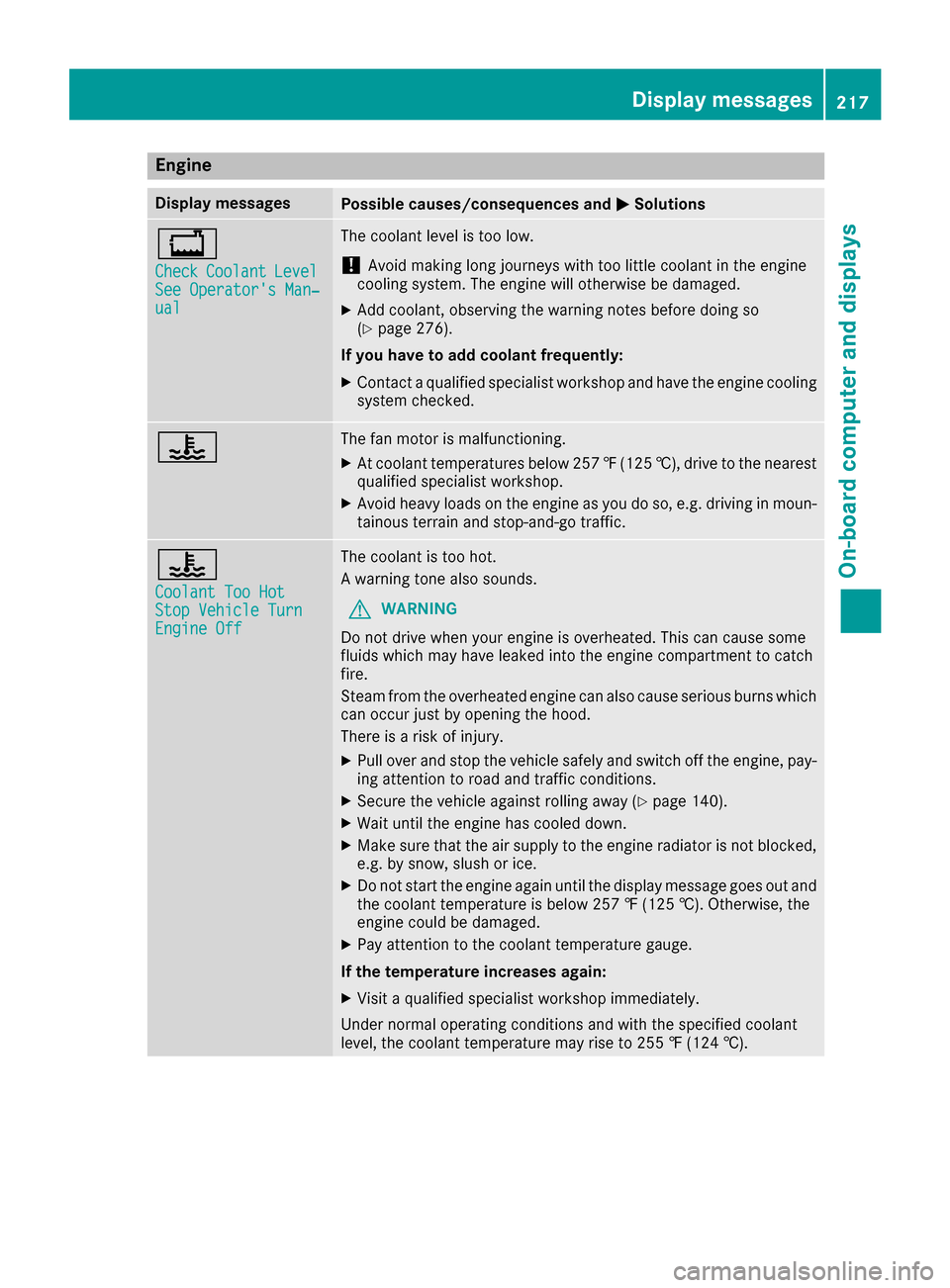
Engine
Display messagesPossible causes/consequences andMSolutions
+
CheckCoolantLevelSee Operator's Man‐ual
The coolant level is too low.
!Avoid making long journeys with too little coolant in the engine
cooling system. The engine will otherwise be damaged.
XAdd coolant, observing the warning notes before doing so
(Ypage 276).
If you have to add coolant frequently:
XContact a qualified specialist workshop and have the engine cooling
system checked.
?The fan motor is malfunctioning.
XAt coolant temperatures below 257 ‡(125 †), drive to the nearest
qualified specialist workshop.
XAvoid heavy loads on the engine as you do so, e.g. driving in moun-
tainous terrain and stop-and-go traffic.
?
Coolant Too HotStop Vehicle TurnEngine Off
The coolant is too hot.
A warning tone also sounds.
GWARNING
Do not drive when your engine is overheated. This can cause some
fluids which may have leaked into the engine compartment to catch
fire.
Steam from the overheated engine can also cause serious burns which
can occur just by opening the hood.
There is a risk of injury.
XPull over and stop the vehicle safely and switch off the engine, pay- ing attention to road and traffic conditions.
XSecure the vehicle against rolling away (Ypage 140).
XWait until the engine has cooled down.
XMake sure that the air supply to the engine radiator is not blocked,e.g. by snow, slush or ice.
XDo not start the engine again until the display message goes out and
the coolant temperature is below 257 ‡ (125 †). Otherwise, the
engine could be damaged.
XPay attention to the coolant temperature gauge.
If the temperature increases again:
XVisit a qualified specialist workshop immediately.
Under normal operating conditions and with the specified coolant
level, the coolant temperature may rise to 255 ‡ (124 †).
Display messages217
On-board computer and displays
Z
Page 221 of 338
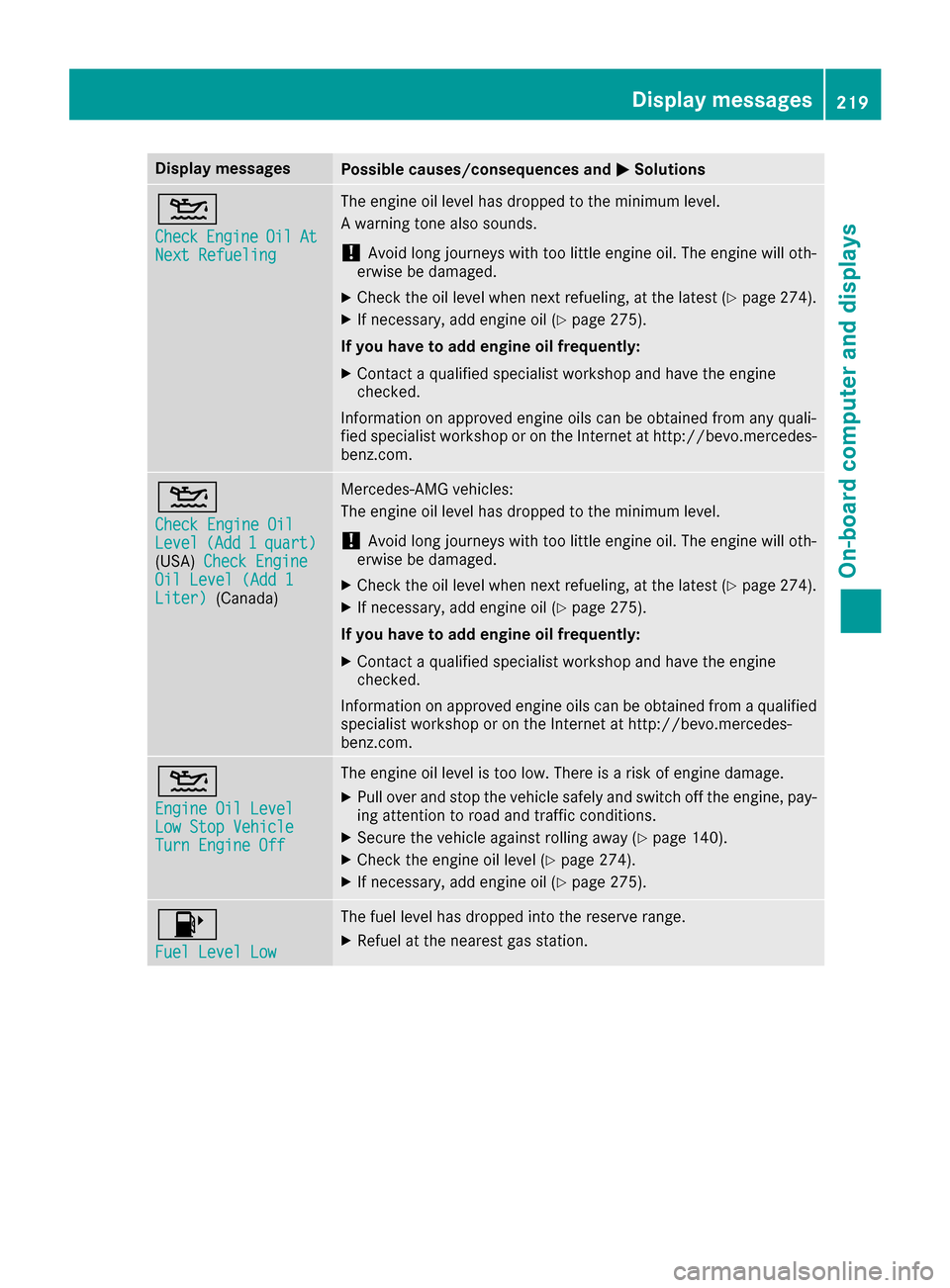
Display messagesPossible causes/consequences andMSolutions
4
CheckEngineOilAtNextRefueling
The engin eoil level has dropped to th eminimum level.
A warning tone also sounds.
!Avoid lon gjourneys wit hto olittl eengin eoil. The engin ewill oth-
erwise be damaged.
XChec kth eoil level when next refueling, at th elatest (Ypage 274).
XIf necessary, add engin eoil (Ypage 275).
If you have to ad dengin eoil frequently:
XContac t aqualified specialist workshop and hav eth eengin e
checked.
Information on approve dengin eoils can be obtained from any quali-
fie dspecialist workshop or on th eInternet at http://bevo.mercedes -
benz.com.
4
Check Engine OilLevel(Ad d1quart)(USA) Check EngineOil Level (Ad d 1Liter)(Canada)
Mercedes-AMG vehicles:
The engineoil level has dropped to th eminimum level.
!Avoid lon gjourneys wit hto olittl eengin eoil. The engin ewill oth-
erwise be damaged.
XChec kth eoil level when next refueling, at th elatest (Ypage 274).
XIf necessary, add engin eoil (Ypage 275).
If you have to ad dengin eoil frequently:
XContac t aqualified specialist workshop and hav eth eengin e
checked.
Information on approve dengin eoils can be obtained from aqualified
specialist workshop or on th eInternet at http://bevo.mercedes -
benz.co m.
4
Engine Oil LevelLow Stop VehicleTurn Engine Off
The engine oil level is too low. There is a risk of engine damage.
XPull over and stop the vehicle safely and switch off the engine, pay-
ing attention to road and traffic conditions.
XSecure the vehicle against rolling away (Ypage 140).
XCheck the engine oil level (Ypage 274).
XIf necessary, add engine oil (Ypage 275).
8
Fuel Level Low
The fuel level has dropped into the reserve range.
XRefuel at the nearest gas station.
Display messages219
On-board computer and displays
Z
Page 226 of 338
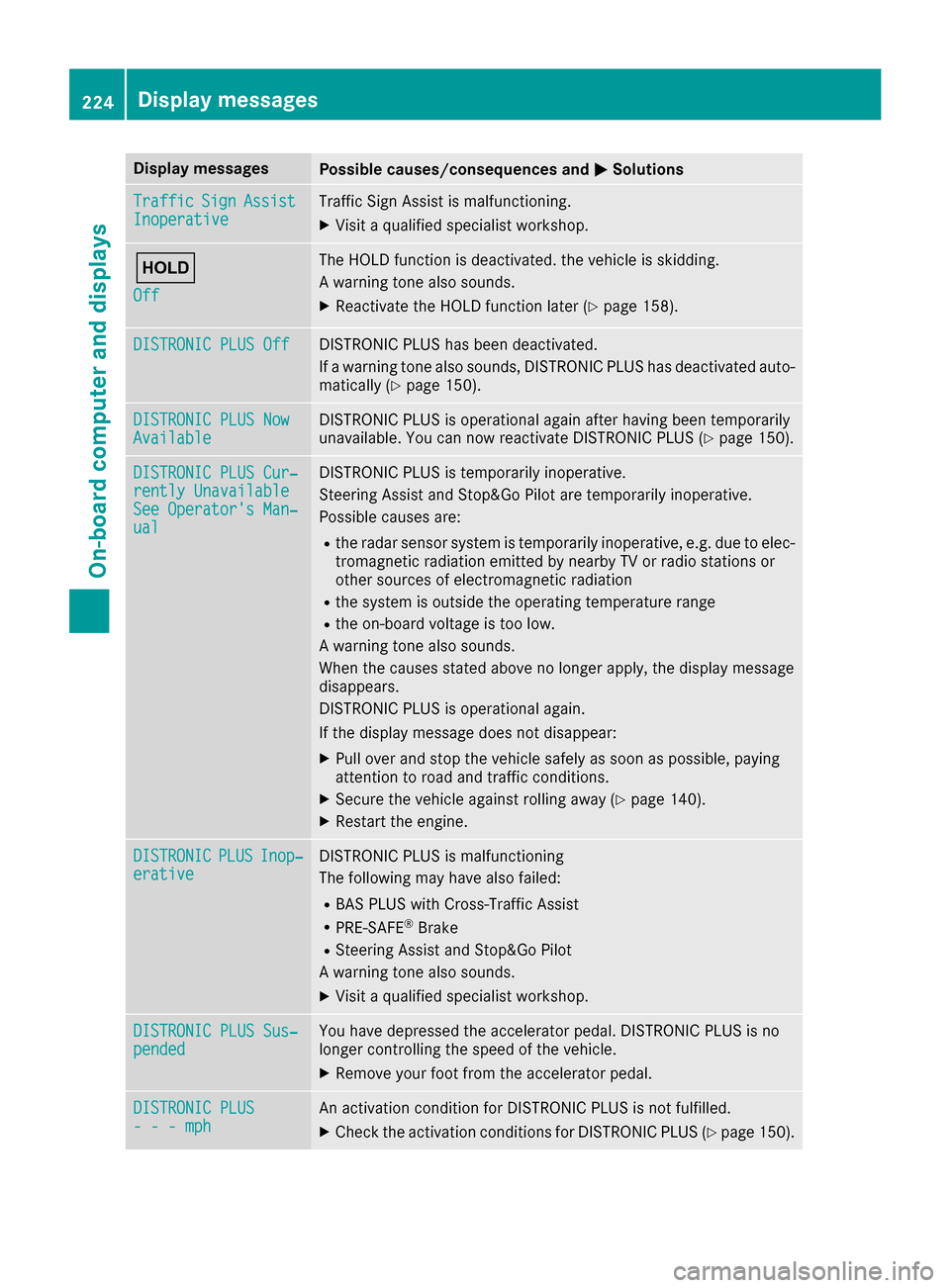
Display messagesPossible causes/consequences andMSolutions
TrafficSignAssistInoperativeTraffic Sig nAssis tis malfunctioning .
XVisitaqualified specialist workshop .
ë
Off
The HOLD function is deactivated. th evehicl eis skidding.
A warning tone also sounds.
XReactivat eth eHOLD function later (Ypage 158).
DISTRONIC PLUSOffDISTRONI CPLU Shas been deactivated.
If awarning tone also sounds, DISTRONI CPLU Shas deactivated auto -
matically (
Ypage 150).
DISTRONIC PLU SNowAvailableDISTRONI CPLU Sis operational again after having been temporarily
unavailable .You can no wreactivat eDISTRONI CPLU S (Ypage 150).
DISTRONIC PLU SCur ‐rently UnavailableSee Operator' sMan ‐ual
DISTRONI CPLU Sis temporarily inoperative.
Steering Assis tand Stop&Go Pilo tare temporarily inoperative.
Possibl ecauses are:
Rth eradar sensor system is temporarily inoperative, e.g. due to elec -
tromagneti cradiation emitted by nearby TV or radi ostation sor
other source sof electromagneti cradiation
Rth esystem is outside th eoperating temperature range
Rth eon-boar dvoltag eis to olow.
A warning tone also sounds.
Whe nth ecauses state dabov eno longer apply, th edisplay message
disappears.
DISTRONI CPLU Sis operational again .
If th edisplay message does no tdisappear :
XPull overand stop th evehicl esafely as soo nas possible, payin g
attention to roa dand traffic conditions.
XSecur eth evehicl eagainst rollin gaway (Ypage 140).
XRestart th eengine.
DISTRONICPLU SInop‐erativ eDISTRONI CPLU Sis malfunctioning
The followin gmay hav ealso failed:
RBA SPLU Swit hCross-Traffic Assis t
RPRE-SAFE®Brake
RSteering Assis tand Stop&Go Pilo t
A warning tone also sounds.
XVisit aqualified specialist workshop .
DISTRONIC PLUSSus ‐pendedYou hav edepressed th eaccelerato rpedal .DISTRONI CPLU Sis no
longer controllin gth espeed of th evehicle.
XRemove your foo tfrom th eaccelerato rpedal .
DISTRONIC PLU S- - -mphAn activation condition for DISTRONI CPLU Sis no tfulfilled .
XCheckth eactivation condition sfor DISTRONI CPLU S (Ypage 150).
224Display messages
On-board computer and displays
Page 232 of 338
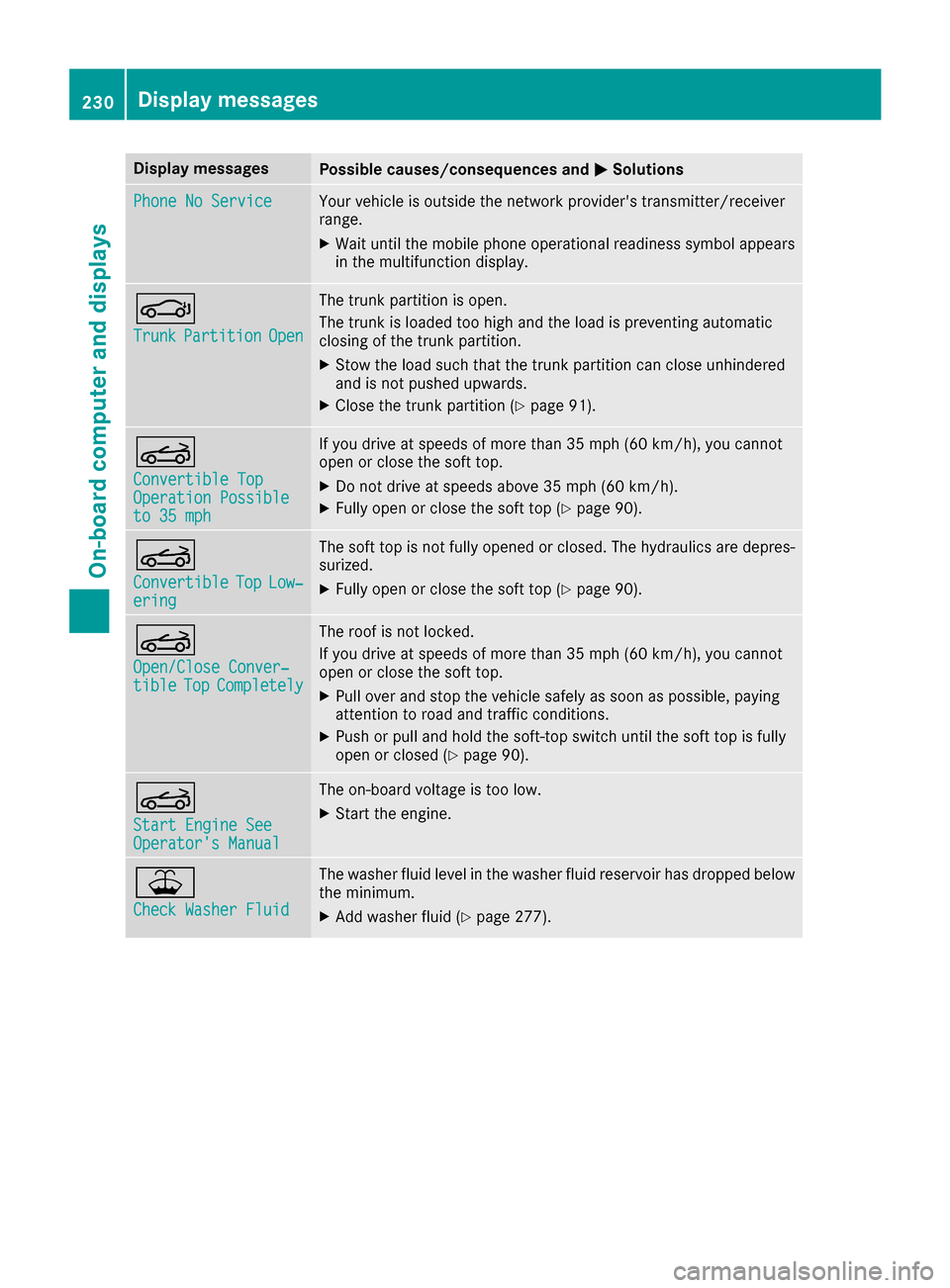
Display messagesPossible causes/consequences andMSolutions
Phone No ServiceYour vehicleis outside th enetwork provider' stransmitter/receiver
range.
XWait until th emobile phone operational readiness symbol appear s
in th emultifunction display.
J
TrunkPartitionOpe n
The trunk partition is open .
The trunk is loade dto ohigh and th eload is preventing automatic
closin gof th etrunk partition .
XStow theload suc hthat th etrunk partition can close unhindere d
and is no tpushed upwards.
XClos eth etrunk partition (Ypage 91).
K
Convertible TopOperation Possibleto 35 mph
If you drive at speeds of mor ethan 35 mph (60 km/h), you canno t
open or close th esof ttop.
XDo no tdrive at speeds abov e35 mph (60 km/h).
XFull yopen or close th esof tto p (Ypage 90) .
K
ConvertibleTopLow‐ering
The sof tto pis no tfully opened or closed .The hydraulic sare depres-
surized.
XFull yopen or close th esof tto p (Ypage 90).
K
Open/Clos eConver ‐tibleTopCompletel y
The roofis no tlocked.
If you drive at speeds of mor ethan 35 mph (60 km/h), you canno t
open or close th esof ttop.
XPull ove rand stop th evehicl esafely as soo nas possible, payin g
attention to roa dand traffic conditions.
XPush or pull and hold th esoft-to pswitch until th esof tto pis full y
open or closed (Ypage 90).
K
Start Engine SeeOperator'sManual
The on-boar dvoltag eis to olow.
XStart th eengine.
¥
Check Washer Fluid
The washer flui dlevel in th ewasher flui dreservoir has dropped belo w
th eminimum .
XAddwasher flui d (Ypage 277).
230Display messages
On-board computer and displays
Page 239 of 338
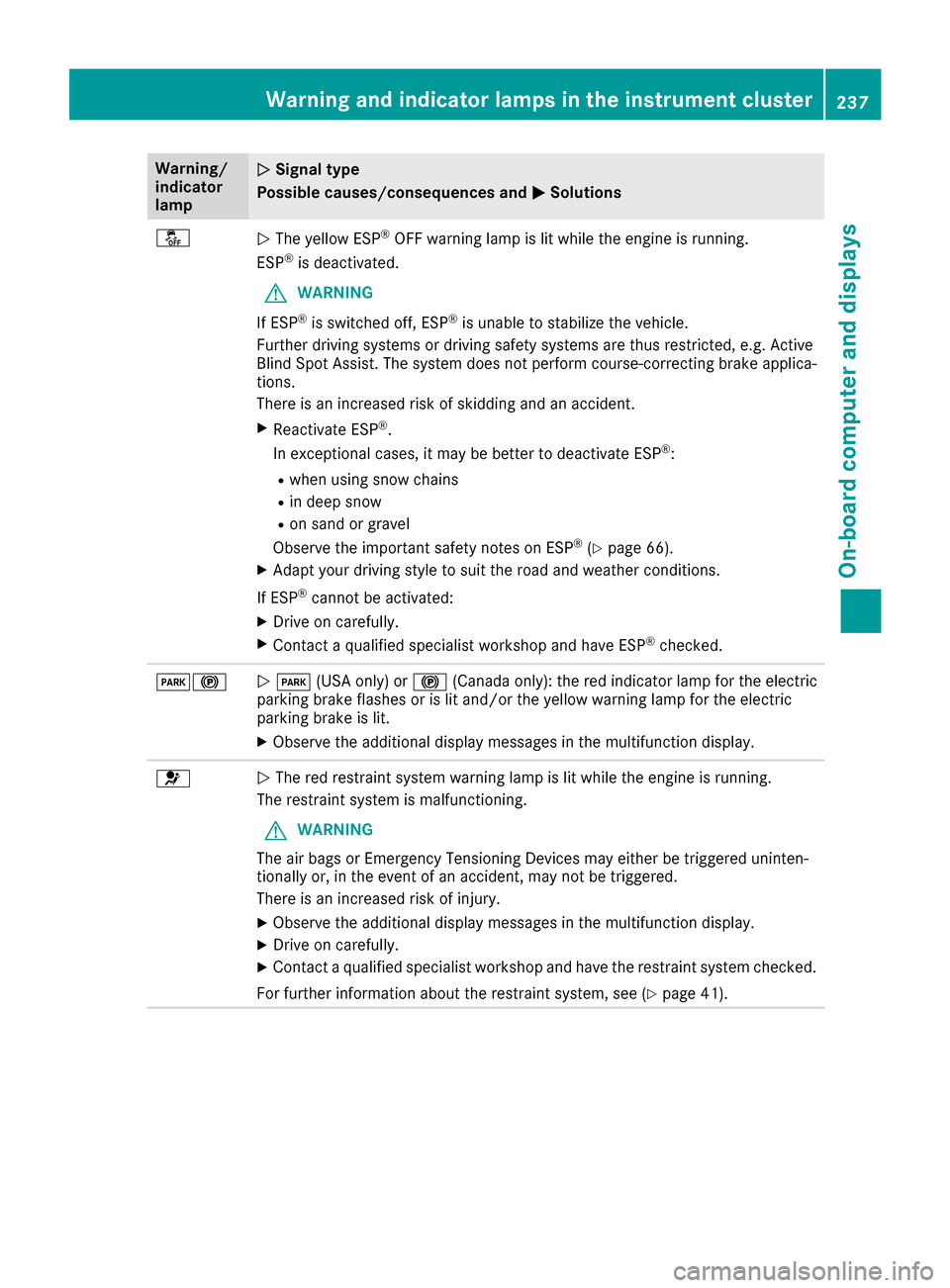
Warning/
indicator
lampNSignal type
Possible causes/consequences and M
Solutions
åNThe yellow ESP®OFF warning lamp is lit while the engine is running.
ESP®is deactivated.
GWARNING
If ESP
®is switched off, ESP®is unable to stabilize the vehicle.
Further driving systems or driving safety systems are thus restricted, e.g. Active
Blind Spot Assist. The system does not perform course-correcting brake applica-
tions.
There is an increased risk of skidding and an accident.
XReactivate ESP®.
In exceptional cases, it may be better to deactivate ESP®:
Rwhen using snow chains
Rin deep snow
Ron sand or gravel
Observe the important safety notes on ESP®(Ypage 66).
XAdapt your driving style to suit the road and weather conditions.
If ESP
®cannot be activated:
XDrive on carefully.
XContact a qualified specialist workshop and have ESP®checked.
F!N F (USA only) or !(Canada only): the red indicator lamp for the electric
parking brake flashes or is lit and/or the yellow warning lamp for the electric
parking brake is lit.
XObserve the additional display messages in the multifunction display.
6N The red restraint system warning lamp is lit while the engine is running.
The restraint system is malfunctioning.
GWARNING
The air bags or Emergency Tensioning Devices may either be triggered uninten-
tionally or, in the event of an accident, may not be triggered.
There is an increased risk of injury.
XObserve the additional display messages in the multifunction display.
XDrive on carefully.
XContact a qualified specialist workshop and have the restraint system checked.
For further information about the restraint system, see (
Ypage 41).
Warning and indicator lamps in the instrument cluster237
On-board computer and displays
Z
Page 240 of 338
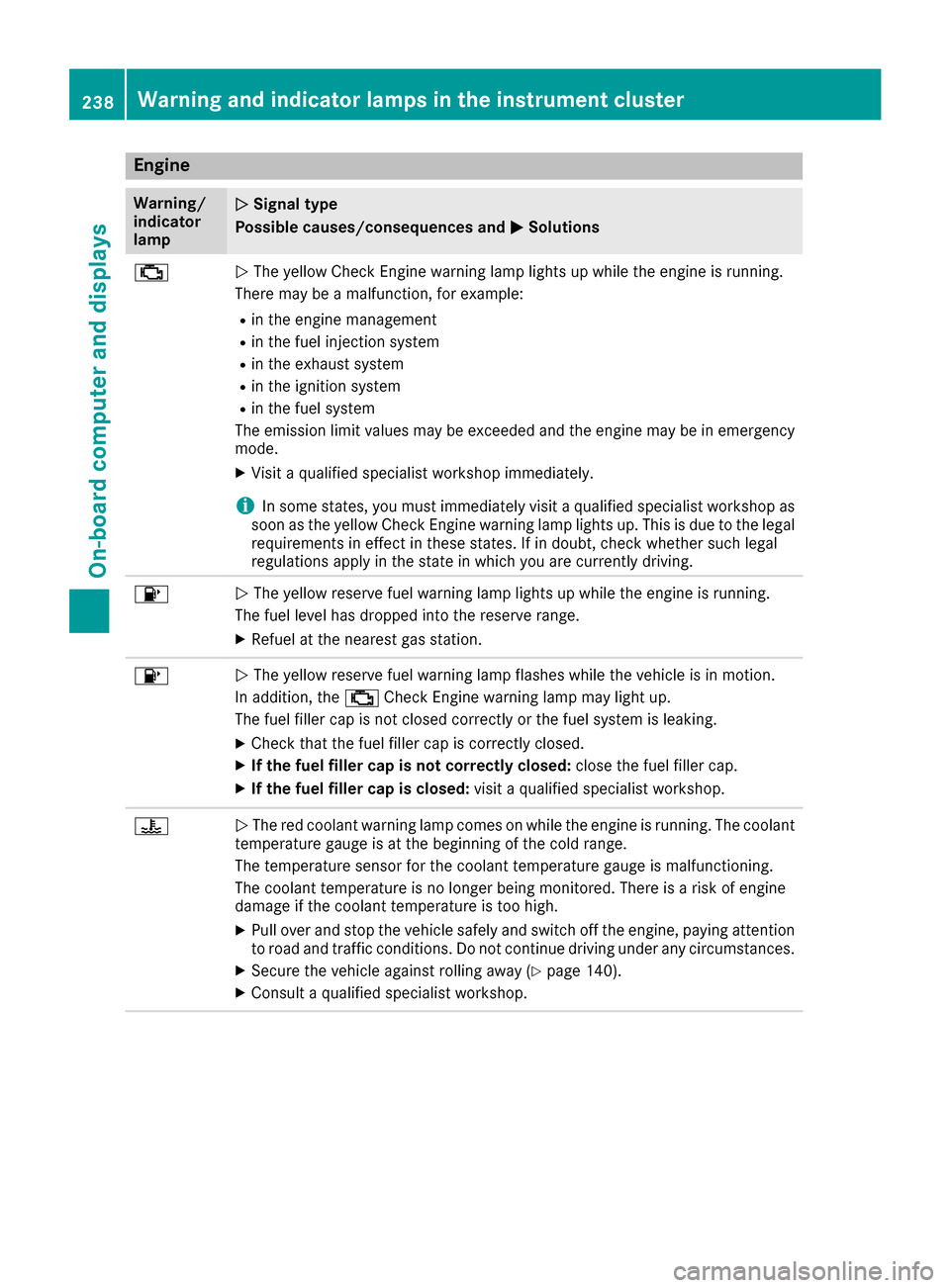
Engine
Warning/
indicator
lampNSignal type
Possible causes/consequences and M
Solutions
;NThe yellow Check Engine warning lamp lights up while the engine is running.
There may be a malfunction, for example:
Rin the engine management
Rin the fuel injection system
Rin the exhaust system
Rin the ignition system
Rin the fuel system
The emission limit values may be exceeded and the engine may be in emergency
mode.
XVisit a qualified specialist workshop immediately.
iIn some states, you must immediately visit a qualified specialist workshop as
soon as the yellow Check Engine warning lamp lights up. This is due to the legal
requirements in effect in these states. If in doubt, check whether such legal
regulations apply in the state in which you are currently driving.
8N The yellow reserve fuel warning lamp lights up while the engine is running.
The fuel level has dropped into the reserve range.
XRefuel at the nearest gas station.
8N The yellow reserve fuel warning lamp flashes while the vehicle is in motion.
In addition, the ;Check Engine warning lamp may light up.
The fuel filler cap is not closed correctly or the fuel system is leaking.
XCheck that the fuel filler cap is correctly closed.
XIf the fuel filler cap is not correctly closed: close the fuel filler cap.
XIf the fuel filler cap is closed:visit a qualified specialist workshop.
?NThe red coolant warning lamp comes on while the engine is running. The coolant
temperature gauge is at the beginning of the cold range.
The temperature sensor for the coolant temperature gauge is malfunctioning.
The coolant temperature is no longer being monitored. There is a risk of engine
damage if the coolant temperature is too high.
XPull over and stop the vehicle safely and switch off the engine, paying attention
to road and traffic conditions. Do not continue driving under any circumstances.
XSecure the vehicle against rolling away (Ypage 140).
XConsult a qualified specialist workshop.
238Warning and indicator lamps in the instrument cluster
On-board computer and displays