door lock MERCEDES-BENZ S-Class CABRIOLET 2017 A217 Owner's Manual
[x] Cancel search | Manufacturer: MERCEDES-BENZ, Model Year: 2017, Model line: S-Class CABRIOLET, Model: MERCEDES-BENZ S-Class CABRIOLET 2017 A217Pages: 338, PDF Size: 8.14 MB
Page 11 of 338
with Steering Assist and Stop&Go
Pilot ...............................................156
Doors
Automatic locking (switch) ...............7 9
Central locking/unlocking
(SmartKey) ...................................... .72
Control panel .................................. .39
Display message ............................ 229
Emergency locking ........................... 79
Emergency unlocking ....................... 79
Important safety notes .................... 78
Opening (from inside) ...................... 78
Power closing .................................. 79
Drinking and driving ......................... 144
Drive program
Automatic ...................................... 135
Manual ........................................... 135
Manual (Mercedes-AMG vehi-
cles) ............................................... 136
SETUP (on-board computer) .......... 203
Driver's door
see Doors
Driving abroad
Mercedes-Benz Service ................. 279
Driving Assistance package ............. 181
Driving on flooded roads .................. 148
Driving safety systems
ABS (Anti-lock Braking System) ....... 61
ADAPTIVE BRAKE ............................. 68
Adaptive Brake Assist ...................... 65
BAS (Brake Assist System) .............. 62
BAS PLUS with Cross-Traffic
Assist ............................................... 62
COLLISION PREVENTION ASSIST
PLUS ................................................ 64
Distance warning function ............... 64
EBD (electronic brake force distri-
bution) ............................................. 68
ESP
®(Electronic Stability Pro-
gram) ............................................... 66
Important safety information ........... 61
Overview .......................................... 61
PRE-SAFE
®Brake ............................. 68
STEER CONTROL ............................. 70
Driving systems
360°camera .................................. 172
Active Blind Spot Assist ................. 181 Active Lane Keeping Assist ............ 184
Active
Parking Assist ..................... 164
AIR
MATIC ...................................... 159
ATTENTION ASSIST ........................ 176
Cruise control ................................ 149
Display message ............................ 220
DISTRONIC PLUS ........................... 150
DISTRONIC PLUS with Steering
Assist and Stop&Go Pilot ............... 156
Driving Assistance package ........... 181
HOLD function ............................... 158
Night View Assist Plus ................... 178
PARKTRONIC ................................. 161
Rear view camera .......................... 168
Traffic Sign Assist .......................... 177
Driving tips
AMG ceramic brakes ..................... 147
Automatic transmission ................. 134
Brakes ........................................... 146
Break-in period .............................. 123
DISTRONIC PLUS ........................... 156
Downhill gradient ........................... 146
Drinking and driving ....................... 144
Driving in winter ............................. 148
Driving on flooded roads ................ 148
Driving on wet roads ...................... 148
Exhaust check ............................... 145
Fuel ................................................ 144
General .......................................... 144
Hydroplaning ................................. 148
Icy road surfaces ........................... 148
Important safety notes .................. 123
Limited braking efficiency on sal-
ted roads ....................................... 146
Snow chains .................................. 304
Subjecting brakes to a load ........... 146
The first 1000 miles (1500 km) ..... 123
Wet road surface ........................... 146
DVD video
Operating (on-board computer) ..... 196
see also Digital Operator's Man-
ual .................................................. 243
E
EASY-ENTRY featureFunction/notes ............................. 102
EASY-ENTRY system ............................ 97
Index9
Page 15 of 338
Lane Keeping Assistsee Active Lane Keeping Assist
LATCH-type (ISOFIX) child seat
anchors ................................................ 59
License plate lamp (display mes-
sage) .................................................. .216
Light sensor (display message) ....... 216
Lights
Adaptive Highbeam Assist PLUS .... 109
Automatic headlamp mode ............ 107
Cornering light function ................. 109
Fogged up headlamps .................... 110
General notes ................................ 107
Hazard warning lamps ................... 109
High beam flasher .......................... 108
High-beam headlamps ................... 108
Light switch ................................... 107
Low-beam headlamps .................... 108
Parking lamps ................................ 108
Rear fog lamp ................................ 108
Setting exterior lighting ................. 107
Standing lamps .............................. 108
Switching the daytime running
lamps on/off (on-board com-
puter) ............................................. 202
Switching the spotlight on/off ....... 202
Turn signals ................................... 108
see Interior lighting
Loading guidelines ............................ 254
Locking
see Central locking
Locking (doors)
Automatic ........................................ 79
Emergency locking ........................... 79
From inside (central locking but-
ton) ..................................................7 8
Locking centrally
see Central locking
Low-beam headlamps
Display message ............................ 216
Switching on/off .......................... .108
Luggage cover
see Trunk partition
Lumbar support
Adjusting the 4-way lumbar sup-
port ............................ ......................9
8M
M+S tires............................................ 304
Malfunction message
see Display messages
Matte finish (cleaning instruc-
tions) .................................................. 281
mbrace
Call priority ....................................2 64
Display message ............................ 210
Downloading destinations
(COMAND) ..................................... 264
Downloading routes ....................... 267
Emergency call .............................. 262
General notes ................................ 261
Geo fencing ................................... 267
Info call button .............................. 263
Locating a stolen vehicle ...............2 66
Remote fault diagnosis .................. 266
Remote vehicle locking .................. 266
Roadside Assistance button .......... 263
Search & Send ............................... 265
Self-test ......................................... 261
Speed alert ....................................2 67
System .......................................... 261
Triggering the vehicle alarm ........... 267
Vehicle remote unlocking .............. 265
Mechanical key
Function/notes ................................ 74
General notes .................................. 74
Inserting .......................................... 74
Locking vehicle ................................ 79
Removing ......................................... 74
Unlocking the driver's door .............. 79
Media Interface
USB port in the armrest of the
center console ............................... 256
see Digital Operator's Manual
Memory card (audio) ......................... 195
Memory function
Seats, steering wheel, exterior
mirrors ...........................................1 05
Mercedes-Benz Intelligent Drive
360°camera .................................. 172
ABS (Anti-lock Brake System) .......... 61
Active Blind Spot Assist ................. 181
Active Lane Keeping Assist ............ 184
Active Parking Assist ..................... 164
Index13
Page 20 of 338
SectionWheels and tires ............................3 02
Securing a load
see Securing cargo
Securing cargo .................................. 257
Selector lever
Cleaning ......................................... 286
see Automatic transmission
Sensors (cleaning instructions) ....... 284
Service menu (on-board com-
puter) ..................................................1 98
Service message
see ASSYST PLUS
Service products
Brake fluid ..................................... 332
Coolant (engine) ............................ 332
Engine oil ....................................... 331
Fuel ................................................ 330
Important safety notes .................. 329
Refrigerant (air-conditioning sys-
tem) ............................................... 333
Washer fluid ................................... 333
Setting the date/time format
see also Digital Operator's Man-
ual ..................................................2 43
Setting the language
see also Digital Operator's Man-
ual ..................................................2 43
Setting the time
see also Digital Operator's Man-
ual ..................................................2 43
Settings
Factory (on-board computer) ......... 203
On-board computer ....................... 198
SETUP (on-board computer) ............. 203
Side impact air bag .............................4 8
Side marker lamp (display mes-
sage) ................................................... 216
Side windows
Cleaning ......................................... 283
Convenience closing feature ............ 87
Convenience opening feature ..........8 7
Important safety information ........... 85
Opening/closing .............................. 86
Opening/closing (all) ....................... 86
Problem (malfunction) .....................8 8
Resettin g........................................ .88 R
eversin
gfeature ............................ .85
SIRIUS services
see also Digital Operator's Man-
ual .................................................. 243
SmartKey
Changing the battery ....................... 75
Changing the programming .............7 4
Checking the battery ...................... .75
Convenience closing feature ............ 87
Convenience opening feature .......... 87
Display message ............................ 231
Door central locking/unlocking ...... .72
Important safety notes .................... 72
KEYLESS-GO start function .............. 74
Loss .................................................7 6
Mechanical key ................................ 74
Opening/closing soft top ................. 90
Overview .......................................... 72
Positions (ignition lock) ................. 124
Problem (malfunction) ..................... 76
Starting the engine ........................ 126
Smartphone
Starting the engine ........................ 126
SMS
see also Digital Operator's Man-
ual .................................................. 243
Snow chains ...................................... 304
Sockets
Center console .............................. 260
General notes ................................ 260
Rear compartment .........................2 60
Trunk ............................................. 261
Soft top
AIRCAP ............................................ 91
Cleaning ......................................... 282
Display message ....... ..................... 230
Important sa
fety notes .................... 89
Opening/closing (SmartKey) ........... 90
Opening/closing (with soft-top
switch) ............................................. 90
Problem (malfunction) ..................... 92
Relocking ......................................... 91
Soft-top switch ....................................9 0
Sound
Switching on/off ........................... 244
Special seat belt retractor .................. 58
Specialist workshop ............................29
18Index
Page 41 of 338
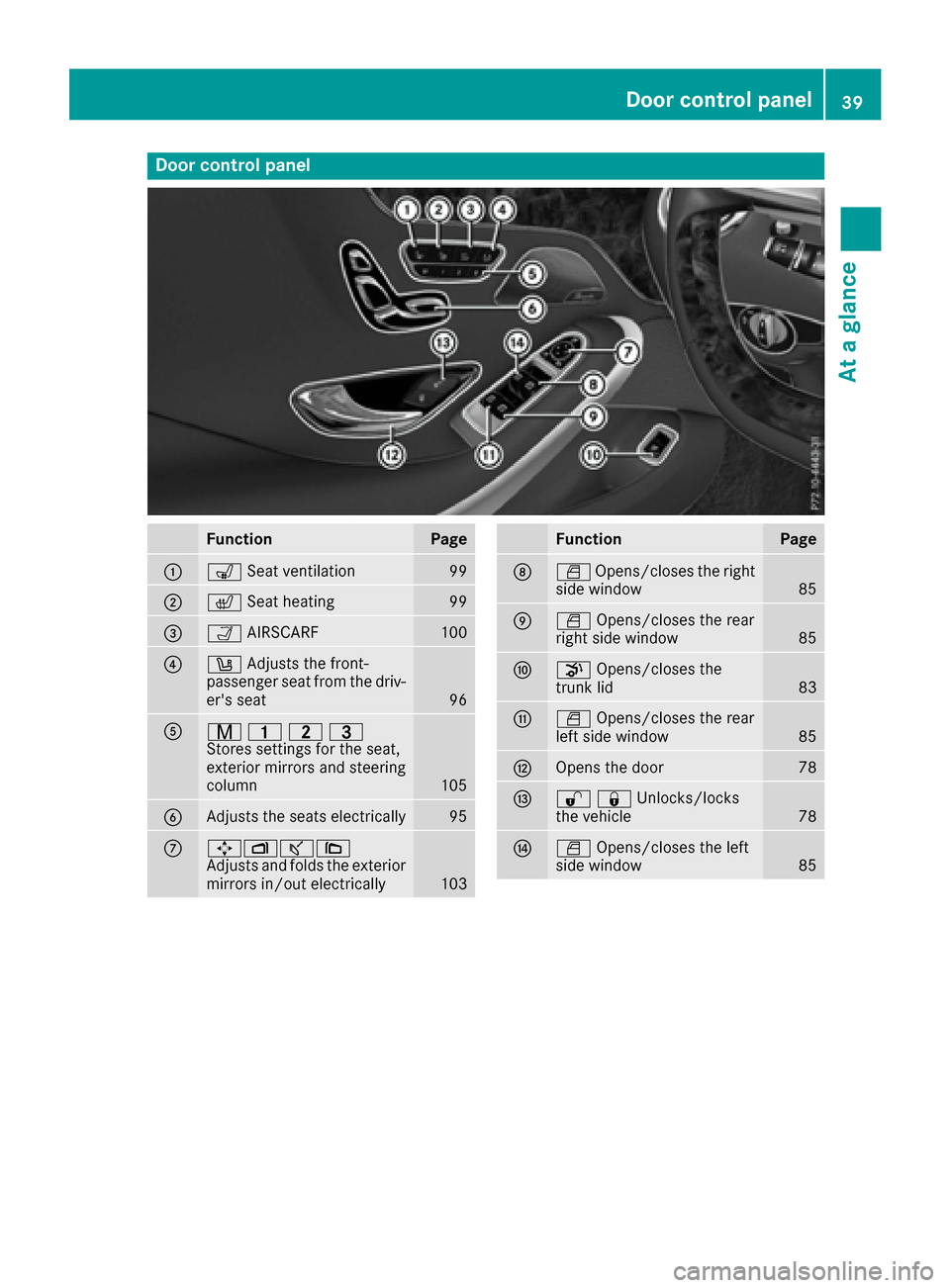
Door controlpanel
FunctionPage
:s Seat ventilation99
;cSeat heatin g99
=ÒAIRSCARF100
?w Adjust sth efront-
passenger seat from th edriv-
er' sseat
96
Ar 45=
Stores settings for the seat,
exterior mirrors and steering
column
105
BAdjusts the seats electrically95
C7Zª\
Adjusts and folds the exterior
mirrors in/out electrically
103
FunctionPage
DW Opens/closes the right
side window85
EW Opens/closes the rear
right side window85
Fp Opens/closes the
trunk lid83
GW Opens/closes the rear
left side window85
HOpens the door78
I%&Unlocks/locks
the vehicle78
JW Opens/closes the left
side window85
Door control panel39
At a glance
Page 47 of 338
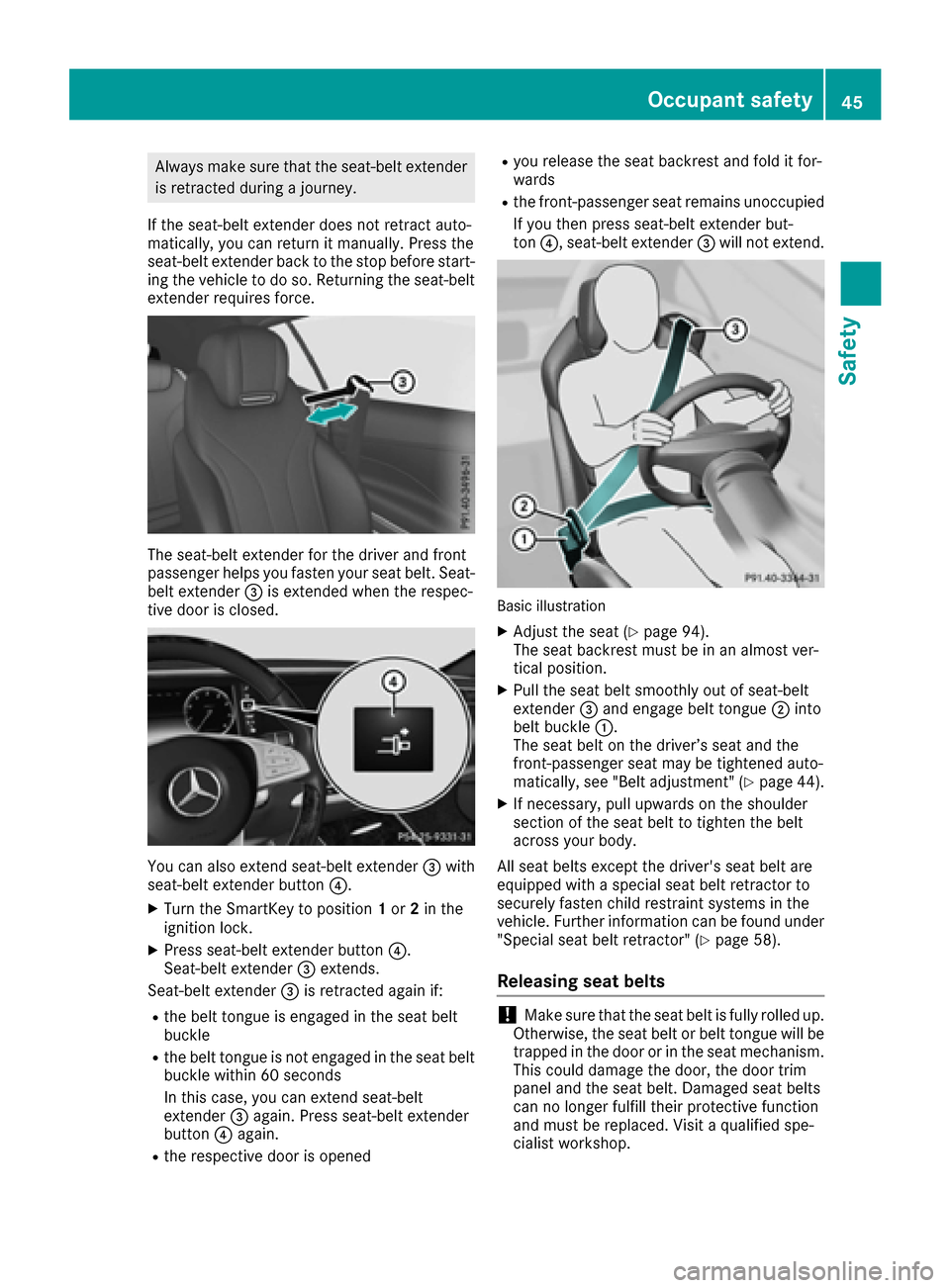
Always make sure that the seat-belt extenderis retracted during a journey.
If the seat-belt extender does not retract auto-
matically, you can return it manually. Press the
seat-belt extender back to the stop before start-
ing the vehicle to do so. Returning the seat-belt
extender requires force.
The seat-belt extender for the driver and front
passenger helps you fasten your seat belt. Seat-
belt extender =is extended when the respec-
tive door is closed.
You can also extend seat-belt extender =with
seat-belt extender button ?.
XTurn the SmartKey to position 1or 2in the
ignition lock.
XPress seat-belt extender button ?.
Seat-belt extender =extends.
Seat-belt extender =is retracted again if:
Rthe belt tongue is engaged in the seat belt
buckle
Rthe belt tongue is not engaged in the seat belt
buckle within 60 seconds
In this case, you can extend seat-belt
extender =again. Press seat-belt extender
button ?again.
Rthe respective door is opened
Ryou release the seat backrest and fold it for-
wards
Rthe front-passenger seat remains unoccupied
If you then press seat-belt extender but-
ton ?, seat-belt extender =will not extend.
Basic illustration
XAdjust the seat (Ypage 94).
The seat backrest must be in an almost ver-
tical position.
XPull the seat belt smoothly out of seat-belt
extender =and engage belt tongue ;into
belt buckle :.
The seat belt on the driver’s seat and the
front-passenger seat may be tightened auto-
matically, see "Belt adjustment" (
Ypage 44).
XIf necessary, pull upwards on the shoulder
section of the seat belt to tighten the belt
across your body.
All seat belts except the driver's seat belt are
equipped with a special seat belt retractor to
securely fasten child restraint systems in the
vehicle. Further information can be found under
"Special seat belt retractor" (
Ypage 58).
Releasing seat belts
!Make sure that the seat belt is fully rolled up.
Otherwise, the seat belt or belt tongue will be
trapped in the door or in the seat mechanism.
This could damage the door, the door trim
panel and the seat belt. Damaged seat belts
can no longer fulfill their protective function
and must be replaced. Visit a qualified spe-
cialist workshop.
Occupant safety45
Safety
Z
Page 59 of 338
uations, PRE-SAFE®PLUS takes pre-emptive
measures to protect the veh icleoccupants.
Important safety notes
The intervention of PRE-SAFE®PLUS cannot
prevent an imminent co llision.
The driverisnot warned when PRE-SAFE
®PLUS
intervenes.
PRE-SAFE
®PLUS does not intervene ifthe veh i-
cle isbacking up.
When driving, or when parking or exiting a park-
ing space with assistance from Active Parking
Assist, PRE-SAFE
®PLUS willnotapply the
brakes.
Function
PRE-SAFE®PLUS intervenes incertain situa-
tions ifthe radar sensor system detects an
imminent head-on or rear-end co llision.
PRE-SAFE
®PLUS takes the foll owing measures
dependin g on the hazardous situation detected:
Rifthe radar sensor system detects that a
head-on co llisionis imminent, the seat belts
are pre-tensioned.
Rif the radar sensor system detects that a rear-
end co llisionis imminent:
-the brake pressure isincreased ifthe driv er
applies the brakes when the veh icle issta-
tionary.
-the seat belts are pre-tensioned.
The PRE-SAFE®PLUS braking applicationiscan-
celed:
Rif the accelerator pedal is depressed when a
gear isengaged
Rifthe risk of a co llision passes or isno longer
detected
Rif DI ST RONIC PLUS indicates an intention to
pull away
If the hazardous situation passes without result-
ing inan acc ident, the original settings are
restored.
Automatic measures after an acci-
dent
Im mediate lyafter an accident, the foll owing
measures are implemented, depending on the
type and severity of the impact:
Rthe hazard warning lamps are activated
Rthe emergency lighting is activated
Rthe vehicle doors are unlocked
Rthe front side wind ows are lowered
Rthe electrically adjustable steering wheel is
raised
Rthe engine is switched off and the fuel supply
is cut off
Rvehicles with mbrace: automatic emergency
call
Children in the vehicle
Important safety notes
Accident statistics show that ch ildren secured
in the rear seats are safer than ch ildren secured
in the front-passenger seat. For this reason,
Mercedes-Benz strongly advises that you install
a child restraint system on a rear seat. Children
are generally better protected there.
If a child younger than twelve years old and
under 5 ft (1.50 m) in height is traveling in the
vehicle:
Ralways secure the child ina child restraint
system suitable for Mercedes-Benz vehicles.
The child restraint system must be appropri-
ate to the age, weight and size of the child
Rbe sure to observe the instructions and safety
notes inthis section inaddition to the child
restraint system manufacturer's installation
instructions
Rbe sure to observe the instructions and safety
notes on the "Occupant classification system
(OCS)" (
Ypage 49)
GWARNING
If you leave children unsupervised in the vehi-
cle, they could set it inmotion by, for example:
Rrelease the parking brake.
Rshift the automatic transmission out of the
parking position P.
Rstart the engine.
Children in the vehicle57
Safety
Z
Page 72 of 338
Function
XTo activate/deactivate:activateor deacti -
vat ePRE-SAF E®Brake in th eon-board com-
puter (Ypage 200).
If th ePRE-SAF E®Brake is no tactivated, th e
æ symbol appear sin th emultifunction dis-
play.
Starting at aspee dof aroun d 4mph (7 km/h),
this function warn syou if you rapidly approac h a
vehicl ein front. An intermittent warning tone
will then soun dand th e· distanc ewarning
lamp will ligh tup in th einstrumen tcluster.
XBrake immediately to defuse th esituation .
or
XTak eevasive action provide dit is saf eto do
so.
PRE-SAF E
®Brake can also brak eth evehicl e
automatically under th efollowin gconditions:
Rth edriver and fron tpassenger have their seat
belt sfastene d
Rthevehicl espee dis between approximately
4 mph (7 km/ h) and 124 mph (200 km/h)
At speeds of up to approximately 44 mph
(70 km/h) PRE-SAFE
®Brake can also detect:
Rstationary objects in the path of your vehicle,
e.g. stopped or parked vehicles
Rpedestrians in the path of your vehicle
iIf there is an increased risk of a collision,
preventive passenger protection measures
(PRE-SAFE
®) are triggered (Ypage 56).
If the risk of collision with the vehicle in front
remains and you do not brake, take evasive
action or accelerate significantly, the vehicle
may perform automatic emergency braking, up
to the point of ful l bra
ke application. Automatic
emergency braking is not performed until imme-
diately prior to an imminent accident.
You can prevent the intervention of the PRE-
SAFE
®Brake at any time by:
Rdepressing the accelerator pedal further.
Ractivating kickdown.
Rreleasing the brake pedal.
The braking action of PRE-SAFE®Brake is ended
automatically if:
Ryou maneuver to avoid the obstacle.
Rthere is no longer a risk of collision.
Rthere is no longer an obstacle detected in
front of your vehicle.
STEER CONTROL
General information
STEER CONTROL helps you by transmitting a
noticeable steering force to the steering wheel
in the direction required for vehicle stabilization.
This steering assistance is provided in particular
if:
Rboth right wheels or both left wheels are on a
wet or slippery road surface when you brake
Rthe vehicle starts to skid
Important safety notes
iObserve the "Important safety notes" sec-
tion (Ypage 61).
No steering support is provided from STEER
CONTROL, if:
RESP®is deactivated
RESP®is malfunctioning
Rthe steering is faulty
Power steering will, however, continue to func-
tion.
Protection against theft
Immobilizer
The immobilizer prevents your vehicle from
being started without the correct SmartKey.
XTo activate with the SmartKey: remove the
SmartKey from the ignition lock.
XTo activate with KEYLESS-GO start-func-
tion or KEYLESS-GO: switch the ignition off
and open the driver's door.
XTo deactivate: switch on the ignition.
When leaving the vehicle, always take the
SmartKey with you and lock the vehicle. Anyone can start the engine if a valid SmartKey has been
left inside the vehicle.
iThe immobilizer is always deactivated when
you start the engine.
In the event that the engine cannot be started
(yet the vehicle's battery is charged), the sys-
tem is not operational. Contact an authorized
Mercedes-Benz Center or call
1-800-FOR-MERCedes (in the USA) or
1-800-387-0100 (in Canada).
70Protection against theft
Safety
Page 73 of 338
ATA (anti-theft alarmsystem)
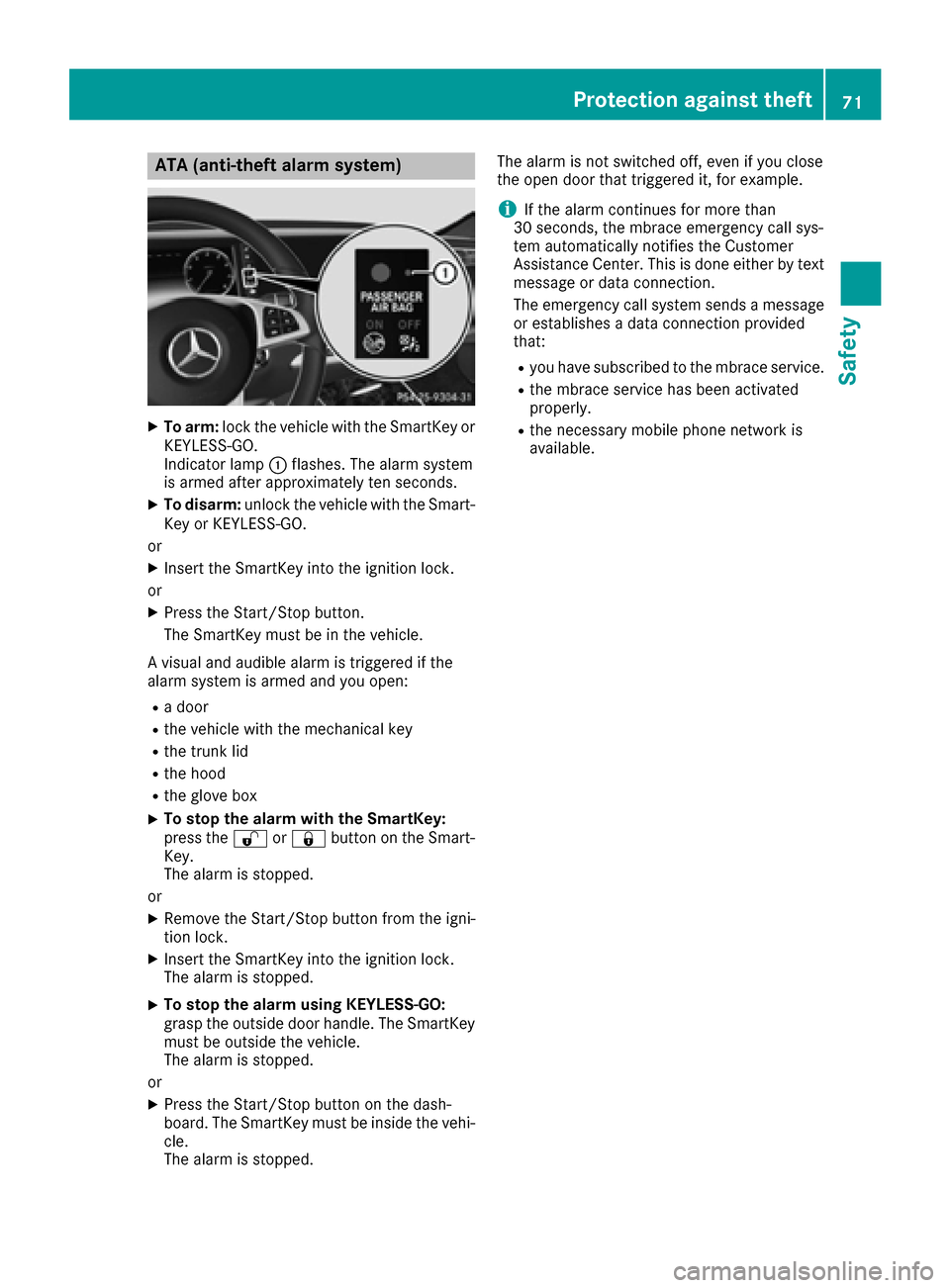
XTo arm: lockth evehicl ewit hth eSmartKey or
KEYLESS-GO .
Indicato rlamp :flashes .The alarm system
is armed after approximately te nseconds.
XTo disarm: unlockth evehicl ewit hth eSmart -
Key or KEYLESS-GO .
or
XInser tth eSmartKey int oth eignition lock.
or
XPress th eStart/Sto pbutton.
The SmartKey mus tbe in th evehicle.
A visual and audible alarm is triggered if th e
alarm system is armed and you open :
Radoor
Rth evehicl ewit hth emechanical ke y
Rthetrunk lid
Rth ehoo d
Rtheglov ebox
XTo stop th ealarm wit hth eSmartKey :
press th e% or& buttonon th eSmart -
Key.
The alarm is stopped.
or
XRemove th eStart/Sto pbutto nfrom th eigni-
tion lock.
XInser tth eSmartKey int oth eignition lock.
The alarm is stopped.
XTo stop th ealarm using KEYLESS-GO:
gras pth eoutside door handle. The SmartKey
mus tbe outside th evehicle.
The alarm is stopped.
or
XPress th eStart/Sto pbutto non th edash -
board. The SmartKey mus tbe inside th evehi-
cle .
The alarm is stopped. The alarm is no
tswitched off ,eve nif you close
th eopen door that triggered it ,for example.
iIf th ealarm continues for mor ethan
30 sec onds, th embrace emergenc ycall sys-
te m automatically notifie sth eCustome r
Assistance Center. This is don eeither by text
message or dat aconnection .
The emergenc ycall system sends amessage
or establishes adat aconnection provided
that:
Ryou hav esubscribed to th embrace service.
Rth embrace servic ehas been activated
properly.
Rth enecessar ymobile phone network is
available.
Protection against theft71
Safety
Z
Page 74 of 338

SmartKey
Important safety notes
GWARNING
If children are left unsupervised in the vehicle,
they could:
Ropen the doors, thus endangering other
people or road users.
Rget out and disrupt traffic.
Roperate the vehicle's equipment.
Additionally, children could set the vehicle in
motion if, for example, they:
Rrelease the parking brake.
Rshifting the automatic transmission out of
park position P
RStart the engine.
There is a risk of an accident and injury.
When leaving the vehicle, always take the
SmartKey with you and lock the vehicle. Never
leave children or animals unattended in the
vehicle. Always keep the SmartKey out of
reach of children.
GWARNING
If you attach heavy or large objects to the
SmartKey, the SmartKey could be uninten-
tionally turned in the ignition lock. This could
cause the engine to be switched off. There is a risk of an accident.
Do not attach any heavy or large objects to the
SmartKey. Remove any bulky key rings before
inserting the SmartKey into the ignition lock.
!Keep the SmartKey away from strong mag-
netic fields. Otherwise, the remote control
function could be affected.
Strong magnetic fields can occur in the vicin-
ity of powerful electrical installations.
Do not keep the SmartKey:
Rwith electronic devices, e.g. a mobile phone
or another SmartKey.
Rwith metallic objects, e.g. coins or metal foil.
Rinside metallic objects, e.g. a metal case.
This can affect the functionality of the Smart- Key. Vehicles with KEYLESS-GO start function:
do
not keep the SmartKey on the parcel shelf or in
the trunk. Otherwise, the SmartKey may not be
detected, e.g. when starting the engine using
the Start/Stop button.
A brief radio connection between the vehicle
and the SmartKey determines whether a valid
SmartKey is in, or in the direct vicinity of, the
vehicle. This occurs, for example:
Rwhen starting the engine
Rwhile driving
Rwhen using HANDS-FREE ACCESS
Rwhen the external door handles are touched
Rduring convenience closing
SmartKey functions
:& Locks the vehicle
;FOpens/closes the trunk lid
=%Unlocks the vehicle
XTo unlock centrally: press the%button.
If you do not open the vehicle within approx-
imately 40 seconds of unlocking:
Rthe vehicle is locked again.
Ranti-theft protection is reactivated.
XTo lock centrally: press the&button.
The SmartKey centrally locks and unlocks the
following components:
Rthe doors
Rthe trunk lid
Rthe glove box
Rthe fuel filler flap
The turn signals flash once when unlocking and
three times when locking.
You can also set an audible signal to confirm
that the vehicle has been locked. The audible
72SmartKey
Opening and closing
Page 75 of 338

signal can be activated and deactivated via the
multimedia system; see the Digital Operator's
Manual.
You will receive visual and acoustic locking con-
firmation if all components were able to be
locked.
When the locator lighting is activated via the
multimedia system, it lights up when it is dark
after the vehicle is unlocked with the SmartKey;
see the Digital Operator's Manual.
XTo open the trunk lid automatically from
outside the vehicle:press and hold theF
button until the trunk lid opens.
KEYLESS-GO
General notes
Bear in mind that the engine can be started by
any of the vehicle occupants if there is a Smart-
Key in the vehicle (
Ypage 126).
Locking/unlocking centrally
You can start, lock or unlock the vehicle using
KEYLESS-GO. To do this, you only need carry the
SmartKey with you. You can combine the func-
tions of KEYLESS-GO with those of a conven-
tional SmartKey. Unlock the vehicle by using
KEYLESS-GO, for instance, and lock it using the
& button on the SmartKey.
The driver's door and the door at which the han-
dle is used, must both be closed. The SmartKey
must be outside the vehicle. When locking or
unlocking with KEYLESS-GO, the distance
between the SmartKey and the corresponding
door handle must not be greater than 3 ft (1 m).
A brief radio connection between the vehicle
and the SmartKey determines whether a valid
SmartKey is in, or in the direct vicinity of, the
vehicle. This occurs, for example:
Rwhen starting the engine
Rwhile driving
Rwhen using HANDS-FREE ACCESS
Rwhen the external door handles are touched
Rduring convenience closing
XTo unlock the vehicle: touch the inner sur-
face of the door handle.
XTo lock the vehicle: touch sensor surface :
or ;.
Make sure that you do not touch the inner
surface of the door handle.
XConvenience closing feature: touch
recessed sensor surface ;for an extended
period.
XTo open the trunk lid: push in the top of the
star on the trunk lid.
The trunk lid opens.
Deactivating and activating
If you do not intend to use a SmartKey for an
extended period of time, you can deactivate the
KEYLESS-GO function of the SmartKey. The
SmartKey will then use very little power, thereby
conserving battery power. For the purposes of
activation/deactivation, the vehicle must not be
nearby.
XTo deactivate: press the&button on the
SmartKey twice in rapid succession.
The battery check lamp (
Ypage 75) of the
SmartKey flashes twice briefly and lights up
once, then KEYLESS-GO is deactivated.
XTo activate: press any button on the Smart-
Key.
or
XInsert the SmartKey into the ignition lock.
KEYLESS-GO and all of its associated features
are available again.
SmartKey73
Opening and closing
Z