keyless MERCEDES-BENZ S-CLASS CABRIOLET 2017 Owners Manual
[x] Cancel search | Manufacturer: MERCEDES-BENZ, Model Year: 2017, Model line: S-CLASS CABRIOLET, Model: MERCEDES-BENZ S-CLASS CABRIOLET 2017Pages: 521, PDF Size: 10.48 MB
Page 68 of 521

If
yo udon otopen thev ehicle within appr ox‐
imatel y40seconds af teru nlocking:
R The vehicle is loc keda gain
R Anti- theftp rotection is reactivated
Do no tkeep thek eytoget her wit helectronic
devices or me talo bjects. This can af fect the
ke y's functionalit y.
% If batter ychec klamp 2does no tlight up
af te rp ressing the% or& button, the
batter yisdischar ged. Ac
tivating/deactivatin gthe acoustic lo cking
ve rification signal Multimedia sy
stem:
, Vehicle .
î Vehicle set-
tings .
Acoustic lock #
Activate Oor deacti vate ª thef unction. Ac
tivating/deactivatin gthe pani calarm Re
quirements:
% The panic alar mfunction is onl yavailable in
cer tain countries.
R The ignition is switched off. #
Toactivate: press button 1fora pprox‐
ima tely one second.
Av isual and audibl ealarmist riggered. #
Todeactivate: brieflyp ress but ton1again.
or #
Press thes tart/s topb utton on thec ockpit
(the keyisi nside thev ehicle). Changing
theu nlocking settings Po
ssible unlocking functions of thek ey:
R Central unlocking
R Unlocking thed rive r's door and fuel filler flap #
Toswitc hbetwe en settings: pressthe
% and& button ssimultaneousl yfor
appr oximatel ysix seconds until theb attery
ch eckl am pflashes twice.
If th eu nlocking function fort he driver's door
and fuel filler flap has been selec ted:
R Pressing the% button asecon dtime cen‐
trally unloc ksthev ehicle.
R Vehicles with KEYLESS-GO: ifyo ut ouch
th ei nner sur face of thed oor handle on the
driver's door ,onlyt he driver's door and fuel
fi ller flap ar eunlocked. Re
ducing the energy consu mptionoft hekey All
vehicles: ifyo udon otuse thev ehicle or a
ke yf or an extende dperio doft ime,youc an
re duce thee nergy consum ption of ther espec‐
tiv ek ey.T odos o, deactivat ethe keyf unctions. Opening and closing
65
Page 71 of 521
Problem
Possible causes/consequences and M
MSolutions #
Chec kthe batter yusing theb atter ychec klam pand replace if necessar y. #
Use thee mer gency keytol ockoru nlock. #
Have thek eycheckedataq ualified specialis tworks hop.
Yo uh ave lostak ey. #
Have thek eydeacti vatedataq ualified specialis tworks hop. #
If necessar y,ha ve thel oc ks changed as well. Doors
Note
sont he additional doo rlock The additional door loc
kisonlya vailable for
ve hicles fort he United Kingdom. &
WARNING Risk of inju ryto persons
inside thev ehicle when thea dditional
door loc kisactivated
If th ea dditional door loc kisactivated, the
door scan no longer be opened from the
inside.
If th er ea repersons in thev ehicle, they can
no longer le avet he vehicle, e.g. in hazardous
situations. #
Neverlea ve persons unattended in the
ve hicle, particularly children, elderly
person sorpersonsinneed of help. #
Ifth er ea repersons in thev ehicle, do
no ta ctivat ethe additional door loc k. The additional door loc
kisautomaticall yactiva‐
te dint hefollowing situations:
R The vehicle is loc kedu sing thek ey.
R The vehicle is loc kedu sing KEYLESS-GO.
% Afterl ocking youc an issue asignal wit hthe
horn.
If th ea dditional door loc kisactivated, thed oors
cann otbe opened from thei nside. Yo
uc an deactivat ethe additional door loc kby
deactivating thei nterior pr otection (→ page93). Un
locking/opening thed oor sfromt he inside Un
ited Kingdom onl y:obser vethen otes on the
additional door loc k(→pag e68). 68
Opening and closing
Page 74 of 521
%
Mercedes-Benzr ecommendsthat youc arry
th ee mer gency keyinc aseoff unction
re strictions. Lo
cking and unlocking thev ehicle wit hKEY‐
LESS-GO Re
quirements:
R The keyiso utside thev ehicle.
R The dis tance betwee nthe keya nd thev ehicle
does no texceed 1m.
R The driver's doo rand thed oor at whic hthe
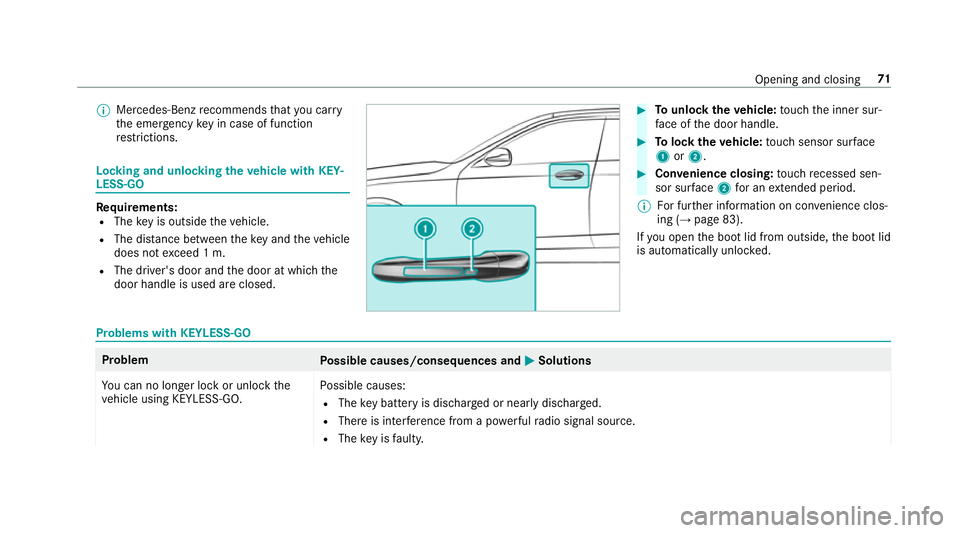
door handle is used ar eclosed. #
Tounlo ckthev ehicle: touc ht he inner sur‐
fa ce of thed oor handle. #
Toloc kthe vehicle: touc hs ensor sur face
1 or2. #
Convenience closing: touc hr ecessed sen‐
sor sur face 2 forane xtende dperiod.
% Forfurther information on con venience clos‐
ing (→ page 83).
If yo uo pen theb ootlid from outside, theb ootlid
is automaticall yunloc ked. Problems wit
hKEYLESS-GO Problem
Possible causes/consequences and M
MSolutions
Yo uc an no lon gerloc koru nlockthe
ve hicle using KEYLESS-GO. Po
ssible causes:
R The keyb atte ry is dischar gedorn early dischar ged.
R Ther eisi nterfere nce from apowe rful radio signal source.
R The keyisf aulty. Opening and closing
71
Page 78 of 521
in
thec losing area or ma yenter thec losing
area during thec losing process. #
Mak esuret hat nobody is in thev icinity
of thec losing area during thec losing
process. #
Use one of thef ollowing options tostop
th ec losing process:
R Press thep button on thek ey.
R Press or pull ther emo teoperating
switc hont he driver's door.
R Press thec losing or locking button
on theb ootlid.
R Press thet op of thes taront he boot
lid. Ve
hicles with HANDS-FREE ACCESS: it is also
possible tostop thec losing process bymoving
yo ur foot inak ickin gmotion under ther ear
bumper.
Yo uh ave thef ollowing options toclos ethe boot
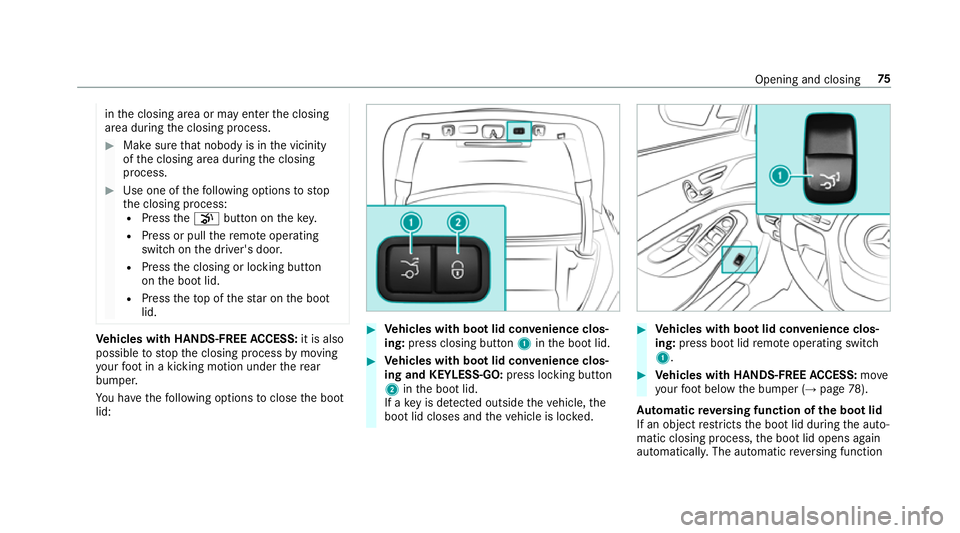
lid: #
Vehicles with boo tlid conve nience clos‐
ing: press closing button 1intheb ootlid. #
Vehicles with boo tlid conve nience clos‐
ing and KEYLESS-GO: press locking button
2 intheb ootlid.
If ak eyis de tected outsid ethe vehicle, the
boo tlid closes and thev ehicle is loc ked. #
Vehicles with boo tlid conve nience clos‐
ing: press boo tlid remo teoperating switch
1. #
Vehicles with HANDS-FREE ACCESS: move
yo ur foot belo wthe bumper (→ page78).
Au tomatic reve rsing function of th ebootlid
If an objec trestricts theb ootlid during thea uto‐
matic closing process, theb ootlid opens again
automaticall y.The automatic reve rsing function Opening and closing
75
Page 80 of 521
#
Deactivat eKEYLESS-G Oormakes ure
th at thek eylocated is at leas t3m
aw ay from thev ehicle in suc hsitua‐
tions. When making
thek icking mo vement, mak esure
th at your feet aref irml yont he ground, other‐
wise youc ould lose your balance, e.g .onice.
Re quirements:
R The keyisb ehind thev ehicle.
R Stand at leas t30cmawayfromt hevehicle
while per form ing thek icking mo vement.
R Do no tcome int ocontact wit hthe bumper
while making thek icking mo vement.
R Do no tcarry out thek icking mo vement too
slowl y.
R The kicking mo vement mus tbetowards the
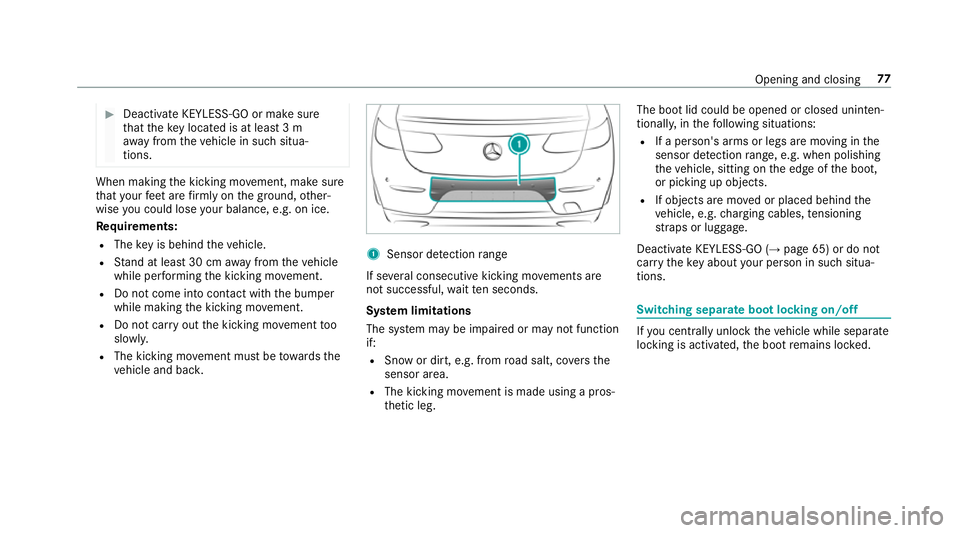
ve hicle and bac k. 1
Senso rdetection range
If se veralc onsecutiv ekickin gmovements are
no ts uccessful, waitte ns econds.
Sy stem limitations
The sy stem ma ybeimpaired or ma ynotfunction
if:
R Sno word irt, e.g. from road salt ,cove rsthe
sensor area.
R The kicking mo vement is made using apros‐
th etic leg. The boo
tlid could be opened or closed unin ten‐
tional ly,int hefollowing situations:
R Ifap erson's arms or legs ar emovingint he
sensor de tection range, e.g .whenp olishing
th ev ehicle, sitting on thee dgeoft he boot,
or picking up objects.
R If objects ar emovedorp laced behind the
ve hicle, e.g. chargin gcables, tensioning
st ra ps or luggage.
Deactivat eKEYLESS-GO (→ page65) or do not
car rythek eyabout your person in suc hsitua‐
tions. Swit
ching separat ebootlocking on/off If
yo uc entrally unlo ckthev ehicle while separate
locking is activated, theb ootremain sloc ked. Openin
gand closing 77
Page 85 of 521
R
The sof ttop is closed. The side windo
wsarec losed when the
sof ttop is closed. #
Tointer rupt convenience closing: release
the & button.
% Con venience closing can also be operated
wi th KEYLESS-GO (→ page71). Problems with
thes ide windo ws Problem
Possible causes/consequences and M
M Solutions
As ide windo wcann otbe closed and
yo uc anno tsee thec ause. #
Chec ktos ee if an yobjects ar einthe windo wguide.
& WARNING Risk of becoming trapped or fata llyi njured if reve rsing pr otection is no tactivated
If yo uc lose aside wind owagain immediatel yafter it has been bloc kedorr eset, thes ide windo wcloses
wit hincreased or maximum forc e. The reve rsing featur eist hen no tactive.
Pa rtsoft he body could become trapped in thec losing area in thep rocess. #
Mak esuret hat no parts of theb ody ar einthe closing area. #
Tostop thec losing process, release theb utton or press theb utton again toreopen thes ide win‐
do w. #
Close thes oftt op.
If as ide windo wisobstructed during closin gand reopens again slightly: 82
Opening and closing
Page 93 of 521
The
ATAs ystem is primed automaticall yafter
appr oximatel y10seconds:
R Afterl ocking thev ehicle wit hthe key.
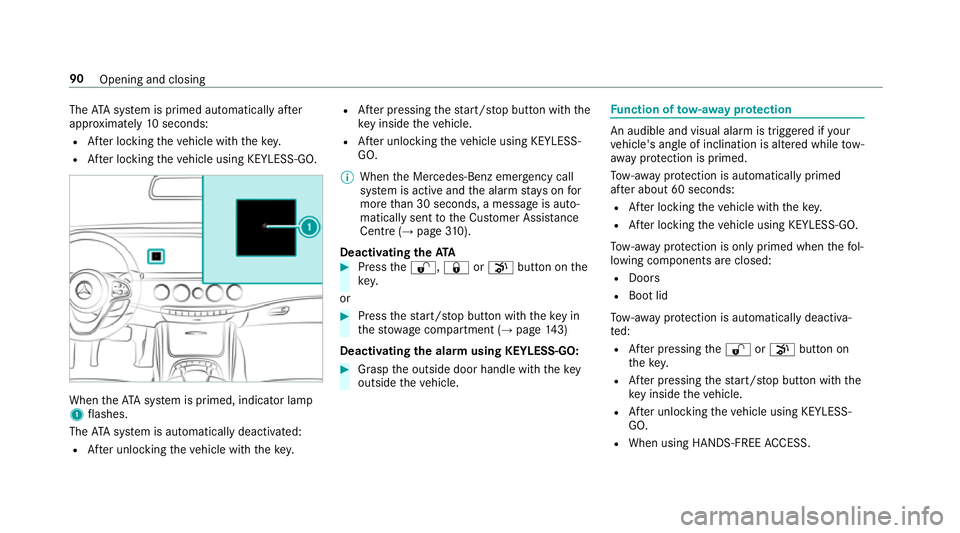
R Afterl ocking thev ehicle using KEYLESS-GO. When
theA TAsystem is primed, indicator lamp
1 flashes.
The ATAs ystem is automaticall ydeactivated:
R Afteru nlocking thev ehicle wit hthe key. R
Afterp ressing thes tart/s topb utton wit hthe
ke yins ide thev ehicle.
R Afteru nlocking thev ehicle using KEYLESS-
GO.
% When theM ercedes‑Benz emer gency call
sy stem is activ eand thea larms tays on for
mor ethan 30 seconds, amessag eisauto‐
maticall ysenttot he Cus tomer Assis tance
Centr e(→pa ge310).
Deactivatin gthe ATA #
Press the% ,& orp button on the
key.
or #
Press thes tart/s topb utton wit hthe keyin
th es towa ge compartment (→ page143)
Deactivating thea larm using KEYLESS-GO: #
Grasp theo utside door handle wit hthe key
outside thev ehicle. Fu
nction of tow- aw ay protection An audible and visual alar
mistriggered if your
ve hicle's angle of inclination is altered while tow-
aw ay protection is primed.
To w- aw ay protection is automatically primed
af te ra bout 60 seconds:
R Afterl ocking thev ehicle wit hthe key.
R Afterl ocking thev ehicle using KEYLESS-GO.
To w- aw ay protection is onl yprimed when thef ol‐
lowing component sareclosed:
R Doo rs
R Boo tlid
To w- aw ay protection is automaticall ydeactiva‐
te d:
R Afterp ressing the% orp button on
th ek ey.
R Afterp ressing thes tart/s topb utton wit hthe
ke yins ide thev ehicle.
R Afteru nlocking thev ehicle using KEYLESS-
GO.
R When using HANDS-FREE ACCESS. 90
Opening and closing
Page 94 of 521
Priming/deactivating
tow- aw ay protection Multimedia sy
stem:
, Vehicle .
î Vehicle settings .
Tow-
away protection #
Activate Oor deacti vate ª thef unction.
To w- aw ay protection remains deactivated until:
R The vehicle is unloc keda gain.
R Avehicle door is opened.
R The vehicle is loc keda gain. Fu
nction of interior pr otection When interior pr
otection is primed, avisual and
audible alar mistriggered if mo vement is de tec‐
te dint hevehicle interior.
Interior pr otection is primed automaticall yafter
appr oximatel y10seconds:
R Afterl ocking thev ehicle wit hthe key.
R Afterl ocking thev ehicle using KEYLESS-GO. Interior pr
otection is onl yprimed when thef ol‐
lowing component sareclosed:
R Doo rs
R Boo tlid
Interior pr otection is automaticall ydeactivated:
R Afterp ressing the% orp button on
th ek ey.
R Afterp ressing thes tart/s topb utton wit hthe
ke yins ide thev ehicle.
R Afteru nlocking thev ehicle using KEYLESS-
GO.
R When using HANDS-FREE ACCESS.
The following situations can lead toafalse
alarm:
R Movin gobjects, e.g. masc otsint hevehicle
interior.
R The side windo wisopen.
R When container swithf luids, e.g. drink sbot‐
tles, ar eintherear passenger compartment. Priming/deactivating interior pr
otection Multimedia sy
stem:
, Vehicle .
î Vehicle settings .
Inte-
rior motion sensor #
Activate Oor deacti vate ª thef unction.
Interior pr otection remains deactivated until:
R The vehicle is unloc keda gain.
R Avehicle door is opened.
R The vehicle is loc keda gain. Openin
gand closing 91
Page 497 of 521
Fu
nctio n................................................ 91
Intermediat edestination
Calculating arout ew ithi ntermediate
destinations ........................................ 268
Editing ................................................ .268
Entering ............................................... 267
St artin gana utomatic filling station
sear ch................................................. 267
St artin gthe automatic service sta‐
tio ns ear ch .......................................... 272
Internet Deletin gabookmar k........................... .316
Del eting br owser dat a.......................... 316
Managing bookmar ks.......................... 316
Interne tconnection
Cancellin gpermission .......................... 314
Connection status ................................ 314
Displ aying thec onnection status ........ .315
Editing access da ta.............................. 314
Es tablishing .........................................3 14
Information .......................................... 310
Mobile phone de tails .......................... .314
Re strictions ......................................... 310
Setting access da ta............................. 312
Setting up (Blue tooth®
). ...................... .312 Setting up (business
telephony) .......... .311
Switching Blu etoo th®
profile (DUN/
PA N) .....................................................3 13
Vi aB luetooth ®
..................................... 312
Vi ac ommunication modul e................. .311
Vi aW i-Fi............................................... 311
Interne tradio
Calling up ............................................. 317
Del eting stations .................................. 318
Logging in ............................................ 318
Logging out .......................................... 318
Overvie w..............................................3 17
Saving stations .................................... 318
Selecting and connecting toas tation
............................................................ .318
Selecting stre am .................................. 318
Setting options .................................... 318
Te rm sofu se ........................................3 18
Ionisation ................................................ .134
iPhone ®
see Apple CarPlay™
ISOFIXc hild seatattachment
Fittin g................................................... .54
No tes. .................................................... 53 ISOFIXc
hild seatsecuring sy stem
Seat ssuitable fora ttaching ................... 59 J
Jack Declaration of Conformity .................... .26
St orag elocation ..................................3 96
Jump-star tconnection ............................ 373 K
Key .............................................................. 64
Batter y.................................................. 66
Emer gency keye lemen t....................... .66
Energy consum ption .............................. 65
Fe atures ................................................ 64
Ke yr ing at tach ment .............................. 66
Overvie w............................................... 64
Pa nic alar m........................................... 65
Proble m................................................. 67
Un lockin gsetting .................................. 65
KEYLESS-GO Lockin gthe vehicle ................................ 71
Problem .................................................71
Un lockin gsetting .................................. 65 494
Index
Page 499 of 521
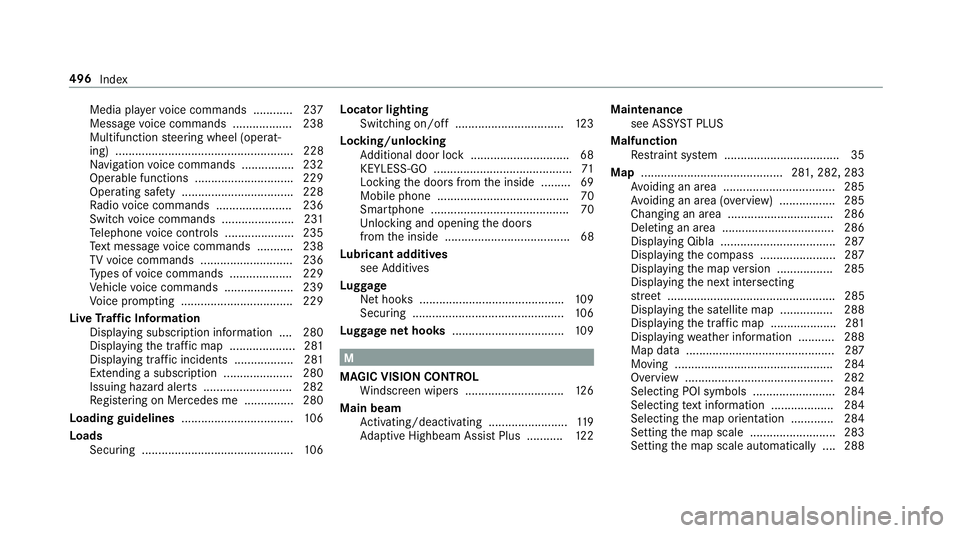
Media pla
yerv oice commands ............ 237
Messag evoice commands .................. 238
Multifunction steering wheel (operat‐
ing) ...................................................... 228
Na vigation voice command s............... .232
Operable function s............................. .229
Operatin gsafet y. ................................ .228
Ra dio voice command s....................... 236
Swit chvoice command s..................... .231
Te lephon evoice controls .....................2 35
Te xt messa gevoice command s........... 238
TV voice command s........................... .236
Ty pes of voice command s................... 229
Ve hicle voice command s..................... 239
Vo ice prom pting .................................. 229
Liv eTraffic Information
Displaying subscription information .... 280
Displaying thet raffic map .................... 281
Displaying traf fici ncidents .................. 281
Extending asubscription ..................... 280
Issuing hazar dalerts. .......................... 282
Re gis tering on Mercedes me ............... 280
Loadin gguidelines .................................. 106
Loads Securing .............................................. 106Locator lighting
Swit ching on/of f................................. 12 3
Lock ing/unlocking
Ad ditional door loc k............................. .68
KEYLESS-GO .......................................... 71
Locking thed oor sfromt he inside ......... 69
Mobile phone ........................................70
Smartphone .......................................... 70
Un lockin gand opening thed oors
from thei nside ...................................... 68
Lu bricant additives
see Additives
Lu ggage
Ne thook s........................................... .109
Securing .............................................. 106
Lu ggag enethooks .................................. 109 M
MAGIC VISION CONTROL Windsc reen wiper s.............................. 12 6
Main beam Activating/deactivating ........................ 11 9
Ad aptiv eHighbeam Assis tPlus .......... .122 Maintenance
see ASS YSTP LUS
Malfunction Restra int sy stem ................................... 35
Map ...........................................2 81,2 82, 283
Av oiding an area ..................................2 85
Av oiding an area (o verview) ................ .285
Changing an area ................................ 286
Deleting an area .................................. 286
Displ aying Qibla .................................. .287
Displ aying thec ompass ....................... 287
Displaying them apversion ................ .285
Displ aying then extintersecting
st re et ................................................... 285
Displaying thes atellit emap ................2 88
Displ aying thet raffic map .................... 281
Displaying weather information .......... .288
Map dat a............................................. 287
Moving ................................................ 284
Overvie w............................................. 282
Selecting POI symbols ......................... 284
Selecting text information ................... 284
Selecting them ap orientation .............2 84
Setting them ap scale .......................... 283
Setting them ap scale automatically ....2 88496
Index