audio MERCEDES-BENZ S-CLASS CABRIOLET 2018 User Guide
[x] Cancel search | Manufacturer: MERCEDES-BENZ, Model Year: 2018, Model line: S-CLASS CABRIOLET, Model: MERCEDES-BENZ S-CLASS CABRIOLET 2018Pages: 502, PDF Size: 6.27 MB
Page 294 of 502
Calling up Apple CarPlay™ sound settings
Multimedia system:
,Connect.Apple CarPlay.Sound
#Select theto ne menu (→pa ge 324).
Ending Apple CarPlay™
Multimedia sy stem:
,Connect.Apple CarPlay
#Select Disconnect .
The connection is ended.
The mobile phone continues tobe supplied
with elect ricity.
or
#Disconnect the connecting cable between
th e mobile phone and multimedia sy stem.
Mercedes-Benz recommends disconnecting
th e connecting cable only when theve hicle is
st ationar y.
Android Auto
Android Autoove rview
&
WARNING Risk of dist raction from infor‐
mation sy stems and communications
equipment
If yo u operate information and communica‐
tion equipment integ rated in theve hicle
when driving, youwill be distracted from the
traf fic situation. This could also cause youto
lose control of theve hicle.
#Only operate this equipment when the
traf fic situation permits.
#If yo u cannot be sure of this, stop the
ve hicle whilst paying attention toroad
and traf fic conditions and ope rate the
equipment with theve hicle stationar y.
You must observ eth e legal requirements forth e
country in whi chyou are cur rently driving when
operating the multimedia sy stem.
Mobile phone functions can be used with
Android Autousing the Android operating sys‐
te m on the multimedia sy stem. It is operated using
the controller or thevo ice-operated con‐
trol sy stem. You can activate thevo ice-opera ted
control sy stem bypressing and holding theó
button on the multifunction steering wheel.
When using Android Autovia thevo ice-opera ted
control sy stem, the multimedia sy stem can still
be opera ted via theVo ice Cont rol Sy stem
(
→page 220).
Only one mobile phone at a time can be connec‐
te d via Android Auto to the multimedia sy stem.
The availability of Android Autoand Android Auto
Apps may vary according tothe count ry.
The service pr ovider is responsible forth is appli‐
cation and the services and conte nt connected
to it.
Information on Android Auto
While using Android Auto,va rious functions of
th e multimedia sy stem, forex ample the media
source Blue tooth
®audio, are not available.
Only one route guidance can be active at a time.
If ro ute guidance isactive on the multimedia sys‐
te m, it is closed when route guidance is star ted
on the mobile phone.
292
Multimedia sy stem
Page 306 of 502
Settingthe Internet radio options
Multimedia sy stem:
,Radio.Þ Radio Source.TuneIn
Radio.Z Options
The following options are available:
RSelect Stream: select thest re am quality.
RLogin to TuneIn Account : log intoyour
Tu neIn user account.
RLog Out of Account: log out of your TuneIn
user account.
#Select an option.
Media
Au dio mode
Info rm ation on the audio mode
&
WARNING Risk of dist raction when han‐
dling data storage media
If yo u handle a datastorage medium while
driving, your attention is diverted from the
traf fic conditions. This could also cause you
to lose control of theve hicle.
#Only handle a data storage medium
when theve hicle is stationar y.
Perm issible file sy stems:
RFA T32
RexFA T
RNTFS
Pe rm issible data storage medium:
RSD card
RUSB storage device
RiPod®/iPhone®
RMTP devices
RBlue tooth®audio equipment
%
RThe multimedia sy stem supports a total
of up to50,000 files.
RData storage media up to2 TB are sup‐
por ted (32‑bit address space). Suppor
tedfo rm ats:
RMP3
RWMA
RAAC
RWA V
RFLAC
RAL AC
% Obser vethefo llowing no tes:
RDue tothe lar gevariet yof available
music files rega rding encoders, sampling
ra tes and data rates, playback cannot
alw ays be guaranteed.
RDue tothe wide range of USB devices
av ailable on the mar ket, pl ayback cann ot
be guaranteed for all USB devices.
RCop y-pr otected music files or DRM
enc rypte dfiles cannot be pla yed bac k.
RMP3 pla yers must support Media Trans‐
fe r Pr otocol (MTP).
304
Multimedia sy stem
Page 307 of 502
Manufactured under license from Dolby Labora‐
tories. Dolb y,Dolby Audio and the double-D sym‐
bol are trademar ksof Dolby Laboratories.
Graceno te,th e Graceno telogo and logotype,
"P ow ered byGracen ote", MusicID and Pla ylist
Plus are either regis tere d trademar ksor trade‐
mar ksof Graceno te, Inc. in theUn ited States
and/or other countries.
Note s on copyright
Au dio files that you create or reproduce yourself
fo r playba ckare general lysubject tocopyright
pr otection. In many count ries, reproductions,
eve nfo r private use, are not permitted without
th e prior consent of the copyright holder. Make
sure that you kn owabout the applicable copy‐
ri ght regulations and that you co mply withthese. Ac
tivating media mode
Multimedia sy stem:
,Media.à Media Sources
#Select a media source.
Playable music files are pla yed bac k.
Inserting/removing an SD card
& DANG ER Risk of fata l injury from swal‐
lowing SD cards
SD cards are small parts.
They could be swallo wed and lead tochok‐
ing.
#Ke ep SD cards out of there ach of chil‐
dren.
#Seek medical attention immediately if
an SD card has been swallo wed.
* NO
TEDama gecaused byhigh temp era‐
tures
High temp eratures can damage the SD mem‐
ory card.
Multimedia sy stem 305
Page 309 of 502
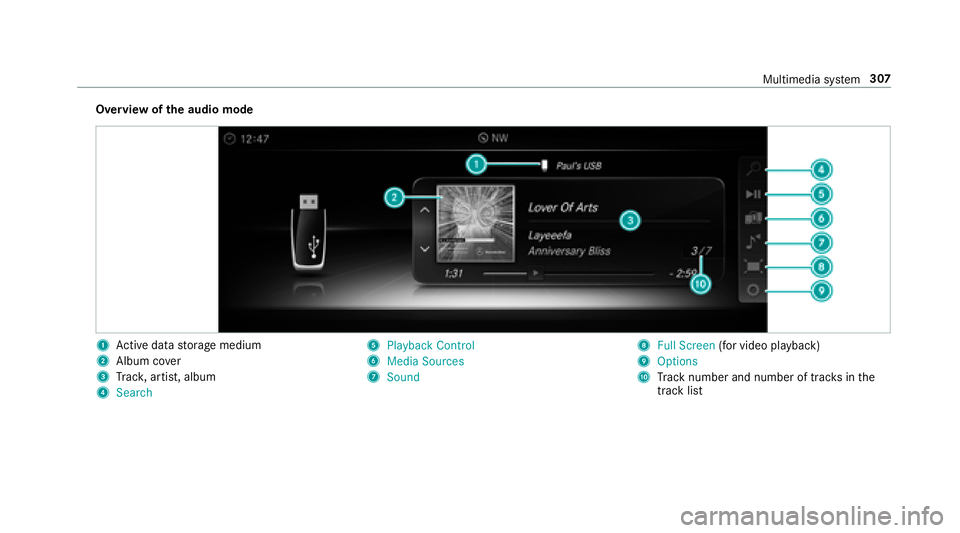
Overview ofthe audio mode
1Ac tive da tastorage medium
2Album co ver
3Trac k, artist, album
4Search
5Playback Control
6Media Sources
7Sound
8Full Screen (for video playback)
9Options
ATrack number and number of trac ksinthe
track li st
Multimedia sy stem 307
Page 313 of 502
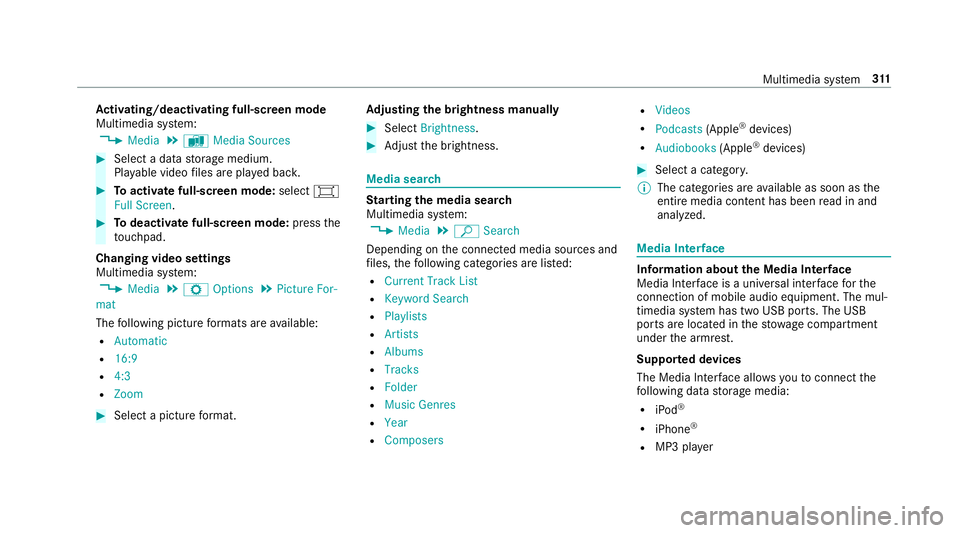
Activating/deactivating full-screen mode
Multimedia sy stem:
,Media.à Media Sources
#Select a data storage medium.
Pla yable video files are pla yed bac k.
#Toactivate full-screen mode: select#
Full Screen.
#To deactivate full-scre en mode:pressthe
to uchpad.
Changing video settings
Multimed iasystem:
,Media.Z Options.Picture For-
mat
The following picture form ats are available:
RAutomatic
R16:9
R4:3
RZoom
#Select a picture form at. Ad
justing the brightness manually
#Select Brightness .
#Adjust the brightness.
Media sear ch
Starting the media sear ch
Multimedia sy stem:
,Media.ª Search
Depending on the connected media sources and
fi les, thefo llowing categories are lis ted:
RCurrent Track List
RKeyword Search
RPlaylists
RArtists
RAlbums
RTracks
RFolder
RMusic Genres
RYear
RComposers
RVideos
RPodcasts (Apple®devices)
RAudiobooks (Apple®devices)
#Select a categor y.
% The categories are available as soon as the
entire media conte nt has beenread in and
analyzed.
Media Inter face
Information about the Media Inter face
Media Inte rface is a universal inter face forth e
connection of mobile audio equipment. The mul‐
timedia sy stem has two USB ports. The USB
ports are located in thestow age compartment
under the armrest.
Suppor ted devices
The Media Inter face allo wsyouto connect the
fo llowing data storage media:
RiPod®
RiPhone®
RMP3 pla yer
Multimedia sy stem 31
1
Page 315 of 502
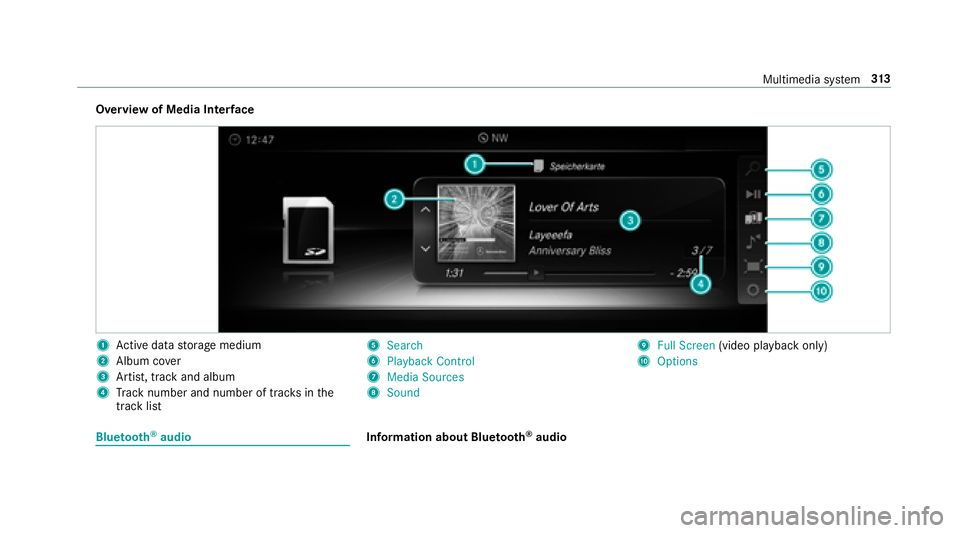
Overview of Media Interface
1Ac tive da tastorage medium
2Album co ver
3Artist, track and album
4Track number and number of trac ksinthe
track li st
5Search
6Playback Control
7Media Sources
8Sound
9Full Screen (video playback only)
AOptions
Blue tooth®audioInformation about Blue tooth®audio
Multimedia sy stem 31
3
Page 316 of 502
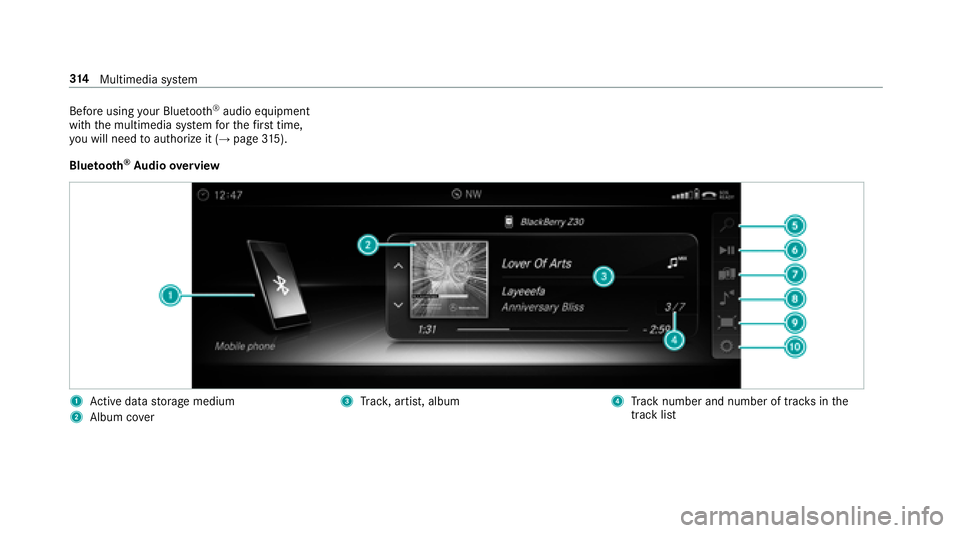
Before usingyour Blue tooth®audio equipment
with the multimedia sy stem forth efirs t time,
yo uwill need toauthorize it (
→page 315).
Blue tooth
®Au dio overview
1Ac tive da tastorage medium
2Album co ver
3Trac k, artist, album4Track number and number of trac ksinthe
track li st
314
Multimedia sy stem
Page 317 of 502
5Search
6Playback Control
7Media Sources
8Sound
9Full Screen(video playback only)
AOptions
Sear ching for and authorizing a Blue tooth
®
audio device
Requ irements:
RBluetooth®is activated on the multimedia
sy stem and audio equipment (→page 244).
RTh eaudio equipme nt supportsthe Blue‐
toot h®audio profiles A2DP and AVRC P.
RThe audio equipment is "visible" forot her
devices.
Multimedia sy stem:
,Media.à Media Sour-
ces.á Bluetooth Audio
Au thorizing new Blu etoo th
®audio equipment
#Select ¥.
#SelectAdd New Bluetooth Audio Device.
#SelectStart Search on System .
De tected audio equipment is displ ayed in the
device list.
#Select a Blue tooth®audio device.
Auth orization starts. A code is displa yed on
th e multimedia sy stem and on the mobile
phone.
#If th e codes are identical, confi rmonthe
audio equipment.
The audio equipment is connec ted and play‐
back starts.
Selecting Blu etoo th
®audio equipment that
has already been authorized
#Select ¥.
#Select a Blue tooth®audio device.
Establishing a connection from the Blue‐
to oth
®audio equipment
The Blue tooth®device name of the multimedia
sy stem is MB BLUETOOTH XXXXX.
#Select Search from Device.
#Start the authorization on the audio equip‐
ment (see manufacturer's operating instruc‐
tions).
A code is displa yed on the multimedia sys‐
te m and on the mobile phone.
#Confirm on bo thdevices if the codes are
identical.
The audio equipment is connected and play‐
back starts.
Wi th some audio equipment, playback must be
initially star ted on the device itself so that the
multimedia sy stem can play the audio files.
% Device-specific information on authorizing
and connecting Blue tooth
®-capable mobile
phones can be obta ined at http://
www.me rcedes-benz.com/connect or from
an authorized Mercedes-Benz Center.
Multimedia sy stem 31
5
Page 318 of 502
Activating Blue tooth®audio
Multimedia sy stem:
,Media.à Media Sources
#Select áBluetooth Audio.
The multimedia sy stem activates the connec‐
te d Blue tooth
®audio equipment.
Selecting a music pla yer
Multimedia sy stem:
,Media.à Media Sour-
ces.á Bluetooth Audio
#Select a Blue tooth®audio device.
If multiple music pla yers are present on the
Blu etoo th
®audio equipment a list appears.
#Select a music pla yer.
Playback starts.
Sear ching for a track
Multimedia sy stem:
,Media.à Media Sour-
ces.á Bluetooth Audio
#Select ª.
#Select a categor y.
A track li stappears.
#Select a trac k.
% The function is only available when the
mobile phone and the music pla yer selected
on the mobile phone support this function.
Switching Blu etoo th
®audio equipment via
NFC
Requ irements:
RObser vethe no tes on using NFC
(→page 283).
RThe Blue tooth®audio overview is displa yed
(→page 316).
#Ligh tly press the NFC area on the mobile
phone (see the manufacturer's operating
instructions).
If th e mobile phone has already been author‐
ized on the multimedia sy stem as Blue tooth
®
audio equipment, it is now connec ted.
If th e mobile phone is authorized on the mul‐
timedia sy stem as Blue tooth
®audio equip‐
ment forth efirs t time, it is connected af ter
confirming the instructions forth e mobile
phone (see the manufacturer's operating
instructions).
Disconnecting Blue tooth
®audio equipment
Multimedia sy stem:
,Phone.á Media Sources
#Select a Blue tooth®audio device.
#Select ¥Deauthorize.
#Select Yes.
Radio
Switching on the radio
Multimedia sy stem:
,Radio
#Alternatively: press the$ button.
The radio display appears. Youwill hear the
last station pla yed on the last frequency
band selected.
31 6
Multimedia sy stem
Page 321 of 502
#SelectMove Highlighted Station.
#Select a memo rypreset.
Deleting stations:
#Highlight a preset entry and navigate tothe
left.
#Select Delete Highlighted Station .
#SelectYes.
Tagging music trac ks
Multimedia system:
,Radio
If ra dio stations pr ovide there leva nt information,
th is function allo wsyouto trans fer information
on the music track cur rently pl aying toan
Apple
®device. You can then pur chase the audio
fi le from theiTunes Store®.
#Select ♫→ Tag This Song.
The track information is sa ved.
Ac tivating/deactivating radio text
Multimedia sy stem:
,Radio.Z Options.Display Radio
Text Information
#Ac tivate Oor deacti vate ª the function.
Satellite radio
Info rm ation on the satellite radio
SIRIUS XM®satelli teradio of fers more than 175
digital-quality radio channels pr oviding 100%
commercial-free music, sports, ne wsand enter‐
ta inment, forex ample. SIRIUS XM satellite radio
emplo ysafleet of high-per form ance satellites to
broadcast around the clock thro ughout the USA
and Canada. The satellite radio program is avail‐
able for a monthly fee. Information about this
can be obtained from a Sirius XM
®Service Cen‐
te r and at http://www.siriusxm.com (USA) or
http://www.siriusxm.ca (Canada).
% Sirius, XM and all related mar ksand logos
are trademar ksof Sirius XM Radio Inc. and
its subsidiaries. All other mar ks,ch annel names and logos are
the property of their
re spective owners. All rights reser ved.
Satellite radio restrictions
Satellite radio mode may be temp orarily una vail‐
able or inter rupte dfo r a variet yof reasons.
These include environmenta l ortopog raphical
conditions be yond the control of Mercedes-Benz
US A,LLC. Thus, operation at cer tain locations
may not be possible.
Re gis tering satellite radio
Re quirements:
Rsatellite radio equipment
Rre gistration with a satellite radio pr ovider
Rifre gistration is not included when pur chas‐
ing the sy stem, your credit card de tails will
be re
qu ired toac
tivateyour account
Multimedia sy stem 31
9