display MERCEDES-BENZ S-CLASS CABRIOLET 2018 User Guide
[x] Cancel search | Manufacturer: MERCEDES-BENZ, Model Year: 2018, Model line: S-CLASS CABRIOLET, Model: MERCEDES-BENZ S-CLASS CABRIOLET 2018Pages: 502, PDF Size: 6.27 MB
Page 95 of 502
Usingthe memory function
&
WARNING Risk of an accident if the
memory function is used while driving
If yo u use the memory function on the driv‐
er's side while driving, you could lose cont rol
of theve hicle as a result of the adjustments
being made.
#Use the memory function on the driv‐
er's side when theve hicle is stationar y.
&
WARNING Risk of entrapment when set‐
ting the seat with the memory function
When the memory function adjusts the seat
or steering wheel, you and other vehicle
occupants – particularly children – could
become trapped.
#During the setting procedure of the
memory function, ensure that no body
parts are in the sweep of the seat or
th esteering wheel.
#If somebody becomes trapped, immedi‐
ately release the memory function posi‐
tion button.
The adjustment process is stopped.
&
WARNING Risk of entrapment if the
memory function is activated bychildren
Children could become trapped if they acti‐
va te the memory function, particularly when
unattended.
#Ne ver lea vechildren unatte nded inthe
ve hicle.
#When leaving theve hicle, alw aysta ke
th eke ywit hyo u and lock theve hicle.
The memory function can be used when the igni‐
tion is switched off.
St oring
The memory function is only available in vehicles
with the memory pac kage .
Seat adjustments for up tothre e people can be
st ored and called up using the memory function. The
following settings can be stored forth e front
seats:
RSeat, backrest, head restra int position and
con tour of the seat backrest in the lumbar
re gion
RAc tive multicontour seat: side bols ters of the
seat backrest, shoulder of the seat backrest,
conto ur ofthe seat backrest, dynamic func‐
tion le vel
RSeat heate r:distribution of the heated sec‐
tions of the seat cushion and seat backrest
RDriver's side: steering wheel position and
position of the outside mir rors on the driver's
and front passenger sides
RHead-up Display
Seats and stowing 93
Page 96 of 502
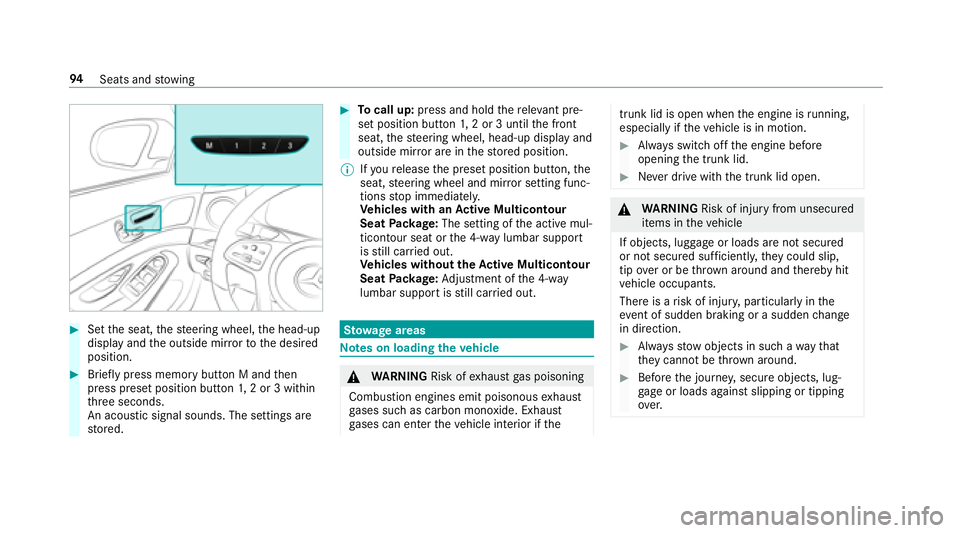
#Setthe seat, thesteering wheel, the head-up
display and the outside mir rorto the desired
position.
#Brief lypress memory button M and then
press preset position button 1,2 or 3 within
th re e seconds.
An acoustic signal sounds. The settings are
st ored.
#To call up: press and hold there leva nt pre‐
set position button 1,2 or 3 until the front
seat, thesteering wheel, head-up display and
outside mir ror are in thestored position.
% Ifyo ure lease the preset position button, the
seat, steering wheel and mir ror setting func‐
tions stop immediatel y.
Ve hicles with an Active Multicon tour
Seat Package: The setting of the active mul‐
ticon tour seat or the 4-w aylumbar support
is still car ried out.
Ve hicles without theAc tive Multicon tour
Seat Package: Adjustment of the 4-w ay
lumbar support is still car ried out.
St ow age areas
Note s on loading theve hicle
&
WARNING Risk ofexhaust gas poisoning
Combustion engines emit poisonous exhaust
ga ses such as carbon monoxide. Exhaust
ga ses can enter theve hicle interior if the
trunk lid is open when the engine is running,
especially if theve hicle is in motion.
#Alw ays switch off the engine before
opening the trunk lid.
#Ne ver drive with the trunk lid open.
&
WARNING Risk of injury from unsecured
items in theve hicle
If objects, luggage or loads are not secured
or not secured suf ficientl y,they could slip,
tip ove r or be throw n around and thereby hit
ve hicle occupants.
There is a risk of injur y,particularly in the
ev ent of sudden braking or a sudden change
in direction.
#Alw aysstow objects in such a wayth at
th ey cannot be thro wn around.
#Before the journe y,secure objects, lug‐
ga ge or loads against slipping or tipping
ove r.
94
Seats and stowing
Page 108 of 502
#Do not place additional objects, espe‐
ciallythose mode of me tal, in the
mobile phone stowage compartment.
* NO
TEDama getoobjects caused by
placing them in the mobile phone stow‐
age compartment
If yo uplac e objects inthe mobile phone
stow age compartment, these may be dam‐
aged byelectromagnetic fields.
#Do not place credit cards, storage
media or other objects sensitive to
electromagnetic fields in the mobile
phone stowage compartment.
* NO
TEDama getothe mobile phone
stow age compartment caused byliquids
If liquids enter the mobile phone stowage
compartment, the compartment may be
damaged.
#Ensure that no liquids enter the mobile
phone stowage compartment.
RDepending on theve hicle equipment, the
mobile phone is connected totheve hicle's
ex terior aerial via thech arging module.
RThe charging function and wireless connec‐
tion of the mobile phone totheve hicle's
ex terior aerial are only available if the ignition
is switched on.
RSmall mobile phones may not be able tobe
ch arge d in everyposition of the mobile
phone stowage compartment.
RLargemobile phones which do not rest flat in
th e mobile phone stowage compartment may
not be able tobe charge d or connec ted with
th eve hicle's exterior aerial.
RThe mobile phone may heat up during the
ch arging process. This depends on the appli‐
cations (apps) cur rently running.
RTo ensure more ef ficient charging and con‐
nection with theve hicle's exterior aerial,
re mo vethe pr otective co ver from the mobile
phone. Pr otective co vers which are designed
fo r wireless charging are excluded.
RWhen charging, the mat should be used if
possible.
Wire lesscharging of the mobile phone in the
front
Re quirements:RThe mobile phone must be suitable for wire‐
less charging (Qi-compatible mobile phone).
Yo u can find a li stof Qi-compatible mobile
phones at:
http://www.mercedes-benz.com/connect
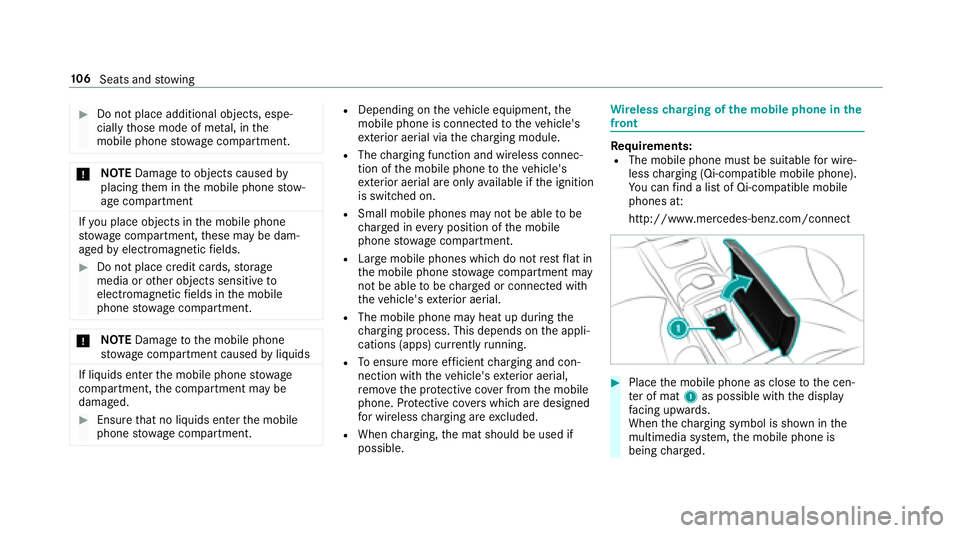
#Place the mobile phone as close tothe cen‐
te r of mat 1as possible with the display
fa cing up wards.
When thech arging symbol is shown in the
multimedia sy stem, the mobile phone is
being charge d.
10 6
Seats and stowing
Page 114 of 502
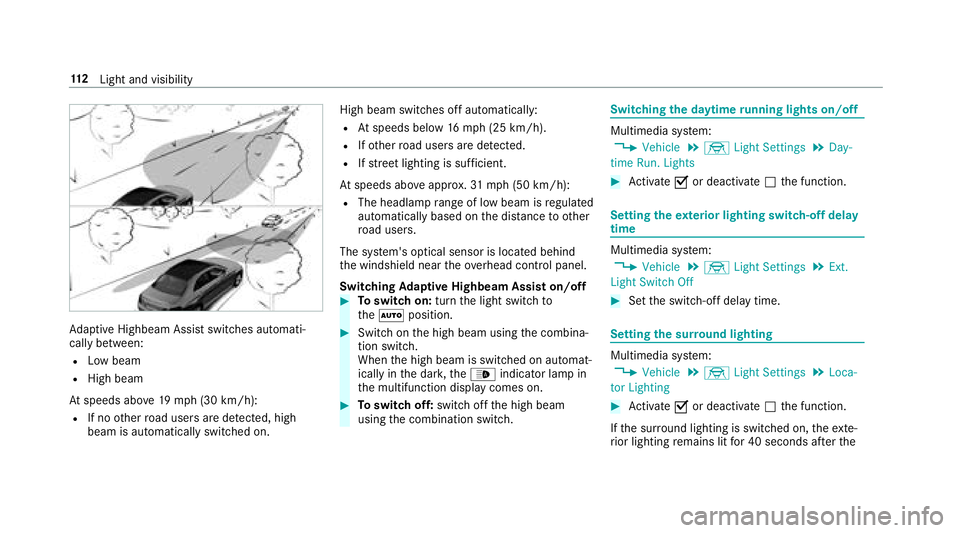
Adaptive Highbeam Assist switch es automati‐
cally between:
RLow beam
RHigh beam
At speeds abo ve19 mp h (30 km/h):
RIf no other road users are de tected, high
beam is au tomatical lyswitched on. High beam switches off automatically:
RAt
speeds below 16mp h(2 5 km/h).
RIfot her road users are de tected.
RIfstre et lighting is suf ficient.
At speeds abo veappr ox.31 mp h (50 km/h):
RThe headlamp range of low beam is regulated
automatically based on the dis tance to ot her
ro ad users.
The sy stem's optical sensor is located behind
th e windshield near theove rhead control panel.
Switching Adaptive Highbeam Assist on/off
#To switch on: turnthe light switch to
th eà position.
#Switch on the high beam using the combina‐
tion switch.
When the high beam is switched on automat‐
ically in the dar k,the_ indicator lamp in
th e multifunction display comes on.
#To switch off: switch offthe high beam
using the combination switch.
Switching the daytime running lights on/off
Multimedia sy stem:
,Vehicle.÷ Light Settings.Day-
time Run. Lights
#Ac tivate Oor deacti vate ª the function.
Setting theex terior lighting switch-off delay
time
Multimedia sy stem:
,Vehicle.÷ Light Settings.Ext.
Light Switch Off
#Set the switch-off delay time.
Setting the sur round lighting
Multimedia sy stem:
,Vehicle.÷ Light Settings.Loca-
tor Lighting
#Ac tivate Oor deacti vate ª the function.
If th e sur round lighting is switched on, theex te‐
ri or lighting remains lit for 40 seconds af terth e
11 2
Light and visibility
Page 115 of 502
vehicle is unloc ked. When youstart theve hicle,
th e sur round lighting is switched off and auto‐
matic driving lights are activated.
Interior lighting
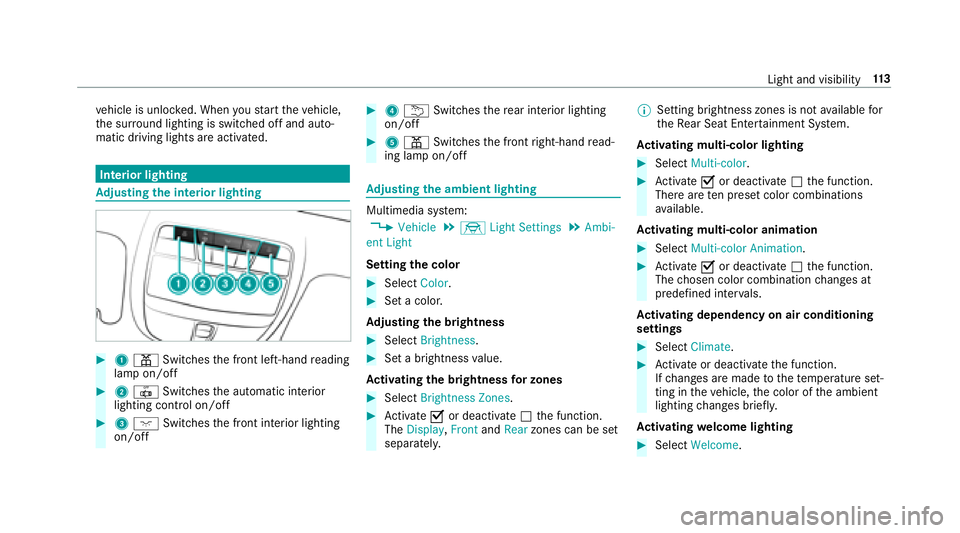
Ad justing the in terior lighting
#1 p Switches the front left-hand reading
lamp on/off
#2 | Switches the automatic interior
lighting control on/off
#3 c Switches the front interior lighting
on/off
#4 u Switches there ar interior lighting
on/off
#5 p Switches the front right-hand read‐
ing lamp on/off
Ad justing the ambient lighting
Multimedia sy stem:
,Vehicle.÷ Light Settings.Ambi-
ent Light
Setting the color
#Select Color.
#Set a colo r.
Ad justing the brightness
#Select Brightness .
#Set a brightness value.
Ac tivating the brightness for zones
#Select Brightness Zones .
#Activate Oor deacti vate ª the function.
The Display ,Front andRear zones can be set
separately. %
Setting brightness zones is not available for
th eRe ar Seat En tertainment Sy stem.
Ac tivating multi-color lighting
#Select Multi-color.
#Activate Oor deacti vate ª the function.
There are ten preset color combinations
av ailable.
Ac tivating multi-color animation
#Select Multi-color Animation.
#Activate Oor deacti vate ª the function.
The chosen color combination changes at
predefined inter vals.
Ac tivating dependency on air conditioning
settings
#Select Climate .
#Activate or deacti vate the function.
If ch anges are made tothete mp erature set‐
ting in theve hicle, the color of the ambient
lighting changes brief ly.
Ac tivating welcome lighting
#Select Welcome.
Light and visibility 11
3
Page 124 of 502
Setting climate controltoautomatic
In au tomatic mode, the set temp erature is regu‐
lated bythete mp erature of the dispensed air
and the air flow .
#Press theà button.
#Toswitch tomanual mode: presstheK
button.
Climate style
Climate style function
In automatic mode, you can select thefo llowing
climate style settings forth e driver's and front
passenger areas:
RFO CUS: high air flow , slightly cooler setting
RMEDIUM: medium air flow ,st andard setting
RDIFFUSE: low airflow , slightly warmer and
draft-free setting Ad
justing the climate style settings
Multimedia sy stem:
,Vehicle.b Climate Control.Cli-
mate Mode
#Select FOCUS, MEDIUM orDIFFUSE .
% In order to feelthe ef fect of the climate
st yle, theà function must be active
(
→page 122).
Overview of air distribution settings
The symbols in the display indicate which vents
th e air flow is being directed thro ugh:
R¯ demis terve nts
RP center and side air vents
RO foot we llve nts
RS center, side and foot we llve nts
Ra defros ter and foot we llve nts
R_ allvents
Rb defros ter,middle and side air vents
RW automatic air distribution
Setting the air distribution
Multimedia sy stem:
,Vehicle.b Climate Control.Air
Distribution
#Select Driverand/or Passenger.
#Setthe air distribution.
Setting thefo ot we lltemp erature
Multimedia sy stem:
,Vehicle.b Climate Con-
trol.Footwell Temperature
#Select Driverand/or Passenger.
#Setthefo ot we llte mp erature.
122
Climat e control
Page 131 of 502
#Therefore,check regularly that there
are no flammable materials in the
engine compartment or on theex haust
sy stem.
Re quirements:RThe SmartK eyis located in theve hicle and
th e SmartK eybattery is not dischar ged.
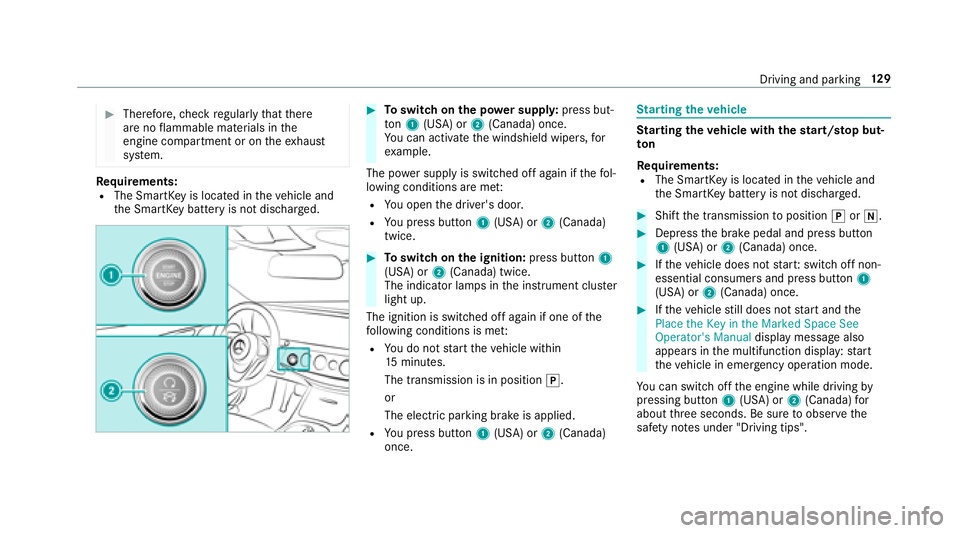
#To switch on the po wer supp ly:press but‐
to n1 (USA) or 2(Canada) once.
Yo u can activate the windshield wipers, for
ex ample.
The po wer supp lyis switched off again if thefo l‐
lowing conditions are me t:
RYou open the driver's door.
RYo upr ess butto n1 (USA) or 2(Canada)
twice.
#To switch on the ignition: press button 1
(USA) or 2(Canada) twice.
The indicator lamps in the instrument clus ter
light up.
The ignition is switched off again if one of the
fo llowing conditions is me t:
RYou do not start theve hicle within
15 minutes.
The transmission is in position j.
or
The electric parking brake is applied.
RYo upr ess butto n1 (USA) or 2(Canada)
once.
St arting theve hicle
Starting theve hicle with thest art/s top but‐
to n
Requ irements:
RThe SmartK eyis located in theve hicle and
th e SmartK eybattery is not dischar ged.
#Shift the transmission toposition jori.
#Depress the brake pedal and press button
1 (USA) or 2(Canada) once.
#Ifth eve hicle does not star t:switch off non-
essential consumers and press button 1
(USA) or 2(Canada) once.
#Ifth eve hicle still does not start and the
Place the Key in the Marked Space See
Operator's Manual display message also
appears in the multifunction display: start
th eve hicle in emer gency operation mode.
Yo u can switchoff the engine while driving by
pressing button 1(USA) or 2(Canada) for
about thre e seconds. Be sure toobser vethe
saf etyno tes under "Driving tips".
Driving and parking 12
9
Page 132 of 502
Starting theve hicle in emer gency operation
mode
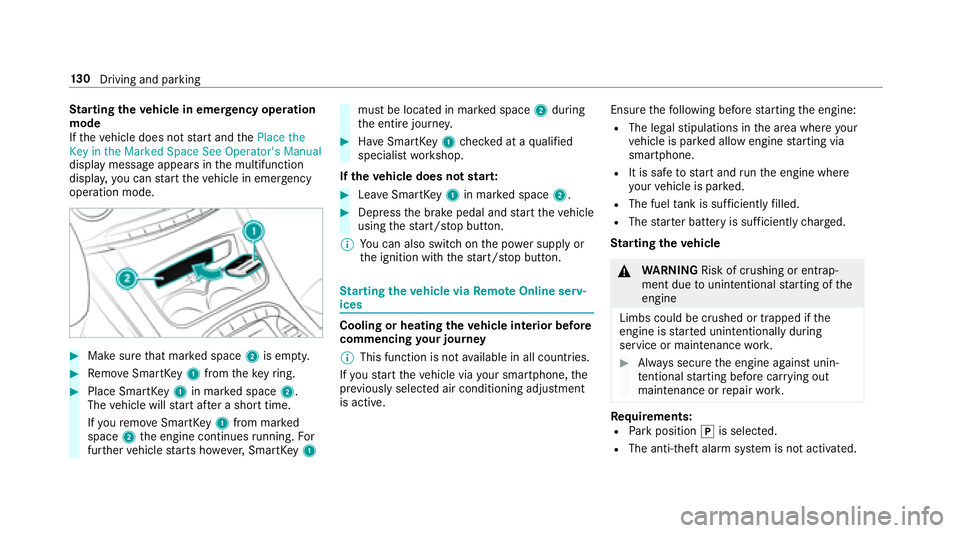
If th eve hicle does not start and thePlace the
Key in the Marked Space See Operator's Manual
display message appears in the multifunction
displa y,yo u can start theve hicle in emer gency
operation mode.
#Make surethat mar ked space 2is em pty.
#Re mo veSmartK ey1 from theke yring.
#Place Smart Key1 in mar ked space 2.
The vehicle will start af ter a short time.
If yo ure mo veSmartK ey1 from mar ked
space 2the engine continues running. For
fur ther vehicle starts ho wever,SmartK ey1
must be located in mar ked space 2during
th e entire journe y.
#Have SmartK ey1 checked at a qualified
specialist workshop.
If th eve hicle does not star t:
#Lea veSmartK ey1 in mar ked space 2.
#Depress the brake pedal and start theve hicle
using thest art/ stop button.
% You can also switchon the po wer supp lyor
th e ignition with thest art/ stop button.
St arting theve hicle via Remo teOnline serv‐
ices
Cooling or heating theve hicle interior before
commencing your journey
% This function is not available in all countries.
If yo ustart theve hicle via your smartphone, the
pr ev iously selecte d air conditioning adjustment
is active. Ensure
thefo llowing before starting the engine:
RThe legal stipulations in the area where your
ve hicle is par ked allow engine starting via
smartphone.
RIt is safe tostart and runth e engine where
yo ur vehicle is par ked.
RThe fuel tank is suff icientlyfilled.
RThe star ter battery is suf ficiently charge d.
St arting the vehicle
&
WARNING Risk of crushing or entrap‐
ment due tounin tentional starting of the
engine
Limbs could be crushed or trapped if the
engine is star ted unintentionally during
service or maintenance work.
#Alw ays secure the engine against unin‐
te ntional starting before car rying out
maintenance or repair work.
Re quirements:RPark position jis selected.
RThe anti- theft alarm sy stem is not activated.
13 0
Driving and pa rking
Page 136 of 502
Non-combusted fuel may get into the cata‐
lytic con verter.
#Only depress the accelera tor pedal
slightl y.
#Have the cause rectified immediately at
a qu alified specialist workshop.
Limited braking ef fect on salt-treate dro ads:
Rdue tosalt build-up on the brake discs and
brakepads, the braking dis tance can increase
conside rably or result in braking only on one
side.
Rmaintain a much greater safe dis tance tothe
ve hicle in front.
To preve nt salt build-up:
Rbrake occasionally while paying attention to
th e tra ffic conditions.
Rcarefully depress the brake pedal at the end
of the journey and when starting the next
journe y.
ECOstart/s top function
Opera tion of the ECO start/s top function
Mercedes -AMG vehicles: observeth e no tes in
th e Supplement. Otherwise, you may not recog‐
nize dangers.
The engine is au tomatical lyswitched off if the
fo llowing conditions are me t:
Rifyo ubr ake theve hicle toast andstill in
transmission position hori.
Rif all vehicle conditions for an au tomatic
engine stop are met.
The è symbol appears in the multifunction
display when theve hicle is stationar y.
The engine is restar ted automatically if:
Ryo ure lease the brake pedal in transmission
position hwhen the HOLD function is not
active.
Ryo u shift from transmission position j.
Ryou enga getransmission position hork.
Ryou depress the accelerator pedal.
Ryo uch ange theve hicle le vel.
Ran automatic engine start is necessar y.
If th e engine was switched off bythe ECO start/
st op function and you lea vetheve hicle, a warn‐
ing tone sounds. The Vehicle Operational Switch
the Ignition Off Before Exiting displaymessage
also appears in the multifunction displa y.Ifyo u
do not switch off the ignition, the ignition is
automatically switched off af ter one minute.
13 4
Driving and pa rking
Page 137 of 502
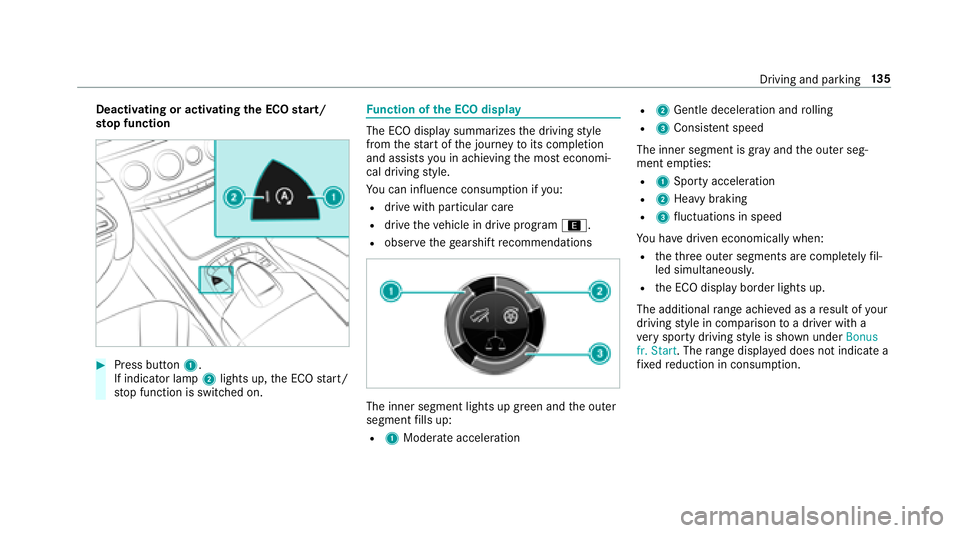
Deactivating or activatingthe ECO start/
sto p function
#Press button 1.
If indicator la mp2lights up, the ECO start/
st op function is switched on.
Fu nction of the ECO display
The ECO display summarizes the driving style
from thest art of the journey toits completion
and assists you in achieving the most economi‐
cal driving style.
Yo u can influence consum ption if you:
Rdrive wit h particular care
Rdrive theve hicle in drive program ;.
Robservethege arshift recommendations
The inner segment lights up green and the outer
segment fills up:
R1 Moderate acceleration
R2Gentle decele ration and rolling
R3 Consis tent speed
The inner segment is gr ayand the outer seg‐
ment em pties:
R1 Sporty acceleration
R2Heavy braking
R3fluctuations in speed
Yo u ha vedriven economically when:
Rtheth re e outer segments are comple tely fil‐
led simultaneousl y.
Rthe ECO display border lights up.
The additional range achieve d as aresult of your
driving style in comparison toa driver with a
ve ry sporty driving style is shown under Bonus
fr. Start . Therange displ ayed does not indicate a
fi xe dre duction in consum ption.
Driving and parking 13
5