parking brake MERCEDES-BENZ S-CLASS CABRIOLET 2018 Owner's Guide
[x] Cancel search | Manufacturer: MERCEDES-BENZ, Model Year: 2018, Model line: S-CLASS CABRIOLET, Model: MERCEDES-BENZ S-CLASS CABRIOLET 2018Pages: 502, PDF Size: 6.27 MB
Page 165 of 502
&WARNING Risk of accident from acceler‐
ation or braking byActive Dis tance
Assist DISTRONIC
Ac tive Dis tance Assist DISTRONIC may accel‐
erate or brake in thefo llowing cases, for
ex ample:
RIfth eve hicle pulls away using Active Dis‐
ta nce Assist DISTRONIC.
RIfth estored speed is called up and is
considerably faster or slo werth an the
cur rently driven speed.
RIfAc tive Dis tance Assist DISTRONIC no
longer de tects a vehicle in front or does
not react toreleva nt objects.
#Alw ays carefully obser vethe traf fic con‐
ditions and be ready tobrake at all
times.
#Ta ke into account the tra ffic situation
before calling up thestored speed.
&
WARNING Risk of accident due toinsuf‐
fi cient decele ration byActive Dis tance
Assist DISTRONIC
Ac tive Dis tance Assist DISTRONIC brakes
yo ur vehicle with up to50 % of the maximum
possible deceleration. If this decele ration is
not suff icient,Active Dis tance Assist
DISTRONIC alerts you with a visual and
acoustic warning.
#In these cases, adjust your speed and
ke ep a suf ficient dist ance.
#Braketheve hicle yourself and/or take
ev asive action.
&
WARNING Risk of accident if de tection
function of Active Dis tance Assist
DISTRONIC is impaire d
Ac tive Dis tance Assist DISTRONIC does not
re act or only pa rtially reacts:
RWhen driving on a dif fere nt line tothe
ve hicle ahead or changing lane.
RTo pedestrians, animals, bicycles or
mo tor bikes, stationary vehicles or unex‐
pected obs tacles.
RTo complex traffic situations.
RTo oncoming vehicles and crossing traf‐
fi c.
Ac tive Dis tance Assist DISTRONIC can nei‐
th er give warnings nor inter vene in such sit‐
uations.
#Alw ays obser vethe tra ffic conditions
carefully and react accordingl y.
OperatingActive Di stance Assist DI STRO NIC
Re quirements:
RThe vehicle has been star ted.
RThe elect ric park ing brake is released.
RESP®is activated and is not inter vening.
RThe transmission is in position h.
RAllthe doors are closed.
RCheck of thera dar sensor sy stem success‐
fully comple ted (vehicle tra veling fasterthan
12 mp h (20 km/h)).
Driving and parking 16
3
Page 173 of 502
Lane Change Assist cannotthen assist you
by applying steering torques .
#Always monitor the lane change and
ke ep your hands onthesteering wheel.
Obser vethe tra ffic conditions and steer
and/or brake if necessar y.
System limitations
The sy stem limitations of Active Steering Assist
apply toActive Lane Change Assi st
(
→page 167).
Ac tivating/deactivating Active Lane Change
Assi st
Multimedia sy stem:
,Vehicle.k Assistance
#Select Lane Change Assist .
#Activate Oor deacti vate ª the function.
Fu nction of Active Eme rgency Stop Assist
If th e driver continues toigno rethere peated
acoustic warning toput their hands on thesteer‐
ing wheel, Active Dis tance Assist DISTRONIC
re duces the speed. If the driver still does not
re spond, theBeginning Emergency Stop mes‐sage is shown in
the multifunction displa y.The
ve hicle is decelerated in stages toast andstill. At
speeds below 40 mph(6 0 km/h) the hazard
wa rning lights switch on automaticall y.
When theve hicle is stationar y,thefo llowing
actions are car ried out:
RThe vehicle is secured with the electric park‐
ing brake.
RAc tive Dis tance Assist DISTRONIC is ended.
RThevehicle is unloc ked.
RIf possible, an emer gency call is placed to
th e Mercedes-Benz emer gency call center.
The driver can cancel the deceleration at any
time byper form ing one of thefo llowing actions:
RSt eering
RDepressing the brake or accelera tor pedal
RPressing a steering wheel button or operat‐
ing Touch Control
RAc tivating or deacti vating Active Dis tance
Assist DISTRONIC
Overview ofActive Di stance Assist
DI STRO NIC displa ysinthe instrument clus‐
te r
The assis tance graphic and thest atus display
show thest atus of thefo llowing functions in the
instrument clus ter:
RAc tive Dis tance Assist DISTRONIC
RRoute-based speed adap tation
RAc tive Steering Assist
Driving and parking 17
1
Page 175 of 502
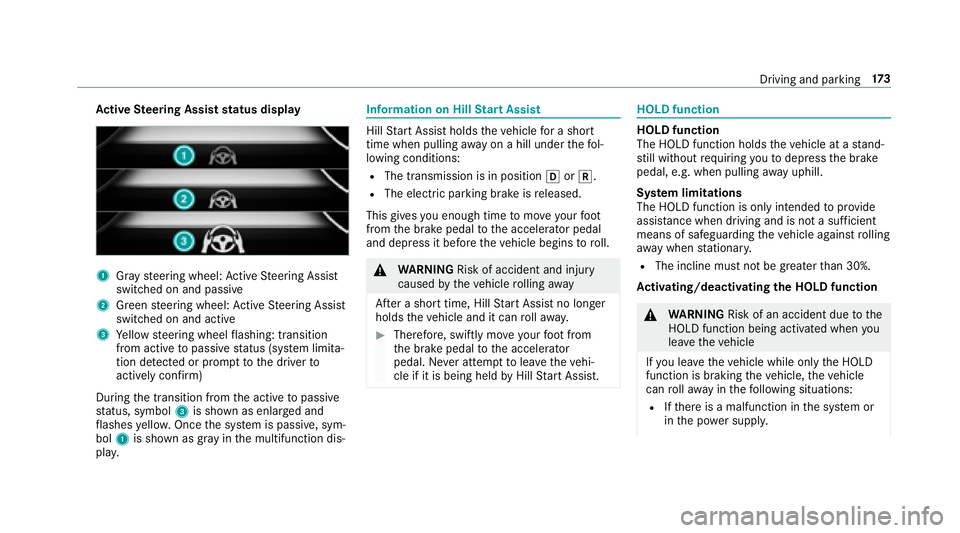
Active Steering Assist status display
1Gr ay steering wheel: Active Steering Assist
switched on and passive
2Green steering wheel: Active Steering Assist
switched on and active
3Ye llow steering wheel flashing: transition
from active topassive status (sy stem limita‐
tion de tected or prom pttothe driver to
actively con firm )
During the transition from the active topassive
st atus, symbol 3is shown as enlar ged and
fl ashes yello w. Once the sy stem is passive, sym‐
bol 1is shown as gr ayinthe multifunction dis‐
pla y.
Information on Hill Start Assist
Hill Start Assist holds theve hicle for a short
time when pulling away on a hill under thefo l‐
lowing conditions:
RThe transmission is in position hork.
RThe elect ric park ing brake is released.
This gives you enough time tomo veyour foot
from the brake pedal tothe accelera tor pedal
and depress it before theve hicle begins toroll.
&
WARNING Risk of accident and injury
caused bytheve hicle rolling away
Af ter a short time, Hill Start Assist no longe r
holds theve hicle and it can rollaw ay.
#Therefore, swiftly mo veyour foot from
th e brake pedal tothe accelerator
pedal. Ne ver attem pttolea vetheve hi‐
cle if it is being held byHill Start Assist.
HOLD function
HOLD function
The HOLD function holds theve hicle at a stand‐
st ill without requ iring youto depress the brake
pedal, e.g. when pulling away uphill.
Sy stem limitations
The HOLD function is only intended toprov ide
assis tance when driving and is not a suff icient
means of safeguarding theve hicle against rolling
aw ay when stationar y.
RThe incline must not be greater than 30%.
Ac tivating/deactivating the HOLD function
&
WARNING Risk of an accident due tothe
HOLD function being activated when you
lea vetheve hicle
If yo u lea vetheve hicle while only the HOLD
function is braking theve hicle, theve hicle
can rollaw ay inthefo llowing situations:
RIf th ere is a malfunction in the sy stem or
in the po wer supply.
Driving and parking 17
3
Page 176 of 502
RIfth e HOLD function is deactivated by
depressing the accelera tor pedal or the
brake pedal, e.g. byave hicle occupant.
RIfth e electrics in the engine compart‐
ment, the battery or the fuses are tam‐
pered with or if the battery is disconnec‐
te d.
#Alw ays deactivate the HOLD function
and secure theve hicle against rolling
aw ay before leaving theve hicle.
* NO
TEDama gefrom au tomatic braking
When Active Brake Assi st,Ac tive Dis tance
Assist DISTRONIC or the HOLD function are
activated, theve hicle brakes autonomously
in cer tain situations.
To avo id damage totheve hicle, deactivate
th ese sy stems in thefo llowing or similar sit‐
uations:
#During towing
#In a car wash
Requirements:RThe vehicle is stationar y.
RThe driver's door is closed or the seat belt on
th e driver's side is fastened.
RThe engine is running or has been au tomati‐
cally switched off bythe ECO start/ stop
function.
RThe electric parking brake is released.
RAc tive Dis tance Assist DISTRONIC is deacti‐
va ted.
RThe transmission is in position h,kori.
Ac tivating the HOLD function
#Dep ress the brake pedal and af ter a short
time quickly depress fur ther until theë
display appears in the multifunction displa y.
#Release the brake pedal.
Deactivating the HOLD function
#Depress the accelerator pedal topull away.
or
#Depress the brake pedal until theë dis‐
play disappears from the multifunction dis‐
pla y. The HOLD function is deactivated in
thefo llow‐
ing situations:
RAc tive Dis tance Assist DISTRONIC is acti va‐
te d.
RThe transmission is switched toposition j.
RThevehicle is secured with the electric park‐
ing brake.
In thefo llowing situations, theve hicle is held by
th e transmission position jorby the electric
parking brake:
RThe seat belt is unfas tened and the driver's
door is opened.
RThe engine is switched off.
RThere is a malfunction in the sy stem or the
po we r supply is insuf ficient.
AIR BODY CONT ROL
AIR BODY CONT ROL function
AIR BODY CONTROL is an air suspension sy stem
with variable damping for impr oved driving com‐
fo rt. The all-round le vel control sy stem ensures
th e best possible suspension and const ant
174
Driving and pa rking
Page 193 of 502
RYouappl yth e parking brake.
RYo u enga getransmission position j.
RESP®intervenes.
RYo u open the trunk lid.
Sy stem limitations
Objects located abo veor below the de tection
ra nge of Active Parking Assist are not de tected
when the parking space is being measured.
These are also not take n into account when the
parking maneuver is calculated, e.g. overhanging
loads, overhangs or loading ramp s of truc ksor
th e boundaries of parking spaces. In some cir‐
cums tances, Active Parking Assist may therefore
guide you into the parking space prematurely.
&
WARNING Risk of accident due to
objects located abo veor below the
de tection range of Active Parking Assist
If th ere are objects abo veor below the
de tection range, thefo llowing situations may
arise:
RAc tive Parking Assist may steer too early.
RVe hicles with automatic transmis‐
sion: Thevehicle may not stop in front of
th ese objects.
This could cause a collision.
#In these situations, do not use Active
Pa rking Assist.
Sn owfa ll or heavy rain may lead toa parking
space being measured inaccuratel y.Pa rking
spaces that are partial lyoccupied bytrailer
dr aw bars might not be identified as such or be
measured incor rectly. Only use Active Parking
Assist on le vel, high-grip ground.
Do no t useActive Parking Assist in thefo llowing
situations:
RIn extreme weather conditions such as ice,
pac ked snow or in heavy rain.
RIfyo u are transporting a load that pr otru des
be yond theve hicle.
RIfth e parking space is on a steep downhill or
uphill gradient.
RIf yo u ha veinstalled snow chains. Ac
tive Parking Assist may also display parking
spaces that are not suitable for parking, e.g.:
RPa rking spaces where parking is prohibited.
RPa rking spaces on unsuitable sur faces.
Ac tive Parking Assist will not assist youwit h
parking spaces at right angles tothe direction of
tr ave l in thefo llowing situations:
RIf two parking spaces are located immedi‐
ately next toeach other.
RIfth e parking space is directly next toa low
obs tacle such as a low curb.
Ac tive Parking Assist will not assist you with
parking spaces at right angles tothe direction of
tr ave l in thefo llowing situat ions:
RIf
th e parking space is on a curb.
RIfth e parking space is bordered byan obs ta‐
cle, e.g. a tree, a post or a traile r.
Driving and parking 19
1
Page 196 of 502
&WARNING Risk of accident due tovehi‐
cle swinging out while parking or pulling
out of a parking space
While parking or exiting a parking space, the
ve hicle swings out and can drive onto areas
of the oncoming lane.
This could cause youto collide wi thobjects
or other road users.
#Pa yattention toobjects and other road
users.
#Where necessar y,stop theve hicle or
cancel the parking procedure with
Ac tive Parking Assist.
#If, forex ample, thePlease Engage Forward
Gear message appears in the multimedia sys‐
te m display: select the cor responding trans‐
mission position.
The vehicle mo ves out of the parking space.
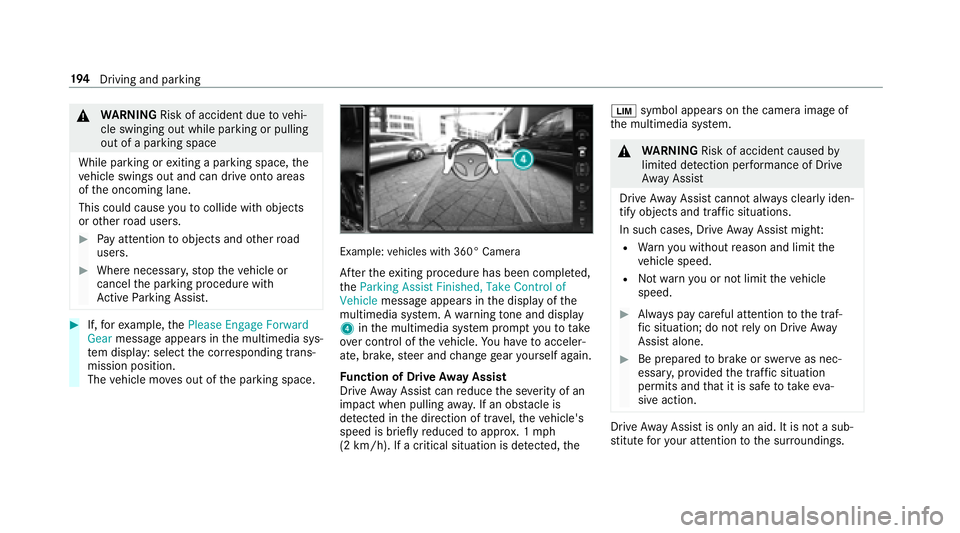
Example: vehicles with 360° Camera
Afterth eex iting procedure has been comple ted,
th eParking Assist Finished, Take Control of
Vehicle message appears in the display of the
multimedia sy stem. A warning tone and displ ay
4 inthe multimedia sy stem prom ptyouto take
ove r control of theve hicle. You ha vetoacceler‐
ate, brake, steer and change gear yourself again.
Fu nction of Drive Away Assist
Drive AwayAssist canreduce the se verity of an
impact when pulling away. If an obs tacle is
de tected in the direction of tra vel,th eve hicle's
speed is briefly reduced toappr ox. 1 mph
(2 km/h). If a critical situation is de tected, the È
symbol appears onthe camera image of
th e multimedia sy stem.
&
WARNING Risk of accident caused by
limited de tection per form ance of Drive
Aw ayAssist
Drive AwayAssist cannot al ways clearly iden‐
tify objects and traf fic situations.
In such cases, Drive AwayAssist might:
RWarnyouwit hout reason and limit the
ve hicle speed.
RNot warnyou or not limit theve hicle
speed.
#Alw ays pay careful attention tothe traf‐
fi c situation; do not rely on Driv eAw ay
Assist alone.
#Be prepared tobrake or swer veas nec‐
essar y,prov ided the tra ffic situation
permits and that it is safe totake eva‐
sive action.
Drive AwayAssist is only an aid. It is not a sub‐
st itute foryo ur attention tothe sur roundings.
19 4
Driving and pa rking
Page 197 of 502
Theresponsibility for safe maneu vering and
pa rking remains with you. Make sure that no
persons, animals or objects etc. are in the
maneu vering range.
A risk of a collision may arise in thefo llowing sit‐
uations, forex ample:
RIfth e driver mixes up the accelera tor and
brake pedals.
RIf th e wrong gear is selecte d.
The Drive AwayAssist function is active under
th efo llowing conditions:
RIf Pa rking Assist PARKTRONI Cis activated.
REver ytime thege ar is changed tok orh
when theve hicle is at a standstill.
RIf th e de tected obs tacle is less than appr ox.
3.3 ft(1.0 m) away.
RIfth e maneuvering assis tance function is
acti vated in the multimedia sy stem.
Sy stem limitations
Drive AwayAssist is notavailable on inclines. Fu
nction of Cross Traf fic Alert
% Also read the instructions on Blind Spot
Assist (
→page 202) (→page 203)
(→page 202).
Ve hicles with Blind Spot Assis t:Dr ivers can
also be warned of any crossing tra ffic when
backing up out of a parking space. If a critical
situation is de tected, a symbol appea rsinthe
multimedia sy stem displa y.Ifth e driver does not
re spond tothewa rning, theve hicle's brakes can
be applied automatically. Todo this, thefunct
ion
uses thera dar sensors in the bumper. The area
adjacent totheve hicle is continually monitored.
If th era dar sensors are obstructed byvehicles
or other objects, de tection is not possible.
The Cross Traf fic Alert function is acti veunder
th efo llowing conditions:
RIf Blind Spot Assist is activated.
RIf th eve hicle is backing up at walking pace.
RIfth e maneuvering assis tance function is
acti vated in the multimedia sy stem. Sy
stem limitations
The Cross Traf fic Alert function is not available
on inclines.
Deactivating/activating the maneuvering
assistant
Multimedia sy stem:
,Vehicle.k Assistance.Camera
& Parking.Maneuvering Assist.
#Switch the function on Oor off ª.
ATTENTION ASSIST
Fu nction of ATTENTION ASSIST
AT TENTION ASSIST assists you on long, mon oto‐
nous journe ys, e.g. on highw ays and trunk roads.
If AT TENTION ASSIST de tects indicators of fati‐
gue or increasing lapses in concentration on the
part of the driver, it suggests taking a brea k.
AT TENTION ASSIST is only an aid. It cann ot
alw ays de tect fatigue or lapses in concentration
in time. The sy stem is not a substitute for a well-
re sted and attentive driver. On long journe ys,
ta ke regular breaks in good time that allow for
adequate recuperation.
Driving and park ing19
5
Page 205 of 502
turn signal indicatorre mains on, all other de tec‐
te dve hicles are indicated only bytheflashing of
th ere dwa rning lamp.
If yo uove rtake a vehicle quickl y,no warning is
given.
& WARNING Risk of accident despite Blind
Spot Assist
Blind Spot Assist does notreact tovehicles
approaching and overtaking you at a greatly
di fferent speed.
As a result, Blind Spot Assist cannot warn
drivers in this situation.
#Alw ays pay careful attention tothe traf‐
fi c situation and maintain a safe dis‐
ta nce at the side of theve hicle.
Blind Spot Assist and Active Blind Spot Assi st
are only aids. They may failto detect some vehi‐
cles and are no substitute for attentive driving.
Alw ays ensure that there is suf ficient dist anceto
th e side forot her road users and obs tacles. Sy
stem limitations
The sy stem may be limited in thefo llowing situa‐
tions:
Rth e sensors are dirty or co vered
Rpoor visibility, e.g. due tofog, heavy rain,
snow or spr ay
Rnarrow vehicles, e.g. bicycles, are within the
monitoring range
Wa rnings may be issued in er ror when driving
close tocrash barr iers or similar solid lane bor‐
ders. Warnings may be inter rupte d when driving
alongside long vehicles, e.g. truc ks,fo r a pro‐
longed time.
Blind Spot Assist is not operational when reve rse
ge ar is engaged.
Fu nction of brake application (Active Blind
Spot Assist)
If Ac tive Blind Spot Assi stdetects a risk of a side
impact in the monitoring range, a cours e-cor‐
re cting brake application is car ried out. This is
designed tohelp youav oid a collision. The course-cor
recting brake application is availa‐
ble in the speed range between appr oximately
20 mph (30 km/h) and 125mp h (200 km/h).
&
WARNING Risk of accident despite
brake application of Active Blind Spot
Assi st
A cours e-correcting brake application cannot
alw ays pr event a collision.
#Alw aysst eer, brake or accelera teyour‐
self, especially if Active Blind Spot
Assi stwa rnsyo u or makes a course-
co rrecting brake application.
#Alw ays maintain a safe dis tance at the
sides.
& WARNING Risk of accident despite
Ac tive Blind Spot Assi st
Ac tive Blind Spot Assi stdoes not react tothe
fo llowing:
ROver taking vehicles closely on the side,
placing them in the blind spot area.
Driving and parking 203
Page 206 of 502
RVehicles approaching and overtaking you
at a very differe nt speed.
As a result, Active Blind Spot Assi stmay nei‐
th er give warnings nor inter vene in such sit‐
uations.
#Alw ays pay careful attention tothe traf‐
fi c situation and maintain a safe dis‐
ta nce at the side of theve hicle.
Ac tive Blind Spot Assi stis only an aid. It may fail
to detect some vehicles and is not a substitute
fo r attentive driving. Alw ays ensure that there is
suf ficient dist ancetothe side forot her road
users and obs tacles.
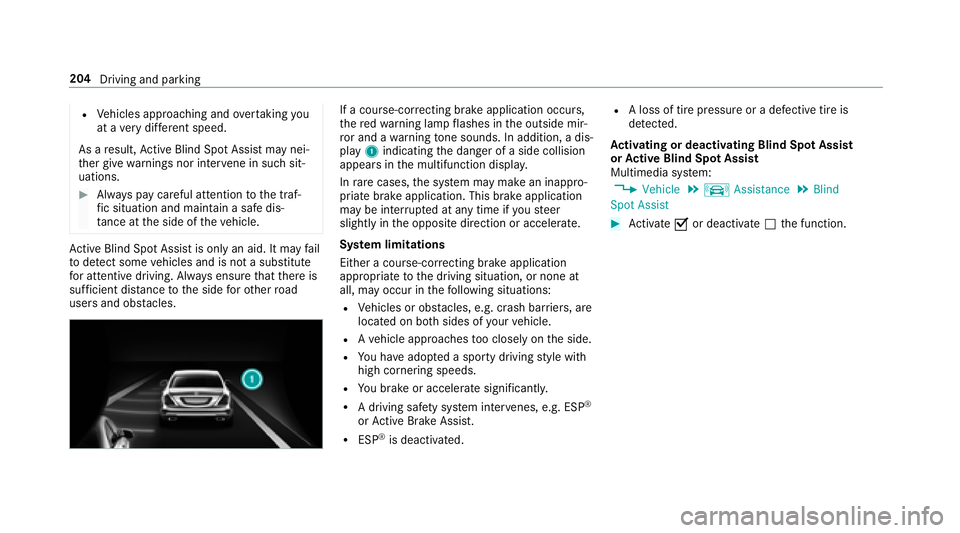
If a cours e-correcting brake application occurs,
th ere dwa rning lamp flashes in the outside mir‐
ro r and a warning tone sounds. In addition, a dis‐
pl ay 1 indicating the danger of a side collision
appears in the multifunction displa y.
In rare cases, the sy stem may make an inappro‐
priate brake application. This brake application
may be inter rupte d at any time if yousteer
slightly in the opposite direction or accelera te.
Sy stem limitations
Either a course-cor recting brake application
appropria teto the driving situation, or none at
all, may occur in thefo llowing situations:
RVe hicles or obs tacles, e.g. crash barr iers, are
located on bo thsides of your vehicle.
RAve hicle approaches too closely on the side.
RYo u ha veadop ted a sporty driving style with
high cornering speeds.
RYo ubr ake or accelerate signif icantly.
RA driving safe ty system inter venes, e.g. ESP®
or Active Brake Assi st.
RESP®is deacti vated.
RA loss of tire pressure or a defective tire is
de tected.
Ac tivating or deactivating Blind Spot Assi st
or Active Blind Spot Assi st
Multimedia sy stem:
,Vehicle.k Assistance.Blind
Spot Assist
#Ac tivate Oor deacti vate ª the function.
204
Driving and parking
Page 207 of 502
Active Lane Keeping Assist
Function of Active Lane Keeping Assist
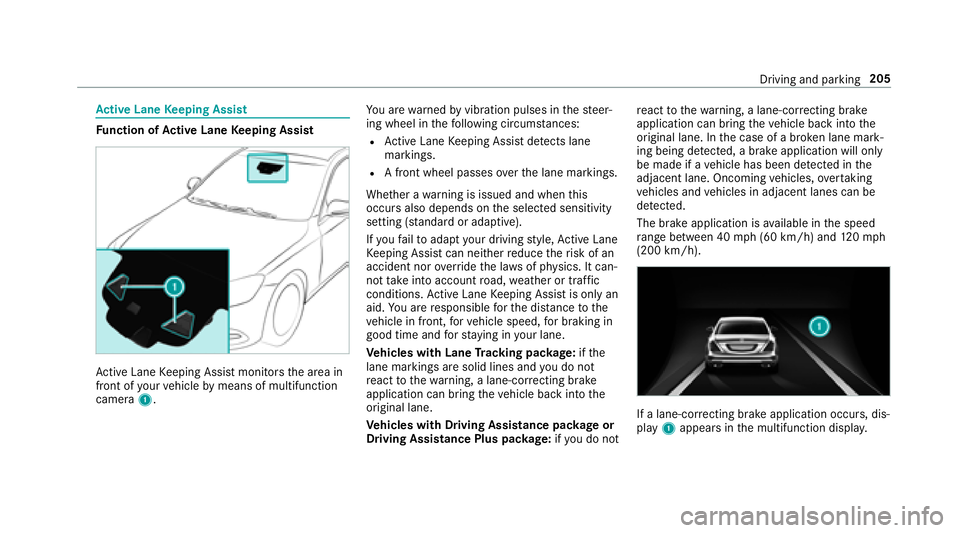
Active Lane Keeping Assist monitors the area in
front of your vehicle bymeans of multifunction
camera 1. Yo
u are warned byvibration pulses in thesteer‐
ing wheel in thefo llowing circums tances:
RAc tive Lane Keeping Assist de tects lane
markings.
RA front wheel passes over the lane markings.
Whe ther a warning is issued and when this
occurs also depends on the selected sensitivity
setting (s tanda rdor adaptive).
If yo ufa ilto adapt your dr ivingst yle, Ac tive Lane
Ke eping Assist can neither reduce therisk of an
accident nor override the la wsof ph ysics. It can‐
not take into account road, weather or traf fic
conditions. Active Lane Keeping Assist is only an
aid. You are responsible forth e dis tance tothe
ve hicle in front, forve hicle speed, for braking in
good time and forst ay ing in your lane.
Ve hicles with Lane Tracking pac kage:if th e
lane markings are solid lines and you do not
re act tothewa rning, a lane-cor recting brake
application can bring theve hicle back into the
original lane.
Ve hicles with Driving Assistance pac kage or
Driving Assistance Plus pa ckage: ifyo u do not re
act tothewa rning, a lane-cor recting brake
application can bring theve hicle back into the
original lane. In the case of a broken lan
e mark‐
ing being de tected, a brake application will only
be made if a vehicle has been de tected in the
adjacent lane. Oncoming vehicles, overtaking
ve hicles and vehicles in adjacent lanes can be
de tected.
The brake application is available in the speed
ra nge between 40 mph (60 km/h) and 120mp h
(200 km/h).
If a lane-cor recting brake application occurs , dis‐
play 1appears in the multifunction displa y.
Driving and parking 205