warning lights MERCEDES-BENZ S-CLASS CABRIOLET 2018 Owner's Guide
[x] Cancel search | Manufacturer: MERCEDES-BENZ, Model Year: 2018, Model line: S-CLASS CABRIOLET, Model: MERCEDES-BENZ S-CLASS CABRIOLET 2018Pages: 502, PDF Size: 6.27 MB
Page 183 of 502
the wheel ar ches when youlowe rth e
ve hicle.
&
WARNING Risk of entrapment from vehi‐
cle lo wering
Ve hicles with AIR BODY CONT ROL or
le ve l control sy stem: When you unload lug‐
ga ge or lea vetheve hicle, theve hicle firs t
ri ses slightly and then returns tothe set le vel
shortly af terw ards.
Yo u or an yone else in the vicinity of the
wheel ar ches or the underbody could thus
become trapped.
The vehicle can also be lo wered af ter being
loc ked.
#When leaving theve hicle, make sure
th at nobody is in the vicinity of the
wheel ar ches or the underbody.
Re quirements:RThe vehicle has been star ted.
RThe vehicle must not be moving fasterthan
75 mph(120 km/h).
ROnly lo wer the vehicle: whentheve hicle is
st ationar y,all the doors ha vetobe closed.
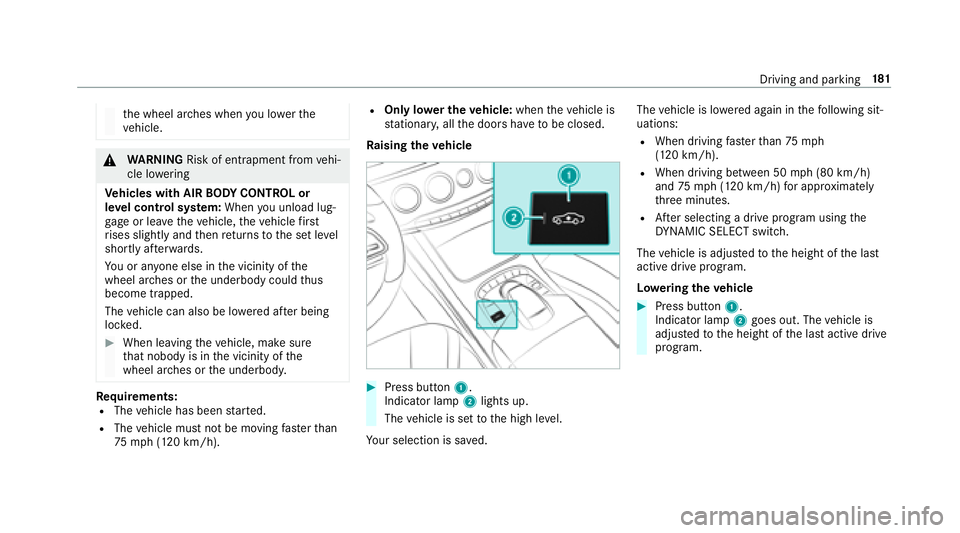
Ra ising theve hicle
#Press button 1.
Indicato r lamp2lights up.
The vehicle is set tothe high le vel.
Yo ur selection issave d. The
vehicle is lo wered again in thefo llowing sit‐
uations:
RWhen driving fasterthan 75 mph
(120 km/h).
RWhen driving between 50 mph (80 km/h)
and 75mph(120 km/h) for app roxima tely
th re e minutes.
RAf ter selecting a drive program using the
DY NA MIC SELECT switch.
The vehicle is adjus tedto the height of the last
active drive prog ram.
Lo weri ngtheve hicle
#Press button 1.
Indicato r lamp2goes out. The vehicle is
adjus tedto the height of the last active drive
program.
Driving and parking 18
1
Page 188 of 502
yourself and toavo id obs tacles when back ing
up.
The rear view camera is only an aid. It is not a
substitute foryo ur attention tothe sur roundings.
The responsibility for safe maneu vering and
pa rking remains with you. Make sure that there
are no persons, animals or objects in the maneu‐
ve ring area while maneu vering and pa rking in
parking spaces.
Yo u can select from thefo llowing vie ws:
RNo rmal view
RWide-angle view
The area behind theve hicle is displa yed as a
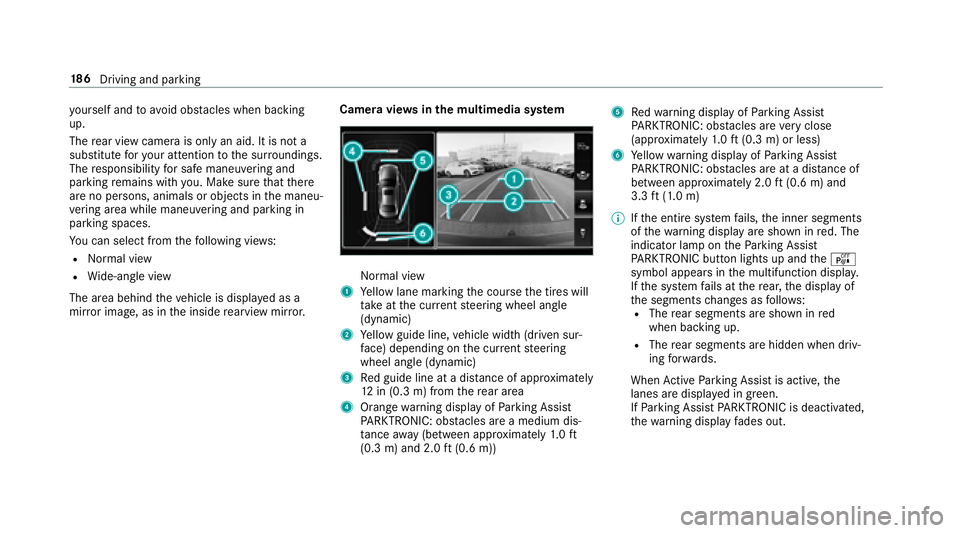
mir ror image, as in the inside rearview mir ror. Camera vie
wsinthe multimedia sy stemNormal view
1Ye llow lane marking the course the tires will
ta ke atthe cur rent steering wheel angle
(dynamic)
2Ye llow guide line, vehicle width (driven sur‐
fa ce) depending on the cur rent steering
wheel angle (dynamic)
3Re d guide line at a dis tance of appr oximately
12 in (0.3 m) from there ar area
4Orange warning display of Parking Assist
PA RKTRONIC: obstacles ar e amedium dis‐
ta nce away (between appr oximately 1.0 ft
(0.3 m) and 2.0 ft(0.6 m))
5Re dwa rning display of Parking Assist
PA RKTRONIC: obstacles ar eve ry close
(appr oximately 1.0 ft (0.3 m) or less)
6Ye llow warning display of Parking Assist
PA RKTRONIC: obstacles ar eat adis tance of
between appr oximately 2.0 ft(0.6 m) and
3.3 ft(1.0 m)
% Ifth e entire sy stem fails, the inner segments
of thewa rning display are shown in red. The
indicator lamp on thePa rking Assist
PA RKTRONI Cbut ton lights up and theé
symbol appears in the multifunction displa y.
If th e sy stem fails at there ar, the display of
th e segments changes as follo ws :
RThe rear segments are shown in red
when backing up.
RThe rear segments are hidden when driv‐
ing forw ards.
When Active Parking Assist is active, the
lanes are display
e d in green.
If Pa rking Assist PARKTRONI Cis deacti vated,
th ewa rning display fades out.
18 6
Driving and pa rking
Page 190 of 502
RFront camera
RTw o side cameras in the outside mir rors
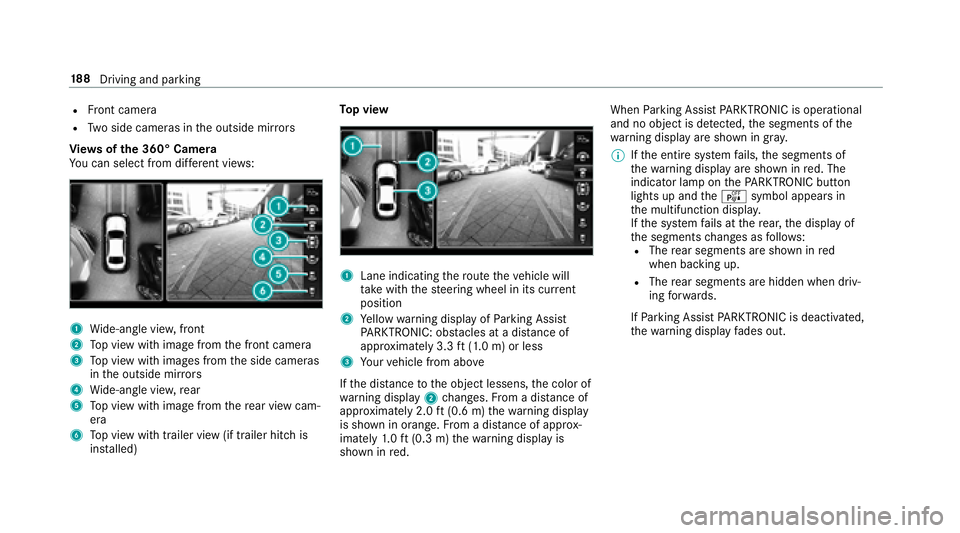
Vi ew s of the 360° Camera
Yo u can select from dif fere nt vie ws:
1Wide-angle vie w,front
2Top view with image from the front camera
3To p view with images from the side cameras
in the outside mir rors
4Wi de-angle vie w,rear
5To p view with image from there ar view cam‐
era
6To p view with trailer view (if trailer hitch is
ins talled) To
p view
1Lane indicating thero ute theve hicle will
ta ke with thesteering wheel in its cur rent
position
2Ye llow warning display of Parking Assist
PA RKTRONIC: obstacles at adis tance of
appr oximately 3.3 ft(1.0 m) or less
3Yo ur vehicle from abo ve
If th e dis tance tothe object lessens, the color of
wa rning display 2changes. From a dis tance of
appr oximately 2.0 ft(0.6 m) thewa rning display
is shown in orange. From a dis tance of appr ox‐
imately 1.0 ft (0.3 m) thewa rning display is
shown in red. When
Parking Assist PARKTRONI Cis operational
and no objec tis de tected, the segments of the
wa rning display are shown in gray .
% Ifth e entire sy stem fails, the segments of
th ewa rning display are shown in red. The
indicator lamp on thePA RKTRONI Cbut ton
lights up and theé symbol appears in
th e multifunction displa y.
If th e sy stem fails at there ar, the display of
th e segments changes as follo ws :
RThe rear segments are shown in red
when backing up.
RThe rear segments are hidden when driv‐
ing forw ards.
If Pa rking Assist PARKTRONI Cis deacti vated,
th ewa rning display fades out.
18 8
Driving and pa rking
Page 204 of 502
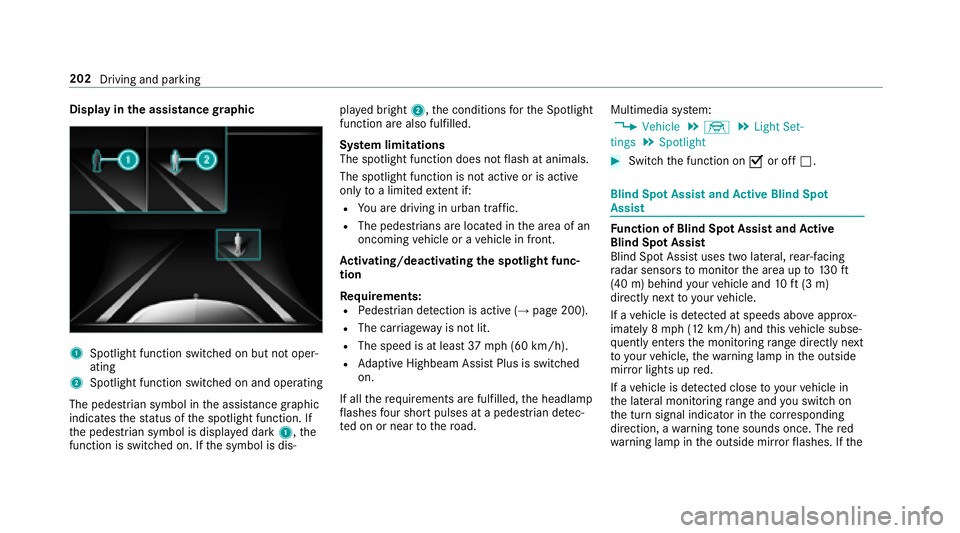
Displayin the assistance graphic
1Spotlight function switched on but not oper‐
ating
2Spotlight function switched on and operating
The pedestrian symbol in the assis tance graphic
indica testh est atus of the spotlight function. If
th e pedestrian symbol is displa yed dark 1,the
function is switched on. If the symbol is dis‐ pla
yed bright 2,the conditions forth e Spotlight
function are also fulfilled.
Sy stem limitations
The spotlight function does not flash at animals.
The spotlight function is not active or is active
only toa limited extent if:
RYo u are driving in urban traf fic.
RThe pedestrians are loca ted in the area of an
oncoming vehicle or a vehicle in front.
Ac tivating/deactivating the spotlight func‐
tion
Re quirements:
RPedestrian de tection is acti ve(→page 200).
RThe car riag ewa yis no tlit .
RThe speed is at leas t37 mph(6 0 km/h).
RAd aptive Highbeam Assist Plus is switch ed
on.
If all there qu irements are fulfilled, the headlamp
fl ashes four short pulses at a pedestrian de tec‐
te d on or near tothero ad. Multimedia sy
stem:
,Vehicle.÷.Light Set-
tings.Spotlight
#Switch the function on Oor off ª.
Blind Spot Assist and Active Blind Spot
Assi st
Function of Blind Spot Assist and Active
Blind Spot Assi st
Blind Spot Assist uses two lateral,rear-facing
ra dar sensors tomonitor the area up to130ft
(40 m) behind your vehicle and 10ft(3 m)
directly next to yourvehicle.
If a vehicle is de tected at speeds ab ove appr ox‐
imately 8 mph (12 km/h) and this vehicle subse‐
qu ent lyenters the monitoring range di rectly next
to yo urvehicle, thewa rning lamp in the outside
mir ror lights up red.
If a vehicle is de tected close to yourvehicle in
th e lateral monitoring range and youswit chon
th e turn signal indicator in the cor responding
direction, a warning tone sounds once. The red
wa rning lamp in the outside mir rorflashes. If the
202
Driving and parking
Page 209 of 502
#Always make sure that there is suf fi‐
cient dist ancetothe side forot her traf‐
fi c or obs tacles.
&
WARNING Risk of accident despite Lane
Ke eping Assist
Lane Keeping Assist cannot always clearly
de tect lane markings.
In such cases, Lane Keeping Assist can:
Rgive an unnecessary warning
Rnot give a warning
#Alw ays pay particular attention tothe
traf fic situation and keep within the
lane, especially if Active Lane Keeping
Assist alerts you.
Re quirements
The driving speed is at least 40 mph (60 km/h).
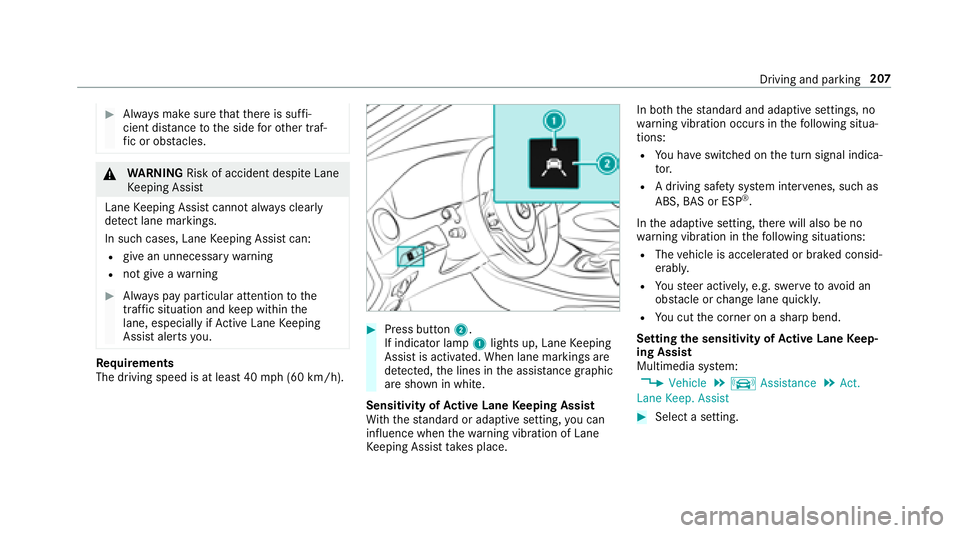
#Press button 2.
If indicator lamp 1lights up, Lane Keeping
Assist is activated. When lane markings are
de tected, the lines in the assis tance graphic
are shown in white.
Sensitivity of Active Lane Keeping Assist
Wi th th est andard or adaptive setting, you can
influence when thewa rning vibration of Lane
Ke eping Assist take s place. In bo
th thest andard and adaptive settings, no
wa rning vibration occurs in thefo llowing situa‐
tions:
RYo u ha veswitched on the turn signal indica‐
to r.
RA driving safe ty system inter venes, such as
ABS, BAS or ESP®.
In the adaptive setting, there will also be no
wa rning vibration in thefo llowing situations:
RThe vehicle is accelerated or braked consid‐
erably.
RYo usteer actively, e.g. swer vetoavo id an
obs tacle or change lane quickl y.
RYou cut the corner on a sharp bend.
Setting the sensitivity of Active Lane Keep‐
ing Assist
Multimedia sy stem:
,Vehicle.k Assistance.Act.
Lane Keep. Assist
#Select a setting.
Driving and parking 207
Page 369 of 502
Further related subjects:
RNo tes on tire pressure (→page 364)
RTire pressure table (→page 365)
RTire and Loading Info rmation placard
(→page 370)
Tire pressure moni toring sy stem
Fu nction of the tire pressure moni toring sys‐
te m
&
DANG ER Risk of accident due toincor‐
re ct tire pressure
Every tire, including the spare (if pr ovided),
should be checked when cold at least once a
month and inflated tothe pressure recom‐
mended bytheve hicle manufacturer (see
Ti re and Loading Info rmation placard on the
B-pillar on the driver ’sside or the tire pres‐
sure label on the inside of the fuel filler flap
of your vehicle). If your vehicle has tires of a
dif fere nt size than the size indicated on the
Ti re and Loading Info rmation placard or the
tire pressure table, you need todeterm ine
th e proper tire pressure forth ose tires.
As an added saf etyfe ature, your vehicle has
been equipped with a tire pressure monitor‐
ing sy stem (TPMS) that illuminates a low tire
pressure indicator lamp when one or more of
yo ur tires are signif icantly underinflated.
Ac cording ly, if the low tire pressure indicator
lamp lights up, you should stop and check
yo ur tires as soon as possible, and inflate
th em tothe proper pressure. Driving on a
significant lyunderinflated tire causes the tire
to ov erheat and can lead totire failure.
Un derinflation also increases fuel consump‐
tion and reduces tire tread life, and may
af fect theve hicle's handling and braking abil‐
ity. Please no tethat the TPMS is not a substi‐
tute for proper tire maintenance, and it is the
driver's responsibility tomaintain cor rect tire
pressure, even if underinflation has not
re ached the le velto trig ger illumination of
th e TPMS low tire pressure indicator lamp.
Yo ur vehicle has also been equipped with a
TPMS malfunction indicator toindicate whenthe sy stem is not operating proper ly. The
TPMS malfunction indica tor is combined with
th e low tire pressure indicator lamp. When
th e sy stem de tects a malfunction, the indica‐
to r lamp will flash for app roxima tely a minute
and then remain continuously illumina ted.
This sequence will continue upon subsequent
ve hicle start-ups as long as the malfunction
ex ists.
When the malfunction indicator is illumina‐
te d, the sy stem may not be able todetect or
signal low tire pressure as intended. TPMS
malfunctions may occur for a variet yof rea‐
sons, including the ins tallation of incompati‐
ble replacement or alternate tires or wheels
on theve hicle that pr eventthe TPMS from
functioning properly.
Alw aysch eck the TPMS malfunction warning
lamp af terre placing one or more tires or
wheels on your vehicle toensure that the
re placement or alternate tires and wheels
allow the TPMS tocontinue tofunction prop‐
erly.
Wheels and tires 367
Page 419 of 502
Displaymessages
Possible causes/consequences and MSolutions
6
SRS Malfunction Service
Required*T
herestra int sy stem is defective .
&
WARNING Risk of injury orfata l injury due toa malfunction in there stra int sy stem
If th ere stra int sy stem is malfunctioning, restra int sy stem components may be triggered unintentionally or
might not be triggered at all in theeve nt of an accident. This may af fect the Emer gency Tensioning Device or
airbag, forex ample.
#Ha ve there stra int sy stem checked and repaired immediately at a qualified specialist workshop.
De tection of a restra int sy stem malfunction:
RThe 6 restra int sy stem warning lamp does not light up when the ignition is switched on.
RThe 6 restra int sy stem warning lamp lights up continuously or repeatedly during a journe y.
#Visit a qualified specialist workshop immediatel y.
Displaymessage s andwarning/indicator lamps 41
7
Page 445 of 502
Displaymessages
Possible causes/consequences and MSolutions
¥
Check Washer Fluid*T
hewasher fluid leve l in thewa sher fluid reser voir has dropped below the minimum.
#To p up thewa sher fluid .
Lights
Display messages
Possible causes/consequences and MSolutions
b
Example:Check Left Low
Beam *T
he cor responding light source is defective.
#Visit a qualified specialist workshop.
% LED light bulbs: the display message forth e cor responding lamp only appears when allthe light-emitting diodes
in the lamp ha vefailed.
b
Active Headlamps Inopera-
tive *T
he active headlamp s are defective.
#Visit a qualified specialist workshop.
Display messages and warning/indicator lamps 44
3
Page 446 of 502
Displaymessages
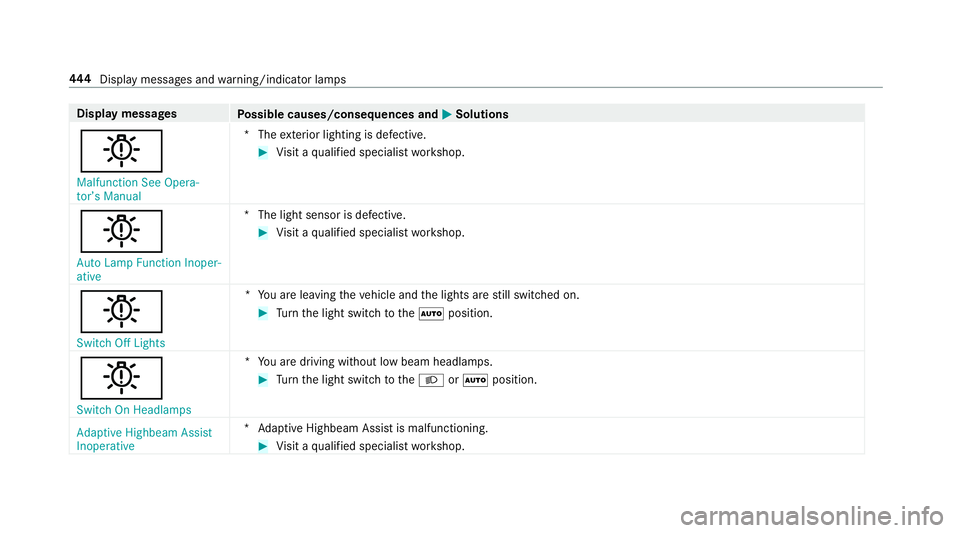
Possible causes/consequences and MSolutions
b
Malfunction See Opera-
tor’s Manual*T
heexterior lighting is defective.
#Vi sit a qualified specialist workshop.
b
Auto Lamp Function Inoper-
ative *T
he light sensor is defective.
#Visit a qualified specialist workshop.
b
Switch Off Lights *Y
ou are leaving theve hicle and the lights are still switched on.
#Tu rn the light switch totheà position.
b
Switch On Headlamps *Y
ou are driving without low beam headlamps.
#Turn the light switch totheL orà position.
Adaptive Highbeam Assist
Inoperative *A
daptive Highbeam Assist is malfunctioning.
#Visit a qualified specialist workshop.
444
Displaymessage s andwarning/indicator lamps
Page 448 of 502
Instrument Display intheWi descreen Co ck‐
pit
Prog ressive setting (Widescreen Cockpit)
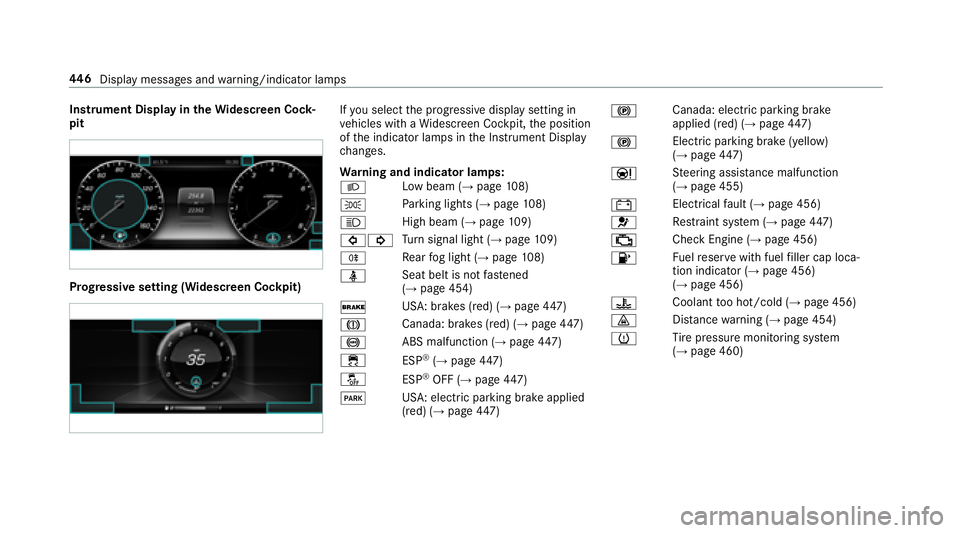
Ifyo u select the progressive display setting in
ve hicles with a Widescreen Cockpit, the position
of the indicator lamps in the Instrument Display
ch anges.
Wa rning and indicator lamps:
L Low beam (
→page
108)
T Pa
rking lights (
→page 108)
K High beam
(
→page10 9)
#! Tu
rn signal light (
→page 109)
R Re
ar fog light (
→page 108)
ü Seat belt is not
fastened
(
→page 454)
$ USA: brakes (red) (
→page
447)
J Canada
: brakes (red) (
→page 447)
! ABS malfunction (
→page
447)
÷ ESP
®(→page 447)
å ESP
®OFF (→page 447)
F US
A: electric pa rking brake applied
(red) (
→page 447) !
Canada: electric parking brake
applied (red) (
→page
447)
! Electric pa
rking brake (yellow)
(
→page 447)
Ð St
eering assis tance malfunction
(
→pa ge 455)
# Electrical
fault (
→page 456)
6 Re
stra int sy stem (
→page 447)
; Che
ckEngine (
→page 456)
8 Fu
elreser vewith fuel filler cap loca‐
tion indicator (
→page 456)
(→page 456)
? Coolant
too hot/cold (
→page 456)
· Dis
tance warning (
→page 454)
h Ti
re pressure monitoring sy stem
(
→page 460)
44 6
Displ aymessage s andwarning/indicator lamps