USB MERCEDES-BENZ S-CLASS CABRIOLET 2018 Owner's Manual
[x] Cancel search | Manufacturer: MERCEDES-BENZ, Model Year: 2018, Model line: S-CLASS CABRIOLET, Model: MERCEDES-BENZ S-CLASS CABRIOLET 2018Pages: 502, PDF Size: 6.27 MB
Page 31 of 502
Ingeneral, this information documents thest ate
of a component part, a module, a sy stem or the
sur roundings such as:
Roperating statuses of sy stem components
(e.g. fluid leve ls, battery status, tire pressure)
Rstatus messages concerning theve hicle and
its individual components (e.g. number of
wheel revo lutions/speed, decele ration, lat‐
eral acceleration, display of thefast ened seat
belts)
Rmalfunctions or defects in impor tant sy stem
components (e.g. lights, brakes)
Rinformation on vehicle damage events
Rsystem reactions in special driving situations
(e.g. airbag deployment, inter vention of sta‐
bility control sy stems)
Rambient conditions (e.g. temp erature, rain
sensor)
In addition toprov iding the actual control unit
function, this data assists the manufacturer in
de tecting and rectifying malfunctions and opti‐
mizing vehicle functions. The majority of this
data is temp orary and is only processed in the ve
hicle itself. Only a small portion of the data is
st ored in theev ent or malfunction memor y.
When service workis done on your vehicle, the
te ch nical da tafrom theve hicle can be read out
by service network staff (e.g. workshops, manu‐
fa cturer) or third parties (e.g. breakdown serv‐
ices). Services include repair services, mainte‐
nance processes, warranty events a
nd
quality
assurance measures, forex ample. The read out
is per form ed via the legally prescribed port for
th e diagnostics connection in theve hicle. The
re spective service network locations or third
parties collect, process and use the data. They
document tech nical statuses of theve hicle,
assist in finding malfunctions and impr oving
qu ality and are transmitted tothe manufacturer,
if necessar y.Fu rthermore, the manufacturer is
subject toproduct liability. Forth is, the manu‐
fa cturer requirestech nical da tafrom vehicles.
Malfunction memories in theve hicle can be
re set bya service outlet as part of repair or
maintenance work.
They can enter data into theve hicle's comfort
and inf otainment functions themselves as part
of the selected equipment. These include:
Rmultimedia data such as music,
films or pho‐
to sfo r playba ckin an integrated multimedia
sy stem
Raddress book data for use in connection with
an integrated hands-free sy stem or an inte‐
grated navigation sy stem
Rentered navigation destinations
Rdata about the use of Internet services
This data can be sa ved locally in theve hicle or it
is located on a device which you ha veconnected
to theve hicle (e.g. smartphone, USB flash drive
or MP3 pla yer). If this data is stored in theve hi‐
cle, you c
an dele
teit at any time. This data can
only be transmitte dto third parties upon your
re qu est with particular rega rd tothe scope of
use of online services according toyour selected
settings.
Yo u can store or change con venience settings/
individualization in theve hicle at any time.
Depending on the equipment, this includes, for
ex ample:
Rseat and steering wheel position settings
General no tes 29
Page 98 of 502
#Alwaysstow objects so that they can‐
not be throw n around in such situa‐
tions.
#Alw ays make sure that objects do not
pr otru de from stowage spaces, luggage
nets or stowage nets.
#Close the loc kable stow age spaces
before starting a journe y.
#Alwaysstow and secure heavy, hard,
pointe d, sharp-edged, fragile or bulky
objects in the trunk.
Obser vethe no tes on loading theve hicle.
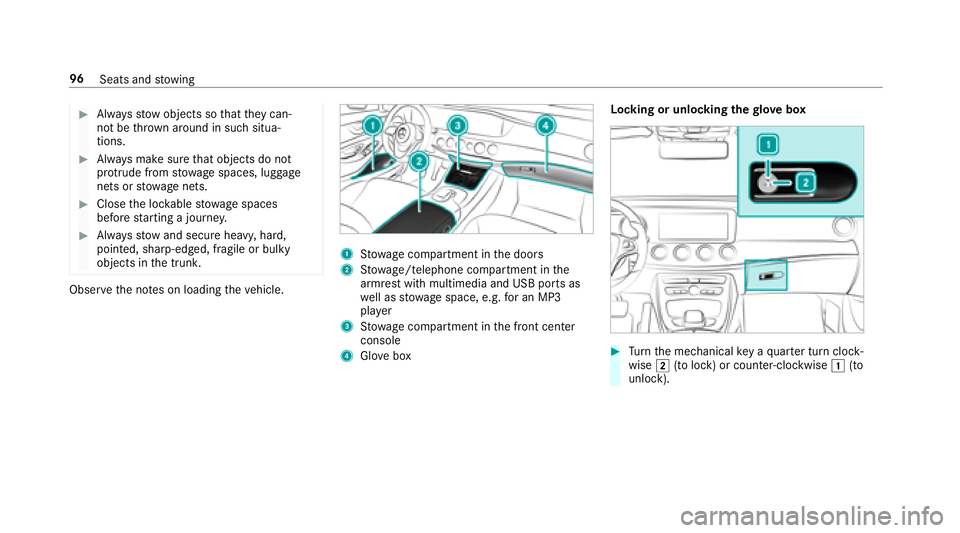
1Stow age compartment in the doors
2St ow age/telephone compartment in the
armrest with multimedia and USB ports as
we ll as stow age space, e.g. for an MP3
pla yer
3Stow age compartment in the front center
console
4Glo vebox Locking or unlocking
thegl ove box#Turn the mechanical key a quarter turn clock‐
wise 2(to lock) or counter-clockwise 1(to
unlock).
96 Seats and stowing
Page 223 of 502
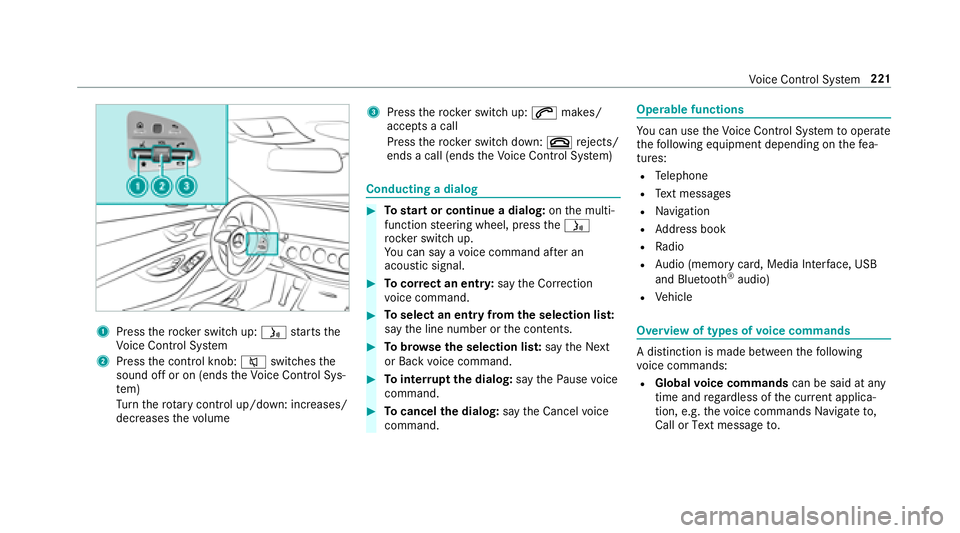
1Presstherock er switch up: óstarts the
Vo ice Cont rol Sy stem
2Press the control knob: 8switches the
sound off or on (ends theVo ice Cont rol Sys‐
te m)
Tu rn thero tary control up/down: increases/
decreases thevo lume
3Press therock er switch up: 6makes/
accepts a call
Press therock er switch down: ~rejects/
ends a call (ends theVo ice Cont rol Sy stem)
Conducting a dialog
#To start or continue a dialog: onthe multi‐
function steering wheel, press theó
rock er switch up.
Yo u can say a voice command af ter an
acou stic signal.
#To cor rect an entry :say theCorrection
vo ice command.
#To select an entry from the selection lis t:
say the line number or the conte nts.
#Tobrows eth e selection lis t:say theNext
or Back voice command.
#To inter rupt the dialog: saythePause voice
command.
#To cancel the dialog: saytheCancel voice
command.
Operable functions
Yo u can use theVo ice Cont rol Sy stem tooperate
th efo llowing equipment depending on thefe a‐
tures:
RTe lephone
RText message s
RNavigation
RAddress book
RRadio
RAu dio (memory card, Media Inter face, USB
and Blu etoo th®audio)
RVe hicle
Overview of types of voice commands
A distinction is made between thefo llowing
vo ice commands:
RGlobal voice commands can be said at any
time and rega rdless of the cur rent applica‐
tion, e.g. thevo ice commands Navigate to,
Call orText message to.
Voice Cont rol Sy stem 221
Page 225 of 502
Rdo not use any abbreviations, unnecessary
spaces or special characters.
If a station list entry is not recognized:
Rsay theRead out station list voice command.
Essential voice commands
Overview of switch voice commands
Swit chvoice commands can be used toopen
cer tain applications. The voice command selec‐
tion can be used rega rdless of the application
th at is cur rently acti ve.
Switch voice commands
Vo ice command Function
Navigation To
switch tonavigation mode
Map To
switch tomap display
Address book To
switch toaddress book
Telephone To
switch totelephone mode
Text message To
switch totext message s
Radio To
switch toradio mode
Media To
switch tomedia mode
USB To
switch toUSB
Memory card To
switch tomemory card
Voice Cont rol Sy stem 223
Page 251 of 502
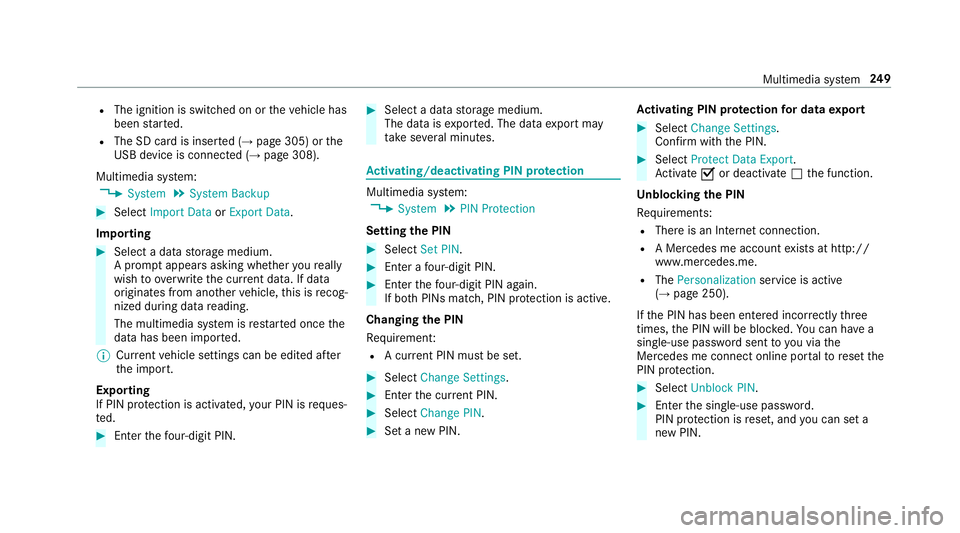
RThe ignition is switched on ortheve hicle has
been star ted.
RThe SD card is inser ted (→page 305) or the
USB device is connecte d (→page 308).
Multimedia sy stem:
,System.System Backup
#Select Import Data orExport Data .
Importing
#Select a data storage medium.
A prom ptappears asking whe ther youre ally
wish to overwrite the cur rent da ta. If da ta
originates from ano ther vehicle, this is recog‐
nized duri ng datareading.
The multimedia sy stem is restar ted once the
data has been impor ted.
% Current vehicle settings can be edited af ter
th e import.
Exporting
If PIN pr otection is activated, your PIN isrequ es‐
te d.
#En terth efo ur-digit PIN.
#Select a data storage medium.
The data is expor ted. The data export may
ta ke several minutes.
Ac tivating/deactivating PIN pr otection
Multimedia sy stem:
,System.PIN Protection
Setting the PIN
#Select Set PIN.
#Enter a four-digit PIN.
#En terth efo ur-digit PIN again.
If bo th PINs match, PIN pr otection is active.
Changing the PIN
Re quirement:
RA cur rent PIN must be set.
#SelectChange Settings.
#Enterth e cur rent PIN.
#Select Change PIN.
#Set a new PIN. Ac
tivating PIN pr otection for data export
#Select Change Settings .
Confirm wi th the PIN.
#Select Protect Data Export .
Ac tivate Oor deacti vate ª the function.
Un blocking the PIN
Re quirements:
RThere is an Internet connection.
RA Mercedes me account exists at http://
www.me rcedes.me.
RThe Personalization service is active
(→page 250).
If th e PIN has been entered incor rectly thre e
times, the PIN will be bloc ked. You can ha vea
single-use password sent to you via the
Mercedes me connect online por talto reset the
PIN pr otection.
#Select Unblock PIN.
#Enterth e single-use password.
PIN pr otection is reset, and you can set a
new PIN.
Multimedia sy stem 24
9
Page 253 of 502
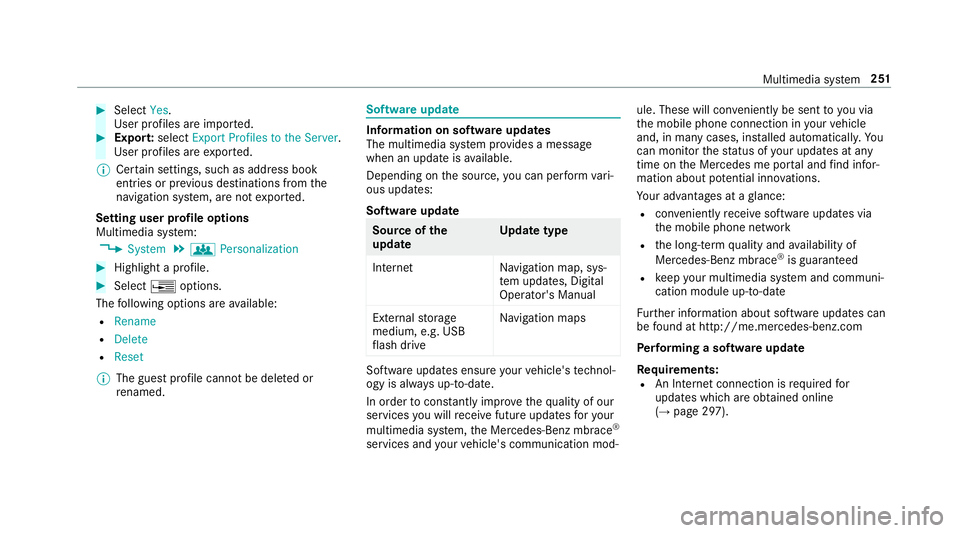
#SelectYes.
User profiles are impor ted.
#Expor t:select Export Profiles to the Server.
User profiles are expor ted.
% Certain settings, such as address book
ent ries or pr evious destinations from the
navigation sy stem, are not expor ted.
Setting user profile options
Multimedia sy stem:
,System.g Personalization
#Highlight a profile.
#Select ¥options.
The following options are available:
RRename
RDelete
RReset
% The guest profile cannot be dele ted or
re named.
Soft wareupdate
Information on software updates
The multimedia sy stem pr ovides a message
when an update is available.
Depending on the source, you can per form vari‐
ous updates:
Software update
Source of the
update Up
date type
Interne tN avigation map, sys‐
te m updates, Digital
Operator's Manual
External storage
medium, e.g. USB
fl ash drive Na
vigation maps
Software updates ensure your vehicle's tech nol‐
ogy is al ways up-to-date.
In order tocons tantly impr ovethequ ality of our
services youwill receive future updates foryo ur
multimed iasystem, the Mercedes-Benz mbrace
®
services and your vehicle's communication mod‐ ule. These will con
veniently be sent to you via
th e mobile phone connection in your vehicle
and, in many cases, ins talled automaticall y.Yo u
can monito rth est atus of your updates at any
time on the Mercedes me por tal and find infor‐
mation about po tential inno vations.
Yo ur advantages at a glance:
Rcon veniently receive software update s via
th e mobile phone network
Rthe long- term quality and availability of
Mercedes-Benz mbrace®is guaranteed
Rke ep your multimedia sy stem and communi‐
cation module up-to-date
Fu rther information about software updates can
be found at http ://me.mercedes-benz.com
Pe rforming a software upda te
Re quirements:
RAn Internet connection is requiredfor
updates which are obtained online
(
→page 297).
Multimedia sy stem 251
Page 289 of 502
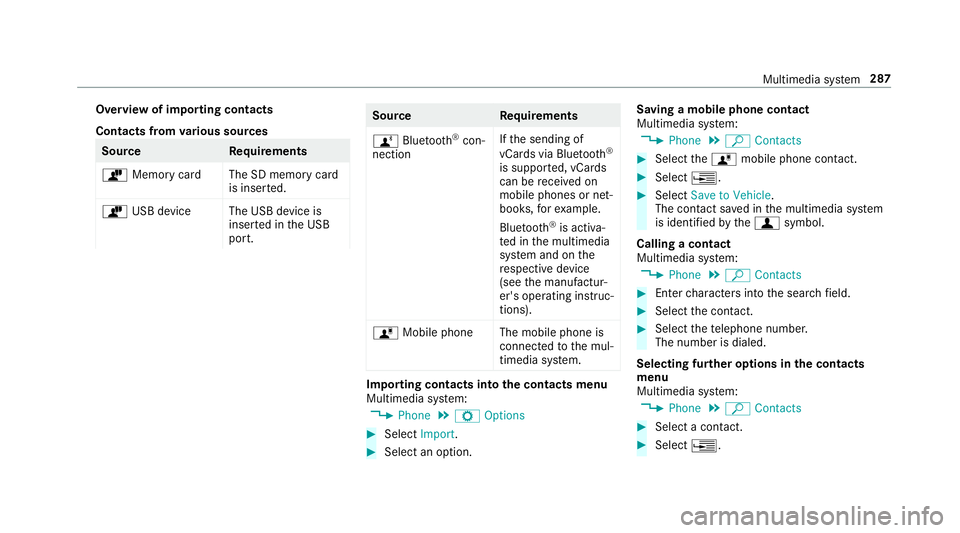
Overview of importing contacts
Contacts fromvarious sources
Source Requirements
ò Memory car dThe SD memory card
is inser ted.
ò USB device The USB device is
inserted in the USB
port.
Source Requirements
ñ Bluetooth
®con‐
nection If
th e sending of
vCards via Blue tooth®
is suppor ted, vCards
can be receive d on
mobile phones or net‐
books, forex ample.
Blue tooth
®is activa‐
te d in the multimedia
sy stem and on the
re spective device
(see the manufactur‐
er's operating instruc‐
tions).
ó Mobile phone The mobile phone is
connectedtothe mul‐
timedia sy stem.
Importing contacts into the contacts menu
Multimedia sy stem:
,Phone.Z Options
#Select Import.
#Select an option. Saving a mobile phone contact
Multimedia sy
stem:
,Phone.ª Contacts
#Select theó mobile phone conta ct.
#Select¥.
#SelectSave to Vehicle.
The contact sa ved in the multimedia sy stem
is identified bythef symbol.
Calling a contact
Multimedia sy stem:
,Phone.ª Contacts
#Enterch aracters into the sear chfield.
#Select the conta ct.
#Selectthete lephone number.
The number is dialed.
Selecting fur ther options in the contacts
menu
Multimedia sy stem:
,Phone.ª Contacts
#Select a conta ct.
#Select¥.
Multimedia sy stem 287
Page 293 of 502
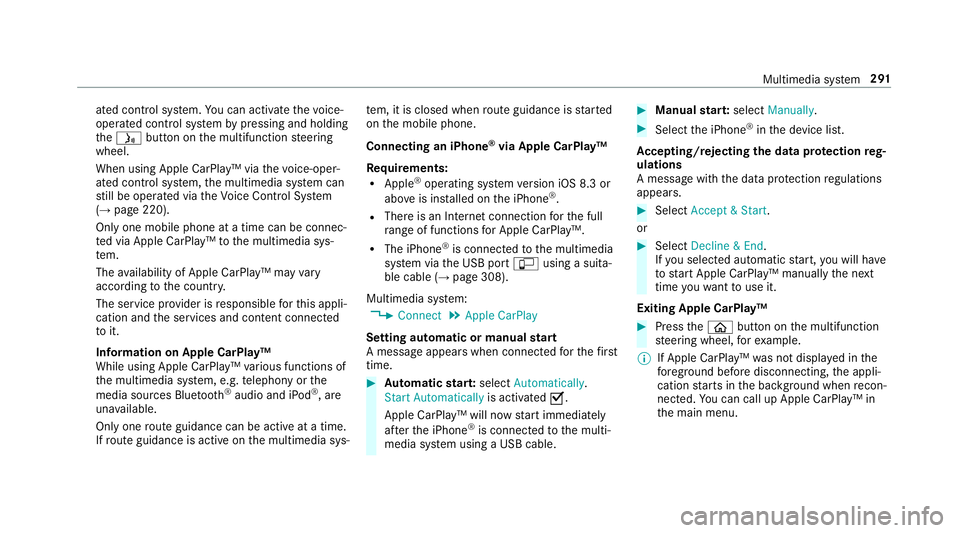
ated control system. You can act ivate thevo ice-
opera ted control sy stem bypressing and holding
th eó button on the multifunction steering
wheel.
When using Apple CarPlay™ via thevo ice-oper‐
ated control sy stem, the multimedia sy stem can
st ill be operated via theVo ice Cont rol Sy stem
(
→page 220).
Only one mobile phone at a time can be connec‐
te d via Apple CarPlay™ tothe multimedia sys‐
te m.
The availability of Apple CarPlay™ may vary
according tothe count ry.
The service pr ovider is responsible forth is appli‐
cation and the services and conte nt connected
to it.
Information on Apple CarPlay™
While using Apple CarPlay™ various functions of
th e multimedia sy stem, e.g. telephony or the
media sources Blue tooth
®audio and iPod®, are
una vailable.
Only one route guidance can beact ive at a time.
If ro ute guidance isact ive on the multimedia sys‐ te
m, it is closed when route guidance isstar ted
on the mobile phone.
Connecting an iPhone
®via Apple CarPlay™
Re quirements:
RApple®operating sy stem version iOS 8.3 or
abo veis ins talled on the iPhone®.
RThere is an Internet connection forth e full
ra nge of functions for Apple CarPlay™.
RThe iPhone®is connected tothe multimedia
sy stem via the USB port çusing a suita‐
ble cable (
→page 308).
Multimedia sy stem:
,Connect.Apple CarPlay
Setting automat ic or m
anualstart
A message appears when connec tedfo rth efirs t
time.
#Au tomatic star t:select Automatically .
Start Automatically is activatedO.
Apple CarPlay™ will now start immediately
af te rth e iPhone
®is connected tothe multi‐
media sy stem using a USB cable.
#Manual star t:select Manually .
#Selectthe iPhone®in the device list.
Ac cepting/rejecting the data pr otection reg‐
ulations
A message with the data pr otection regulations
appears.
#Select Accept & Start .
or
#Select Decline & End.
If yo u selected automatic start, youwill have
to start Apple CarPlay™ manually the next
time youwa nttouse it.
Exiting Apple CarPlay™
#Press theò button on the multifunction
st eering wheel, forex ample.
% If Apple CarPlay™ was not displa yed in the
fo re ground before disconnecting, the appli‐
cation starts in the bac kground when recon‐
nected. You can call up Apple CarPlay™ in
th e main menu.
Multimedia sy stem 291
Page 295 of 502
Connecting a mobile phone via AndroidAuto
Requ irements:
RThefirs t acti vation of Android Autoon the
multimedia sy stem must be car ried out when
th eve hicle is stationary for saf etyre asons.
RThe mobile phone support s AndroidAuto
from Android 5.0.
RThe Android Autoapp is ins talled on the
mobile phone.
RIn order touse thete lephone functions, the
mobile phone must be connected tothe mul‐
timedia sy stem via Blue tooth
®(→page 282).
If th ere was no prior Internet connection, this
is es tablished with the use of the mobile
phone with Android Auto.
RThe mobile phone is connected tothe multi‐
media sy stem via the USB port çusing a
suitable cable (
→page 308).
RThere is an Internet connection forth e full
ra nge of functions for Android Auto. Multimedia sy
stem:
,Connect.Android Auto
#Select the mobile phone from the device list.
Ac cepting/rejecting the data pr otection reg‐
ulations
A message with the data pr otection regulations
appears.
#Select Accept & Start .
or
#Select Decline & End.
Ac tivating automatic start
#Select Start Automatically O.
St arting manually
#Select the mobile phone from the device list.
Exiting Android Auto
#Press theò button on the multifunction
st eering wheel, forex ample.
% If Android Autowa s not displa yed in thefo re ‐
ground before disconnecting, the application
st arts in the bac kground when reconnected. Yo
u can call up Android Autointhe main
menu.
Calling up the Android Autosound settings
Multimedia sy stem:
,Connect.Android Auto.Sound
#Selecting theto ne menu (→pa ge 324).
Ending Android Auto
Multimedia sy stem:
,Connect.Android Auto
#Select Disconnect .
The connection is ended.
The mobile phone continues tobe supplied
with electri city.
or
#Disconnect the connecting cable between
th e mobile phone and multimedia sy stem.
Mercedes-Benz recommends disconnecting
th e connecting cable only when theve hicle is
st ationar y.
Multimedia sy stem 293
Page 306 of 502
Settingthe Internet radio options
Multimedia sy stem:
,Radio.Þ Radio Source.TuneIn
Radio.Z Options
The following options are available:
RSelect Stream: select thest re am quality.
RLogin to TuneIn Account : log intoyour
Tu neIn user account.
RLog Out of Account: log out of your TuneIn
user account.
#Select an option.
Media
Au dio mode
Info rm ation on the audio mode
&
WARNING Risk of dist raction when han‐
dling data storage media
If yo u handle a datastorage medium while
driving, your attention is diverted from the
traf fic conditions. This could also cause you
to lose control of theve hicle.
#Only handle a data storage medium
when theve hicle is stationar y.
Perm issible file sy stems:
RFA T32
RexFA T
RNTFS
Pe rm issible data storage medium:
RSD card
RUSB storage device
RiPod®/iPhone®
RMTP devices
RBlue tooth®audio equipment
%
RThe multimedia sy stem supports a total
of up to50,000 files.
RData storage media up to2 TB are sup‐
por ted (32‑bit address space). Suppor
tedfo rm ats:
RMP3
RWMA
RAAC
RWA V
RFLAC
RAL AC
% Obser vethefo llowing no tes:
RDue tothe lar gevariet yof available
music files rega rding encoders, sampling
ra tes and data rates, playback cannot
alw ays be guaranteed.
RDue tothe wide range of USB devices
av ailable on the mar ket, pl ayback cann ot
be guaranteed for all USB devices.
RCop y-pr otected music files or DRM
enc rypte dfiles cannot be pla yed bac k.
RMP3 pla yers must support Media Trans‐
fe r Pr otocol (MTP).
304
Multimedia sy stem