phone MERCEDES-BENZ S-CLASS CABRIOLET 2018 Owner's Manual
[x] Cancel search | Manufacturer: MERCEDES-BENZ, Model Year: 2018, Model line: S-CLASS CABRIOLET, Model: MERCEDES-BENZ S-CLASS CABRIOLET 2018Pages: 502, PDF Size: 6.27 MB
Page 4 of 502
Atagl ance .................................................... 6
Cockpit ........................................................... 6
Wa rning and indicator lamps ........................ 10
Overhead contro l panel ................................ 12
Door control panel and seat adjustment ....... 14
Control settings inthere ar compartment .... .16
Emergencies and breakdowns ...................... 18
DigitalOperator' sManua l........................ .20
Callin gup the Digital Operator's Manual ...... 20
General no tes............................................. 21
Pr otecting the environment .......................... 21
Mercedes-Benz GenuineParts ....................... 21
Operator's Manual ........................................2 2
Service and vehicle operation ......................2 3
Operating saf ety.......................................... .24
Declaration of conformity for wireless
ve hicle components .....................................2 5
Diagnost ics connection ................................ 26
Qualified specialist workshop ....................... 27
Cor rect use of theve hicle ............................. 27
Problems with your vehicle ........................... 27
Re porting saf etydefects .............................. .27 Limited
Warranty .......................................... 28
QR codes forth ere scue card ....................... 28
Data storage .................................................2 8
Copyright .. .................................................... 32
Occupant safety......................................... 33
Re stra int sy stem .......................................... .33
Seat belts ..................................................... 35
Airbags ......................................................... 40
PRE-SAFE
®sy stem ....................................... 47
Childr en intheve hicle ..................................4 9
No tes on pets in theve hicle .........................5 6
Opening and closing.................................. 57
SmartK ey...................................................... 57
Doors ............................................................ 61
Tr unk ............................................................ 65
Ro ller sun blinds .......................................... .71
Side windo ws................................................ 72
Pa noramic roof ............................................. 76
Anti-theft pr otection .................................... .79
Seats and stowing ...................................... 81
No tes on the cor rect driver's seat posi‐
tion ............................................................... 81
Seats ............................................................ 82
St eering wheel ..............................................9 0
Using the memory function .......................... 93
St ow age areas .............................................. 94
Cup holder .................................................. 100
Ashtr ayand cigar ette lighter ...................... .101
Soc kets ....................................................... 102
Re frigerator box .......................................... 103
Wi reless charging of the mobile phone
and connection with theex terior antenna .. 105
Ins talling or removing thefloor mats ..........1 07
Light and visibility ................................... 108
Exterior lighting .......................................... 108
Interior lighting ............................................ 113
Wi ndshield wiper and windshield washer
sy stem ........................................................ 114
Mir rors ........................................................ 116
Operating the sun visors ............................. 119
Infrared reflective windshield function ........ 119
2
Conte nts
Page 5 of 502
Climate control......................................... 121
Overview of climate contro l systems ......... .121
Operating the climate control sy stem ......... 121
Drivin gand pa rking ................................. 128
Driving ........................................................ 128
DY NA MIC SELECT switch ............................1 36
Au tomatic transmission .............................. 137
Re fueling .................................................... 140
Pa rking ...................................................... .142
Driving and driving saf etysy stems ............ .150
Instrument Display and on-board
comp uter .................................................. 208
Instrument Display overview ...................... 208
Overview of the buttons on thesteering
wheel ......................................................... .209
Operating the on-board computer .............. 209
Overview of displa ysinthe multifunction
display ......................................................... 211
Ad justing the instrument lighting ............... .211
Menus and submenus ................................. 212
Head-up Display .......................................... 218
Vo ice Control Sy stem .............................. 220
No tes on operating saf ety.......................... 22 0
Ope ration ................................................... 220
Using theVo ice Cont rol Sy stem ef fec‐
tively ........................................................... 222
Essential voice commands ........................ .223
Multimedia sy stem .................................. 233
Overview and operation .............................. 233
Sy stem settings .......................................... 242
ENERGIZING comfort .................................. 254
Na vigation .................................................. 256
Te lephone .................................................. .280
Online and Internet functions ..................... 297
Media .........................................................3 04
Ra dio ...........................................................3 16
Sound ......................................................... 324
Main tenance and care ............................. 327
ASS YST PLUS service inter val display ........ 327
Engine compartment .................................. 328
Cleaning and care ...................................... .334
Breakdown assist ance............................ 342
Emergency ..................................................3 42
Flat tire ....................................................... 342
Battery (vehicle) ......................................... 348
To w starting or towing away ....................... 353
Electrical fuses ........................................... 359
Wheels and tires ...................................... 362
No tes on noise or unusual handling char‐
acteristics .................................................. .362
Re gular checking of wheels and tires ......... 362
No tes on snow chains ................................ 363
Ti re pressure .............................................. 364
Loading theve hicle .....................................3 70
Ti re labeling ................................................ 374
Definition of term sfo r tires and loading ..... 379
Changing a wheel ...................................... .382
Tech nical data .......................................... 392
No tes on tech nical da ta.............................. 392
Ve hicle electronics .....................................3 92
Ve hicle identification plate, VIN and
engine number overview ............................ .394
Operating fluids .......................................... 396
Conte nts 3
Page 31 of 502
Ingeneral, this information documents thest ate
of a component part, a module, a sy stem or the
sur roundings such as:
Roperating statuses of sy stem components
(e.g. fluid leve ls, battery status, tire pressure)
Rstatus messages concerning theve hicle and
its individual components (e.g. number of
wheel revo lutions/speed, decele ration, lat‐
eral acceleration, display of thefast ened seat
belts)
Rmalfunctions or defects in impor tant sy stem
components (e.g. lights, brakes)
Rinformation on vehicle damage events
Rsystem reactions in special driving situations
(e.g. airbag deployment, inter vention of sta‐
bility control sy stems)
Rambient conditions (e.g. temp erature, rain
sensor)
In addition toprov iding the actual control unit
function, this data assists the manufacturer in
de tecting and rectifying malfunctions and opti‐
mizing vehicle functions. The majority of this
data is temp orary and is only processed in the ve
hicle itself. Only a small portion of the data is
st ored in theev ent or malfunction memor y.
When service workis done on your vehicle, the
te ch nical da tafrom theve hicle can be read out
by service network staff (e.g. workshops, manu‐
fa cturer) or third parties (e.g. breakdown serv‐
ices). Services include repair services, mainte‐
nance processes, warranty events a
nd
quality
assurance measures, forex ample. The read out
is per form ed via the legally prescribed port for
th e diagnostics connection in theve hicle. The
re spective service network locations or third
parties collect, process and use the data. They
document tech nical statuses of theve hicle,
assist in finding malfunctions and impr oving
qu ality and are transmitted tothe manufacturer,
if necessar y.Fu rthermore, the manufacturer is
subject toproduct liability. Forth is, the manu‐
fa cturer requirestech nical da tafrom vehicles.
Malfunction memories in theve hicle can be
re set bya service outlet as part of repair or
maintenance work.
They can enter data into theve hicle's comfort
and inf otainment functions themselves as part
of the selected equipment. These include:
Rmultimedia data such as music,
films or pho‐
to sfo r playba ckin an integrated multimedia
sy stem
Raddress book data for use in connection with
an integrated hands-free sy stem or an inte‐
grated navigation sy stem
Rentered navigation destinations
Rdata about the use of Internet services
This data can be sa ved locally in theve hicle or it
is located on a device which you ha veconnected
to theve hicle (e.g. smartphone, USB flash drive
or MP3 pla yer). If this data is stored in theve hi‐
cle, you c
an dele
teit at any time. This data can
only be transmitte dto third parties upon your
re qu est with particular rega rd tothe scope of
use of online services according toyour selected
settings.
Yo u can store or change con venience settings/
individualization in theve hicle at any time.
Depending on the equipment, this includes, for
ex ample:
Rseat and steering wheel position settings
General no tes 29
Page 32 of 502
Rsuspension and climate control settings
Rindividualization such as interior lighting
If yo ur vehicle is accordingly equipped, you can
connect your smartphone or ano ther mobile end
device totheve hicle. You can cont rolth em via
th e control elements integrated in your vehicle.
Images and audio from the smartphone can be
output via the multimedia sy stem. Cer tain infor‐
mation is simultaneously transfer redto yo ur
smartphone.
Dependin g onthere spective integration type,
th is includes, forex ample:
Rge neral vehicle data
Rposition data
This enables the use of selected smartphone
apps, e.g. navigation or music playbac k.There is
no fur ther interaction between the smartphone
and theve hicle; in particular, vehicle data is not
directly accessible. Which type of fur ther data
processing occurs is de term ined bythe pr ovider
of the specific app used. Which settings you can
make, ifan y,depends on the specific app and
th e operating sy stem of your smartphone.
Online services
Wire less network connection
If yo ur vehicle has a wireless network connec‐
tion, it enables data tobe exc hanged between
yo ur vehicle and additional sy stems. The wire‐
less network connection is enabled via theve hi‐
cle's transmitter and receive r unit or via connec‐
te d mobile end devices (e.g. smartphones).
Online functions can be used via the wireless
network connection. This includes online serv‐
ices and applications/apps pr ovided bythe man‐
ufacturer or other pr oviders.
Manufa cturer's se rvices
Re garding online services of the manufacturer,
th e individual functions are described bythe
manufacturer in a sui table place (e.g. Operator's
Manual, website of the manufacturer) along with
th ere leva nt da taprotection information. Per‐
sonal data may be used forth e pr ovision of
online services. Data is exch anged via a secure
connection, e.g. the manufacturer's designated
IT sy stems. Personal data is collected, pro‐
cessed and used via the pr ovision of services exc
lusively on the basis of legal permissions or
with prior consent.
The services and functions (sometimes subject
to afe e) can usually be activated or deactivated.
In some cases, this also applies tothe entire
ve hicle's data connection. This excludes, in par‐
ticular, legally prescribed functions and services.
Third pa rty services
If it is possible touse online services from other
pr ov iders, th
ese services are subj
ecttothe data
pr otection and term s of use of there sponsible
pr ov ider. The manufacturer has no influence on
th e conte ntexc hanged.
Please inquire, therefore, about the type, scope
and purpose of the collection and use of per‐
sonal data as part of third party services from
th eir respective pr ovider.
COMAND/mbrace
Ifth eve hicle is equipped with COMAND or
mbrace, additional data about theve hicle's oper‐
ation, the use of theve hicle in cer tain situations,
30
General no tes
Page 97 of 502
&WARNING Risk of injury from incorrectly
stowe d objects
If objects in theve hicle interior are stowed
incor rectly, they can slide or be throw n
around and hit vehicle occupants. In addi‐
tion, cup holders, open stowage spaces and
mobile phone brac kets cann otalw aysre tain
all objects they contain.
There is arisk of injur y,particularly in the
ev ent of sudden braking or a sudden change
in direction.
#Alw aysstow objects so that they can‐
not be throw n around in such situa‐
tions.
#Alw ays make sure that objects do not
pr otru de from stowage spaces, luggage
nets or stowage nets.
#Close the loc kable stow age spaces
before starting a journe y.
#Alwaysstow and secure heavy, hard,
pointe d, sharp-edged, fragile or bulky
objects in the trunk.
Obser vethe no tes on the cup holders.
&
WARNING Risk of burn s fromtailpipes
and tailpipe trim
The tailpipe and tailpipe trim can become
ve ry hot. If you come into contact withth ese
parts of theve hicle, you could burn yourself.
#Alw ays be particular lycareful around
th eta ilpipe and theta ilpipe trim.
#Allow theve hicle parts tocool down
before youto uch them.
The driving characteristics of your vehicle are
dependent on the distribution of the load within
th eve hicle. You should bear thefo llowing in
mind when loading theve hicle:
RNe verex ceed the permissible gross mass or
th e gross axle weight rating forth eve hicle
(including occupants). The values are speci‐
fi ed on theve hicle identification plate on the
ve hicle's B-pillar.
RThe load must not pr otru de abo vethe upper
edge of the seat backrests.
RAlw ays place the load behind unoccupied
seats if possible.
RSecure the load using the parcel net hooks.
Distribute the load on the parcel net hooks
eve nly.
St ow age spaces in theve hicle interior
Overview of the front stowage compa rt‐
ments
& WARNING Risk of injury from incorrectly
stowe d objects
If objects in theve hicle interior are stowed
incor rectl y,they can slide or be thro wn
around and hit vehicle occupants. In addi‐
tion, cup holders, open stowage spaces and
mobile phone brac kets cann otalw aysre tain
all objects they contain.
There is arisk of injur y,particularly in the
eve nt of sudden braking or a sudden change
in direction.
Seats and stowing 95
Page 98 of 502
#Alwaysstow objects so that they can‐
not be throw n around in such situa‐
tions.
#Alw ays make sure that objects do not
pr otru de from stowage spaces, luggage
nets or stowage nets.
#Close the loc kable stow age spaces
before starting a journe y.
#Alwaysstow and secure heavy, hard,
pointe d, sharp-edged, fragile or bulky
objects in the trunk.
Obser vethe no tes on loading theve hicle.
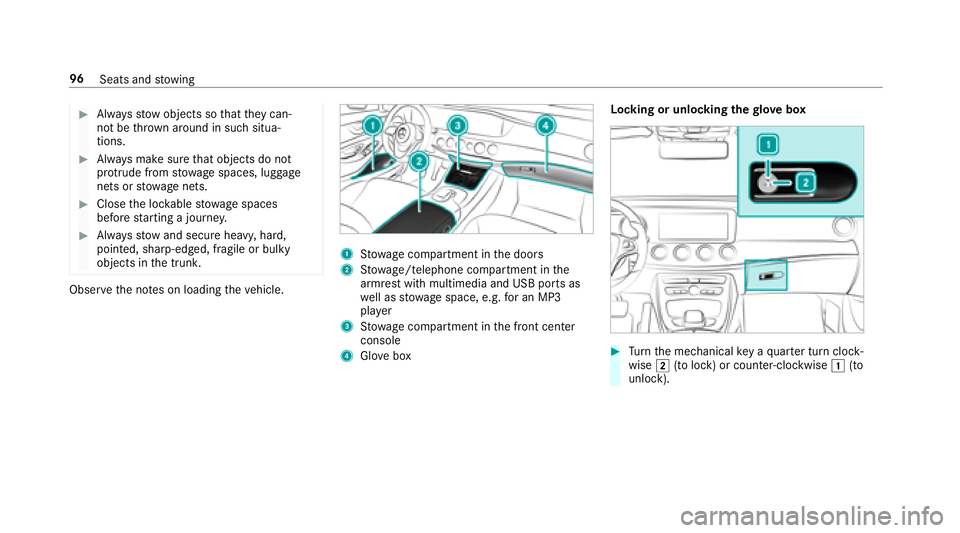
1Stow age compartment in the doors
2St ow age/telephone compartment in the
armrest with multimedia and USB ports as
we ll as stow age space, e.g. for an MP3
pla yer
3Stow age compartment in the front center
console
4Glo vebox Locking or unlocking
thegl ove box#Turn the mechanical key a quarter turn clock‐
wise 2(to lock) or counter-clockwise 1(to
unlock).
96 Seats and stowing
Page 107 of 502
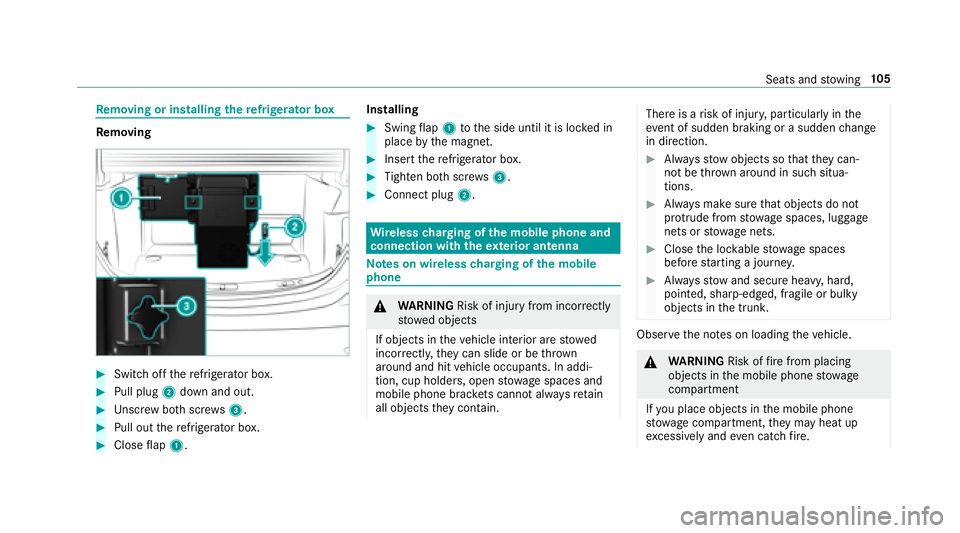
Removing or in stalling there frigerator box
Re moving
#Switch off there frigerator box.
#Pull plug 2down and out.
#Unscr ew both scr ews3.
#Pull out there frigerator box.
#Close flap 1. Installing
#Swing
flap 1 tothe side until it is loc ked in
place bythe magnet.
#Insert there frigerator box.
#Tighten bo thscr ews3.
#Connect plug 2.
Wirelesscharging of the mobile phone and
connection with theex terior antenna
Note s on wireless charging of the mobile
phone
& WARNING Risk of injury from incorrectly
stowe d objects
If objects in theve hicle interior are stowed
incor rectly, they can slide or be throw n
around and hit vehicle occupants. In addi‐
tion, cup holders, open stowage spaces and
mobile phone brac kets cann otalw aysre tain
all objects they contain.
There is arisk of injur y,particularly in the
ev ent of sudden braking or a sudden change
in direction.
#Alw aysstow objects so that they can‐
not be throw n around in such situa‐
tions.
#Alw ays make sure that objects do not
pr otru de from stowage spaces, luggage
nets or stowage nets.
#Close the loc kable stow age spaces
before starting a journe y.
#Alwaysstow and secure heavy, hard,
pointe d, sharp-edged, fragile or bulky
objects in the trunk.
Obser vethe no tes on loading theve hicle.
&
WARNING Risk offire from placing
objects in the mobile phone stowage
compartment
If yo u place objects in the mobile phone
stow age compartment, they may heat up
exc essively and even catch fire .
Seats and stowing 10
5
Page 108 of 502
#Do not place additional objects, espe‐
ciallythose mode of me tal, in the
mobile phone stowage compartment.
* NO
TEDama getoobjects caused by
placing them in the mobile phone stow‐
age compartment
If yo uplac e objects inthe mobile phone
stow age compartment, these may be dam‐
aged byelectromagnetic fields.
#Do not place credit cards, storage
media or other objects sensitive to
electromagnetic fields in the mobile
phone stowage compartment.
* NO
TEDama getothe mobile phone
stow age compartment caused byliquids
If liquids enter the mobile phone stowage
compartment, the compartment may be
damaged.
#Ensure that no liquids enter the mobile
phone stowage compartment.
RDepending on theve hicle equipment, the
mobile phone is connected totheve hicle's
ex terior aerial via thech arging module.
RThe charging function and wireless connec‐
tion of the mobile phone totheve hicle's
ex terior aerial are only available if the ignition
is switched on.
RSmall mobile phones may not be able tobe
ch arge d in everyposition of the mobile
phone stowage compartment.
RLargemobile phones which do not rest flat in
th e mobile phone stowage compartment may
not be able tobe charge d or connec ted with
th eve hicle's exterior aerial.
RThe mobile phone may heat up during the
ch arging process. This depends on the appli‐
cations (apps) cur rently running.
RTo ensure more ef ficient charging and con‐
nection with theve hicle's exterior aerial,
re mo vethe pr otective co ver from the mobile
phone. Pr otective co vers which are designed
fo r wireless charging are excluded.
RWhen charging, the mat should be used if
possible.
Wire lesscharging of the mobile phone in the
front
Re quirements:RThe mobile phone must be suitable for wire‐
less charging (Qi-compatible mobile phone).
Yo u can find a li stof Qi-compatible mobile
phones at:
http://www.mercedes-benz.com/connect
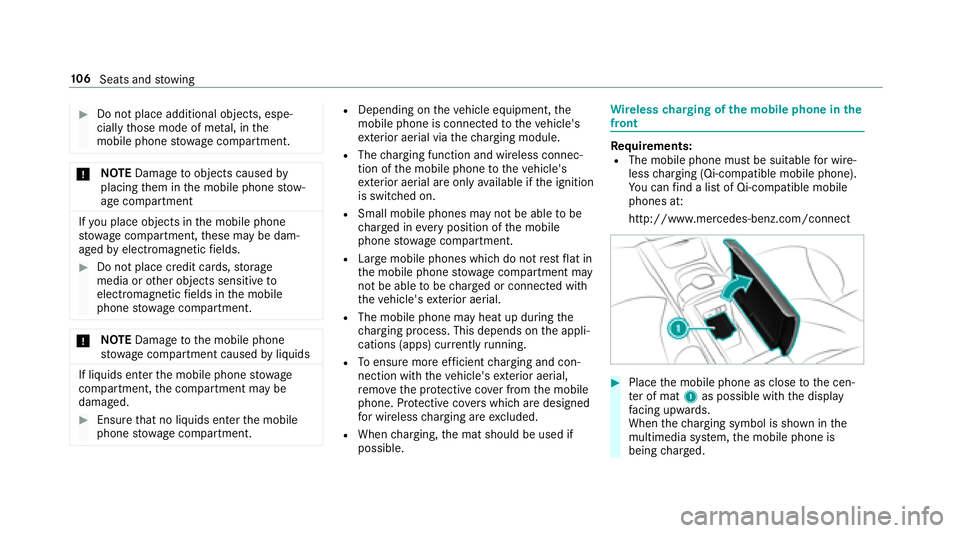
#Place the mobile phone as close tothe cen‐
te r of mat 1as possible with the display
fa cing up wards.
When thech arging symbol is shown in the
multimedia sy stem, the mobile phone is
being charge d.
10 6
Seats and stowing
Page 132 of 502
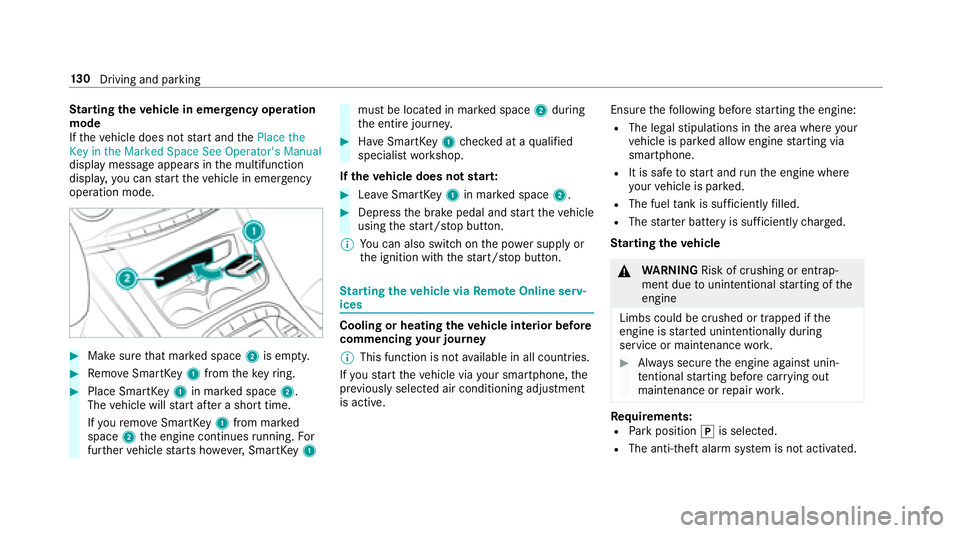
Starting theve hicle in emer gency operation
mode
If th eve hicle does not start and thePlace the
Key in the Marked Space See Operator's Manual
display message appears in the multifunction
displa y,yo u can start theve hicle in emer gency
operation mode.
#Make surethat mar ked space 2is em pty.
#Re mo veSmartK ey1 from theke yring.
#Place Smart Key1 in mar ked space 2.
The vehicle will start af ter a short time.
If yo ure mo veSmartK ey1 from mar ked
space 2the engine continues running. For
fur ther vehicle starts ho wever,SmartK ey1
must be located in mar ked space 2during
th e entire journe y.
#Have SmartK ey1 checked at a qualified
specialist workshop.
If th eve hicle does not star t:
#Lea veSmartK ey1 in mar ked space 2.
#Depress the brake pedal and start theve hicle
using thest art/ stop button.
% You can also switchon the po wer supp lyor
th e ignition with thest art/ stop button.
St arting theve hicle via Remo teOnline serv‐
ices
Cooling or heating theve hicle interior before
commencing your journey
% This function is not available in all countries.
If yo ustart theve hicle via your smartphone, the
pr ev iously selecte d air conditioning adjustment
is active. Ensure
thefo llowing before starting the engine:
RThe legal stipulations in the area where your
ve hicle is par ked allow engine starting via
smartphone.
RIt is safe tostart and runth e engine where
yo ur vehicle is par ked.
RThe fuel tank is suff icientlyfilled.
RThe star ter battery is suf ficiently charge d.
St arting the vehicle
&
WARNING Risk of crushing or entrap‐
ment due tounin tentional starting of the
engine
Limbs could be crushed or trapped if the
engine is star ted unintentionally during
service or maintenance work.
#Alw ays secure the engine against unin‐
te ntional starting before car rying out
maintenance or repair work.
Re quirements:RPark position jis selected.
RThe anti- theft alarm sy stem is not activated.
13 0
Driving and pa rking
Page 133 of 502
RThe panic alarm is not activated.
RThe hazardwarning lights are switched off.
RThe hood is closed.
RThe doors are closed and loc ked.
RThe windo wsand sliding sunro of are closed.
#Start theve hicle using the smartphone:RAf tereve ryvehicle start, the engine runs for
te n minu tes.
RYo u can car ryout a maximum of two consec‐
utive starting attem pts. The vehicle must be
st ar ted once with the SmartK eybefore trying
to start theve hicle again with the smart‐
phone.
RYo u can stop theve hicle again at any time.
RFu rther information can be found inthe
smartphone app.
Securing the engine against starting before
car rying out maintenance or repair work:
#Switch on the hazard warning lights.
or
#Un lock the doors. or
#Open a side window or
the sliding sunroof.
Breaking-in no tes
Mercedes-AMG vehicles: observeth e no tes in
th e Supplement. Otherwise, you may failto rec‐
ognize dangers.
To preser vethe engine during thefirs t
1, 000 miles (1,500 km):
Rdrive at varying road speeds and engine
speeds.
Rdrive theve hicle in drive program A
or ;.
Rchange gear before theta ch ome ter needle is
Ô ofthewa yto there d area of theta ch ome‐
te r.
Rdo not shift down a gear manually in order to
brake.
Ravo idoverstra ining theve hicle, e.g. driving at
full thro ttle.
Rdo not depress the accelera tor pedal past
th e pressure point (kickdown).
Ronly increase the engine speed gradually and
accelerate theve hicle tofull speed af ter
1, 000 miles (1,500 km).
This also applies when the engine or parts of the
driv etra in ha vebeen replaced.
Please also obser vethefo llowing breaking-in
no tes:
Rin cer tain driving and driving saf etysy stems,
th e sensor sy stem adjusts automatically
while a cer tain dis tance is driven af terth e
ve hicle has been delivered or af terre pairs.
Fu ll sy stem ef fectiveness is not achie ved
unt ilth e end of this teach-in process.
Rbrakepads, brake discs and tires that are
either new or ha vebeen replaced only ach‐
ie ve opt
imum braking ef fect and grip af ter
se veral hundred kilom eters of driving. Com‐
pensate forth ere duced braking ef fect by
applying greater forc eto the brake pedal.
Driving and parking 13
1