radio MERCEDES-BENZ S-CLASS COUPE 2014 User Guide
[x] Cancel search | Manufacturer: MERCEDES-BENZ, Model Year: 2014, Model line: S-CLASS COUPE, Model: MERCEDES-BENZ S-CLASS COUPE 2014Pages: 413, PDF Size: 12.76 MB
Page 103 of 413
G
WARNING
The reversing function does not react:
R to soft, light and thin objects, e.g. small fin-
gers
R while resetting
This means that the reversing feature cannot
prevent someone being trapped in these sit-
uations. There is a risk of injury.
When closing, make sure that no parts of the
body are in the closing area. If someone
becomes trapped, press the switch to open
the side window again. Opening and closing the side win-
dows
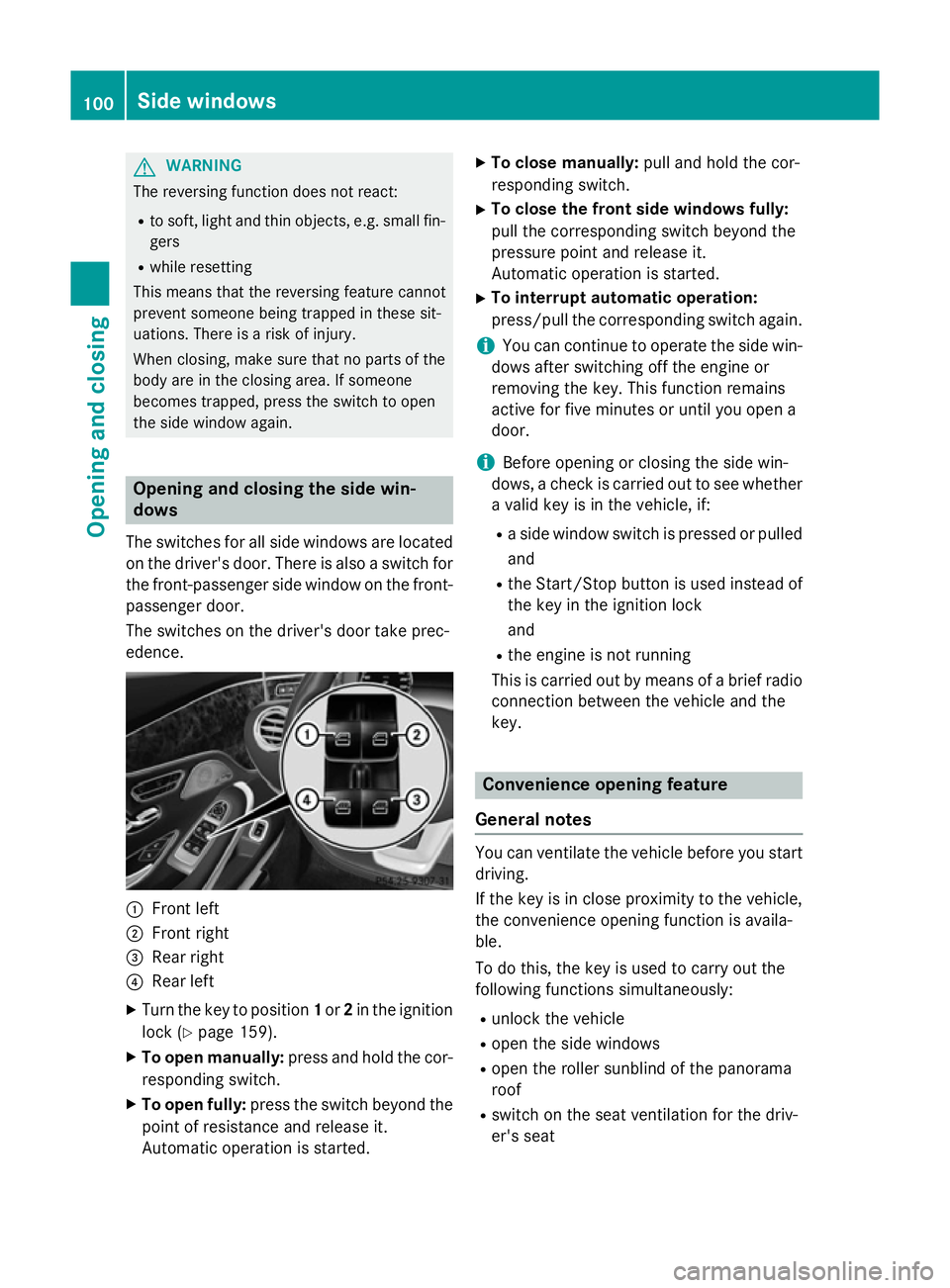
The switches for all side windows are located
on the driver's door. There is also a switch for
the front-passenger side window on the front- passenger door.
The switches on the driver's door take prec-
edence. :
Front left
; Front right
= Rear right
? Rear left
X Turn the key to position 1or 2in the ignition
lock (Y page 159).
X To open manually: press and hold the cor-
responding switch.
X To open fully: press the switch beyond the
point of resistance and release it.
Automatic operation is started. X
To close manually: pull and hold the cor-
responding switch.
X To close the front side windows fully:
pull the corresponding switch beyond the
pressure point and release it.
Automatic operation is started.
X To interrupt automatic operation:
press/pull the corresponding switch again.
i You can continue to operate the side win-
dows after switching off the engine or
removing the key. This function remains
active for five minutes or until you open a
door.
i Before opening or closing the side win-
dows, a check is carried out to see whether a valid key is in the vehicle, if:
R a side window switch is pressed or pulled
and
R the Start/Stop button is used instead of
the key in the ignition lock
and
R the engine is not running
This is carried out by means of a brief radio
connection between the vehicle and the
key. Convenience opening feature
General notes You can ventilate the vehicle before you start
driving.
If the key is in close proximity to the vehicle,
the convenience opening function is availa-
ble.
To do this, the key is used to carry out the
following functions simultaneously:
R unlock the vehicle
R open the side windows
R open the roller sunblind of the panorama
roof
R switch on the seat ventilation for the driv-
er's seat 100
Side windowsOpening and closing
Page 153 of 413
X
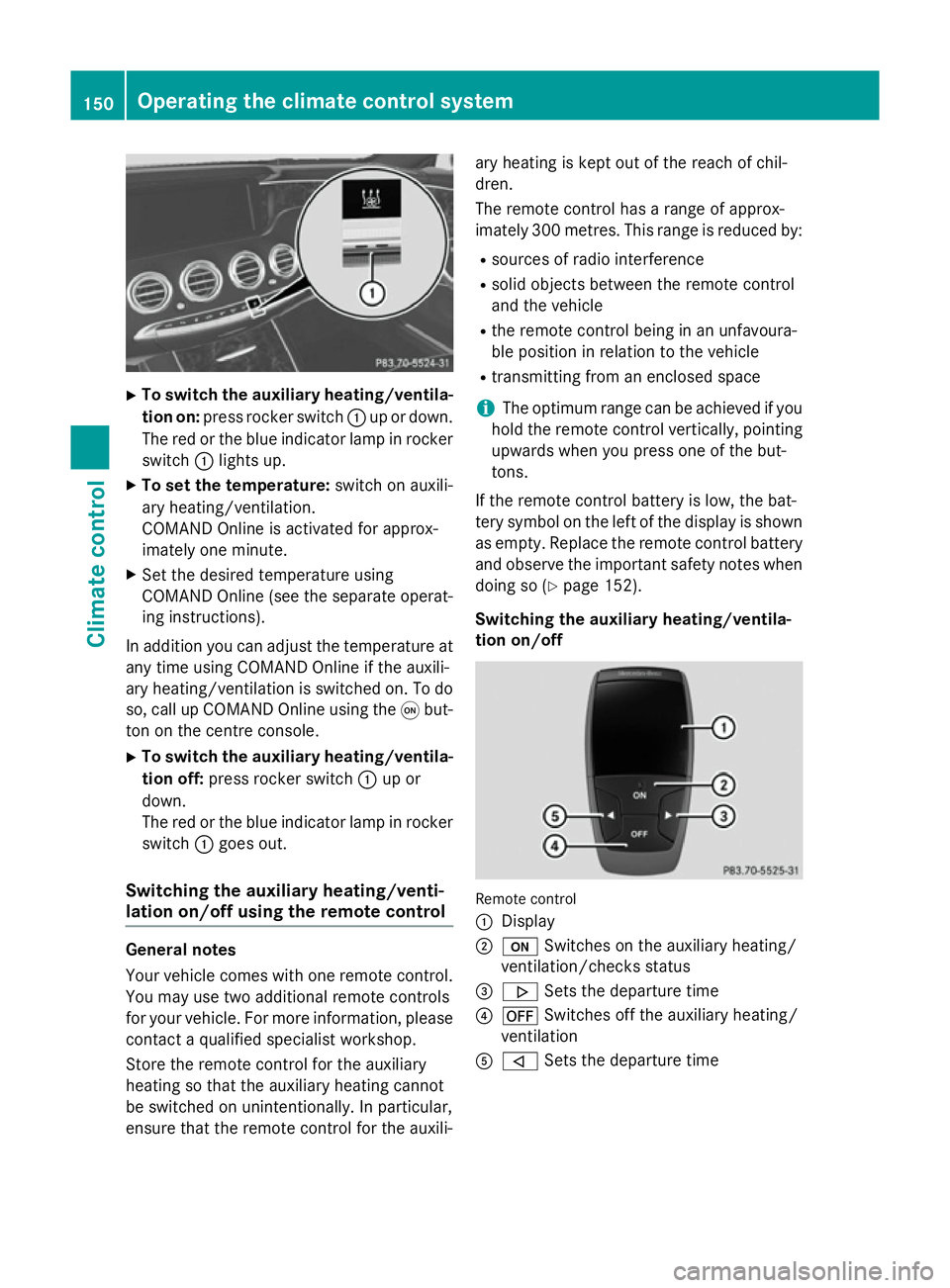
To switch the auxiliary heating/ventila-
tion on: press rocker switch :up or down.
The red or the blue indicator lamp in rocker
switch :lights up.
X To set the temperature: switch on auxili-
ary heating/ventilation.
COMAND Online is activated for approx-
imately one minute.
X Set the desired temperature using
COMAND Online (see the separate operat-
ing instructions).
In addition you can adjust the temperature at any time using COMAND Online if the auxili-
ary heating/ventilation is switched on. To do
so, call up COMAND Online using the qbut-
ton on the centre console.
X To switch the auxiliary heating/ventila-
tion off: press rocker switch :up or
down.
The red or the blue indicator lamp in rocker
switch :goes out.
Switching the auxiliary heating/venti-
lation on/off using the remote control General notes
Your vehicle comes with one remote control.
You may use two additional remote controls
for your vehicle. For more information, please contact a qualified specialist workshop.
Store the remote control for the auxiliary
heating so that the auxiliary heating cannot
be switched on unintentionally. In particular,
ensure that the remote control for the auxili- ary heating is kept out of the reach of chil-
dren.
The remote control has a range of approx-
imately 300 metres. This range is reduced by:
R sources of radio interference
R solid objects between the remote control
and the vehicle
R the remote control being in an unfavoura-
ble position in relation to the vehicle
R transmitting from an enclosed space
i The optimum range can be achieved if you
hold the remote control vertically, pointing
upwards when you press one of the but-
tons.
If the remote control battery is low, the bat-
tery symbol on the left of the display is shown as empty. Replace the remote control battery and observe the important safety notes when
doing so (Y page 152).
Switching the auxiliary heating/ventila-
tion on/off Remote control
:
Display
; u Switches on the auxiliary heating/
ventilation/checks status
= . Sets the departure time
? ^ Switches off the auxiliary heating/
ventilation
A , Sets the departure time 150
Operating the climate control systemClimate control
Page 163 of 413
If you depress the brake pedal and press the
Start/Stop button, the engine starts immedi-
ately.
A check which periodically establishes a radio
connection between the vehicle and the key
determines whether a valid key is in the vehi- cle. This occurs, for example, when starting
the engine.
To start the vehicle without actively using the
key:
R the Start/Stop button must be inserted in
the ignition lock
R the key must be in the vehicle
R the vehicle must not be locked with the key
or KEYLESS-GO (Y page 85)
Do not keep the key:
R with electronic devices, e.g. a mobile
phone or another key
R with metallic objects, e.g. coins or metal
film
R inside metallic objects, e.g. a metal case
This can affect the key's functionality.
If you lock the vehicle with the key's remote
control or with KEYLESS-GO, after a short
time:
R you will not be able to switch on the ignition
with the Start/Stop button
R you will not be able to start the engine with
the Start/Stop button until the vehicle is
unlocked again
If you lock the vehicle centrally using the but- ton on the front door (Y page 91), you can
continue to start the engine with the Start/
Stop button.
The engine can be switched off while the vehi-
cle is in motion by pressing and holding the
Start/Stop button for three seconds. This
function operates independently of the ECO
start/stop automatic engine switch-off func-
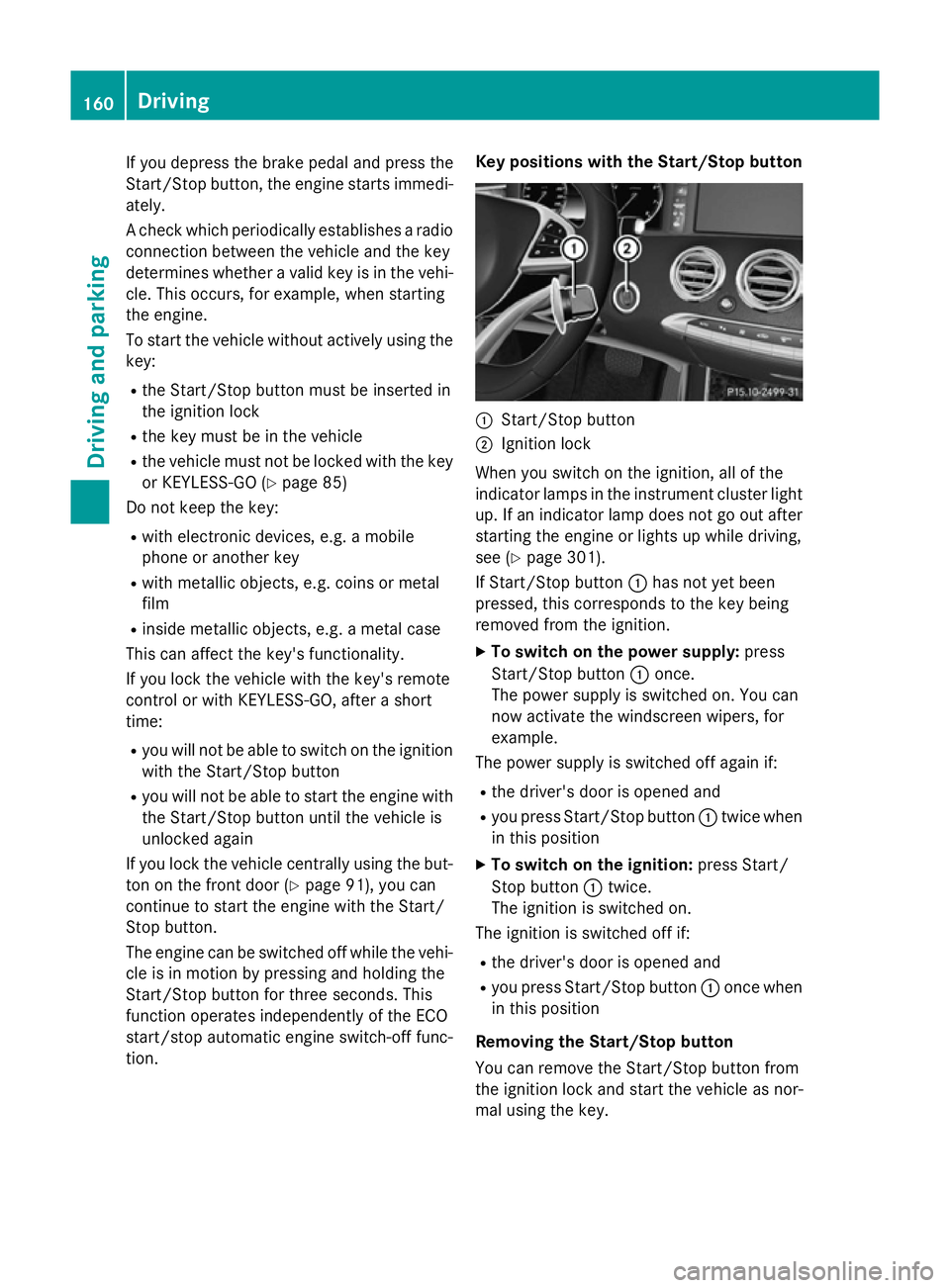
tion. Key positions with the Start/Stop button
:
Start/Stop button
; Ignition lock
When you switch on the ignition, all of the
indicator lamps in the instrument cluster light up. If an indicator lamp does not go out after
starting the engine or lights up while driving,
see (Y page 301).
If Start/Stop button :has not yet been
pressed, this corresponds to the key being
removed from the ignition.
X To switch on the power supply: press
Start/Stop button :once.
The power supply is switched on. You can
now activate the windscreen wipers, for
example.
The power supply is switched off again if:
R the driver's door is opened and
R you press Start/Stop button :twice when
in this position
X To switch on the ignition: press Start/
Stop button :twice.
The ignition is switched on.
The ignition is switched off if:
R the driver's door is opened and
R you press Start/Stop button :once when
in this position
Removing the Start/Stop button
You can remove the Start/Stop button from
the ignition lock and start the vehicle as nor-
mal using the key. 160
DrivingDriving and parking
Page 215 of 413
Problems with PARKTRONIC
Problem
Possible causes/consequences and
M
MSolutions Only the red segments
in the PARKTRONIC
warning displays are lit.
You also hear a warning
tone for approximately
two seconds.
PARKTRONIC is then
deactivated and the
indicator lamp on the
PARKTRONIC button
lights up. PARKTRONIC has malfunctioned and has switched off.
X If problems persist, have PARKTRONIC checked at a qualified
specialist workshop. Only the red segments
in the PARKTRONIC
warning displays are lit.
PARKTRONIC is then
deactivated. The PARKTRONIC sensors are dirty or there is interference.
X Clean the PARKTRONIC sensors (Y page 347).
X Switch the ignition back on. The problem may be caused by an external source of radio or
ultrasound waves.
X See if PARKTRONIC functions in a different location. Active Parking Assist
General notes Active Parking Assist is an electronic parking
aid with ultrasound. It measures the road on
both sides of the vehicle. A parking symbol
indicates a suitable parking space. Active
steering intervention and brake application
can assist you during parking and when exit-
ing a parking space. You may also use
PARKTRONIC (Y page 209).
Important safety notes Active Parking Assist is only an aid. It is not a
substitute for your attention to the immediate
surroundings. The responsibility for safe
manoeuvring and parking remains with you.
Make sure that no persons, animals or
objects are in the manoeuvring range.
When PARKTRONIC is switched off, Active
Parking Assist is also unavailable. G
WARNING
While parking or pulling out of a parking
space, the vehicle swings out and can drive
onto areas of the oncoming lane. This could
cause you to collide with other road users.
There is a risk of an accident.
Pay attention to other road users. Stop the
vehicle if necessary or cancel the Active Park- ing Assist parking procedure.
! If unavoidable, you should drive over
obstacles such as kerbs slowly and not at a
sharp angle. Otherwise, you may damage
the wheels or tyres.
Active Parking Assist may also display spaces not suitable for parking, e.g.:
R parking or stopping prohibitions
R in front of driveways or entrances and exits
R unsuitable surfaces 212
Driving systemsDriving and parking
Page 246 of 413
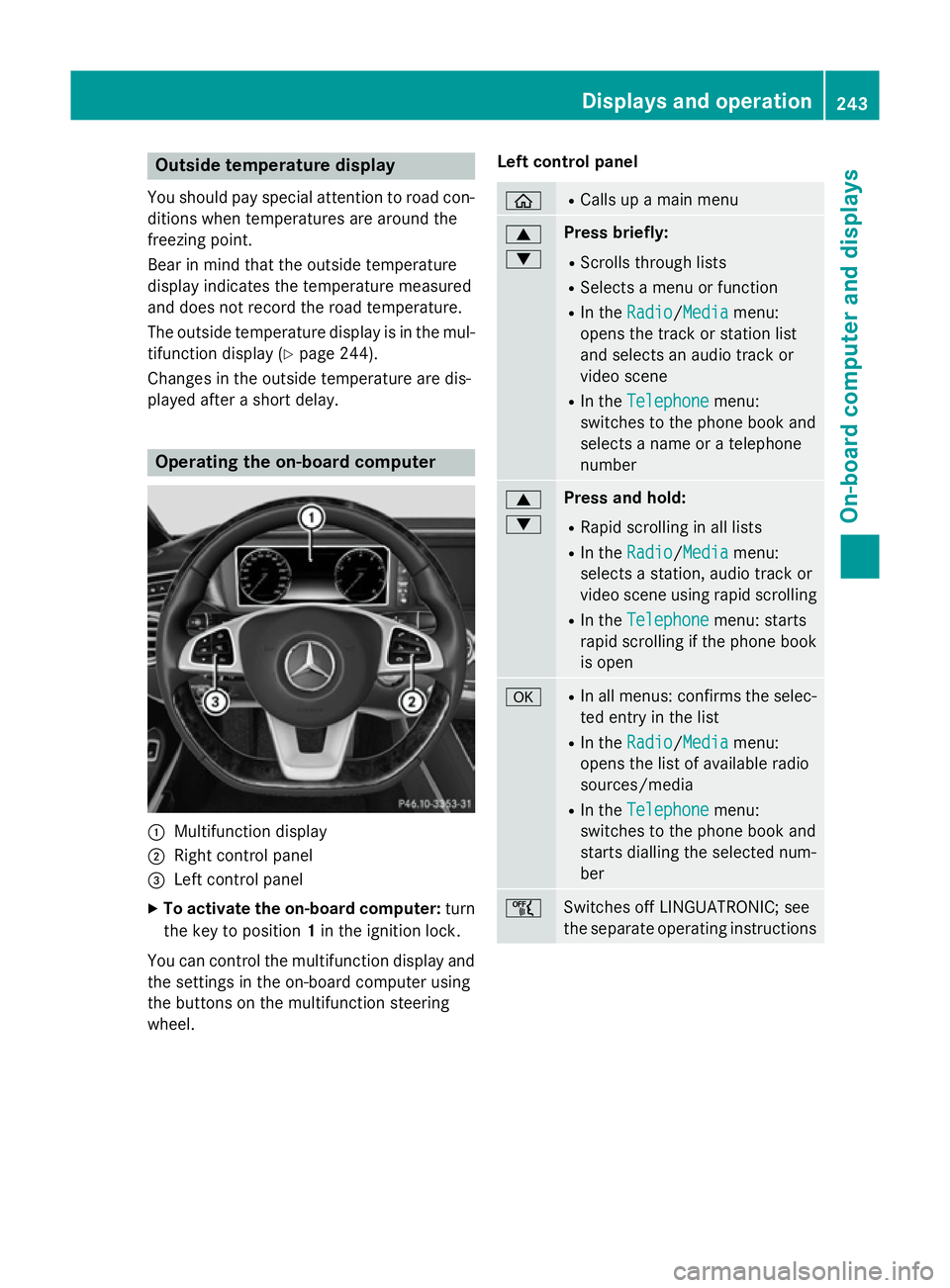
Outside temperature display
You should pay special attention to road con-
ditions when temperatures are around the
freezing point.
Bear in mind that the outside temperature
display indicates the temperature measured
and does not record the road temperature.
The outside temperature display is in the mul- tifunction display (Y page 244).
Changes in the outside temperature are dis-
played after a short delay. Operating the on-board computer
:
Multifunction display
; Right control panel
= Left control panel
X To activate the on-board computer: turn
the key to position 1in the ignition lock.
You can control the multifunction display and
the settings in the on-board computer using
the buttons on the multifunction steering
wheel. Left control panel ò R
Calls up a main menu 9
: Press briefly:
R Scrolls through lists
R Selects a menu or function
R In the Radio Radio/Media Mediamenu:
opens the track or station list
and selects an audio track or
video scene
R In the Telephone Telephone menu:
switches to the phone book and
selects a name or a telephone
number 9
: Press and hold:
R Rapid scrolling in all lists
R In the Radio Radio/ Media
Mediamenu:
selects a station, audio track or
video scene using rapid scrolling
R In the Telephone Telephone menu: starts
rapid scrolling if the phone book is open a R
In all menus: confirms the selec-
ted entry in the list
R In the Radio
Radio/Media Mediamenu:
opens the list of available radio
sources/media
R In the Telephone
Telephone menu:
switches to the phone book and
starts dialling the selected num-
ber ñ
Switches off LINGUATRONIC; see
the separate operating instructions Displays and operation
243On-board computer and displays Z
Page 247 of 413
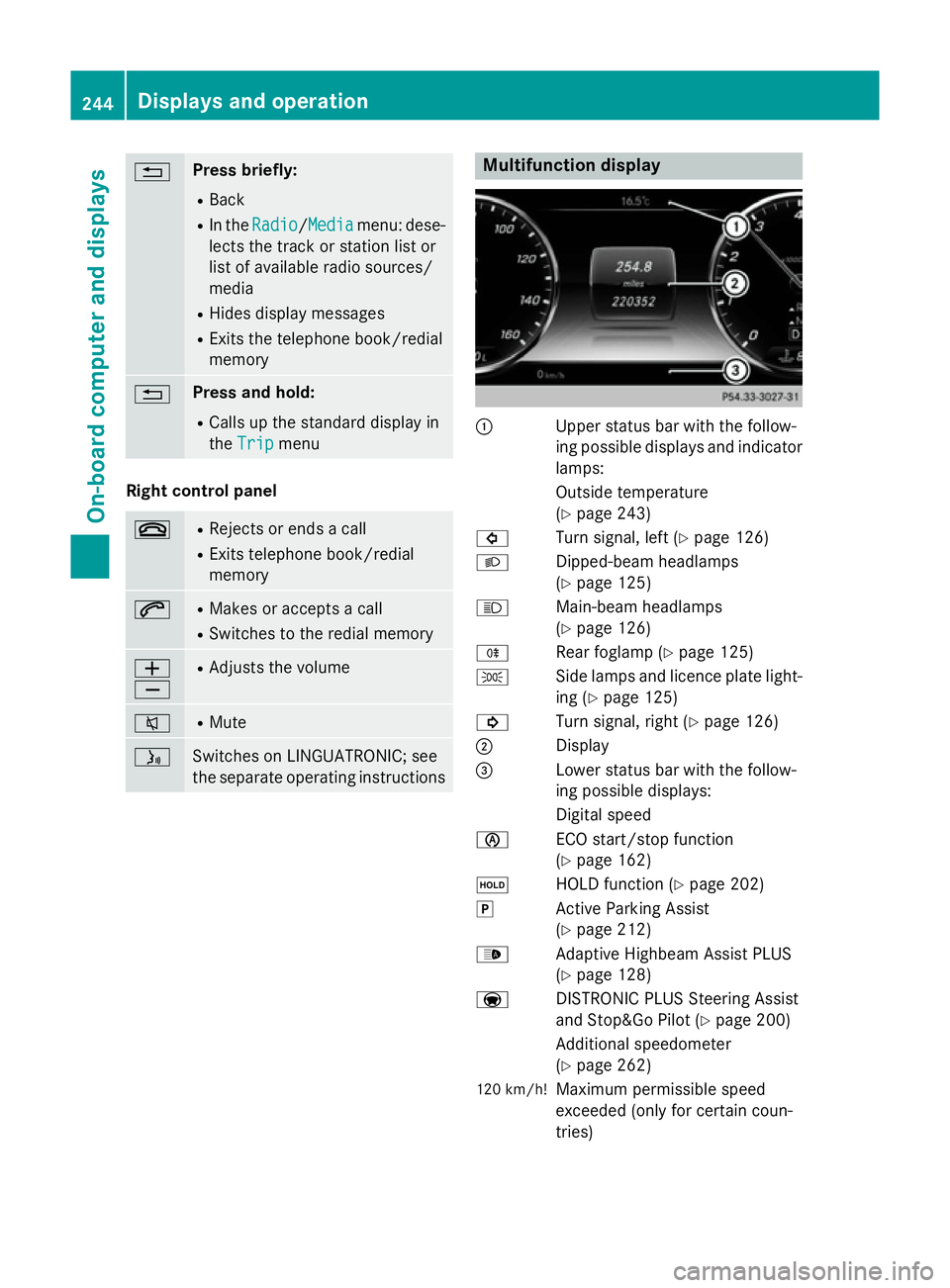
% Press briefly:
R Back
R In the Radio
Radio/Media Mediamenu: dese-
lects the track or station list or
list of available radio sources/
media
R Hides display messages
R Exits the telephone book/redial
memory % Press and hold:
R Calls up the standard display in
the Trip Trip menu Right control panel
~ R
Rejects or ends a call
R Exits telephone book/redial
memory 6 R
Makes or accepts a call
R Switches to the redial memory W
X R
Adjusts the volume 8 R
Mute ó
Switches on LINGUATRONIC; see
the separate operating instructions Multifunction display
:
Upper status bar with the follow-
ing possible displays and indicator
lamps:
Outside temperature
(Y page 243)
# Turn signal, left (Y page 126)
L Dipped-beam headlamps
(Ypage 125)
K Main-beam headlamps
(Ypage 126)
R Rear foglamp (Y page 125)
T Side lamps and licence plate light-
ing (Y page 125)
! Turn signal, right (Y page 126)
; Display
= Lower status bar with the follow-
ing possible displays:
Digital speed
è ECO start/stop function
(Ypage 162)
ë HOLD function (Y page 202)
j Active Parking Assist
(Ypage 212)
_ Adaptive Highbeam Assist PLUS
(Ypage 128)
a DISTRONIC PLUS Steering Assist
and Stop&Go Pilot (Y page 200)
Additional speedometer
(Y page 262)
120 km/h! Maximum permissible speed
exceeded (only for certain coun-
tries) 244
Displays and operationOn-board computer and displays
Page 250 of 413

=
Upshift indicator
? Currently selected gear, gearshift options when shifting manually
If Traffic Sign Assist is activated in the head-up display sub-menu, detected traffic signs are
also shown in the AMG display.
In the Settings menu, in the submenu head-up display, you have the following settings options:
R Switching other displays on/off (Y page 259)
R Setting the position (Y page 260)
R Adjusting the brightness (Y page 260)Menus and submenus
Menu overview
Press the òbutton on the steering wheel
to call up the list of menus and select a menu.
Operating the on-board computer
(Y page 243).
Depending on the equipment fitted in the
vehicle, you can call up the following menus:
R Trip Trip menu (Y page 247)
R Navi
Navi menu (navigation instructions)
(Y page 249)
R Radio
Radio menu (Y page 251)
R Media
Media menu (Y page 252)
R Telephone
Telephone menu (Ypage 254)
R Assistance graphic Assistance graphic menu
(Y page 256)
R Service Service menu (Ypage 256)
R Settings
Settings menu (Ypage 257)
R AMG
AMG menu in AMG vehicles (Y page 263) Trip menu
Standard display X
Press and hold the %button on the
steering wheel until the Trip
Tripmenu with
trip meter :and total distance
recorder ;is shown.
Displaying the range and current fuel
consumption Menus and submenus
247On-board computer and displays Z
Page 254 of 413
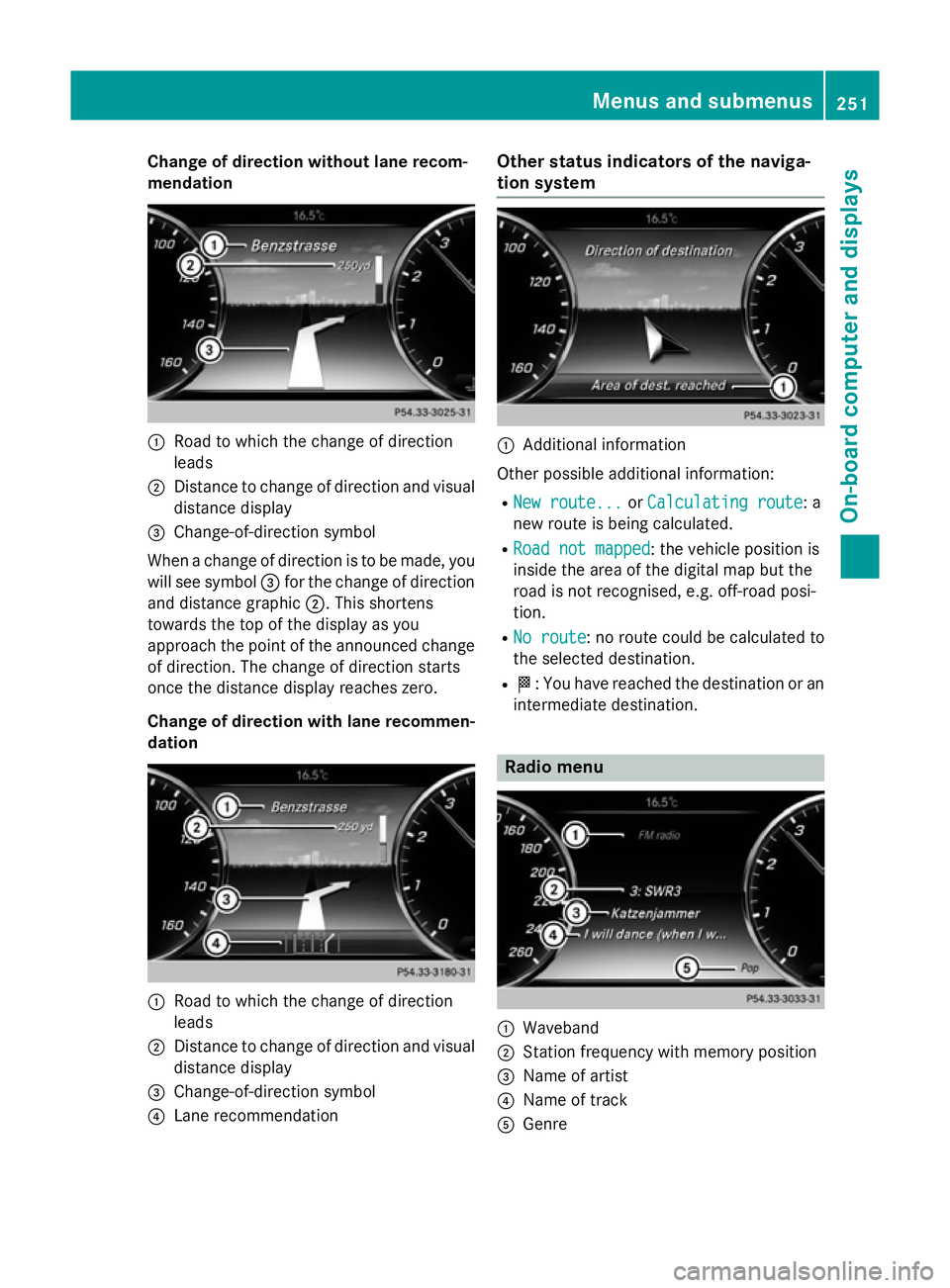
Change of direction without lane recom-
mendation :
Road to which the change of direction
leads
; Distance to change of direction and visual
distance display
= Change-of-direction symbol
When a change of direction is to be made, you will see symbol =for the change of direction
and distance graphic ;. This shortens
towards the top of the display as you
approach the point of the announced change
of direction. The change of direction starts
once the distance display reaches zero.
Change of direction with lane recommen- dation :
Road to which the change of direction
leads
; Distance to change of direction and visual
distance display
= Change-of-direction symbol
? Lane recommendation Other status indicators of the naviga-
tion system
:
Additional information
Other possible additional information:
R New route... New route... orCalculating route Calculating route: a
new route is being calculated.
R Road not mapped
Road not mapped : the vehicle position is
inside the area of the digital map but the
road is not recognised, e.g. off-road posi-
tion.
R No route No route : no route could be calculated to
the selected destination.
R O: You have reached the destination or an
intermediate destination. Radio menu
:
Waveband
; Station frequency with memory position
= Name of artist
? Name of track
A Genre Menus and submenus
251On-board computer and displays Z
Page 255 of 413
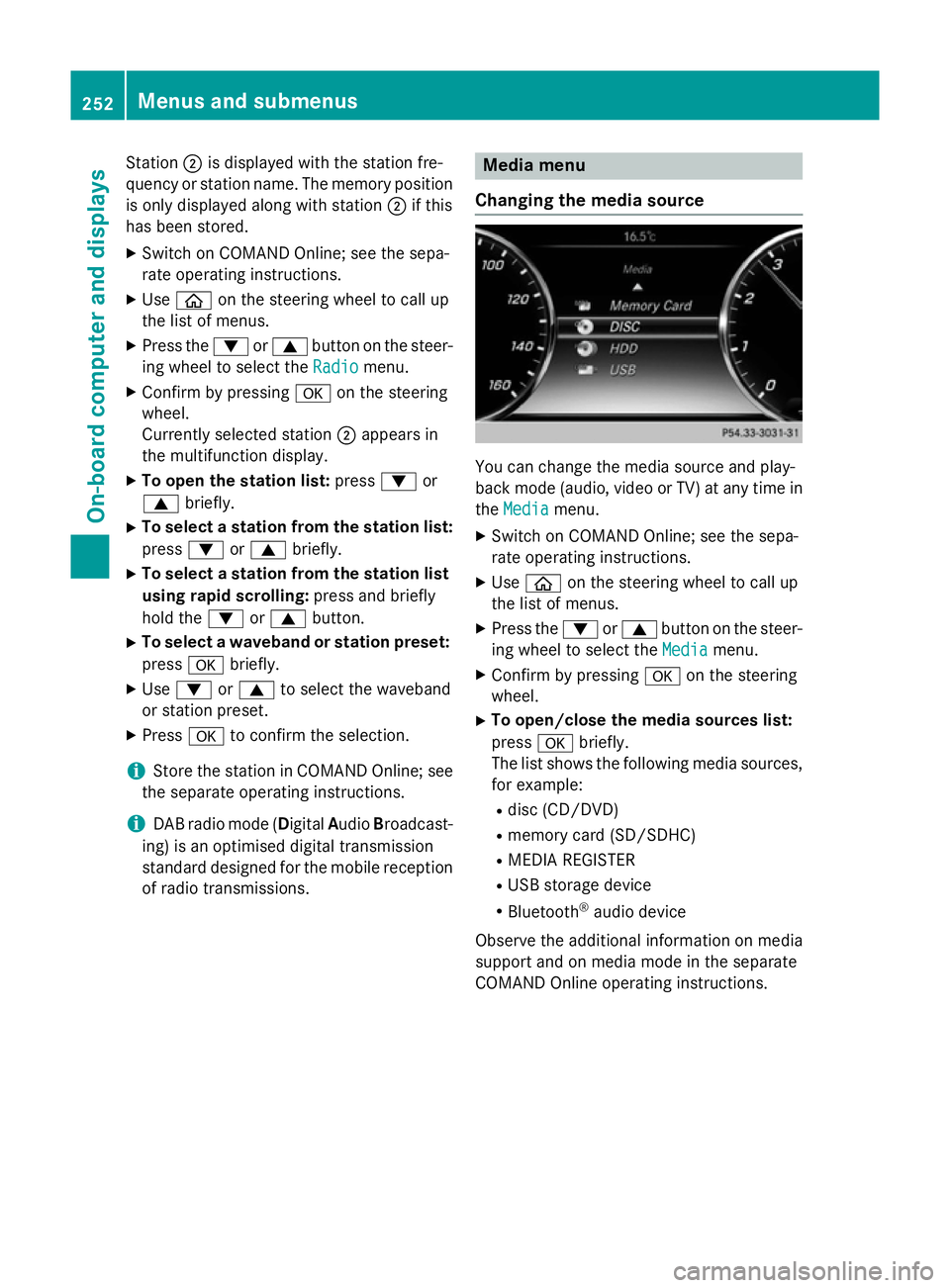
Station
;is displayed with the station fre-
quency or station name. The memory position is only displayed along with station ;if this
has been stored.
X Switch on COMAND Online; see the sepa-
rate operating instructions.
X Use ò on the steering wheel to call up
the list of menus.
X Press the :or9 button on the steer-
ing wheel to select the Radio
Radio menu.
X Confirm by pressing aon the steering
wheel.
Currently selected station ;appears in
the multifunction display.
X To open the station list: press:or
9 briefly.
X To select a station from the station list:
press :or9 briefly.
X To select a station from the station list
using rapid scrolling: press and briefly
hold the :or9 button.
X To select a waveband or station preset:
press abriefly.
X Use : or9 to select the waveband
or station preset.
X Press ato confirm the selection.
i Store the station in COMAND Online; see
the separate operating instructions.
i DAB radio mode (Digital
AudioBroadcast-
ing) is an optimised digital transmission
standard designed for the mobile reception of radio transmissions. Media menu
Changing the media source You can change the media source and play-
back mode (audio, video or TV) at any time in
the Media Media menu.
X Switch on COMAND Online; see the sepa-
rate operating instructions.
X Use ò on the steering wheel to call up
the list of menus.
X Press the :or9 button on the steer-
ing wheel to select the Media
Mediamenu.
X Confirm by pressing aon the steering
wheel.
X To open/close the media sources list:
press abriefly.
The list shows the following media sources,
for example:
R disc (CD/DVD)
R memory card (SD/SDHC)
R MEDIA REGISTER
R USB storage device
R Bluetooth ®
audio device
Observe the additional information on media
support and on media mode in the separate
COMAND Online operating instructions. 252
Menus and submenusOn-board computer and displays
Page 276 of 413
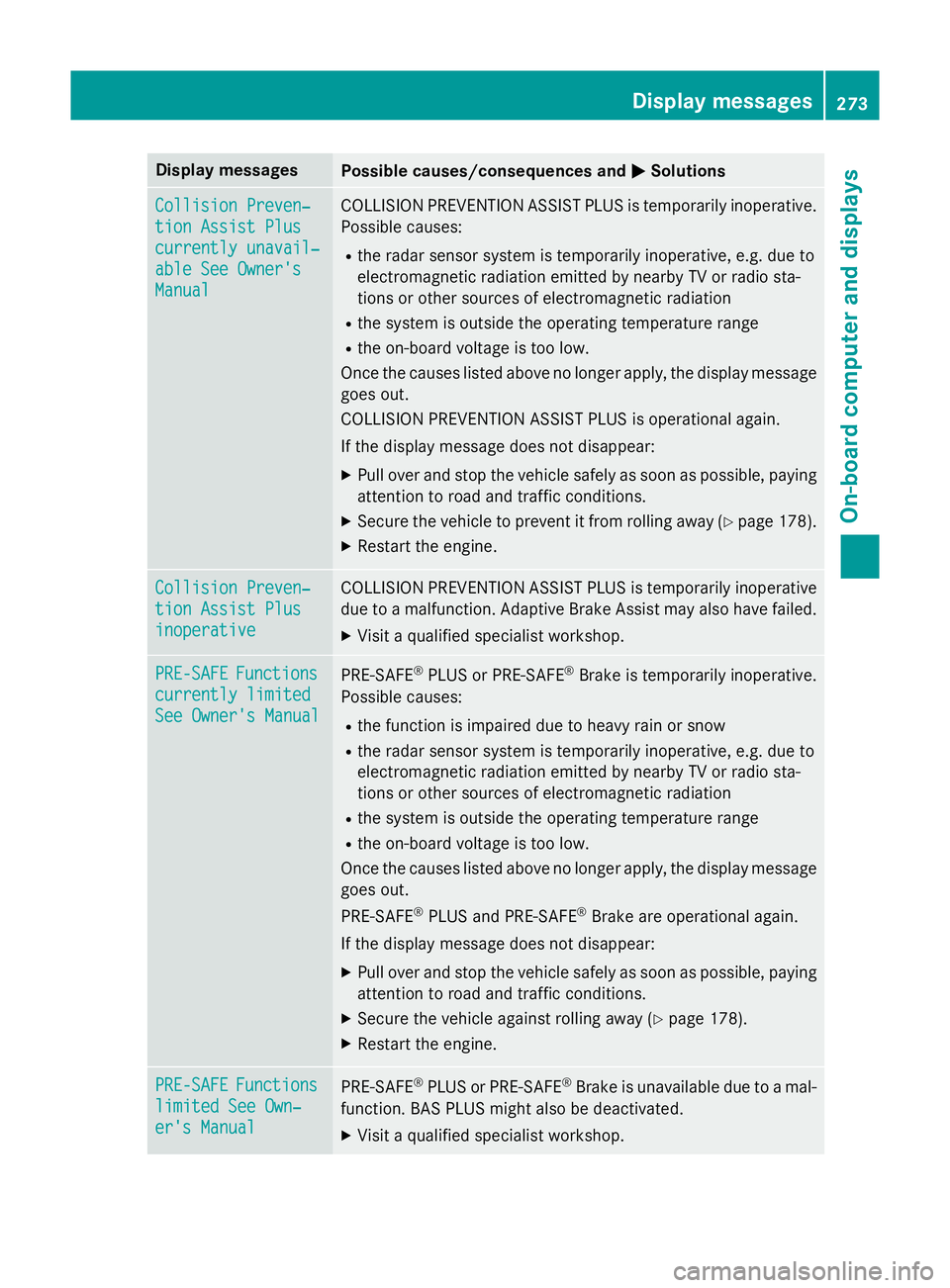
Display messages
Possible causes/consequences and
M
MSolutions Collision Preven‐
Collision Preven‐
tion Assist Plus tion Assist Plus
currently unavail‐ currently unavail‐
able See Owner's able See Owner's
Manual Manual COLLISION PREVENTION ASSIST PLUS is temporarily inoperative.
Possible causes:
R the radar sensor system is temporarily inoperative, e.g. due to
electromagnetic radiation emitted by nearby TV or radio sta-
tions or other sources of electromagnetic radiation
R the system is outside the operating temperature range
R the on-board voltage is too low.
Once the causes listed above no longer apply, the display message goes out.
COLLISION PREVENTION ASSIST PLUS is operational again.
If the display message does not disappear:
X Pull over and stop the vehicle safely as soon as possible, paying
attention to road and traffic conditions.
X Secure the vehicle to prevent it from rolling away (Y page 178).
X Restart the engine. Collision Preven‐ Collision Preven‐
tion Assist Plus tion Assist Plus
inoperative inoperative COLLISION PREVENTION ASSIST PLUS is temporarily inoperative
due to a malfunction. Adaptive Brake Assist may also have failed.
X Visit a qualified specialist workshop. PRE-SAFE
PRE-SAFE
Functions
Functions
currently limited
currently limited
See Owner's Manual See Owner's Manual PRE
‑SAFE ®
PLUS or PRE ‑SAFE®
Brake is temporarily inoperative.
Possible causes:
R the function is impaired due to heavy rain or snow
R the radar sensor system is temporarily inoperative, e.g. due to
electromagnetic radiation emitted by nearby TV or radio sta-
tions or other sources of electromagnetic radiation
R the system is outside the operating temperature range
R the on-board voltage is too low.
Once the causes listed above no longer apply, the display message
goes out.
PRE ‑SAFE ®
PLUS and PRE ‑SAFE®
Brake are operational again.
If the display message does not disappear:
X Pull over and stop the vehicle safely as soon as possible, paying
attention to road and traffic conditions.
X Secure the vehicle against rolling away (Y page 178).
X Restart the engine. PRE-SAFE PRE-SAFE
Functions
Functions
limited See Own‐
limited See Own‐
er's Manual er's Manual PRE
‑SAFE ®
PLUS or PRE‑ SAFE®
Brake is unavailable due to a mal-
function. BAS PLUS might also be deactivated.
X Visit a qualified specialist workshop. Display
messages
273On-board computer and displays Z