coolant temperature MERCEDES-BENZ S-CLASS COUPE 2014 Owners Manual
[x] Cancel search | Manufacturer: MERCEDES-BENZ, Model Year: 2014, Model line: S-CLASS COUPE, Model: MERCEDES-BENZ S-CLASS COUPE 2014Pages: 413, PDF Size: 12.76 MB
Page 11 of 413
Consumption statistics (on-board
computer) .......................................... 248
Convenience closing feature ............ 101
Convenience opening feature .......... 100
Convenience opening/closing (air-
recirculation mode) ...........................145
Coolant (engine)
Checking the level ......................... 340
Display message ............................ 282
Important safety notes .................. 406
Temperature gauge ........................ 242
Warning lamp ................................. 307
Coolbox .............................................. 324
Cooling
see Climate control
Copyright ............................................. 27
Cornering light function
Display message ............................ 279
Function/notes ............................ .127
Crash-responsive emergency light-
ing ....................................................... 131
Crosswind Assist (vehicles with
MAGIC BODY CONTROL) ................... 204
Crosswind Assist (vehicles with-
out MAGIC BODY CONTROL) ...............77
Cruise control
Cruise control lever ...................... .186
Deactivating ................................... 188
Display message ............................ 291
Driving system ............................... 186
Important safety notes .................. 186
LIM indicator lamp ......................... 186
Selecting ........................................ 187
Setting a speed .............................. 188
Storing and maintaining current
speed ............................................. 187
Cup holder
Centre console .............................. 320
Important safety notes .................. 320
Rear compartment ......................... 321 D
Data see Technical data
Daytime driving lights
Display message ............................ 281
Function/notes ............................ .125 Dealership
see Qualified specialist workshop
Declarations of conformity ................. 24
Diagnostics connection ......................24
Digital speedometer .........................249
Dipped-beam headlamps
Display message ............................ 279
Setting for driving abroad (sym-
metrical) ........................................ 124
Setting for driving on the right/
left ................................................. 261
Switching on/off ........................... 125
DIRECT SELECT lever
Automatic transmission ................. 167
Display
see Display message
see Warning and indicator lamps
Display message
Driving systems ............................ .285
Display messages
ASSYST PLUS ................................ 342
Calling up (on-board computer) ..... 265
Engine ............................................ 282
General information ....................... 265
Hiding (on-board computer) ........... 265
Introduction ................................... 265
Key ................................................ 298
Lights ............................................. 279
Safety systems .............................. 266
Tyres .............................................. 293
Vehicle .......................................... .295
Distance recorder
see Trip meter
Distance warning function
Function/notes ................................ 73
Distance warning signal (warning
lamp) ................................................. .309
DISTRONIC PLUS
Activating ....................................... 193
Activation conditions ..................... 193
Cruise control lever ....................... 193
Deactivating ................................... 198
Display message ............................ 289
Displays in the multifunction dis-
play ................................................ 198
Driving tips ................................... .199
Function/notes ............................ .191
Important safety notes .................. 192 8
Index
Page 22 of 413
Stowage net ................................... 317
Stowage well beneath the boot
floor .................................................... 319
Summer tyres
In winter ........................................ 378
Sun visor ............................................ 321
Suspension tuning
Active Body Control ABC ............... 205
AIRMATIC ...................................... 208
SETUP (on-board computer) .......... 264
Switching the auxiliary heating/
ventilation
On/off ........................................... 149 T
Tail lamps Display message ............................ 280
see Lights
Technical data
Capacities ...................................... 402
Information .................................... 400
Tyres/wheels ................................. 391
Vehicle data ................................... 408
Telephone
Accepting a call (multifunction
steering wheel) .............................. 255
Display message ............................ 298
Introduction ................................... 254
Menu (on-board computer) ............ 254
Number from the phone book ........ 255
Redialling ....................................... 255
Rejecting/ending a call ................. 255
Telephone compartment ................ 316
Temperature
Coolant .......................................... 242
Engine oil (on-board computer) ...... 263
Outside temperature ...................... 243
Setting (climate control )................ 142
TEMPOMAT
Function/note s............................. 186
TIREFIT kit .......................................... 357
Top Tether ............................................ 62
Total distance recorder .................... 247
Tow-away protection
Activating ......................................... 81
Deactivating ..................................... 81
Function ........................................... 81 Tow-starting
Emergency engine starting ............ 370
Important safety notes .................. 367
Towing
Important safety notes .................. 367
Notes for 4MATIC vehicles ............ 370
With the rear axle raised ................ 369
Towing away
Fitting the towing ey e.................... 369
Removing the towing eye ............... 369
With both axles on the ground ....... 369
Towing eye ......................................... 355
Traffic Sign Assist
Activating ....................................... 228
Activating/deactivating the warn-ing function .................................... 258
Display message ............................ 289
Function/note s............................. 227
Important safety notes .................. 228
Instrument cluster display ............. 228
Transmission
see Automatic transmission
Transporting the vehicle .................. 370
Trim pieces (cleaning instruc-
tions) .................................................. 350
Trip computer (on-board com-
puter) .................................................. 248
Trip meter
Calling up ....................................... 247
Resetting (on-board computer) ...... 249
Turn signals
Switching on/of f........................... 126
TV
Operating (on-board computer) ..... 254
Two-way radio
Frequencies ................................... 400
Installation ..................................... 400
Transmission output (maximum) .... 400
Windscreen (infrared reflective) ..... 334
Type identification plate
see Vehicle identification plate
Tyre pressure
Calling up (on-board computer) ..... 381
Display message ............................ 293
Important safety notes .................. 381
Not reached (TIREFIT) .................... 359
Reached (TIREFIT) .......................... 359
Recommended ............................... 380 Index
19
Page 35 of 413
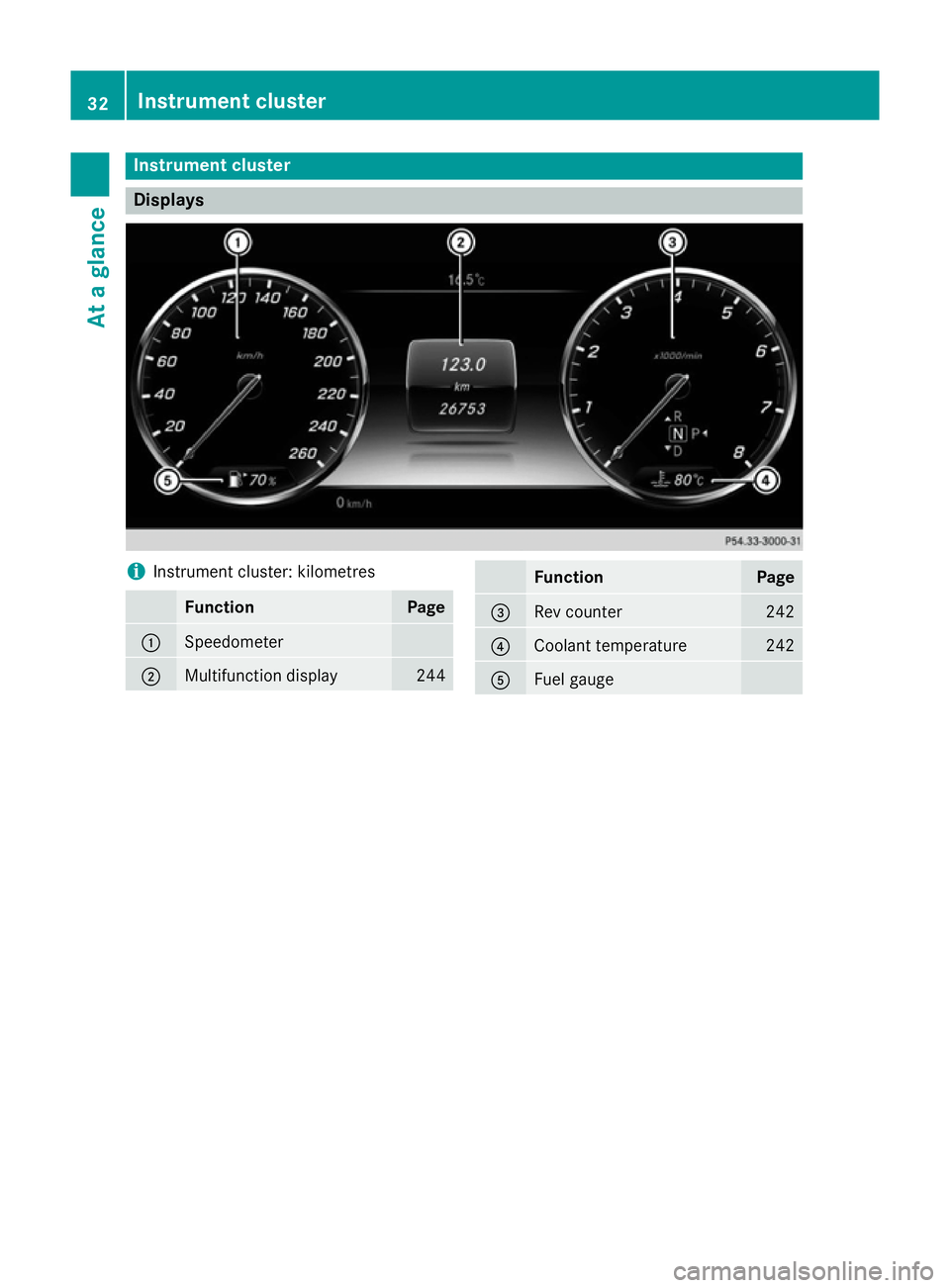
Instrument cluster
Displays
i
Instrument cluster: kilometres Function Page
:
Speedometer
;
Multifunction display 244 Function Page
=
Rev counter 242
?
Coolant temperature 242
A
Fuel gauge32
Instrument clusterAt a glance
Page 155 of 413
X
Press the uand^ buttons simulta-
neously.
The Îsymbol in the remote control dis-
play flashes.
X Press the ,or. button to set the
desired departure time.
i The longer you press the
,or.
button, the faster the time changes.
X Press the uand^ buttons simulta-
neously.
The new departure time is stored.
When setting the departure time, observe the important safety notes (Y page 148).
Activating the set departure time X Briefly press the ubutton.
X Press the ,or. button repeatedly
until the desired departure time appears in
the display.
X Press the ubutton.
The Ísymbol, the departure time and,
depending on the selected departure time, the letter A, BorCappear in the display.
Deactivating the set departure time
X Briefly press the ubutton.
X Press the ,or. button.
The status of the auxiliary heating is shown in the display.
X Press the .button.
The first departure time stored appears in
the display.
X Press the ^button.
OFF
OFF is shown in the remote control display.
Switching the heater booster function
on/off The heater booster function helps the engine
reach its operating temperature faster during
its warm-up phase. This helps to heat the
vehicle interior faster. The heater booster
function switches on at lower outside tem-
peratures and lower coolant temperatures.
You can also activate the heater booster man- ually. X
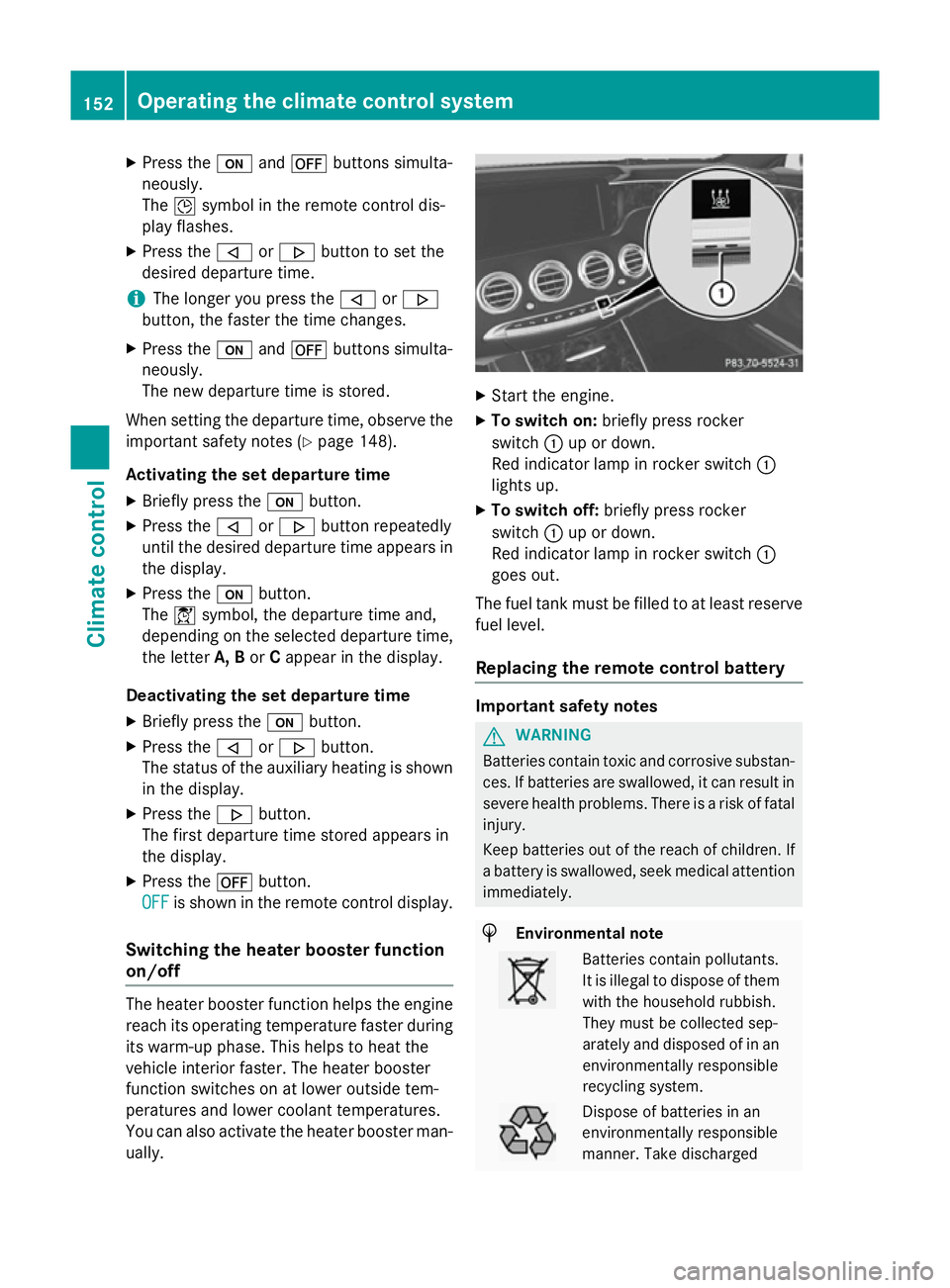
Start the engine.
X To switch on: briefly press rocker
switch :up or down.
Red indicator lamp in rocker switch :
lights up.
X To switch off: briefly press rocker
switch :up or down.
Red indicator lamp in rocker switch :
goes out.
The fuel tank must be filled to at least reserve fuel level.
Replacing the remote control battery Important safety notes
G
WARNING
Batteries contain toxic and corrosive substan- ces. If batteries are swallowed, it can result in
severe health problems. There is a risk of fatal injury.
Keep batteries out of the reach of children. If
a battery is swallowed, seek medical attention immediately. H
Environmental note Batteries contain pollutants.
It is illegal to dispose of them
with the household rubbish.
They must be collected sep-
arately and disposed of in anenvironmentally responsible
recycling system. Dispose of batteries in an
environmentally responsible
manner. Take discharged152
Operating the climate control systemClimate control
Page 170 of 413
Problem
Possible causes/consequences and
M
MSolutions The coolant tempera-
ture display is showing
more than 120 †. A
display message may
also appear in the mul-
tifunction display and a
warning tone may
sound. The coolant level is too low. The coolant is too hot and the engine
is no longer being cooled sufficiently.
X Stop as soon as possible and allow the engine and the coolant to
cool down.
X Check the coolant level (Y page 340). Observe the warning
notes as you do so and top up the coolant if necessary. If the coolant level is correct, the engine radiator fan may be faulty.
The coolant is too hot and the engine is no longer being cooled
sufficiently.
X If the coolant temperature is below 120 †, you can continue
driving to the nearest qualified specialist workshop.
X Avoid heavy loads on the engine as you do so, e.g. driving in
mountainous terrain and stop-start traffic. Automatic transmission
Important safety notes
G
WARNING
If the engine speed is above the idling speed
and you engage transmission position Dor R,
the vehicle could pull away suddenly. There is a risk of an accident.
When engaging transmission position Dor R,
always firmly depress the brake pedal and do not simultaneously accelerate. G
WARNING
The automatic transmission switches to neu-
tral position Nwhen you switch off the engine.
The vehicle may roll away. There is a risk of an
accident.
After switching off the engine, always switch
to parking position P. Prevent the parked vehi-
cle from rolling away by applying the parking
brake. DIRECT SELECT lever
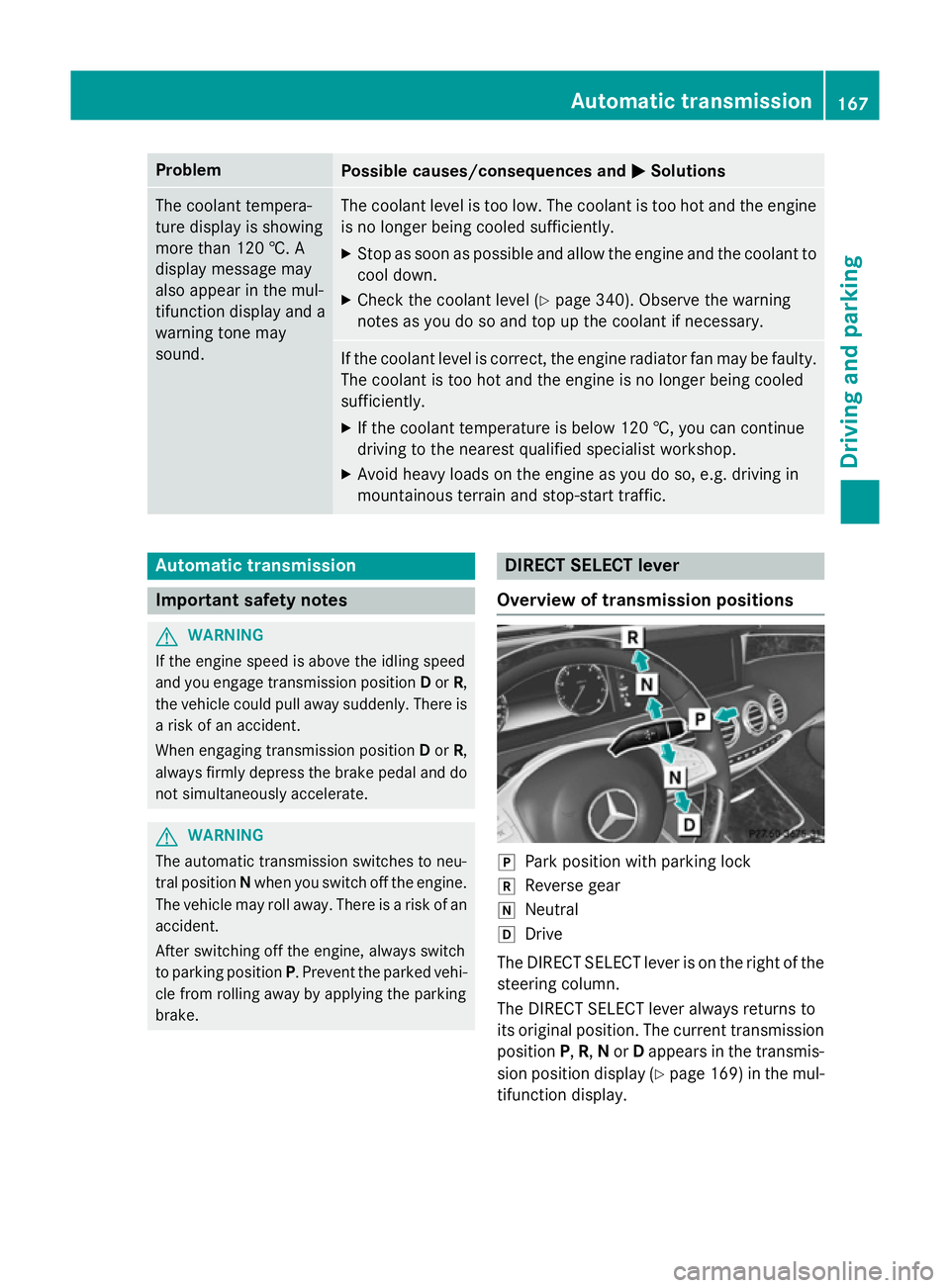
Overview of transmission positions j
Park position with parking lock
k Reverse gear
i Neutral
h Drive
The DIRECT SELECT lever is on the right of the
steering column.
The DIRECT SELECT lever always returns to
its original position. The current transmission position P,R, Nor Dappears in the transmis-
sion position display (Y page 169) in the mul-
tifunction display. Automatic transmission
167Driving and parking Z
Page 245 of 413
Useful information
i This Owner's Manual describes all mod-
els, series and optional equipment for your
vehicle that were available at the time of
going to press. National variations are pos- sible. Note that your vehicle may not be
equipped with all of the functions descri-
bed. This is also the case for systems and
functions relevant to safety.
i Read the information on qualified special-
ist workshops: (Y page 25). Important safety notes
G
WARNING
Operating the integrated information systems and communications equipment in the vehicle
while driving will distract you from traffic con-
ditions. You could then lose control of the
vehicle. There is a risk of an accident.
Only operate these devices if road traffic con-
ditions permit. If you are unsure about the
surrounding conditions, pull over to a safe
location and make entries only while the vehi-
cle is stationary.
You must observe the legal requirements for
the country in which you are currently driving when operating the on-board computer. G
WARNING
If the instrument cluster has failed or mal-
functioned, you may not recognise function
restrictions relevant to safety. The operating
safety of your vehicle may be impaired. There is a risk of an accident.
Drive on carefully. Have the vehicle checked
at a qualified specialist workshop immedi-
ately.
The on-board computer only shows messages
or warnings from certain systems in the mul- tifunction display. You should therefore make
sure your vehicle is operating safely at all times. Otherwise, a vehicle that is not oper-
ating safely may cause an accident.
If the operating safety of the vehicle is not
guaranteed, stop the vehicle at once, paying
attention to road traffic conditions. Contact a
qualified specialist workshop.
For an overview, see the instrument panel
illustration (Y page 32). Displays and operation
Rev counter
! Do not drive in the overrevving range.
Doing so will damage the engine.
The red band in the rev counter indicates the engine's overrevving range.
The fuel supply is interrupted to protect the
engine when the red band is reached. Coolant temperature gauge
G
WARNING
If you open the bonnet while the engine is
overheating or while there is a fire in the
engine compartment, you could come into
contact with hot gases or other leaking ser-
vice products. There is a danger of injury.
Allow an overheating engine to cool down
before opening the bonnet. If there is a fire in the engine compartment, leave the bonnet
closed and notify the fire brigade.
The coolant temperature is shown in the rev
counter (Y page 32).
At high outside temperatures and when driv-
ing uphill, the coolant temperature may rise.
Under normal operating conditions and with
the specified coolant level, the coolant tem-
perature may rise to 124 †. 242
Displays and operationOn-board computer and displays
Page 265 of 413
X
Use ò on the steering wheel to call up
the list of menus.
X Press the :or9 button on the steer-
ing wheel to select the Settings
Settingsmenu.
X Confirm by pressing aon the steering
wheel.
X Press the :or9 button to select the
Instrument cluster
Instrument cluster submenu.
X Press ato confirm.
X Press the :or9 button to select the
Display unit Speed-/odometer
Display unit Speed-/odometer func-
tion.
You will see the selected setting: km
km or
Miles Miles.
X Press the abutton to save the setting.
The selected unit of measurement for dis-
tance applies to:
R speedometer
R digital speedometer in the Trip
Trip menu
R additional speedometer in the status area
on the multi-function display
The unit in the additional speedometer is
displayed inversely to the selected dis-
tance unit.
R total distance recorder and the trip meter
R trip computer
R current consumption and the range
R navigation messages in the Navi Navimenu
R cruise control
R SPEEDTRONIC
R DISTRONIC PLUS
R ASSYST PLUS service interval display
Selecting the permanent display function
Use the Permanent display
Permanent display function to
switch on the following displays in the status area of the multifunction display:
R outside temperature
R coolant temperature
X Use ò on the steering wheel to call up
the list of menus.
X Press the :or9 button on the steer-
ing wheel to select the Settings
Settings menu. X
Confirm by pressing aon the steering
wheel.
X Press the :or9 button to select the
Instrument cluster Instrument cluster submenu.
X Press ato confirm.
X Press :or9 to select the Perma‐ Perma‐
nent display
nent display function.
X Press ato confirm.
The current selection Outside tempera‐
Outside tempera‐
ture
ture orCoolant temperature
Coolant temperature is dis-
played.
X To change the setting: pressaagain.
Switching the additional speedometer
on/off
Use the Additional speedometer Additional speedometer function
to choose whether the status area in the mul- tifunction display shows the speed digitally.
X Use ò on the steering wheel to call up
the list of menus.
X Press the :or9 button on the steer-
ing wheel to select the Settings
Settingsmenu.
X Confirm by pressing aon the steering
wheel.
X Press the :or9 button to select the
Instrument cluster
Instrument cluster submenu.
X Press ato confirm.
X Use : or9 to select the Addi‐
Addi‐
tional speedometer
tional speedometer function.
The current selection is displayed.
X To activate/deactivate: press thea
button again.
Vehicle submenu Setting permanent SPEEDTRONIC
X Use ò on the steering wheel to call up
the list of menus.
X Press the :or9 button on the steer-
ing wheel to select the Settings Settingsmenu.
X Confirm by pressing aon the steering
wheel.
X Press the :or9 button to select the
Vehicle Vehicle submenu. 262
Menus and submenusOn-board computer and displays
Page 285 of 413
Engine
Display messages
Possible causes/consequences and
M
MSolutions +
Top Top
up
upcoolant
coolant See
See
Owner’s Manual
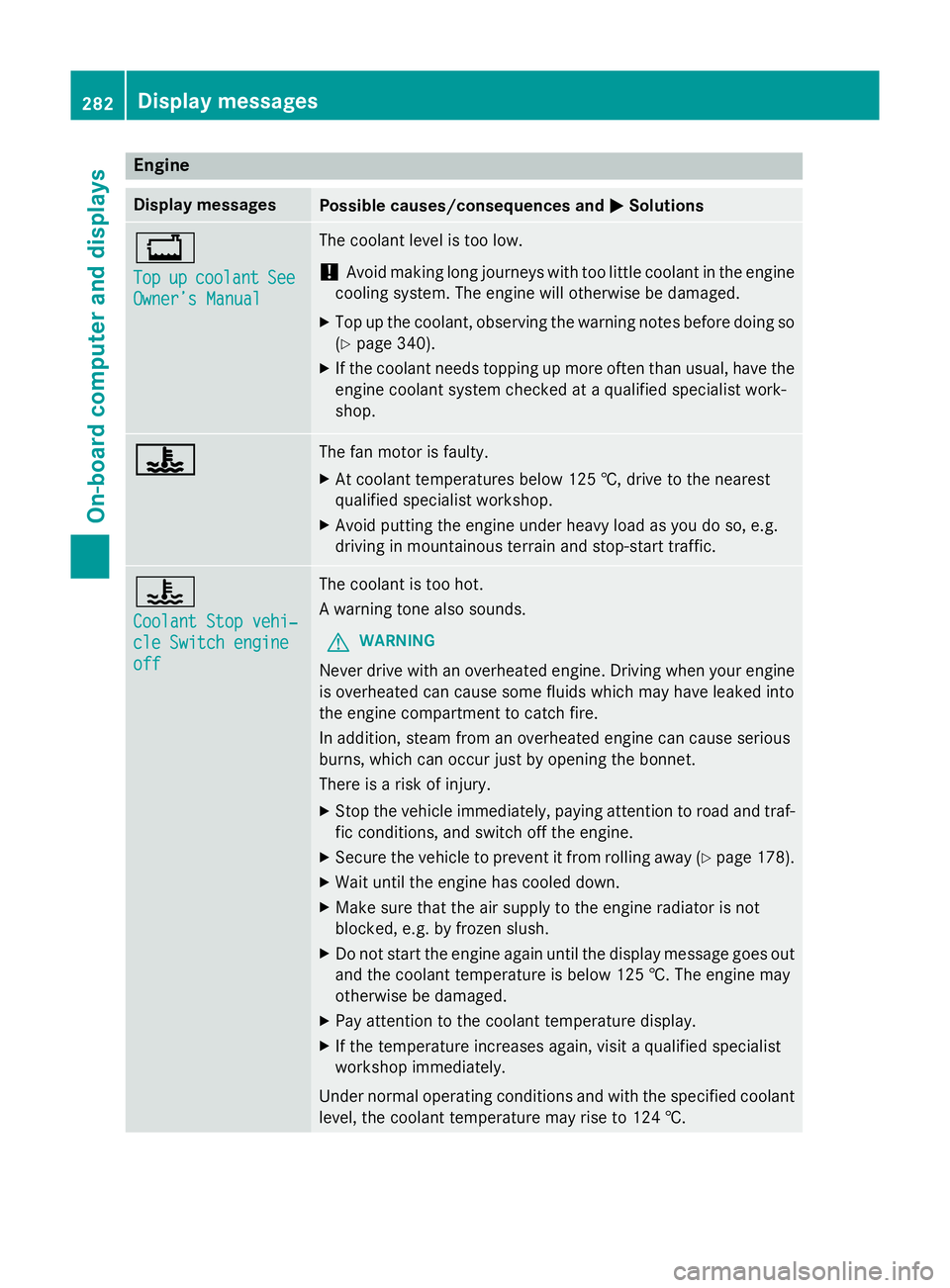
Owner’s Manual The coolant level is too low.
! Avoid making long journeys with too little coolant in the engine
cooling system. The engine will otherwise be damaged.
X Top up the coolant, observing the warning notes before doing so
(Y page 340).
X If the coolant needs topping up more often than usual, have the
engine coolant system checked at a qualified specialist work-
shop. ? ? The fan motor is faulty.
X At coolant temperatures below 125 †, drive to the nearest
qualified specialist workshop.
X Avoid putting the engine under heavy load as you do so, e.g.
driving in mountainous terrain and stop-start traffic. ?
Coolant Stop vehi‐ Coolant Stop vehi‐
cle Switch engine cle Switch engine
off off The coolant is too hot.
A warning tone also sounds.
G WARNING
Never drive with an overheated engine. Driving when your engine is overheated can cause some fluids which may have leaked into
the engine compartment to catch fire.
In addition, steam from an overheated engine can cause serious
burns, which can occur just by opening the bonnet.
There is a risk of injury.
X Stop the vehicle immediately, paying attention to road and traf-
fic conditions, and switch off the engine.
X Secure the vehicle to prevent it from rolling away (Y page 178).
X Wait until the engine has cooled down.
X Make sure that the air supply to the engine radiator is not
blocked, e.g. by frozen slush.
X Do not start the engine again until the display message goes out
and the coolant temperature is below 125 †. The engine may
otherwise be damaged.
X Pay attention to the coolant temperature display.
X If the temperature increases again, visit a qualified specialist
workshop immediately.
Under normal operating conditions and with the specified coolant level, the coolant temperature may rise to 124 †. 282
Display messagesOn-board computer and displays
Page 310 of 413
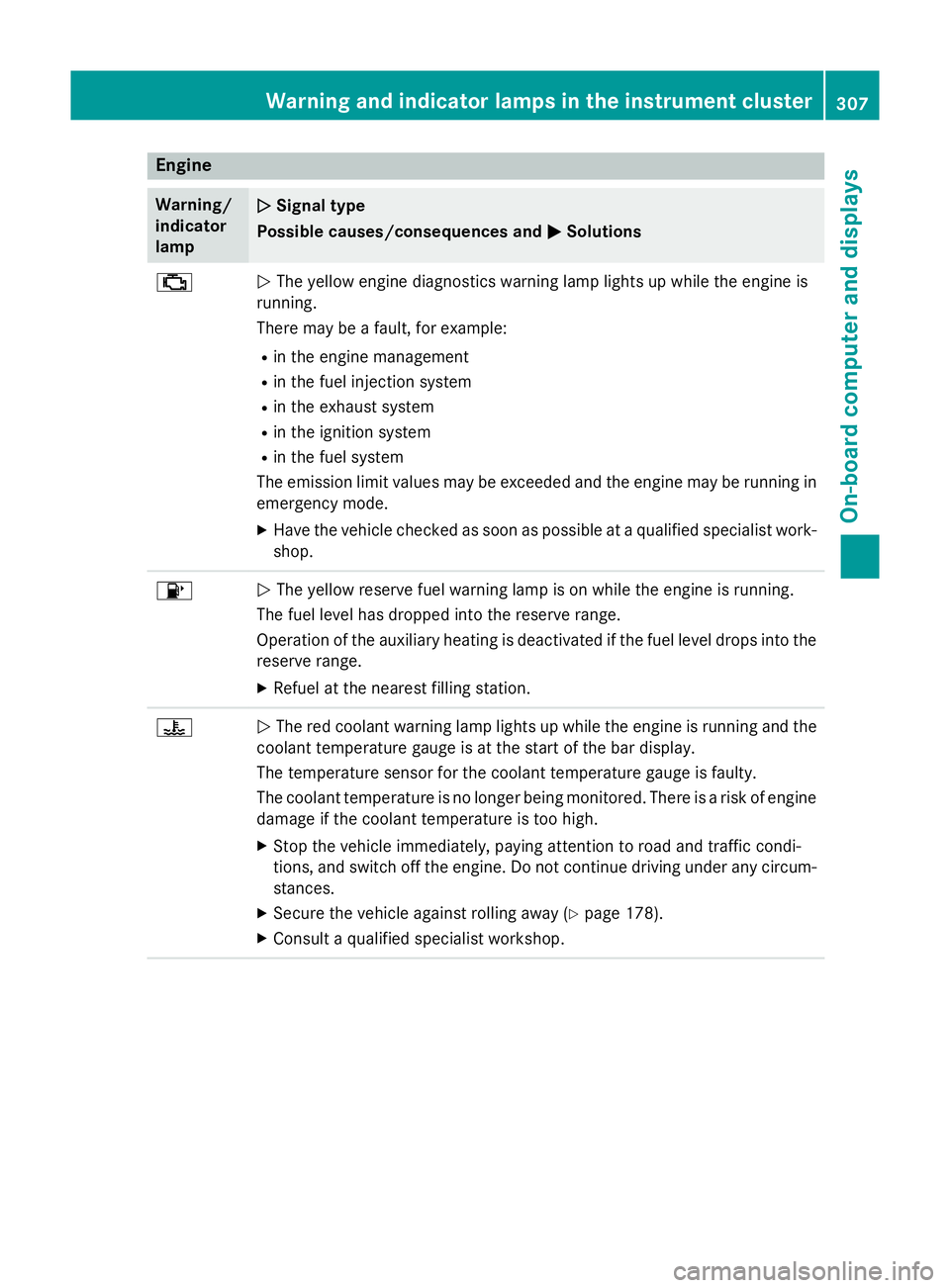
Engine
Warning/
indicator
lamp
N N
Signal type
Possible causes/consequences and M
MSolutions ;
N
The yellow engine diagnostics warning lamp lights up while the engine is
running.
There may be a fault, for example:
R in the engine management
R in the fuel injection system
R in the exhaust system
R in the ignition system
R in the fuel system
The emission limit values may be exceeded and the engine may be running in emergency mode.
X Have the vehicle checked as soon as possible at a qualified specialist work-
shop. 8
N
The yellow reserve fuel warning lamp is on while the engine is running.
The fuel level has dropped into the reserve range.
Operation of the auxiliary heating is deactivated if the fuel level drops into the reserve range.
X Refuel at the nearest filling station. ?
N
The red coolant warning lamp lights up while the engine is running and the
coolant temperature gauge is at the start of the bar display.
The temperature sensor for the coolant temperature gauge is faulty.
The coolant temperature is no longer being monitored. There is a risk of engine
damage if the coolant temperature is too high.
X Stop the vehicle immediately, paying attention to road and traffic condi-
tions, and switch off the engine. Do not continue driving under any circum-
stances.
X Secure the vehicle against rolling away (Y page 178).
X Consult a qualified specialist workshop. Warning and indicator lamps in the instrument cluster
307On-board computer and displays Z
Page 311 of 413
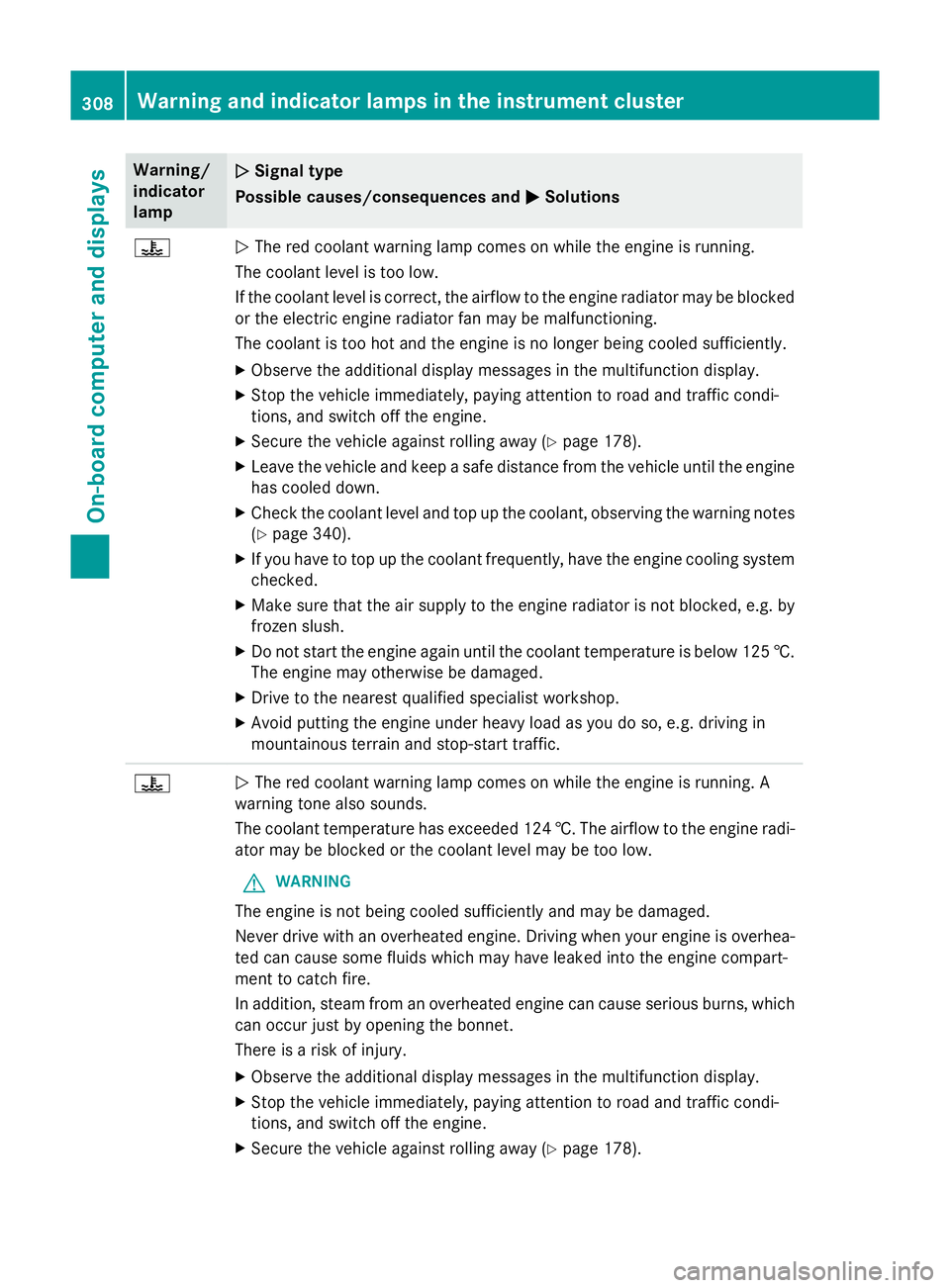
Warning/
indicator
lamp
N N
Signal type
Possible causes/consequences and M
MSolutions ?
N
The red coolant warning lamp comes on while the engine is running.
The coolant level is too low.
If the coolant level is correct, the airflow to the engine radiator may be blocked
or the electric engine radiator fan may be malfunctioning.
The coolant is too hot and the engine is no longer being cooled sufficiently.
X Observe the additional display messages in the multifunction display.
X Stop the vehicle immediately, paying attention to road and traffic condi-
tions, and switch off the engine.
X Secure the vehicle against rolling away (Y page 178).
X Leave the vehicle and keep a safe distance from the vehicle until the engine
has cooled down.
X Check the coolant level and top up the coolant, observing the warning notes
(Y page 340).
X If you have to top up the coolant frequently, have the engine cooling system
checked.
X Make sure that the air supply to the engine radiator is not blocked, e.g. by
frozen slush.
X Do not start the engine again until the coolant temperature is below 125 †.
The engine may otherwise be damaged.
X Drive to the nearest qualified specialist workshop.
X Avoid putting the engine under heavy load as you do so, e.g. driving in
mountainous terrain and stop-start traffic. ?
N
The red coolant warning lamp comes on while the engine is running. A
warning tone also sounds.
The coolant temperature has exceeded 124 †. The airflow to the engine radi- ator may be blocked or the coolant level may be too low.
G WARNING
The engine is not being cooled sufficiently and may be damaged.
Never drive with an overheated engine. Driving when your engine is overhea-
ted can cause some fluids which may have leaked into the engine compart-
ment to catch fire.
In addition, steam from an overheated engine can cause serious burns, which
can occur just by opening the bonnet.
There is a risk of injury.
X Observe the additional display messages in the multifunction display.
X Stop the vehicle immediately, paying attention to road and traffic condi-
tions, and switch off the engine.
X Secure the vehicle against rolling away (Y page 178).308
Warning and indicator lamps in the instrument clusterOn-board computer and displays