lights MERCEDES-BENZ S-Class COUPE 2016 C217 Owner's Guide
[x] Cancel search | Manufacturer: MERCEDES-BENZ, Model Year: 2016, Model line: S-Class COUPE, Model: MERCEDES-BENZ S-Class COUPE 2016 C217Pages: 410, PDF Size: 8.62 MB
Page 88 of 410
Checking the battery
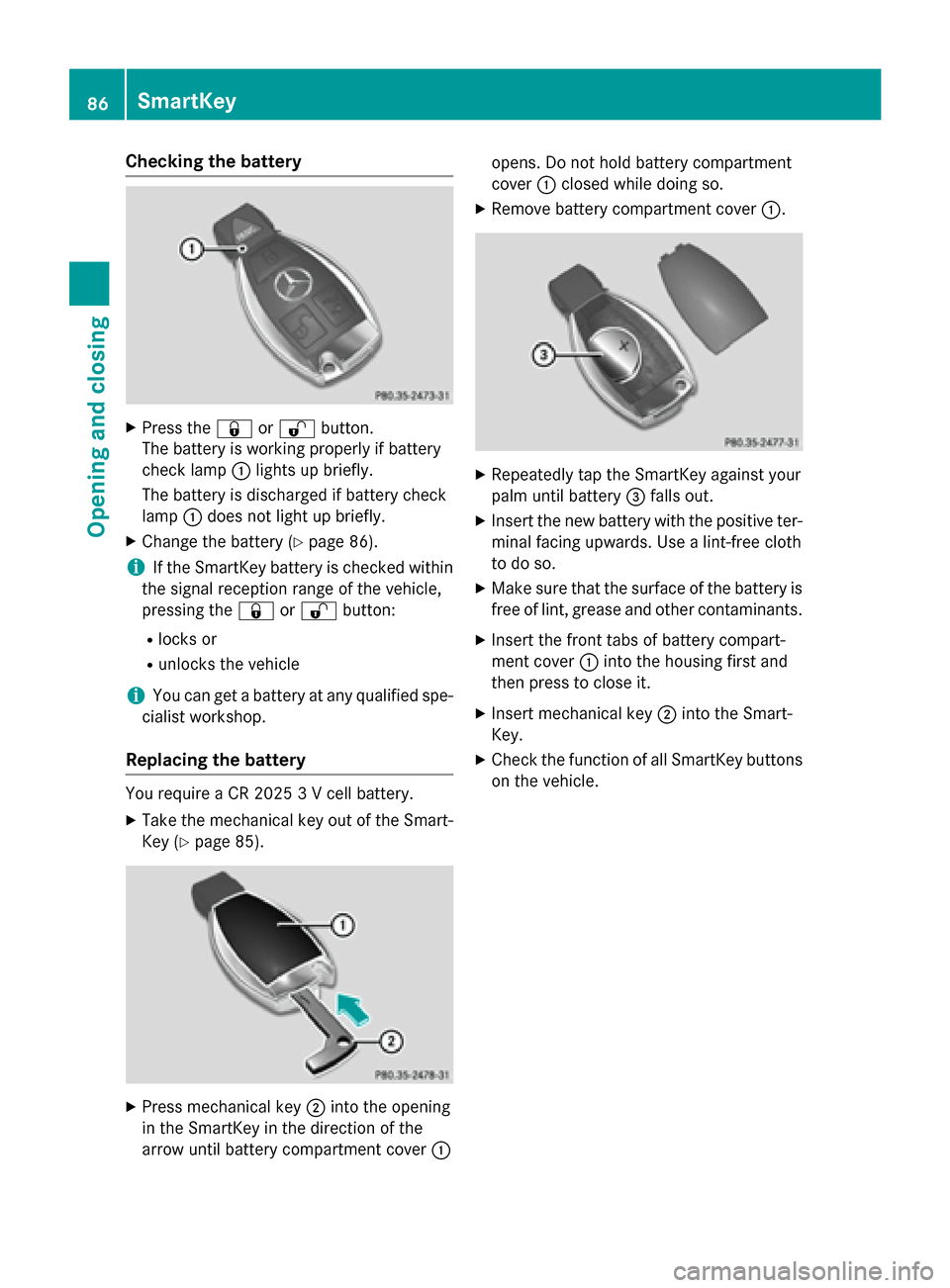
XPress the&or% button.
The battery is working properly if battery
check lamp :lights up briefly.
The battery is discharged if battery check
lamp :does not light up briefly.
XChange the battery (Ypage 86).
iIf the SmartKey battery is checked within
the signal reception range of the vehicle,
pressing the &or% button:
Rlocks or
Runlocks the vehicle
iYou can get a battery at any qualified spe-
cialist workshop.
Replacing the battery
You require a CR 2025 3 V cell battery.
XTake the mechanical key out of the Smart-
Key (
Ypage 85).
XPress mechanical key ;into the opening
in the SmartKey in the direction of the
arrow until battery compartment cover :opens. Do not hold battery compartment
cover
:closed while doing so.
XRemove battery compartment cover :.
XRepeatedly tap the SmartKey against your
palm until battery=falls out.
XInsert the new battery with the positive ter-
minal facing upwards. Use a lint-free cloth
to do so.
XMake sure that the surface of the battery is
free of lint, grease and other contaminants.
XInsert the front tabs of battery compart-
ment cover :into the housing first and
then press to close it.
XInsert mechanical key ;into the Smart-
Key.
XCheck the function of all SmartKey buttons
on the vehicle.
86SmartKey
Opening and closing
Page 111 of 410
!Do not move the front-passenger seat
fully forwards if there are objects in the
parcel net in the front-passenger footwell.
The objects could otherwise be damaged.
Adjusting the front-passenger seat
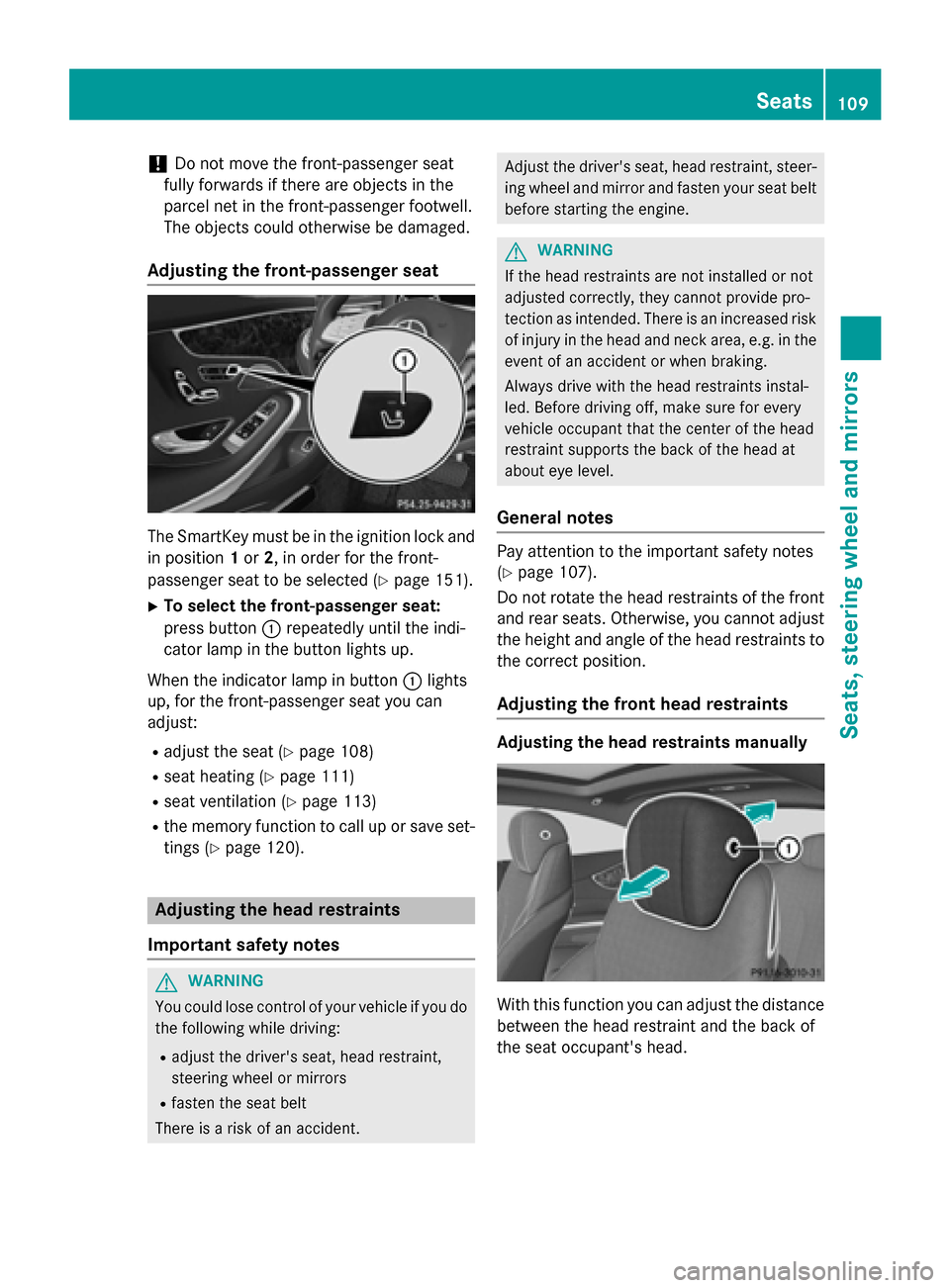
The SmartKey must be in the ignition lock and in position 1or 2, in order for the front-
passenger seat to be selected (
Ypage 151).
XTo select the front-passenger seat:
press button :repeatedly until the indi-
cator lamp in the button lights up.
When the indicator lamp in button :lights
up, for the front-passenger seat you can
adjust:
Radjust the seat (Ypage 108)
Rseat heating (Ypage 111)
Rseat ventilation (Ypage 113)
Rthe memory function to call up or save set- tings (
Ypage 120).
Adjusting the head restraints
Important safety notes
GWARNING
You could lose control of your vehicle if you do the following while driving:
Radjust the driver's seat, head restraint,
steering wheel or mirrors
Rfasten the seat belt
There is a risk of an accident.
Adjust the driver's seat, head restraint, steer- ing wheel and mirror and fasten your seat belt
before starting the engine.
GWARNING
If the head restraints are not installed or not
adjusted correctly, they cannot provide pro-
tection as intended. There is an increased risk
of injury in the head and neck area, e.g. in the event of an accident or when braking.
Always drive with the head restraints instal-
led. Before driving off, make sure for every
vehicle occupant that the center of the head
restraint supports the back of the head at
about eye level.
General notes
Pay attention to the important safety notes
(
Ypage 107).
Do not rotate the head restraints of the front
and rear seats. Otherwise, you cannot adjust
the height and angle of the head restraints to
the correct position.
Adjusting the front head restraints
Adjusting the head restraints manually
With this function you can adjust the distance
between the head restraint and the back of
the seat occupant's head.
Seats109
Seats, steering wheel and mirrors
Z
Page 117 of 410
Steering wheel heating
Activating/deactivating
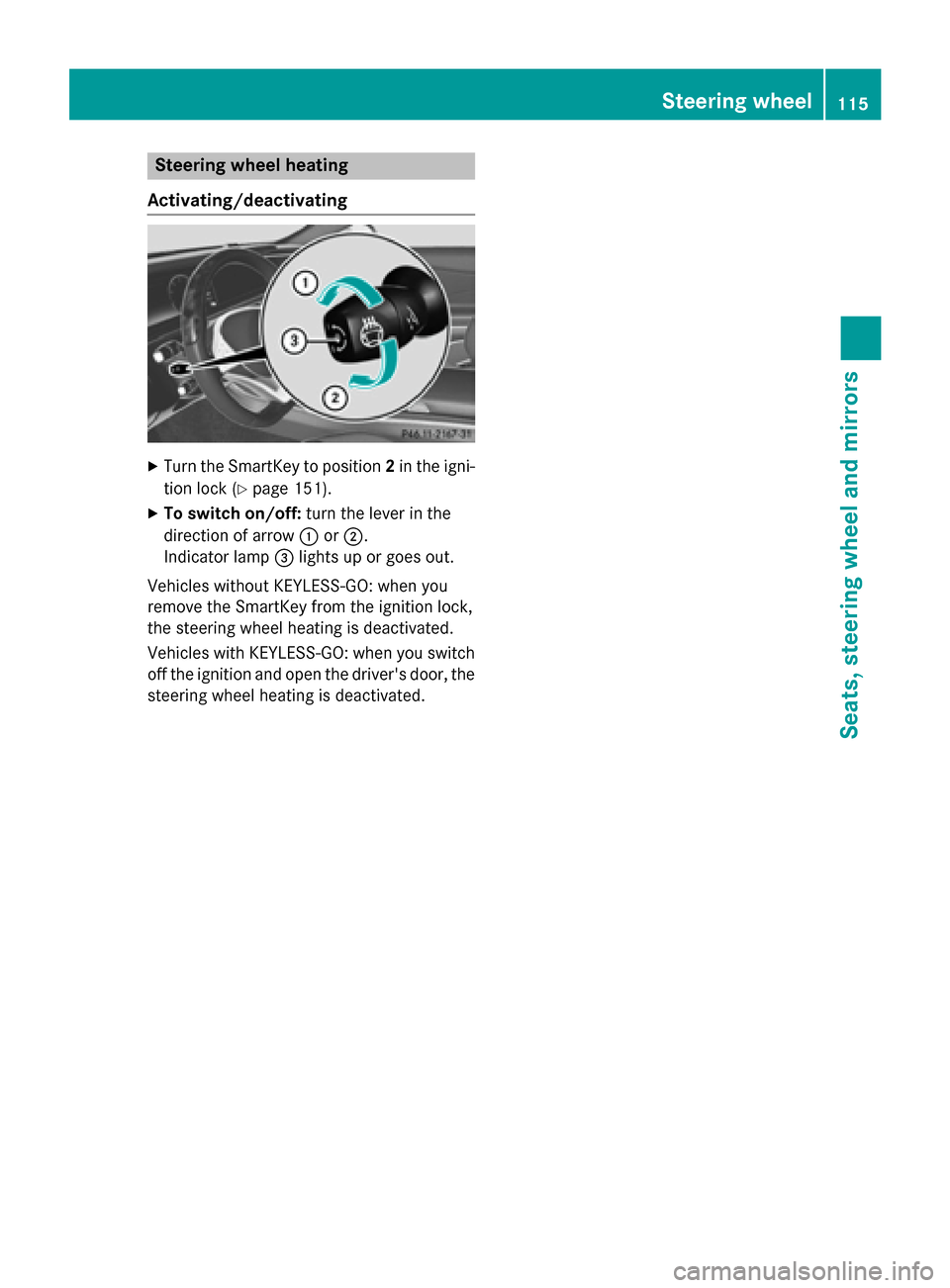
XTurn the SmartKey to position 2in the igni-
tion lock (
Ypage 151).
XTo switch on/off: turn the lever in the
direction of arrow :or;.
Indicator lamp =lights up or goes out.
Vehicles without KEYLESS-GO: when you
remove the SmartKey from the ignition lock,
the steering wheel heating is deactivated.
Vehicles with KEYLESS-GO: when you switch
off the ignition and open the driver's door, the steering wheel heating is deactivated.
Steering wheel115
Seats, steering wheel and mirrors
Z
Page 120 of 410
Adjusting the exterior mirrors
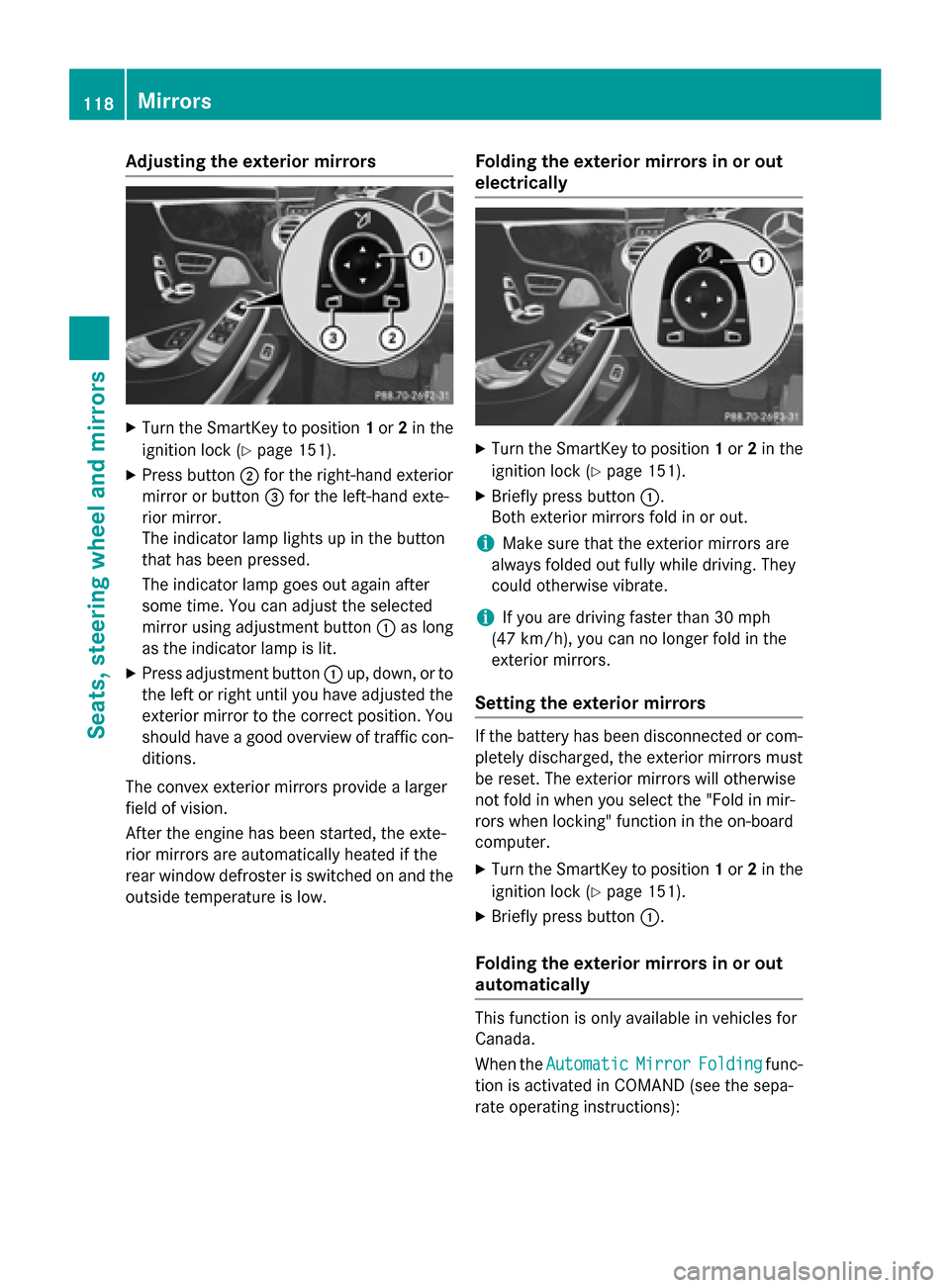
XTurn theSmartKey to position 1or 2in th e
ignition loc k (
Ypage 151).
XPress butto n; for th eright-hand exterio r
mirror or butto n= for th eleft-han dexte -
rio rmirror .
The indicator lamp lights up in th ebutto n
that has been pressed.
The indicator lamp goes out again after
som etime. You can adjust th eselected
mirror usin gadjustmen tbutto n: as lon g
as th eindicator lamp is lit .
XPress adjustmentbutto n: up, down ,or to
th elef tor right until you hav eadjusted th e
exterio rmirror to th ecorrec tposition .You
should hav e agoo doverview of traffic con-
ditions.
The convex exterio rmirror sprovide alarger
field of vision .
Afte rth eengin ehas been started, th eexte -
rio rmirror sare automatically heated if th e
rear window defroste ris switched on and th e
outside temperature is low.
Folding the exteri or mirrorsinor out
electri cally
XTurn th eSmartKey to position 1or 2in th e
ignition loc k (
Ypage 151).
XBriefly pressbutto n:.
Both exterio rmirror sfol din or out .
iMake sure that theexterio rmirror sare
always folded out fully while driving .The y
could otherwise vibrate .
iIf you are driving fasterthan 30 mph
(47 km/ h), you can no longer fold in the
exterior mirrors.
Setting the exterior mirrors
If the battery has been disconnected or com-
pletely discharged, the exterior mirrors must
be reset. The exterior mirrors will otherwise
not fold in when you select the "Fold in mir-
rors when locking" function in the on-board
computer.
XTurn the SmartKey to position 1or 2in the
ignition lock (
Ypage 151).
XBriefly press button :.
Folding the exterior mirrors in or out
automatically
This function is only available in vehicles for
Canada.
When theAutomatic
MirrorFoldingfunc-
tion is activated in COMAND (see the sepa-
rate operating instructions):
118Mirrors
Seats, steering wheel and mirrors
Page 125 of 410
Useful information............................124
Exterior lighting ................................ 124
Interior lighting ................................. 129
Replacing bulbs ................................. 130
Windshield wipers ............................130
123
Lights and windshield wipers
Page 126 of 410
Useful information
i
This Operator's Manual describes all
models and all standard and optional equip-
ment of your vehicle available at the time of
publication of the Operator's Manual.
Country-specific differences are possible.
Please note that your vehicle may not be
equipped with all features described. This
also applies to safety-related systems and
functions.
iRead the information on qualified special-
ist workshops (
Ypage 26).
Exterior lighting
General notes
For reasons of safety, Mercedes-Benz recom-
mends that you drive with the lights switched
on even during the daytime. In some coun-
tries, operation of the headlamps varies due
to legal requirements and self-imposed obli-
gations.
Setting the exterior lighting
Setting options
Exterior lighting can be set using:
Rthe light switch
Rthe combination switch (Ypage 126)
Rthe on-board computer (Ypage 247)
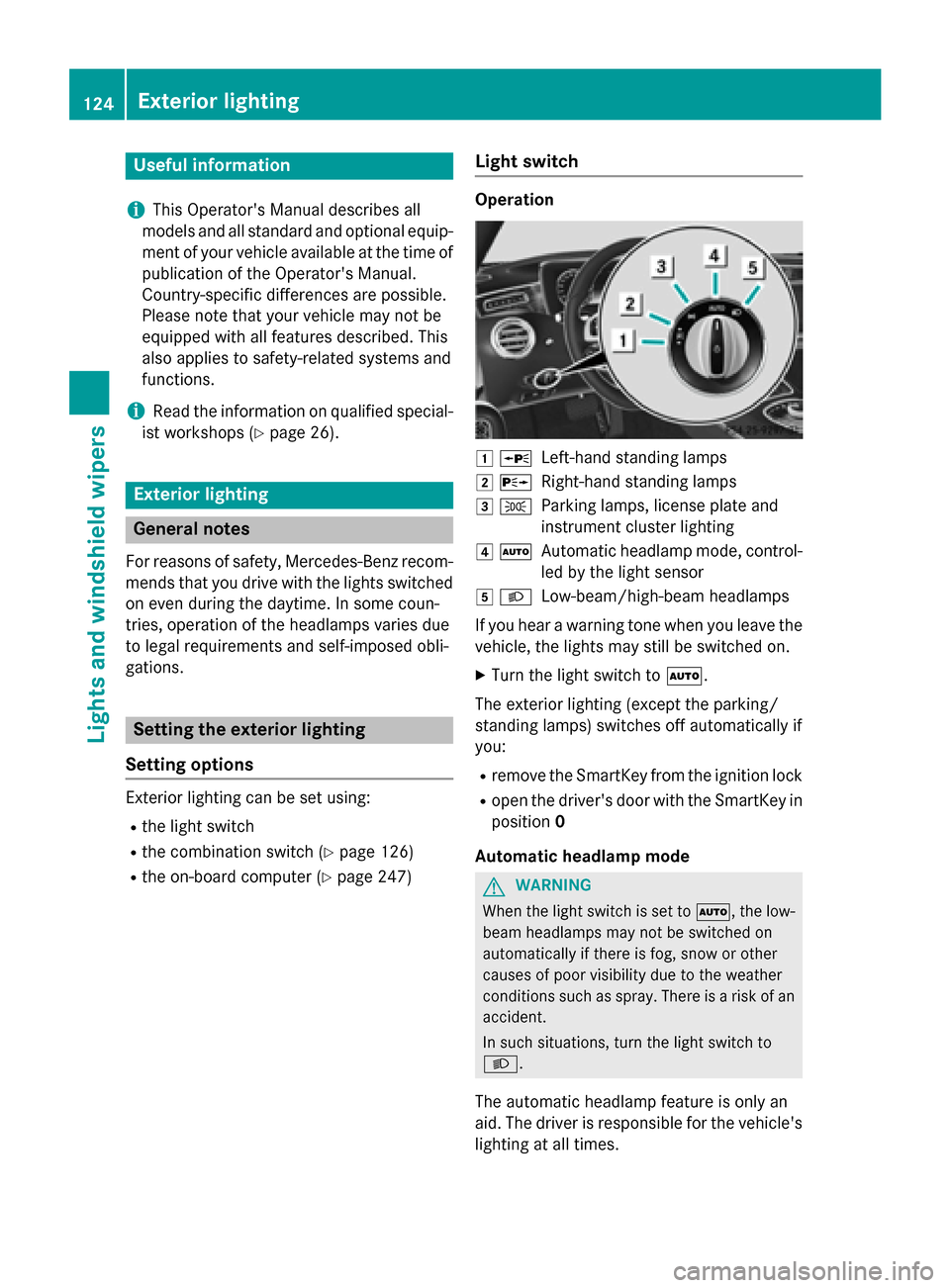
Light switch
Operation
1 WLeft-hand standing lamps
2XRight-hand standing lamps
3TParking lamps, license plate and
instrument cluster lighting
4ÃAutomatic headlamp mode, control-
led by the light sensor
5LLow-beam/high-beam headlamps
If you hear a warning tone when you leave the
vehicle, the lights may still be switched on.
XTurn the light switch to Ã.
The exterior lighting (except the parking/
standing lamps) switches off automatically if
you:
Rremove the SmartKey from the ignition lock
Ropen the driver's door with the SmartKey in position 0
Automatic headlamp mode
GWARNING
When the light switch is set to Ã, the low-
beam headlamps may not be switched on
automatically if there is fog, snow or other
causes of poor visibility due to the weather
conditions such as spray. There is a risk of an
accident.
In such situations, turn the light switch to
L.
The automatic headlamp feature is only an
aid. The driver is responsible for the vehicle's
lighting at all times.
124Exterior lighting
Lights and windshield wipers
Page 127 of 410
Canada only:
The daytime running lamps improve the visi-
bility of your vehicle during the day. The day-
time running lamps function is required by law
in Canada. It cannot therefore be deactivated.
When the engine is running and the vehicle is
stationary: if you move the selector lever from
a drive position to P, the daytime running
lamps/low-beam headlamps go out after
three minutes.
When the engine is running, the vehicle is
stationary and in bright ambient light: if you
turn the light switch to T, the daytime
running lamps and parking lamps switch on.
If the engine is running and you turn the light
switch to L, the manual settings take
precedence over the daytime running lamps.
USA only:
The daytime running lamps improve the visi-
bility of your vehicle during the day. To do this,
the daytime running lamps function must be
switched on using the on-board computer
(
Ypage 248).
If the engine is running and you turn the light
switch to TorL, the manual settings
take precedence over the daytime running
lamps.
à is the favored light switch setting. The
light setting is automatically selected accord-
ing to the brightness of the ambient light
(exception: poor visibility due to weather con-
ditions such as fog, snow or spray):
RSmartKey in position 1in the ignition lock:
the parking lamps are switched on or off
automatically depending on the brightness
of the ambient light.
RWith the engine running: if you have acti-
vated the "daytime running lamps" function
via the on-board computer, the daytime
running lamps or the parking lamps and the
low-beam headlamps are switched on or off
automatically depending on the brightness
of the ambient light.
XTo switch on automatic headlamp
mode: turn the light switch to Ã.Low-beam headlamps
Even if the light sensor does not detect that it
is dark, the parking lamps and low-beam
headlamps switch on when the ignition is
switched on and the light switch is set to the
L
position. This is a particularly useful
function in the event of rain and fog.
XTo switch on the low-beam headlamps:
turn the SmartKey in the ignition lock to
position 2or start the engine.
XTurn the light switch to L.
The green Lindicator lamp in the instru-
ment cluster lights up.
Parking lamps
!If the battery has been excessively dis-
charged, the parking lamps or standing
lamps are automatically switched off to
enable the next engine start. Always park
your vehicle safely and sufficiently lit
according to legal standards. Avoid the
continuous use of the Tparking lamps
for several hours. If possible, switc
h on the
X right or the Wleft standing lamp.
XTo switch on: turn the light switch to T.
The green Tindicator lamp in the instru-
ment cluster lights up.
Standing lamps
Switching on the standing lamps ensures the
corresponding side of the vehicle is illumina-
ted.
XTo switch on the standing lamps: the
SmartKey is not in the ignition lock or it is in
position 0.
XTurn the light switch to W(left-hand side
of the vehicle) or X(right-hand side of
the vehicle).
Exterior lighting125
Lights and windshield wipers
Z
Page 128 of 410
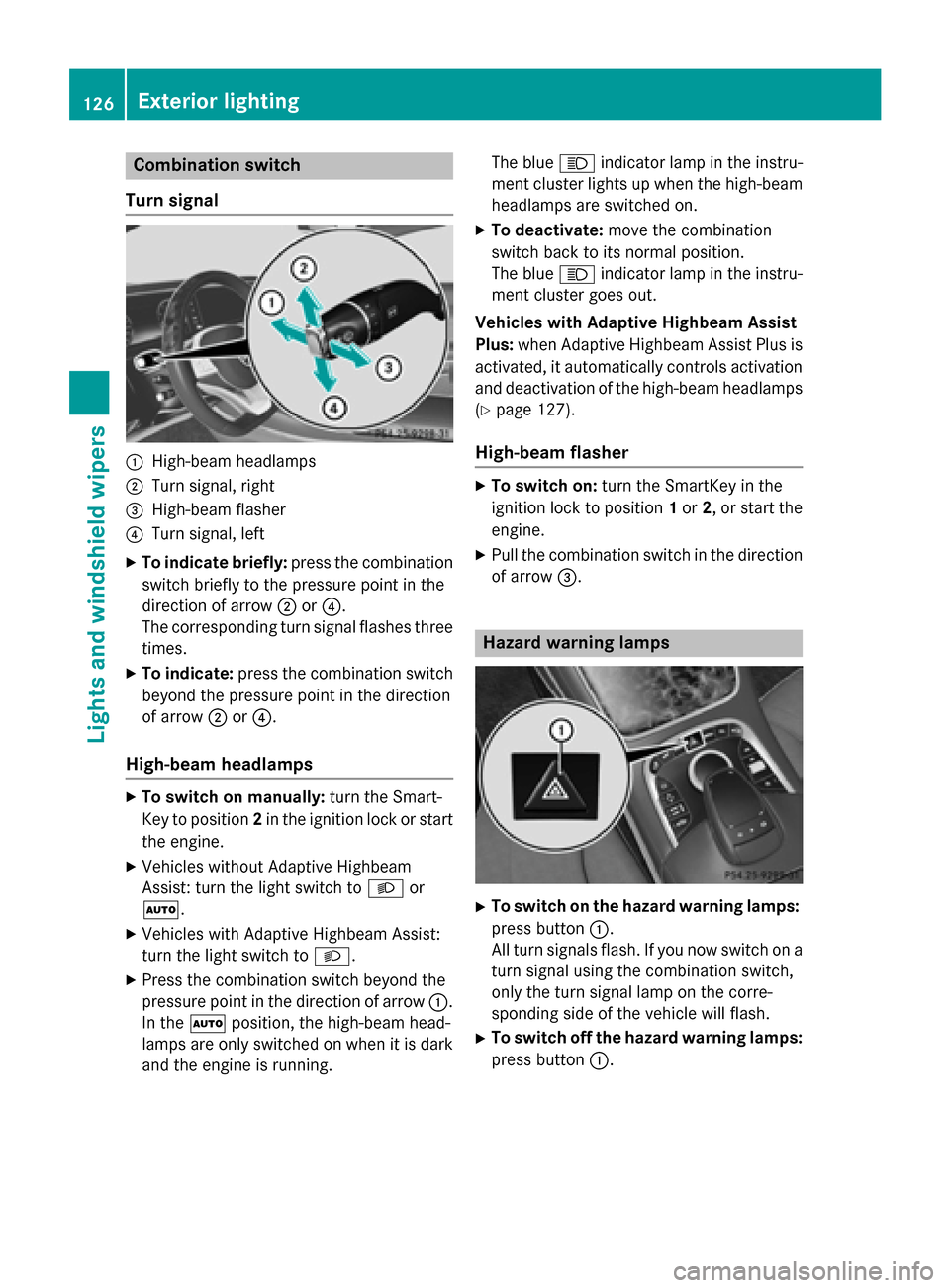
Combination switch
Turn signal
:High-beam headlamps
;Turn signal, right
=High-beam flasher
?Turn signal, left
XTo indicate briefly: press the combination
switch briefly to the pressure point in the
direction of arrow ;or?.
The corresponding turn signal flashes three
times.
XTo indicate: press the combination switch
beyond the pressure point in the direction
of arrow ;or?.
High-beam headlamps
XTo switch on manually: turn the Smart-
Key to position 2in the ignition lock or start
the engine.
XVehicles without Adaptive Highbeam
Assist: turn the light switch to Lor
Ã.
XVehicles with Adaptive Highbeam Assist:
turn the light switch to L.
XPress the combination switch beyond the
pressure point in the direction of arrow :.
In the Ãposition, the high-beam head-
lamps are only switched on when it is dark
and the engine is running. The blue
Kindicator lamp in the instru-
ment cluster lights up when the high-beam
headlamps are switched on.
XTo deactivate: move the combination
switch back to its normal position.
The blue Kindicator lamp in the instru-
ment cluster goes out.
Vehicles with Adaptive Highbeam Assist
Plus: when Adaptive Highbeam Assist Plus is
activated, it automatically controls activation and deactivation of the high-beam headlamps
(
Ypage 127).
High-beam flasher
XTo switch on: turn the SmartKey in the
ignition lock to position 1or 2, or start the
engine.
XPull the combination switch in the direction
of arrow =.
Hazard warning lamps
XTo switch on the hazard warning lamps:
press button :.
All turn signals flash. If you now switch on a
turn signal using the combination switch,
only the turn signal lamp on the corre-
sponding side of the vehicle will flash.
XTo switch off the hazard warning lamps:
press button :.
126Exterior lighting
Lights and windshield wipers
Page 129 of 410
The hazard warning lamps automatically
switch on if:
Ran air bag is deployed or
Rthe vehicle decelerates rapidly from a
speed of above 45 mph (70 km/h) and
comes to a standstill
The hazard warning lamps switch off auto-
matically if the vehicle reaches a speed of
above 6 mph (10 km/h) again after a full
brake application.
The hazard warning lamps still operate if the
ignition is switched off.
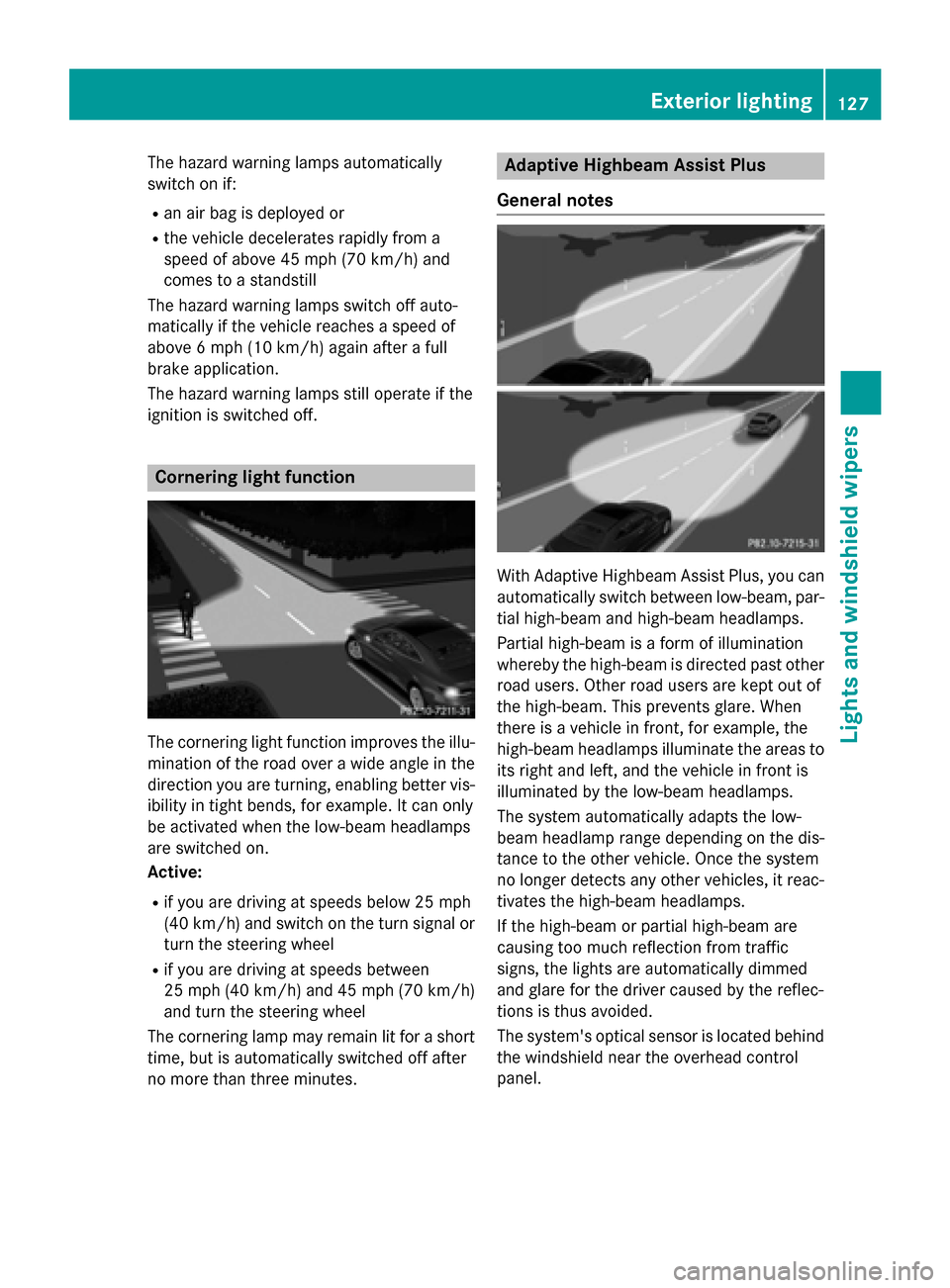
Cornering light function
The cornering light function improves the illu-
mination of the road over a wide angle in the
direction you are turning, enabling better vis-
ibility in tight bends, for example. It can only
be activated when the low-beam headlamps
are switched on.
Active:
Rif you are driving at speeds below 25 mph
(40 km/h) and switch on the turn signal or
turn the steering wheel
Rif you are driving at speeds between
25 mph (40 km/ h)and 45 mph (70 km/h)
and turn the steering wheel
The cornering lamp may remain lit for a short
time, but is automatically switched off after
no more than three minutes.
Adaptive Highbeam Assist Plus
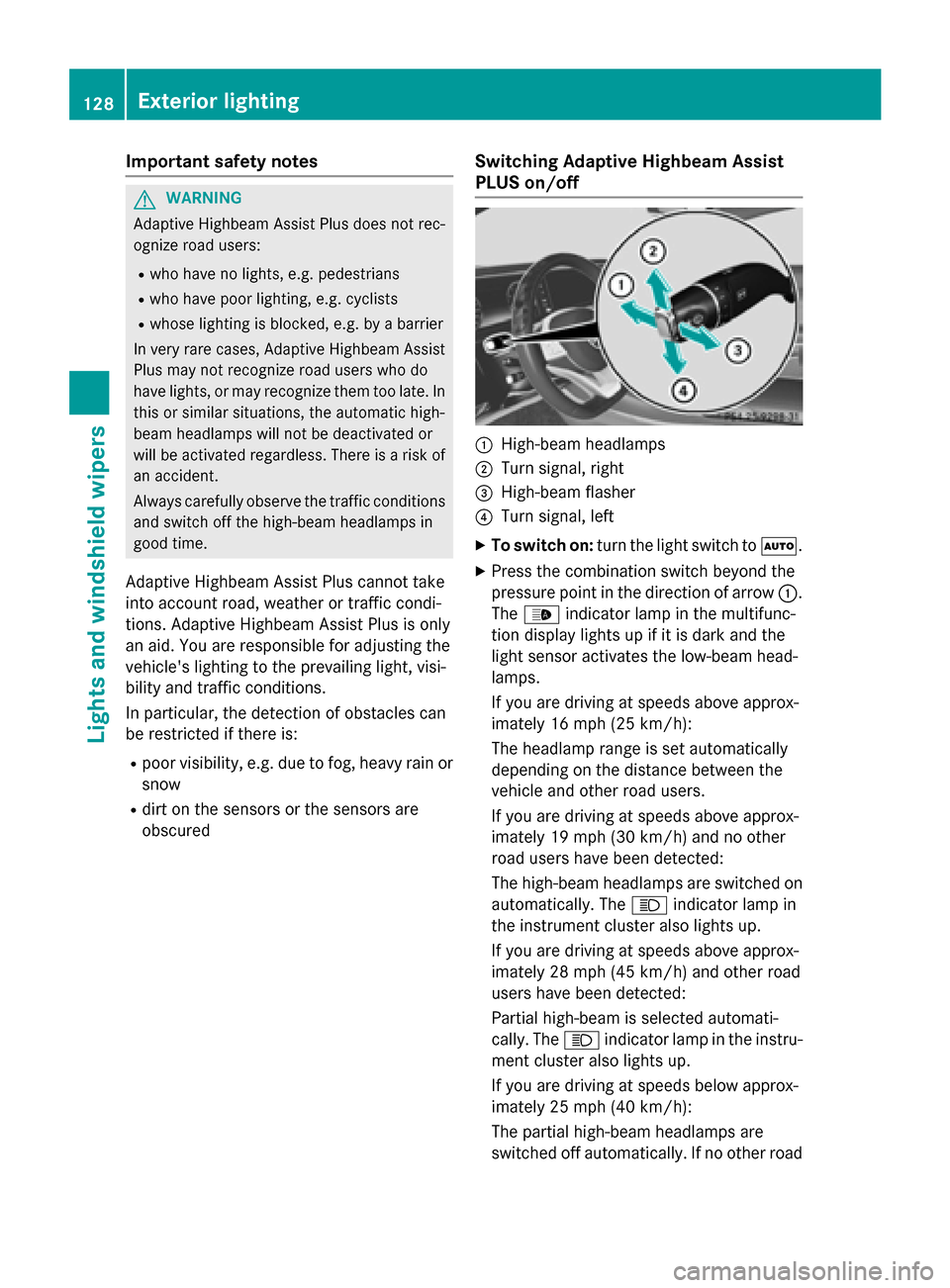
General notes
With Adaptive Highbeam Assist Plus, you can
automatically switch between low-beam, par-
tial high-beam and high-beam headlamps.
Partial high-beam is a form of illumination
whereby the high-beam is directed past other
road users. Other road users are kept out of
the high-beam. This prevents glare. When
there is a vehicle in front, for example, the
high-beam headlamps illuminate the areas to
its right and left, and the vehicle in front is
illuminated by the low-beam headlamps.
The system automatically adapts the low-
beam headlamp range depending on the dis-
tance to the other vehicle. Once the system
no longer detects any other vehicles, it reac-
tivates the high-beam headlamps.
If the high-beam or partial high-beam are
causing too much reflection from traffic
signs, the lights are automatically dimmed
and glare for the driver caused by the reflec-
tions is thus avoided.
The system's optical sensor is located behind the windshield near the overhead control
panel.
Exterior lighting127
Lights and windshield wipers
Z
Page 130 of 410
Important safety notes
GWARNING
Adaptive Highbeam Assist Plus does no trec -
ognize road users:
Rwho hav eno lights ,e.g. pedestrian s
Rwho havepoor lighting ,e.g. cyclist s
Rwhoselighting is blocked, e.g. by abarrier
In ver yrar ecases, Adaptive Highbeam Assist
Plus may no trecognize road user swho do
hav elights ,or may recognize them to olate. In
this or similar situations, th eautomatic high -
beam headlamps will no tbe deactivated or
will be activated regardless .Ther eis aris kof
an accident.
Always carefully observ eth etraffic condition s
and switch off th ehigh-beam headlamps in
goo dtime.
Adaptive Highbeam Assist Plus cannot take
into account road, weather or traff iccond i-
tions. Adaptive Highbeam Assist Plus isonly
an aid. You are responsible for adjusting the
vehicle's lighting to the prevailing light, visi-
bilit y and traff icconditions.
In particular, the detection of obstacles can
be restricted ifthere is:
Rpoor vis ibility, e.g. due to fog, heavy rain or
snow
Rdirt on the sensors or the sensors are
obscured
Switching Adaptive Highbeam Assist
PLUS on/off
:High-beam headlamps
;Turn signal, right
=High-beam flasher
?Turn signal, left
XTo switch on: turn thelight switch to Ã.
XPress the combination switch beyond the
pressure point inthe direction of arrow :.
The _ indicator lamp inthe multifunc-
tion display lights up if it is dark and the
ligh t sensor act ivates the low-beam head-
lamps.
If you are driving at speeds above approx-
imately 16 mph (25 km/h):
The headlamp range isset automatical ly
depe nding on the distance between the
vehicle and other road users.
If you are driving at speeds above approx-
imately 19 mph (30 km/h) and no other
road users have been detecte d:
The high-beam headlamps are switched on
automatically. The Kindicator lamp in
the instrument cluster also lights up.
If you are driving at speeds above approx-
imately 28 mph (45 km/h)and other road
users have been detected:
Partial high-beam is selected automati-
cally. The Kindicator lamp in the instru-
ment cluster also lights up.
If you are driving at speeds below approx-
imately 25 mph (40 km/h):
The partial high-beam headlamps are
switched off automatically. If no other road
128Exterior lighting
Lights and windshield wipers