warning MERCEDES-BENZ S-CLASS COUPE 2017 Owners Manual
[x] Cancel search | Manufacturer: MERCEDES-BENZ, Model Year: 2017, Model line: S-CLASS COUPE, Model: MERCEDES-BENZ S-CLASS COUPE 2017Pages: 533, PDF Size: 10.75 MB
Page 201 of 533
Av
ailable suspension settings Driv
eprogram Characteristics
S
(Sport)
S+
(Spor tPlus) R
The suspension tuning is firm er.
R When driving at speeds abo ve70 km/h, thev ehicle is lo weredb y10mmc ompared tothen ormal le vel.
R The vehicle is no tlowe reda nyfurther if youa retra velling at higher speeds.
R When drivin gatspeeds belo w50km/h,thev ehicle is raised again.
C
(Comfort)
E
(Econo my) R
The suspension tunin giscomfor table.
R When driving at speeds abo ve160k m/h, thev ehicle is lo weredb y10mmc ompared tothen ormal le vel.
R The vehicle is no tlowe reda nyfurther if youa retrav elling at higher speeds.
R When driving at speeds belo w120 km/h, thev ehicle is raised again. Setting
thev ehicle le vel &
WARNING Risk of accident because
ve hicle le velist oo high
If yo ud rive atah igher vehicle le vel,th ed riv‐
ing characteristic smaybe impaired due to
th eh igher vehicle centre of gravity.
The vehicle ma ytipove rmoreq uickl yona
bend, fore xamp le. #
Alw ayss elect as lo wavehicle le velas
possible and adap tyour driving style
accordin gly. &
WARNING Risk of entrapment from vehi‐
cle lo wering
Whe nlowe ring thev ehicle, other people
could become trapped if their limbs are between
thev ehicle body and thet yres or
underneat hthe vehicle. #
Mak esurenoo ne is underneat hthe
ve hicle or in thei mmediat evicinity of
th ew heel ar ches when youl owe rthe
ve hicle. 19 8
Driving and pa rking
Page 202 of 533
&
WARNING Risk of entrapment from vehi‐
cle lo wering
Ve hicles with AIRB ODYC ONT ROLor
le ve lc ontrol sy stem: When youu nload lug‐
ga ge or lea vethev ehicle, thev ehicle first
ri ses slightly and then returns tothes etlevel
shortl yafter wa rds.
Yo uora nyone else in thev icinit yoft he
whee larches or theu nderbody could thus
become trapped.
The vehicle can also be lo wereda fter being
loc ked. #
When leaving thev ehicle, mak esure
th at nobody is in thev icinit yoft he
whee larches or theu nderbody. Re
quirements:
R The vehicle has been star ted.
R The vehicle mus tnotbe moving fasterthan
80 km/h. Ra
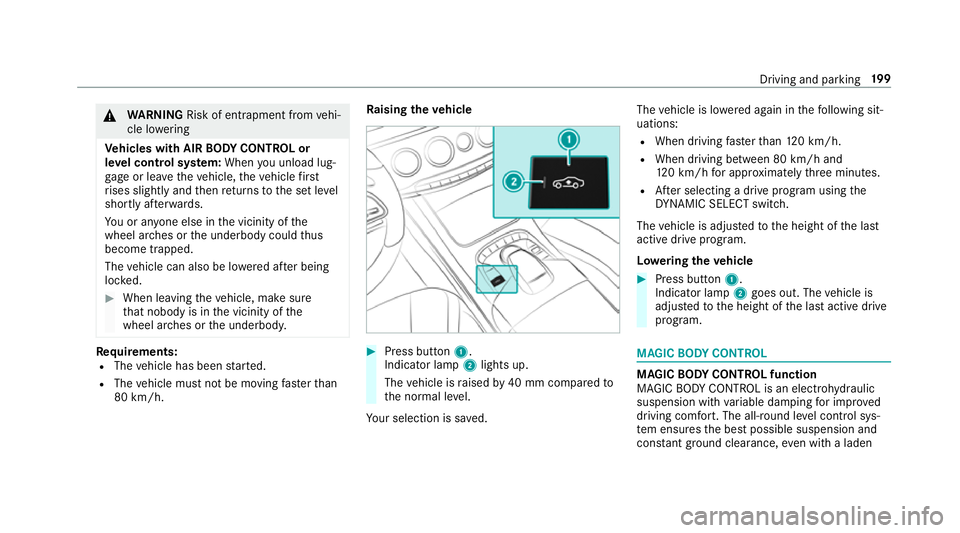
ising thev ehicle #
Press but ton1.
Indica torlamp 2lights up.
The vehicle is raised by40 mm compared to
th en ormal le vel.
Yo ur selection is sa ved. The
vehicle is lo wereda gain in thef ollowing sit‐
uations:
R When driving fasterthan 120k m/h.
R When driving between 80 km/h and
120k m/h fora pproxima tely thre em inutes.
R Afters electing adrive program using the
DY NA MIC SELECT switch.
The vehicle is adjus tedtot he height of thel ast
activ edrive program.
Lo weri ngthev ehicle #
Press but ton1.
Indica torlamp 2goes out. The vehicle is
adjus tedtot he height of thel asta ctiv edrive
program. MAGIC
BODY CONT ROL MAGIC
BODY CONT ROLfunction
MAGIC BODY CONTROL is an electrohydraulic
suspension wit hvariable dampin gfor impr oved
driving comfort. The all-round le velc ontrol sys‐
te me nsures theb estp ossible suspension and
const ant groun dclearance, evenw ithal aden Drivin
gand parking 19 9
Page 206 of 533
RO
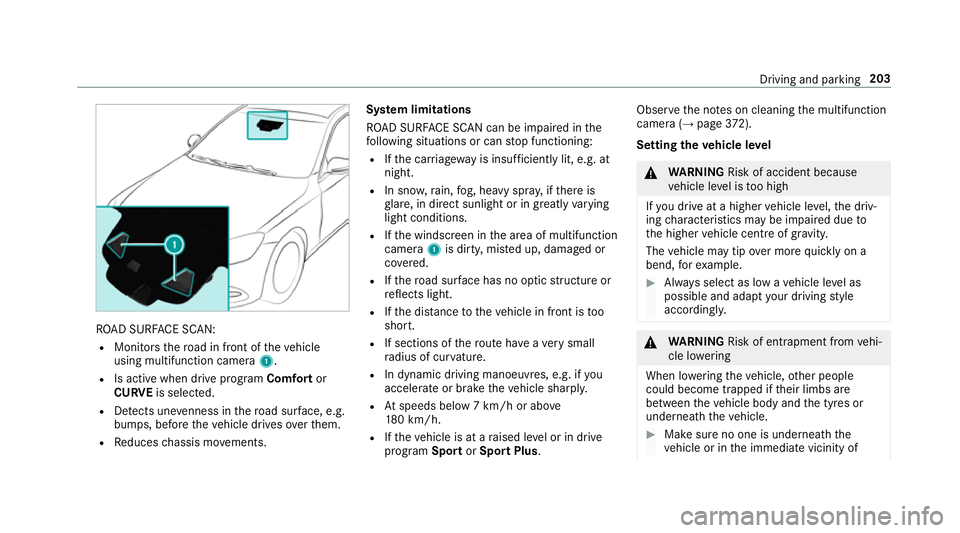
AD SUR FACE SCAN:
R Monitor sthe road in fron tofthevehicle
using multifunction camera 1.
R Is activ ewhen driv eprogram Comfort or
CURVE is selected.
R Detects une venness in ther oad sur face, e.g.
bu mp s, befor ethe vehicle drives overthem.
R Reduces chassis mo vements. Sy
stem limitations
RO AD SUR FACE SCAN can be impaired in the
fo llowing situations or can stop functioning:
R Ifth ec arriag ew ay is insuf ficiently lit, e.g. at
night.
R In sno w,rain, fog, heavy spr ay,ift hereis
gl are, in direct sunlight or in greatlyvarying
light conditions.
R Ifth ew indscreen in thea reaofm ultifunction
camera 1is dirty ,miste du p, damaged or
co vered.
R Ifth er oad sur face ha snoo ptic stru ctur eor
re flectsl ight.
R Ifth ed ista nce tothev ehicle in front is too
short.
R If sections of ther out ehave averys mall
ra dius of cur vature.
R In dynamic driving manoeuv res, e.g. if you
accelerat eorbrake thev ehicle sharpl y.
R Atspeeds belo w7km/h or abo ve
18 0k m/h.
R Ifth ev ehicle is at araised le velorind rive
prog ram Sport orSpor tPlus . Obser
vethen otes on cleaning them ultifunction
camer a(→pag e372).
Se ttin gthe vehicl elevel &
WARNING Risk of accident because
ve hicle le velist oo high
If yo ud rive atah igher vehicle le vel,th ed riv‐
ing characteristic smaybe impaired due to
th eh igher vehicle centre of gravity.
The vehicle ma ytipove rmoreq uickl yona
bend, fore xamp le. #
Alw ayss elect as lo wavehicle le velas
possible and adap tyour driving style
accordin gly. &
WARNING Risk of entrapment from vehi‐
cle lo wering
Whe nlowe ring thev ehicle, other people
could become trapped if their limbs are
between thev ehicle body and thet yres or
underneat hthe vehicle. #
Mak esurenoo ne is underneat hthe
ve hicle or in thei mmediat evicinity of Driving and parking
203
Page 207 of 533
th
ew heel ar ches when youl owe rthe
ve hicle. &
WARNING Risk of entrapment from vehi‐
cle lo wering
Ve hicles with AIRB ODYC ONT ROLor
le ve lc ontrol sy stem: When youu nload lug‐
ga ge or lea vethev ehicle, thev ehicle first
ri ses slightly and then returns tothes etlevel
shortl yafter wa rds.
Yo uora nyone else in thev icinit yoft he
whee larches or theu nderbody could thus
become trapped.
The vehicle can also be lo wereda fter being
loc ked. #
When leaving thev ehicle, mak esure
th at nobody is in thev icinit yoft he
whee larches or theu nderbody. Re
quirements:
R The vehicle has been star ted.
R The vehicle mus tnotbe moving fasterthan
12 0k m/h. R
Onl yw henloweri ngthev ehicle: whenthe
ve hicle is stationar y,all thed oor shave tobe
closed.
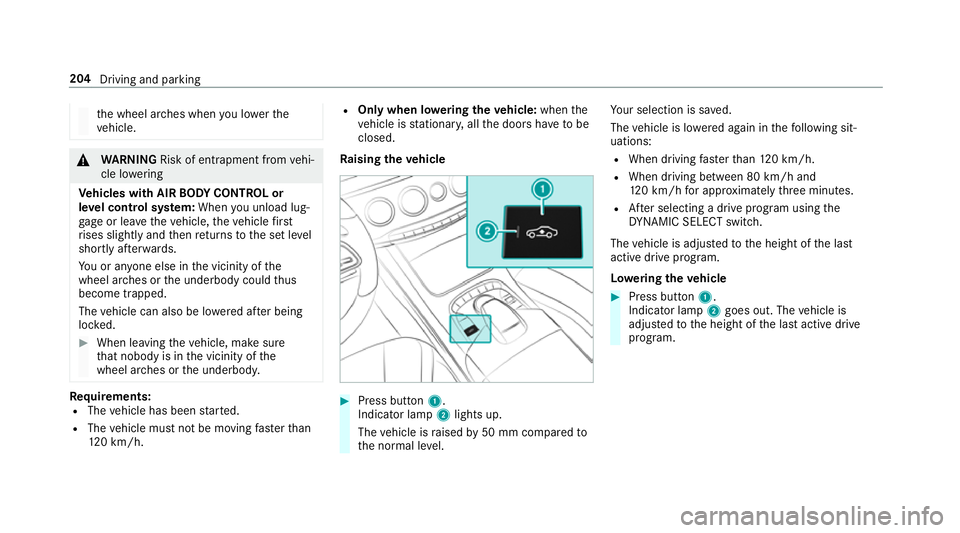
Ra ising thev ehicle #
Press but ton1.
Indica torlamp 2lights up.
The vehicle is raised by50 mm compared to
th en ormal le vel. Yo
ur selection is sa ved.
The vehicle is lo wereda gain in thef ollowing sit‐
uations:
R When driving fasterthan 120k m/h.
R When driving between 80 km/h and
120k m/h fora pproxima tely thre em inutes.
R Afters electing adrive program using the
DY NA MIC SELECT switch.
The vehicle is adjus tedtot he height of thel ast
activ edrive program.
Lo weri ngthev ehicle #
Press but ton1.
Indica torlamp 2goes out. The vehicle is
adjus tedtot he height of thel asta ctiv edrive
program. 204
Driving and parking
Page 208 of 533
Pa
rking Assis tPARKTRONIC Fu
nction of Parking Assis tPARKTRONIC Pa
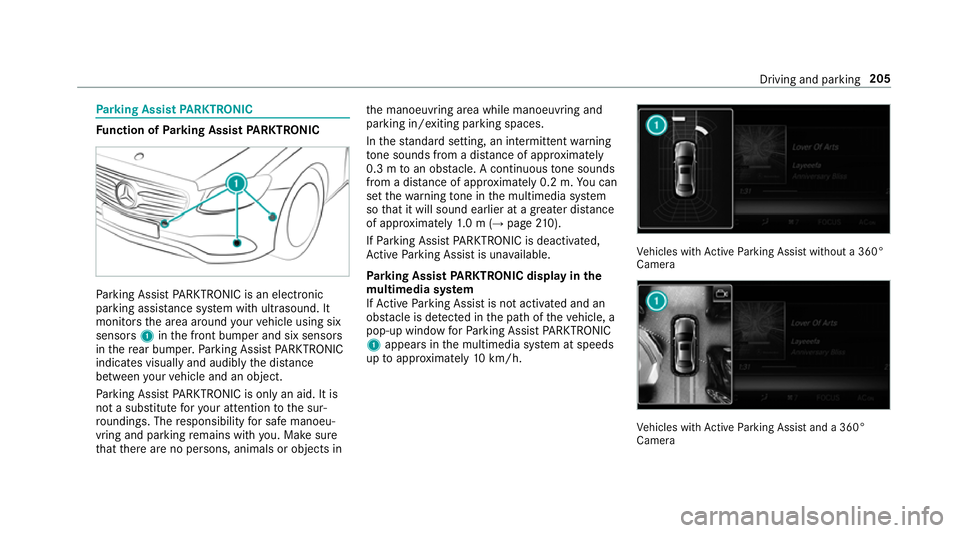
rking Assis tPARKTRONIC is an electronic
pa rkinga ssistanc esystem wit hultrasound. It
monitor sthe area around your vehicle using six
sensors 1inthef ront bumper and six sensors
in ther ear bumper .Parking Assis tPARKTRONIC
indicates visually an daudibl ythe dis tance
betwee nyour vehicle and an object.
Pa rking Assis tPARKTRONIC is only an aid. It is
no tas ubstitut efor your attentio ntothe sur‐
ro undings. The responsibility fors afem anoeu‐
vring and parking remains wit hyou. Mak esure
th at ther ea reno persons, animals or objects in th
em anoeuvring area while manoeuvring and
parking in/exitin gparking spaces.
In thes tandar dsetting ,ani ntermit tent wa rning
to ne sounds from adista nc eofa pproximately
0. 3mtoano bstacle .Ac ontinuou stone sounds
from adista nc eofa pproximatel y0.2m. Youc an
se tthe warning tone in them ultimedia sy stem
so that it will soun dearlier at agreater dis tance
of appr oximatel y1.0m( →pag e210).
If Pa rking Assis tPARKTRONIC is deactivated,
Ac tiveP arking Assis tisunavailable.
Pa rking Assis tPARKTRONIC displa yinthe
mu ltimedia sy stem
If Ac tiveP arking Assis tisnotactivated and an
obs tacle is de tected in thep athoft hevehicle, a
pop-up windo wforParking Assis tPARKTRONIC
1 appear sinthe multimedia sy stem at speeds
up toappr oximatel y10k m/h. Ve
hicles wit hActiv eParking Assis twithout a360°
Camera Ve
hicles wit hActiv eParking Assis tand a360°
Camera Driving and parking
205
Page 209 of 533
Sy
stem limitations
Pa rking Assis tPARKTRONIC does no tneces sa‐
ri ly take intoa ccount thef ollowing obs tacles:
R Obs tacle sb elow th edetection range, e.g.
pe rsons, animals or objects.
R Obs tacle sabove thed etection range, e.g.
ove rhanging loads, overhang sorl oading
ra mp sofl orries.
The sensor smustbef reeofd irt, ice and slush.
Otherwise, they ma ynotfunction cor rectly.
Clea nthe sensor sregularly ,taking ca renotto
scratc hordamagethem.
Fu nction of thep assiv es ide impact pr otec‐
tion
Pa ssiv eside impact pr otection is an additional
Pa rking Assis tPARKTRONIC functio nwhich
wa rnst he driver about obs tacle satt he side of
th ev ehicle. Awarning is issued when obs tacles
ar ed etected between thef ront and rear de tec‐
tion range. In orde rfor an objec ttobedetected,
th es ensor sinthe front and rear bumper must
de tect theo bjec twhile youa redrivin gpastit. During
thep arking procedur eormanoeuvring,
objects ar edetected as thev ehicle drives past.
If yo us teer in thed irection of adetected obs ta‐
cle and ther eisar isk ofalateral collision, a
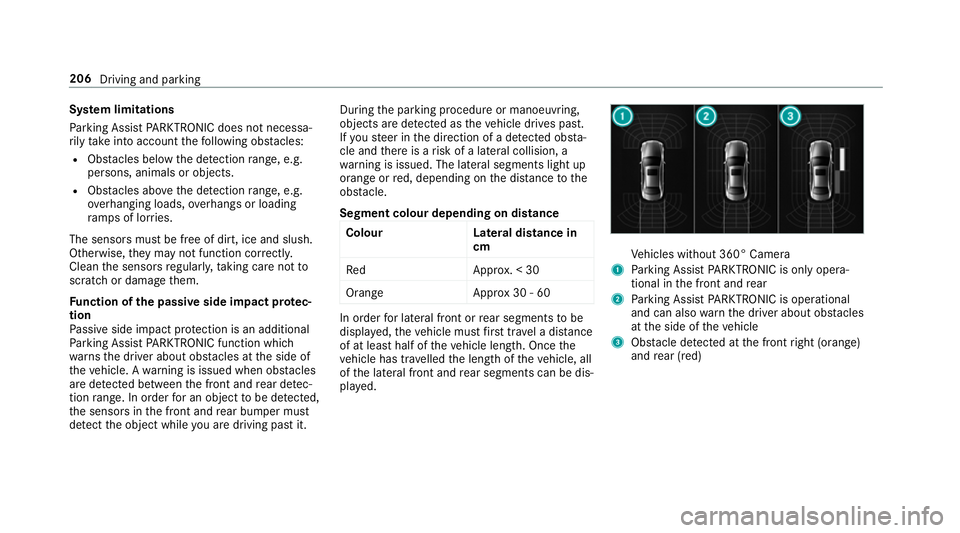
wa rning is issued. The lateral segment slight up
orang eorred, depending on thed ista nce tothe
obs tacle.
Segment colour dependin gondistance
Colour Lateral distance in
cm
Re dA pprox.<30
Orang eA pprox30 -60 In order
forl ateral front or rear segment stobe
displa yed, thev ehicle mus tfirst trave lad ista nce
of at leas thalfoft hevehicle length. Once the
ve hicle has tr avelled thel engt hoft hevehicle, all
of thel ateral front and rear segment scan be dis‐
pla yed. Ve
hicles without 360° Camera
1 Parking Assis tPARKTRONIC is only opera‐
tiona linthe front and rear
2 Parking Assis tPARKTRONIC is operational
an dc an also warnthed rive ra bout obs tacles
at thes ide of thev ehicle
3 Obstacle de tected at thef ront right (orange)
and rear (red) 206
Drivingand parking
Page 211 of 533
%
Parking Assis tPARKTRONIC is au tomatical ly
activated when thev ehicle is star ted.
Ad justin gthe warning tones of Parking
Assis tPARKTRONIC
Multimedia sy stem:
, Vehicle .
k Assistance .
Camera
&P ark. Assist .
Set warning tone
Ad justin gthe volum eoft hewarning tones #
Select Warning tonev olume.#
Setav alue.
Ad justin gthe pitc hofthewarning tones #
Select Warning tonep itch.
Se tav alue.
Specifying thes tarting point fort he warning
to nes
Yo uc an specify whe ther theP arking Assist
PA RKTRONI Cwarning tones shoul dcommence
when thev ehicle is fur ther aw ay from an obs ta‐
cle. #
Select Warn early. #
Activate Oor deacti vate ª thef unction. Ac
tivating/deactivatin gaudi ofadeout
Yo uc an specify whe ther thev olume of amedia
source in them ultimedia sy stem is tobe
re duced when Parking Assis tPARKTRONIC gi ves
an audible warning. #
Select Audio fadeout durin gwarnin gtones . #
Activate Oor deacti vate ª thef unction. Re
versing camera Fu
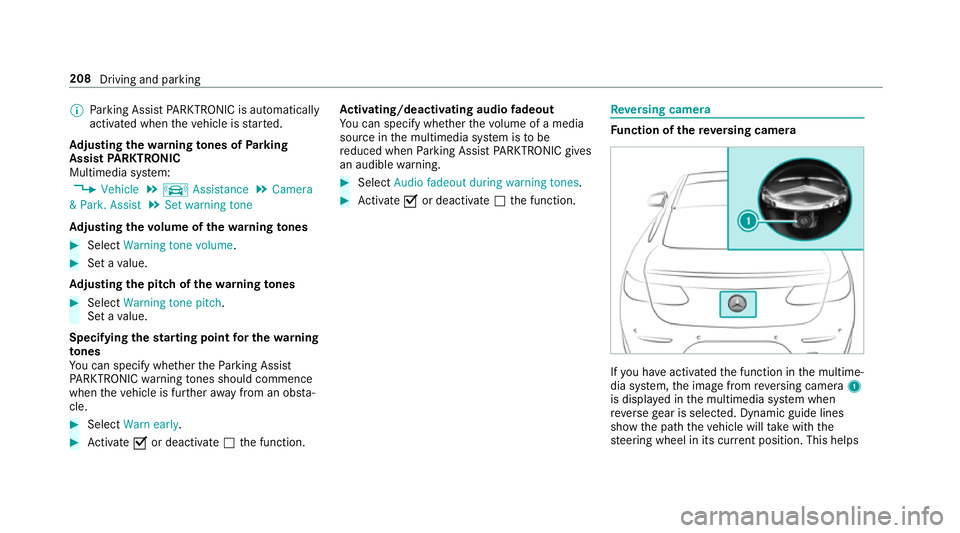
nction of ther eve rsing camera If
yo uh ave activated thef unction in them ultime‐
dia sy stem, thei mag efromr eve rsing camera 1
is displa yedint he multimedia sy stem when
re ve rseg ear is selected. Dynamic guide lines
sho wthe pat hthe vehicle will take wit hthe
st eering wheel in its cur rent position. Thi shelps 208
Driving and pa rking
Page 212 of 533
yo
utoo rientat eyourself and toavo id obs tacles
whe nreve rsing.
The reve rsing camer aisonlyana id. It is no ta
substitut efor your attentio ntothe sur roundings.
The responsibility fors afem anoeuvring and
parking remains wit hyou. Mak esuret hat there
ar enop ersons, animals or objects in the
manoeuvring area while manoeuvring and park‐
ing in parking spaces.
Yo uc an select from thef ollowing vie ws:
R Normal view
R Wide-angle view
The area behind thev ehicle is displa yedasa
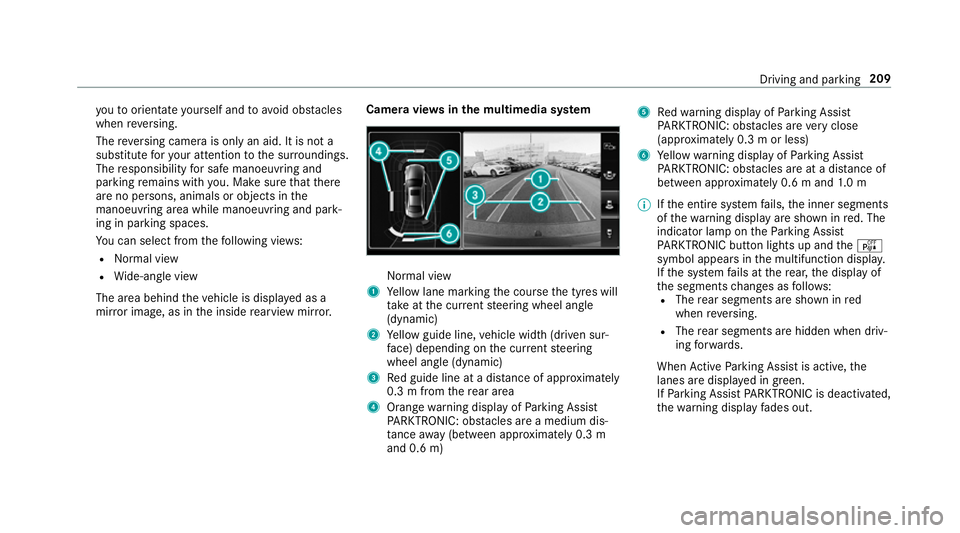
mir rorimage, as in thei nside rearvie wmirro r. Camer
aviews inthem ultimedia sy stem Normal view
1 Yello wl ane markin gthe course thet yres will
ta ke atthec urrent steering wheel angle
(dynamic)
2 Yello wg uide line, vehicle widt h(driven sur‐
fa ce) depending on thec urrent steering
wheel angle (dynamic)
3 Redg uide line at adista nce of appr oximately
0. 3mf romt herear area
4 Orang ewarning displa yofParking Assist
PA RKTRONIC: obstacles ar eamedium dis‐
ta nce away (between appr oximatel y0.3 m
and 0. 6m) 5
Redw arning displa yofParking Assist
PA RKTRONIC: obstacles ar everyc lose
(appr oximatel y0.3mo rless)
6 Yello ww arning displa yofParking Assist
PA RKTRONIC: obstacles ar eatadista nce of
betwee napproximately 0.6 mand1.0m
% Ifth ee ntir esystemf ails, thei nner segments
of thew arning displa yareshown in red. The
indicator lam pontheParking Assist
PA RKTRONI Cbuttonl ights up and theé
symbol appear sinthe multifunction displa y.
If th es ystemf ails at ther ear ,the displa yof
th es egment schanges as follo ws:
R The rear segment sareshown in red
when reve rsing.
R The rear segment sarehidde nwhen driv‐
ing forw ards.
When ActiveP arking Assis tisactive, the
lanes ar edispla yeding reen.
If Pa rking Assis tPARKTRONIC is deactivated,
th ew arning displa yfades out. Driving and parking
209
Page 214 of 533
R
Front camera
R Twos ide cameras in theo utside mir rors
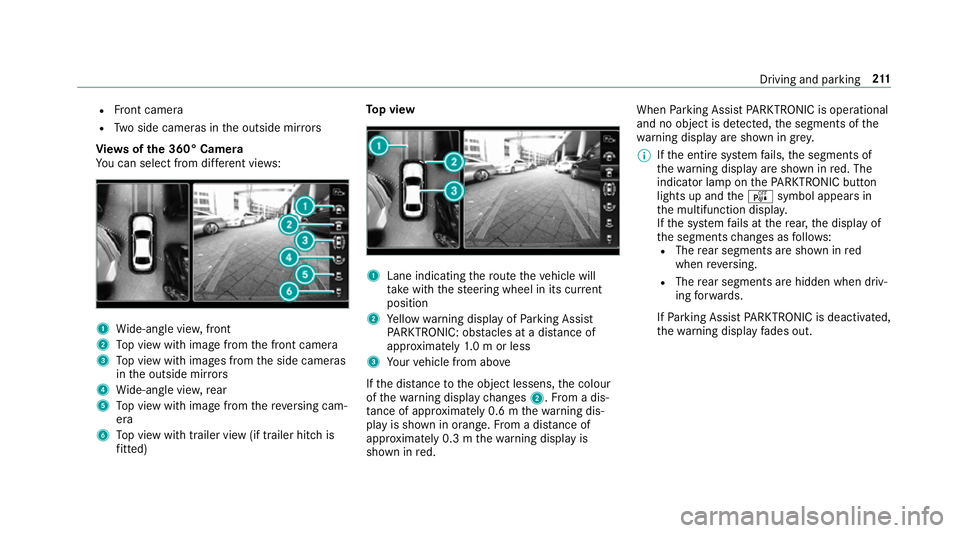
Vi ew soft he 360 °Camera
Yo uc an select from dif fere nt vie ws: 1
Wide-angle vie w,front
2 Topv ieww ithi mag efromt he front camera
3 Topv ieww ithi mages from thes ide cameras
in theo utside mir rors
4 Wide-angle vie w,rear
5 Topv ieww ithi mag efromt hereve rsing cam‐
era
6 Topv ieww itht railer vie w(if trailer hitc his
fi tted) To
pv iew 1
Lane indicating ther out ethe vehicle will
ta ke wit hthe steering wheel in its cur rent
position
2 Yello ww arning displa yofParking Assist
PA RKTRONIC: obstacles at adista nce of
appr oximatel y1.0morl ess
3 Your vehicle from abo ve
If th ed ista nce totheo bjec tlessens, thec olour
of thew arning displa ychanges 2.Fromad is‐
ta nce of appr oximatel y0.6mt hewarning dis‐
pla yiss hown in orange. From adistan ce of
appr oximatel y0.3mt hewarning displa yis
shown in red. When
Parking Assis tPARKTRONIC is operational
an dnoo bjectisd etected, thes egments of the
wa rning displa yareshown in grey.
% Ifth ee ntir esystemf ails, thes egment sof
th ew arning displa yareshown in red. The
indicator lam ponthePARKTRONI Cbutton
light supa ndthe é symbol appear sin
th em ultifunction displa y.
If th es ystemf ails at ther ear ,the displa yof
th es egment schanges as follo ws:
R The rear segment sareshown in red
when reve rsing.
R The rear segment sarehidde nwhen driv‐
ing forw ards.
If Pa rking Assis tPARKTRONIC is deactivated,
th ew arning displa yfades out. Driving and parking
211
Page 217 of 533
Ac
tiveP arking Assis tisonlyana id. It is no ta
substitut efor your attentio ntothe sur roundings.
The responsibility fors afem anoeuvring and
parking remains wit hyou. Mak esuret hat no
persons, animals or objectse tc. areinthe
manoeuvring range.
Ac tiveP arking Assis tiscancelled if, among
ot her things ,one of thef ollowing actions is car‐
ri ed out:
R Youd eactivat eParking Assis tPARKTRONIC.
R Youd eactivat eActiv eParking Assist.
R Youb egin steering.
R Youa ppl ythe parking brake.
R Youe ngaget ransmission position j.
R ESP ®
inter venes.
R Youo pen theb ootlid.
Sy stem limitations
Object slocated abo veor belo wthe de tection
ra ng eofA ctiveParking Assis tare notd etected
when thep arking space is being measured.
These ar ealso no ttaken in toaccount when the
parkin gmanoeuvr eiscalculated, e.g. overhang‐
ing loads, overhangs or loading ramp sofl orries or
theb oundaries of parking spaces. In some cir‐
cums tances, ActiveP arking Assis tmaytherefore
guide youi ntot he parking space prematurel y. &
WARNING Risk of accident du eto
object slocated abo veor belo wthe
de tection rang eofA ctiveParking Assist
If th er ea reobjects abo veor belo wthe
de tection range, thef ollowing situations may
arise:
R ActiveP arking Assis tmaysteer tooe arly.
R Vehicles with automatic transmis‐
sion: Thevehicle ma ynotstop in front of
th ese objects.
This could cause acollision. #
Inthese situations, do no tuse Active
Pa rking Assist. Sn
owfa ll or heavy rain ma ylead toap arking
spac ebeingm easured inaccuratel y.Pa rking
spaces that ar epartial lyoccupied bytrailer
dr aw bar sm ight no tbeidentified as suc horbe
measured incor rectly .Only us eActiv eParking
Assis tonlevel, high-grip ground. Do no
tuse ActiveP arking Assis tinthefollowing
situations:
R Inextreme weather condition ssuchasi ce,
pac keds noworinh eavyrain.
R Ifyo ua retransportin gaload that pr otru des
be yond thev ehicle.
R Ifth ep arking space is on asteep downhill or
uphill gradient.
R Ifyo uh avei nstalled sno wchains.
Ac tiveP arking Assis tmayalso displa yparking
spaces that ar enotsuitable forp arking, e.g.:
R Parking spaces wher eparkin gisp rohibited.
R Parking spaces on unsuitable sur faces.
Ac tiveP arking Assis twill no tassis tyou with
parking spaces at right angles tothed irection of
tr ave lint hefollowing situations:
R If tw oparkin gspaces ar elocated immedi‐
atel ynexttoe acho ther.
R Ifth ep arking space is directly next toalow
obs tacle su chasalow kerb. 214
Driving and pa rking