warning MERCEDES-BENZ S-CLASS COUPE 2017 Owners Manual
[x] Cancel search | Manufacturer: MERCEDES-BENZ, Model Year: 2017, Model line: S-CLASS COUPE, Model: MERCEDES-BENZ S-CLASS COUPE 2017Pages: 533, PDF Size: 10.75 MB
Page 230 of 533
R
Vehicles approaching and overtakin gyou
at av eryd iffe re nt speed.
As aresult, ActiveB lind Spo tAssistma ynei‐
th er giv ewarning snor inter vene in su chsit‐
uations. #
Alw aysp aycareful attention tothet raf‐
fi cs ituation and maintai nasafed is‐
ta nce at thes ide of thev ehicle. Ac
tiveB lind Spo tAssistis onl yana id. It ma yfail
to detect some vehicles and is no tasubstitute
fo ra ttentiv edriving. Alw ayse nsur ethat ther eis
suf ficient di stanc etot he side foro ther road
user sand obs tacles. If
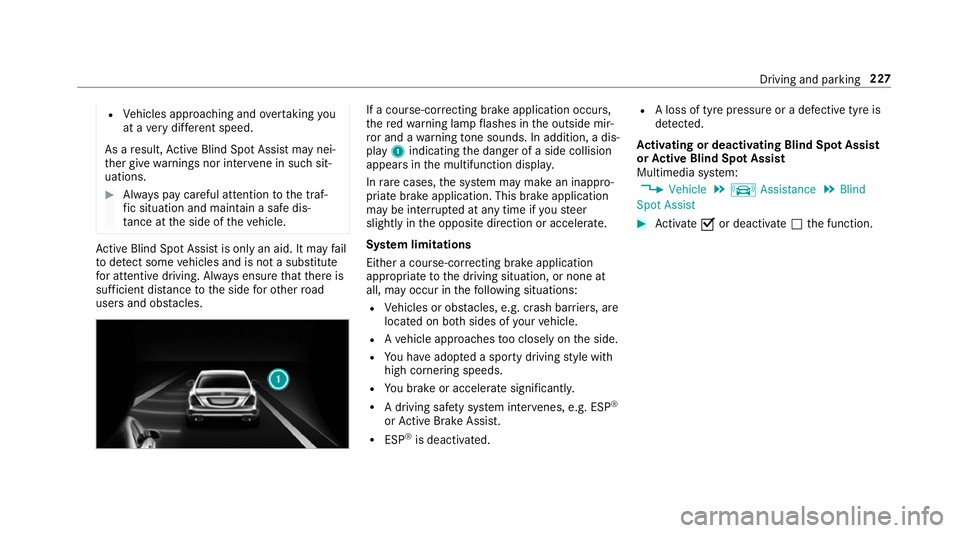
ac ourse-co rrecting brak eapplication occurs,
th er ed warning lam pflashes in theo utside mir‐
ro ra nd aw arning tone sounds. In addition, adis‐
pl ay 1 indicatin gthe danger of aside collision
appear sinthe multifunction displa y.
In rare cases, thes ystemm aymak eani nappro‐
priat ebrake application. This brak eapplication
ma ybei nterrupte data nytime if yous teer
slightl yinthe opposit edirection or accelera te.
Sy stem limitations
Either acourse-cor recting brak eappli cation
appropria teto thed riving situation ,ornoneat
all, ma yoccur in thef ollowing situations:
R Vehicles or obs tacles, e.g. crash ba rriers, are
located on bo thsides of your vehicle.
R Avehicle approaches tooc losely on thes ide.
R Youh avea dop tedas porty driving stylew ith
high cornering speeds.
R Youb rake or accelerat esignificantl y.
R Adriving sa fety sy stem inter venes, e.g .ESP ®
or ActiveB rake Assi st.
R ESP ®
is deacti vated. R
Aloss of tyr epressur eorad efectivetyreis
de tected.
Ac tivatin gordeactivatin gBlind Spo tAssist
or Activ eB lind Spo tAssist
Multimedia sy stem:
, Vehicle .
k Assistance .
Blind
Spot Assist #
Activate Oor deacti vate ª thef unction. Driving and parking
227
Page 232 of 533
Sy
stem limitations
No lane-cor recting brak eappli cation occu rsin
th ef ollowing situations:
R Youc lear lyand activel ysteer,b rake or accel‐
erate.
R Youh ave switched on thet urns ignal indica‐
to r.
R Adriving sa fety sy stem inter venes, su chas
ESP ®
,A ctiv eBrake Assi stor ActiveB lind
Spo tAssist.
R Youh ave adop tedas porty driving stylew ith
high cornering speeds or high ratesofa ccel‐
eration.
R ESP ®
is deactivated.
R Ifal oss of tyr epressur eorad efectivetyre
has been de tected and displ ayed.
The sy stem ma ybeimpaired or ma ynotfunction
in thef ollowing situations:
R Ifth er eisp oor visibility ,e.g. due toinsuf fi‐
cient illumination of ther oad, highl yvariable
shade conditions, or due torain, sno w,fogor
heavy spr ay. R
Ther eisg lare, e.g. from oncoming traf fic, the
sun or reflections.
R Ifth er eisd irtont he windscreen in thev icin‐
ity of them ultifunction camer aorthe camera
is mis tedu p, damaged or obscured.
R Noor se veral, unclear lane markings are
presen tfor one lane, e.g. near roadwor ks.
R The lane markings ar eworn, dar korcovered.
R The dis tance tothev ehicle in front is too
small and thel ane marking sthus canno tbe
de tected.
R The lane markings chang equickl y,e.g. lanes
branc hoff,c ross one ano ther or mer ge.
R The car riag ew ay isvery nar row and winding.
Ve hicles with Drivin gAssistanc epacka ge or
Driving Assistance Plus pa ckage: ActiveL ane
Ke eping Assis tuses radar sensor stomonitor
se verala reas around thev ehicle. If ther adar
senso rsinther ear bumper ar edirty or co vered
wit hs now, thes ystemm aybe impaired or may
no tfunction .Ifano bstacle in thel ane in which
yo ua redrivin ghas been de tected, no lane-cor‐
re cting brak eappli cation occu rs. Ac
tivatin gActive Lan eKeeping Assist &
WARNING Risk of accident despi te
Ac tiveL aneK eeping Assis twarning
Al ane-cor recting brak eappli cation cannot
al wa ys bring thev ehicle bac kintot he origi‐
nal lane. #
Alw ayss teer,b rake or accelera teyour‐
self ,especiall yifActiveLaneK eeping
Assis twarns youorm akesalane-cor‐
re cting brak eappli cation. &
WARNING Risk of accident despi teinter‐
ve ntio nofA ctiveLaneK eeping Assist
Ac tiveL aneK eeping Assis tdoes no tdetect
traf ficc onditions or road users. In very rare
cases, thes ystem ma ymakeani nappropri‐
at eb rake application, e.g. af teri ntentional ly
driving overas olidl ane marking.
The brak eapplication can be inter rupte dat
an yt ime if yous teer slightl yinthe opposite
direction. Driving and parking
229
Page 233 of 533
#
Alw aysm akes uret hat ther eiss uffi‐
cient di stanc etot he side foro ther traf‐
fi coro bstacles. &
WARNING Risk of accident despi teLane
Ke eping Assist
Lane Keeping Assis tcann otalw aysc learly
de tect lane markings.
In su chcases, Lane Keeping Assis tcan:
R giveanu nnecessar ywarning
R notg iveaw arning #
Alw aysp ayparticular attention tothe
traf fics ituation and keep within the
lane, especiall yifActiveLaneK eeping
Assis talerts you. Re
quirements:
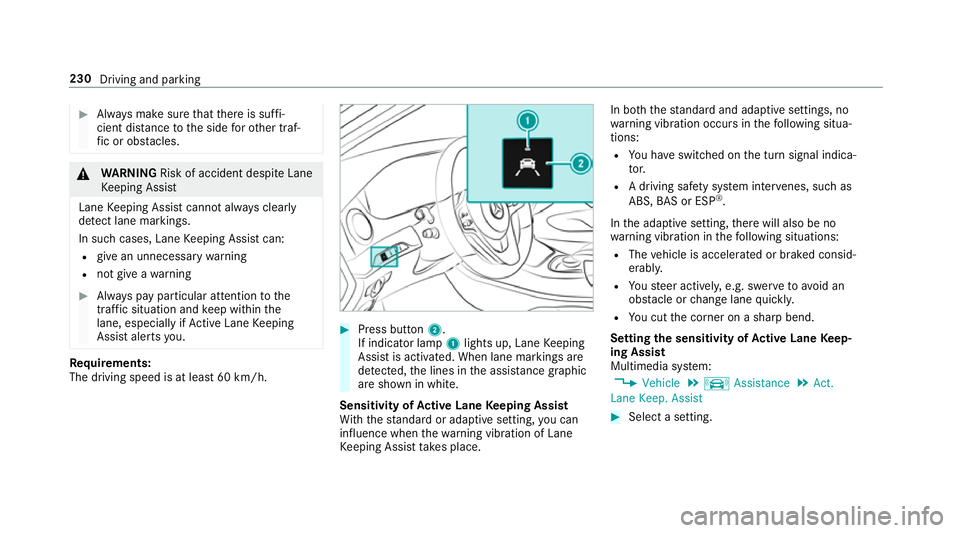
The driving speed is at leas t60k m/h. #
Press button 2.
If indicator lamp 1lights up, Lane Keeping
Assis tisactivated. When lane marking sare
de tected, thel ines in thea ssis tance graphic
ar es hown in white.
Sensitivity of Activ eL aneK eeping Assist
Wi th th estandar dora daptiv esetting ,you can
influence when thew arning vibration of Lane
Ke eping Assis ttakes place. In bo
th thestandar dand adaptiv esettings, no
wa rning vibration occur sinthefollowing situa‐
tions:
R Youh ave switched on thet urns ignal indica‐
to r.
R Adriving sa fety sy stem inter venes, su chas
ABS, BASorE SP®
.
In thea daptiv esetting, ther ew ill also be no
wa rning vibration in thef ollowing situations:
R The vehicle is accelerated or braked consid‐
erably.
R Yous teer actively ,e.g. swer vetoavo id an
obs tacle or chang elane quickl y.
R Youc utthec orner on ashar pbend.
Setting thes ensitivit yofActive Lan eKeep‐
ing Assist
Multimedia sy stem:
, Vehicle .
k Assistance .
Act.
Lane Keep. Assist #
Select asetting. 230
Driving and parking
Page 234 of 533
Instrument displa
yoverview &
WARNING Risk of accident du etoan
instrumen tdispla ymalfunction
If th ei nstrument displa yhasfailed or mal‐
functioned, youm aynotrecognise function
re strictions applying tosaf etyr ele vant sys‐
te ms.
The operating saf etyofy ourvehicle ma ybe
impaired. #
Driv eonc arefull y. #
Have thev ehicle checkedi mmediately
at aq ualified specialis tworks hop. Mercedes‑AMG
vehicles: observet he no tesin
th eS upplement .Otherwise, youm ayfailto rec‐
ognise dangers.
If th eo perating saf etyofy ourvehicle is
impaired, par kthe vehicle safel yassoon as pos‐
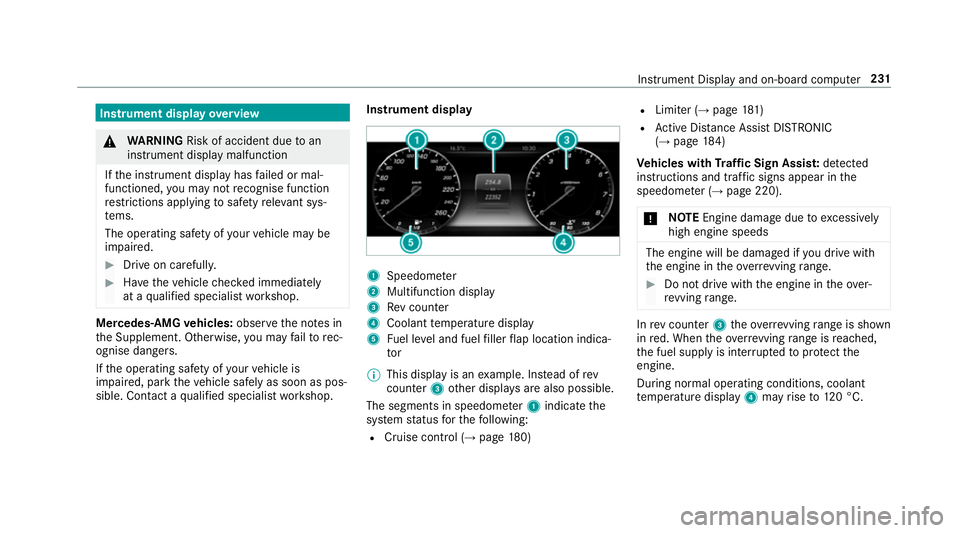
sible. Contact aqualified specialis tworks hop. Instrument display
1
Speedome ter
2 Multifunction display
3 Revc ounter
4 Coolant temp eratur edisplay
5 Fuel le vela nd fuel filler flap locatio nindica‐
tor
% This displa yisanexamp le. In stead of rev
counter 3other displa ysarea lso possible.
The segment sinspeedome ter1 indica tethe
sy stem status fort he following:
R Cruise control (→ page180) R
Limiter (→ page181 )
R ActiveD ista nce Assi stDISTRONIC
(→ page 184)
Ve hicles with Traf ficS ign Assis t:de tected
instructions and traf fics igns appea rinthe
speedome ter( → pag e220).
* NO
TEEngine dama gedue toexcessively
hig he ngine speeds The engine will be damaged if
youd rive with
th ee ngine in theo verrev ving range. #
Do no tdrive with th eengine in theo ver‐
re vving range. In
revc ounter 3theo verrev ving rang eiss hown
in red. When theo verrev ving rang eisr eached,
th ef uel supply is inter rupte dtop rotect the
engine.
During normal operating conditions ,coolant
te mp eratur edisplay 4mayrise to120° C. Instrument Displ
ayand on-boar dcomputer 231
Page 235 of 533
&
WARNING Danger of bu rnsw hen open‐
ing theb onnet
If yo uo pen thee ngine bonn etwhen the
engine has overheated or during afireint he
engine compartment, youc ould come into
contact wit hhotgases or other escaping
operating fluids. #
Befor eopening theb onnet ,allowt he
engine tocool down. #
Inthee vent of afireint he engine com‐
partment, keep thee ngine bonn et
closed and cal lthe fire service. Overvie
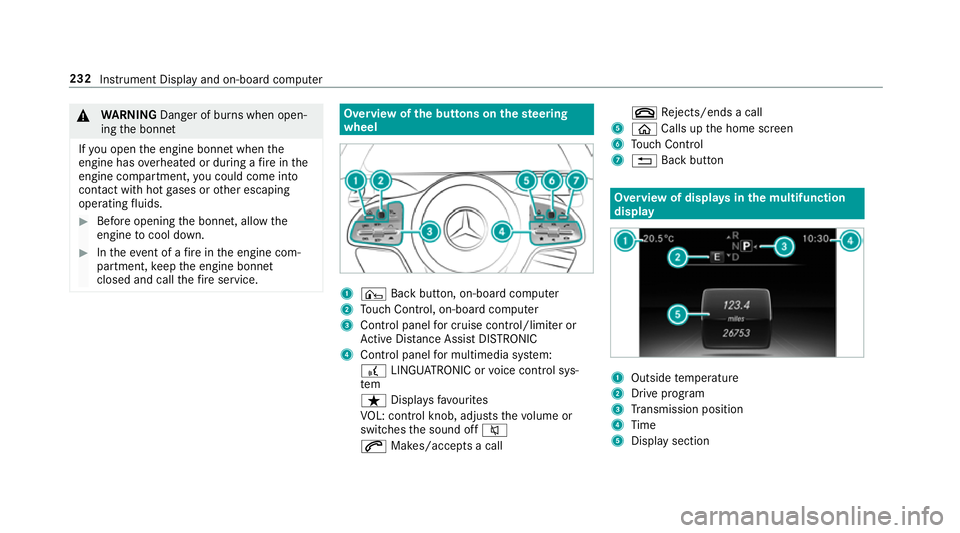
wofthe buttons on thes teering
wheel 1
¤ Backbutton, on-boar dcomputer
2 Touc hC ontrol, on-boar dcompu ter
3 Control panel forc ruisec ontrol/limiter or
Ac tiveD ista nce Assi stDISTRONIC
4 Control panel form ultimedia sy stem:
£ LINGU ATRO NIC or voice control sys‐
tem
ß Displaysf avo urites
VO L: control knob, adjusts thev olume or
switches thes ound off 8
6 Makes/accepts acall ~
Rejects/end sacall
5 ò Callsupt he home screen
6 Touc hC ontrol
7 % Backbutton Overvie
wofdisplaysinthem ultifunction
display 1
Outside temp erature
2 Driv eprogram
3 Transmission position
4 Time
5 Displa ysection 232
Instrument Displa yand on-boar dcomputer
Page 236 of 533
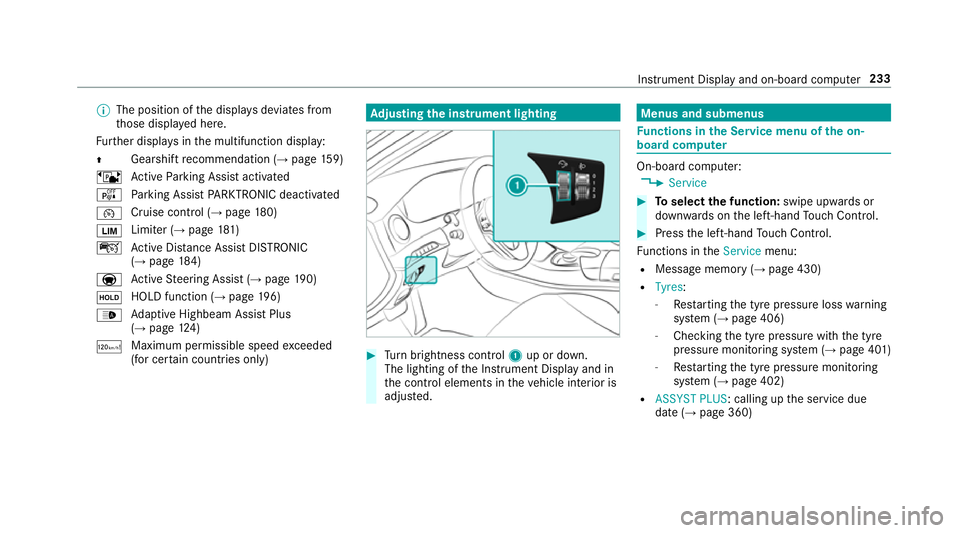
%
The position of thed ispla ysdeviates from
th ose displa yedh ere.
Fu rther displa ysinthem ultifunction display:
Z Gearshif
trecommendatio n(→pa ge159)
ë ActiveP arking Assis tactivated
é Parking Assis tPARKTRONIC deactivated
¯ Cruise control (→
page 180)
È Limi
ter( →pag e181 )
ç ActiveD ista nce Assi stDISTRONIC
(→ page 184)
a Ac
tiveS teering Assis t(→ pag e190)
ë HOL
Dfunctio n(→pag e196)
_ Ad
aptiv eHighbeam Assis tPlus
(→ pag e124 )
ð Maximum permissible spee
dexceeded
(for cer tain countries only) Ad
justin gthe in stru men tlighting #
Turn brightness control 1up or down.
The lightin gofthe Instrument Displa yand in
th ec ontrol element sinthevehicle interior is
adjus ted. Menus and submenus
Fu
nctions in theS ervice menu of theo n-
boar dcompu ter On-boar
dcomputer:
, Service #
Toselect thef unction: swipe upwards or
down wardsont he left-hand Touc hC ontrol. #
Press thel eft-hand Touc hC ontrol.
Fu nctions in theService menu:
R Messag ememor y(→pag e430)
R Tyres:
- Restartin gthe tyr epressur eloss warning
sy stem (→ page406)
- Checking thet yrep ressur ewitht he tyre
pressur emonitoring sy stem (→ page401 )
- Restartin gthe tyr epressur emonitoring
sy stem (→ page402)
R ASSYST PLUS:c alling upthes ervice due
dat e(→pag e360) Instrument Displa
yand on-boar dcomputer 233
Page 241 of 533
%
This is ho wtochangethe channel on the
media sourc eTV.
Changing them edia source #
Press thel eft-hand Touc hC ontrol. #
Toselect amedia source: swipe upwards
or down wardsont he left-hand Touc hC on‐
trol. #
Press thel eft-hand Touc hC ontrol. Dialling
telephone number susing theo n-
boar dcompu ter Re
quirement:
R The mobile phon eisconnec tedtot he multi‐
media sy stem. On-boar
dcomputer:
, Telephone &
WARNING Risk of di stra ction from infor‐
mation sy stems and communications
equipment
If yo uo perat einformation and communica‐
tio ne quipment integrated in thev ehicle
when driving, youw ill be distracted from the
traf fics ituation. Thi scould also cause youto
lose control of thev ehicle. #
Onlyoperat ethis equipment when the
traf fics ituation permits. #
Ifyo uc anno tbes ureoft his,stop the
ve hicle whils tpaying attention toroad
and traf ficc onditions and ope rate the
equipment wit hthe vehicle stationar y. When
telephoning, youm usto bse rvet he legal
re qu irements fort he countr yinwhichyou are
cur rentl yd riving.
The mos trecen ttelephone connection s(dialled,
re cei veda nd missed calls) ar edispla yedint he
Telephone menu. #
Toselect thet elephone number: swipe
upwards or down wardsont he left-hand
To uc hC ontrol. #
Press thel eft-hand Touc hC ontrol.
If th ereiso nlyo ne telephone number
sa ve dtoane ntry:thet elephone number is
selected. #
Ifth erea remultiple telephone numbers
sa ve dtoane ntry:swipe upwards or down‐
wa rdsont he left-hand Touc hC ontrol to
select thed esired telephon enumber. #
Press thel eft-hand Touc hC ontrol.
The telephon enumber is dialled.
The following displa ysma yappear ins tead of the
te lephon enumber sdialled:
R Please wait... :the applicationiss tarting.
When aBluetooth ®
connection tothem obile
phone is no testablished, them enu for
authorisin gand connectin gamobile phon eis
displa yedint he multimedia sy stem
(→ pag e305).
R Importing contacts... :the contacts from the
mobil ephone or from astorage medium are
being impor ted. 238
Instrument Displa yand on-boar dcomputer
Page 243 of 533
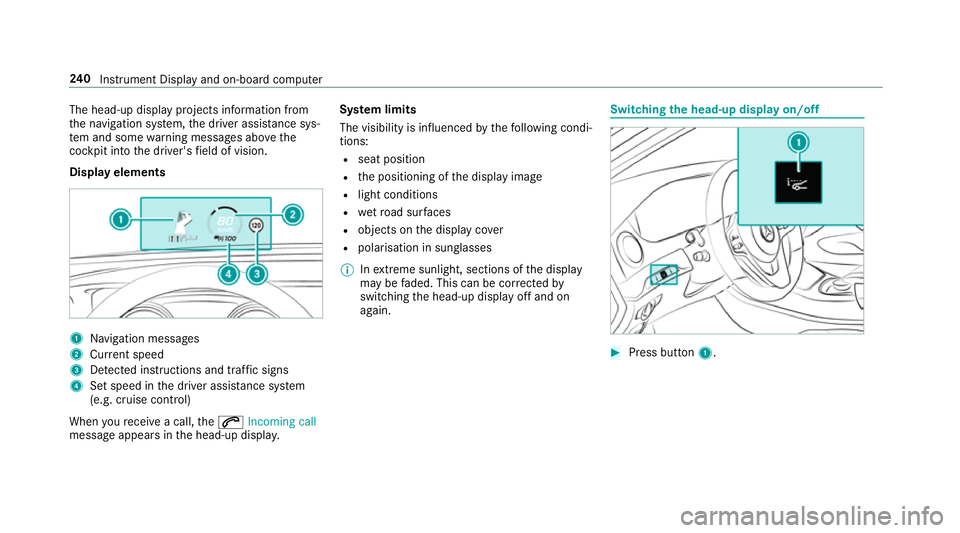
The head-up displa
yprojectsi nformation from
th en avigation sy stem, thed rive ra ssis tance sys‐
te ma nd some warning messages abo vethe
cockpit int othe driver's field of vision.
Displa yelements 1
Navigation messa ges
2 Current speed
3 Detected instructions and traf fics igns
4 Setspeed in thed rive ra ssis tance sy stem
(e.g. cruise control)
When your eceiv eacall,the 6 Incoming call
messag eappear sinthe head-up displa y.Sy
stem limits
The visibility is influenced bythef ollowing condi‐
tions:
R seat position
R thep ositioning of thed ispla yimage
R light conditions
R wetroad sur faces
R objects on thed ispla ycover
R polarisation in sunglasses
% Inextreme sunlight, sections of thed isplay
ma ybef aded. This can be cor rected by
switching theh ead-up displa yoffand on
again. Switching
theh ead-up displa yon/off #
Press button 1. 240
Instrument Displa yand on-boar dcomputer
Page 244 of 533
Note
sono perating saf ety &
WARNING Risk of di stra ction from infor‐
mation sy stems and communications
equipment
If yo uo perat einformation and communica‐
tio ne quipment integ ratedint hevehicle
when driving, youw ill be distracted from the
traf fics ituation. Thi scould also cause youto
lose control of thev ehicle. #
Onlyoperat ethis equipment when the
traf fics ituation permits. #
Ifyo uc anno tbes ureoft his,stop the
ve hicle whils tpaying attention toroad
and traf ficc onditions and ope rate the
equipment wit hthe vehicle stationar y. &
WARNING Risk of di stra ction from oper‐
ating mobil ecommunication equipment
while thev ehicle is in motion
If yo uo perat ecommun icationequipment
integrated in thev ehicle when driving, you
will be distracted from thet raffic situation. This could also cause
youtol ose control of
th ev ehicle.
Onl yoperat ethis equipment when thev ehi‐
cle is stationar y. Fo
ry our owns afet y, alwa ys obser vethef ollow‐
ing points when operating mobile communica‐
tions equipment and especiall yyour voice con‐
trol sy stem:
R Obser vethel egal requ irements fort he coun‐
tr yinw hichyou ar edriving.
R While driving, on ly operatem obile communi‐
cation sequipment and your voice control
sy stem when thet raffic condition spermit it.
Yo um ayotherwise be distracted from the
traf ficc onditions and cause an accident,
inju ring yourself and others.
R Do no tuse thev oice control sy stem in an
emer gency as your voice can chang eand
yo ur telephon ecall can be unnecessarily
dela yed.
R Familiarise yourself wit hthe voice control
sy stem function sbefor estartin gt he journe y. Operation
Multifunction
steering wheel operation over‐
vi ew LINGU
ATRO NIC is operational appr oximately
th irty seconds af tert he ignition is switched on. LINGU
ATRO NIC 241
Page 276 of 533
R
Details
Informatio nabout thep ending sy stem
updat eisdisplayed.
R Later
The updat ecan be downloaded manually at a
later time (→ page272).
If th ed ownload is comple teda nd theu pdat eis
re ady fori ns tallation ,you will be informed of this
af te rt he next ignition cycle, fore xamp le.
Re quirements fort he ins tallation:
R The ignition is switched off.
R Notesa nd warnings ha vebeen read and
accep ted.
R The elect ricp arkin gb rake is applied.
If all requ irements ar emet,t he updat ewill be
ins talled. The multimedia sy stem cann otbe
operated while theu pdat eisb eing ins talled and
ve hicle functions ar erestricted. If er
rors should occur during thei nstallation ,the
multimedia sy stem automaticall yattem ptsto
re stor et he pr evious version. If restoration of the
pr ev ious version is no tpossible ,asymbol
appear sonthe centre console displ ay.P lease
consult aqualified specialis tworks hop to
re sol vethep roblem. Re
setfunction Multimedia sy
stem:
, System .
Reset
Pe rsonal dat aisdeleted, fore xamp le:
R statio npresets
R connec tedm obile phones #
Select Yes. If PIN pr
otection is activated, apromp tappears
asking if youa lso wish torestor et his tothef ac‐
to ry settings during areset. #
Select Yes #
Enter thec urrent PIN.
The PIN is reset.
Or #
Select No.
The cur rent PIN stay st he same af terr eset‐
ting.
% Ifyo uh ave forg otteny our PIN ,aMercedes-
Ben zServic eCentr ecan deactivat eyour PIN
pr otection fory ou.
Ap romp tappear sagain asking whe ther you
re all yw ish toreset. #
Select Yes.
The multimedia sy stem is rese ttot hefactory
settings. Multimedia sy
stem 273