fog light MERCEDES-BENZ S-CLASS COUPE 2017 User Guide
[x] Cancel search | Manufacturer: MERCEDES-BENZ, Model Year: 2017, Model line: S-CLASS COUPE, Model: MERCEDES-BENZ S-CLASS COUPE 2017Pages: 533, PDF Size: 10.75 MB
Page 213 of 533
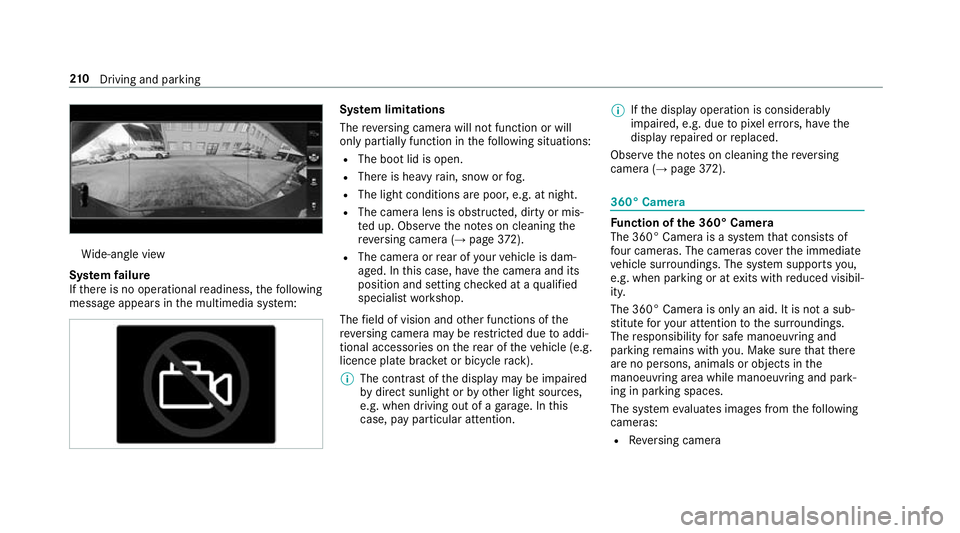
Wi
de-angle view
Sy stem failure
If th er eisnoo perational readiness, thef ollowing
messag eappear sinthe multimedia sy stem: Sy
stem limitations
The reve rsing camer awill no tfunction or will
onl ypartiall yfunction in thef ollowing situations:
R The boo tlid is open.
R Ther eish eavyrain, sno worfog.
R The light conditions ar epoor ,e.g. at night.
R The camer alens is obstructed, dirty or mis‐
te du p. Obser vethen otes on cleaning the
re ve rsing camer a(→ pag e372).
R Thec ame raor rear of your vehicle is dam‐
aged. In this case, ha vethec amer aand its
position and setting checkedataq ualified
specialis tworks hop.
The field of vision and other functions of the
re ve rsing camer amaybe restricted du etoaddi‐
tional accesso ries on ther ear of thev ehicle (e.g.
licence plat ebrack et or bicycle rack ).
% The contras tofthe displa ymaybe impaired
by direct sunlight or by other light sources,
e.g. when driving out of agarage. In this
case, pa yparticular attention. %
Ifth ed ispla yoperation is considerably
impaired, e.g. due topixel er rors,h ave the
displa yrepaired or replaced.
Obser vethen otes on cleaning ther eversing
camera (→ page372). 360° Ca
mera Fu
nction of the3 60° Camera
The 360° Camer aisasystemt hat consists of
fo ur cameras. The cameras co verthe immediate
ve hicle sur roundings. The sy stem supports you,
e.g .when parkin goratexitsw ithr educed visibil‐
ity.
The 360° Camer aisonlyana id. It is no tasub‐
st itut efor your attentio ntothe sur roundings.
The responsibility fors afem anoeuvring and
parking remains wit hyou. Mak esuret hat there
ar enop ersons, animals or objects in the
manoeuvring area whil emanoeuvring and park‐
ing in parking spaces.
The sy stem evaluates images from thef ollowing
cameras:
R Reversing camera 210
Driving and pa rking
Page 215 of 533
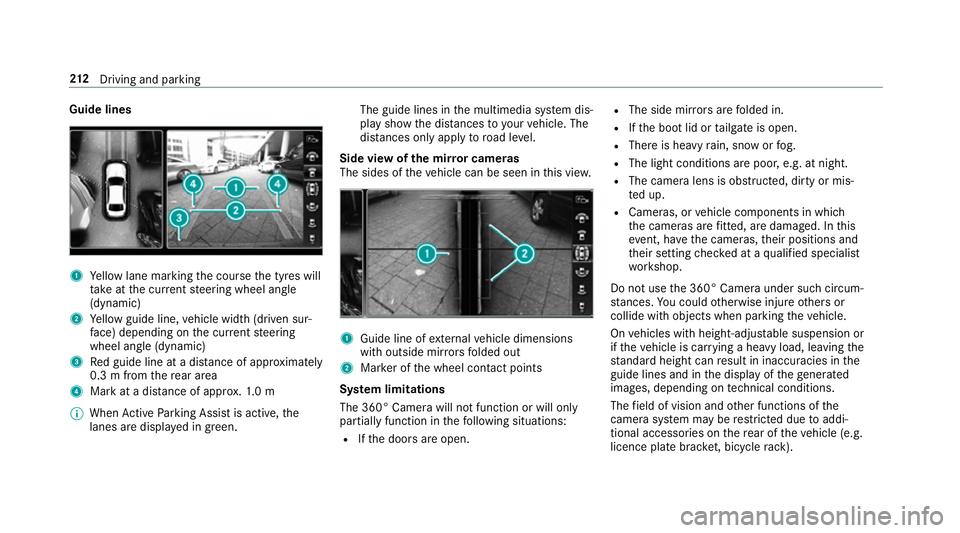
Guide lines
1
Yello wl ane markin gthe course thet yres will
ta ke atthec urrent steering wheel angle
(dynamic)
2 Yello wg uide line, vehicle widt h(driven sur‐
fa ce) depending on thec urrent steering
wheel angle (dynamic)
3 Redg uide line at adista nce of appr oximately
0. 3mf romt herear area
4 Markatad istance of appr ox.1 .0 m
% When ActiveP arking Assis tisactive, the
lanes ar edispla yeding reen. The guide lines in
them ultimedia sy stem dis‐
pla yshowt he dis tances toyour vehicle. The
dis tances only apply toroad le vel.
Side vie wofthe mir rorc ameras
The side softhevehicle can be seen in this vie w. 1
Guide line of extern al vehicle dimensions
wit ho utside mir rors folded out
2 Markeroft he wheel contact points
Sy stem limitations
The 360° Camera will no tfunction or will only
partiall yfunction in thef ollowing situations:
R Ifth ed oor sareopen. R
The side mir rors aref olded in.
R Ifth eb ootlid or tailgat eiso pen.
R Ther eish eavyrain, sno worfog.
R The light conditions ar epoor ,e.g. at night.
R The camer alens is obstructed, dirty or mis‐
te du p.
R Cameras, or vehicle componentsinw hich
th ec ameras ar efitted, ar edamaged .Inthis
eve nt, ha vethec ameras, their position sand
th eir setting checkedataq ualified specialist
wo rkshop.
Do no tuse the3 60° Camer aunder suc hcircum‐
st ances. Youc ouldotherwise injur eother sor
collide wit hobjectsw hen parking thev ehicle.
On vehicles wit hheight-adjus table suspension or
if th ev ehicle is car rying aheavy load, leavin gthe
st andar dheigh tcan result in inaccuracies in the
guide lines and in thed ispla yoft hegenerated
ima ges, depending on tech nica lconditions.
The field of vision and other functions of the
came rasystem ma yberestricted due toaddi‐
tional accesso ries on ther ear of thev ehicle (e.g.
licence plat ebrack et,b icyc le rack ). 212
Driving and pa rking
Page 225 of 533
Wa
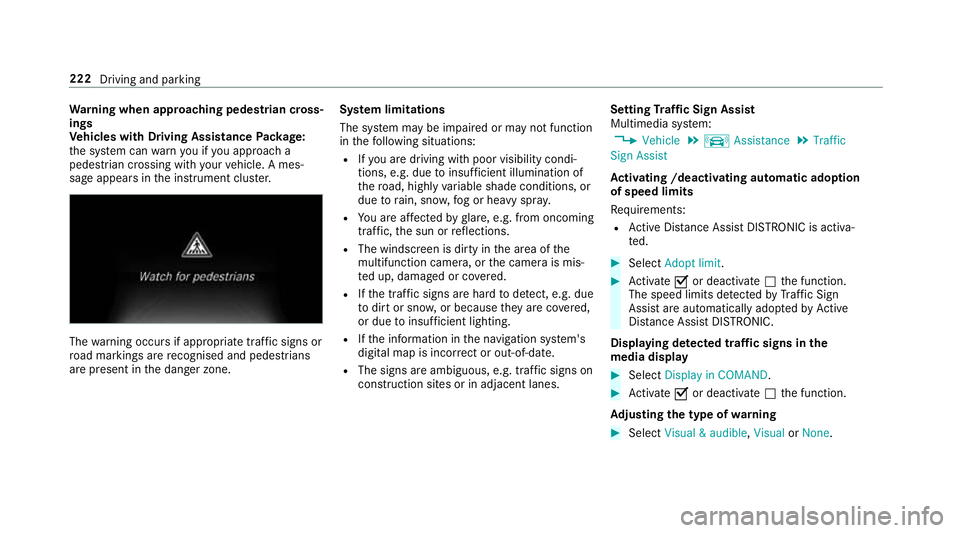
rning when app roaching pedestrian cross‐
ings
Ve hicles with Drivin gAssistanc ePacka ge:
th es ystemc anwarnyouify ou approac ha
pedestrian crossing wit hyour vehicle. Ames‐
sag eappears inthei nstrument clus ter. The
warning occur sifappropriat etraffic signs or
ro ad markings ar erecognised and pedestrians
ar ep resent in thed anger zone. Sy
stem limitations
The sy stem ma ybeimpaired or ma ynotfunction
in thef ollowing situations:
R Ifyo ua redrivin gwithp oor visibilit ycondi‐
tions ,e.g.d ue toinsuf ficient illumination of
th er oad, highly variable shade conditions, or
due torain, sno w,fogorh eavy spr ay.
R Youa reaffected byglare, e.g .fro mo ncoming
traf fic, thes un or reflections.
R The windscreen is dirty in thea reaoft he
multifunction camera, or thec amer aism is‐
te du p, damaged or co vered.
R Ifth et raffic signs ar ehardtod etect, e.g. due
to dir tors now, or because they arec ove red,
or due toinsuf ficient lighting.
R Ifth ei nformation in then avigation sy stem's
digital map is incor rect or out-of-da te.
R The signs ar eambiguous, e.g. traf fics igns on
construction sites or in adjacent lanes. Setting
Traf ficS ign Assist
Multimedia sy stem:
, Vehicle .
k Assistance .
Traffic
Sign Assist
Ac tivatin g/deacti vatin ga utomati cadoption
of speed limits
Re quirements:
R ActiveD ista nce Assi stDISTRONI Cisactiva‐
te d. #
Select Adopt limit. #
Activate Oor deacti vate ª thef unction.
The speed limits de tected byTraf ficS ign
Assi starea utomaticall yadop tedbyA ctive
Dis tance Assi stDISTRONIC.
Displ aying de tected traf fics igns in the
media display #
Select Display in COMAND . #
Activate Oor deacti vate ª thef unction.
Ad justin gthe type of warning #
Select Visual&audible ,Visual orNone. 222
Driving and parking
Page 226 of 533
Ad
justin gthe warning threshold
This value de term ines thes peed at whic ha
wa rning is issued when exceeded. #
Select Warning threshold. #
Setthe desired speed. Night
View Assist Fu
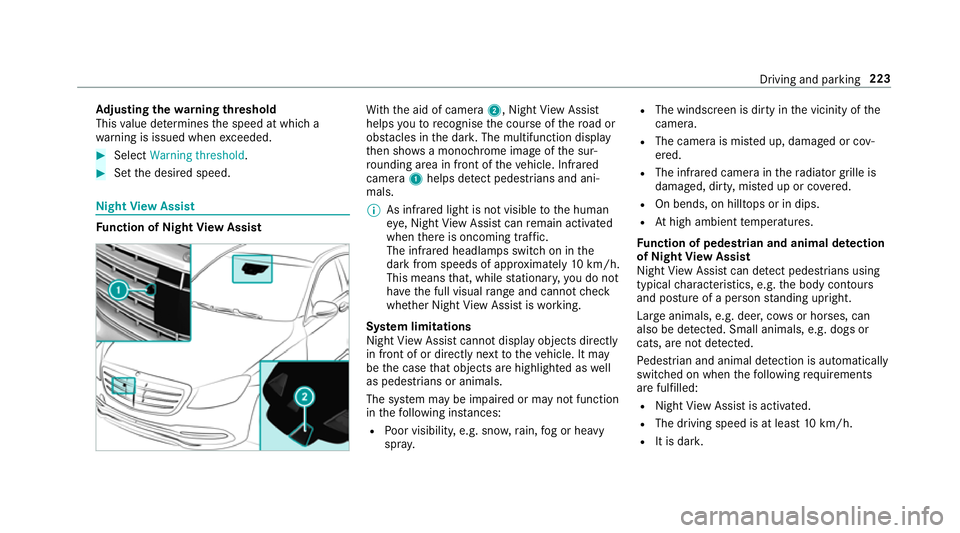
nction of Night View Assist Wi
th th eaid of camera 2,NightView Assi st
helps youtor ecognise thec ourse of ther oad or
obs tacle sint he dar k.The multifunction display
th en sho wsam onochrome imag eofthe sur‐
ro unding area in fron tofthevehicle. Infrared
camera 1helps de tect pedestrians and ani‐
mals.
% As infrared light is no tvisible totheh uman
ey e, Night View Assi stcan remain activated
when ther eiso ncoming traf fic.
The infrared headlamps switc honinthe
dar kfroms peeds of appr oximatel y10km/h.
Thi sm eans that, while stationar y,yo udon ot
ha ve thef ull visual rang ea nd canno tcheck
whe ther Night View Assi stiswo rking.
Sy stem limitations
Night View Assi stcanno tdispl ay object sdirectly
in front of or directl ynexttot hevehicle. It may
be thec ase that object sarehighlighted as well
as pedestrians or animals.
The sy stem ma ybeimpaired or ma ynotfunction
in thef ollowing ins tances:
R Poor visibility ,e.g. sno w,rain, fogorh eavy
spr ay. R
The windscreen is dirty in thev icinity of the
came ra.
R The camer aismiste du p, damaged or cov‐
ered.
R The infrared camera in ther adiator grille is
damaged, dirty ,miste duporc overed.
R On bends, on hilltops or in dips.
R Athigh ambient temp eratures.
Fu nction of pedestrian and anima ldetection
of Night View Assist
Nigh tViewA ssistcan de tect pedestrians using
typica lcharacteristics, e.g. theb ody conto urs
and postur eofapersonstanding upright.
Lar geanimals, e.g .deer ,cows or horses, can
also be de tected. Smal lanimals, e.g. dog sor
cats, ar enotdetected.
Pe destrian and animal de tection is au tomatically
switched on when thef ollowing requ irements
ar ef ulfilled:
R Night View Assi stis activated.
R The drivin gspeed is at leas t10k m/h.
R It is da rk. Driving and pa
rking 223
Page 232 of 533
Sy
stem limitations
No lane-cor recting brak eappli cation occu rsin
th ef ollowing situations:
R Youc lear lyand activel ysteer,b rake or accel‐
erate.
R Youh ave switched on thet urns ignal indica‐
to r.
R Adriving sa fety sy stem inter venes, su chas
ESP ®
,A ctiv eBrake Assi stor ActiveB lind
Spo tAssist.
R Youh ave adop tedas porty driving stylew ith
high cornering speeds or high ratesofa ccel‐
eration.
R ESP ®
is deactivated.
R Ifal oss of tyr epressur eorad efectivetyre
has been de tected and displ ayed.
The sy stem ma ybeimpaired or ma ynotfunction
in thef ollowing situations:
R Ifth er eisp oor visibility ,e.g. due toinsuf fi‐
cient illumination of ther oad, highl yvariable
shade conditions, or due torain, sno w,fogor
heavy spr ay. R
Ther eisg lare, e.g. from oncoming traf fic, the
sun or reflections.
R Ifth er eisd irtont he windscreen in thev icin‐
ity of them ultifunction camer aorthe camera
is mis tedu p, damaged or obscured.
R Noor se veral, unclear lane markings are
presen tfor one lane, e.g. near roadwor ks.
R The lane markings ar eworn, dar korcovered.
R The dis tance tothev ehicle in front is too
small and thel ane marking sthus canno tbe
de tected.
R The lane markings chang equickl y,e.g. lanes
branc hoff,c ross one ano ther or mer ge.
R The car riag ew ay isvery nar row and winding.
Ve hicles with Drivin gAssistanc epacka ge or
Driving Assistance Plus pa ckage: ActiveL ane
Ke eping Assis tuses radar sensor stomonitor
se verala reas around thev ehicle. If ther adar
senso rsinther ear bumper ar edirty or co vered
wit hs now, thes ystemm aybe impaired or may
no tfunction .Ifano bstacle in thel ane in which
yo ua redrivin ghas been de tected, no lane-cor‐
re cting brak eappli cation occu rs. Ac
tivatin gActive Lan eKeeping Assist &
WARNING Risk of accident despi te
Ac tiveL aneK eeping Assis twarning
Al ane-cor recting brak eappli cation cannot
al wa ys bring thev ehicle bac kintot he origi‐
nal lane. #
Alw ayss teer,b rake or accelera teyour‐
self ,especiall yifActiveLaneK eeping
Assis twarns youorm akesalane-cor‐
re cting brak eappli cation. &
WARNING Risk of accident despi teinter‐
ve ntio nofA ctiveLaneK eeping Assist
Ac tiveL aneK eeping Assis tdoes no tdetect
traf ficc onditions or road users. In very rare
cases, thes ystem ma ymakeani nappropri‐
at eb rake application, e.g. af teri ntentional ly
driving overas olidl ane marking.
The brak eapplication can be inter rupte dat
an yt ime if yous teer slightl yinthe opposite
direction. Driving and parking
229
Page 475 of 533
Displa
ymessages
Possible causes/consequences and M
MSolutions
Adaptive Highbeam Assist
Plus Camera view restric-
ted See Owner's Manual *T
he camer aviewisr estricted. Possible causes:
R dirtont he windscreen in thec amera's field of vision
R heavy rain, sno worfog
Driv ings ystems and driving saf etys yst ems ma ybemalfunctioning or temp orarily una vailable.
Onc ethe cause of thep roblem is no longer present ,driving sy stems and driving saf etys yst ems ar eavailable again.
If th ed ispla ymessag edoes no tdisappear: #
Pull overand stop thev ehicle safely as soon as possible, paying attention toroad and traf ficc onditions. #
Clea nthe windscreen. Wa
rning and indicator lamps Overvie
wofwarningand indicator lamps Som
esystems per form aself-tes twhen thei gni‐
tion is switched on. Some warning and indicator
lamps ma ybriefly light up or flash. This behav‐
iour is non-critical. Thes ewarning and indicator
lamps onl yindicat eamalfunction if they light up
or flash af tert he engine is star tedord uring a
journe y. Instrument displa
yinthe widesc reen cockpit Prog
ressiv esetting (widescreen cockpit) 472
Displaymessa gesa nd warning/indicator lamps
Page 476 of 533
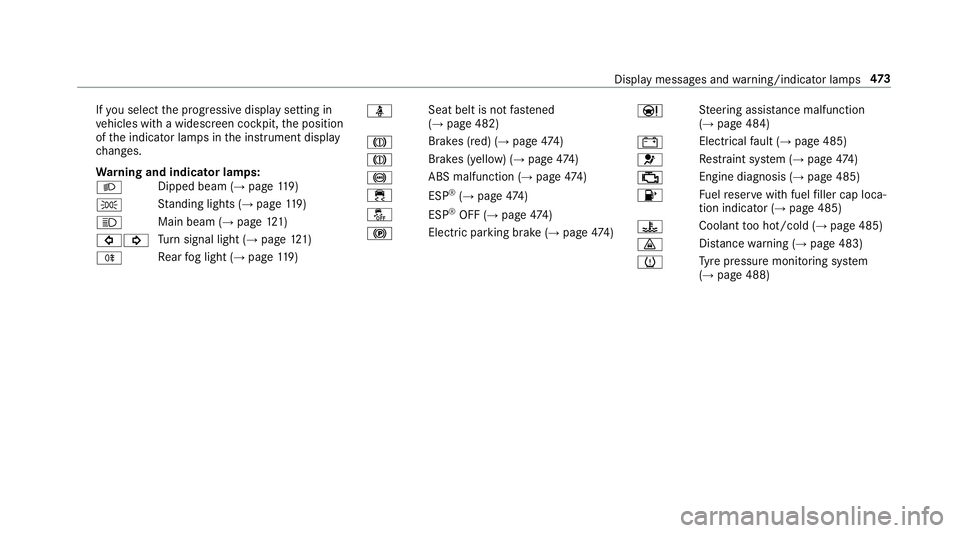
If
yo us elect thep rogressiv edispla ysetting in
ve hicles wit hawidescreen cockpit, thep osition
of thei ndicator lamps in thei nstrument display
ch anges.
Wa rning and indicator lamps:
L Dipped beam (→
page119 )
T St
anding light s(→pag e119 )
K Main beam (→
page121 )
#! Tu
rn signal light (→ page121 )
R Re
ar fogl ight (→ page119 ) ü
Seat bel
tisnotfast ened
(→ pag e482)
J Brakes (red) (→
page474 )
J Brakes (yell
ow)(→pag e474 )
! ABS malfunction (→
page474 )
÷ ESP®
(→ page 474)
å ESP®
OFF (→ page474 )
! Electric parking brak
e(→pag e474 ) Ð
St
eering assis tance malfunction
(→ page 484)
# Electrical
fault (→ page485)
6 Re
stra int sy stem (→ page474 )
; Engine diagnosis (→
page485)
8 Fu
elreser vewit hfuel filler cap loca‐
tion indicator (→ page485)
? Coolant
tooh ot/cold (→ page485)
· Dis
tance warning (→ page483)
h Ty
re pressur emonitoring sy stem
(→ pag e488) Displa
ymessages and warning/indicator lamps 473
Page 509 of 533
Knee airbag
................................................ 37L
Laden Notes. .................................................. 102
St ow ages pac eunde rthe boo tfloor ... .110
Lamp see In terior lighting
Lam p(Instrument Display)
see Warning/indicator lamps
Lane Keeping Assist
see ActiveL aneK eeping Assist
Language Notes. ................................................. 268
Setting. ................................................2 68
LEDl ight
see Intelligent Ligh tSystem
Le velc ontrol sy stem
see AI RBODYC ONTROL
see MAGIC BODY CONTROL
Light switch Overvie w.............................................. 11 9Lighting
see Lights
Lights ........................................................ 11 9
Ac tiveh eadlamps function .. ................ 12 2
Ad aptiv eHighbeam Assis tPlus ............ 124
Ad justing thei nstrument lighting ........ 233
Au tomatic driving lights ....................... 12 0
Combination swit ch............................. 121
Corne ring light ..................................... 12 3
Dippe dbeam. ...................................... .119
Driving ab road .................................... .119
Fo glight (extended range) ................... 12 3
Haza rdwa rning light s......................... .122
Headla mpflasher ................................ .121
Intellige nt Light Sy stem ....................... 12 2
Light switc h.........................................1 19
Main beam ...........................................1 21
Mo torw ay mode ................................... 12 3
Pa rking light s....................................... 11 9
Re ar fogl ight ....................................... 12 0
Re sponsibility forl ighting sy stems .......1 19
Setting thed ipped beam ..................... 12 5
Setting thes urround lighting .............. .125
St anding light s..................................... 11 9
Tu rn signal light .................................... 121Limiter
...................................................... 181
Buttons ................................................ 182
Callin gupas peed............................... 182
Fu nctio n............................................... 181
Pa ssiv emode ....................................... 181
Pe rm anen tsetting .............................. .183
Re quirements: .................................... .182
Selecting ............................................. 182
Setting aspeed ................................... 182
St oring aspeed ................................... 182
Switching of f....................................... 182
Switching on ........................................ 182
Sy stem limitations ...............................1 81
Limiting speed see Limiter
LINGU ATRO NIC ........................................ 241
Application specific voice commands
............................................................ .242
Au dible help function s......................... 24 3
Entering numbe rs................................ 24 3
Global voice command s..................... .242
Impr oving speec hqualit y..................... 24 3
Languag esetting ................................. 24 3
Media pla yerv oice commands ............ 250
Messag evoice commands ................... 251 506
Index
Page 516 of 533
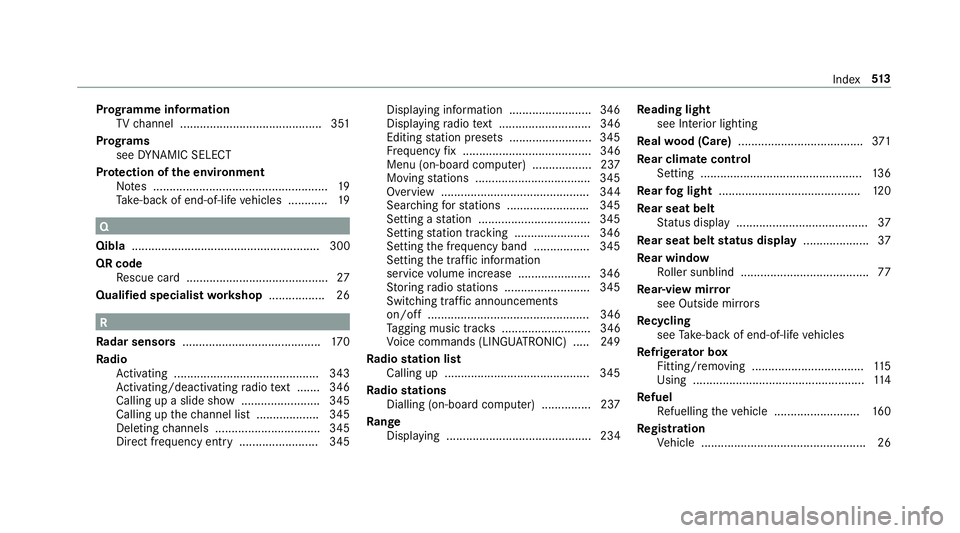
Prog
ramme in form ation
TV channel .......................................... .351
Prog rams
se eD YNAMI CSELECT
Pr otection of thee nvironment
No tes. .................................................... 19
Ta ke -ba ckof end-of-lif evehicles ............ 19 Q
Qibla ......................................................... 300
QR code Rescue car d...........................................27
Qualified specialis tworks hop ................. 26 R
Ra dar senso rs.......................................... 17 0
Ra dio
Ac tivating ............................................ 343
Ac tivating/deactivating radio text ....... 346
Calling up aslide show........................ 345
Calling up thec hannel lis t................... 345
Deleting channels ................................ 345
Direct frequenc yentry ........................ 345 Displaying information ......................... 346
Displaying
radio text ............................ 346
Editing statio npresets ........................ .345
Fr equency fix. ...................................... 346
Menu (on-boa rdcompu ter) .................. 237
Moving stations .................................. .345
Overvie w............................................. 344
Sear ching fors tations ........................ .345
Setting astatio n. ................................ .345
Setting statio ntrack ing. ...................... 346
Settin gthe frequency band ................. 345
Setting thet raffic in form ation
service volume inc rease ...................... 346
St oring radio stations .......................... 345
Swit ching traf fica nnouncements
on/of f................................................. 346
Ta gging music trac ks........................... 346
Vo ice command s(LINGU ATRO NIC) .....2 49
Ra dio station list
Calling up ............................................ 345
Ra dio stations
Dialling (on-boa rdcompu ter) ............... 237
Ra nge
Displaying ............................................ 234 Re
ading light
see Interior lighting
Re alwo od (Care) ...................................... 371
Re ar climat econtrol
Setting ................................................. 13 6
Re ar fogl ight ...........................................1 20
Re ar seat belt
St atus displa y....................................... .37
Re ar seat bel tstatus display .................... 37
Re ar window
Ro ller sunblin d....................................... 77
Re ar-vie wmirror
see Outside mir rors
Re cycling
see Take -ba ckof end-of-lif evehicles
Re frigerator box
Fitting/removing .................................. 11 5
Using .................................................... 11 4
Re fuel
Re fuelling thev ehicle .......................... 16 0
Re gistration
Ve hicle .................................................. 26 Index
513