ESP MERCEDES-BENZ S-CLASS COUPE 2017 Owner's Manual
[x] Cancel search | Manufacturer: MERCEDES-BENZ, Model Year: 2017, Model line: S-CLASS COUPE, Model: MERCEDES-BENZ S-CLASS COUPE 2017Pages: 533, PDF Size: 10.75 MB
Page 105 of 533
R
Sea theater: distribution of theh eated sec‐
tion soft he seat cushion and seat backrest
R Driver's side: steering wheel position and
position of theo utside mir rors on thed rive r's
and front passenger sides
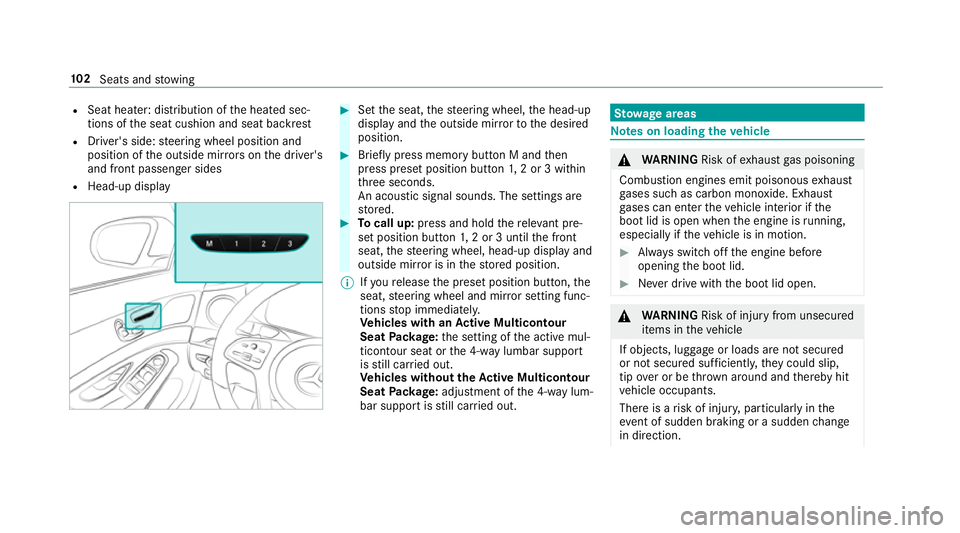
R Head-up display #
Setthe seat, thes teering wheel, theh ead-up
displa yand theo utside mir rortot he desired
position. #
Brief lypress memor ybutton Mandthen
press prese tposition button 1,2or3w ithin
th re es econds.
An acoustic signal sounds. The settings are
st ored. #
Tocall up: press and hold ther ele vant pre‐
se tp osition button1,2or3u ntilthef ront
seat, thes teering wheel, head-up displa yand
outside mir rorisint hestored position.
% Ifyo ur elease thep rese tp osition button, the
seat, steering wheel and mir rors etting func‐
tions stop immediatel y.
Ve hicles with an Activ eM ulticon tour
Seat Package: thes etting of thea ctiv em ul‐
ticon tour seat or the4 -way lumbar support
is still car ried out.
Ve hicles without theA ctive Multicon tour
Seat Package: adjustment of the4 -way lum‐
bar suppor tisstillc arried out. St
ow agea reas Note
sonl oading thev ehicle &
WARNING Risk ofexhaus tgas poisoning
Combustio nengines emit poisonous exhaust
ga ses suc hascarbon monoxide. Exhaust
ga ses can enter thev ehicle interior if the
boo tlid is open when thee ngine is running,
especially if thev ehicle is in motion. #
Alw ayss witc hoffthee ngine before
opening theb ootlid. #
Neverd rive wit hthe boo tlid open. &
WARNING Risk of inju ryfrom unsecu red
items in thev ehicle
If objects, luggag eorloads ar enotsecured
or no tsecured suf ficientl y,they could slip,
tip ove rorbet hrow na roun da nd thereb yhit
ve hicle occupants.
Ther eisar isk of inju ry,p articularly in the
ev ent of sudden braking or asudden change
in direction. 102
Seats and stowing
Page 109 of 533
Skibag
Un
folding thet hrough-load ski bag and load‐
ing skis &
WARNING Risk of inju rydue tousin gthe
th ro ugh-load sk ibag incor rectly
The thro ugh-load sk ibag in conjunctio nwith
th el ashing stra ps cann otrestra in any
object sother than skis.
Ve hicle occupants could be stru ck inthe
ev ent of sudden braking or an acciden tinthe
fo llowing cases:
R Ifyo ut ranspo rtother heavy or sharp-
edged objectsint hethro ugh-load sk ibag
R Ifyo udon otsecur ethe thro ugh-load ski
bag wit hthe lashing stra ps #
Onlystore skis in thet hrough -load ski
bag. #
Alw ayss ecur ethe thro ugh-load sk ibag
wit hthe lashing stra ps so that it cannot
mo vearound. Ensur
ethe following when using thet hrough-
loads kibag:
R do no ttranspo rtmor ethan thre ep airsof
skis in thet hrough -load sk ibag
R when carefull ysliding thes kis int oorremov‐
ing them from thet hrough -load sk ibag, mind
th es har pedges and corner softhe skis
St ow thes kis as follo ws:
R when slidin gthe skis in, position ther unning
sur faces of ther espectiv epair of skis
to ge ther
R position one pair of skis at theb otto mw ith
th et ips of thes kis pointing outwards
R position thet wo additional pair sofskis on
th el efta nd right-hand side abo vethel ower
pair of skis wit hthe tips of thes kis ar eby
90° tothet ips of thes kis below Un
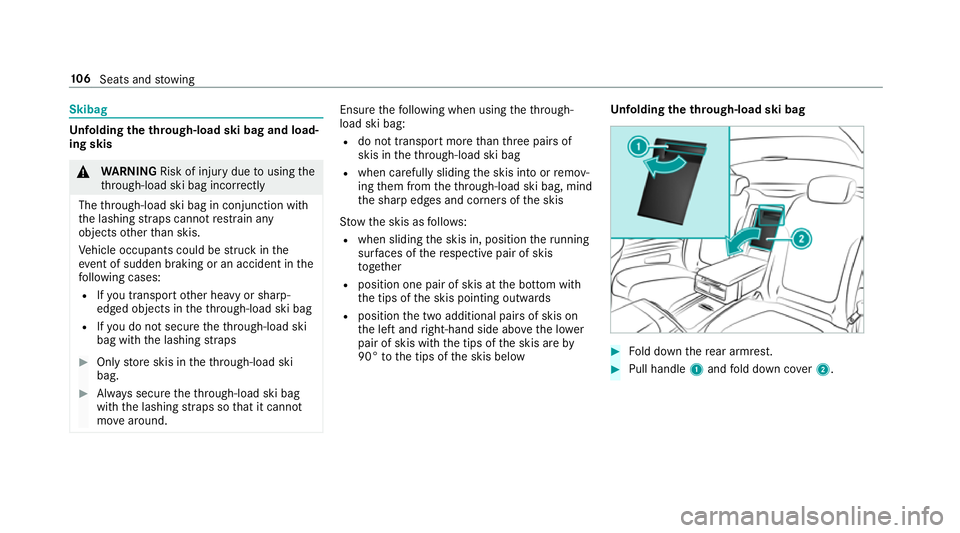
folding thet hrough-load ski bag #
Fold down ther ear armrest. #
Pull handle 1and fold down co ver2. 106
Seats and stowing
Page 119 of 533
Fi
tting #
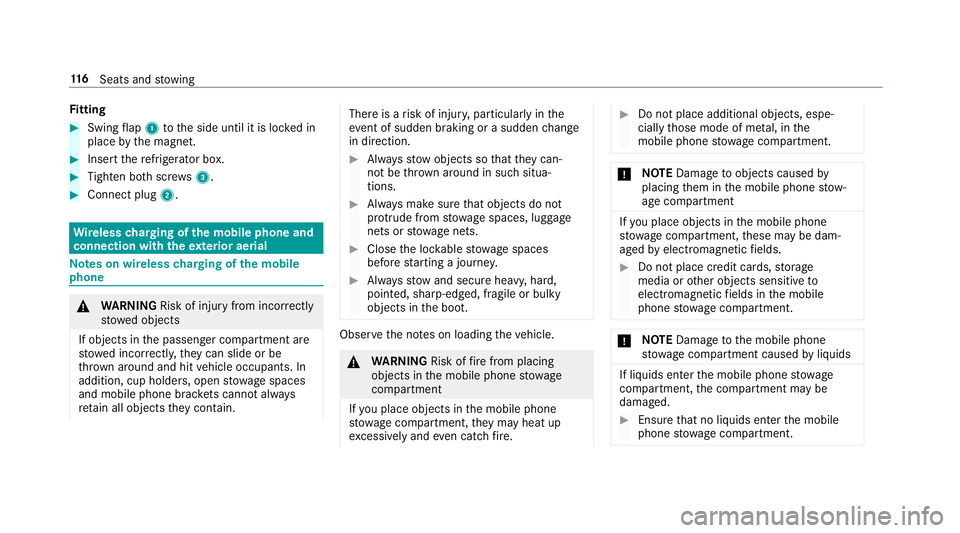
Swing flap 1 tothes ide until it is loc kedin
place bythem agnet. #
Inser tthe refrigerator box. #
Tighten bo thscr ews 3. #
Connect plug 2. Wire
lesschargin goft he mobile phone and
connection with thee xterior aerial Note
sonw ireless chargin goft he mobile
phone &
WARNING Risk of inju ryfrom incor rectly
stowe dobjects
If objects in thep assenger compartmen tare
stowe dincor rectl y,they can slide or be
th ro wn around and hit vehicle occupants. In
addition, cup holders, open stowages paces
and mobile phon ebrack etsc ann otalw ays
re tain all object stheyc ontain. The
reisar isk of inju ry,p articularly in the
ev ent of sudden braking or asudden change
in direction. #
Alw ayss towo bjectssot hatthey can‐
no tb ethrow na roun dins uchs itua‐
tions. #
Alw aysm akes uret hat objectsdon ot
pr otru de from stowages paces, luggage
nets or stowagen ets. #
Close thel oc kable stow ages paces
befor estarti ngajou rney. #
Alw ayss towa nd secur eheavy ,hard,
poin ted, sharp-edged, fragile or bulky
objects in theb oot. Obser
vethen otes on loading thev ehicle. &
WARNING Risk offire from placing
objects in them obile phone stowage
compartment
If yo up laceo bject sinthe mobile phone
stow agec ompartment ,the ym ayheat up
exc essively and evencatc hfire. #
Do no tplace additional objects ,espe‐
ciall ythose mode of me tal, in the
mobil ephone stowagec ompartment. *
NO
TEDama getoobject scaused by
placing them in them obile phone stow‐
ag ec ompartment If
yo up laceo bject sinthe mobile phone
stow agec ompartment ,these ma ybedam‐
aged byelectromagnetic fields. #
Do no tplace credit cards, storage
media or other objectss ensitiveto
electromagnetic fields in them obile
phone stowagec ompartment. *
NO
TEDama getothem obile phone
stow agec ompartment caused byliquids If liquids enter
them obile phone stowage
compartment ,the compartment ma ybe
damaged. #
Ensur ethat no liquids enter them obile
phone stowagec ompartment. 11 6
Seats and stowing
Page 122 of 533
Exterior lighting
Note
sonc hanging thel ight swhen driving
abroad Ve
hicles with static LEDh eadlamps: it is not
necessa ryto chang ethe headlamps. The legal
re qu irements ar ealso me tincountries where
traf ficd rive sont heother side of ther oad.
Ve hicles with Intelligent Light Sy stem: before
crossin gthe border int ocount ries wher ethey
driv eont heother side of ther oad, it is neces‐
sar ytos ettheh eadlamps tosymmetrical dipped
beam (→ page127).
Af tert he headlamps ar echanged:
R oncoming traf ficisn otdazzled
R thee dgeoft heroad is no tilluminated as far
or as high
R the" mo torw ay mode" and "enhanced fog
light "function sarenota vailable.
The headlamps mus tberesettoa symm etrical
dippe dbeamw heny ou retur nfroma broad. Ligh
ting sy stems and your responsibility The
various lighting sy stems of thev ehicle are
onl yaids. The driver of thev ehicle is responsible
fo rc orrect vehicle illumination in accordance
wit hthe pr evailing light and visibilit yconditions,
legal requirements and traf fics ituation. Light switch
Ope
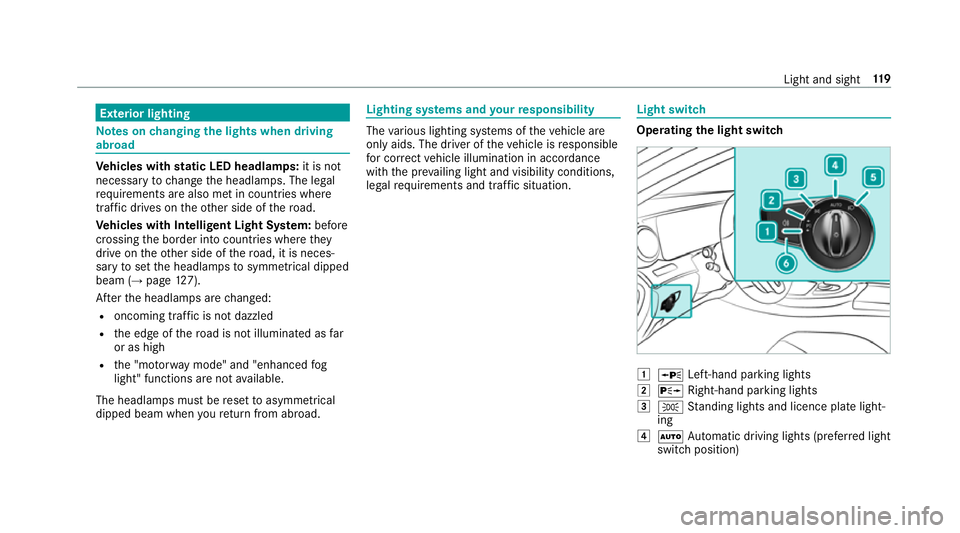
ratin gthe light switch 1
W Left-hand pa rking lights
2 X Right-hand parkin glights
3 T Standing light sand licenc eplatelight‐
ing
4 Ã Automatic driving lights (prefer redl ight
switc hposition) Light and sight
11 9
Page 123 of 533
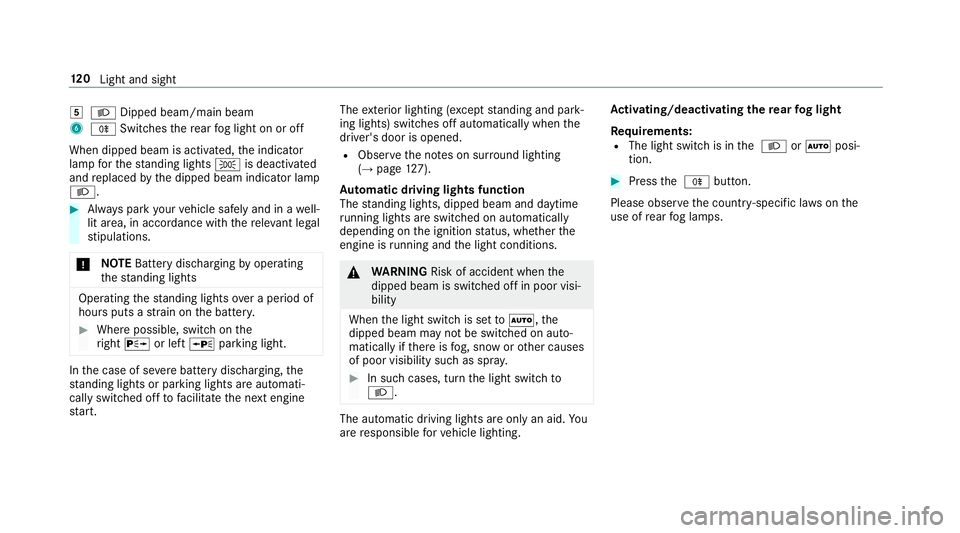
5
L Dippe dbeam/ main beam
6 R Switche sthe rear fogl ight on or off
When dipped beam is activated, thei ndicator
lam pfor thes tanding lights Tis deactivated
and replaced bythed ipped beam indicator lamp
L. #
Alw aysp arky our vehicle safely and in awell-
lit area, in accordance wit hthe releva nt le gal
st ipulations.
* NO
TEBatter ydisch arging byoperating
th es tanding lights Operatin
gthe standing light soverap eriod of
hour sputs astrai nont he batter y. #
Wher epossible, switc honthe
ri ght X or left Wparking light. In
thec ase of se vere batter ydischarging, the
st anding light sorparkinglight sareautomati‐
call yswit ched of ftofacilitat ethe next engine
st art. The
exterior lighting (e xcep ts tanding and park‐
ing lights) swit ches of fautomaticall ywhen the
driver's door is opened.
R Obser vethen otes on sur round lighting
(→ pag e127).
Au tomatic drivin glights function
The standing lights, dipped beam and daytime
ru nning lights ar eswitched on au tomatical ly
dependin gonthe ignition status ,whether the
engine is running and thel ight conditions. &
WARNING Risk of accident whe nthe
dipped beam is switched of finpoor visi‐
bility
When thel ight switc hissetto à ,the
dipped beam ma ynotbe switched on auto‐
matically if ther eisf og, sno worother causes
of poor visibility suc hasspray. #
In suc hcases, tur nthe light switc hto
L . The automatic driving lights ar
eonlyana id.Yo u
ar er esponsibl efor vehicle lighting. Ac
tivating/deactivatin gthe rear fogl ight
Re quirements:
R The light switc hisintheL orà posi‐
tion. #
Press theR button.
Please obser vethec ount ry-specific la wsonthe
use of rear fogl amps. 12 0
Light and sight
Page 124 of 533
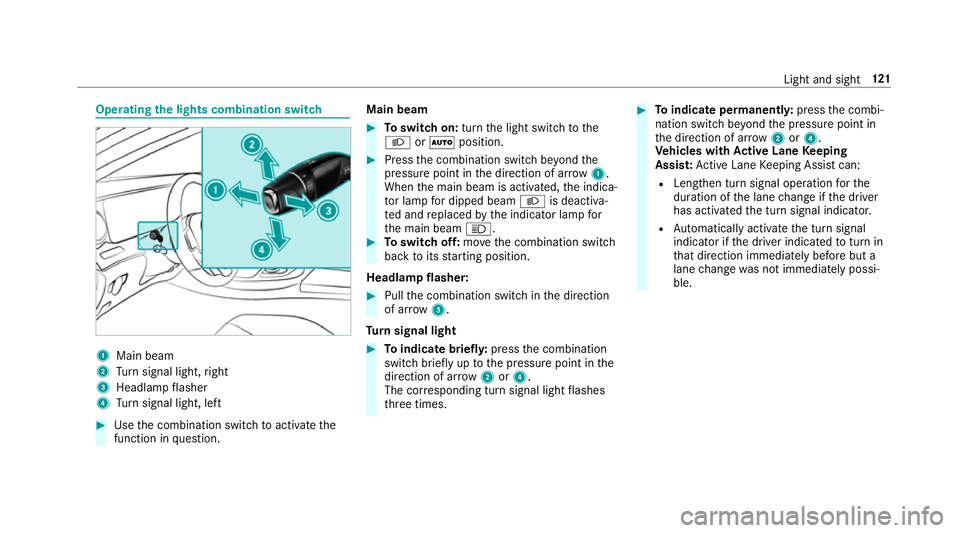
Operating
thel ight scombination switch 1
Main beam
2 Turn signal light, right
3 Headlam pflasher
4 Turn signal light, left #
Use thec ombination switc htoactivatethe
function in question. Main beam #
Toswitc hon:tur nthe light switc htothe
L orà position. #
Press thec ombination switc hbeyond the
pressur epoint in thed irection of ar row1.
When them ain beam is activated, thei ndica‐
to rlam pfor dipped beam Lis deactiva‐
te da nd replaced bythei ndicator lam pfor
th em ain beam K. #
Toswitc hoff:mo vethec ombination switch
bac ktoi tsstartin gposition.
Headla mpflasher: #
Pullthe combination switc hinthe direction
of ar row3.
Tu rn signal light #
Toindicat ebriefl y:press thec ombination
switc hbriefly up tothep ressur epoint in the
direction of ar row2or4.
The cor responding tur nsignal light flashes
th re et imes. #
Toindicat epermanentl y:press thec ombi‐
nation switc hbeyond thep ressur epoint in
th ed irection of ar row2or4.
Ve hicles with Activ eL aneK eeping
Assis t:Ac tiveL aneK eeping Assis tcan:
R Lengthen tur nsignal operation fort he
duration of thel ane chang eift he driver
has activated thet urns ignal indicator.
R Automatical lyactivat ethe tur nsignal
indicator if thed rive rindicated totur nin
th at direction immediatel ybefor ebut a
lane chang ewas no timmediately possi‐
ble. Light and sight
121
Page 127 of 533
Multimedia sy
stem:
, Vehicle .
÷ Light settings .
Intell.
Light System #
Activate Oor deacti vate ª thef unction. Ad
aptiv eHighbeam Assis tPlus Ad
aptiv eHighbeam Assis tPlus function &
WARNING Risk of accident despi te
Ad aptiv eHighbeam Assis tPlus
Ad aptiv eHighbeam Assis tPlus does no trec‐
ognise thef ollowing road users:
R Road user swithout lights, e.g .pedes‐
trians
R Road user swithp oor lighting ,e.g.
cyclists
R Road user swhos elighting is obstructed,
e.g .bya barrier
On very rare occasions, Adaptiv eHighbeam
Assis tPlus ma yfail torecognise other road
user sthat ha velights, or ma yrecognise
th em tool ate. In
this, or in similar situations ,the automatic
main beam will no tbedeactivated or will be
activated despit ethe presence of other road
users. #
Alw ayso bser vethet raffic carefull yand
switc hoffthem ain beam in good time. Sy
stem limitations
Ad aptiv eHighbeam Assis tPlus canno ttak ei nto
account road, weather or traf ficc onditions.
De tection ma yberestricted if:
R Visibility is impaired, fore xamp le in fog,
heavy rain or sno w.
R Ther eisd irtont he sensor sorthe sensors
ar eo bscured.
Ad aptiv eHighbeam Assis tPlus is on lyan aid.
Yo ua re re sponsible fora dju sting thev ehicle's
lighting tothep reva ilin glight ,visibilit yand traf‐
fi cc onditions. Ad
aptiv eHighbeam Assis tPlus swit ches auto‐
maticall ybetwe en:
R Dipped beam
R Partial main beam
R Main beam
The partial main beam uses them ain beam to
shine pas tother road user srather than dazzling 124
Light and sight
Page 133 of 533
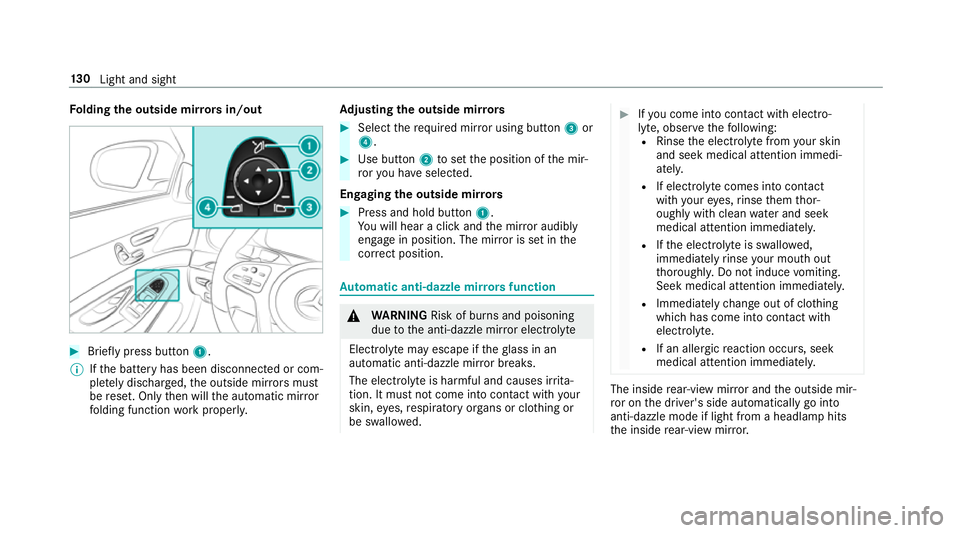
Fo
lding theo utside mir rors in/out #
Brief lypress button 1.
% Ifth eb atter yhas been disconnected or com‐
ple tely discharged ,the outside mir rors must
be reset. Onl ythen will thea utomatic mir ror
fo lding function workproperly. Ad
justin gthe outside mir rors #
Select ther equired mir roru sing button 3or
4. #
Use button 2tosetthe position of them ir‐
ro ry ou ha veselected.
Engaging theo utside mir rors #
Press and hold button 1.
Yo uw ill hear aclicka nd them irro ra udibly
engag einposition .The mir roriss etinthe
cor rect position. Au
tomatic anti-dazzl emirro rs function &
WARNING Risk of bu rnsa nd poisoning
due tothea nti-dazzle mir rore lectrolyte
Electrolyt emayescap eiftheglass in an
automatic anti-dazzle mir rorb reaks.
The electrolyt eisharmful and causes ir rita‐
tion. It mu stnotc ome int ocontact wi thyour
skin, eyes,respirator yorgans or clo thing or
be swallo wed. #
Ifyo uc om eintoc ontact wit helectro‐
ly te ,o bser vethef ollowing:
R Rinse thee lectrolyt efromy our skin
and seek medical attention immedi‐
atel y.
R If electrolyt ecomes int ocontact
wit hyour eyes, rinse them thor‐
oughl ywithc lean waterand seek
medica lattention immediately.
R Ifth ee lectrolyt eisswallowe d,
immediatel yrins eyour mout hout
th oroughly .Donotinduce vomiting.
Seek medica lattention immediately.
R Immedia tely ch ang eout of clo thing
whic hhas com eintoc ontact wi th
electrolyte.
R If an allergic reaction occurs, seek
medical attention immediatel y. The inside
rear-vie wmirro ra nd theo utside mir‐
ro ront he driver's side automaticall ygointo
anti-dazzle mode if light from aheadlam phits
th ei nside rear-vie wmirro r. 13 0
Light and sight
Page 158 of 533
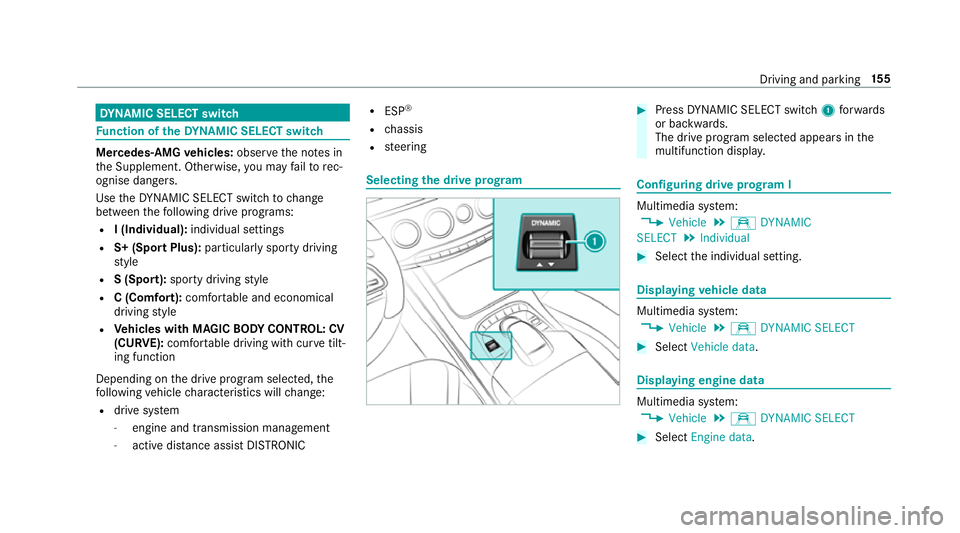
DY
NA MIC SELECT switch Fu
nction of theD YNAMI CSELECT switch Mercedes-AMG
vehicles: observet he no tesin
th eS upplement .Otherwise, youm ayfailto rec‐
ognise dangers.
Use theD YNAMI CSELECT switc htochange
between thef ollowing driv eprograms:
R I(Individual): individual settings
R S+ (Spor tPlus): particular lysporty driving
st yle
R S(Sport): sporty driving style
R C(Comfort): comfortable and economical
drivin gstyle
R Vehicles with MAGIC BODY CONT ROL: CV
(CURVE): comfortable drivin gwithc urve tilt‐
ing function
Depending on thed rive program selected, the
fo llowing vehicle characteristic swillch ange:
R driv esystem
- engine and transmission management
- activ edista nce assi stDISTRONIC R
ESP ®
R chassis
R steering Selecting
thed rive prog ram #
Press DYNA MIC SELECT switch 1forw ards
or backwards.
The driv eprogram selected appea rsinthe
multifunction displa y. Configuring driv
eprogram I Multimedia sy
stem:
, Vehicle .
e DYNAMIC
SELECT .
Individual #
Select thei ndividual setting. Displaying
vehicl edata Multimedi
asystem:
, Vehicle .
e DYNAMIC SELECT #
Select Vehicle data . Displaying engine data
Multimedia sy
stem:
, Vehicle .
e DYNAMIC SELECT #
Select Engine data. Driving and parking
15 5
Page 168 of 533
#
Hold remo tecontrol 5atvarious angles at
ad ista nce betwee n1cmto8cminf ront of
th ei nside rearvie wmirro r.Yo us hould test
eve ryposition foratl east 25 seconds before
trying ano ther position. #
Hold remo tecontrol 5atthes ame angles
at various dis tances in front of thei nside rear
vie wm irro r.Yo us hould test eve ryposition
fo ratl east 25 seconds befor etryinga nother
position. #
Notethat som eremo tecontrols transmit
only foral imitedp eriod, press button 6on
re mo tecontrol 5agai nbefor etransmission
ends. #
Align thea erial line of theg arag edoor
opener unit wit hthe remo tecontrol.
% Suppor tand additiona linformation on pro‐
gramming:
R OntheH omeLink ®
Hotline on (0) 08000
466 35 465or+ 49 (0) 6838 907-2 77.
R OntheI nterne tath ttp://
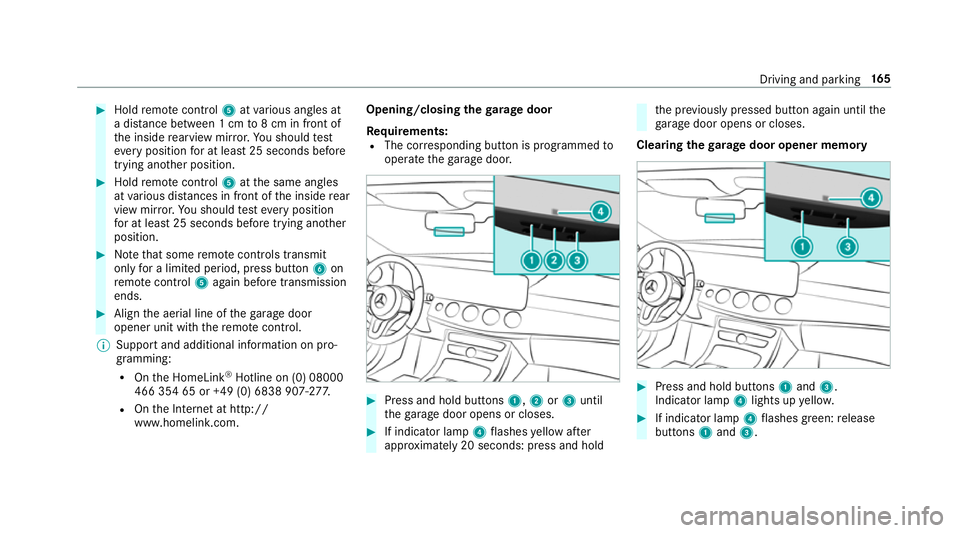
www.homelin k.com. Opening/closing the
garage door
Requ irements:
R The cor responding button is programmed to
operat ethe garage door. #
Press and hold buttons 1,2or3 until
th eg arag edoor opens or closes. #
If indicator lamp 4flashes yello wa fter
appr oximatel y20seconds :press and hold th
ep reviously pressed but tona gain until the
ga rage door opens or closes.
Clearing theg arag edooro pene rmemo ry #
Press and hold buttons 1and 3.
Indicator lamp 4lights up yello w. #
If indicator lamp 4flashes green: release
buttons 1and 3. Drivin
gand parking 16 5