ESP MERCEDES-BENZ S-CLASS COUPE 2017 Workshop Manual
[x] Cancel search | Manufacturer: MERCEDES-BENZ, Model Year: 2017, Model line: S-CLASS COUPE, Model: MERCEDES-BENZ S-CLASS COUPE 2017Pages: 533, PDF Size: 10.75 MB
Page 216 of 533
See
then otes on cleaning the3 60° Camera
(→ pag e372).
Selec tingav iewf or the 360° Camera
Re quirements:
R The Autoreversing camera function is selec‐
te dint he multimedia sy stem. #
Enga gereve rseg ear. #
Inthem ultimedia sy stem, select thed esired
vie w.
Switching reve rsing camer aautomatic mode
on/off
The reve rsing camer aisonlyana id. It is no ta
substitut efor your attentio ntothe sur roundings.
The responsibility fors afem anoeuvring and
parking remains wit hyou. Mak esuret hat no
persons, animals or objectse tc. areinthe
manoeuvring range. Paya ttention to your sur‐
ro unding sand be ready tobrak eata ll times.
Multimedia sy stem:
, Vehicle .
k Assistance .
Camera
&P ark. Assist .
Auto reversin gcamera #
Switc hthe function on Oor off ª. Opening
thec amer acove rofthe reve rsing
camera
Multimedia sy stem:
, Vehicle .
k Assistance .
Camera
&P ark. Assist #
Select Open camera cover.
% The camer acover closes automaticall yafter
some time or af terani gnitio ncycle.
Assigning thec amer aasaf avourite
Yo uc an call up thec amer aviewd irectly in the
multimedia sy stem byassignin gitasaf avourite. #
Press theò button on thet ouchpad or
contro ller.
The main function saredispla yed. #
Navigat edownwards twice.
The Favourites men uappears. #
Select New favourite. #
Select Vehicle . #
Select Camera. Ac
tiv eP arking Assist Fu
nction of Activ eP arking Assist
Ac tiveP arking Assis tisanelectronic pa rking
assis tance sy stem whic huses ultrasound and is
automaticall yactivated during forw ardt rave l.
The sy stem is operational at speeds of up to
appr oximatel y35k m/h.When all thec onditions
ar ef ulfilled, thec symbol appear sinthe
multifunction displa yand thes ystema utomati‐
cally sear ches fora nd measu resp arking spaces
on bo thsides of thev ehicle parallel and perpen‐
dicular tothed irection of tra vel. If ActiveP arking
Assis tisactivated, suitable parkin gspaces are
displa yedint he multimedia sy stem. The ë
symbol appear sinthe multifunction displa y.The
ar row sshowonw hichs ide of thec arriag eway
free parking spaces ar eloca ted.
The parkin gspace and, if necessar y,thep arking
direction can be selected as desired. Active
Pa rking Assis tcalculates asuitable vehicle path
and assists youinp arkingand exitin gthe park‐
ing space.
Ac tiveP arking Assis tchanges gear,a ccelerates,
brakes and steer sthe vehicle. Driving and parking
213
Page 217 of 533
Ac
tiveP arking Assis tisonlyana id. It is no ta
substitut efor your attentio ntothe sur roundings.
The responsibility fors afem anoeuvring and
parking remains wit hyou. Mak esuret hat no
persons, animals or objectse tc. areinthe
manoeuvring range.
Ac tiveP arking Assis tiscancelled if, among
ot her things ,one of thef ollowing actions is car‐
ri ed out:
R Youd eactivat eParking Assis tPARKTRONIC.
R Youd eactivat eActiv eParking Assist.
R Youb egin steering.
R Youa ppl ythe parking brake.
R Youe ngaget ransmission position j.
R ESP ®
inter venes.
R Youo pen theb ootlid.
Sy stem limitations
Object slocated abo veor belo wthe de tection
ra ng eofA ctiveParking Assis tare notd etected
when thep arking space is being measured.
These ar ealso no ttaken in toaccount when the
parkin gmanoeuvr eiscalculated, e.g. overhang‐
ing loads, overhangs or loading ramp sofl orries or
theb oundaries of parking spaces. In some cir‐
cums tances, ActiveP arking Assis tmaytherefore
guide youi ntot he parking space prematurel y. &
WARNING Risk of accident du eto
object slocated abo veor belo wthe
de tection rang eofA ctiveParking Assist
If th er ea reobjects abo veor belo wthe
de tection range, thef ollowing situations may
arise:
R ActiveP arking Assis tmaysteer tooe arly.
R Vehicles with automatic transmis‐
sion: Thevehicle ma ynotstop in front of
th ese objects.
This could cause acollision. #
Inthese situations, do no tuse Active
Pa rking Assist. Sn
owfa ll or heavy rain ma ylead toap arking
spac ebeingm easured inaccuratel y.Pa rking
spaces that ar epartial lyoccupied bytrailer
dr aw bar sm ight no tbeidentified as suc horbe
measured incor rectly .Only us eActiv eParking
Assis tonlevel, high-grip ground. Do no
tuse ActiveP arking Assis tinthefollowing
situations:
R Inextreme weather condition ssuchasi ce,
pac keds noworinh eavyrain.
R Ifyo ua retransportin gaload that pr otru des
be yond thev ehicle.
R Ifth ep arking space is on asteep downhill or
uphill gradient.
R Ifyo uh avei nstalled sno wchains.
Ac tiveP arking Assis tmayalso displa yparking
spaces that ar enotsuitable forp arking, e.g.:
R Parking spaces wher eparkin gisp rohibited.
R Parking spaces on unsuitable sur faces.
Ac tiveP arking Assis twill no tassis tyou with
parking spaces at right angles tothed irection of
tr ave lint hefollowing situations:
R If tw oparkin gspaces ar elocated immedi‐
atel ynexttoe acho ther.
R Ifth ep arking space is directly next toalow
obs tacle su chasalow kerb. 214
Driving and pa rking
Page 219 of 533
play: select
thec orresponding transmission
position.
The vehicle drives int othe selected parking
space.
On completion of thep arking procedure, the
Active Parking Assist finished, take contro lof
the vehicle. displaymessa geappears. Further
manoeuvring ma ystillben ecessar y. #
Afterc ompletion of thep arking procedure,
safeguar dthe vehicle agains trolling away.
When requ ired bylegal requirements or local
conditions: tur nthe wheels towa rdst he kerb.
% Youc an stop thev ehicle and chang ethe
transmiss ionp osit iond urin gthe parking pro‐
cedure. The sy stem then calculates anew
ve hicle path. The parking procedur ecan
th en be continued. If no ne wvehicle pat his
av ailable, thet ransmission position will be
ch anged again. If thev ehicle has no tyet
re ached thep arking space, thep arking pro‐
cedur ewill be cancelled, should agear be
ch anged. Exiting
aparki ng space wit hActive Parking
Assist
Re quirement:
Yo uc an on lyex itap arkin gspace wit hActive
Pa rking Assis tifyou ha veprev iousl yparke dt he
ve hicle wit hActiv eParking Assist.
Please no tethat youa re re sponsible fort he vehi‐
cle and sur rounding sduring thee ntir eparking
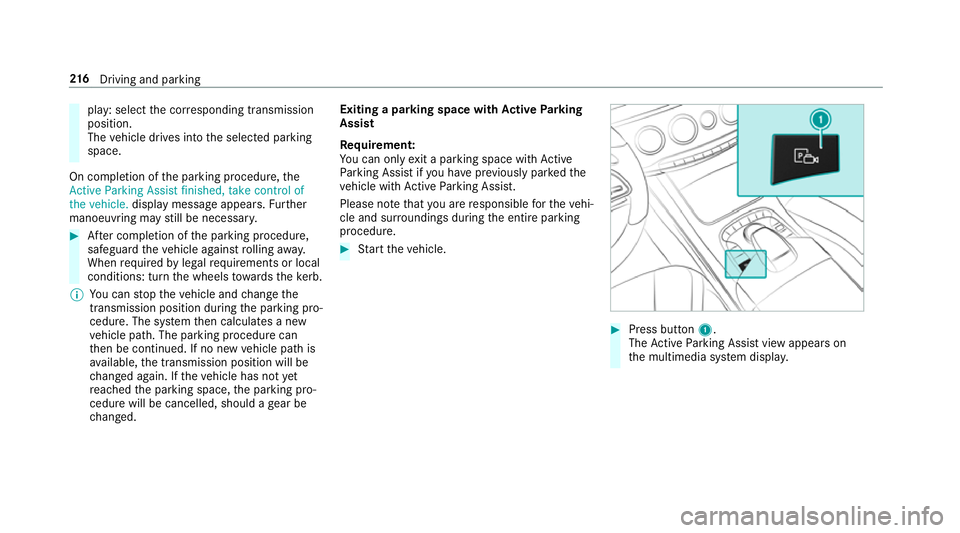
procedure. #
Startt he vehicle. #
Press button 1.
The ActiveP arking Assis tviewa ppear son
th em ultimedia sy stem displa y. 216
Driving and pa rking
Page 220 of 533
#
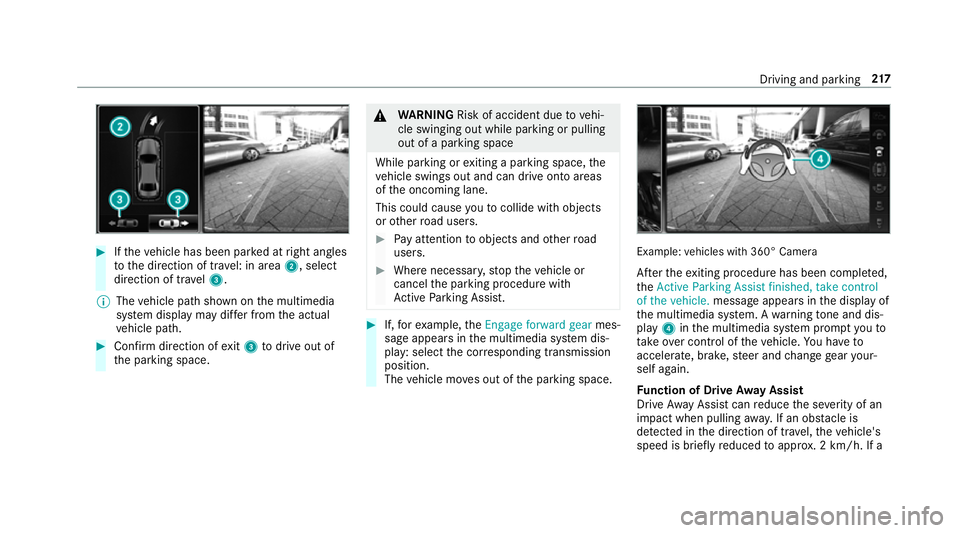
Ifth ev ehicle has been par kedatr ight angles
to thed irection of tra vel: in area 2,select
direction of tra vel3.
% The vehicle pat hshown on them ultimedia
sy stem displa ymaydifferf romt he actual
ve hicle path. #
Confir mdirection of exit3 todriv eout of
th ep arking space. &
WARNING Risk of accident du etovehi‐
cle swinging out while parking or pulling
out of aparking space
While parking or exitin gap arkin gspace, the
ve hicle swings out and can driv eontoa reas
of theo ncoming lane.
This could cause youtoc ollidewitho bjects
or other road users. #
Paya ttention toobject sand other road
users. #
Wher enecessar y,stop thev ehicle or
cancel thep arking procedur ewith
Ac tiveP arking Assist. #
If,fore xamp le,the Engage forward gear mes‐
sag eappear sinthe multimedia sy stem dis‐
play: select thec orresponding transmission
position.
The vehicle mo veso ut of thep arking space. Example:
vehicles wit h360° Camera
Af tert he exitin gprocedur ehas been comple ted,
the Active Parkin gAssist finished, take control
of the vehicle. messageappear sinthe displa yof
th em ultimedia sy stem. Awarning tone and dis‐
pl ay 4 inthem ultimedia sy stem prom ptyouto
ta ke over control of thev ehicle. Youh ave to
accelerate, brake, steer and chang egear your‐
self again.
Fu nction of Driv eAwayA ssist
Driv eAwayA ssistcan reduce thes eve rity of an
impact when pulling away.Ifano bstacle is
de tected in thed irection of tra vel,th ev ehicle's
speed is briefly reduced toappr ox.2 km/h .Ifa Driving and pa
rking 217
Page 221 of 533
critical situation is de
tected, asym bolapp ears
on thec amer aimag eoft he multimedia sy stem. &
WARNING Risk of accident caused by
limited de tection per form anc eofD rive
Aw ayAssi st
Driv eAwayA ssistcanno talway sc learly iden‐
tify objects and traf fics ituations.
In su chcases, Driv eAwayA ssistmight:
R Warnyouw ithout reason and limit the
ve hicle speed.
R Notw arny ou or no tlimit thev ehicle
speed. #
Alw aysp aycareful attention tothet raf‐
fi cs ituation; do no trely on Driv eAway
Assi stalone. #
Be prepared tobrak eors werveasn ec‐
essar y,prov ided thet raffic situation
permit sand that it is saf etotakee va‐
siv ea ction. Driv
eAwayA ssistis onl yana id. It is no tasub‐
st itut efor your attentio ntothe sur roundings. The
responsibility fors afem anoeuvring and
parking remains wit hyou. Mak esuret hat no
persons, animals or objectse tc. areinthe
manoeuvring range.
Ar isk of acollision ma yarise in thef ollowing sit‐
uations, fore xamp le:
R Ifth ed rive rm ixes up thea ccelera tora nd
brak epedals.
R Ifth ew rong gear is selec ted.
The Driv eAwayA ssistfunction is activ eunder
th ef ollowing conditions:
R IfPa rking Assis tPARKTRONIC is activated.
R Ever ytimet he gear is changed tok orh
when thev ehicle is at astandstill.
R Ifth ed etected obs tacle is less than appr ox.
1. 0ma way.
R Ifth em anoeuvring assis tance functio nis
acti vatedint he multimedia sy stem.
Sy stem limitations
Driv eAwayA ssistis no tavailable on inclines. Fu
nction of Cross Traf ficA lert
% Alsoread thei nstruction sonBlind Spot
Assis t(→ pag e227).
Ve hicles with Blind Spo tAssis t:driver scan
also be warned of an ycrossing traf ficw hen
re ve rsing out of aparkin gspace. If acritical sit‐
uation is de tected, awarning symbol appear son
th ec amer aimag eoft he multimedia sy stem. If
th ed rive rd oes no trespond tothew arning ,the
ve hicle's brakes can be applied automaticall y.To
do this, thef unction uses ther adar senso rsin
th eb umper .The area adjacen ttothevehicle is
continually monitored.
If th er adar senso rsareo bstructed byvehicles
or other objects, de tection is no tpossible.
The Cross Traf ficA lertfunction is acti veunder
th ef ollowing conditions:
R If Blind Spo tAssis tisa ctivated.
R Ifth ev ehicle is reve rsing at walkin gpace.
R Ifth em anoeuvring assis tance functio nis
acti vatedint he multimedia sy stem.
The Cross Traf ficA lertfunction is no tavailable
on inclines. 218
Driving and pa rking
Page 228 of 533
Displa
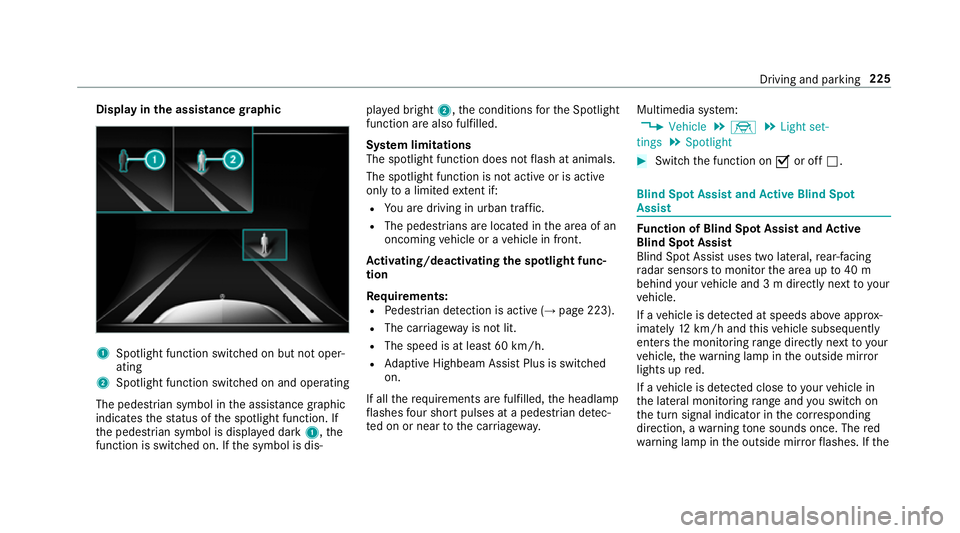
yinthe assistance graphic 1
Spotligh tfunction switched on but no toper‐
ating
2 Spotligh tfunction switched on and operating
The pedestrians ymbol inthea ssis tance graphic
indica test he status of thes potlight function .If
th ep edestrian symbol is displa yedd ark 1,t he
function is switched on. If thes ymbol is dis‐ pla
yedb right 2,t he conditions fort he Spotlight
function ar ealso fulfilled.
Sy stem limitations
The spotlight function does no tflash at animals.
The spotlight function is no tactiv eorisa ctive
on lyto alimited extent if:
R Youa redrivin ginurban traf fic.
R The pedestrians are loca tedint he area of an
oncoming vehicle or avehicle in front.
Ac tivating/deactivatin gthe spotlight func‐
tion
Re quirements:
R Pedestrian de tection is acti ve (→pag e223).
R The car riag ewa yisn otlit.
R The speed is at leas t60k m/ h.
R Adaptiv eHighbeam Assis tPlus is swit ched
on.
If all ther equirements ar efulfilled, theh eadlamp
fl ashes four sho rtpulses at apedestrian de tec‐
te donorn eartothec arriag ewa y. Multimedia sy
stem:
, Vehicle .
÷ .
Light set-
tings .
Spotlight #
Switc hthe function on Oor off ª. Blind Spo
tAssis tand Activ eB lind Spot
Assi st Fu
nction of Blind Spo tAssis tand Active
Blind Spo tAssist
Blind Spo tAssistuses tw olateral, rear-facing
ra dar sensor stomonitor thea reaupto40m
behind your vehicle and 3mdirectlynexttoy our
ve hicle.
If av ehicle is de tected at speeds ab ovea ppr ox‐
imatel y12km/h and this vehicle subsequently
enter sthe monitoring rang ed irec tlyn exttoy our
ve hicle, thew arning lam pinthe outside mir ror
light supr ed.
If av ehicle is de tected clos etoyourvehicle in
th el ateral monitoring rang ea nd yous wit ch on
th et urns ignal indicator in thec orresponding
direction, awarning tone sounds once .The red
wa rning lam pinthe outside mir rorf lashes. If the Driving and pa
rking 225
Page 229 of 533
tur
ns igna lindica torr emain son, all other de tec‐
te dv ehicles ar eindicated onl ybytheflashin gof
th er ed warning lamp.
If yo uo vertak eav ehicle quickl y,no warning is
given. &
WARNING Risk of accident despi teBlind
Spo tAssist
Blind Spo tAssistdoes no treact tovehicles
approaching and overtakin gyou at agreatly
di fferent speed.
As aresult, Blind Spo tAssis tcanno twarn
driver sinthis situa tion. #
Alw aysp aycareful attention tothet raf‐
fi cs ituation and maintai nasafed is‐
ta nce at thes ide of thev ehicle. Blind Spo
tAssis tand ActiveB lind Spo tAssist
ar eo nly aids. The ymayfailto detect some vehi‐
cles and ar enosubstitut efor attentiv edriving.
Alw ayse nsur ethat ther eiss ufficient di stanc eto
th es ide foro ther road user sand obs tacles. Sy
stem limitations
The sy stem ma ybelimited in thef ollowing situa‐
tions:
R thes ensor saredirty or co vered
R poor visibility ,e.g. due tofog, heavy rain,
sno wors pray
R narrowv ehicles, e.g. bicycles, ar ewithin the
monitoring range
Wa rnings ma ybeissued in er rorw hen driving
close tocrash ba rrier sors imilar solid lane bor‐
ders. Warnings ma ybeinterrupte dw hen driving
alongside long vehicles, e.g. lor ries, forap ro‐
longed time.
Blind Spo tAssis tisn otoperationa lwhen reve rse
ge ar is engaged.
Fu nction of brak eapplication (Activ eBlind
Spo tAssist)
If Ac tiveB lind Spo tAssistdetects arisk of aside
impact in them onitoring range, acourse-cor‐
re cting brak eappli cation is car ried out. This is
designed tohelp youa void ac ollision. The course-cor
recting brak eappli cation is availa‐
ble in thes peed rang eb etwe en appr oximately
30 km/h and 200 km/h. &
WARNING Risk of accident despi te
brak eapplication of ActiveB lind Spot
Assi st
Ac ourse-co rrecting brak eapplication cann ot
alw aysp reve nt ac ollision. #
Alw ayss teer,b rake or accelera teyour‐
self ,especiall yifActiveBlind Spot
Assi stwa rnsy ou or makes acourse-
co rrecting brak eapplication. #
Alw aysm aintain asafed ista nce at the
sides. &
WARNING Risk of accident despi te
Ac tiveB lind Spo tAssist
Ac tiveB lind Spo tAssistdoes no treact tothe
fo llowing:
R Over taking vehicles closely on thes ide,
placing them in theb lind spo tarea. 226
Driving and parking
Page 230 of 533
R
Vehicles approaching and overtakin gyou
at av eryd iffe re nt speed.
As aresult, ActiveB lind Spo tAssistma ynei‐
th er giv ewarning snor inter vene in su chsit‐
uations. #
Alw aysp aycareful attention tothet raf‐
fi cs ituation and maintai nasafed is‐
ta nce at thes ide of thev ehicle. Ac
tiveB lind Spo tAssistis onl yana id. It ma yfail
to detect some vehicles and is no tasubstitute
fo ra ttentiv edriving. Alw ayse nsur ethat ther eis
suf ficient di stanc etot he side foro ther road
user sand obs tacles. If
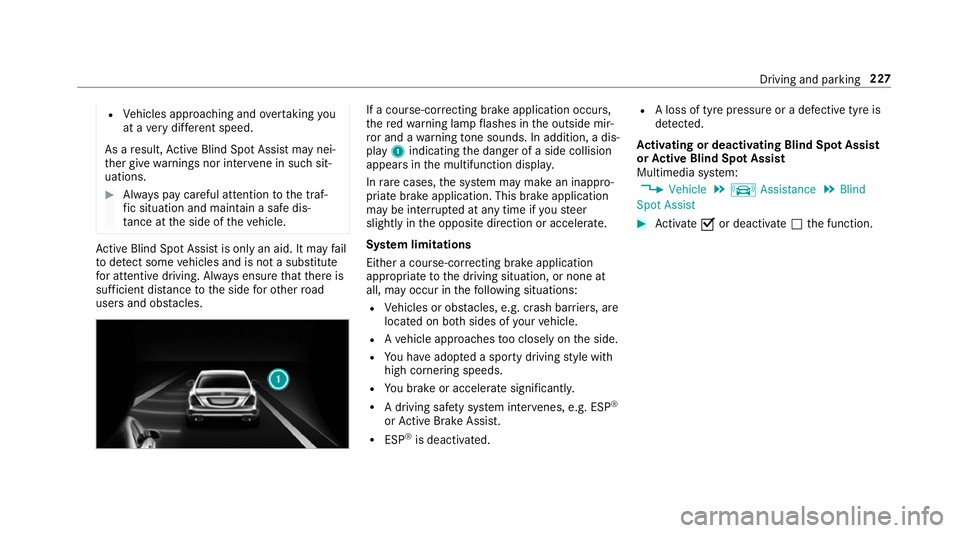
ac ourse-co rrecting brak eapplication occurs,
th er ed warning lam pflashes in theo utside mir‐
ro ra nd aw arning tone sounds. In addition, adis‐
pl ay 1 indicatin gthe danger of aside collision
appear sinthe multifunction displa y.
In rare cases, thes ystemm aymak eani nappro‐
priat ebrake application. This brak eapplication
ma ybei nterrupte data nytime if yous teer
slightl yinthe opposit edirection or accelera te.
Sy stem limitations
Either acourse-cor recting brak eappli cation
appropria teto thed riving situation ,ornoneat
all, ma yoccur in thef ollowing situations:
R Vehicles or obs tacles, e.g. crash ba rriers, are
located on bo thsides of your vehicle.
R Avehicle approaches tooc losely on thes ide.
R Youh avea dop tedas porty driving stylew ith
high cornering speeds.
R Youb rake or accelerat esignificantl y.
R Adriving sa fety sy stem inter venes, e.g .ESP ®
or ActiveB rake Assi st.
R ESP ®
is deacti vated. R
Aloss of tyr epressur eorad efectivetyreis
de tected.
Ac tivatin gordeactivatin gBlind Spo tAssist
or Activ eB lind Spo tAssist
Multimedia sy stem:
, Vehicle .
k Assistance .
Blind
Spot Assist #
Activate Oor deacti vate ª thef unction. Driving and parking
227
Page 232 of 533
Sy
stem limitations
No lane-cor recting brak eappli cation occu rsin
th ef ollowing situations:
R Youc lear lyand activel ysteer,b rake or accel‐
erate.
R Youh ave switched on thet urns ignal indica‐
to r.
R Adriving sa fety sy stem inter venes, su chas
ESP ®
,A ctiv eBrake Assi stor ActiveB lind
Spo tAssist.
R Youh ave adop tedas porty driving stylew ith
high cornering speeds or high ratesofa ccel‐
eration.
R ESP ®
is deactivated.
R Ifal oss of tyr epressur eorad efectivetyre
has been de tected and displ ayed.
The sy stem ma ybeimpaired or ma ynotfunction
in thef ollowing situations:
R Ifth er eisp oor visibility ,e.g. due toinsuf fi‐
cient illumination of ther oad, highl yvariable
shade conditions, or due torain, sno w,fogor
heavy spr ay. R
Ther eisg lare, e.g. from oncoming traf fic, the
sun or reflections.
R Ifth er eisd irtont he windscreen in thev icin‐
ity of them ultifunction camer aorthe camera
is mis tedu p, damaged or obscured.
R Noor se veral, unclear lane markings are
presen tfor one lane, e.g. near roadwor ks.
R The lane markings ar eworn, dar korcovered.
R The dis tance tothev ehicle in front is too
small and thel ane marking sthus canno tbe
de tected.
R The lane markings chang equickl y,e.g. lanes
branc hoff,c ross one ano ther or mer ge.
R The car riag ew ay isvery nar row and winding.
Ve hicles with Drivin gAssistanc epacka ge or
Driving Assistance Plus pa ckage: ActiveL ane
Ke eping Assis tuses radar sensor stomonitor
se verala reas around thev ehicle. If ther adar
senso rsinther ear bumper ar edirty or co vered
wit hs now, thes ystemm aybe impaired or may
no tfunction .Ifano bstacle in thel ane in which
yo ua redrivin ghas been de tected, no lane-cor‐
re cting brak eappli cation occu rs. Ac
tivatin gActive Lan eKeeping Assist &
WARNING Risk of accident despi te
Ac tiveL aneK eeping Assis twarning
Al ane-cor recting brak eappli cation cannot
al wa ys bring thev ehicle bac kintot he origi‐
nal lane. #
Alw ayss teer,b rake or accelera teyour‐
self ,especiall yifActiveLaneK eeping
Assis twarns youorm akesalane-cor‐
re cting brak eappli cation. &
WARNING Risk of accident despi teinter‐
ve ntio nofA ctiveLaneK eeping Assist
Ac tiveL aneK eeping Assis tdoes no tdetect
traf ficc onditions or road users. In very rare
cases, thes ystem ma ymakeani nappropri‐
at eb rake application, e.g. af teri ntentional ly
driving overas olidl ane marking.
The brak eapplication can be inter rupte dat
an yt ime if yous teer slightl yinthe opposite
direction. Driving and parking
229
Page 233 of 533
#
Alw aysm akes uret hat ther eiss uffi‐
cient di stanc etot he side foro ther traf‐
fi coro bstacles. &
WARNING Risk of accident despi teLane
Ke eping Assist
Lane Keeping Assis tcann otalw aysc learly
de tect lane markings.
In su chcases, Lane Keeping Assis tcan:
R giveanu nnecessar ywarning
R notg iveaw arning #
Alw aysp ayparticular attention tothe
traf fics ituation and keep within the
lane, especiall yifActiveLaneK eeping
Assis talerts you. Re
quirements:
The driving speed is at leas t60k m/h. #
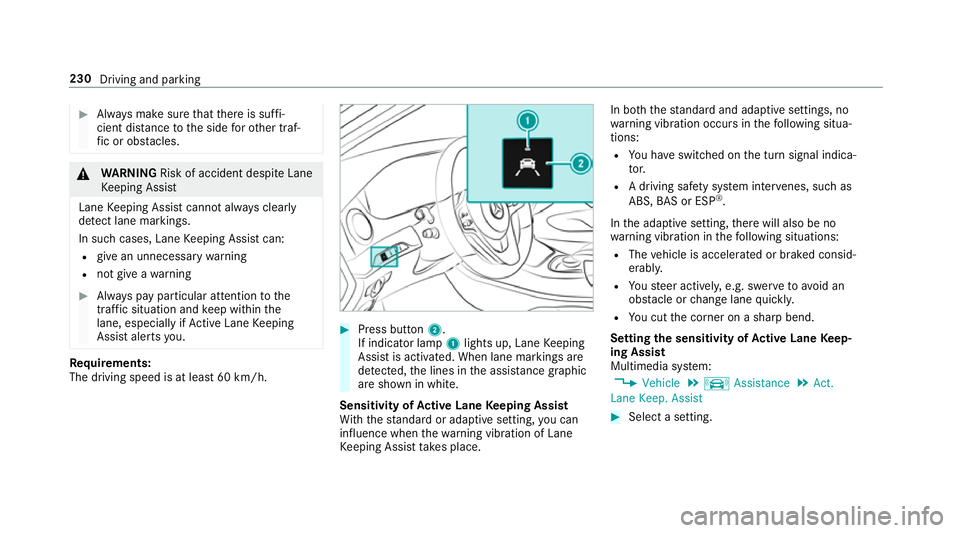
Press button 2.
If indicator lamp 1lights up, Lane Keeping
Assis tisactivated. When lane marking sare
de tected, thel ines in thea ssis tance graphic
ar es hown in white.
Sensitivity of Activ eL aneK eeping Assist
Wi th th estandar dora daptiv esetting ,you can
influence when thew arning vibration of Lane
Ke eping Assis ttakes place. In bo
th thestandar dand adaptiv esettings, no
wa rning vibration occur sinthefollowing situa‐
tions:
R Youh ave switched on thet urns ignal indica‐
to r.
R Adriving sa fety sy stem inter venes, su chas
ABS, BASorE SP®
.
In thea daptiv esetting, ther ew ill also be no
wa rning vibration in thef ollowing situations:
R The vehicle is accelerated or braked consid‐
erably.
R Yous teer actively ,e.g. swer vetoavo id an
obs tacle or chang elane quickl y.
R Youc utthec orner on ashar pbend.
Setting thes ensitivit yofActive Lan eKeep‐
ing Assist
Multimedia sy stem:
, Vehicle .
k Assistance .
Act.
Lane Keep. Assist #
Select asetting. 230
Driving and parking