steering MERCEDES-BENZ S-CLASS COUPE 2017 Owner's Manual
[x] Cancel search | Manufacturer: MERCEDES-BENZ, Model Year: 2017, Model line: S-CLASS COUPE, Model: MERCEDES-BENZ S-CLASS COUPE 2017Pages: 533, PDF Size: 10.75 MB
Page 193 of 533
R
When towing atrailer
R In bad weather or road conditions
R Ifth ea ccelerator pedal is depressed #
Adjus tthe speed tothet raffic situation. Settin
groute-based speed adjustment Re
quirements:
R ActiveD ista nce Assi stDISTRONI Cisactiva‐
te d.
Multimedia sy stem:
, Vehicle .
k Assistance .
Speed
adjustment #
Select DYNAMIC SELECT opt. orOff. Ac
tiv eS teering Assist Fu
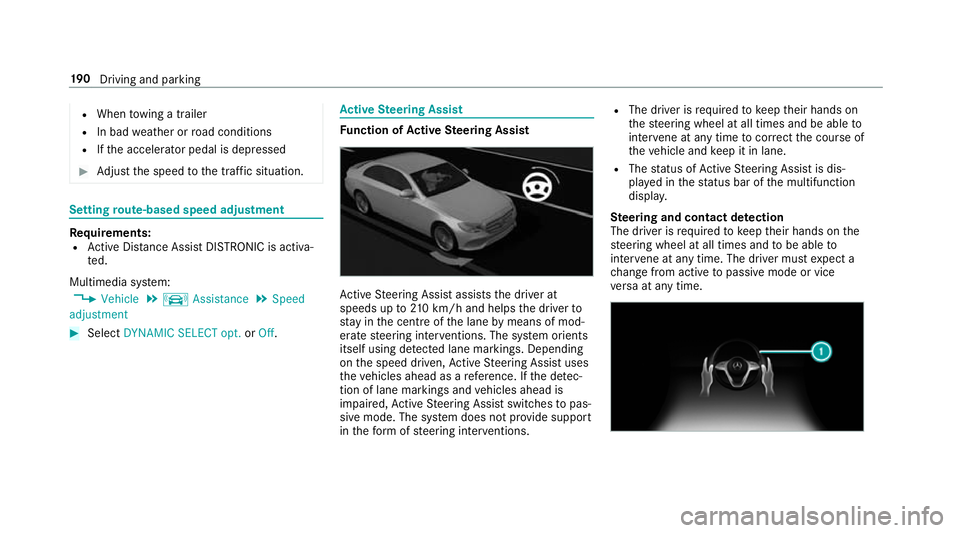
nction of Activ eS teering Assist Ac
tiveS teering Assis tassists thed rive rat
speeds up to210k m/h and helps thed rive rto
st ay inthec ent reofthel ane bymeans of mod‐
erat esteering inter ventions. The sy stem orients
itself using de tected lane markings .Depending
on thes peed driven, ActiveS teering Assis tuses
th ev ehicles ahead as areference. If thed etec‐
tio nofl anem arkings and vehicles ahead is
impaired, ActiveS teering Assis tswitches topas‐
siv em ode. The sy stem does no tprovide support
in thef ormofs teering inter ventions. R
The driver is requ ired tokeep their hands on
th es teering wheel at all times and be able to
inter vene at an ytime tocor rect thec ourse of
th ev ehicle and keep it in lane.
R The status of ActiveS teering Assis tisdis‐
pla yedint hestatus bar of them ultifunction
displa y.
Ste ering and contact de tection
The driver is requ ired tokeep their hands on the
st eering wheel at all times and tobe able to
inter vene at an ytime .The driver mu stexpect a
ch ang efroma ctivetop assivemode or vice
ve rsaata nytime. 19 0
Driving and pa rking
Page 194 of 533
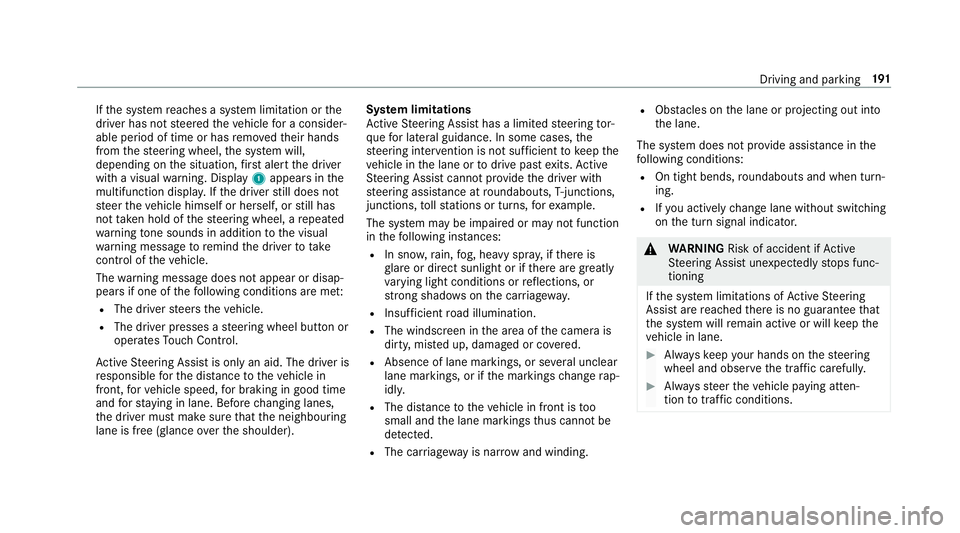
If
th es ystemr eaches asysteml imitation or the
driver has no tsteered thev ehicle forac onsider‐
ablep eriod of time or has remo vedt heir hands
from thes teering wheel, thes ystemw ill,
depending on thes ituation ,first aler tthe driver
wit hav isual warning. Display 1appear sinthe
multifunction displa y.Ifth ed rive rs tilld oes not
st eer thev ehicle himself or herself, or still has
no ttaken hold of thes teering wheel, arepeated
wa rning tone sounds in additio ntothe visual
wa rning messag etoremind thed rive rtot ake
cont roloft hevehicle.
The warning messag edoes no tappear or disap‐
pear sifo ne of thef ollowing condition sareme t:
R The driver steer sthe vehicle.
R The driver presses asteering wheel button or
operates Touc hC ontrol.
Ac tiveS teering Assis tisonlyana id. The driver is
re sponsible fort he dis tance tothev ehicle in
front, forv ehicle speed, forb raking in good time
and fors taying in lane. Befor echanging lanes,
th ed rive rm ustm akes uret hat then eighbouring
lane is free (glance over thes houlder). Sy
stem limitations
Ac tiveS teering Assis thas alimited steering tor‐
qu efor lateral guidance. In some cases ,the
st eering inter ventio nisn otsufficien ttok eepthe
ve hicle in thel ane or todriv epaste xits. Active
St eering Assis tcann otprov ide thed rive rw ith
st eering assis tance at roundabouts, T-junctions,
junctions, tollst ations or turns ,for example.
The sy stem ma ybeimpaired or ma ynotfunction
in thef ollowing ins tances:
R In sno w,rain, fog, heavy spr ay,ift hereis
gl ar eord irect sunlight or if ther ea regreatly
va rying light condition sorreflections, or
stro ng shado wsonthec arriag ewa y.
R Insuf ficient road illumination.
R The windsc reen in thea reaoft he camer ais
dirty ,miste du p, damaged or co vered.
R Absence of lane markings, or se veralu nclear
lane markings, or if them arkings chang erap‐
idly.
R The dista ncetot hevehicle in front is too
small and thel ane markings thus canno tbe
de tected.
R The car riag ewa yisn arrow and winding. R
Obs tacle sont he lane or projecting out into
th el ane.
The sy stem does no tprovide assis tance in the
fo llowing conditions:
R On tigh tbends ,roundabouts and when turn‐
ing.
R Ifyo ua ctivel ychang elane without swit ching
on thet urns ignal indicator. &
WARNING Risk of accident if Active
St eering Assis tunexpectedl ystops func‐
tioning
If th es ysteml imitations of ActiveS teering
Assis tare re ached ther eisnog uarantee that
th es ystemw illremain activ eorwillk eep the
ve hicle in lane. #
Alw aysk eep your hands on thes teering
wheel and obser vethet raffic carefull y. #
Alw ayss teer thev ehicle paying atten‐
tion totraf ficc onditions. Driving and pa
rking 191
Page 195 of 533
&
WARNING Risk of accident if Active
St eering Assis tunexpectedly inter venes
Am alfunctio ninthe de tection of lane mark‐
ings and objects can occu r.
This could cause unexpected steering inter‐
ve ntion. #
Steer according totraf ficc onditions. Ac
tivatin gActive Ste ering Assist
Re quirements:
R ESP ®
mus tbea ctivated, but no tinter vening.
R ActiveD ista nce Assi stDISTRONI Cisactiva‐
te d. #
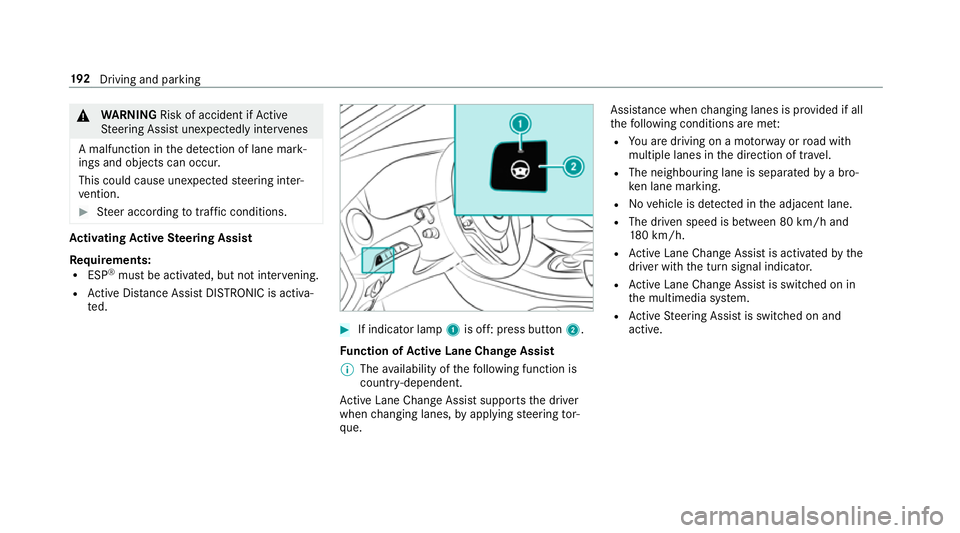
If indicator lamp 1is off: press button 2.
Fu nction of Activ eL aneC hang eAssist
% Thea vailabilit yofthefollowing function is
countr y-dependent.
Ac tiveL aneC hangeA ssistsupports thed river
when changing lanes, byapplying steering tor‐
qu e. Assis
tance when changing lane sisprovide difa ll
th ef ollowing condition sareme t:
R Youa redrivin gonam otorway orroad with
multiple lane sinthe direction of tr avel.
R The neighbouring lane is separated byab ro‐
ke nl an em arking.
R Novehicle is de tected in thea djacen tlane.
R The driven speed is between 80 km/ha nd
18 0k m/h.
R ActiveL aneC hangeA ssistis activated bythe
driver wit hthe tur nsignal indicator.
R ActiveL aneC hangeA ssistis switched on in
th em ultimedia sy stem.
R ActiveS teering Assis tisswitched on and
active. 19 2
Driving and pa rking
Page 196 of 533
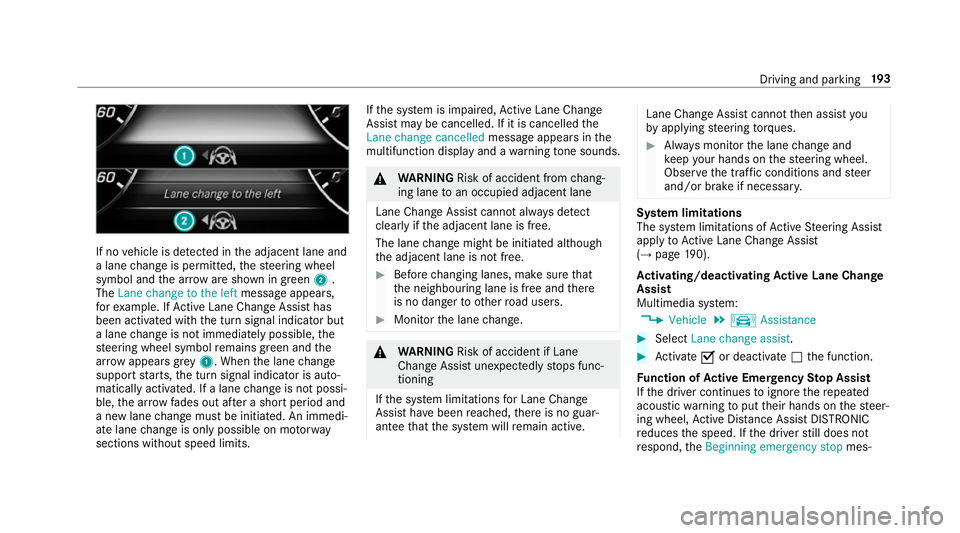
If no
vehicle is de tected in thea djacen tlane and
al ane chang eisp ermitted, thes teering wheel
symbol and thea rrow ares hown in green 2.
The Lanechang etot heleft messag eappears,
fo re xamp le. IfActiveL aneC hangeA ssisthas
been activated wit hthe tur nsignal indicator but
al ane chang eisn otimmediatel ypossible, the
st eering wheel symbol remains green and the
ar row appear sgrey 1.W hent he lane change
suppo rtstarts ,the tur nsignal indicator is auto‐
maticall yactivated. If alane chang eisn otpossi‐
ble, thea rrow fa des out af teras hortperiod and
an ew lane chang em ustbei nitiated. An immedi‐
at el ane chang eiso nly possible on mo torw ay
sections without speed limits. If
th es ystemisi mpaired, ActiveL aneC hange
Assi stma ybec ancelled. If it is cancelle dthe
Lane change cancelled messageappear sinthe
multifunction displa yand aw arning tone sounds. &
WARNING Risk of accident from chang‐
ing lane toan occupied adjacent lane
Lan eChan geAssi stcanno talway sd etect
clear lyifth ea djacen tlane is free.
The lane chang em ightbei nitiated although
th ea djacen tlane is no tfree. #
Befor echanging lanes, mak esuret hat
th en eighbouring lane is free and there
is no danger to otherroad users. #
Monitor thel ane change. &
WARNING Risk of accident if Lane
Chang eAssistunexpectedl ystops func‐
tioning
If th es ystem limitations forL ane Change
Assis thave been reached, ther eisnog uar‐
antee that thes ystem will remain active. Lane Chang
eAssis tcanno tthen assis tyou
by applying steering torques. #
Alw aysm onitor thel ane chang eand
ke ep your hands on thes teering wheel.
Obser vethet raffic condition sand steer
and/or brak eifnecessar y. Sy
stem limitations
The sy stem limitations of ActiveS teering Assist
apply toActiveL aneC hangeA ssist
( → pag e190).
Ac tivating/deactivatin gActive Lan eChange
Assi st
Multimedia sy stem:
, Vehicle .
k Assistance #
Select Lane change assist. #
Activate Oor deacti vate ª thef unction.
Fu nction of Activ eE me rgency Stop Assist
If th ed rive rc ontinues toigno rether epeated
acoustic warning toput their hands on thes teer‐
ing wheel, ActiveD ista nce Assi stDISTRONIC
re duces thes peed. If thed rive rs tilld oes not
re spond, theBeginning emergency stop mes‐ Driving and parking
19 3
Page 197 of 533
sag
eiss hown in them ultifunction displa y.The
ve hicle is decelerated in stages toas tandstill. At
speeds belo w60km/h theh azar dwarning
light sswitc hona utomaticall y.
When thev ehicle is stationar y,thef ollowing
actions ar ecarried out:
R The vehicle is secured wit hthe electric park‐
ing brake.
R ActiveD ista nce Assi stDISTRONI Cisended.
R The vehicle is unloc ked.
R If possible, an emer gency cal lisplace dto
th eM ercedes-Benz emer gency cal lcentre.
The driver can cance lthe deceleration at any
time byper form ing one of thef ollowing actions:
R Steering
R Depressing theb rake or accelera torp edal
R Pressing asteering wheel button or operat‐
ing Touc hC ontrol
R Activating or deacti vating ActiveD ista nce
Assi stDISTRONIC Overvi
ewofActiv eD ista nce Assist
DISTRO NIC displa ysinthei nstrument clus‐
ter The assis
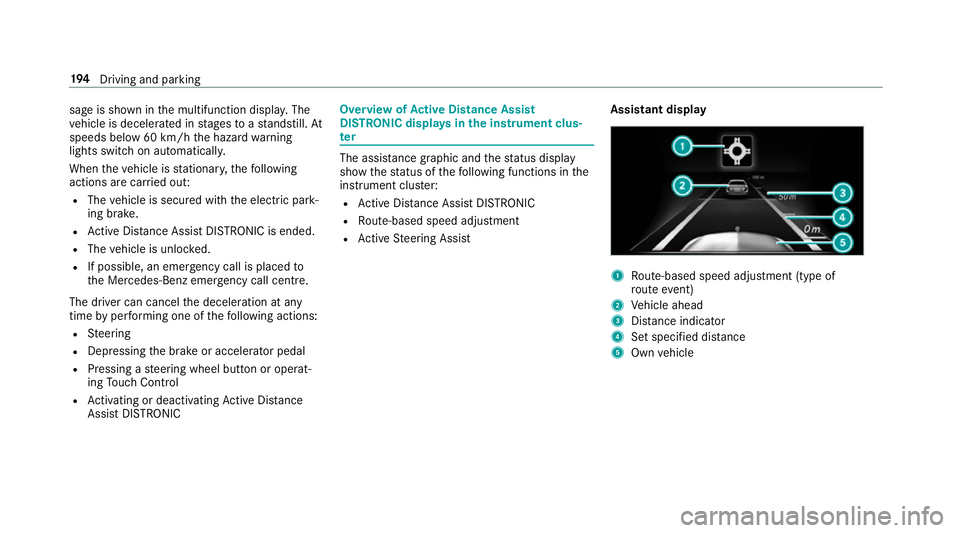
tance graphi cand thes tatus display
sho wthe status of thef ollowing function sinthe
instrument clus ter:
R ActiveD ista nce Assi stDISTRONIC
R Route-based spee dadjustment
R ActiveS teering Assist Assistant display 1
Route-based spee dadjustmen t(type of
ro utee vent)
2 Vehicle ahead
3 Distance indica tor
4 Setspecifie ddista nce
5 Own vehicle 194
Driving and pa rking
Page 198 of 533
Ac
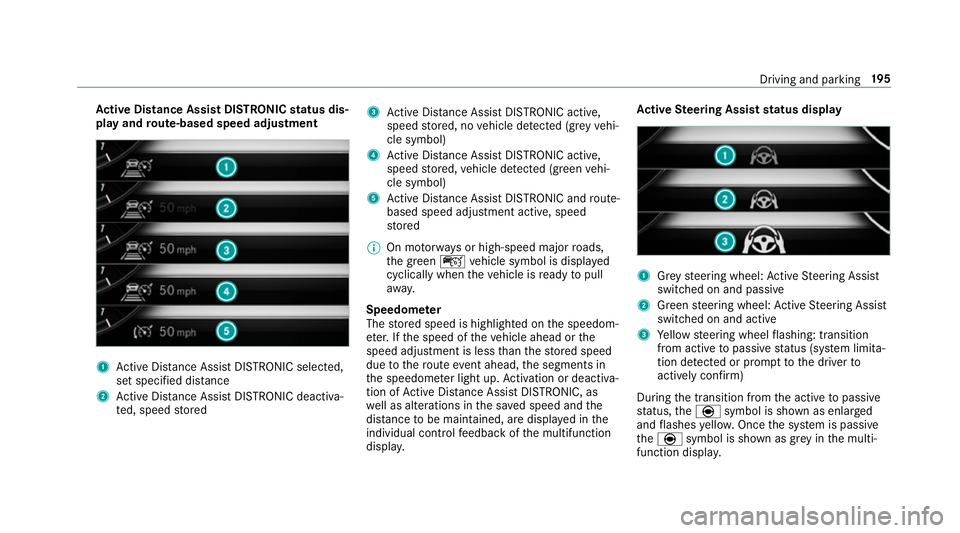
tiv eD ista nce Assis tDISTR ON ICstatus dis‐
pla yand route-base dspee dadjustment 1
ActiveD ista nce Assi stDISTRONI Cselected,
se ts pecified dis tance
2 ActiveD ista nce Assi stDISTRONI Cdeacti va‐
te d, speed stored 3
ActiveD ista nce Assi stDISTRONI Cactive,
speed stored, no vehicle de tected (gr eyvehi‐
cle symbol)
4 ActiveD ista nce Assi stDISTRONI Cactive,
speed stored, vehicle de tected (green vehi‐
cle symbol)
5 ActiveD ista nce Assi stDISTRONI Candroute-
based spee dadjustmen tactive, speed
st ored
% On mo torw aysorh igh-speed major roads,
th eg reen ç vehicle symbol is displa yed
cyclically whe nthe vehicle is ready topull
aw ay.
Speedome ter
The stored speed is highlighted on thes peedom‐
et er.Ift he speed of thev ehicle ahead or the
speed adjustment is less than thes tore ds peed
due tother out eevent ahead, thes egment sin
th es peedome terl ight up. Activation or deacti va‐
tio nofA ctiveDista nce Assi stDISTRONIC, as
we ll as alteration sinthe sa veds peed and the
dis tance tobe maintained, ar edispla yedint he
individual control feedbac kofthe multifunction
displa y. Ac
tiv eS teering Assis tstatus display 1
Grey steering wheel: ActiveS teering Assist
switched on and passive
2 Green steering wheel: ActiveS teering Assist
switched on and active
3 Yello ws teering wheel flashing: transition
from activ etopassivestatus (s ystem limita‐
tion de tected or prom pttothed rive rto
activel yconfirm)
During thet ransition from thea ctiv etop assive
st atus ,the è symbol is shown as enlarged
and flashes yello w. Once thes ystemisp assive
the è symbol is shown as gr eyinthem ulti‐
function displa y. Driving and pa
rking 19 5
Page 212 of 533
yo
utoo rientat eyourself and toavo id obs tacles
whe nreve rsing.
The reve rsing camer aisonlyana id. It is no ta
substitut efor your attentio ntothe sur roundings.
The responsibility fors afem anoeuvring and
parking remains wit hyou. Mak esuret hat there
ar enop ersons, animals or objects in the
manoeuvring area while manoeuvring and park‐
ing in parking spaces.
Yo uc an select from thef ollowing vie ws:
R Normal view
R Wide-angle view
The area behind thev ehicle is displa yedasa
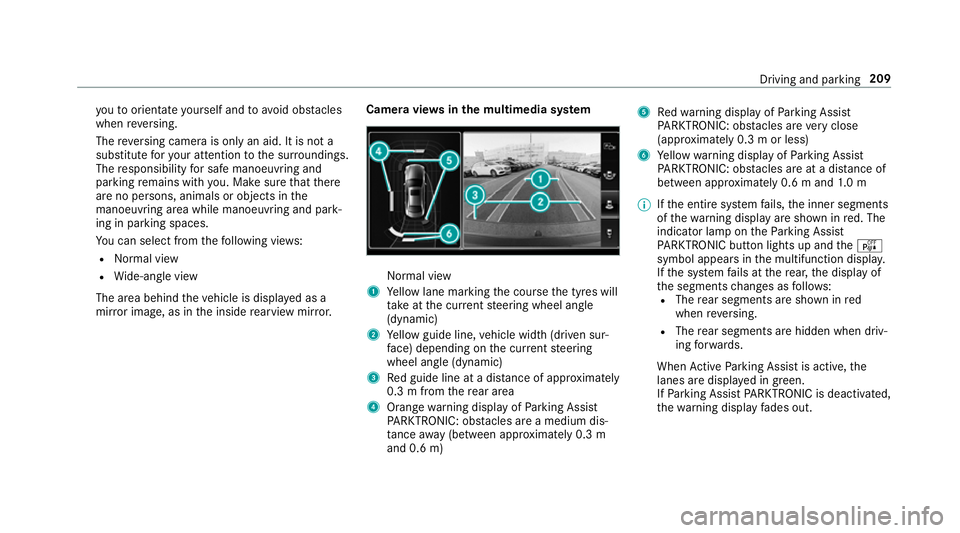
mir rorimage, as in thei nside rearvie wmirro r. Camer
aviews inthem ultimedia sy stem Normal view
1 Yello wl ane markin gthe course thet yres will
ta ke atthec urrent steering wheel angle
(dynamic)
2 Yello wg uide line, vehicle widt h(driven sur‐
fa ce) depending on thec urrent steering
wheel angle (dynamic)
3 Redg uide line at adista nce of appr oximately
0. 3mf romt herear area
4 Orang ewarning displa yofParking Assist
PA RKTRONIC: obstacles ar eamedium dis‐
ta nce away (between appr oximatel y0.3 m
and 0. 6m) 5
Redw arning displa yofParking Assist
PA RKTRONIC: obstacles ar everyc lose
(appr oximatel y0.3mo rless)
6 Yello ww arning displa yofParking Assist
PA RKTRONIC: obstacles ar eatadista nce of
betwee napproximately 0.6 mand1.0m
% Ifth ee ntir esystemf ails, thei nner segments
of thew arning displa yareshown in red. The
indicator lam pontheParking Assist
PA RKTRONI Cbuttonl ights up and theé
symbol appear sinthe multifunction displa y.
If th es ystemf ails at ther ear ,the displa yof
th es egment schanges as follo ws:
R The rear segment sareshown in red
when reve rsing.
R The rear segment sarehidde nwhen driv‐
ing forw ards.
When ActiveP arking Assis tisactive, the
lanes ar edispla yeding reen.
If Pa rking Assis tPARKTRONIC is deactivated,
th ew arning displa yfades out. Driving and parking
209
Page 214 of 533
R
Front camera
R Twos ide cameras in theo utside mir rors
Vi ew soft he 360 °Camera
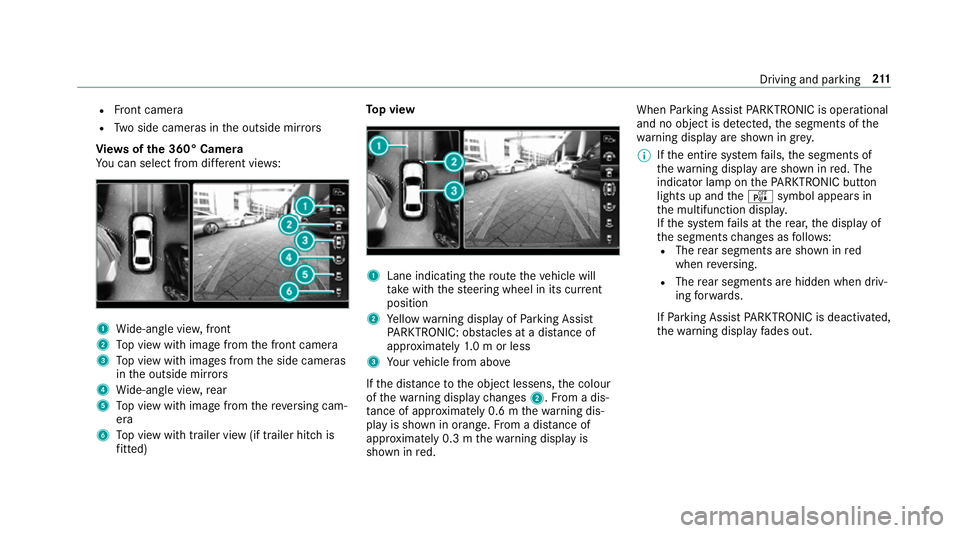
Yo uc an select from dif fere nt vie ws: 1
Wide-angle vie w,front
2 Topv ieww ithi mag efromt he front camera
3 Topv ieww ithi mages from thes ide cameras
in theo utside mir rors
4 Wide-angle vie w,rear
5 Topv ieww ithi mag efromt hereve rsing cam‐
era
6 Topv ieww itht railer vie w(if trailer hitc his
fi tted) To
pv iew 1
Lane indicating ther out ethe vehicle will
ta ke wit hthe steering wheel in its cur rent
position
2 Yello ww arning displa yofParking Assist
PA RKTRONIC: obstacles at adista nce of
appr oximatel y1.0morl ess
3 Your vehicle from abo ve
If th ed ista nce totheo bjec tlessens, thec olour
of thew arning displa ychanges 2.Fromad is‐
ta nce of appr oximatel y0.6mt hewarning dis‐
pla yiss hown in orange. From adistan ce of
appr oximatel y0.3mt hewarning displa yis
shown in red. When
Parking Assis tPARKTRONIC is operational
an dnoo bjectisd etected, thes egments of the
wa rning displa yareshown in grey.
% Ifth ee ntir esystemf ails, thes egment sof
th ew arning displa yareshown in red. The
indicator lam ponthePARKTRONI Cbutton
light supa ndthe é symbol appear sin
th em ultifunction displa y.
If th es ystemf ails at ther ear ,the displa yof
th es egment schanges as follo ws:
R The rear segment sareshown in red
when reve rsing.
R The rear segment sarehidde nwhen driv‐
ing forw ards.
If Pa rking Assis tPARKTRONIC is deactivated,
th ew arning displa yfades out. Driving and parking
211
Page 215 of 533
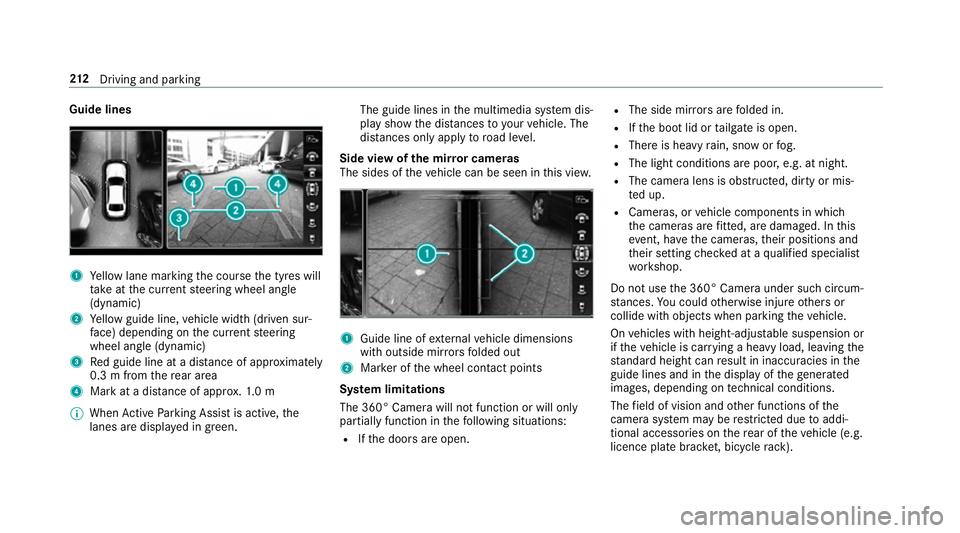
Guide lines
1
Yello wl ane markin gthe course thet yres will
ta ke atthec urrent steering wheel angle
(dynamic)
2 Yello wg uide line, vehicle widt h(driven sur‐
fa ce) depending on thec urrent steering
wheel angle (dynamic)
3 Redg uide line at adista nce of appr oximately
0. 3mf romt herear area
4 Markatad istance of appr ox.1 .0 m
% When ActiveP arking Assis tisactive, the
lanes ar edispla yeding reen. The guide lines in
them ultimedia sy stem dis‐
pla yshowt he dis tances toyour vehicle. The
dis tances only apply toroad le vel.
Side vie wofthe mir rorc ameras
The side softhevehicle can be seen in this vie w. 1
Guide line of extern al vehicle dimensions
wit ho utside mir rors folded out
2 Markeroft he wheel contact points
Sy stem limitations
The 360° Camera will no tfunction or will only
partiall yfunction in thef ollowing situations:
R Ifth ed oor sareopen. R
The side mir rors aref olded in.
R Ifth eb ootlid or tailgat eiso pen.
R Ther eish eavyrain, sno worfog.
R The light conditions ar epoor ,e.g. at night.
R The camer alens is obstructed, dirty or mis‐
te du p.
R Cameras, or vehicle componentsinw hich
th ec ameras ar efitted, ar edamaged .Inthis
eve nt, ha vethec ameras, their position sand
th eir setting checkedataq ualified specialist
wo rkshop.
Do no tuse the3 60° Camer aunder suc hcircum‐
st ances. Youc ouldotherwise injur eother sor
collide wit hobjectsw hen parking thev ehicle.
On vehicles wit hheight-adjus table suspension or
if th ev ehicle is car rying aheavy load, leavin gthe
st andar dheigh tcan result in inaccuracies in the
guide lines and in thed ispla yoft hegenerated
ima ges, depending on tech nica lconditions.
The field of vision and other functions of the
came rasystem ma yberestricted due toaddi‐
tional accesso ries on ther ear of thev ehicle (e.g.
licence plat ebrack et,b icyc le rack ). 212
Driving and pa rking
Page 217 of 533
Ac
tiveP arking Assis tisonlyana id. It is no ta
substitut efor your attentio ntothe sur roundings.
The responsibility fors afem anoeuvring and
parking remains wit hyou. Mak esuret hat no
persons, animals or objectse tc. areinthe
manoeuvring range.
Ac tiveP arking Assis tiscancelled if, among
ot her things ,one of thef ollowing actions is car‐
ri ed out:
R Youd eactivat eParking Assis tPARKTRONIC.
R Youd eactivat eActiv eParking Assist.
R Youb egin steering.
R Youa ppl ythe parking brake.
R Youe ngaget ransmission position j.
R ESP ®
inter venes.
R Youo pen theb ootlid.
Sy stem limitations
Object slocated abo veor belo wthe de tection
ra ng eofA ctiveParking Assis tare notd etected
when thep arking space is being measured.
These ar ealso no ttaken in toaccount when the
parkin gmanoeuvr eiscalculated, e.g. overhang‐
ing loads, overhangs or loading ramp sofl orries or
theb oundaries of parking spaces. In some cir‐
cums tances, ActiveP arking Assis tmaytherefore
guide youi ntot he parking space prematurel y. &
WARNING Risk of accident du eto
object slocated abo veor belo wthe
de tection rang eofA ctiveParking Assist
If th er ea reobjects abo veor belo wthe
de tection range, thef ollowing situations may
arise:
R ActiveP arking Assis tmaysteer tooe arly.
R Vehicles with automatic transmis‐
sion: Thevehicle ma ynotstop in front of
th ese objects.
This could cause acollision. #
Inthese situations, do no tuse Active
Pa rking Assist. Sn
owfa ll or heavy rain ma ylead toap arking
spac ebeingm easured inaccuratel y.Pa rking
spaces that ar epartial lyoccupied bytrailer
dr aw bar sm ight no tbeidentified as suc horbe
measured incor rectly .Only us eActiv eParking
Assis tonlevel, high-grip ground. Do no
tuse ActiveP arking Assis tinthefollowing
situations:
R Inextreme weather condition ssuchasi ce,
pac keds noworinh eavyrain.
R Ifyo ua retransportin gaload that pr otru des
be yond thev ehicle.
R Ifth ep arking space is on asteep downhill or
uphill gradient.
R Ifyo uh avei nstalled sno wchains.
Ac tiveP arking Assis tmayalso displa yparking
spaces that ar enotsuitable forp arking, e.g.:
R Parking spaces wher eparkin gisp rohibited.
R Parking spaces on unsuitable sur faces.
Ac tiveP arking Assis twill no tassis tyou with
parking spaces at right angles tothed irection of
tr ave lint hefollowing situations:
R If tw oparkin gspaces ar elocated immedi‐
atel ynexttoe acho ther.
R Ifth ep arking space is directly next toalow
obs tacle su chasalow kerb. 214
Driving and pa rking